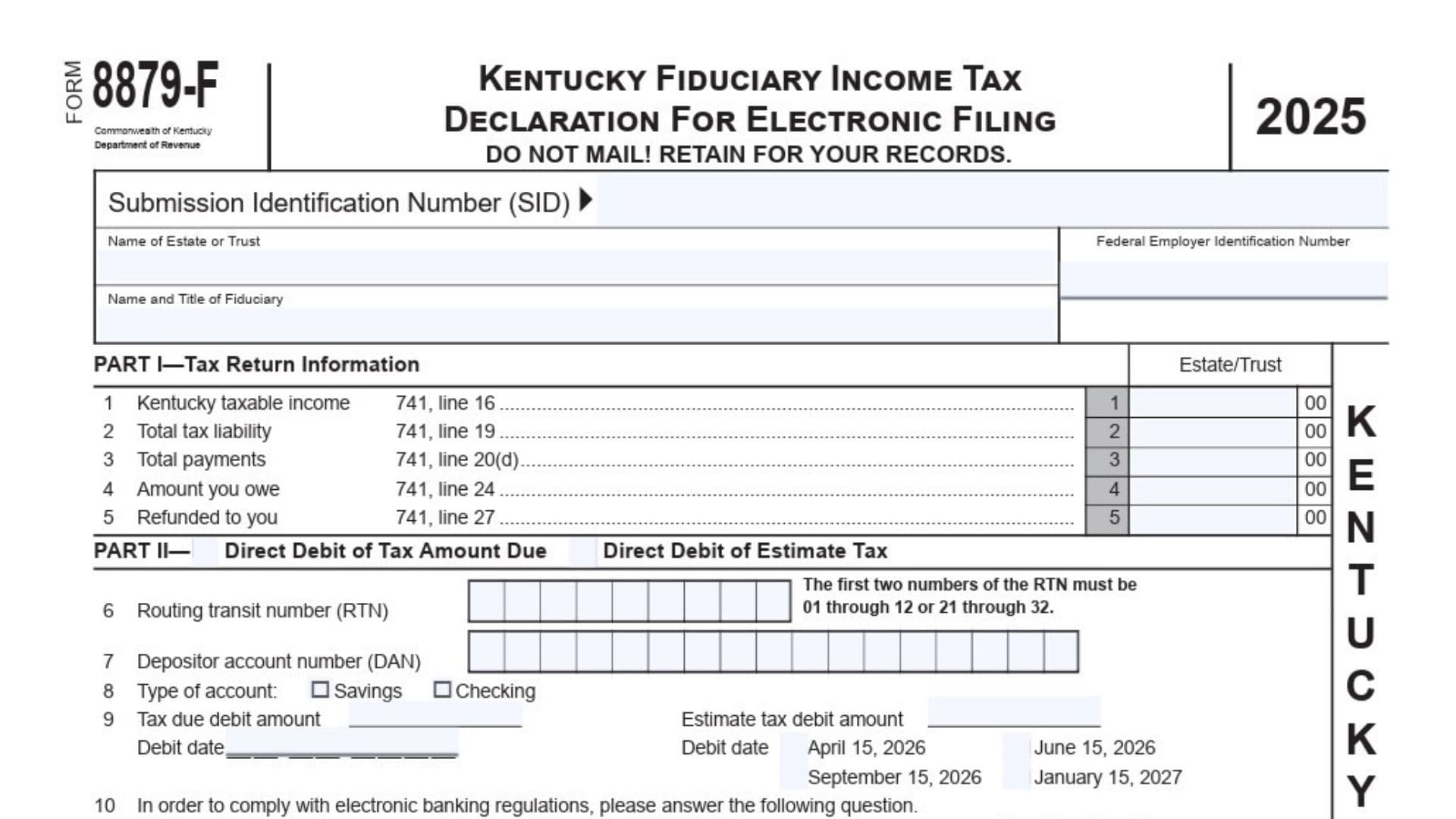
Kentucky Form 8879-F is the Fiduciary Income Tax Declaration for Electronic Filing used for certain electronically submitted Kentucky estate and trust income tax returns for tax year 2025. The form serves as the fiduciary’s or authorized agent’s written confirmation that the identifying details, taxable income, tax liability, payments, balance due, or refund shown in the electronic return are accurate and complete. It also documents the fiduciary’s permission for an electronic return originator, commonly called an ERO, or another transmitter to send the return and related schedules to the Kentucky Department of Revenue. When direct debit is selected, the form records the bank routing number, account number, account type, payment amount, debit date, and authorization to withdraw the funds. It may be used to authorize payment of the current tax balance, estimated tax installments, or both. Form 8879-F is generally required when a federal-state electronic filing is submitted without a federal personal identification number and when a Kentucky fiduciary return is filed through an online filing method. It is not required for a qualifying federal-state electronic filing completed with a federal PIN. The form is not sent to the Department as a standalone paper filing. Instead, the signed document must be kept with the filing records, usually for three years. The Kentucky fiduciary return or amended return must be completed before this declaration is prepared, reviewed, or signed. The form also contains separate certification areas for the fiduciary or agent, the ERO, and a paid preparer when the paid preparer is not the ERO.
Who Uses Form 8879-F?
The form may involve several parties:
- The estate or trust filing the Kentucky fiduciary income tax return
- The fiduciary responsible for the estate or trust
- An authorized agent acting for the fiduciary
- An electronic return originator
- A return transmitter
- A paid tax preparer
- A self-filing fiduciary or agent using approved online filing software
The fiduciary may be an executor, administrator, trustee, personal representative, or another person authorized to act for the estate or trust.
When Is Form 8879-F Required?
Federal-State Electronic Filing With A Federal PIN
Form 8879-F is not required when the fiduciary return is filed through the federal-state electronic filing method using a valid federal PIN.
Federal-State Electronic Filing Without A Federal PIN
The form must be completed when the federal-state electronic filing method is used without a federal PIN.
The fiduciary or agent must review and sign the completed declaration before the ERO transmits the return.
Online Filing
A fiduciary or agent filing the Kentucky return through an online filing method must complete Form 8879-F.
The completed form must be kept for three years and should not be mailed to the Kentucky Department of Revenue.
How To File Form 8879-F
Form 8879-F is an authorization and record-retention document rather than a paper return that is mailed by itself.
Complete The Fiduciary Return First
Prepare the Kentucky fiduciary income tax return or amended return before completing Form 8879-F.
The amounts entered in Part I must come from the completed Kentucky Form 741. Do not estimate the figures or use amounts from an unfinished draft.
Complete Form 8879-F Before Signing
Every required field must be completed before the fiduciary, agent, ERO, or paid preparer signs.
No party should sign a blank or partially completed declaration.
Obtain The Fiduciary’s Signature Before Transmission
The fiduciary or authorized agent must review and sign the form before the electronic return is transmitted.
The signed declaration confirms that the fiduciary agrees with the electronic filing information and authorizes transmission.
Do Not Mail The Form
Do not mail Form 8879-F to the Kentucky Department of Revenue.
Keep it with the estate’s or trust’s tax records. When an ERO submits the return, the ERO must retain the form for three years.
Give Copies To The Fiduciary
The ERO must provide the fiduciary or agent with a copy of the completed Form 8879-F and the other information being electronically filed.
The fiduciary should keep these copies with the estate or trust records.
Documents That May Need To Be Retained Or Attached To The Filing Records
A fiduciary filing from home should keep Form 8879-F with the return and include the required supporting material in the electronic filing process.
Relevant supporting documents may include:
- Kentucky copies of Forms K-1
- Documents proving claimed tax credits
- Schedules explaining adjustments entered as “Other”
- Documents requiring original or authorized signatures
- A complete copy of federal Form 1041
- Payment records
- Bank-account verification
- Other schedules required by the Kentucky fiduciary return
An ERO is also responsible for including the applicable Kentucky K-1 forms, credit documentation, adjustment schedules, signature documents, and a complete federal Form 1041 with the filing information when required.

How To Complete Kentucky Form 8879-F
Form Header And Identification Information
Form Number
The printed number identifies the document as Form 8879-F.
No taxpayer entry is required in this area.
Tax Year
The form applies to tax year 2025.
The amounts reported should agree with the estate’s or trust’s 2025 Kentucky fiduciary income tax return.
Kentucky Fiduciary Income Tax Declaration For Electronic Filing
The main heading identifies the form as an electronic filing declaration for an estate or trust.
It does not replace Kentucky Form 741. It supports and authorizes the electronic transmission of that return.
Do Not Mail Notice
The form must be retained for the filer’s records rather than mailed separately to the Department.
An ERO or online filer should keep the completed form for three years.
Submission Identification Number
Enter the 20-digit Submission Identification Number assigned to the electronic tax return.
The SID links the signed declaration to the exact electronic submission. Enter it after the fiduciary or agent has completed the applicable direct-debit information.
Check every digit carefully. Do not substitute the FEIN, software confirmation number, bank confirmation number, or ERO identification number.
Name Of Estate Or Trust
Enter the full legal name of the estate or trust.
The name must match the name entered on Kentucky Form 741 and the federal fiduciary return.
Examples include:
- Estate of John A. Smith
- Smith Family Revocable Trust
- Jane Doe Testamentary Trust
Do not use an informal abbreviation if it differs from the name used on the tax return.
Federal Employer Identification Number
Enter the estate’s or trust’s FEIN.
Use the nine-digit number assigned to the filing entity. Do not enter the fiduciary’s Social Security number unless the applicable tax instructions specifically require it, which is not the purpose of this FEIN field.
Verify that the number matches Kentucky Form 741.
Name And Title Of Fiduciary
Enter the full name of the person responsible for the estate or trust, followed by that person’s official capacity.
Examples include:
- Maria Lewis, Trustee
- David Carter, Executor
- Susan Hill, Personal Representative
- Robert Green, Administrator
The name should identify the person who will review and sign Part III.
Part I: Tax Return Information
Part I summarizes key amounts from the completed Kentucky fiduciary income tax return.
Lines 1 through 3 must be completed. You must also complete either Line 4 or Line 5, depending on whether the return shows an amount due or a refund.
Line 1: Kentucky Taxable Income
Enter the Kentucky taxable income reported on Form 741, Line 16.
Copy the amount exactly from the completed return. Do not enter federal taxable income unless it is identical to the amount reported on the Kentucky line.
Enter dollars in the main amount area and cents in the two-digit cents area.
Line 2: Total Tax Liability
Enter the total tax liability from Form 741, Line 19.
This is the total Kentucky tax calculated before applying the payments reported on the next line.
Do not enter only the unpaid balance.
Line 3: Total Payments
Enter total payments from Form 741, Line 20(d).
This amount may include applicable withholding, estimated payments, extension payments, refundable credits, or other qualifying payments included in the total on Form 741.
Copy the final total rather than listing the individual payment components.
Line 4: Amount You Owe
Enter the balance due shown on Form 741, Line 24.
Complete this line when the return results in tax that must still be paid.
The amount must agree with the electronic return. When the balance will be paid through direct debit, the tax-due debit amount in Part II should normally match this line.
Line 5: Refunded To You
Enter the refund shown on Form 741, Line 27.
Complete this line when the estate or trust is entitled to receive a refund.
Do not complete both Lines 4 and 5 with positive amounts. A completed return should generally show either an amount due or a refund, not both.
Part II: Direct Debit Information
Part II is completed when the fiduciary or agent wants to authorize an electronic withdrawal for:
- The tax amount currently due
- Estimated fiduciary income tax
- Both the current balance and estimated tax
Check the appropriate box at the top of Part II.
Direct Debit Of Tax Amount Due Checkbox
Check this box when the balance reported on Part I, Line 4 will be withdrawn directly from the selected bank account.
Complete Lines 6 through 10 and authorize the transaction on Line 11.
Direct Debit Of Estimate Tax Checkbox
Check this box when one or more estimated tax payments will be withdrawn from the bank account.
You may select this option whether or not direct debit is also being used for the current tax balance.
Using Both Direct Debit Options
Both boxes may be checked when the fiduciary wants to pay the balance due and schedule estimated payments through the same filing.
The bank routing number, account number, and account type used for estimated payments cannot differ from the information used for the balance-due transaction.
Line 6: Routing Transit Number
Enter the financial institution’s nine-digit routing transit number.
The first two digits must fall within one of these ranges:
- 01 through 12
- 21 through 32
Use a check, bank statement, financial institution report, or another bank-generated record to verify the routing number.
Do not use the number from a deposit slip because it may be an internal routing number that cannot process an electronic withdrawal.
Contact the financial institution when you are unsure which routing number should be used for electronic funds transfers.
Line 7: Depositor Account Number
Enter the bank-account number from which the payment will be withdrawn.
The account number may contain up to 17 digits.
When the account number contains fewer than 17 digits:
- Begin entering it in the leftmost box.
- Continue from left to right.
- Leave any unused boxes blank.
Do not add zeros to fill unused spaces unless the zeros are part of the actual bank-account number.
Verify the number using a check, statement, bank-generated form, or financial institution report.
Line 8: Type Of Account
Select one account type:
- Savings
- Checking
Choose the box that accurately describes the account identified on Lines 6 and 7.
Do not check both boxes.
Line 9: Payment Amounts And Debit Dates
Line 9 contains separate areas for the tax-due payment and estimated tax payments.
Tax Due Debit Amount
Enter the amount from Part I, Line 4 that the fiduciary wants withdrawn from the account.
The debit amount should not exceed the authorized balance due unless the payment system specifically allows another amount.
Confirm that sufficient funds will be available on the selected date.
Tax Due Debit Date
Enter the date on which the Department should initiate the withdrawal.
Use month, day, and four-digit year format.
A payment scheduled for withdrawal on or before April 15, 2026, is treated as timely. The actual withdrawal may occur later because processing can take up to two weeks.
Penalty and interest may begin to accrue when tax due is not paid by April 15, 2026.
Estimate Tax Debit Amount
Enter the amount of each estimated tax payment that will be withdrawn.
The form allows one to four equal estimated payments. The amount entered should represent each installment rather than the combined annual estimated tax amount.
For example, when four equal payments of $2,000 are planned, enter $2,000 as the estimated tax debit amount and select all four dates.
Estimated Payment Dates
Select each date on which the estimated payment should be withdrawn.
The available dates are:
- April 15, 2026
- June 15, 2026
- September 15, 2026
- January 15, 2027
You may select one, two, three, or all four dates.
Each selected date uses the same estimated payment amount shown on Line 9. The bank information must remain the same for every scheduled payment.
An actual withdrawal may occur after the selected date, but a correctly scheduled payment is treated according to the requested debit date.
Line 10: Foreign Bank Account Question
Answer whether the funds will come from an account located outside the United States.
Select either:
- Yes
- No
This question is required under electronic banking regulations and must not be left unanswered.
Answer Yes when the account is maintained at a financial institution outside the United States. Answer No when the funds will come from a United States account.
A foreign account may require a payment method other than the requested direct debit.
Other Ways To Pay A Balance Due
The fiduciary is not limited to the direct-debit option on Form 8879-F.
Credit Card Payment
The 2025 Kentucky fiduciary income tax may be paid online using an accepted credit card, including Mastercard, Visa, or Discover.
The payer will generally need:
- Card type
- Card number
- Expiration date
- Cardholder’s billing address
Additional processing charges may apply depending on the payment service.
Separate ACH Debit Payment
A separate ACH debit payment may be made through the Department’s electronic payment service.
The payer generally needs:
- Bank name
- Bank-account number
- Bank routing number
Form EPAY
Form EPAY may be used when supported by the tax software provider.
This option allows the tax due or estimated tax to be paid electronically separately from the filing of the return.
Check Or Money Order
When paying by check or money order, submit the payment with Form 741-V, Kentucky Electronic Payment Voucher.
Do not use the bank fields in Part II when no direct debit is being requested through the electronic filing.
Part III: Declaration Of Fiduciary Or Agent
Part III must be reviewed and signed after Part I and any applicable direct-debit information have been completed.
The electronic return is not considered fully authorized by this form unless the fiduciary or agent signs it before transmission.
Line 11: Direct Debit Authorization
Check the authorization box when Part II contains a request for direct debit of tax due, estimated tax, or both.
By checking the box and signing the form, the fiduciary or agent authorizes:
- The Kentucky Department of Revenue to begin the ACH withdrawal
- The Department’s financial agent to process the payment
- The named financial institution to debit the account
- Participating financial institutions to exchange information needed to investigate or resolve payment issues
The authorization remains effective until the fiduciary or agent notifies the Department that it should be terminated.
Canceling A Scheduled Payment
To cancel a payment, contact the Kentucky Department of Revenue at least two business days before the scheduled debit date.
The cancellation telephone number is:
(502) 564-4581
A late cancellation request may not stop the withdrawal.
Responsibility For An Unpaid Balance
The fiduciary remains responsible for the full tax liability, interest, and penalties when the Department does not receive complete and timely payment.
Signing the authorization does not eliminate the liability if the withdrawal fails because of insufficient funds, incorrect bank information, a closed account, or another problem.
Fiduciary Electronic Filing Declaration
By signing Part III, the fiduciary or agent confirms that:
- The information provided to the ERO or transmitter is accurate.
- The Part I amounts agree with the electronic Kentucky return.
- The return is true, correct, and complete to the best of the signer’s knowledge.
- The ERO or transmitter may send the return and attachments electronically.
- The Department may send an acceptance or rejection acknowledgment to the ERO or transmitter.
- The Department may explain why a submission was rejected.
- Information related to the use of the filing software and computer system may be disclosed to the Department as part of the electronic filing process.
Review the final electronic return before signing.
Fiduciary Or Agent Signature Fields
Signature Of Fiduciary Or Agent
The fiduciary or authorized agent must sign after the form has been completed.
Do not sign before reviewing the identifying information, Part I amounts, bank details, and payment selections.
PTIN Or Identification Number
Enter the fiduciary’s or agent’s PTIN or other applicable identification number.
Use the identifier appropriate to the signer’s role.
Daytime Telephone Number
Enter a telephone number where the fiduciary or agent can be reached during normal business hours.
Include the area code.
Date Signed
Enter the date the fiduciary or agent signs the form.
The signature must be obtained before the electronic return is transmitted.
When A New Fiduciary Signature Is Required
A corrected return may require a new Form 8879-F after the fiduciary has already signed.
Prepare a new form for signature when a correction changes:
- Kentucky taxable income by more than $50, or
- The refund or balance due by more than $14
Minor changes within those thresholds may not require a new declaration, but the return and retained records should still reflect the final transmitted information.
Part IV: ERO And Paid Preparer Declaration
Part IV records the ERO’s review and, when applicable, the paid preparer’s certification.
The ERO must complete and sign this part.
ERO Declaration
By signing, the ERO confirms that:
- Form 8879-F was reviewed.
- The entries are complete and correct to the best of the ERO’s knowledge.
- The fiduciary or agent signed before the return was transmitted.
- Bank-account evidence was reviewed when Part II was completed.
- The bank information agrees with the name shown on the form.
- The fiduciary received copies of the filing information.
- Applicable electronic filing requirements were followed.
- The return was prepared and transmitted in accordance with Kentucky electronic filing procedures.
An ERO acting only as a collector is not responsible for examining the complete return. In that situation, the declaration is limited to confirming that Form 8879-F accurately reflects the return data.
ERO’s Use Only
Also Paid Preparer Checkbox
Check this box when the ERO also prepared the return for compensation.
When the ERO is also the paid preparer, the ERO does not need to complete or sign the separate paid preparer section.
Self-Employed Checkbox
Check this box when the ERO operates as a self-employed tax professional rather than through a separate firm.
ERO Firm Name And Address
Enter the ERO firm’s complete name and address.
When the ERO is self-employed, enter the individual’s business name or personal name and business address.
ERO Signature
The ERO must sign after reviewing the completed form and obtaining the fiduciary’s signature.
ERO Signature Date
Enter the date the ERO signs.
ERO Identification Number
Enter the ERO’s assigned identification number.
Do not enter the return’s SID in this field.
ERO FEIN
Enter the ERO firm’s federal employer identification number when applicable.
ERO ZIP Code
Enter the ZIP Code associated with the ERO’s firm or self-employed business address.
Paid Preparer’s Use Only
A paid preparer who is not also the ERO must complete this section.
Paid Preparer Self-Employed Checkbox
Check the box when the paid preparer works independently and is not filing under a separate firm.
Paid Preparer Firm Name And Address
Enter the paid preparer’s firm name and complete address.
A self-employed preparer should enter their own business information.
Preparer’s Signature
The paid preparer must sign the declaration.
The signature confirms that the preparer examined the return and supporting schedules and believes they are true, correct, and complete based on the information available.
Preparer Date
Enter the date the paid preparer signs.
Preparer Identification Number
Enter the preparer’s applicable identification number.
Preparer FEIN
Enter the paid preparer firm’s FEIN when applicable.
Preparer ZIP Code
Enter the ZIP Code associated with the preparer’s business address.
When The ERO Cannot Obtain The Preparer’s Signature
When the paid preparer is not the ERO and the ERO cannot obtain the preparer’s signature on Form 8879-F, attach a copy of the tax return bearing the paid preparer’s signature to the retained Form 8879-F records.
Fiduciary Or Agent Responsibilities
A fiduciary or agent using an ERO should:
- Verify every entry on Form 8879-F, including the FEIN.
- Review the paper or electronic copy of the completed tax return.
- Confirm that the return information is correct.
- Review all payment amounts and bank details.
- Sign Form 8879-F after the return is prepared.
- Sign before the ERO transmits the return.
- Keep a copy of the completed declaration and return information.
A fiduciary filing from home should also retain the required K-1 forms, credit documentation, adjustment schedules, signed documents, and federal Form 1041 with the filing records.
ERO Responsibilities
The ERO must:
- Complete Form 8879-F.
- Obtain the fiduciary’s or agent’s signature before transmission.
- Verify proof of the bank account when direct debit is selected.
- Include the required Kentucky K-1 forms and supporting documents.
- Include credit verification documents when credits are claimed.
- Include schedules explaining “Other” income adjustments.
- Include documents requiring signatures.
- Include a complete copy of federal Form 1041 when required.
- Provide copies of Form 8879-F and the filing information to the fiduciary.
- Retain the signed declaration for three years.
- Complete and sign Part IV.