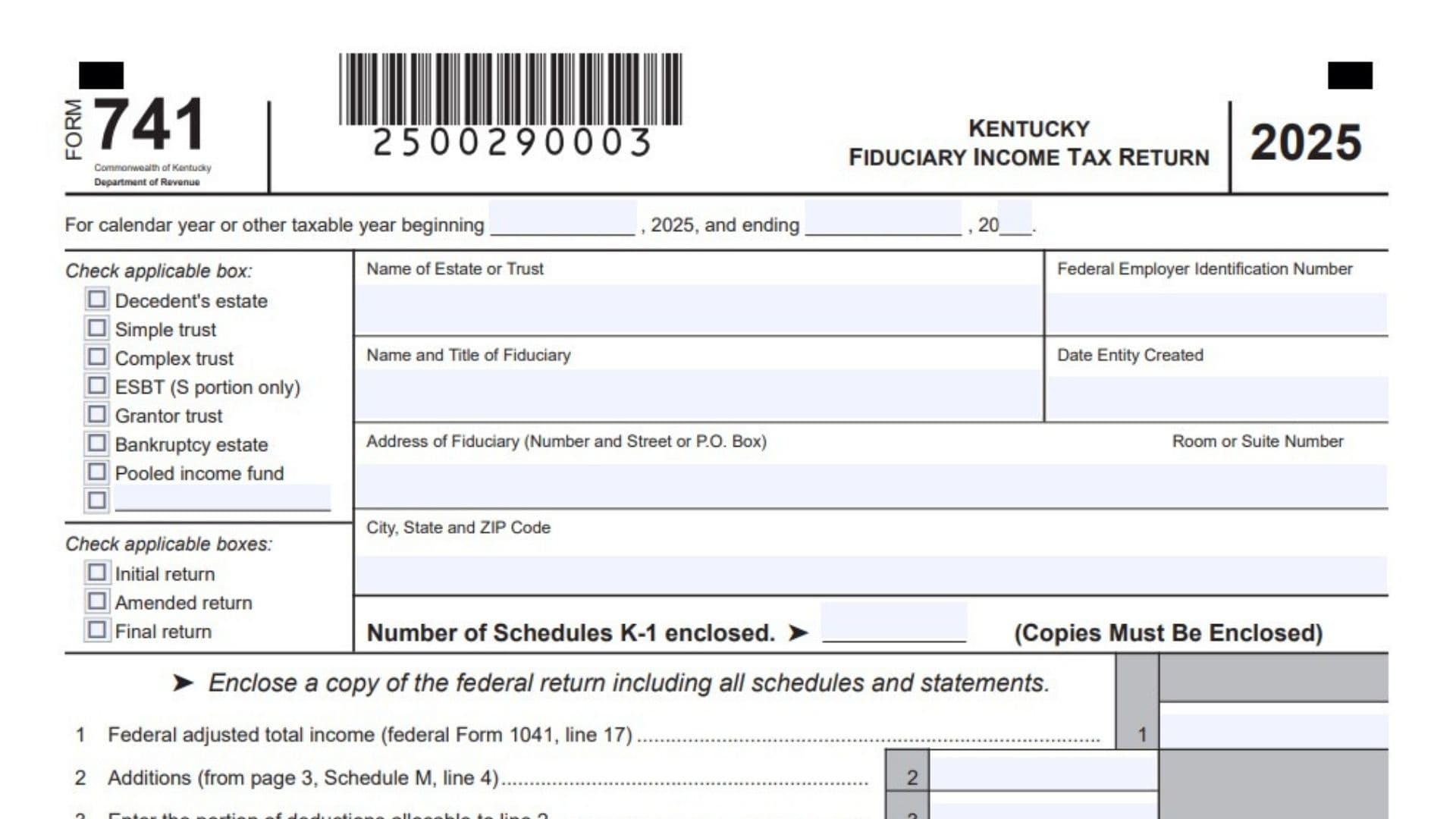
Kentucky Form 741, Kentucky Fiduciary Income Tax Return, is used to calculate and report Kentucky income tax for an estate, trust, or other qualifying fiduciary entity. The return begins with the entity’s federal adjusted total income from federal Form 1041 and then applies Kentucky-specific additions, subtractions, deductions, exclusions, and income distribution rules. It can be used for a decedent’s estate, simple trust, complex trust, the S portion of an ESBT, grantor trust, bankruptcy estate, pooled income fund, or another entity type entered on the blank classification line. The return determines Kentucky adjusted total income, the income retained by the fiduciary, income attributable to certain nonresident beneficiaries, and the fiduciary’s final Kentucky taxable income. It also calculates the Kentucky income tax at the applicable 4 percent rate, adds certain special taxes or recapture amounts, subtracts nonrefundable credits, and reports estimated payments, withholding, nonresident withholding, and pass-through entity tax credits. If the entity paid too little, Form 741 calculates the tax due, penalties, interest, and total amount owed. If it paid too much, the return calculates the overpayment, the portion applied to the next year’s estimated tax, and the remaining refund. The return also contains Schedule A for certain charitable deduction adjustments, Schedule B for the income distribution deduction, and Schedule M for Kentucky additions and subtractions. Additional questions collect information about prior-year filings, expenses connected with Kentucky-taxable income, passive activity losses, federal audit changes, accumulation distributions, and amended returns. Copies of the federal fiduciary return, applicable Kentucky schedules, beneficiary Schedules K-1, payment documents, credit documentation, and other supporting computations may need to be enclosed.
How To File Kentucky Form 741
Complete federal Form 1041 and all applicable federal schedules before preparing Kentucky Form 741. Many amounts on the Kentucky return come directly from the federal return or must be adjusted using information calculated for federal tax purposes.
Next, identify the entity type, filing period, and return status. Complete the identifying information for the estate or trust and the fiduciary. Prepare Schedule M before completing the main income section if the entity has Kentucky additions or subtractions. Prepare Schedule A when applicable, followed by Schedule B if the entity is claiming an income distribution deduction.
Transfer the required amounts to the main return, calculate taxable income, and complete the tax computation on the second page. Attach a complete copy of the federal return, including its schedules and statements. Also enclose copies of all beneficiary Schedules K-1 and any other schedules, forms, or computations required by a particular line.
The fiduciary or authorized agent must review and sign the return. A paid preparer must complete the preparer section when applicable. The authorization question in the preparer section allows the Kentucky Department of Revenue to discuss the return with the preparer when the Yes box is selected.
Mail a paper return to:
Kentucky Department of Revenue
Frankfort, KY 40620-0016
When paying by check, make the check payable to the Kentucky State Treasurer. Include the entity’s federal employer identification number and the notation “KY Income Tax 2025” with the payment. Electronic payment options are available through revenue.ky.gov.

How To Complete Kentucky Form 741
Taxable Year And Entity Information
Taxable Year Beginning: Enter the first day of the estate’s or trust’s taxable year. A calendar-year filer generally begins on January 1, 2025. A fiscal-year filer should enter its actual starting date in 2025.
Taxable Year Ending: Enter the last day of the taxable year. For a calendar-year return, enter December 31, 2025. For a fiscal-year return, enter the applicable ending date and year.
Entity Type
Select the box that accurately describes the estate, trust, or other fiduciary entity.
Decedent’s Estate: Check this box when the return is being filed for the estate of a deceased person.
Simple Trust: Check this box when the entity is treated as a simple trust under the applicable fiduciary income tax rules.
Complex Trust: Check this box when the trust does not qualify as a simple trust and is treated as a complex trust.
ESBT, S Portion Only: Select this box when the return relates to the S corporation portion of an electing small business trust.
Grantor Trust: Check this box when the entity is treated as a grantor trust for income tax purposes.
Bankruptcy Estate: Select this box when the taxpayer is a bankruptcy estate that files as a separate taxable entity.
Pooled Income Fund: Check this box when the return is for a pooled income fund.
Blank Entity Type Line: A separate blank checkbox and writing line appear below the listed entity categories. Use this line to identify an applicable fiduciary entity type that is not covered by the named choices.
Return Status
More than one status box may apply in limited circumstances, such as an amended final return.
Initial Return: Check this box if this is the first Kentucky fiduciary income tax return filed for the entity.
Amended Return: Check this box when correcting or changing a previously filed Kentucky Form 741. The changes must also be explained in the Additional Information Required section.
Final Return: Select this box when the estate or trust has terminated and will not file another Kentucky fiduciary income tax return.
Identifying Information
Name Of Estate Or Trust: Enter the full legal name of the estate or trust. Use the same name associated with the entity’s federal employer identification number and federal return.
Federal Employer Identification Number: Enter the estate’s or trust’s nine-digit FEIN. Verify the number carefully because it is used to identify the account and match payments and tax documents.
Name And Title Of Fiduciary: Enter the full name of the executor, administrator, trustee, personal representative, or other person responsible for filing the return. Include the person’s fiduciary title.
Date Entity Created: Enter the date the trust was created, the estate began, or the entity otherwise came into existence.
Address Of Fiduciary: Enter the fiduciary’s number and street address or post office box.
Room Or Suite Number: Enter the room, apartment, office, or suite number when one is part of the mailing address.
City, State, And ZIP Code: Enter the city, state abbreviation, and ZIP Code associated with the fiduciary’s address.
Number Of Schedules K-1 Enclosed: Enter the total number of Kentucky beneficiary Schedules K-1 attached to the return. Enclose a copy of every Schedule K-1 included in the count.
Federal Return Attachment: Enclose a complete copy of the federal fiduciary income tax return, including all supporting schedules and statements.
Kentucky Income Calculation
Lines 1 Through 16
Line 1: Enter the federal adjusted total income shown on federal Form 1041, line 17. Use the amount before making the Kentucky additions and subtractions reported on Schedule M.
Line 2: Enter the total Kentucky additions from Schedule M, Part I, line 4. These adjustments increase federal adjusted total income for items that Kentucky requires the estate or trust to include.
Line 3: Enter the portion of the entity’s deductions that is directly allocable to the income reported on line 2. Do not enter all deductions. Include only expenses associated with the Kentucky additions.
Line 4: Subtract line 3 from line 2. This produces the net increase to income after accounting for deductions connected with the addition items.
Line 5: Add line 1 and line 4. This is the federal adjusted total income after incorporating the net Kentucky additions.
Line 6: Enter the total Kentucky subtractions from Schedule M, Part II, line 8. These are amounts included in federal adjusted total income that Kentucky permits the estate or trust to remove.
Line 7: Enter the portion of deductions allocable to the income reported as a subtraction on line 6. Include only expenses related to those subtraction items.
Line 8: Subtract line 7 from line 6. The result is the net Kentucky subtraction after accounting for deductions connected with the excluded income.
Line 9: Subtract line 8 from line 5. The result is the estate’s or trust’s Kentucky adjusted total income or loss. Enter the same amount on Schedule B, line 1. If the calculation produces a loss, report it using the appropriate negative amount format.
Line 10: Enter the income distribution deduction calculated on Schedule B, line 15. Enclose the applicable beneficiary Schedules K-1 supporting the distributions and the allocation of income.
Line 11: Enter the allowable Kentucky pension income exclusion. If the exclusion is greater than $31,110, enclose Schedule P to support the amount claimed.
Line 12: Enter the allowable federal estate tax deduction used for Kentucky purposes. Enclose a calculation showing how the deduction was determined.
Line 13: Add lines 10, 11, and 12. This is the total of the income distribution deduction, pension income exclusion, and federal estate tax deduction.
Line 14: Subtract line 13 from line 9. The result is the total income remaining taxable to the fiduciary before the adjustment for intangible income attributable to nonresident beneficiaries.
Intangible Income Attributable To Nonresident Beneficiaries
Line 15: If the estate or trust has intangible income included on line 14 that is attributable to nonresident beneficiaries, enter that portion here. Intangible income can include items such as interest, dividends, or similar investment income, depending on the applicable allocation rules. Enter zero when the entity does not have an applicable amount.
Line 16: Subtract line 15 from line 14. This is the fiduciary’s Kentucky taxable income and the amount used to begin the tax calculation.
Official Use Only: Leave this box blank. It is reserved for processing by the Kentucky Department of Revenue.
Tax Computation
Lines 17 Through 27
Line 17(a): Multiply the taxable income on line 16 by 4 percent, or 0.04. Enter the resulting Kentucky income tax before adding any special tax or recapture amounts.
Line 17(b): Review the listed additional tax sources. Check the applicable box and enter any tax due from Form 4972-K, Schedule RC-R, Schedule DS-R, or an Angel Investor Credit recapture. More than one box may be checked when more than one additional tax applies.
Line 17(c): Add the regular tax calculated on line 17(a) to all amounts entered from the sources listed on line 17(b). Enter the combined total on line 17(c).
Line 18: Enter the total allowable nonrefundable Kentucky tax credits. Enclose Schedule ITC and all documents needed to verify the credits. Nonrefundable credits can reduce the tax but cannot create a negative tax amount.
Line 19: Subtract line 18 from line 17(c). If line 18 is greater than line 17(c), enter zero rather than a negative number. This is the total tax after nonrefundable credits.
Payments And Withholding
Line 20(a): Enter all Kentucky estimated income tax payments made for the taxable year, including any payment submitted with an extension request. Confirm that each payment was made under the correct FEIN and tax year.
Line 20(b): Enter Kentucky income tax withheld and reported on Forms W-2 or 1099. Enclose copies of the forms that show the withholding claimed.
Line 20(c): Enter Kentucky nonresident withholding reported on Form PTE-WH, line 9, and any pass-through entity tax credit reported on Form PTET-CR, line 9. Enclose the applicable forms. Add the amounts together if the estate or trust is claiming both.
Line 20(d): Add lines 20(a), 20(b), and 20(c). This is the entity’s total payments, withholding, and qualifying pass-through entity tax credits.
Line 21: Compare line 19 with line 20(d). If line 19 is larger, subtract line 20(d) from line 19. Enter the difference as the tax due before penalties and interest. Leave the line blank or enter zero when payments equal or exceed the total tax.
Penalties And Interest
Line 22(a): Enter any estimated tax penalty that applies because the estate or trust did not pay the required estimated tax on time. Check the box when Form 2210-K is attached.
Line 22(b): Enter the interest due on unpaid tax. Interest generally applies when tax remains unpaid after the required payment date.
Line 22(c): Enter the applicable late payment penalty when the tax was not paid by the required deadline.
Line 22(d): Enter the applicable late filing penalty when the return was filed after the required deadline without an accepted extension or other applicable relief.
Line 23: Add lines 22(a), 22(b), 22(c), and 22(d). This is the total estimated tax penalty, interest, late payment penalty, and late filing penalty.
Amount Owed Or Overpaid
Line 24: Add line 19 and line 23. If that total is greater than line 20(d), subtract line 20(d) from the combined amount. Enter the result as the total amount owed. This line includes both the unpaid tax and any penalties or interest.
Line 25: If line 20(d) is greater than the combined total of lines 19 and 23, subtract lines 19 and 23 from line 20(d). Enter the result as the amount overpaid.
Line 26: Enter the portion of the line 25 overpayment that the estate or trust wants credited toward its 2026 Kentucky estimated income tax. This amount cannot be greater than the overpayment on line 25.
Line 27: Subtract line 26 from line 25. The remaining amount is the refund requested by the estate or trust.
Declaration And Signature Section
Declaration: The signer declares under penalties of perjury that the return, schedules, statements, and attachments have been reviewed and are true, correct, and complete to the best of the signer’s knowledge and belief. Review the entire return before signing.
Sign Here
Signature Of Fiduciary Or Agent: The fiduciary or an authorized agent must sign the return. The signer may be an executor, administrator, trustee, personal representative, or another properly authorized person.
Date: Enter the date on which the fiduciary or agent signs the return.
PTIN Or Identification Number Of Fiduciary Or Agent: Enter the applicable PTIN or other requested identification number for the person signing as fiduciary or agent.
Telephone Number, Daytime: Enter a daytime telephone number where the fiduciary or agent can be reached regarding the return.
Paid Preparer Use
Signature Of Preparer: A paid preparer must sign the return in the preparer section.
Preparer Signature Date: Enter the date the paid preparer signs the return.
Name Of Preparer Or Firm: Enter the preparer’s full name or the legal name of the tax preparation firm.
ID Number: Enter the preparer’s or firm’s applicable identification number.
Email: Enter the preparer’s email address.
Telephone Number: Enter the preparer’s telephone number.
Authorization To Discuss The Return: Check Yes to authorize the Kentucky Department of Revenue to discuss the return with the paid preparer. Check No if the fiduciary does not want to provide this authorization. This permission does not replace any separate authorization that may be required for broader representation.
Mailing And Payment Information
Mail To: Send the completed paper return and required attachments to the Kentucky Department of Revenue, Frankfort, KY 40620-0016.
Check Payable To: Make a check payment payable to the Kentucky State Treasurer.
Electronic Payment Options: Payments may be made electronically through revenue.ky.gov.
Payment Identification: Include the estate’s or trust’s FEIN and the notation “KY Income Tax 2025” so the payment can be applied to the correct account and tax period.
Schedule A, Charitable Deduction
Do not complete Schedule A for a simple trust or pooled income fund. For another qualifying estate or trust, complete this schedule only when both of the following apply: the return includes additions or subtractions on page 1, line 2 or line 6, and the entity claimed a charitable deduction on federal Form 1041.
Schedule A, Line 1: Enter Kentucky-taxable income paid or permanently set aside for charitable purposes that was not reported on federal Form 1041, Schedule A. Include any additional capital gains that meet these conditions. Also report this amount as an other subtraction on Schedule M, line 7.
Schedule A, Line 2: Enter Kentucky tax-exempt income paid or permanently set aside for charitable purposes that was reported on federal Form 1041, Schedule A. Also include this amount as an other addition on Schedule M, line 3.
Schedule B, Income Distribution Deduction
Schedule B determines the estate’s or trust’s Kentucky distributable net income and the portion that may be deducted for distributions to beneficiaries. Apply the relevant federal fiduciary income distribution rules when completing this schedule.
Schedule B, Line 1: Enter the Kentucky adjusted total income or loss calculated on page 1, line 9.
Schedule B, Line 2: Enter adjusted tax-exempt interest. Use the amount after applying any adjustments required for the distributable net income calculation.
Schedule B, Line 3: Enter the net gain shown on Kentucky Schedule D, Form 741, column 1, line 19. If Schedule D shows a net loss, enter zero on this line.
Schedule B, Line 4: Enter the amount included from federal Form 1041, Schedule A, line 4.
Schedule B, Line 5: Enter the net capital gains included on Kentucky Schedule A, line 1 or line 2.
Schedule B, Line 6: Enter Kentucky gains included in the amount reported on page 1, line 9 as a negative number. If the Kentucky amount is a capital loss, enter it as a positive number. For this purpose, the Kentucky gain or loss includes the federal amount and all applicable Kentucky adjustments.
Schedule B, Line 7: Combine lines 1 through 6, observing the positive and negative signs entered on each line. The result is the estate’s or trust’s distributable net income.
Schedule B, Line 8: Complete this line for a complex trust. Enter the trust’s accounting income for the tax year as determined under the governing instrument and applicable law.
Schedule B, Line 9: Enter the amount of income that the governing instrument or applicable law required the fiduciary to distribute currently.
Schedule B, Line 10: Enter other amounts paid, credited, or otherwise required to be distributed to beneficiaries during the taxable year.
Schedule B, Line 11: Add lines 9 and 10. This is the total amount distributed or required to be distributed. If the result is greater than line 8, apply the relevant federal instructions when determining the allowable amount.
Schedule B, Line 12: Enter the portion of tax-exempt income included in the total distributions reported on line 11.
Schedule B, Line 13: Subtract line 12 from line 11. This is the first tentative income distribution deduction.
Schedule B, Line 14: Subtract line 2 from line 7. This is the second tentative income distribution deduction.
Schedule B, Line 15: Compare line 13 with line 14 and enter the smaller amount. This is the allowable income distribution deduction. Transfer the same amount to page 1, line 10.
Schedule M, Kentucky Additions And Subtractions
Schedule M reconciles federal adjusted total income with the income recognized under Kentucky law. Part I reports Kentucky additions, while Part II reports Kentucky subtractions.
Schedule M, Part I, Additions To Federal Adjusted Total Income
Schedule M, Line 1: Enter interest income from bonds issued by other states and their political subdivisions when that interest is included as a Kentucky addition.
Schedule M, Line 2: Enter Kentucky additions received from partnerships, other fiduciaries, and S corporations. Enclose a schedule identifying the sources and amounts.
Schedule M, Line 3: Enter all other Kentucky additions that do not belong on lines 1 or 2. Enclose a supporting schedule explaining each item. Include the amount from Schedule A, line 2 when applicable.
Schedule M, Line 4: Add Schedule M lines 1, 2, and 3. Enter the total here and transfer it to page 1, line 2.
Schedule M, Part II, Subtractions From Federal Adjusted Total Income
Schedule M, Line 5: Enter qualifying interest from obligations of the United States government. Enclose a schedule identifying the obligations and the amount claimed.
Schedule M, Line 6: Enter Kentucky subtractions received from partnerships, other fiduciaries, and S corporations. Enclose a schedule showing the source and calculation of each subtraction.
Schedule M, Line 7: Enter other allowable Kentucky subtractions that do not belong on lines 5 or 6. Enclose a supporting schedule. Include the amount from Schedule A, line 1 when applicable.
Schedule M, Line 8: Add Schedule M lines 5, 6, and 7. Enter the total here and transfer it to page 1, line 6.
Additional Information Required
Question 1
Was A Kentucky Fiduciary Income Tax Return Filed For 2024?: Check Yes if the estate or trust filed a Kentucky fiduciary income tax return for 2024. Check No if it did not. When No is selected, explain why no 2024 return was filed on the lines provided.
Question 2
Expenses Allocable To Kentucky-Taxable Income: If the fiduciary received income that Kentucky does not tax, indicate whether deductions were limited to the portion of expenses allocable to taxable income. Check Yes if the deductions were properly limited and enclose the supporting computation. Check No if they were not.
Question 3
Passive Activity Losses: Check Yes if the estate or trust had one or more passive activity losses during the taxable year. Check No if it did not. When Yes is selected, report the losses on Form 8582-K, Kentucky Passive Activity Loss Limitations, to calculate the amount allowed for Kentucky purposes.
Question 4
Federal Audit Changes: If a federal audit changed taxable income that was originally reported for any earlier year, submit a copy of the federal Revenue Agent’s Report to the Kentucky Department of Revenue. Send the report separately. Do not attach it to the current Form 741.
Question 5
Accumulation Distribution: Indicate whether the estate or trust made an accumulation distribution during the taxable year as defined in Internal Revenue Code Section 665(b). Check Yes or No. If Yes is selected, enclose federal Schedule J from Form 1041.
Question 6
Amended Return Explanation: If the filing is an amended return, make sure the Amended Return box is checked on the first page. Explain each change in the space provided. Enclose a separate page when the available space is not sufficient. The explanation should identify the original amount, corrected amount, reason for the change, and affected line whenever possible.
Final Kentucky Form 741 Filing Checklist
Before submitting the return, verify that the taxable year, entity classification, return status, legal name, FEIN, fiduciary information, and mailing address are complete. Confirm that every amount transferred from federal Form 1041, Schedule A, Schedule B, Schedule M, Schedule D, Schedule ITC, Schedule P, and other supporting forms matches the attached documentation.
Recheck all additions, subtractions, deduction allocations, distribution calculations, tax calculations, payments, penalties, overpayments, estimated tax credits, and refund amounts. Make sure every required Schedule K-1, withholding form, credit document, and supporting computation is enclosed. The fiduciary or authorized agent must sign and date the return, and a paid preparer must complete the preparer section when applicable.