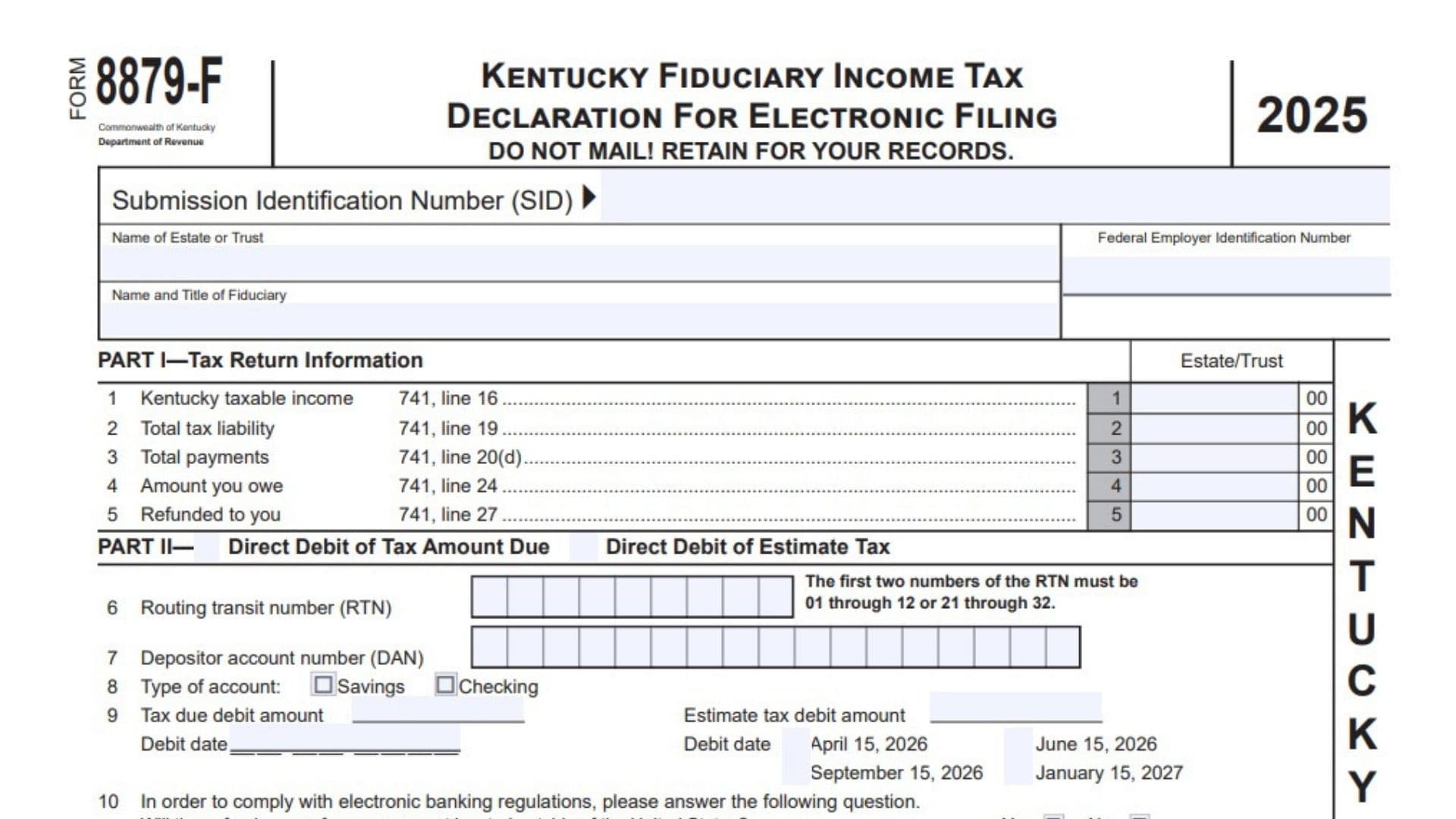
Kentucky Form 8879-F, Kentucky Fiduciary Income Tax Declaration for Electronic Filing, is an authorization and verification form used with certain electronically filed Kentucky fiduciary income tax returns. It allows the fiduciary or authorized agent of an estate or trust to confirm that the taxable income, tax liability, payments, balance due, and refund shown in the electronic return agree with the completed tax return. The form also records the fiduciary’s consent for an electronic return originator, commonly called an ERO, or another transmitter to send the return, schedules, statements, and related information electronically to the Kentucky Department of Revenue. When the estate or trust chooses to pay tax due or estimated tax by direct debit, Form 8879-F provides the banking information, debit amount, payment dates, and authorization needed for electronic withdrawals. It also includes declarations for the fiduciary, ERO, and paid preparer. Form 8879-F is not a payment voucher and is not mailed with the return. It must be completed before anyone signs it, and the fiduciary or agent must sign it before the electronic return is transmitted. Depending on the electronic filing method, the form may be required even when no direct debit is requested. The completed form must be retained with the tax records, generally for three years, so it can document the fiduciary’s approval of the electronically filed return and any authorized bank withdrawals.
Who Must Complete Kentucky Form 8879-F?
Whether Form 8879-F is required depends on how the Kentucky fiduciary return is filed.
Federal And State Electronic Filing With A Federal PIN: Form 8879-F is not required when the return is filed through the combined federal and state electronic filing method using a federal personal identification number.
Federal And State Electronic Filing Without A Federal PIN: Form 8879-F must be completed when the combined federal and state return is transmitted without a federal PIN.
Online Filing: Form 8879-F must be completed when the Kentucky fiduciary return is filed through an online filing method. The completed form must be retained for three years.
How To File Kentucky Form 8879-F
Do not mail Form 8879-F to the Kentucky Department of Revenue. It is a recordkeeping and authorization document rather than a separately filed tax return.
Complete Kentucky Form 741, including all applicable schedules and statements, before completing Form 8879-F. An amended fiduciary return must also be completed before preparing the related Form 8879-F.
Enter the amounts from the completed Kentucky fiduciary return in Part I. Complete Part II when the estate or trust authorizes a direct debit for the balance due, estimated tax, or both.
The fiduciary or authorized agent must review the completed return, verify the estate’s or trust’s identifying information, inspect the paper copy of the return, and sign Form 8879-F before the electronic return is transmitted.
The ERO must obtain the fiduciary’s signature, complete the applicable preparer section, transmit the return, provide the fiduciary with copies of the completed documents, and retain Form 8879-F for three years.
A fiduciary filing from home should keep Form 8879-F with the estate’s or trust’s tax records. The filer should also retain or submit electronically, as required by the filing system, the Kentucky copies of beneficiary Schedules K-1, documents supporting tax credits, schedules explaining other income adjustments, documents requiring signatures, and a complete copy of federal Form 1041.
General Completion Rules
Complete every applicable section before obtaining signatures. A fiduciary, agent, ERO, or paid preparer must not sign a blank or incomplete Form 8879-F.
Confirm that all identifying information and tax amounts agree with the electronic version of the Kentucky fiduciary return.
Use whole dollar amounts in Part I. The form includes spaces for cents, which are generally shown as zero when the return is prepared using rounded whole dollar amounts.
Keep a completed copy with the estate’s or trust’s tax records. Do not send the form by itself to the Department of Revenue.

How To Complete Kentucky Form 8879-F
Identification Section
Submission Identification Number: Enter the 20-digit submission identification number assigned to the electronically filed return. This number identifies the specific electronic submission. Enter it after the applicable direct debit information has been completed.
Name Of Estate Or Trust: Enter the estate’s or trust’s complete legal name. The name must agree with Kentucky Form 741 and the federal fiduciary income tax return.
Federal Employer Identification Number: Enter the estate’s or trust’s federal employer identification number. Review the number carefully and confirm that it matches the electronic return.
Name And Title Of Fiduciary: Enter the full name of the fiduciary or authorized agent responsible for the return. Include the person’s title, such as executor, administrator, trustee, personal representative, or authorized agent.
Part I, Tax Return Information
Part I summarizes important amounts from Kentucky Form 741. Lines 1 through 3 must be completed. Complete either line 4 or line 5, depending on whether the return shows an amount owed or a refund.
Line 1: Enter the Kentucky taxable income from Form 741, line 16. The amount must exactly match the taxable income included in the electronic return.
Line 2: Enter the total Kentucky tax liability from Form 741, line 19. This is the tax after applying the nonrefundable credits reported on the fiduciary return.
Line 3: Enter total payments from Form 741, line 20(d). This amount may include estimated tax payments, extension payments, withholding, nonresident withholding, and applicable pass-through entity tax credits.
Line 4: Enter the amount owed from Form 741, line 24. Complete this line when the total tax, penalties, and interest exceed the payments and credits reported on the return.
Line 5: Enter the amount to be refunded from Form 741, line 27. Complete this line when the return shows an overpayment remaining after any amount credited to the following year’s estimated tax.
Part II, Direct Debit Of Tax Amount Due And Estimated Tax
Complete Part II when the estate or trust wants the Kentucky Department of Revenue to withdraw a balance due, estimated tax payment, or both from a financial institution account.
Direct Debit Of Tax Amount Due Box: Check this box when authorizing an electronic withdrawal for the amount owed on the 2025 fiduciary income tax return.
Direct Debit Of Estimated Tax Box: Check this box when authorizing one or more electronic withdrawals for 2026 estimated fiduciary income tax.
The estate or trust may choose estimated tax direct debit independently of the payment method used for the current-year balance due.
Line 6
Line 6: Enter the financial institution’s nine-digit routing transit number. The first two digits must be from 01 through 12 or from 21 through 32.
Verify the routing number using a check, account statement, financial institution report, or another document produced by the bank. Do not use a deposit slip because it may show an internal routing number that is not valid for electronic funds transfers.
Contact the financial institution when there is uncertainty about which routing number should be used.
Line 7
Line 7: Enter the depositor account number for the account from which the funds will be withdrawn. The number may contain up to 17 digits.
Enter the digits from left to right. Leave any unused boxes blank when the account number contains fewer than 17 digits.
Verify the account number against a reliable bank document before submitting the return. An incorrect account number could delay the payment or cause the withdrawal to fail.
Line 8
Line 8: Select the type of financial institution account.
Savings: Check this box when the withdrawal will come from a savings account.
Checking: Check this box when the withdrawal will come from a checking account.
Select only the account type that matches the banking information entered on lines 6 and 7.
Line 9
Line 9, Tax Due Debit Amount: Enter the balance due that will be withdrawn from the account. This amount should agree with Part I, line 4, unless another payment arrangement is being used for part of the liability.
Line 9, Tax Due Debit Date: Enter the date on which the balance due withdrawal should be initiated. Use the month, day, and four-digit year format.
A payment scheduled for withdrawal on or before April 15, 2026, is treated as timely. The actual removal of funds from the account may occur later. Processing can take up to two weeks.
Line 9, Estimated Tax Debit Amount: Enter the amount of each estimated tax payment that will be withdrawn. The selected payments must be equal.
Line 9, April 15, 2026: Check this box to authorize an estimated tax withdrawal on April 15, 2026.
Line 9, June 15, 2026: Check this box to authorize an estimated tax withdrawal on June 15, 2026.
Line 9, September 15, 2026: Check this box to authorize an estimated tax withdrawal on September 15, 2026.
Line 9, January 15, 2027: Check this box to authorize an estimated tax withdrawal on January 15, 2027.
The estate or trust may select from one to four estimated tax payment dates. The same estimated tax amount will be withdrawn on each selected date.
The bank routing number, account number, and account type used for estimated tax payments must be the same as the information used for the balance due direct debit transaction.
A withdrawal may occur after its selected processing date, but a properly scheduled payment is treated as timely.
Line 10
Line 10: Indicate whether the direct debit funds will come from a financial account located outside the United States.
Yes: Check this box when the funds will come from an account maintained outside the United States.
No: Check this box when the account is maintained within the United States.
This question must be answered whenever Part II is completed because federal electronic banking regulations require the information.
Current-Year Payment Options
A fiduciary with an amount on Part I, line 4, may choose from several payment methods.
Direct Debit With The Electronic Return
Complete Part II, lines 6 through 10, check the Direct Debit of Tax Amount Due box, and check the authorization box on line 11.
The direct debit choice for Kentucky does not have to match the payment method selected for the federal return.
Credit Card Or Separate ACH Debit
A fiduciary may pay through the Kentucky Department of Revenue’s electronic payment system using an accepted credit card or ACH debit.
A credit card payment generally requires the card type, card number, expiration date, and the cardholder’s billing address.
An ACH debit payment generally requires the bank name, bank account number, and routing number.
The fiduciary may contact the Kentucky Department of Revenue at 502-564-4581 when assistance with an electronic payment is needed.
Form EPAY
Form EPAY may be used to make an electronic tax payment separately from the electronic return when supported by the tax preparation software.
Check Or Money Order
A fiduciary paying by check or money order should submit the payment with Kentucky Form 741-V, Kentucky Electronic Payment Voucher.
Unpaid Balance Due
Penalty and interest begin to accrue on unpaid 2025 fiduciary income tax after April 15, 2026.
Submitting an electronic return without a successful payment does not remove the estate’s or trust’s liability for the tax, interest, or penalties.
Part III, Declaration Of Fiduciary Or Agent
The fiduciary or agent should complete and sign Part III only after Part I and any applicable direct debit information have been completed.
Line 11
Line 11: Check the authorization box when approving an ACH withdrawal for the current-year tax due, estimated tax payments, or both.
By checking the box, the fiduciary or agent authorizes the Kentucky Department of Revenue and its financial agent to initiate the electronic withdrawal. The authorization also permits the financial institution to debit the specified account.
The authorization remains effective until the fiduciary or agent contacts the Kentucky Department of Revenue to terminate it.
To cancel a scheduled payment, contact the Kentucky Department of Revenue at 502-564-4581 no later than two business days before the scheduled debit date.
The authorization permits the financial institutions involved in processing the payment to receive confidential information needed to answer questions and resolve payment issues.
A balance due return does not count as fully paid unless the Department of Revenue receives the entire payment on time. The estate or trust remains responsible for unpaid tax, interest, and penalties if the electronic withdrawal is rejected, returned, or otherwise unsuccessful.
By signing, the fiduciary or agent confirms that the information provided to the ERO or transmitter is accurate and that the amounts in Part I agree with the corresponding amounts in the electronically filed fiduciary return.
The signature also authorizes the electronic transmission of the return, schedules, and statements and permits the Department of Revenue to send the ERO or transmitter an acknowledgment indicating whether the return was accepted or rejected.
Fiduciary Or Agent Signature Fields
Signature Of Fiduciary Or Agent: The fiduciary or authorized agent must sign after reviewing the completed return and Form 8879-F. The signature must be obtained before the electronic return is transmitted.
PTIN Or Identification Number Of Fiduciary Or Agent: Enter the applicable preparer tax identification number or other requested identification number for the person signing as fiduciary or agent.
Telephone Number, Daytime: Enter a daytime telephone number where the fiduciary or agent can be contacted about the return or direct debit authorization.
Date Signed: Enter the date the fiduciary or agent signed the completed form.
An ERO or preparer must not ask the fiduciary or agent to sign an incomplete form.
Correcting The Return After It Is Signed
A new Form 8879-F must be completed and signed when a correction made after signing causes either of the following changes:
The corrected Kentucky taxable income differs from the signed amount by more than $50.
The corrected refund or balance due differs from the signed amount by more than $14.
When the change does not exceed these limits, a new signature form may not be required, but the corrected return must still be accurate and properly transmitted.
Part IV, Declaration And Signature Of Electronic Return Originator And Paid Preparer
Part IV records the declarations and identifying information of the ERO and any separate paid preparer.
The ERO confirms that the return has been reviewed and that the entries on Form 8879-F are complete and correct to the best of the ERO’s knowledge.
An ERO acting only as a collector is not responsible for reviewing the accuracy of the underlying return. The collector confirms only that Form 8879-F accurately reflects the return data received.
When Part II is completed, the ERO must verify the fiduciary’s proof of account and confirm that it agrees with the name and banking information used for the return.
The ERO must also confirm that the fiduciary or agent signed the form before transmission and that copies of all electronically filed forms and information were provided to the fiduciary.
ERO Section
Also Paid Preparer Box: Check this box when the ERO also prepared the fiduciary return for compensation. An ERO who is also the paid preparer does not need to complete or sign the separate Paid Preparer’s Use Only section.
Self-Employed Box: Check this box when the ERO is self-employed.
ERO Firm’s Name And Address: Enter the ERO firm’s legal name and complete mailing address. A self-employed ERO should enter the name and address used for the business.
ERO Signature: The ERO must sign the completed form.
ERO Signature Date: Enter the date the ERO signed Form 8879-F.
Identification Number Of ERO: Enter the identification number assigned to the electronic return originator.
ERO FEIN: Enter the federal employer identification number of the ERO or ERO firm.
ERO ZIP Code: Enter the ZIP Code associated with the ERO’s business address.
Paid Preparer Section
Complete this section when a paid preparer is involved and is not also the ERO.
Paid Preparer Self-Employed Box: Check this box when the paid preparer is self-employed.
Paid Preparer Firm’s Name And Address: Enter the legal name and complete mailing address of the preparer’s firm. A self-employed preparer should enter the business name and address used for tax preparation services.
Preparer’s Signature: The paid preparer must sign the form.
Preparer Signature Date: Enter the date the paid preparer signed.
Identification Number Of Preparer: Enter the preparer’s applicable identification number.
Paid Preparer FEIN: Enter the federal employer identification number of the preparation firm.
Paid Preparer ZIP Code: Enter the ZIP Code associated with the preparer’s business address.
If the paid preparer is not the ERO, the preparer must complete, sign, and date this section.
When the ERO cannot obtain the paid preparer’s signature directly on Form 8879-F, attach a copy of the tax return bearing the paid preparer’s signature to the retained Form 8879-F.
Fiduciary Or Agent Responsibilities
A fiduciary or agent working with an ERO should:
Verify the estate’s or trust’s name, FEIN, fiduciary information, and all other entries.
Inspect the completed paper copy of the Kentucky return.
Confirm that the tax amounts shown in Part I agree with Form 741.
Review all direct debit information, including the routing number, account number, account type, amounts, and dates.
Sign Form 8879-F only after the return and authorization form are complete.
Sign before the ERO transmits the return.
Retain a copy of Form 8879-F and the completed tax return.
Electronic Return Originator Responsibilities
The ERO should:
Complete Form 8879-F and retain it for three years.
Verify the fiduciary’s or agent’s identity and signature.
Confirm the estate’s or trust’s FEIN.
Verify banking information when a direct debit is authorized.
Attach or electronically submit all required supporting documents.
Provide the fiduciary or agent with copies of Form 8879-F and the complete return information.
Follow all applicable Kentucky electronic filing requirements.
Required Supporting Documents
Depending on the return, the electronic filing package may need to include:
Kentucky copies of beneficiary Schedules K-1.
Documents verifying tax credit amounts.
Schedules explaining amounts reported as other additions or subtractions.
Forms or documents requiring signatures.
A complete copy of federal Form 1041.
Other schedules and statements required to support Kentucky Form 741.
Final Kentucky Form 8879-F Checklist
Confirm that the Kentucky fiduciary return was completed before Form 8879-F.
Determine whether Form 8879-F is required for the selected electronic filing method.
Enter the 20-digit submission identification number.
Verify the estate’s or trust’s legal name and FEIN.
Complete Part I, lines 1 through 3, and either line 4 or line 5.
Complete Part II when authorizing direct debit payments.
Verify the nine-digit routing number and account number using a reliable bank document.
Select the correct account type.
Enter the balance due amount and requested debit date.
Enter the estimated tax amount and select up to four applicable payment dates.
Answer the foreign account question on line 10.
Check the authorization box on line 11 when using direct debit.
Obtain the fiduciary’s or agent’s signature before transmitting the return.
Complete the ERO and paid preparer sections as applicable.
Provide copies to the fiduciary or agent.
Retain Form 8879-F for three years.
Do not mail Form 8879-F to the Kentucky Department of Revenue.