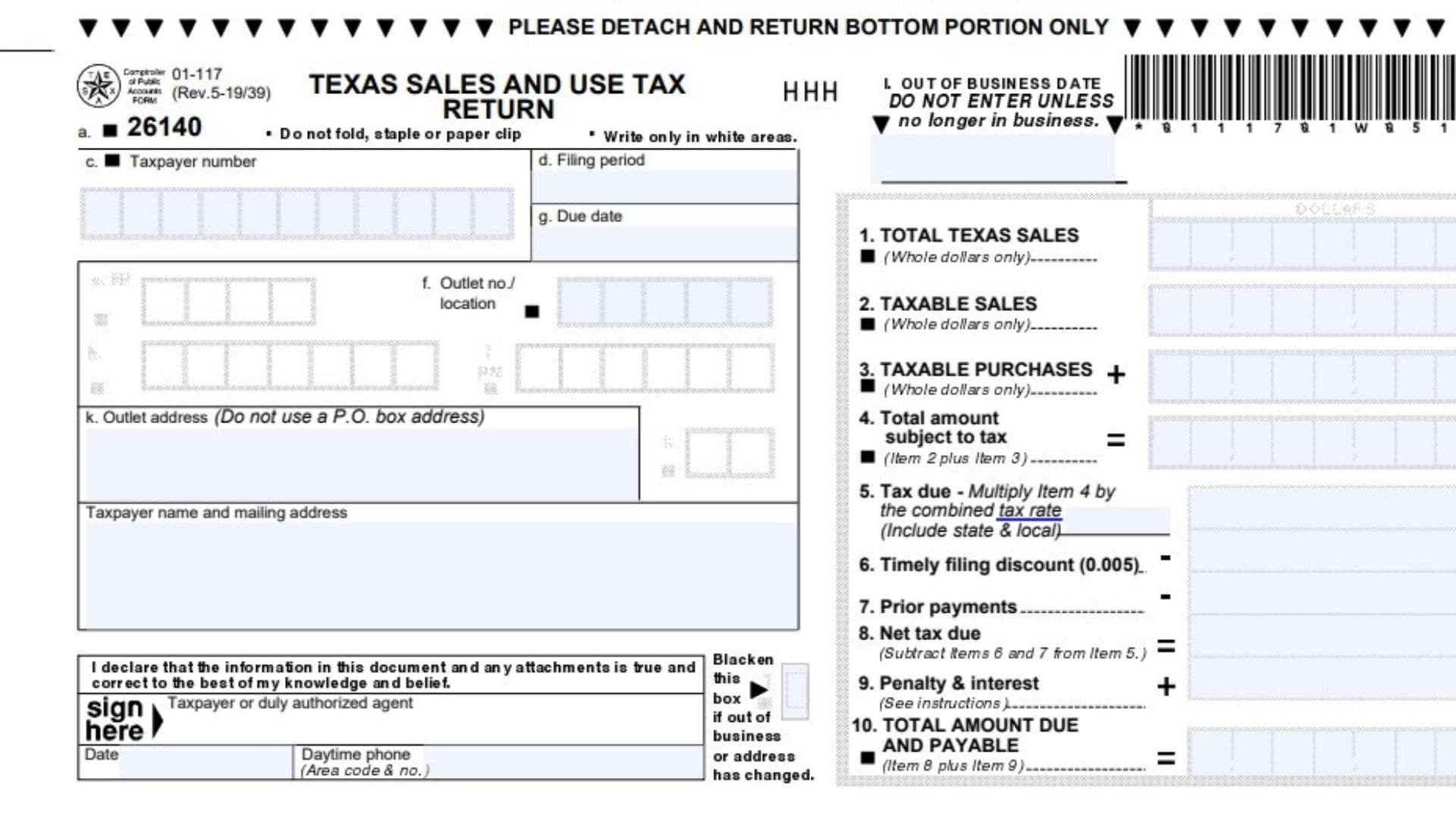
Texas Form 01-117, officially known as the Texas Sales and Use Tax Return – Short Form, is a state tax return used by qualifying businesses to report sales, taxable purchases, and the sales and use tax they owe to the Texas Comptroller of Public Accounts. The form provides a simplified reporting option for businesses that operate from a single Texas location and meet specific filing requirements. It collects information about a business’s total Texas sales, taxable sales, taxable purchases, applicable state and local sales tax, filing discounts, previous payments, and any penalties or interest owed. Businesses use this information to calculate their total tax liability for a particular reporting period. Unlike the longer sales and use tax return, Form 01-117 is intended for businesses with relatively straightforward tax reporting obligations. Completing the form accurately helps ensure that taxable transactions are reported correctly, applicable taxes are calculated using the proper rates, and payments are credited to the correct reporting period.
Who Can File Texas Form 01-117?
Businesses can use the short form only if they satisfy all the eligibility requirements.
To qualify, a business must:
- Operate from only one physical location in Texas.
- Report local sales and use taxes only to the jurisdictions where that business location is situated, such as a city, county, transit authority, or special purpose district.
- Not make advance payments toward its state or local sales and use tax obligations.
- Have no tax credits, including bad debt credits, that need to reduce the amount owed on the return.
- Have no customs broker refunds to report.
- Not operate as a remote seller or marketplace provider.
A business that fails to meet even one of these conditions cannot use the short form.
Instead, it must file Texas Form 01-114, the regular Sales and Use Tax Return.
Businesses responsible for out-of-state use tax that have no physical Texas locations must also use the longer return.
If a business needs to report eligible tax credits or customs broker refunds, it generally must complete Form 01-114 along with Form 01-148, Texas Sales and Use Tax Return Credits and Customs Broker Schedule.
Businesses claiming bad debt credits must submit their claims electronically through the Comptroller’s filing system.
How To File Texas Form 01-117
Texas Form 01-117 can be submitted electronically or by mail.
Filing Electronically
Qualifying businesses may use the Texas Comptroller’s Webfile system to submit their sales and use tax returns.
Before beginning, have the business’s taxpayer information, reporting period, sales figures, purchase records, and applicable tax rate available.
The filing process generally involves entering the required business information, reporting taxable transactions, calculating the tax due, and submitting payment.
The form identifies credit cards and electronic checks as available electronic payment methods.
It also identifies TeleFile as an option for filing a return when no tax is due, using the telephone number 1-888-434-5464.
Filing by Mail
Businesses filing a paper return should complete the detachable lower portion of the form.
Mail the completed return and payment to:
Comptroller of Public Accounts P.O. Box 149355 Austin, TX 78714-9355
If paying by check, make one check for the total amount reported in Item 10 payable to State Comptroller.
Avoid folding, stapling, or attaching paper clips to the return.
Only the completed lower portion should be mailed. The instruction section should be retained for reference.
When Is Texas Form 01-117 Due?
The filing deadline is generally the 20th day of the month following the end of the applicable reporting period.
For example, a monthly return covering January would ordinarily be due on February 20.
If the deadline falls on a weekend or legal holiday, the filing deadline moves to the next business day.
Businesses must submit a return even when they have no sales activity during the reporting period.
Late filing or payment may result in penalties and interest.
Information Needed Before Completing the Form
Gather the following information before preparing the return:
- Texas taxpayer identification number.
- Reporting period and applicable due date.
- Business name and mailing address.
- Physical location and outlet information.
- Records of total Texas sales.
- Records identifying taxable sales and related charges.
- Taxable purchases on which sales or use tax was not paid.
- Applicable combined state and local tax rate.
- Prior payments or overpayments applied to the reporting period.
- Information about any applicable penalties or interest.
- Contact details for the taxpayer or authorized representative.
Having accurate accounting records available will make it easier to complete the calculations and check the return before filing.

How To Complete Texas Form 01-117
The return contains taxpayer identification fields, business location information, ten numbered tax calculation items, an out-of-business date field, and a certification section.
Complete the identification information before entering financial amounts.
General Instructions for Completing the Form
Use black ink when completing a paper return by hand.
Write numbers clearly inside the designated boxes. Typed numbers may be entered consecutively within the available spaces.
Do not write in shaded areas or other sections reserved for official processing.
If the return contains incorrect preprinted information, contact the Comptroller’s office for assistance.
Items 1 through 4 must not be left blank. Enter zero when there is no amount to report.
When a negative amount must be entered, place it inside angle brackets, such as <1,250.00>.
Taxpayer Identification and Business Information
Field a: Form Processing Code
This area contains a preprinted processing code used to identify the return. Do not alter the code or enter additional information in this field.
Field c: Taxpayer Number
Enter or verify the taxpayer identification number assigned to the business for Texas sales and use tax purposes.
This number identifies the taxpayer responsible for the return.
Make sure it matches the business’s Texas sales tax registration.
Field d: Filing Period
Verify the reporting period covered by the return.
The sales and purchase amounts entered later must relate to this period.
Do not combine transactions from different reporting periods unless the applicable reporting instructions specifically allow it.
Field f: Outlet Number or Location
Enter or verify the outlet number identifying the business location covered by the return.
The short form is intended for qualifying businesses operating from a single Texas location.
The outlet number helps associate the reported transactions with the correct business establishment.
Field g: Due Date
Verify the date by which the return and any required payment must be submitted.
For ordinary reporting periods, the deadline is the 20th day of the month following the end of the period, subject to weekend and holiday adjustments.
Field k: Outlet Address
Enter or verify the physical address of the Texas business location.
Use the actual street address rather than a post office box.
Make sure the address accurately identifies the establishment associated with the reported sales.
Taxpayer Name and Mailing Address
Enter or verify the taxpayer’s legal or registered business name and mailing address.
The mailing address is used for correspondence related to the business’s tax account.
If the mailing address has changed, the change should also be reported to the Comptroller.
Out-of-Business Information
Field l: Out-of-Business Date
Complete this field only when the business location identified in Field f is no longer operating.
Enter the date the location went out of business.
If the location continues to operate, leave this field blank.
The date helps the Comptroller identify when the business location ceased operations.
Calculating Texas Sales and Use Tax
This section contains the ten numbered items used to report sales, determine taxable amounts, calculate the tax liability, and identify the total payment due.
Reporting Sales and Taxable Purchases
Item 1: Total Texas Sales
Enter the total value of all sales made in Texas during the reporting period, excluding sales tax collected.
Include sales of tangible personal property, services, leases, rentals, and related charges.
The total should include both taxable and nontaxable sales.
For reporting purposes, Texas sales include transactions made from a physical business location in Texas as well as sales made into Texas from an out-of-state location.
Report the amount in whole dollars.
For example, if the business had $25,000 in total Texas sales, including both taxable and exempt transactions, enter $25,000.
If the business had no sales during the reporting period, enter 0.
Do not assume that all sales reported here are taxable. The taxable portion is reported separately in Item 2.
Item 2: Taxable Sales
Enter the total value of sales subject to Texas sales tax during the reporting period.
Include taxable sales of tangible personal property, taxable services, leases, rentals, and related taxable charges.
Exclude sales tax itself from this amount.
Report the total in whole dollars.
For example, if the business reported $25,000 in total Texas sales but only $18,000 was taxable, enter $18,000 in Item 2.
The remaining $7,000 should not be included in taxable sales if it represents legitimately nontaxable transactions.
The form’s instructions also address adjustments involving purchases or sales on which tax was paid incorrectly or refunded to a customer. Where an adjustment is permitted, the appropriate amount is subtracted from taxable sales.
However, businesses that need to claim tax credits outside the short form’s eligibility requirements must use the appropriate longer return and supporting schedule.
If there are no taxable sales to report, enter 0.
Item 3: Taxable Purchases
Enter the total value of taxable purchases made for the business’s own use when the required Texas sales or use tax was not paid.
These purchases may come from sellers located either inside or outside Texas.
Examples include:
- Taxable equipment purchased without paying sales tax.
- Business supplies purchased from an out-of-state seller without tax.
- Taxable items withdrawn from inventory for business or personal use.
- Items removed from inventory and given away.
- Items originally purchased for an exempt purpose but later used in a taxable manner.
- Taxable property acquired through a lease or rental without paying the applicable tax.
Do not include merchandise held exclusively for resale.
For example, if the business purchased $2,500 worth of taxable equipment for its own use and the required tax was not collected, report $2,500 in Item 3.
Report whole dollars only.
If there are no taxable purchases, enter 0.
Item 4: Total Amount Subject to Tax
Add Item 2 and Item 3 to calculate the total amount subject to sales and use tax.
Use the following formula:
Item 4 = Item 2 + Item 3
For example:
- Item 2: $18,000
- Item 3: $2,500
- Item 4: $20,500
Enter $20,500 in Item 4.
Do not include Item 1 when calculating this amount.
Item 1 reports total Texas sales, including sales that may not be taxable. Adding it again would incorrectly increase the taxable amount.
If both Items 2 and 3 are zero, enter 0 in Item 4.
Calculating Tax Due and Adjustments
Item 5: Tax Due
Calculate the sales and use tax owed by multiplying Item 4 by the applicable combined tax rate.
The combined rate includes the Texas state sales tax and any applicable local taxes imposed by the city, transit authority, county, or special purpose district.
Use the following formula:
Item 5 = Item 4 × Combined Tax Rate
For example, suppose:
- Total amount subject to tax: $20,500
- Combined sales tax rate: 8.25%
The calculation would be:
$20,500 × 0.0825 = $1,691.25
Enter $1,691.25 in Item 5.
The 8.25% rate is an illustration, not a rate that applies to every business.
Use the rate applicable to the business’s location and reporting obligations.
If the rate shown on the return appears incorrect, contact the Comptroller before filing.
Item 6: Timely Filing Discount
Businesses that file their return and pay the required tax by the due date may qualify for a timely filing discount.
The discount equals 0.5% of the tax due reported in Item 5.
Calculate it by multiplying Item 5 by 0.005.
Item 6 = Item 5 × 0.005
For example, if Item 5 shows $1,691.25:
$1,691.25 × 0.005 = $8.45625
Rounded to cents, the discount is $8.46.
Enter $8.46 in Item 6 if the filing and payment meet the timely filing requirements.
Do not claim this discount when the return or payment does not qualify.
Item 7: Prior Payments
Enter the amount of any earlier payment or overpayment that has been specifically assigned to the reporting period covered by the return.
The paper return may already contain a preprinted amount in this field based on payments credited when the return was produced.
Review the amount carefully.
For example, if the business previously made a $200 payment that was applied to the reporting period, Item 7 would show $200.
Do not include payments made for unrelated periods or amounts that have not been applied to this return.
Contact the Comptroller if the amount shown does not match the business’s payment records.
Item 8: Net Tax Due
Calculate the remaining tax liability after subtracting the timely filing discount and applicable prior payments from the tax calculated in Item 5.
Use the following formula:
Item 8 = Item 5 − Item 6 − Item 7
For example:
- Item 5: $1,691.25
- Item 6: $8.46
- Item 7: $200.00
The calculation is:
$1,691.25 − $8.46 − $200.00 = $1,482.79
Enter $1,482.79 in Item 8.
Check that the discount and prior payments have been subtracted only once.
Penalties, Interest, and Total Payment
Item 9: Penalty and Interest
Enter any penalties and interest owed because the return or payment is late.
The form specifies different penalty rates depending on how late the payment is.
For a payment that is 1 to 30 days late, the penalty is 5% of the unpaid tax.
For a payment that is 31 to 60 days late, the penalty increases to 10%.
If the payment is more than 60 days late, a 10% penalty applies along with interest calculated using the applicable published rate.
For example, if the unpaid tax is $1,000 and the payment is 20 days late:
$1,000 × 0.05 = $50
The percentage-based penalty would be $50.
If the same unpaid amount is 45 days late:
$1,000 × 0.10 = $100
The percentage-based penalty would be $100.
When payment is more than 60 days late, interest must also be considered. The applicable rate is provided through the Comptroller’s published interest information.
The form also states that an additional $50 late-filing penalty is assessed whenever a return is filed after its due date.
This additional charge is separate from the percentage-based late-payment penalties.
Determine which penalties and interest apply to the business’s circumstances before completing Item 9.
Item 10: Total Amount Due and Payable
Add the net tax due in Item 8 and the penalties and interest in Item 9.
Use the following formula:
Item 10 = Item 8 + Item 9
For example:
- Item 8: $1,482.79
- Item 9: $50.00
The calculation is:
$1,482.79 + $50.00 = $1,532.79
Enter $1,532.79 in Item 10.
This is the total amount to be paid with the return.
If no penalties or interest apply, Item 10 will generally equal Item 8.
Completing the Signature and Certification Section
After completing the tax calculations, the taxpayer or authorized representative must certify that the information reported is accurate.
Taxpayer or Duly Authorized Agent Signature
The taxpayer or a person authorized to act on behalf of the business must sign the return.
The signature certifies that the information on the return and any accompanying materials is true and correct to the best of the signer’s knowledge and belief.
Make sure the return is signed before mailing it.
Date
Enter the date on which the taxpayer or authorized agent signs the return.
Use the actual signing date.
Daytime Phone Number
Provide a telephone number where the taxpayer or authorized representative can be reached during normal business hours.
Include the area code.
This allows the Comptroller’s office to contact the business if clarification is needed.
Out-of-Business or Address-Change Checkbox
The form includes a checkbox beside the signature area for reporting a business closure or address change.
Fill in the checkbox if the business is no longer operating or its address has changed.
If a location has closed, also complete the out-of-business date field when applicable.
The form also allows businesses to report changes in their mailing or outlet address through the Comptroller’s online services.
How To File an Amended Texas Form 01-117
Businesses that discover an error after filing may need to submit an amended return.
Amended sales and use tax returns can be filed electronically through Webfile or Electronic Data Interchange (EDI), or by submitting a corrected paper return.
Additional documentation may be required to support the requested correction.
Steps for Amending a Paper Return
Step 1: Obtain the Return
Use a copy of the previously filed return or obtain a blank copy of the appropriate return.
Step 2: Identify the Amended Return
Write AMENDED RETURN clearly at the top.
This identifies the submission as a correction rather than a new original return.
Step 3: Correct the Information
If using a copy of the original return, cross out the incorrect amounts and write the corrected figures.
If using a blank return, enter the figures that should have appeared on the original filing.
Review any calculations affected by the changes.
For example, changing taxable sales in Item 2 may also change Item 4, Item 5, and subsequent tax calculations.
Step 4: Sign and Date
The taxpayer or authorized representative must sign and date the amended return.
What Happens If the Amendment Changes the Tax Due?
If the corrected return shows that the business originally underpaid its taxes, the additional tax must be paid along with any applicable penalties and interest.
If the correction shows an overpayment and the business is requesting a refund, it must satisfy the Comptroller’s applicable refund claim requirements.
Correcting a return does not automatically guarantee that an overpayment will be refunded.
How To Report Business Changes or Close a Sales Tax Account
Businesses should update their Texas sales and use tax information when their operating circumstances change.
Reporting an Address Change
If the business mailing address or physical outlet address changes, update the relevant account information with the Comptroller.
The address-change checkbox on the short form can also be used to indicate that a change has occurred.
Make sure the return identifies the correct business location.
Reporting a Business Closure
If the business location has permanently closed, enter the closure date in Field l and mark the appropriate checkbox near the signature section.
The closure date should reflect when the location ceased business operations.
Businesses should also complete any required account termination procedures rather than assuming that submitting a final return automatically closes the tax account.
Remote sellers seeking to end their use tax responsibilities are directed to Form 01-798, Remote Sellers Intent to Terminate Use Tax Responsibilities.
Common Mistakes to Avoid When Completing Texas Form 01-117
Several reporting errors can lead to incorrect tax calculations or processing delays.
Including Total Texas Sales in Item 4
Item 4 must contain only taxable sales and taxable purchases. Do not add Item 1 to the calculation.
Confusing Total Sales With Taxable Sales
Total Texas sales may include exempt or nontaxable transactions. Include only taxable transactions in Item 2.
Forgetting Use Tax on Business Purchases
Taxable items purchased without paying the required sales or use tax may need to be reported in Item 3.
Using the Wrong Combined Tax Rate
The combined tax rate depends on the applicable state and local jurisdictions. Do not automatically use the highest possible combined rate.
Claiming a Discount When Filing Late
The timely filing discount applies only when the return and payment satisfy the filing deadline requirements.
Failing to Account for Prior Payments
Verify any previous payments assigned to the reporting period to avoid paying the same tax twice.
Leaving Required Items Blank
Items 1, 2, 3, and 4 require entries even when the correct amount is zero.
Failing to File a Zero-Sales Return
Businesses are still required to file when they have no sales to report.
Using the Short Form When Ineligible
Businesses with multiple locations or other reporting circumstances outside the short form’s eligibility requirements must use the appropriate regular return.
Forgetting the Signature
An unsigned paper return may create filing or processing problems. Verify that the taxpayer or authorized representative has signed and dated the form.
Final Review Before Filing
Use this checklist before submitting Texas Form 01-117.
Business Information
- Confirm that the business meets all short-form eligibility requirements.
- Verify the taxpayer number and outlet identification.
- Check the reporting period and filing deadline.
- Confirm that the business name and mailing address are correct.
- Verify the physical outlet address.
- Complete the closure date and change checkbox if applicable.
Sales and Purchase Information
- Confirm that Item 1 includes all Texas sales, excluding tax.
- Verify that Item 2 includes only taxable sales and taxable related charges.
- Confirm that Item 3 includes taxable purchases on which tax was not paid.
- Check that Items 1, 2, 3, and 4 contain an amount, including zero where necessary.
- Verify that Items 1 through 4 use whole-dollar amounts.
- Confirm that Item 4 equals Item 2 plus Item 3.
Tax Calculations
- Confirm that Item 5 uses the correct combined state and local tax rate.
- Verify that the timely filing discount in Item 6 is claimed only when eligible.
- Check that Item 7 includes only payments credited to the reporting period.
- Recalculate Item 8 by subtracting Items 6 and 7 from Item 5.
- Include applicable late-payment penalties, late-filing penalties, and interest in Item 9.
- Verify that Item 10 equals Item 8 plus Item 9.
Submission and Payment
- Make sure the taxpayer or authorized agent has signed the return.
- Enter the signing date and daytime telephone number.
- Confirm that the total payment matches Item 10.
- If filing by mail, detach and submit only the required lower portion.
- Do not fold, staple, or attach paper clips to the paper return.
- Send the return and payment by the applicable deadline.
- Retain copies of the return, calculations, and payment confirmation for the business’s records.
Completing Texas Form 01-117 requires accurately separating total sales from taxable sales, identifying taxable purchases, applying the correct combined tax rate, and accounting for eligible discounts and previous payments. Reviewing each item carefully before filing helps businesses report their Texas sales and use tax obligations correctly and avoid preventable errors or penalties.