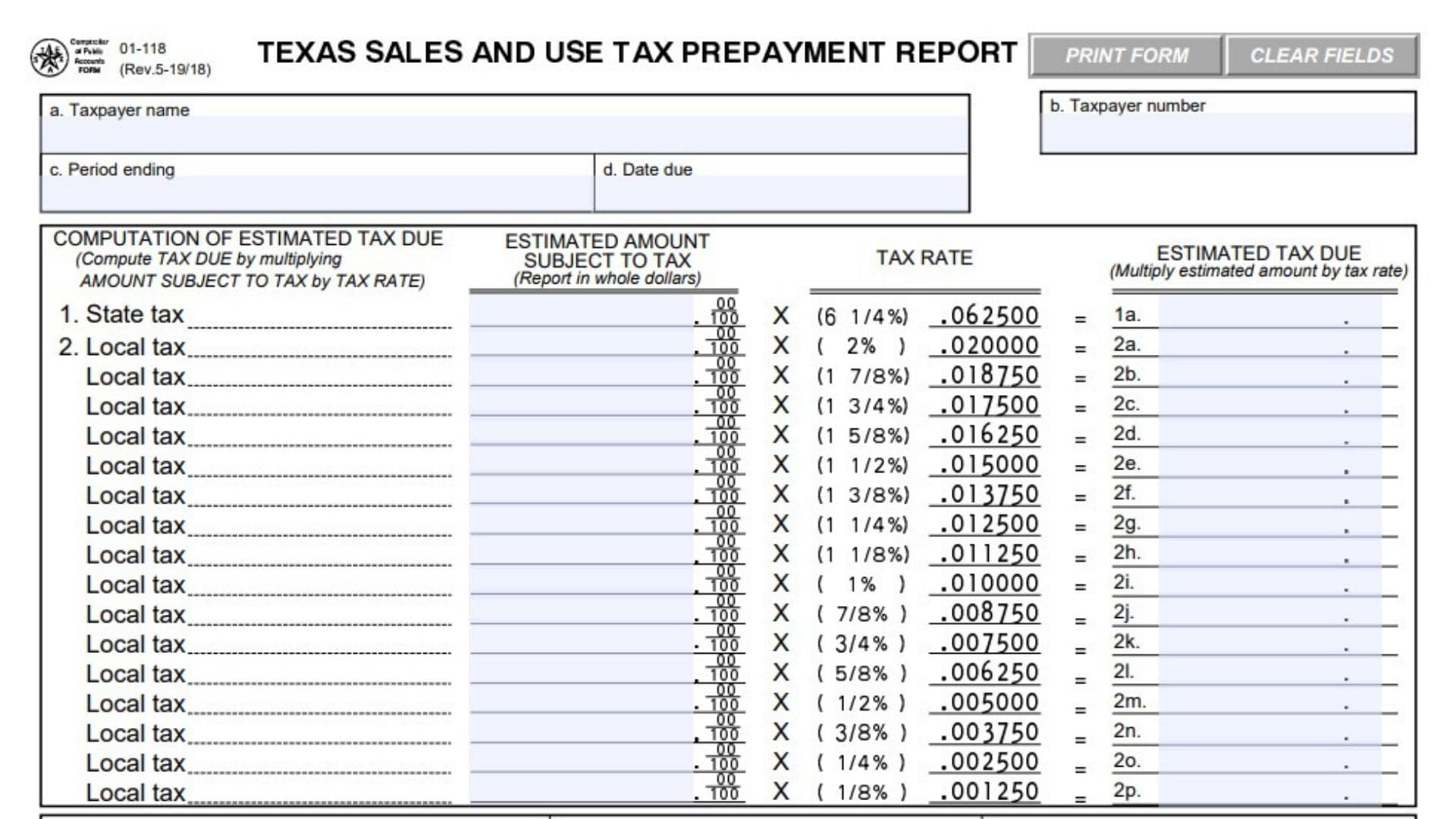
Texas Form 01-118, officially known as the Texas Sales and Use Tax Prepayment Report, is a tax reporting form used by businesses that want to make advance payments toward their Texas sales and use tax obligations. Administered by the Texas Comptroller of Public Accounts, the form allows eligible taxpayers to estimate the sales and use taxes they will owe for a reporting period and submit payment before the regular tax return is due. Businesses that satisfy the prepayment requirements may qualify for a combined 1.75% discount, consisting of an additional 1.25% prepayment discount and the standard 0.5% timely filing discount. The form collects taxpayer identification details, reporting period information, estimated taxable amounts, applicable state and local tax rates, calculated tax liabilities, discounts, and total prepayment amounts. It separates state taxes from local taxes so that each portion can be calculated and reported correctly. Businesses must also file their regular Texas sales and use tax returns on time to retain the available discounts. Completing Form 01-118 accurately is important because incorrect estimates, missed deadlines, or calculation errors may cause a business to lose its discount or owe additional taxes.
Who Can File Texas Form 01-118?
Texas businesses that are required to report and pay sales and use taxes may use Form 01-118 to make qualifying advance tax payments.
The form is intended for taxpayers who want to prepay their estimated state and local sales and use tax liabilities and qualify for the applicable prepayment discount.
To receive the combined 1.75% discount, a business must meet one of two payment requirements and satisfy the filing deadlines.
Requirement 1: Prepay at Least 90% of the Tax Due
The estimated prepayment amount reported in Item 6 must be at least 90% of the total tax that will ultimately be due for the reporting period.
For example, if a business expects its actual sales and use tax liability to be $10,000, its qualifying prepayment amount must be at least $9,000.
The 90% requirement is based on the tax liability for the applicable reporting period, not the amount of total sales.
Requirement 2: Prepay Based on the Previous Year’s Tax
Alternatively, the business may qualify by making a prepayment equal to or greater than the total tax that was due and paid for the corresponding reporting period in the preceding year.
The previous year’s tax amount must be considered before subtracting any discounts that were applied to that payment.
For example, if the business owed and paid $8,000 in tax for the same reporting period last year, a current prepayment of at least $8,000 may satisfy this alternative requirement.
Additional Filing Requirements
Regardless of which payment test is satisfied, the business must also:
- Submit the prepayment report and payment by the applicable prepayment deadline.
- File its regular Texas sales and use tax return on time.
- Calculate the prepayment using the appropriate state and local tax rates.
- Properly report the estimated tax liability and resulting discount.
Meeting the payment threshold alone does not guarantee the discount if the filing deadlines are missed.
How To File Texas Form 01-118
Texas Form 01-118 is submitted to the Texas Comptroller of Public Accounts with the advance payment of estimated sales and use tax.
It is a separate prepayment report and does not replace the business’s regular sales and use tax return.
Filing by Mail
Complete the taxpayer identification section, calculate the estimated tax and prepayment amounts, and transfer the required totals to the detachable payment section.
Detach the lower portion of the form and return it with the payment.
Mail the completed payment section and check to:
State Comptroller P.O. Box 149354 Austin, TX 78714-9354
Make the check payable to STATE COMPTROLLER for the amount calculated in Item 10.
Do not fold, staple, or attach paper clips to the detachable payment section.
The upper calculation section should be retained with the business’s tax records.
Filing and Payment Deadlines
The prepayment deadline depends on whether the business reports sales and use taxes monthly or quarterly.
Monthly Prepayment Reports
Monthly prepayment reports are due on the 15th day of each month.
Quarterly Prepayment Reports
| Reporting Quarter | Prepayment Due Date |
|---|---|
| First quarter | February 15 |
| Second quarter | May 15 |
| Third quarter | August 15 |
| Fourth quarter | November 15 |
If a due date falls on a Saturday, Sunday, or legal holiday, the deadline moves to the next business day.
Payments mailed or transmitted after the applicable deadline do not qualify for the additional prepayment discount.
Businesses must also submit their regular sales and use tax returns by their respective deadlines.
Documents and Information Needed Before Filing
Before completing the form, gather:
- The business’s taxpayer identification number.
- The taxpayer’s registered business name.
- The reporting period and applicable prepayment deadline.
- Estimated taxable sales and purchases for the period.
- Records identifying the transactions subject to state sales and use tax.
- Estimated taxable amounts subject to each applicable local tax rate.
- Applicable city, county, transit authority, and special purpose district taxes.
- The previous year’s tax liability for the corresponding reporting period, if using that qualification method.
- Records supporting the estimated tax amounts.
- Business mailing address and daytime telephone number.
- Information for the taxpayer or authorized representative who will sign the report.
Taxpayers should separate transactions by applicable tax rate before performing the calculations.

How To Complete Texas Form 01-118
The form has two main sections: the estimated tax and prepayment computation area and the detachable payment section.
Begin by completing the taxpayer information at the top of the report.
Taxpayer Identification Information
Field a: Taxpayer Name
Enter the legal name of the taxpayer or registered business responsible for the sales and use tax account.
Use the name associated with the business’s tax registration.
Field b: Taxpayer Number
Enter or verify the taxpayer identification number assigned to the business.
If the field is not already completed, the form instructs sole owners to enter their Social Security number.
Other types of organizations should enter their assigned Federal Employer Identification Number (FEIN).
The identification number is used to associate the payment with the correct taxpayer account.
Taxpayer identification information is collected for tax administration purposes and is subject to applicable disclosure and privacy laws.
Field c: Period Ending
Enter the ending date of the reporting period covered by the estimated tax prepayment.
Make sure the date corresponds to the month or quarter for which the business is making the payment.
For example, a monthly reporting period ending September 30 should identify September 30 as the period-ending date.
Field d: Date Due
Enter or verify the deadline for submitting the prepayment report and payment.
Use the applicable monthly or quarterly prepayment deadline.
If the standard due date falls on a weekend or legal holiday, use the next business day.
Computation of Estimated Tax Due
This section calculates the estimated state and local sales and use tax liabilities.
Each calculation has three components:
- The estimated amount subject to tax.
- The applicable tax rate.
- The resulting estimated tax due.
Enter taxable amounts in whole dollars.
The form provides separate lines for the 6.25% Texas state tax and local tax rates ranging from 0.125% to 2%.
Item 1: State Sales and Use Tax
Item 1: State Tax
Enter the total estimated amount subject to Texas state sales and use tax during the reporting period.
Use the state tax rate of 6.25%, expressed as 0.062500.
Multiply the taxable amount by the state tax rate to calculate the estimated state tax due.
Item 1a: Estimated State Tax Due
Enter the result of multiplying the estimated taxable amount in Item 1 by 0.062500.
Item 1a = Estimated State Taxable Amount × 0.062500
For example, if the business estimates $50,000 in transactions subject to state sales and use tax:
$50,000 × 0.062500 = $3,125.00
Enter $3,125.00 in Item 1a.
This amount will also be used in Item 3 when calculating the total estimated state tax liability.
Item 2: Local Sales and Use Tax
Item 2 contains separate calculation lines for different local tax rates.
The local rate may represent a single local tax or a combination of applicable local taxes.
For example, a 1% city tax combined with a 1% transit authority tax produces a 2% local tax rate.
Group estimated taxable transactions by their applicable local tax rates and enter the amounts on the corresponding lines.
Do not apply every listed local tax rate to the same transaction. Use only the rate or rates that apply to the transaction.
Item 2a: Local Tax at 2%
Enter the estimated taxable amount subject to a 2% local tax rate.
Multiply that amount by 0.020000.
Item 2a = Estimated Taxable Amount × 0.020000
For example, $20,000 subject to a 2% local tax produces $400 in estimated local tax.
Item 2b: Local Tax at 1.875%
Enter the estimated taxable amount subject to a 1.875% local tax rate.
Multiply the amount by 0.018750.
For example, $10,000 × 0.018750 = $187.50.
Item 2c: Local Tax at 1.75%
Enter the estimated taxable amount subject to a 1.75% local tax rate.
Multiply the amount by 0.017500.
For example, $10,000 × 0.017500 = $175.00.
Item 2d: Local Tax at 1.625%
Enter the estimated taxable amount subject to a 1.625% local tax rate.
Multiply the amount by 0.016250.
For example, $10,000 × 0.016250 = $162.50.
Item 2e: Local Tax at 1.5%
Enter the estimated taxable amount subject to a 1.5% local tax rate.
Multiply the amount by 0.015000.
For example, $10,000 × 0.015000 = $150.00.
Item 2f: Local Tax at 1.375%
Enter the estimated taxable amount subject to a 1.375% local tax rate.
Multiply the amount by 0.013750.
For example, $10,000 × 0.013750 = $137.50.
Item 2g: Local Tax at 1.25%
Enter the estimated taxable amount subject to a 1.25% local tax rate.
Multiply the amount by 0.012500.
For example, $10,000 × 0.012500 = $125.00.
Item 2h: Local Tax at 1.125%
Enter the estimated taxable amount subject to a 1.125% local tax rate.
Multiply the amount by 0.011250.
For example, $10,000 × 0.011250 = $112.50.
Item 2i: Local Tax at 1%
Enter the estimated taxable amount subject to a 1% local tax rate.
Multiply the amount by 0.010000.
For example, $10,000 × 0.010000 = $100.00.
Item 2j: Local Tax at 0.875%
Enter the estimated taxable amount subject to a 0.875% local tax rate.
Multiply the amount by 0.008750.
For example, $10,000 × 0.008750 = $87.50.
Item 2k: Local Tax at 0.75%
Enter the estimated taxable amount subject to a 0.75% local tax rate.
Multiply the amount by 0.007500.
For example, $10,000 × 0.007500 = $75.00.
Item 2l: Local Tax at 0.625%
Enter the estimated taxable amount subject to a 0.625% local tax rate.
Multiply the amount by 0.006250.
For example, $10,000 × 0.006250 = $62.50.
Item 2m: Local Tax at 0.5%
Enter the estimated taxable amount subject to a 0.5% local tax rate.
Multiply the amount by 0.005000.
For example, $10,000 × 0.005000 = $50.00.
Item 2n: Local Tax at 0.375%
Enter the estimated taxable amount subject to a 0.375% local tax rate.
Multiply the amount by 0.003750.
For example, $10,000 × 0.003750 = $37.50.
Item 2o: Local Tax at 0.25%
Enter the estimated taxable amount subject to a 0.25% local tax rate.
Multiply the amount by 0.002500.
For example, $10,000 × 0.002500 = $25.00.
Item 2p: Local Tax at 0.125%
Enter the estimated taxable amount subject to a 0.125% local tax rate.
Multiply the amount by 0.001250.
For example, $10,000 × 0.001250 = $12.50.
After completing the applicable local tax lines, add the estimated local tax amounts from Items 2a through 2p.
The total will be transferred to the local tax column of Item 3.
Computation of Prepayment
This section calculates the estimated sales and use tax liability, applicable prepayment discount, and amount to be paid.
The form separates state and local tax calculations into two columns.
Complete both columns using the relevant amounts calculated earlier.
Total Estimated Tax and Discount
Item 3: Total Estimated Tax Due for the Filing Period
Enter the estimated state tax and estimated local tax separately.
In the State Tax column, enter the amount calculated in Item 1a.
In the Local Tax column, add all applicable amounts from Items 2a through 2p.
For example:
- Estimated state tax: $3,125.00
- Estimated local tax: $1,000.00
Enter $3,125.00 in the State Tax column and $1,000.00 in the Local Tax column.
The combined estimated tax liability in this example is $4,125.00, although the form requires state and local amounts to remain separate in Item 3.
Item 4: Prepayment Discount Rate
The prepayment discount rate shown on the form is 1.75%, expressed as 0.01750.
This rate combines the additional 1.25% prepayment discount with the 0.5% timely filing discount.
The same discount rate applies to the state and local tax amounts when the business satisfies the prepayment requirements.
The rate is already printed on the form.
Item 5: Prepayment Discount
Calculate the discount separately for the state and local tax amounts.
Multiply the amount in each Item 3 column by the 1.75% discount rate shown in Item 4.
Item 5 = Item 3 × 0.01750
For example, if the estimated state tax is $3,125.00:
$3,125.00 × 0.01750 = $54.6875
Rounded to cents, the state tax discount is $54.69.
If estimated local tax is $1,000.00:
$1,000.00 × 0.01750 = $17.50
Enter each discount in its respective State Tax or Local Tax column.
Only claim the discount when the applicable prepayment and regular return filing conditions are satisfied.
Calculating the Prepayment Amount
Item 6: Prepayment Amount
Subtract the discount calculated in Item 5 from the estimated tax reported in Item 3.
Perform the calculation separately for state and local taxes.
Item 6 = Item 3 − Item 5
For example:
State tax:
$3,125.00 − $54.69 = $3,070.31
Local tax:
$1,000.00 − $17.50 = $982.50
Enter these amounts in the corresponding prepayment fields.
Item 6a: State Prepayment Amount
Enter the state tax prepayment calculated in Item 6.
This is the estimated state tax after subtracting the eligible prepayment discount.
For example, enter $3,070.31 if that is the calculated amount.
Transfer this figure to Item 8 in the detachable payment section.
Item 6b: Local Prepayment Amount
Enter the local tax prepayment calculated in Item 6.
This is the estimated local tax after subtracting the applicable prepayment discount.
For example, enter $982.50.
Transfer this figure to Item 9 in the detachable payment section.
Item 7: Total Amount of Prepayment
Add the state prepayment from Item 6a and the local prepayment from Item 6b.
Item 7 = Item 6a + Item 6b
For example:
$3,070.31 + $982.50 = $4,052.81
Enter $4,052.81 in Item 7.
This is the total amount of the advance tax payment after applying the eligible discount.
The same total must be entered in Item 10 of the detachable payment section.
How To Complete the Detachable Payment Section
The lower portion of Form 01-118 is returned to the Comptroller with the prepayment.
It includes taxpayer identification fields, filing period information, payment calculations, and the taxpayer’s certification.
The detachable section also contains processing fields and codes used to identify the payment.
Taxpayer and Filing Information
Field e: Processing Field
This is an administrative field printed near the top of the payment section.
Do not enter information in this field unless specifically instructed by the Comptroller.
Field f: Taxpayer Number
Enter or verify the taxpayer identification number.
The number must identify the same taxpayer shown in Field b on the upper portion.
If the information is not preprinted, a sole owner should provide the Social Security number requested by the form. Other types of organizations should use their assigned FEIN.
Field g: Due Date
Enter or verify the due date for the prepayment report.
Make sure it matches the deadline used in Field d.
Field h: Filing Period
Enter the month or quarter covered by the prepayment, including the ending date.
If the field is not preprinted, identify the period clearly.
For example:
- Month Ending 10-31-2026
- Quarter Ending 09-30-2026
Use the actual reporting period rather than the date on which the payment is mailed.
Field i: Processing Field
This area is reserved for administrative information associated with the payment.
Leave it unchanged unless the Comptroller provides instructions for completing it.
Payment Amounts
Item 8: State Prepayment
Transfer the state prepayment amount from Item 6a.
For example, if Item 6a shows $3,070.31, enter $3,070.31 in Item 8.
The amount must match exactly.
The form identifies the state prepayment using payment code 02.
Item 9: Local Prepayment
Transfer the local prepayment amount from Item 6b.
For example, if Item 6b shows $982.50, enter $982.50 in Item 9.
The form identifies the local prepayment using payment code 04.
Item 10: Total Prepayment
Add Item 8 and Item 9.
Item 10 = Item 8 + Item 9
For example:
$3,070.31 + $982.50 = $4,052.81
Enter $4,052.81 in Item 10.
Verify that this total matches Item 7 in the upper computation section.
The amount entered here is the amount payable to the State Comptroller.
Signature and Contact Information
Taxpayer or Duly Authorized Agent Signature
The taxpayer or an authorized representative must sign the return.
The signature certifies that the information provided on the report and any accompanying materials is accurate to the best of the signer’s knowledge and belief.
Do not submit an unsigned paper payment report.
Daytime Phone Number
Enter a telephone number where the taxpayer or authorized representative can be reached during business hours.
Include the area code.
Date
Enter the date the taxpayer or authorized agent signs the report.
Use the actual signing date.
Field j: Taxpayer Name and Mailing Address
Enter or verify the taxpayer’s name and mailing address.
If the preprinted name or address needs correction, make the necessary changes in this section.
Make sure the information corresponds to the taxpayer number reported in Field f.
Field k: Processing Field
This field appears near the payment information and contains boxes used for processing.
Do not fill it in unless instructed by the Comptroller.
Tax Code, Taxpayer Number, and Period Identification Areas
The lower portion also contains administrative identification areas for the tax code, taxpayer number, and reporting period.
These help identify the type of tax payment and the period to which it applies.
Avoid changing preprinted processing codes or entering information in areas reserved for official use.
How the Texas Sales and Use Tax Prepayment Discount Works
The potential discount is one of the main reasons businesses use Form 01-118.
Eligible taxpayers may receive a combined discount of 1.75% when they satisfy the prepayment requirements and file their regular returns on time.
The discount consists of two parts.
Additional Prepayment Discount
The additional prepayment discount is 1.25%.
It is available when the business satisfies one of the qualifying payment tests and makes the required payment by the prepayment deadline.
The business must either prepay at least 90% of the total tax that will be due or meet the preceding-year payment test.
Timely Filing Discount
The timely filing discount is 0.5%.
To retain this discount, the business must also file its regular sales and use tax return on time.
A timely prepayment does not eliminate the requirement to file the regular return.
Example of the Combined Discount
Suppose a business estimates the following tax liabilities:
| Description | Amount |
|---|---|
| Estimated state tax | $6,250.00 |
| Estimated local tax | $2,000.00 |
| Total estimated tax | $8,250.00 |
| Combined discount rate | 1.75% |
| Total discount | $144.38 |
| Total prepayment | $8,105.62 |
The discount is calculated separately for state and local taxes.
State discount:
$6,250.00 × 0.01750 = $109.375, rounded to $109.38.
Local discount:
$2,000.00 × 0.01750 = $35.00.
Total discount:
$109.38 + $35.00 = $144.38.
Total prepayment:
$8,250.00 − $144.38 = $8,105.62.
This example assumes that the business meets the requirements for the full discount.
What Happens If the Prepayment or Return Is Late?
Filing deadlines affect whether a business can claim the prepayment discount.
Prepayment Submitted After the Deadline
A payment mailed or transmitted after the applicable due date does not qualify for the additional prepayment discount.
Prepayment Made on Time but Regular Return Filed Late
If the business prepays on time but files its regular sales and use tax return after the deadline, it loses the available discounts.
The form’s instructions also explain that penalties are assessed only on the tax due that exceeds the amount already prepaid.
For example, if the final tax liability is $10,000 and the business prepaid $9,000, the remaining unpaid tax is $1,000.
Any applicable penalty under this rule would be based on the amount exceeding the prepayment, rather than the entire $10,000 liability.
Insufficient Prepayment
If the estimated prepayment does not satisfy either the 90% test or the previous-year payment test, the business may not qualify for the additional discount.
Businesses should compare their estimated payment with both qualifying thresholds before filing.
Common Mistakes to Avoid When Completing Texas Form 01-118
Applying Every Local Tax Rate
Item 2 lists several local tax rates, but businesses should use only the rates that apply to their transactions.
Combining State and Local Taxes Too Early
Keep state and local tax calculations separate through Items 3, 5, and 6.
Reporting Total Sales Instead of Taxable Amounts
The estimated amount subject to tax should reflect transactions that are actually taxable under the applicable state or local tax rules.
Using the Wrong State Tax Rate
The state tax rate shown on Form 01-118 is 6.25%.
Local taxes are calculated separately.
Incorrectly Calculating the Discount
Use 0.01750 to calculate the 1.75% combined discount, rather than multiplying by 1.75.
Using Last Year’s Discounted Payment for the Previous-Year Test
The previous-year qualification test is based on the total tax that was due and paid for the corresponding period, without subtracting discounts from that prior-year amount.
Failing to Transfer Items 6a and 6b
Item 8 must match Item 6a, and Item 9 must match Item 6b.
Entering an Incorrect Total in Item 10
Item 10 must equal the sum of Items 8 and 9 and match the total prepayment calculated in Item 7.
Missing the Regular Return Deadline
The prepayment report does not replace the regular sales and use tax return.
Submitting an Unsigned Report
Make sure the taxpayer or duly authorized agent signs and dates the detachable payment section.
Final Review Before Filing
Review the following items before submitting Texas Form 01-118.
Taxpayer Identification
- Verify that Field a contains the correct taxpayer name.
- Confirm that Field b contains the appropriate taxpayer identification number.
- Check the reporting period ending date in Field c.
- Verify the prepayment due date in Field d.
- Ensure the taxpayer information in the detachable section matches the upper report.
Estimated State and Local Tax
- Confirm that the estimated taxable amounts are reported in whole dollars.
- Verify that Item 1 uses the 6.25% state tax rate.
- Recalculate the estimated state tax in Item 1a.
- Check that only applicable local tax rates are used in Items 2a through 2p.
- Verify the taxable amounts assigned to each local rate.
- Recalculate each applicable local tax amount.
- Check that the local tax total includes all applicable amounts from Items 2a through 2p.
Prepayment Calculations
- Confirm that Item 3 contains the correct state and local tax totals.
- Verify the 1.75% discount rate in Item 4.
- Recalculate the state and local discounts in Item 5.
- Confirm that Item 6 equals Item 3 minus Item 5 in each column.
- Check that Item 6a contains the correct state prepayment.
- Check that Item 6b contains the correct local prepayment.
- Verify that Item 7 equals Item 6a plus Item 6b.
Discount Eligibility
- Confirm that the prepayment satisfies at least one qualifying payment test.
- Check whether the amount is at least 90% of the final tax expected for the period.
- Alternatively, verify that the prepayment meets the corresponding prior-year tax requirement.
- Confirm that the prepayment report and payment will be submitted by the deadline.
- Make arrangements to file the regular sales and use tax return on time.
Detachable Payment Section
- Verify the taxpayer number in Field f.
- Confirm the due date in Field g.
- Enter the correct reporting month or quarter in Field h.
- Transfer Item 6a to Item 8.
- Transfer Item 6b to Item 9.
- Confirm that Item 10 equals Items 8 and 9 combined.
- Check that Item 10 matches Item 7.
- Verify the taxpayer name and mailing address in Field j.
- Complete the signature, daytime phone number, and date.
- Leave reserved administrative processing fields unchanged.
- Make the payment payable to the State Comptroller.
- Detach the payment section without folding, stapling, or attaching paper clips.
- Retain a copy of the completed report and supporting calculations.
Accurately completing Texas Form 01-118 allows businesses to estimate their state and local sales and use taxes, calculate qualifying prepayment discounts, and submit advance payments for the correct reporting period. Careful calculations and timely submission of both the prepayment report and the regular tax return are essential for retaining the available discounts and meeting Texas sales and use tax reporting obligations.