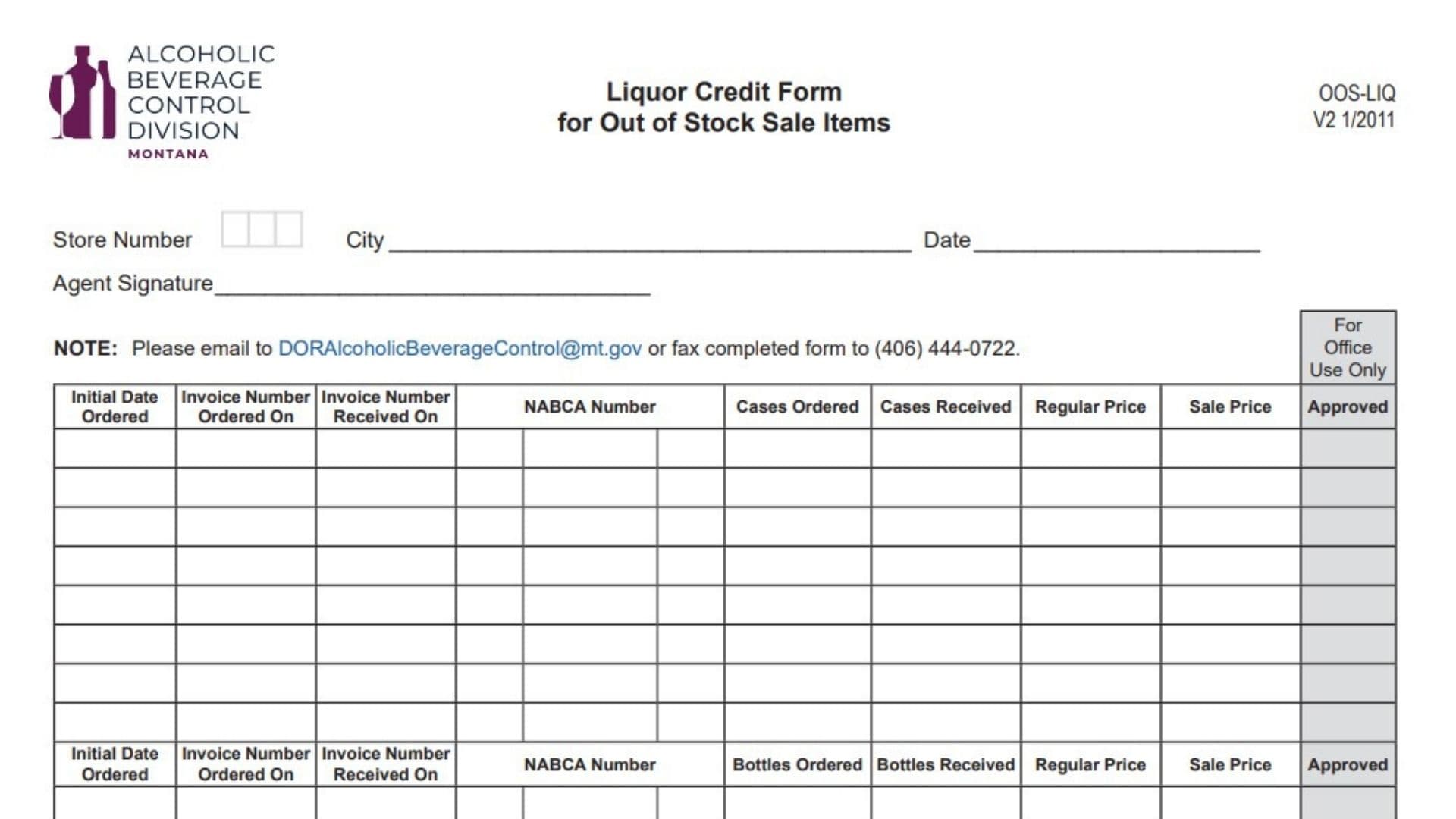
The Montana Liquor Credit Form for Out of Stock Sale Items (OOS-LIQ) allows agency liquor stores to request a credit adjustment when they ordered a product on sale during a promotion month but didn’t receive it because the state warehouse was out of stock—and subsequently had to buy it at the regular (higher) price when it came back in stock. The purpose of the form is to refund the difference between the sale price and the regular price (adjusted for commission/discount) so the agent isn’t penalized for the warehouse stockout.
Important Eligibility Rules
- Timing: You must submit this request immediately following the month the product was on sale.
- Order Date: The adjustment is honored for the quantity ordered on your last pick-date of the sale month. (This rule assumes you had chances to order earlier in the month; if you missed it on the last order due to stockout, you can claim it).
- Quantity Cap: Authorization is granted only for the quantity you actually ordered at the sale price on that last order date. You cannot request credit for more cases than you tried to buy.
- Denial Reason: If the warehouse inventory was insufficient for reasons beyond the Department’s control (e.g., the product was discontinued), the request will be denied.
How To File It
Email the completed form to DORAlcoholicBeverageControl@mt.gov or fax it to (406) 444-0722.
How To Complete Montana Liquor Credit Form For Out Of Stock Sale Items
Agent/Store Information
Store Number
Enter your assigned agency liquor store number.
City
Enter the city where your store is located.
Date
Enter the date you are submitting the form.
Agent Signature
Sign the form (the authorized agent).
Credit Request Table (Cases Or Bottles)
The form has sections for Case credits and Bottle credits. Follow these steps for each product line item:
Initial Date Ordered
Enter the date you ordered the product while it was on sale (and didn’t receive it).
Invoice Number Ordered On
Enter the invoice number from the order where you tried to buy the sale item (the “out of stock” order).
Invoice Number Received On
Enter the invoice number from the later order where you actually received the product (at regular price).
NABCA Number
Enter the full 11-digit product code.
Cases Ordered / Bottles Ordered
Enter the quantity you ordered on your last pick-date of the sale month (the amount you missed out on).
Cases Received / Bottles Received
Enter the quantity you eventually received after the sale ended.
Regular Price
Enter the regular posted price of the product for the month you actually received it.
Sale Price
Enter the discounted sale price that was in effect when you originally tried to order it.
What Happens Next?
Once processed, you will receive a printout verifying the credit. Your account receivable will be adjusted for the price difference (less commission and weighted average discount).