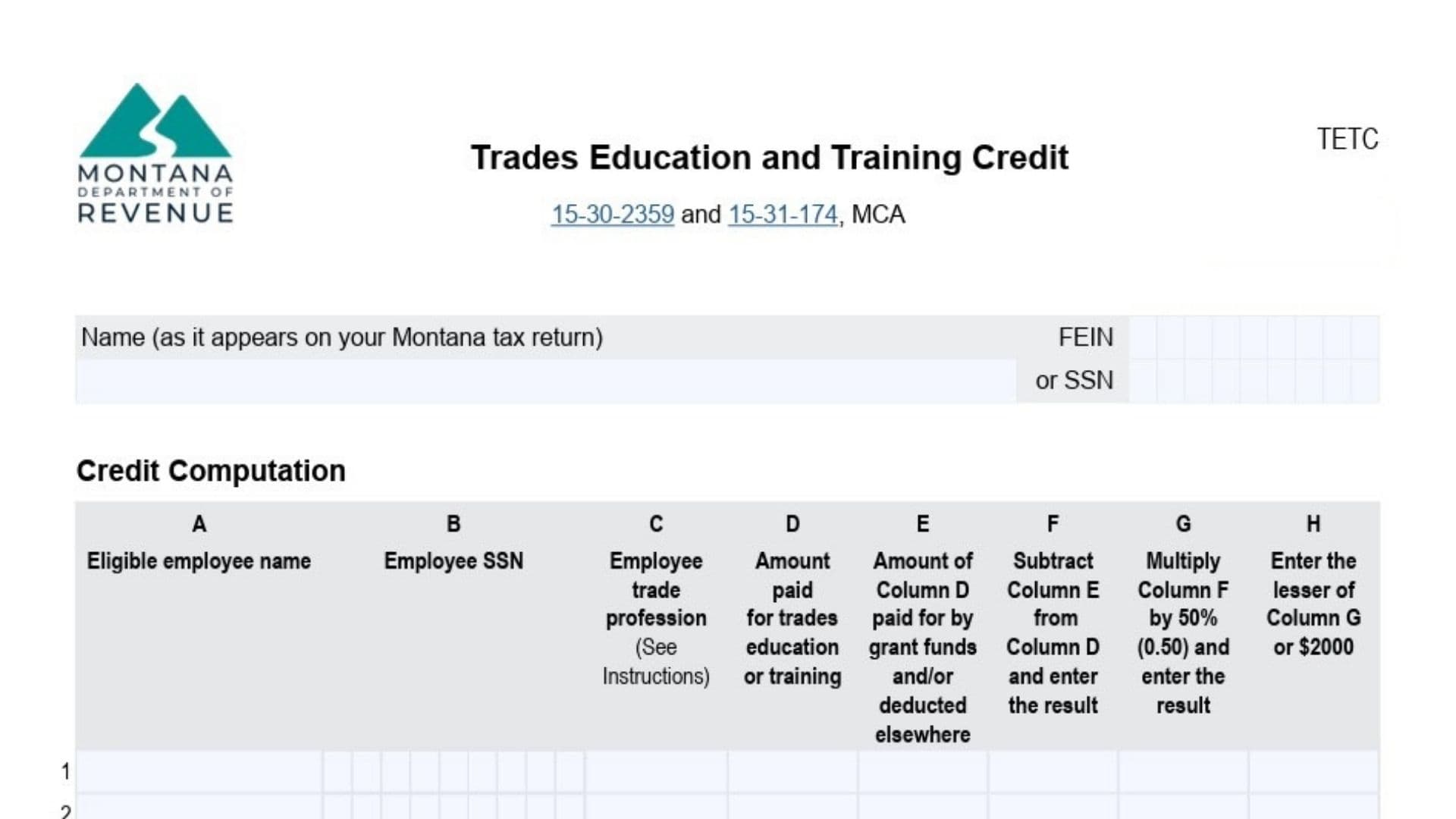
Montana Form TETC is the worksheet-style credit form used to claim the Trades Education And Training Tax Credit for employers who pay qualified third‑party costs to train eligible employees in approved trade professions. The form’s goal is to translate employee-by-employee training costs into a nonrefundable Montana income tax credit equal to 50% of qualified expenses, capped at $2,000 per eligible employee and capped at $25,000 total for the year. You generally use it when your business paid for things like tuition, fees, books, supplies, or required equipment as part of a qualified training method (classroom training where the employee travels, on-site training where the trainer comes to you and customizes the training, or interactive online training with access to the educator and proof of completion). The credit has important limitations: you can’t use the same expenses for both a Montana deduction and this credit (if you deducted them, the instructions say to report them as an addition to income on your Montana return), and any training paid by grants or similar programs can’t be used to compute the credit. The instructions also note a “recapture” concept: if the employer later recovers amounts that were previously treated as credit-eligible expenses, that recovered amount must be included as income and the tax due must be increased by the amount of credit originally taken on the return where the credit was claimed.
How To File Montana Form TETC
Form TETC must be included with your Montana tax return when you claim the Trades Education And Training Credit. If you are claiming the credit for more than 15 employees, the instructions require attaching an additional statement that lists the same employee details and columns as the form’s table. Before filing, confirm each person meets the form’s eligible employee definition (works or is expected to work in a trade profession in Montana for at least 6 months of the year the training occurs) and confirm the expense type and training method meet the form’s “qualified” definitions.
Before You Start (What You Need)
Gather the details the table asks for, per employee, including the employee’s name, Social Security Number, the correct trade profession category, and the amounts you paid for education/training along with any amounts funded by grants or treated elsewhere (such as deducted expenses). Be ready to support any online interactive training with proof of completion, since the instructions explicitly require it. If you deducted any of these education/training costs on your Montana income tax return, prepare to treat those amounts as not eligible for the credit (and follow Montana’s addition-to-income direction described in the form instructions).

How to Complete Montana Form TETC
Form Header (Top Of Page)
- Name (As It Appears On Your Montana Tax Return): Enter your legal name exactly as it appears on the Montana return you’re filing (individual or business, depending on your filing type).
- FEIN Or SSN: Enter the identifying number that matches the Montana return (FEIN for entities that file with a federal employer ID; SSN if applicable to your return type).
- Form Labeling/Version (TETC, V1 7/2025): This is the form identification and version; no entry is required, but confirm you’re using the correct year’s form.
- Clear Form Button (If Using Fillable PDF): Use this only if you need to erase entries and restart; it does not affect the tax rules.
Credit Computation Table (Lines 1–15)
You will complete one row per eligible employee, up to 15 employees on the face of the form.
Column A (Eligible Employee Name)
- Column A, Line 1–15: Enter each eligible employee’s full name, one employee per row.
Column B (Employee SSN)
- Column B, Line 1–15: Enter each employee’s Social Security Number on the same row as their name.
Column C (Employee Trade Profession)
- Column C, Line 1–15: Enter the employee’s trade profession using one of the trade profession categories listed in the instructions (for example, electricians; HVAC workers; plumbers/pipefitters/steamfitters; welders; certain information technology related professionals; and other listed trade groupings).
- Use the closest matching category from the provided list; the instructions explicitly say Column C should come from the included trade profession list.
Column D (Amount Paid For Trades Education Or Training)
- Column D, Line 1–15: Enter the total amount you (the employer) paid for that employee’s trades education or training during the year.
- This is the “gross” amount before subtracting grant-funded portions or amounts deducted elsewhere.
Column E (Grant-Funded And/Or Deducted Elsewhere)
- Column E, Line 1–15: Enter the portion of Column D that was either (a) paid using grant funds or similar programs, and/or (b) claimed as a deduction (or otherwise used) elsewhere as the instructions describe.
- The instructions direct that expenses paid through grants or similar programs cannot be used to calculate the credit, and they also prohibit using the same expenses for both a deduction and the credit.
Column F (Net Qualified Expenses)
- Column F, Line 1–15: Subtract Column E from Column D and enter the difference.2025-Trades-Education-and-Training-Credit.pdf
- This column is intended to represent the remaining amount that may be eligible for the credit after removing ineligible portions (grant-funded and/or deducted elsewhere).2025-Trades-Education-and-Training-Credit.pdf
Column G (50% Credit Amount)
- Column G, Line 1–15: Multiply Column F by 50% (0.50) and enter the result.2025-Trades-Education-and-Training-Credit.pdf
- This is the credit amount before applying the per-employee $2,000 cap.2025-Trades-Education-and-Training-Credit.pdf
Column H (Per-Employee Cap Applied)
- Column H, Line 1–15: Enter the lesser of Column G or $2,000 for each employee.2025-Trades-Education-and-Training-Credit.pdf
- This step enforces the per-employee maximum credit amount described in the instructions.2025-Trades-Education-and-Training-Credit.pdf
Total Credit Line (After Line 15)
- Total Credit (Sum Of Column H, Limited To $25,000): Add all the Column H amounts for all employees listed and compare the total to $25,000; enter the lesser amount as your credit.2025-Trades-Education-and-Training-Credit.pdf
- The form states this number “is your Credit,” and the instructions reiterate not to enter more than $25,000 for the total credit.2025-Trades-Education-and-Training-Credit.pdf
If You Have More Than 15 Employees
- If the credit is being claimed for more than 15 employees, attach a separate statement that contains the same columns and information for the additional employees, then include those additional Column H amounts in your overall total (still limited to $25,000).2025-Trades-Education-and-Training-Credit.pdf
Questions Contact (Information Line)
- The form provides a Department contact phone number and Montana Relay 711 for hearing impaired assistance; this is informational and not something you fill in.2025-Trades-Education-and-Training-Credit.pdf