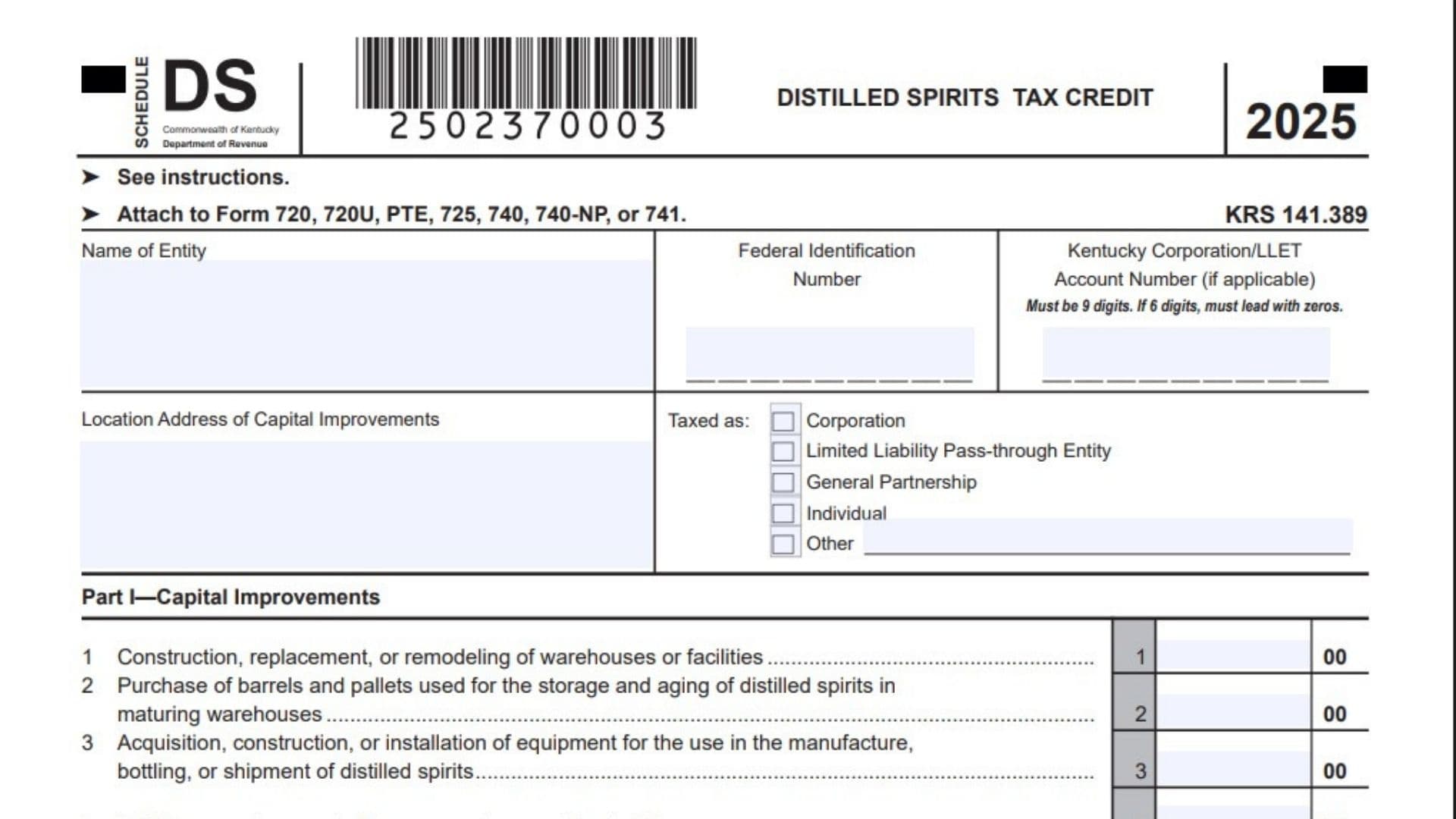
Kentucky Schedule DS is the form taxpayers use to report capital improvements tied to the distilled spirits tax credit and to calculate any required recapture of that credit later on. The credit is available to taxpayers that pay Kentucky property tax on distilled spirits, and it can be claimed against Kentucky income tax or LLET, depending on the filer type. In many cases, the credit is based on approved capital improvement costs connected to the distiller’s premises and the local ad valorem tax paid during the applicable period. The form also tracks whether the credit was accumulated over multiple taxable years, because Kentucky allows the credit to build up and then be claimed in the year the improvements are completed and the credit is used. If the related asset is sold or otherwise disposed of before the end of its useful life, the schedule is also used to compute recapture so the state can recover part of the benefit. For pass-through entities, the rules are more detailed because the credit and any recapture must flow through to partners, members, shareholders, or beneficiaries in the same proportion as the income or loss is passed through. In short, this schedule is both a credit claim form and a recapture form, and it needs to match the taxpayer’s return and supporting records.
How To File Kentucky Schedule DS
Attach Schedule DS to the Kentucky tax return for the year in which the credit is used or the recapture is required. If the taxpayer is a pass-through entity, the recapture must be applied at the LLET level and then passed through to the owners as required. Keep records that verify the capital improvements for at least five years, because the credit depends on proof of the qualifying improvements. If the ad valorem tax or recapture information covers more than one taxable year, attach extra schedules showing the details for each year. Also attach a copy of the local ad valorem tax notice and the receipt from the local jurisdiction to support the credit claimed in Part II. When the form is complete, make sure the calculated credit, any recapture, and the accumulated credit balances all line up with the related tax return.

How to Complete Kentucky Schedule DS
Header Information
Name Of Corporation: Enter the corporation’s legal name.
FEIN: Enter the corporation’s federal employer identification number.
Kentucky Corporation/LLET Account Number: Enter the Kentucky account number. If the number has only six digits, add leading zeros so it becomes nine digits.
Page Number: Enter the page number if you are using more than one page.
Continuation Sheet Company Name Lines: Enter the name, FEIN, and Kentucky Corporation/LLET account number for each additional company or entity when the schedule continues onto another page.
Part I, Capital Improvements
Line 1: Enter the amount of the first category of capital improvement at the distiller’s premises that was completed and specifically tied to the ad valorem tax in Part II.
Line 2: Enter the amount of the second qualifying capital improvement category.
Line 3: Enter the amount of the third qualifying capital improvement category.
Line 4: Enter the amount of the fourth qualifying capital improvement category.
Line 5: Enter the amount of the fifth qualifying capital improvement category.
Line 6: Add lines 1 through 5 and enter the total capital improvement amount.
Part II, Computation Of The Credit
Line 1: Enter the ending date of the ad valorem taxable year for which the credit was claimed. Use the 2 digit month and 2 digit year, beginning with the earliest taxable year ending date if more than one year is involved.
Line 2: Enter the date the ad valorem tax was assessed under Kentucky law.
Line 3: Enter the date the ad valorem tax was paid under Kentucky law.
Line 4: Enter the amount of ad valorem tax that was assessed and paid on the dates shown on lines 2 and 3.
Line 5: Enter 100 percent of the tax that was assessed and paid on time.
Line 6: Multiply line 4 by the percentage on line 5 and enter the result. If you have more than one taxable year, enter the total from line 6 in the Total column.
Line 7: Enter the smaller of Part I, line 6 or Part II, line 6. This is the allowable distilled spirits tax credit.
Part III, Property Disposition And Recapture
If the taxpayer sells, transfers, or disposes of a capital improvement before the end of its useful life, Part III is used to calculate how much credit must be recaptured. If more than five items were disposed of during the year, attach additional schedules with the same detail.
Section A, Description Of Property Sold Or Disposed Of Before The End Of The Recapture Period: List each item of capital improvement that was sold, transferred, or otherwise disposed of before the end of its useful life. Use lines A through E for up to five items.
Section B, Computation Of Tax Credit Recapture: Use this section to figure the recapture amount for each item or taxable year involved.
Section C, Accumulated Tax Credit: Use this section to show the accumulated credit balances and how much credit has carried forward across taxable years.
Part III, Section A
Line A: Describe the first capital improvement item sold or disposed of before the end of the recapture period.
Line B: Describe the second item.
Line C: Describe the third item.
Line D: Describe the fourth item.
Line E: Describe the fifth item.
Part III, Section B
Section B, Line 1: Enter the ending date of the taxable year in which the distilled spirits tax credit was claimed.
Section B, Line 2: Enter the date the capital improvement was sold or disposed of.
Section B, Line 3: Enter the amount of distilled spirits tax credit claimed on the return for the year shown on line 1.
Section B, Line 4: Enter the cost of the capital improvement that was sold or disposed of.
Section B, Line 5: Enter the total cost of all capital improvements tied to the credit reported on line 3.
Section B, Line 6: Divide line 4 by line 5 and convert the result to a percentage carried to four decimal places.
Section B, Line 7: Multiply line 3 by the percentage from line 6 and enter the result.
Section B, Line 8: Enter the amount of the credit from line 3 that was claimed against LLET for the taxable year on line 1.
Section B, Line 9: Enter the amount of the credit from line 3 that was claimed against income tax for the taxable year on line 1.
Section B, Line 10: If line 8 is greater than line 7, enter the difference here. This is the LLET credit recapture.
Section B, Line 11: If line 9 is greater than line 7, enter the difference here. This is the income tax credit recapture.
Part III, Section C
Section C, Accumulated Tax Credit: Use this section to show credit amounts that were accumulated over multiple taxable years and used when the credit was claimed. Do not include delinquent tax, interest, fees, or penalties in this accumulated credit amount.
Filing Notes
The credit must be claimed on the return for the year the capital improvements are completed and used. If the credit spans multiple years, provide separate supporting information for each relevant year so the totals stay accurate. Pass-through entities should make sure the recapture and credit flow-through amounts are reflected properly on each owner’s Kentucky Schedule K-1. The local tax notice and receipt are important backup documents, so keep them with the filed return.