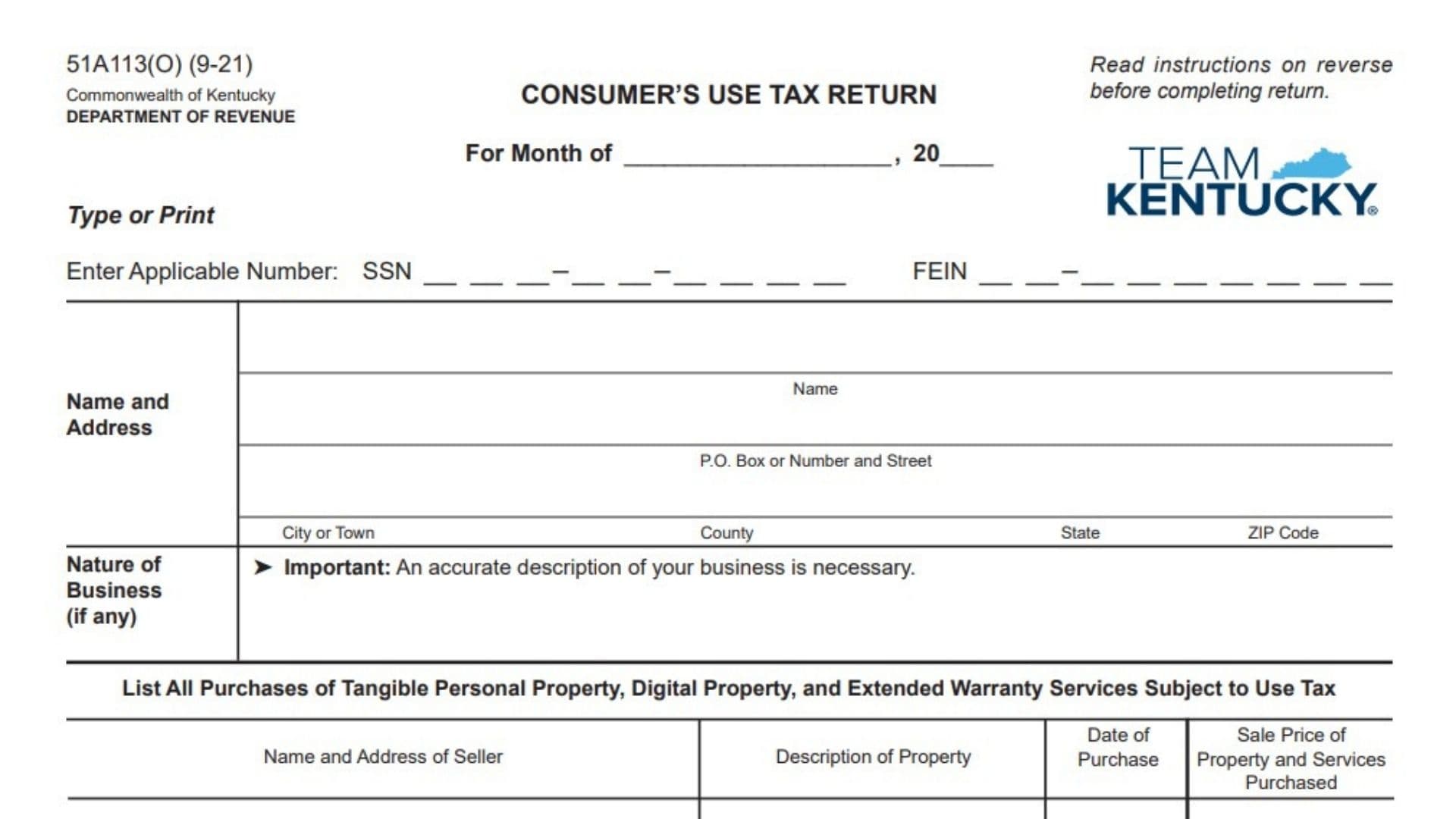
Kentucky Form 51A113(O), titled “Consumer’s Use Tax Return,” is used to report and pay Kentucky use tax on taxable purchases for which Kentucky sales or use tax was not collected at the time of purchase. It generally applies when an individual or business buys taxable tangible personal property, qualifying digital property, or taxable extended warranty services for storage, use, or consumption in Kentucky without paying the required Kentucky tax to the seller. This can occur when items are purchased from an out-of-state seller, through a catalog, online, or from another vendor that does not collect Kentucky sales tax. The return is intended only for people and businesses that owe use tax but are not registered consumers or registered retailers. Registered consumers and retailers must use the returns supplied by the Kentucky Department of Revenue or file electronically through the applicable tax system. The form requires the taxpayer to identify the reporting month, provide a Social Security number or Federal Employer Identification Number, enter a name and address, describe any business activity, and list each taxable purchase. The taxpayer then totals the purchase prices, calculates use tax at 6%, determines whether compensation may be claimed for timely filing and payment, and adds any applicable penalties and interest. The completed return must be signed under penalties of perjury and submitted with payment to the Kentucky Department of Revenue.
Who Should File This Consumer’s Use Tax Return?
Use this return only when you or your business:
- Owe Kentucky use tax on one or more purchases.
- Did not pay Kentucky sales or use tax when making those purchases.
- Purchased the property or services for storage, use, or consumption in Kentucky.
- Are not registered with Kentucky as a consumer for use tax filing.
- Are not a registered Kentucky retailer required to use another return or electronic filing system.
Registered consumers and registered retailers should not use this return. They must use the returns provided by the Department of Revenue or submit their required returns electronically.
What Purchases May Be Subject To Kentucky Use Tax?
The return covers taxable purchases in three broad categories:
- Tangible personal property.
- Digital property transferred electronically.
- Extended warranty services that meet the applicable conditions.
The purchase generally belongs on the return when it is taxable in Kentucky and no Kentucky sales or use tax was paid to the seller.
Tangible Personal Property
Tangible personal property generally means physical, movable property.
Examples listed in the instructions include:
- Mobile homes.
- Campers.
- Airplanes.
- Lumber.
- Clothing.
- Tools.
- Machines.
- Furniture.
- Other goods and merchandise.
The list is not limited to these examples. Other physical items may also be taxable.
Digital Property
Digital property includes certain products delivered electronically rather than as physical goods.
Examples include:
- Digital audio works.
- Digital books.
- Finished digital artwork.
- Digital photographs.
- Electronic periodicals.
- Electronic newspapers.
- Electronic magazines.
- Video greeting cards.
- Audio greeting cards.
- Video games.
- Electronic games.
- Digital codes associated with qualifying digital property.
A digital purchase should not automatically be treated as exempt merely because it was delivered electronically.
Extended Warranty Services
Extended warranty services generally involve a service contract between a purchaser and a provider.
Under the contract:
- The purchaser pays for the coverage.
- The provider agrees to repair, replace, support, or maintain covered tangible or digital property according to the agreement.
The instructions state that extended warranty services are subject to use tax only when:
- The service agreement was sold or extended after July 1, 2018; and
- The underlying tangible personal property or digital property is taxable under the applicable Kentucky tax laws.
When Is The Return Due?
The Consumer’s Use Tax Return is due 20 days after the end of the month in which the taxable purchase was made.
For example, a taxable purchase made during January would generally be reported on a return due 20 days after January ends.
Report purchases according to the month in which they occurred. Do not combine purchases from different reporting months unless the Department of Revenue instructs you to do so.
Information Needed Before Completing The Return
Gather the following information before you begin:
- The month and year in which the taxable purchases occurred.
- Your Social Security number or the business’s FEIN.
- Your full legal name or the business’s legal name.
- Your complete mailing address.
- A clear description of the business, when applicable.
- The name and address of every seller.
- A description of each item or service purchased.
- The purchase date for each transaction.
- The taxable sale price of each purchase.
- Records showing whether any sales or use tax was paid.
- Information needed to calculate late penalties or interest, if applicable.
- Payment for the final amount due.
Invoices, receipts, order confirmations, bank records, and seller statements can help support the amounts reported.

How To Complete Kentucky Form 51A113(O) Line By Line
Form Identification And General Instructions
Form Number: 51A113(O)
The number 51A113(O) identifies the specific Kentucky consumer’s use tax return.
You do not need to write anything beside the form number.
Revision Code: 9-21
The revision code identifies the version of the return.
It is not the reporting month, filing date, purchase date, or tax year.
Commonwealth Of Kentucky
This identifies Kentucky as the government jurisdiction that issued the return.
No entry is required.
Department Of Revenue
This identifies the Kentucky Department of Revenue as the agency that receives and processes the return.
No entry is required.
Consumer’s Use Tax Return
This is the title of the return.
It confirms that the form is for reporting consumer’s use tax rather than sales tax collected from customers.
Read Instructions Before Completing Return
Review the instructions before entering information.
They explain:
- Who may use the form.
- The filing deadline.
- The applicable tax rate.
- The meaning of sale price.
- The types of purchases that may be taxable.
- How penalties, interest, and compensation work.
- How to use the additional purchase-listing area.
Type Or Print
Complete the return by typing or printing clearly.
Use legible characters so the Department can correctly read names, identification numbers, addresses, purchase details, and dollar amounts.
Reporting Period
For Month Of
Enter the month in which the taxable purchases were made.
Write the month rather than the month in which you are completing or mailing the return.
For example, enter “March” when reporting taxable purchases made during March.
Year
Enter the four-digit year associated with the reporting month.
Make sure the month and year match the dates shown in the purchase table.
Taxpayer Identification
The return provides spaces for either a Social Security number or a Federal Employer Identification Number.
Enter the identification number that applies to the person or business filing the return.
Social Security Number
An individual filing in a personal capacity should enter the applicable nine-digit Social Security number.
Follow the number arrangement shown on the return.
Check every digit before filing. Do not enter both an SSN and FEIN unless the Department has specifically instructed you to provide both.
Federal Employer Identification Number
A business filing the return should enter its nine-digit Federal Employer Identification Number.
The FEIN should belong to the business whose name and purchases are reported.
Do not enter a Kentucky tax account number in the FEIN field.
Name And Address Information
Name
Enter the taxpayer’s full legal name.
For an individual, use the person’s legal name.
For a business, use the legal business name associated with the FEIN entered above.
Do not use only a trade name when it differs from the legal taxpayer name.
P.O. Box Or Number And Street
Enter the taxpayer’s complete mailing address.
You may enter:
- A post office box; or
- A street number and street name.
Include an apartment, suite, unit, route, or other delivery information when necessary.
City Or Town
Enter the city or town belonging to the mailing address.
Do not enter the county in this space.
County
Enter the Kentucky county associated with the taxpayer’s address or business location.
Spell the county name clearly.
State
Enter the two-letter state abbreviation for the mailing address.
ZIP Code
Enter the complete ZIP code.
Use the extended ZIP code when it is available, but make sure the basic five-digit ZIP code is accurate.
Nature Of Business
Business Description
Describe the nature of the taxpayer’s business when the return is being filed for a business.
The description should explain what the business actually does.
Examples include:
- Retail clothing store.
- Construction contractor.
- Medical office.
- Restaurant.
- Manufacturing business.
- Property management company.
- Graphic design agency.
- Automotive repair shop.
Avoid vague descriptions such as “business,” “services,” “sales,” or “company.”
The return emphasizes that an accurate business description is necessary.
Leave the space blank or enter an appropriate nonbusiness description when filing as an individual with no business activity, provided that doing so accurately reflects your situation.
Purchase Listing Section
The main table is used to report all taxable purchases of tangible personal property, digital property, and extended warranty services.
Use one row for each purchase.
Do not combine unrelated purchases from different sellers or dates into one unclear entry.
Name And Address Of Seller
Enter the seller’s name and complete address.
Include as much of the following information as available:
- Seller’s legal or business name.
- Street address or post office box.
- City.
- State.
- ZIP code.
When the purchase was made online, use the seller information shown on the invoice, receipt, order confirmation, or account statement.
Do not enter the purchaser’s address in this column.
Description Of Property
Describe what was purchased.
Use a clear description that allows the Department to understand the nature of the item or service.
Examples include:
- Office furniture.
- Construction tools.
- Digital photographs.
- Downloadable video game.
- Laptop computer.
- Machinery parts.
- Extended warranty for office equipment.
- Building materials.
- Clothing.
- Digital magazine subscription.
Avoid general descriptions such as “items,” “goods,” “order,” or “merchandise.”
When an invoice contains several similar taxable items, you may use a concise description that accurately covers them. Maintain the detailed invoice with your records.
Date Of Purchase
Enter the date on which the purchase occurred.
Use a consistent month/day/year format.
The purchase date should fall within the reporting month entered at the top of the return.
Sale Price Of Property And Services Purchased
Enter the taxable sale price of the purchase.
The sale price generally means the purchaser’s cost after subtracting any cash discount received.
Enter the amount in dollars and cents.
Do not include Kentucky sales or use tax already paid. A purchase on which the full Kentucky tax was properly paid generally should not be included as an untaxed purchase.
Remaining Purchase Rows
Continue listing each taxable transaction on a separate row.
For every entry, provide:
- Seller name and address.
- Property or service description.
- Purchase date.
- Taxable sale price.
If all available rows are not needed, leave the unused rows blank.
Additional Purchase-Listing Space
Use the additional table when the front of the return does not provide enough space to report all taxable purchases.
The additional table uses the same columns as the front:
- Name and address of seller.
- Description of property.
- Date of purchase.
- Sale price of property and services purchased.
Completing Each Additional Row
Enter one purchase on each row.
Use the same level of detail required in the front-page table.
Do not enter only a combined amount without identifying the related sellers and purchases.
Additional-Space Subtotal
Add all sale prices entered in the additional table.
Enter that combined amount on the subtotal line.
The subtotal is not a separate tax calculation. Include it with the front-page purchase amounts when calculating Line 1.
Line 1: Total Taxable Sale Price
Add the sale prices of all taxable tangible personal property, digital property, and extended warranty services reported for the month.
Include:
- Purchases listed in the front-page table.
- The subtotal from the additional listing area.
- Any other properly attached purchase schedule, when accepted.
Enter the combined amount on Line 1.
Do not enter the tax itself on this line. Line 1 is the total taxable purchase price before applying the 6% tax rate.
What Is Included In Sale Price?
Sale price generally means the amount the purchaser paid for the property or service, reduced by any cash discount received.
The discount may be expressed in money or another form of value.
Keep records showing how the reported sale price was determined.
Line 2: Use Tax
Calculate 6% of the amount on Line 1.
Use this formula:
Line 1 × 0.06 = Line 2
For example, if Line 1 is $500:
$500 × 0.06 = $30
Enter $30 on Line 2.
Calculate the amount carefully and carry the result to dollars and cents.
Line 3: Compensation
Line 3 allows qualifying compensation for properly reporting and paying the use tax on time.
Compensation is calculated as:
- 1.75% of the first $1,000 of tax; and
- 1.5% of tax over $1,000.
The total compensation cannot exceed $50.
Compensation On Tax Of $1,000 Or Less
When the tax on Line 2 is $1,000 or less, multiply Line 2 by 1.75%.
Use this formula:
Line 2 × 0.0175 = Compensation
For example, if Line 2 is $100:
$100 × 0.0175 = $1.75
Enter $1.75 on Line 3, provided the return and tax payment are timely.
Compensation On Tax Over $1,000
When Line 2 exceeds $1,000:
- Calculate 1.75% of the first $1,000.
- Calculate 1.5% of the amount exceeding $1,000.
- Add the two results.
- Limit the final compensation to $50.
The compensation on the first $1,000 is:
$1,000 × 0.0175 = $17.50
Then calculate 1.5% of the remaining tax.
For example, when Line 2 is $2,000:
Tax Above $1,000: $2,000 − $1,000 = $1,000
Additional Compensation: $1,000 × 0.015 = $15
Total Compensation: $17.50 + $15 = $32.50
Enter $32.50 on Line 3.
Compensation Limit
Do not enter more than $50 on Line 3, even when the percentage calculation produces a larger amount.
When Compensation Is Not Allowed
Do not claim compensation when the tax is not paid on or before the filing deadline.
A late return or late payment may eliminate the compensation and may also result in penalties and interest.
Line 4: Tax Due
Subtract the compensation on Line 3 from the use tax on Line 2.
Use this formula:
Line 2 − Line 3 = Line 4
For example:
- Line 2 use tax: $100.
- Line 3 compensation: $1.75.
- Line 4 tax due: $98.25.
When no compensation is allowed, enter the same amount shown on Line 2.
Do not subtract penalties or interest on this line.
Line 5: Penalty
Enter any applicable penalty for filing or paying late.
When the return and payment are timely, Line 5 will generally be zero or blank, as appropriate.
Late-Filing Penalty
The late-filing penalty is 2% of the tax for each 30-day period or part of a 30-day period that the return is late.
The total late-filing percentage generally cannot exceed 20% of the tax.
However, when the percentage calculation produces less than $10, the late-filing penalty is $10.
A fraction of a 30-day period counts as a full penalty period.
Late-Payment Penalty
The penalty for failing to pay the tax on time is 2% of the unpaid tax for each 30-day period the payment is late.
A minimum penalty of $10 applies.
Because more than one penalty rule may affect a late return, obtain confirmation from the Department when you are uncertain about the correct amount.
Line 6: Interest
Enter the interest owed on a late tax payment.
Interest applies to underpayments according to the applicable Kentucky annual interest rate.
The instructions provide the following general calculation method:
- Convert the annual underpayment interest rate to a decimal.
- Divide that rate by 365.
- Multiply the result by the number of days the payment is late.
- Multiply that amount by the unpaid tax.
The general formula is:
Annual Interest Rate ÷ 365 × Number Of Days Late × Unpaid Tax
Use the interest rate applicable to the period for which the payment is late. Do not assume that an example rate printed in older instructions remains applicable to another year.
When you are uncertain about the correct annual rate or number of late days, confirm the amount with the Kentucky Department of Revenue before filing.
Line 7: Total Amount Due And Payable
Add Lines 4, 5, and 6.
Use this formula:
Line 4 + Line 5 + Line 6 = Line 7
Line 7 includes:
- Tax due after allowable compensation.
- Applicable penalties.
- Applicable interest.
Enter the final amount in dollars and cents.
This is the amount that should be paid with the return.
Taxpayer Declaration
The declaration states that the taxpayer has reviewed the return and any accompanying schedules or statements.
By signing, the taxpayer declares under penalties of perjury that the return is true, correct, and complete to the best of the taxpayer’s knowledge and belief.
Review the following before signing:
- Reporting month and year.
- Identification number.
- Name and address.
- Business description.
- Purchase entries.
- Line 1 total.
- Tax calculation.
- Compensation.
- Penalties.
- Interest.
- Final amount due.
Do not sign a return containing information that you know is incomplete or inaccurate.
Date
Enter the date on which the return is signed.
Use a complete month/day/year date.
Do not enter the reporting month or payment date unless it is also the actual date of signature.
Taxpayer’s Signature
The taxpayer or a person authorized to act for the taxpayer must sign the return.
For a business, the signer should have authority to certify the return on the business’s behalf.
An unsigned return may be considered incomplete.
How To File Kentucky Form 51A113(O)
Prepare The Payment
Make the payment equal to the amount reported on Line 7.
Make the check payable to:
Kentucky State Treasurer
Do not make the check payable only to “Department of Revenue.”
Include appropriate identifying information with the payment so it can be matched to the return, while avoiding unnecessary exposure of sensitive information.
Mail The Return And Payment
Mail the completed return with the check to:
Department of Revenue
Frankfort, Kentucky 40619
Include the complete return and any additional purchase schedule used.
Keep copies of:
- The signed return.
- All continuation pages or schedules.
- The payment.
- Receipts and invoices.
- Proof of mailing.
Filing Deadline
The return and payment are due 20 days after the month in which the taxable purchase occurred.
A return is not fully completed merely because it has been prepared. It must also be submitted with the required payment by the applicable deadline.
How To Use The Additional Purchase Schedule
The additional schedule is intended for taxpayers with more purchases than can fit in the main table.
Name And Address Of Seller
Enter the seller’s complete name and available address.
Description Of Property
Clearly identify the tangible property, digital property, or extended warranty service.
Date Of Purchase
Enter the transaction date.
Make sure it belongs to the reporting month.
Sale Price Of Property And Services Purchased
Enter the taxable sale price for that transaction.
Subtotal
Add all purchase amounts listed in the additional table.
Transfer this subtotal into the total reported on Line 1 of the main return.
Do not calculate a separate 6% tax directly on the continuation page. Combine the subtotal with all other taxable purchases first, and then calculate the tax on Line 2.
Common Consumer’s Use Tax Return Mistakes To Avoid
Using The Return When Already Registered
Registered consumers and registered retailers must use their assigned returns or electronic filing method.
Do not use this return merely because it appears easier.
Reporting The Wrong Month
The month at the top should be the month in which the taxable purchases occurred, not necessarily the month in which the return is prepared.
Entering Both An SSN And FEIN Without A Reason
Use the identification number applicable to the filer.
Providing A Vague Business Description
Explain the actual nature of the business instead of entering a generic word such as “services.”
Omitting Seller Information
Enter the seller’s name and address for each reported purchase whenever the information is available.
Using An Unclear Property Description
Descriptions such as “items” or “online purchase” may not adequately explain what was bought.
Leaving Out Digital Purchases
Qualifying digital property may be taxable even when no physical product was delivered.
Forgetting Extended Warranty Services
A qualifying service agreement may be subject to use tax when the underlying property is taxable and the required conditions are met.
Reporting Purchases On Which Kentucky Tax Was Already Paid
The return is intended for taxable purchases made without payment of Kentucky sales or use tax.
Review receipts before including transactions.
Forgetting The Additional-Space Subtotal
Amounts listed on the additional schedule must be included in Line 1.
Calculating Tax On Each Purchase Separately
Add all taxable sale prices on Line 1, then calculate 6% of the total for Line 2.
Claiming Compensation On A Late Payment
Compensation is not allowed when the tax is not paid by the due date.
Claiming More Than $50 In Compensation
The compensation amount cannot exceed $50.
Subtracting Penalties Or Interest
Penalties and interest increase the balance due. Add them to Line 4 when calculating Line 7.
Using An Outdated Interest Rate
The correct underpayment rate may vary by year. Use the rate applicable to the late-payment period.
Forgetting To Sign The Return
The return includes a declaration under penalties of perjury and requires the taxpayer’s signature.
Making The Check Payable To The Wrong Payee
Make the check payable to the Kentucky State Treasurer.
Consumer’s Use Tax Calculation Example
Assume the taxpayer reports $2,000 in taxable purchases.
Line 1
Total taxable purchases:
$2,000
Line 2
Calculate 6% use tax:
$2,000 × 0.06 = $120
Enter:
$120
Line 3
Calculate timely-filing compensation:
$120 × 0.0175 = $2.10
Enter:
$2.10
Line 4
Subtract compensation from the tax:
$120 − $2.10 = $117.90
Enter:
$117.90
Lines 5 And 6
Assume the return and payment are timely:
- Penalty: $0.
- Interest: $0.
Line 7
Add Lines 4, 5, and 6:
$117.90 + $0 + $0 = $117.90
The amount payable is:
$117.90
Final Filing Checklist
Before submitting the Consumer’s Use Tax Return, confirm that you have:
- Verified that you are eligible to use this return.
- Entered the correct reporting month and year.
- Provided the applicable SSN or FEIN.
- Entered the taxpayer’s legal name.
- Completed the mailing address.
- Included the city or town, county, state, and ZIP code.
- Accurately described the nature of the business, when applicable.
- Listed every taxable purchase made during the reporting month.
- Entered each seller’s name and address.
- Clearly described each item or service.
- Added the correct purchase date.
- Entered the taxable sale price of every purchase.
- Used the additional listing area when necessary.
- Included the additional-space subtotal in Line 1.
- Calculated Line 1 correctly.
- Multiplied Line 1 by 6% for Line 2.
- Calculated compensation correctly when allowed.
- Limited compensation to no more than $50.
- Subtracted Line 3 from Line 2.
- Entered any applicable penalty on Line 5.
- Entered any applicable interest on Line 6.
- Added Lines 4, 5, and 6 for Line 7.
- Reviewed the declaration.
- Signed and dated the return.
- Made the check payable to the Kentucky State Treasurer.
- Included the complete return, payment, and any continuation schedule.
- Kept a copy of the return and supporting records.