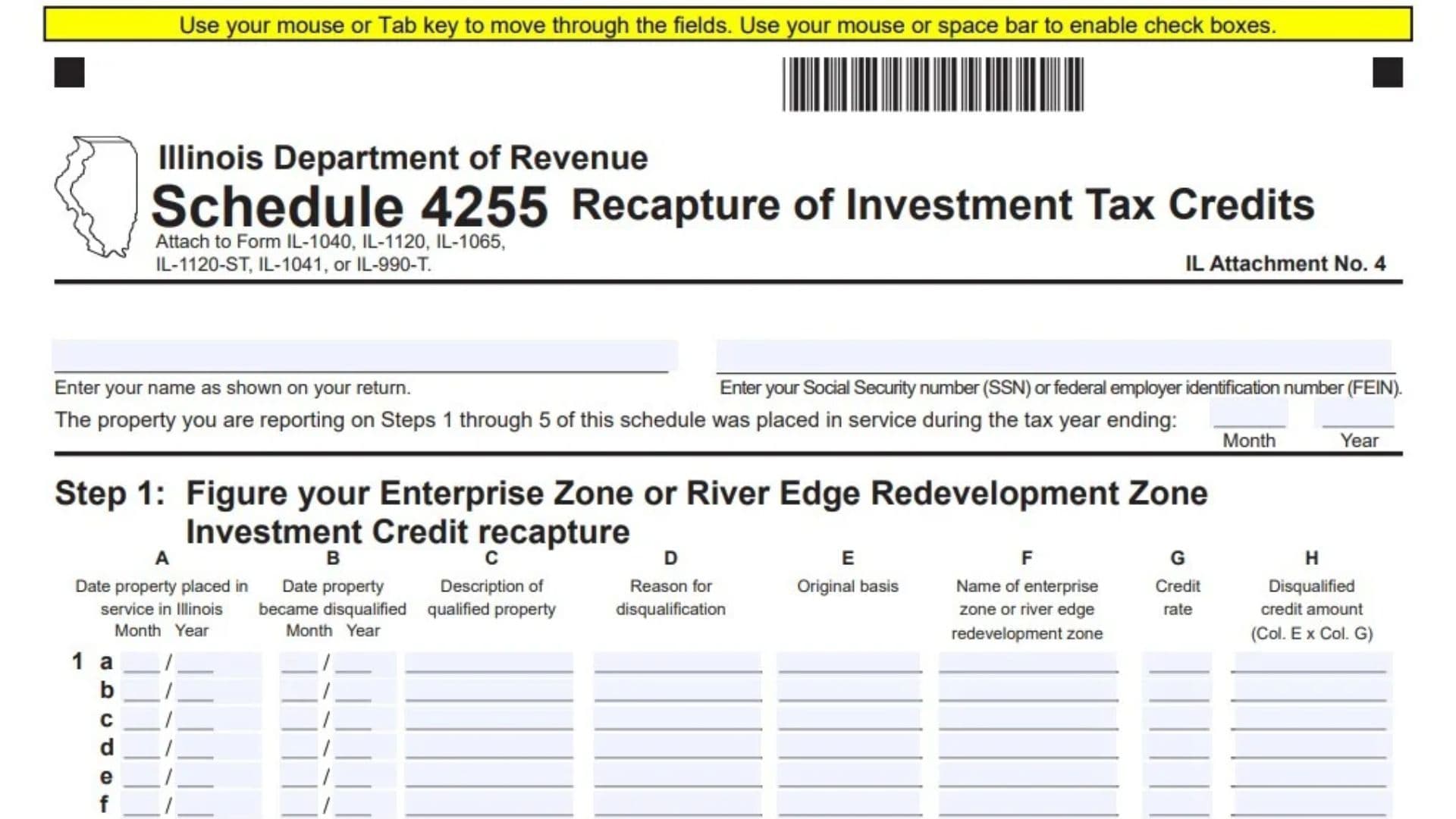
Illinois Schedule 4255, officially titled Recapture of Investment Tax Credits, is a mandatory state tax schedule issued by the Illinois Department of Revenue. It exists to calculate the amount of previously claimed Illinois investment and business tax credits that a taxpayer must repay (recapture) when qualifying property ceases to meet statutory requirements, is disposed of early, or otherwise becomes disqualified. Individuals, C corporations, partnerships, S corporations, fiduciaries (estates and trusts), and exempt organizations use this form to report disqualified property placed in service during a specific prior tax year and to calculate recapture across multiple state credit programs. The form gathers identifying taxpayer information, details about the disqualified assets (such as service dates, disqualification dates, original basis, and project locations), prior credit usage figures, pass-through recapture from Schedule K-1-P, and additional specialized income tax credit recaptures. Completing Schedule 4255 accurately is legally required under the Illinois Income Tax Act, as failing to report required recapture information can result in state tax penalties.
How To File Illinois Schedule 4255
Schedule 4255 is not filed as a standalone document; you must attach it directly to your annual Illinois income or replacement tax return. Specifically, attach it to Form IL-1040 (individuals), Form IL-1120 (corporations), Form IL-1065 (partnerships), Form IL-1120-ST (S corporations), Form IL-1041 (fiduciaries), or Form IL-990-T (exempt organizations). Notice that if you are recapturing property placed in service across multiple prior tax years, you must complete a separate Schedule 4255 for each original placed-in-service tax year.
Before completing the schedule, gather the following records:
- Taxpayer Identification: Your exact name and Social Security number (SSN) or federal employer identification number (FEIN) as shown on your Illinois tax return.
- Asset and Disqualification Records: The month and year each disqualified property was originally placed in service in Illinois, the month and year it became disqualified, a description of the asset, the reason for disqualification, and its original tax basis.
- Zone and Project Details: The specific name or location of the Enterprise Zone, River Edge Redevelopment Zone, Foreign Trade Zone/Sub-Zone, REV Illinois Project, or MICRO Illinois Project where the asset was located.
- Prior Tax Returns: Copies of the Illinois tax returns (and original credit schedules) from the tax year the property was placed in service to verify your total property basis, original credit calculated, and original tax liability.
- Pass-Through Schedules: Any Schedule(s) K-1-P received from partnerships or S corporations reporting your distributive share of credit recapture.

How To Complete Illinois Schedule 4255
Header Information
Name Enter your full legal name or business name exactly as it appears on your main Illinois tax return.
Social Security Number (SSN) or Federal Employer Identification Number (FEIN) Enter your 9-digit SSN (if filing Form IL-1040) or 9-digit FEIN (if filing a business or fiduciary return).
Tax Year Ending (Month and Year) Enter the two-digit month and four-digit year of the tax period during which the disqualified property reported in Steps 1 through 5 was originally placed in service. Use a separate Schedule 4255 for each different placed-in-service tax year.
Step 1: Figure Your Enterprise Zone or River Edge Redevelopment Zone Investment Credit Recapture
Use Step 1 to report disqualified property for which you previously claimed an Enterprise Zone or River Edge Redevelopment Zone Investment Credit.
Lines 1a through 1f: Disqualified Property Details Enter each disqualified property on a separate row (Rows 1a through 1f) across Columns A through H:
- Column A (Date property placed in service in Illinois): Enter the month and year the asset was originally placed in service in Illinois.
- Column B (Date property became disqualified): Enter the month and year the property stopped qualifying for the credit.
- Column C (Description of qualified property): Provide a brief description of the asset (such as machinery, equipment, or building).
- Column D (Reason for disqualification): State why the property became disqualified (for example, sold, moved out of the zone, or removed from service).
- Column E (Original basis): Enter the original cost or tax basis of the property used when calculating the initial credit.
- Column F (Name of enterprise zone or river edge redevelopment zone): Enter the official name of the designated zone where the property was located.
- Column G (Credit rate): Enter the specific credit rate (such as
.005or another applicable statutory rate) that was originally used to compute the credit for that asset. - Column H (Disqualified credit amount): Multiply the original basis in Column E by the credit rate in Column G.
Line 2: Total Enterprise Zone or River Edge Redevelopment Zone Disqualified Credit Add the amounts in Column H for Lines 1a through 1f. Enter this total on Line 2, and carry the same figure over to Step 6, Line 13, Column A.
Step 2: Figure Your High Impact Business Investment Credit Recapture
Use Step 2 to report disqualified property for which you previously claimed a High Impact Business Investment Credit.
Lines 3a through 3f: Disqualified Property Details List each disqualified asset on a separate row (Rows 3a through 3f) across Columns A through H:
- Column A (Date property placed in service in Illinois): Enter the month and year the property was placed in service in Illinois.
- Column B (Date property became disqualified): Enter the month and year the property became disqualified.
- Column C (Description of qualified property): Describe the qualifying asset.
- Column D (Reason for disqualification): Explain why the property no longer qualifies.
- Column E (Original basis): Enter the asset’s original qualifying basis.
- Column F (Name of the foreign trade zone/sub-zone): Enter the name of the foreign trade zone or sub-zone where the business operated.
- Column G (Credit rate): This column is pre-filled with the standard
.005(0.5%) credit rate. - Column H (Disqualified credit amount): Multiply the original basis in Column E by
.005in Column G.
Line 4: Total High Impact Business Disqualified Credit Add the amounts in Column H for Lines 3a through 3f. Enter the total on Line 4, and transfer this amount to Step 6, Line 13, Column B.
Step 3: Figure Your REV Illinois Investment Credit Recapture
Use Step 3 to report disqualified property related to the Reimagining Energy and Vehicles in Illinois (REV Illinois) Investment Credit.
Lines 5a through 5f: Disqualified Property Details Enter each disqualified property on a separate row (Rows 5a through 5f) across Columns A through H:
- Column A (Date property placed in service in Illinois): Enter the month and year the property was placed in service.
- Column B (Date property became disqualified): Enter the month and year the property became disqualified.
- Column C (Description of qualified property): Describe the asset.
- Column D (Reason for disqualification): State the reason the property became disqualified.
- Column E (Original basis): Enter the original basis of the property.
- Column F (Location of REV Illinois Project): Enter the location of the certified REV Illinois project.
- Column G (Credit rate): This column is pre-filled with the
.005(0.5%) credit rate. - Column H (Disqualified credit amount): Multiply Column E by
.005in Column G.
Line 6: Total REV Illinois Disqualified Credit Add the amounts in Column H for Lines 5a through 5f. Enter the total on Line 6, and carry this figure to Step 6, Line 13, Column C.
Step 4: Figure Your Replacement Tax Investment Credit Recapture
Use Step 4 to report disqualified property for which you previously claimed a Replacement Tax Investment Credit.
Lines 7a through 7f: Disqualified Property Details Enter each disqualified property on a separate row (Rows 7a through 7f) across Columns A through G:
- Column A (Date property placed in service in Illinois): Enter the month and year the asset was placed in service in Illinois.
- Column B (Date property became disqualified): Enter the month and year the property became disqualified.
- Column C (Description of qualified property): Describe the qualified asset.
- Column D (Reason for disqualification): Explain why the asset became disqualified.
- Column E (Original basis): Enter the original basis of the property.
- Column F (Credit rate): Enter the applicable Replacement Tax Investment Credit rate originally applied to the asset (such as
.005or.01, depending on base employment growth). - Column G (Disqualified credit amount): Multiply Column E by Column F.
Line 8: Total Replacement Tax Disqualified Credit Add the amounts in Column G for Lines 7a through 7f. Enter the total on Line 8, and transfer this amount to Step 6, Line 13, Column D.
Step 5: Figure Your MICRO Investment Credit Recapture
Use Step 5 to report disqualified property related to the Manufacturing Illinois Chips for Real Opportunity (MICRO) Investment Credit.
Lines 9a through 9f: Disqualified Property Details Enter each disqualified asset on a separate row (Rows 9a through 9f) across Columns A through H:
- Column A (Date property placed in service in Illinois): Enter the month and year the property was placed in service in Illinois.
- Column B (Date property became disqualified): Enter the month and year the property became disqualified.
- Column C (Description of qualified property): Describe the asset.
- Column D (Reason for disqualification): State the reason for disqualification.
- Column E (Original basis): Enter the original basis of the property.
- Column F (Location of MICRO Illinois Project): Enter the location of the certified MICRO Illinois project.
- Column G (Credit rate): This column is pre-filled with the
.005(0.5%) credit rate. - Column H (Disqualified credit amount): Multiply Column E by
.005in Column G.
Line 10: Total MICRO Disqualified Credit Add the amounts in Column H for Lines 9a through 9f. Enter the total on Line 10, and carry this figure to Step 6, Line 13, Column E.
Step 6: Figure Your Total Investment Credit Recapture Amount
Step 6 calculates the actual amount of credit recapture you owe across five separate credit columns:
- Column A: Enterprise Zone or River Edge Redevelopment Zone Investment Credit recapture
- Column B: High Impact Business Investment Credit recapture
- Column C: REV Illinois Investment Credit recapture
- Column D: Replacement Tax Investment Credit recapture
- Column E: MICRO Investment Credit recapture
Complete Lines 11 through 22 down each applicable column:
Line 11: Total Basis of All Your Property Enter the total original basis of all qualifying property placed in service during the tax year entered at the top of the schedule for each respective credit column (not just the basis of the disqualified items).
Line 12: Amount of Your Original Credit Enter the total original investment credit calculated for the placed-in-service tax year for each respective column, before any tax liability limitations.
Line 13: Total Disqualified Credit Amounts Enter the disqualified credit totals calculated in Steps 1 through 5:
- Column A: Enter the amount from Step 1, Line 2.
- Column B: Enter the amount from Step 2, Line 4.
- Column C: Enter the amount from Step 3, Line 6.
- Column D: Enter the amount from Step 4, Line 8.
- Column E: Enter the amount from Step 5, Line 10.
Line 14: Adjusted Credit Subtract Line 13 from Line 12 in each column. This represents the remaining valid credit you were entitled to claim after removing the disqualified assets.
Line 15: Original Tax Amount Enter your original Illinois income or replacement tax liability (after applicable non-investment credits) for the tax year the property was placed in service, including any tax liability from carryforward years in which the credit was actually applied.
Line 16: Amount of Credit Previously Used Compare Line 12 and Line 15 in each column, and enter the smaller of the two amounts. This shows how much of your original credit actually reduced your Illinois tax liability.
Line 17: Net Recapture From Your Own Property Subtract Line 14 from Line 16 in each column. If the calculation produces a negative number, enter 0. (If you never used enough credit to exceed your remaining valid credit on Line 14, no recapture is triggered for this year’s assets.)
Line 18: Recapture From Any Other Schedule 4255 Filed This Year If you are filing more than one Schedule 4255 for the current tax year because you have disqualified property from multiple placed-in-service years, enter the recapture amount carried over from your preceding Schedule(s) 4255 on the final Schedule 4255 you complete. Otherwise, leave blank or enter 0.
Line 19: Distributive Share of Recapture From Partnerships and S Corporations Enter your distributive share of investment credit recapture passed through to you from any partnership or S corporation, as reported on Schedule(s) K-1-P.
Line 20: Subtotal Recapture Add Lines 17, 18, and 19 in each column.
Line 21: Amount Passed Through to Partners or Shareholders (Partnerships and S Corporations Only) If you are filing as a partnership (Form IL-1065) or an S corporation (Form IL-1120-ST), enter the portion of Line 20 that you passed through to your partners or shareholders on their Schedule(s) K-1-P. All other taxpayers leave this line blank or enter 0.
Line 22: Total Investment Credit Recapture Subtract Line 21 from Line 20 in each column. Transfer the resulting recapture totals for Columns A through E to the appropriate recapture lines on your main Illinois tax return.
Step 7: Figure Your Additional Income Tax Credit Recapture Amount
Only complete Step 7 if you have recapture amounts for any of the specialized Illinois income tax credits listed on Lines 23 through 32. If you are attaching multiple Schedules 4255 to your return, complete Step 7 only on the final Schedule 4255.
Line 23: Angel Investment Credit Enter the amount of Angel Investment Credit claimed in any prior tax year that must now be recaptured.
Line 24: EDGE Credit Enter the amount of Economic Development for a Growing Economy (EDGE) Credit claimed in any prior year that is subject to recapture.
Line 25: New Construction EDGE Credit Enter the amount of New Construction EDGE Credit claimed in any prior year that must be recaptured.
Line 26: Historic Preservation Credit Enter the amount of Historic Preservation Credit claimed in any prior year that is subject to recapture.
Line 27: New Markets Development Credit Enter the amount of New Markets Development Credit claimed in any prior year that must be recaptured.
Line 28: REV Illinois Credit Enter the amount of REV Illinois Credit (non-investment income tax credit) claimed in any prior year that must be recaptured.
Line 29: REV Construction Jobs Credit Enter the amount of REV Construction Jobs Credit claimed in any prior year that is subject to recapture.
Line 30: MICRO Illinois Credit Enter the amount of MICRO Illinois Credit (non-investment income tax credit) claimed in any prior year that must be recaptured.
Line 31: MICRO Construction Jobs Credit Enter the amount of MICRO Construction Jobs Credit claimed in any prior year that is subject to recapture.
Line 32: Distributive Share of Additional Income Tax Credit Recapture Enter any distributive share of additional income tax credit recapture reported to you by a partnership or S corporation on Schedule(s) K-1-P.
Line 33: Total Additional Income Tax Credit Recapture Add the amounts on Lines 23 through 32. Enter the total on Line 33 and report this recapture amount on the corresponding line of your main Illinois income tax return.
Final Review Before Filing
Before attaching Schedule 4255 to your Illinois tax return and submitting it, review the checklist below:
- Name and ID Number Match: Confirm that your name and SSN or FEIN at the top of the schedule match your main Illinois return.
- Correct Placed-In-Service Year: Verify that the month and year entered at the top of the form reflect the original placed-in-service tax year for all assets listed in Steps 1 through 5, and ensure you used separate forms if assets came from different tax years.
- Step 1 through Step 5 Math: Double-check that every disqualified asset row multiplies the original basis (Column E) by the exact credit rate (Column G, or Column F in Step 4) and that column totals carry accurately to Line 13.
- Negative Numbers Replaced With Zero: Confirm that if Line 14 is greater than Line 16 in Step 6, you entered
0on Line 17 rather than a negative figure. - Multiple Schedule Consolidation: If filing multiple Schedules 4255, verify that earlier schedules are totaled onto Line 18 of the final schedule and that Step 7 is completed only on the last schedule.
- Return Attachment: Ensure Schedule 4255 (designated as IL Attachment No. 4) is securely attached to your Form IL-1040, IL-1120, IL-1065, IL-1120-ST, IL-1041, or IL-990-T before filing.