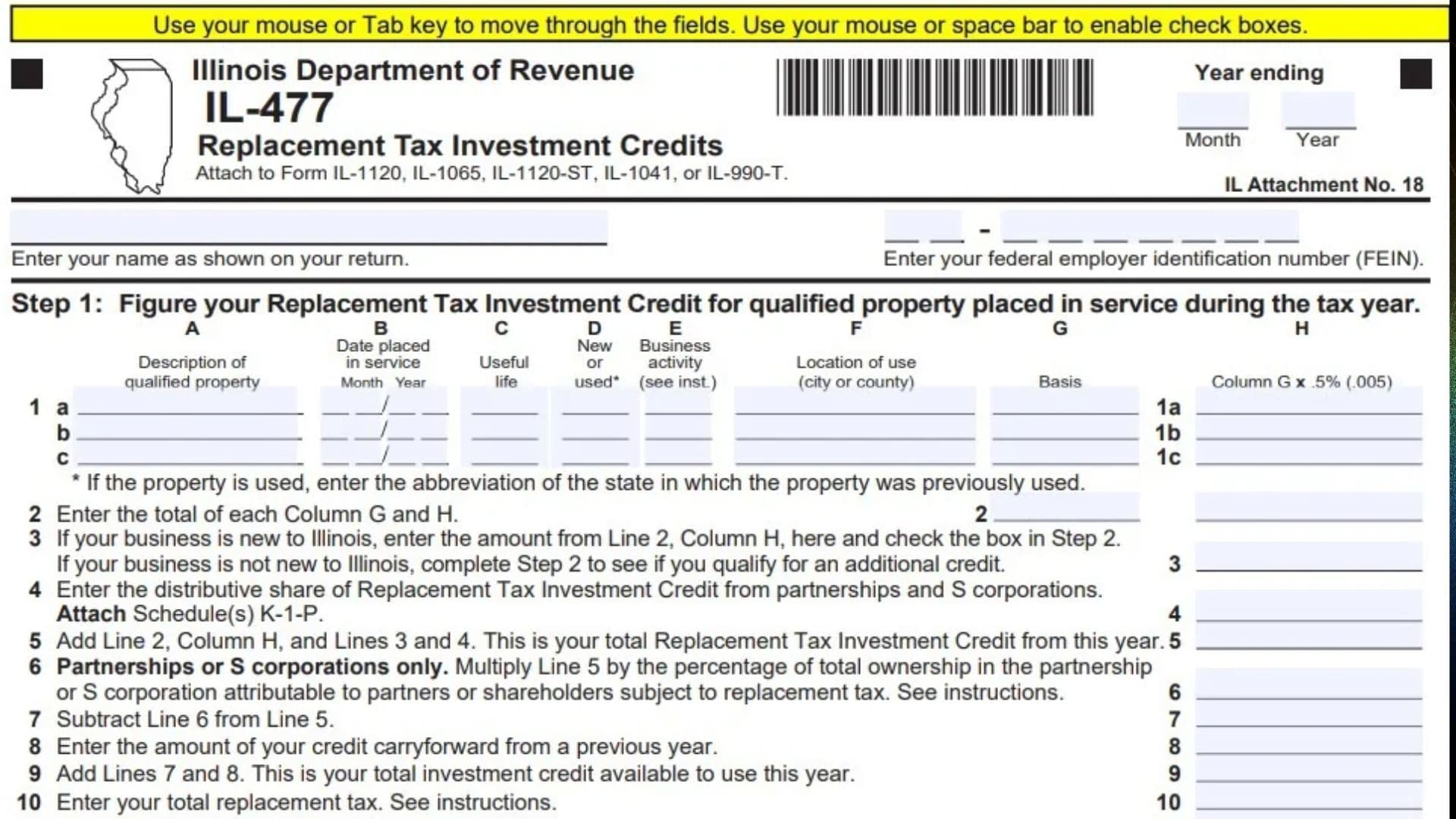
Illinois Form IL-477, Replacement Tax Investment Credits, is a tax schedule issued by the Illinois Department of Revenue. It is used by eligible businesses and other qualifying taxpayers to calculate and claim investment credits for qualified property placed into service during the tax year. The form helps determine the amount of credit available against Illinois replacement tax and the amount of unused credit that can be carried forward to future tax years. The form is relevant to corporations, partnerships, S corporations, trusts, and other eligible entities that file applicable Illinois tax returns. Qualified property must meet the requirements established by the Illinois Department of Revenue. The schedule collects information about each qualifying asset, including its description, date placed in service, useful life, whether it is new or previously used, business activity, location, and adjusted basis.
Form IL-477 also considers whether a business is new to Illinois and whether it qualifies for an additional credit based on employment growth. Businesses that have been operating in Illinois must complete an employment calculation worksheet comparing covered workers during the current year with the preceding year. New businesses operating in Illinois receive special treatment and do not need to complete this employment worksheet.
The schedule also allows taxpayers to report investment credits received through partnerships and S corporations, previous-year credit carryforwards, and applicable replacement tax amounts. Trusts have an additional calculation involving a credit reported on Form IL-1041, Schedule CR. Partnerships and S corporations must also account for the ownership percentage attributable to partners or shareholders subject to replacement tax.
Completing Form IL-477 accurately is important because it determines how much investment credit can be applied against the current year’s replacement tax liability and how much unused credit may be carried forward for five years. The form also includes a certification confirming that the listed credits are valid and based on costs incurred under binding contracts entered into on or before December 31, 2018.
How To File Illinois Form IL-477
Form IL-477 must be attached to the applicable Illinois tax return. The form identifies five possible returns:
- Form IL-1120.
- Form IL-1065.
- Form IL-1120-ST.
- Form IL-1041.
- Form IL-990-T.
Select the applicable tax return based on the taxpayer’s legal and filing status.
Information To Prepare Before Completing the Form
Gather the following information before starting:
- Taxpayer’s legal name as reported on the applicable Illinois return.
- Federal Employer Identification Number (FEIN).
- Tax year-ending month and year.
- Descriptions of qualified property placed in service during the tax year.
- Dates when the property was placed in service.
- Useful life of each asset.
- Whether the property is new or previously used.
- Applicable state abbreviation for previously used property.
- Business activity associated with the qualified property.
- City or county where the property is used.
- Adjusted basis of each qualifying asset.
- Replacement Tax Investment Credit received through partnerships or S corporations.
- Previous-year investment credit carryforward amounts.
- Total replacement tax liability.
- Employment records for the current and preceding years, if applicable.
- Form IL-1041, Schedule CR, line 60, if filing as a trust.
Keep supporting property, financial, and employment records available when completing the schedule.

How To Complete Illinois Form IL-477
The form contains three main steps:
- Step 1: Calculate the Replacement Tax Investment Credit for qualified property.
- Step 2: Complete the base employment calculation worksheet.
- Step 3: Affirm that the listed credits are valid.
Taxpayer Identification Information
Tax Year Ending
Enter the month and year when the taxpayer’s tax year ends. Use the same reporting period as the applicable Illinois tax return.
Taxpayer Name
Enter the taxpayer’s legal name exactly as it appears on the associated Illinois tax return.
Federal Employer Identification Number (FEIN)
Enter the taxpayer’s nine-digit federal employer identification number. Make sure it matches the FEIN reported on the attached Illinois return.
Step 1: Figure Your Replacement Tax Investment Credit
Step 1 calculates the investment credit associated with qualified property placed in service during the current tax year. It includes property information, credit calculations, distributive shares, previous-year carryforwards, and the amount available to offset replacement tax.
Qualified Property Information: Columns A Through H
The first section provides space to report up to three qualifying property items. Each row contains eight columns.
Column A: Description of Qualified Property
Enter a description of each qualified property item placed in service during the tax year.
Identify each asset clearly so it can be distinguished from other property reported on the schedule.
Column B: Date Placed in Service
Enter the month and year when the property was placed in service.
Use the date the property became operational or was placed into service for the applicable business activity.
Column C: Useful Life
Enter the useful life of the qualified property.
Use the applicable useful life information for the asset being reported.
Column D: New or Used Property
Indicate whether the property is new or previously used.
If the property is used, enter the abbreviation of the state in which it was previously used, as instructed on the form.
Column E: Business Activity
Enter the applicable business activity associated with the qualified property.
Follow the specific instructions to determine the appropriate business activity classification.
Column F: Location of Use
Enter the city or county where the qualified property is used.
Provide the location associated with the business use of the asset.
Column G: Basis
Enter the applicable basis of the qualified property.
Use the appropriate adjusted basis information for each asset when completing this column.
Column H: Investment Credit Calculation
Multiply the amount in Column G by 0.5% (0.005).
Enter the calculated amount in Column H.
For each qualifying property item, perform the calculation separately.
Investment Credit Summary: Lines 2 Through 14
Line 2: Total Property Basis and Calculated Credit
Add the amounts reported in Column G for all property entries and enter the total in the Column G section of line 2.
Separately add the amounts reported in Column H and enter the total in the Column H section of line 2.
These totals are used in the subsequent credit calculations.
Line 3: Additional Credit for Businesses New to Illinois
If your business is new to Illinois, enter the amount from line 2, Column H, on line 3.
You must also check the new-business box in Step 2.
A business that is new to Illinois automatically qualifies for the additional credit and does not need to complete lines 15 through 22.
If your business is not new to Illinois, complete Step 2 to determine whether you qualify for an additional credit.
Line 4: Distributive Share of Replacement Tax Investment Credit
Enter your share of Replacement Tax Investment Credit received through partnerships and S corporations.
Attach the applicable Schedule K-1-P forms to support the reported amounts.
Include the qualifying credit amounts attributable to your ownership interest.
Line 5: Total Current-Year Replacement Tax Investment Credit
Add the amount from line 2, Column H, to the amounts reported on lines 3 and 4.
Enter the combined amount on line 5.
This represents your total Replacement Tax Investment Credit generated or received during the current tax year.
Line 6: Ownership Percentage Adjustment for Partnerships and S Corporations
This line applies only to partnerships and S corporations.
Multiply the amount on line 5 by the percentage of total ownership attributable to partners or shareholders who are subject to replacement tax.
Use the applicable ownership information and follow the instructions to determine the correct percentage.
Enter the calculated amount on line 6.
Line 7: Remaining Investment Credit After Ownership Adjustment
Subtract the amount on line 6 from the amount on line 5.
Enter the difference on line 7.
This calculation determines the remaining credit after accounting for the applicable ownership percentage adjustment.
Line 8: Previous-Year Credit Carryforward
Enter the amount of Replacement Tax Investment Credit carried forward from a previous tax year.
Use the applicable prior-year credit records to determine the available amount.
Line 9: Total Investment Credit Available
Add the amounts reported on lines 7 and 8.
Enter the combined amount on line 9.
This represents the total investment credit available for use during the current tax year, including eligible carryforward amounts.
Line 10: Total Replacement Tax
Enter the taxpayer’s total replacement tax liability.
Use the applicable Illinois tax return and instructions to determine the correct amount.
Line 11: Trusts Only – Credit From Form IL-1041, Schedule CR
This line applies only to trusts.
Enter the amount of tax credit reported on Form IL-1041, Schedule CR, line 60.
Follow the applicable instructions when determining the amount to include.
Taxpayers that are not trusts should follow the instructions applicable to their filing situation.
Line 12: Remaining Replacement Tax After Trust Credit
Subtract the amount on line 11 from the amount on line 10.
If the result is zero or negative, enter zero.
Enter the calculated amount on line 12.
Line 13: Replacement Tax Investment Credit Used This Year
Compare the amounts reported on lines 9 and 12.
Enter whichever amount is smaller.
Transfer this amount to the applicable Illinois tax return.
This represents the Replacement Tax Investment Credit allowed for use during the current tax year.
Line 14: Excess Credit Available for Future Years
Subtract the amount on line 13 from the amount on line 9.
If the result is negative, enter zero.
Enter the remaining amount on line 14.
This is the unused investment credit available to carry forward for five years.
Step 2: Figure Your Base Employment Calculation Worksheet
Step 2 determines whether an established business qualifies for an additional Replacement Tax Investment Credit based on employment growth.
The worksheet compares the number of covered workers during the current tax year with the number during the preceding year.
New Business Checkbox
If your business is new to Illinois, mark the designated checkbox.
New businesses must not complete lines 15 through 22.
Instead, follow the instructions for Step 1, line 3. A qualifying new business automatically receives the additional credit treatment described on the form.
Businesses that are not new to Illinois must complete the employment worksheet to determine eligibility for the additional credit.
Employment Information: Line 15
The worksheet provides two columns:
- Column A: Current year.
- Column B: Preceding year.
It also provides twelve monthly entries for each column.
Line 15: Monthly Base Employment Information
Enter the number of covered workers for each applicable month.
Use the number reported on line 1 of the Illinois Department of Employment Security Form UI-3/40, Employer’s Contribution and Wage Report.
Make entries only for months during which the business was taxed by Illinois.
Complete the monthly entries separately for the current year and preceding year.
Line 16: Total Covered Workers
Add the twelve monthly amounts in Column A and enter the total in the current-year section.
Separately add the twelve monthly amounts in Column B and enter the total in the preceding-year section.
Line 17: Number of Months in the Taxable Year
Enter the number of months in the taxable year for each column.
- Column A: Enter the applicable number of months for the current year.
- Column B: Enter the applicable number of months for the preceding year.
Follow the specific instructions when determining the number of months to include.
Line 18: Average Monthly Employment
For each column, divide the amount on line 16 by the corresponding amount on line 17.
Calculate the current-year average using Column A and the preceding-year average using Column B.
Round each result to six decimal places and enter the amounts in the appropriate columns.
Line 19: Employment Growth Amount
Subtract the amount in line 18, Column B, from the amount in line 18, Column A.
Enter the difference on line 19.
If the result is positive, continue to line 20.
If the result is zero or negative, stop the worksheet, enter zero on line 3, and continue to line 4.
A zero or negative result means the business does not qualify for the additional credit.
Line 20: Employment Growth Percentage
Divide the amount on line 19 by the amount on line 18, Column B.
Round the result to six decimal places and enter it on line 20.
If the result is 0.01 or greater, stop the worksheet and enter the amount from line 2, Column H, on line 3.
If the result is less than 0.01, continue to line 21.
Line 21: Calculate 50% of the Employment Growth Percentage
Multiply the amount on line 20 by 50% (0.50).
Round the result to six decimal places and enter the calculated amount on line 21.
Line 22: Additional Investment Credit Calculation
Multiply the amount on line 2, Column G, by the percentage reported on line 21.
Enter the result on line 22.
Transfer this amount to line 3 in Step 1.
This completes the additional credit calculation for businesses that do not qualify for the automatic new-business treatment.
Step 3: Affirm the Listed Credits Are Valid
Step 3 contains a certification checkbox relating to the validity of the Replacement Tax Investment Credits reported on the form.
Credit Validity Certification Checkbox
By checking this box, you affirm that the replacement tax investment credits listed on Form IL-477 are valid and are based on costs incurred under a binding contract entered into on or before December 31, 2018.
Review the certification carefully before checking the box.
The certification confirms that the credits being claimed satisfy the stated contractual cost requirement.
Final Review Before Filing
Before attaching Form IL-477 to your Illinois tax return, review the following checklist to ensure that all information and calculations are complete.
- The tax year-ending month and year are correct.
- The taxpayer’s name matches the applicable Illinois tax return.
- The federal employer identification number is accurate.
- All qualified property placed in service during the tax year is properly listed.
- Each property’s description is complete.
- The date placed in service is correctly reported.
- The useful life of each asset is entered.
- New or used property status is correctly identified.
- The previous-use state abbreviation is entered for used property.
- Business activity information is complete.
- The city or county where each asset is used is reported.
- The adjusted basis is correctly entered in Column G.
- Column H is calculated using the 0.5% rate.
- Line 2 contains the correct Column G and Column H totals.
- Line 3 is completed using the applicable new-business or employment worksheet calculation.
- Distributive credit amounts on line 4 are supported by applicable Schedule K-1-P forms.
- Line 5 correctly combines lines 2, 3, and 4.
- Partnerships and S corporations complete the ownership percentage adjustment on line 6.
- Line 7 correctly subtracts line 6 from line 5.
- Previous-year credit carryforwards are correctly reported on line 8.
- Line 9 correctly adds lines 7 and 8.
- Total replacement tax is correctly reported on line 10.
- Trusts complete line 11 using Form IL-1041, Schedule CR, line 60.
- Line 12 is calculated correctly.
- Line 13 contains the smaller amount from lines 9 and 12.
- Line 14 correctly identifies the excess credit available for a five-year carryforward.
- New businesses check the appropriate box in Step 2 and do not complete lines 15 through 22.
- Established businesses complete the monthly employment worksheet when applicable.
- Employment figures are taken from the appropriate Form UI-3/40 records.
- Lines 16 through 18 are calculated correctly for both years.
- Line 19 accurately reflects the difference in average employment.
- Lines 20 through 22 are completed according to the applicable calculation requirements.
- The amount from line 22 is transferred to line 3 when required.
- The Step 3 certification is reviewed and completed when applicable.
- The completed Form IL-477 is attached to the appropriate Illinois tax return.
Illinois Form IL-477 helps qualifying taxpayers calculate Replacement Tax Investment Credits for eligible property placed in service during the tax year. Accurate property information, employment calculations, ownership adjustments, and credit carryforward records are essential to determining the amount that can be used against current replacement tax liability. Review all calculations and applicable instructions before submitting the completed schedule.