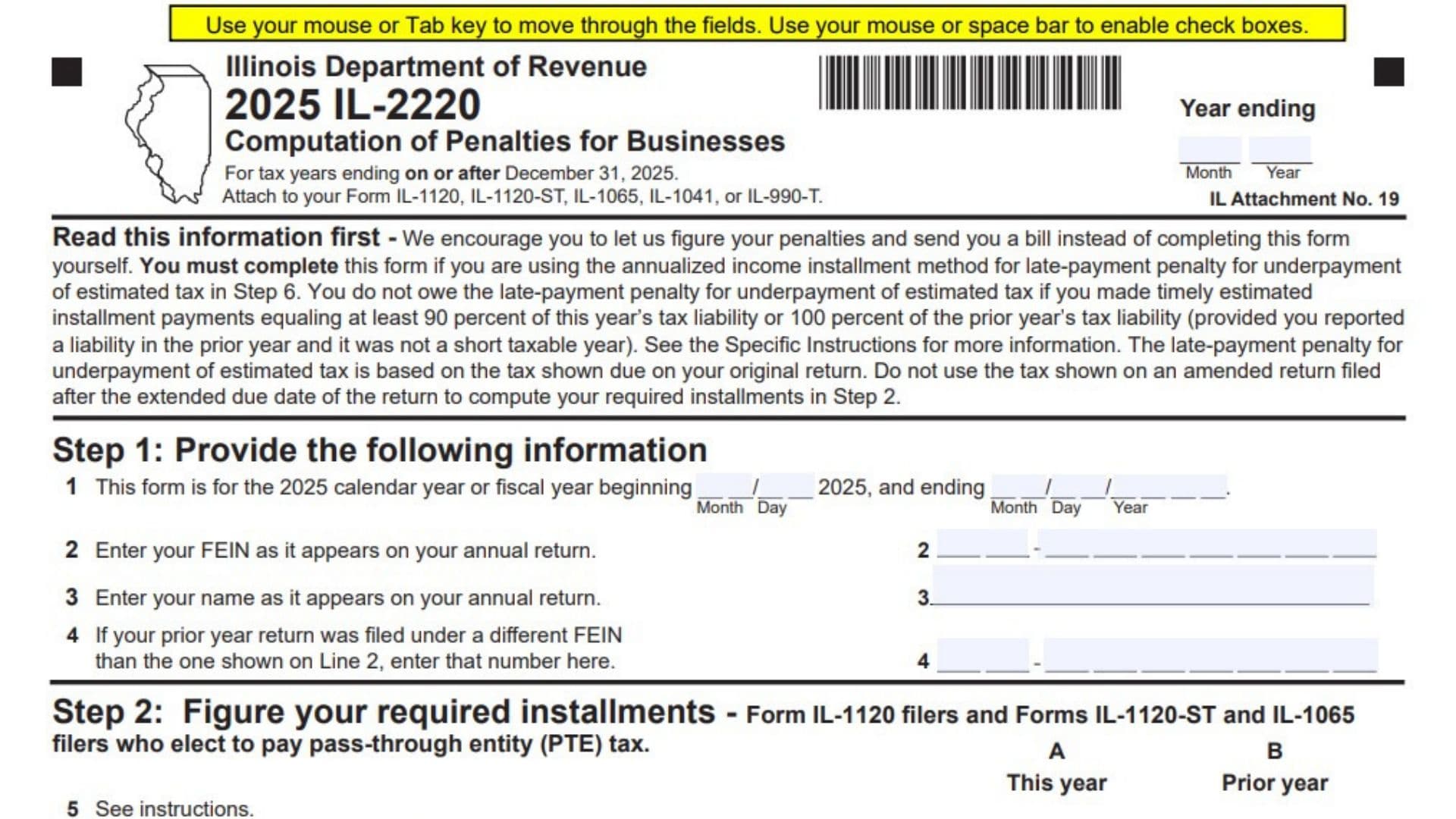
Form IL-2220, titled Computation of Penalties for Businesses, is an Illinois Department of Revenue tax form used by businesses, partnerships, S corporations, trusts, and other applicable entities to calculate penalties associated with unpaid taxes, underpayments of estimated tax, and late tax return payments. It applies to tax years ending on or after December 31, 2025. The form helps businesses determine whether they owe a late-payment penalty for underpaying estimated taxes, a late-payment penalty for unpaid tax, or a late-filing penalty. It also provides a method for calculating required estimated tax installments and determining whether payments were made on time. Businesses use Form IL-2220 when filing applicable Illinois income and replacement tax returns, including Forms IL-1120, IL-1120-ST, IL-1065, IL-1041, and IL-990-T. The form collects business identification details, including the Federal Employer Identification Number (FEIN), business name, tax year, and previous FEIN when applicable. It also requires information about current-year and prior-year tax liabilities, estimated tax installments, withholding credits, payments, unpaid balances, and payment dates. The form contains six main steps, two penalty worksheets, an annualized income installment worksheet, and a separate Pass-Through Entity (PTE) Tax Worksheet. These calculations help determine the correct penalty based on the amount owed, when payments were made, and whether the business qualifies for an alternative installment calculation. Completing Form IL-2220 correctly is important because errors in estimated payments, tax calculations, or payment dates can result in incorrect penalty amounts. Businesses may choose to let the Illinois Department of Revenue calculate their penalties and send a bill instead of completing the form themselves. However, completing Form IL-2220 is required when using the annualized income installment method to calculate the late-payment penalty for underpayment of estimated tax in Step 6.
How To File Form IL-2220
Form IL-2220 must be attached to the applicable Illinois business income tax return. The form identifies five returns that may require this attachment:
- Form IL-1120 – Corporation Income and Replacement Tax Return.
- Form IL-1120-ST – Small Business Corporation Replacement Tax Return.
- Form IL-1065 – Partnership Replacement Tax Return.
- Form IL-1041 – Fiduciary Income and Replacement Tax Return.
- Form IL-990-T – Exempt Organization Income and Replacement Tax Return.
Before completing Form IL-2220, gather your business tax return, estimated payment records, prior-year tax information, withholding credits, and payment dates.
Information and Documents to Prepare
Prepare the following information before starting:
- Your business’s Federal Employer Identification Number (FEIN).
- The business name as shown on the annual tax return.
- The applicable tax year or fiscal-year beginning and ending dates.
- Your previous FEIN, if the prior-year return was filed under a different number.
- Current-year tax liability.
- Prior-year tax liability.
- Pass-through withholding amounts.
- Pass-through entity tax credits.
- Illinois gambling withholding.
- Illinois sports wagering withholding.
- Total required estimated tax installments.
- Dates and amounts of estimated tax payments.
- Dates and amounts of other tax payments and credits.
- Total net income and replacement tax liability.
- Applicable surcharges and pass-through withholding obligations.
- Original and extended tax return due dates.
- Federal and Illinois income information needed for annualized installment calculations.
- Information required for the PTE Tax Worksheet, if applicable.
Important Filing Instructions
When You May Not Owe an Estimated Tax Underpayment Penalty
You generally do not owe the late-payment penalty for underpayment of estimated tax if your timely estimated installment payments equal at least 90% of the current year’s tax liability or 100% of the prior year’s tax liability.
The 100% prior-year rule applies only if you reported a tax liability for the previous year and that year was not a short taxable year.
When Form IL-2220 Is Required
You must complete Form IL-2220 if you choose to use the annualized income installment method to calculate the late-payment penalty for underpayment of estimated tax in Step 6.
Original Return Tax Liability
The estimated tax underpayment penalty is based on the tax shown as due on your original return.
Do not use the tax amount reported on an amended return filed after the extended due date when calculating your required installments in Step 2.
Letting the Department Calculate Your Penalties
The Illinois Department of Revenue encourages businesses to allow the department to calculate their penalties and send a bill rather than completing Form IL-2220 themselves.
If you choose this option, follow the applicable return instructions and do not complete the form unnecessarily.
Attachment Requirement
Attach Form IL-2220 to the applicable annual business income tax return. Select the correct return type and ensure that the information on the penalty form agrees with your tax return and payment records.

How To Complete Form IL-2220
Form IL-2220 contains six main steps and several supporting worksheets. Complete each applicable section in order, using your original tax return, estimated payment records, and other supporting tax information.
Step 1: Provide the Required Business Information
Step 1 identifies the business, its tax year, and its federal tax identification information.
Line 1: Tax Year and Fiscal-Year Dates
Identify whether the form covers the 2025 calendar year or a fiscal year beginning during 2025.
Enter the beginning date and ending date of your tax year in the designated fields.
Provide the month, day, and year for the applicable dates. Make sure the dates agree with the annual tax return being filed.
Line 2: Federal Employer Identification Number (FEIN)
Enter the business’s FEIN exactly as it appears on the annual Illinois tax return.
Use the same nine-digit identification number reported on Form IL-1120, IL-1120-ST, IL-1065, IL-1041, or IL-990-T, as applicable.
Line 3: Business Name
Enter the complete legal name of the business or entity as shown on the annual tax return.
Make sure the spelling and business identification information match the return.
Line 4: Previous FEIN
Complete this line if the previous year’s tax return was filed using a different FEIN from the number entered on line 2.
Enter the previous FEIN in the designated field.
If the business used the same FEIN for both years, follow the form instructions for this field.
Step 2: Figure Your Required Installments
Step 2 calculates the estimated tax installments required for the year. It applies to Form IL-1120 filers and Forms IL-1120-ST and IL-1065 filers that elect to pay Pass-Through Entity (PTE) tax.
The section includes two columns:
- Column A – This Year: Current-year tax information.
- Column B – Prior Year: Previous-year tax information.
Use the applicable tax return and payment records to determine the amounts.
Line 5: Current-Year and Prior-Year Tax Amounts
Enter the applicable tax amounts in the two columns.
- Column A: Enter the current-year tax amount.
- Column B: Enter the prior-year tax amount.
If the prior-year tax was zero or the business filed a short-year return, enter N/A in Column B.
Even when Column B contains N/A, the business may still be required to make estimated tax installments.
Use the applicable instructions to determine the correct tax amounts for each column.
Line 6: Pass-Through Withholding and Other Tax Credits
Enter the total amount of applicable pass-through withholding, PTE tax credits, Illinois gambling withholding, and Illinois sports wagering withholding.
Use the amounts reported on the applicable Form IL-1120, IL-1120-ST, or IL-1065.
Include only the amounts applicable to the business and reporting period.
Line 7: Tax After Subtracting Withholding and Credits
Subtract the amount on line 6 from the current-year amount in line 5, Column A.
Calculation:
Line 7 = Line 5, Column A − Line 6
Enter the resulting amount.
Line 8: Ninety Percent of Current-Year Tax
Multiply the amount reported on line 5, Column A, by 90%.
Calculation:
Line 8 = Line 5, Column A × 0.90
Enter the result. This amount is used to determine the required estimated tax installments.
Line 9: Required Estimated Tax Amount
Determine whether the business must make estimated tax installments based on the applicable tax return type.
For Form IL-1120 filers:
- If line 7 is $400 or less, enter zero and proceed to Step 3.
- If line 7 is more than $400, enter the smaller of line 8 or line 5, Column B.
- If line 7 exceeds $400 and Column B contains N/A, enter the amount from line 8.
For Form IL-1120-ST and Form IL-1065 filers that elected to pay PTE tax:
- If line 7 is $500 or less, enter zero and proceed to Step 3.
- If line 7 exceeds $500, enter the smaller of line 8 or line 5, Column B.
- If line 7 exceeds $500 and Column B contains N/A, enter the amount from line 8.
The applicable threshold depends on the type of return being filed.
Line 10: Amount of Each Required Installment
Divide the amount on line 9 by four to calculate the regular required installment amount.
Calculation:
Line 10 = Line 9 ÷ 4
The result represents the amount of each of the four required estimated tax installments.
If you are using the annualized income installment method, follow the instructions for line 12 and complete Step 6 when applicable.
Line 11: Estimated Tax Installment Due Dates
Enter the due date for each of the four required estimated tax installments.
The installment dates correspond to the 15th day of the following months within your tax year:
- Quarter 1: 15th day of the 4th month.
- Quarter 2: 15th day of the 6th month.
- Quarter 3: 15th day of the 9th month.
- Quarter 4: 15th day of the 12th month.
Enter the applicable month, day, and year for each quarter.
For fiscal-year taxpayers, calculate the dates based on the beginning of the fiscal tax year rather than automatically using calendar-year dates.
Line 12: Required Installment Amounts
Enter the required estimated tax installment amount for each quarter.
Use the regular installment amount from line 10 unless you are using the annualized income installment method.
If you choose to annualize income, complete Step 6 and transfer the applicable installment amounts from line 51 of the annualization worksheet.
Line 13: Pass-Through, Gambling, and Sports Wagering Withholding and PTE Credits Received
Enter the amount of applicable pass-through withholding, gambling withholding, sports wagering withholding, and PTE tax credits received for each quarter.
Report the amount in the appropriate quarterly column.
Use the applicable withholding and credit information to determine how much of the required installment has already been covered.
Line 14: Remaining Installment Amount
Subtract line 13 from line 12 for each quarter.
Calculation:
Line 14 = Line 12 − Line 13
If the result is negative, enter the amount using brackets to indicate a negative number.
If the result is positive, enter the remaining amount required for that installment.
Line 15: Previous Quarter’s Negative Balance
For Quarters 2 through 4, review the amount reported on line 16 for the immediately preceding quarter.
If the previous quarter’s line 16 amount is negative, enter that amount as a positive number on the current quarter’s line 15.
If the previous quarter’s line 16 amount is zero or positive, enter zero.
Do not complete line 15 for Quarter 1.
Line 16: Net Installment Balance
Subtract line 15 from line 14 for each quarter.
Calculation:
Line 16 = Line 14 − Line 15
If the result is negative, use brackets to indicate the negative amount.
The amounts on line 16 are used to determine whether any estimated tax installment remains unpaid and whether an underpayment penalty applies.
Step 3: Figure Your Unpaid Tax
Step 3 applies to all taxpayers completing Form IL-2220. It compares the total tax liability with the payments and credits made by the original due date.
Line 17: Total Tax Liability
Enter the total amount of net income tax, replacement tax, surcharge, and applicable pass-through withholding owed and reported on behalf of members, together with the PTE tax owed.
Use the applicable amounts from the business’s tax return.
Include the tax obligations identified by the form and follow the specific instructions when determining the correct total.
Line 18a: Total Payments Made by the Original Due Date
Enter the total amount of all payments and credits made on or before the original due date of the tax return.
Include applicable amounts such as:
- Credits carried forward from a prior tax year.
- Estimated tax payments.
- Prepayments.
- Extension payments.
- Annual payments made with the tax return.
- Pass-through withholding reported on behalf of the business.
- PTE tax credits.
- Withholding reported on Forms W-2G or 1099.
Add all applicable amounts and enter the total on line 18a.
Line 18b: Total Required Installments
This line has different instructions depending on the type of tax return.
For Forms IL-1120, IL-1120-ST, and IL-1065 filers, enter the total of all four quarterly amounts reported on line 12.
For all other taxpayers, enter zero.
Line 18: Greater of Line 18a or Line 18b
Compare the amounts on lines 18a and 18b.
Enter whichever amount is greater.
Calculation:
Line 18 = Greater of Line 18a or Line 18b
This amount represents the payment figure used to determine the unpaid tax balance.
Line 19: Unpaid Tax Amount
Subtract line 18 from line 17.
Calculation:
Line 19 = Line 17 − Line 18
If the result is positive, enter the amount and continue to Step 4. Transfer this amount to Penalty Worksheet 2, line 23, Column C.
If the result is zero or negative, enter the amount. Use brackets when the result is negative.
A positive amount indicates unpaid tax that may be subject to a late-payment penalty.
Step 4: Figure Your Late-Payment Penalty
Step 4 calculates two different late-payment penalties using separate worksheets.
- Penalty Worksheet 1 calculates the penalty for underpayment of estimated tax.
- Penalty Worksheet 2 calculates the penalty for unpaid tax.
Follow the instructions for each worksheet and use the appropriate payment dates and amounts.
Payment Information for Line 20
Line 20: Amount and Date of Each Payment
Enter the amount and payment date of each payment made toward the tax liability.
Include credits carried forward from a prior tax year.
The form provides 12 separate payment entries, identified as a through l.
For each entry:
- Enter the payment amount in the amount field.
- Enter the actual date the payment was made in the date field.
Use the available spaces to report the applicable payments in chronological order where practical.
The payment information is used when calculating the late-payment penalties in the worksheets that follow.
Penalty Rates
The form provides two penalty rates based on how many days late a payment is.
| Number of Days Late | Penalty Rate |
|---|---|
| 1–30 days | 2% (0.02) |
| 31 days or more | 10% (0.10) |
Use the applicable rate when completing the penalty worksheets.
Penalty Worksheet 1: Late-Payment Penalty for Underpayment of Estimated Tax
Penalty Worksheet 1 applies to Form IL-1120 filers and Forms IL-1120-ST and IL-1065 filers that elect to pay PTE tax.
You do not need to complete this worksheet if you paid the required installment amount shown on line 16 by the corresponding due date shown on line 11 for every quarter.
Line 21: Quarterly Unpaid Installment Calculation
Transfer the unpaid amounts from line 16, Quarters 1 through 4, into the first available line of Column C for the corresponding quarter.
The worksheet contains nine columns.
Column A: Period
Identify the applicable quarter.
The worksheet separates the calculations into Quarter 1, Quarter 2, Quarter 3, and Quarter 4.
Column B: Due Date
Enter the installment due date for the corresponding quarter.
Use the date shown on line 11.
Column C: Unpaid Amount
Enter the unpaid installment amount transferred from line 16.
Start each quarterly calculation with the applicable unpaid amount.
Column D: Payment Applied
Enter the amount of a payment applied against the unpaid installment.
Use the actual payment information and follow the applicable payment allocation instructions.
Column E: Balance Due
Subtract Column D from Column C.
Calculation:
Column E = Column C − Column D
Enter the remaining unpaid balance.
Column F: Payment Date
Enter the date the payment was made.
Use the actual payment date rather than the date the payment was scheduled or prepared.
The worksheet provides additional rows to record multiple payments applied to an installment.
Column G: Number of Days Late
Enter the number of days between the applicable installment due date and the payment date.
Use this number to determine the correct penalty rate.
Column H: Penalty Rate
Enter the applicable penalty rate based on the number of days late.
- Enter 0.02 for payments 1 through 30 days late.
- Enter 0.10 for payments 31 days or more late.
Column I: Penalty
Enter the penalty amount calculated using the applicable unpaid balance and penalty rate.
Apply the correct rate based on the number of days late.
Repeat the calculation for each applicable payment and quarter.
Line 22: Total Late-Payment Penalty for Underpayment of Estimated Tax
Add all penalty amounts entered in Column I for Quarters 1 through 4.
Calculation:
Line 22 = Total of Column I for all four quarters
Enter the total on line 22.
Transfer this amount to the appropriate line of your business tax return:
- Form IL-1120, Step 8, Line 59.
- Form IL-1120-ST, Step 9, Line 63.
- Form IL-1065, Step 9, Line 63.
Special Rule for Fourth-Quarter Overpayments
You may apply a remaining overpayment from the fourth quarter in Column E to an underpayment when completing Penalty Worksheet 2.
However, this is permitted only if the payment date entered in Quarter 4, Column F, is after the original due date of the tax return.
Penalty Worksheet 2: Late-Payment Penalty for Unpaid Tax
Penalty Worksheet 2 calculates the penalty associated with unpaid tax reported on line 19.
Line 23: Unpaid Tax Amount
Enter any positive amount from line 19 on the first line of Column C.
If line 19 is zero or negative, there is no positive unpaid tax amount to transfer to this worksheet.
The worksheet contains nine columns.
Column A: Period
Identify the applicable period as the return period.
Column B: Due Date
Enter the original due date of the tax return.
Use the applicable due date for the business’s tax year.
Column C: Unpaid Amount
Enter the positive unpaid tax amount transferred from line 19.
This is the starting balance used to calculate the late-payment penalty.
Column D: Payment Applied
Enter the amount of each payment applied against the unpaid tax balance.
Use the payment records entered on line 20.
Column E: Balance Due
Subtract Column D from Column C.
Calculation:
Column E = Column C − Column D
Enter the remaining unpaid balance after applying the payment.
Column F: Payment Date
Enter the actual date each payment was made.
If multiple payments were made, use the additional available rows to report the corresponding dates.
Column G: Number of Days Late
Calculate the number of days between the original tax return due date and the payment date.
Use this figure to determine the applicable penalty rate.
Column H: Penalty Rate
Enter the penalty rate based on the number of days the payment was late.
- 0.02 applies when the payment is 1 through 30 days late.
- 0.10 applies when the payment is 31 days or more late.
Column I: Penalty
Enter the calculated penalty amount using the applicable unpaid balance and penalty rate.
Complete the calculation for each applicable payment.
Line 24: Total Late-Payment Penalty for Unpaid Tax
Add all amounts entered in Column I of Penalty Worksheet 2.
Enter the total on line 24.
Transfer this amount to Step 5, line 28.
Step 5: Figure Your Late-Filing Penalty, Total Penalties, and Amount You Owe
Step 5 calculates the late-filing penalty, combines the applicable penalties, and determines whether the business owes an additional amount or has an overpayment.
Complete lines 25 through 27 to calculate the late-filing penalty only when both conditions apply:
- You are filing your tax return after the extended due date.
- Your tax was not paid by the original due date.
Line 25: Tax Due From Your Return
Enter the amount of tax due shown on your applicable tax return.
Use the amount specified in the return instructions for the form you are filing.
Line 26: Late-Filing Penalty Calculation
Multiply the amount reported on line 25 by 2%.
Calculation:
Line 26 = Line 25 × 0.02
Enter the result.
Line 27: Late-Filing Penalty
Enter the smaller of the amount on line 26 or $250.
Calculation:
Line 27 = Lesser of Line 26 or $250
This is the late-filing penalty amount.
If the conditions for calculating the late-filing penalty do not apply, do not calculate this penalty under the conditions specified for lines 25 through 27.
Line 28: Late-Payment Penalty for Unpaid Tax
Transfer the total late-payment penalty for unpaid tax from line 24.
Enter the amount in the designated field.
Line 29: Overpayment or Amount Due on Your Tax Return
Enter the applicable overpayment or tax due from your original tax return.
- If you have an overpayment, enter it as a negative number.
- If you owe additional tax, enter the amount as a positive number.
Use the appropriate tax return line specified in the form instructions.
Line 30: Total Penalties and Amount Owed
Add the amounts reported on lines 27, 28, and 29.
Calculation:
Line 30 = Line 27 + Line 28 + Line 29
Interpret the result as follows:
- If the result is positive, it represents the total amount you owe.
- If the result is negative, it represents the amount you are overpaid.
The amount on line 30 may differ from the overpayment or tax due shown on your original tax return.
If you want to pay your penalties at the time of filing, pay the amount shown on line 30. Otherwise, the Illinois Department of Revenue will send you a bill.
Step 6: Annualization Worksheet for Step 2, Line 12
Step 6 provides an alternative method for calculating required estimated tax installments when business income was not received evenly throughout the year.
Complete this worksheet if your income was unevenly distributed and you choose to annualize your income.
You must complete lines 31 through 51 in all four columns, A through D, as applicable.
If you fail to complete all required lines in Step 6, the Illinois Department of Revenue may disregard your annualization election and calculate the late-payment penalty using four equal installments.
Understanding the Annualization Worksheet Columns
The worksheet contains four columns:
- Column A: First 3 months.
- Column B: First 6 months.
- Column C: First 9 months.
- Column D: First 12 months.
Some lines use different measurement periods, including the first 3, 5, 8, and 11 months.
Follow the period labels printed above each line when entering your amounts.
Line 31: Illinois Net Income for Each Period
Enter your Illinois net income for the applicable period.
If the amount is negative, enter zero.
Column A has a special instruction: go directly to line 34 instead of completing the regular annualization calculation on lines 31 through 33.
Line 32: Annualization Factors for Line 31
Enter the applicable annualization factor for each period.
The worksheet provides the following factors:
- Column B: 4.
- Column C: 2.
- Column D: 1.33333.
Column A follows the instruction to proceed directly to line 34.
Line 33: Annualized Income From Line 31
Multiply the amount on line 31 by the applicable annualization factor on line 32.
Calculation:
Line 33 = Line 31 × Line 32
Enter the calculated amount in each applicable column.
Line 34: Illinois Net Income for Each Period
Enter your Illinois net income for the applicable period.
The periods are:
- Column A: First 3 months.
- Column B: First 5 months.
- Column C: First 8 months.
- Column D: First 11 months.
If the amount is negative, enter zero.
Use the income information for the corresponding period.
Line 35: Annualization Factors for Line 34
Enter the annualization factor corresponding to each period.
The worksheet provides these factors:
- Column A: 4.
- Column B: 2.4.
- Column C: 1.5.
- Column D: 1.09091.
Use the factor shown for each column.
Line 36: Annualized Income From Line 34
Multiply line 34 by the corresponding factor on line 35.
Calculation:
Line 36 = Line 34 × Line 35
Enter the resulting amount in each column.
Line 37: Adjusted Annualized Income
Use different instructions for Column A and Columns B through D.
- Column A: Enter the amount from line 36, Column A.
- Columns B, C, and D: Enter the smaller of line 33 or line 36 for each period.
Compare the two annualized income amounts and use the lower amount in each applicable column.
Line 38: Net Replacement Tax for the Period
Enter the net replacement tax applicable to each period.
Use the amounts determined under the applicable Illinois tax instructions.
Line 39: Net Income Tax or PTE Tax for the Period
Enter the applicable net income tax or pass-through entity tax for each period.
Form IL-1120-ST and IL-1065 filers who elected to pay PTE tax may need to complete the separate PTE Tax Worksheet on page 5 to determine these amounts.
Line 40: Cannabis Surcharge for the Period
Enter the applicable cannabis surcharge for each period.
Use the amount determined under the relevant tax instructions.
Line 41: Sale of Assets by Gaming Licensee Surcharge for the Period
Enter the applicable surcharge associated with the sale of assets by a gaming licensee for each period.
Use the amount determined under the applicable Illinois tax instructions.
Line 42: Total Taxes and Surcharges
Add the amounts reported on lines 38, 39, 40, and 41.
Calculation:
Line 42 = Line 38 + Line 39 + Line 40 + Line 41
Enter the combined amount in each column.
Line 43: Applicable Percentage
Enter or use the applicable percentage printed for each annualization period.
The worksheet provides:
- Column A: 22.5% (0.225).
- Column B: 45% (0.45).
- Column C: 67.5% (0.675).
- Column D: 90% (0.90).
Use the percentage corresponding to each column.
Line 44: Annualized Installment
Multiply line 42 by the applicable percentage on line 43.
Calculation:
Line 44 = Line 42 × Line 43
The resulting amount represents the annualized installment for the corresponding period.
Line 45: Total Previous Installments
Add the amounts from line 51 of all preceding columns and enter the total in the applicable column.
Column A must be left blank because there are no preceding columns.
For Columns B, C, and D, include the applicable line 51 amounts from earlier periods.
Line 46: Remaining Annualized Installment
Subtract line 45 from line 44.
Calculation:
Line 46 = Line 44 − Line 45
If the result is less than zero, enter zero.
Otherwise, enter the calculated amount.
Line 47: Additional Required Amount
Enter the amount determined under the applicable instructions.
The form directs taxpayers to see the instructions for this line. The specific calculation is not provided in the form itself, so use the applicable Illinois instructions to determine the correct figure.
Line 48: Previous Column’s Line 50 Amount
Enter the amount from line 50 of the preceding column.
Column A must be left blank because it has no preceding column.
For Columns B, C, and D, transfer the amount from line 50 of the immediately preceding column.
Line 49: Combined Amount
Add the amounts on lines 47 and 48.
Calculation:
Line 49 = Line 47 + Line 48
Enter the total for each applicable column.
Line 50: Excess Amount
Compare the amounts on lines 49 and 46.
- If line 49 is greater than line 46, subtract line 46 from line 49.
- If line 49 is equal to or less than line 46, enter zero.
Calculation:
Line 50 = Line 49 − Line 46, when Line 49 exceeds Line 46; otherwise, enter zero.
The worksheet instructs taxpayers not to complete line 50 in Column D.
Line 51: Required Annualized Installment
Enter the smaller of the amounts reported on lines 46 and 49.
Calculation:
Line 51 = Lesser of Line 46 or Line 49
The amount entered on line 51 represents the required installment for the corresponding period.
Transfer the applicable amount from each column to Step 2, line 12.
After completing Column A, continue to Column B, then Column C, and finally Column D.
PTE Tax Worksheet: Annualized Pass-Through Entity Tax Calculation
The PTE Tax Worksheet is located on page 5 of Form IL-2220.
Complete this worksheet if you elected to file and pay pass-through entity tax and choose to annualize your income.
It applies to Form IL-1120-ST and Form IL-1065 filers.
The amounts calculated on line 59, Columns A through D, must be transferred to the corresponding columns of Step 6, line 39.
Understanding the PTE Worksheet Columns
The worksheet uses four columns:
- Column A: First 3 months.
- Column B: First 6 months.
- Column C: First 9 months.
- Column D: First 12 months.
The first calculation uses the first 3, 6, and 9 months. The second calculation uses the first 3, 5, 8, and 11 months.
Line 52: Illinois Net Pass-Through Entity Income for Each Period
Enter the Illinois net pass-through entity income that would have been reported on:
- Form IL-1120-ST, Step 9, Line 60; or
- Form IL-1065, Step 9, Line 60.
Use the applicable income for each period.
If the amount is negative, enter zero.
For Column A, follow the instruction to proceed directly to line 55.
Line 53: Annualization Factors for Line 52
Enter the annualization factor for each applicable period.
The worksheet provides:
- Column B: 4.
- Column C: 2.
- Column D: 1.33333.
Column A follows the instruction to proceed directly to line 55.
Line 54: Annualized Pass-Through Entity Income
Multiply the amount on line 52 by the applicable factor on line 53.
Calculation:
Line 54 = Line 52 × Line 53
Enter the result in each applicable column.
Line 55: Illinois Net Pass-Through Entity Income for Each Period
Enter the Illinois net pass-through entity income that would have been reported on Form IL-1120-ST, Step 9, Line 60, or Form IL-1065, Step 9, Line 60, for each period.
Use the following periods:
- Column A: First 3 months.
- Column B: First 5 months.
- Column C: First 8 months.
- Column D: First 11 months.
If the amount is negative, enter zero.
Line 56: Annualization Factors for Line 55
Enter the annualization factor corresponding to each period.
The worksheet provides:
- Column A: 4.
- Column B: 2.4.
- Column C: 1.5.
- Column D: 1.09091.
Use the correct factor for each column.
Line 57: Annualized Pass-Through Entity Income From Line 55
Multiply the amount on line 55 by the corresponding annualization factor on line 56.
Calculation:
Line 57 = Line 55 × Line 56
Enter the calculated amount in each column.
Line 58: Adjusted Annualized Pass-Through Entity Income
Use different instructions for Column A and Columns B through D.
- Column A: Enter the amount from line 57, Column A.
- Columns B, C, and D: Enter the smaller of line 54 or line 57 for each period.
Compare the amounts and enter the lower figure in each applicable column.
Line 59: Pass-Through Entity Tax Calculation
Multiply the amount on line 58 by 4.95%.
Calculation:
Line 59 = Line 58 × 0.0495
Enter the resulting PTE tax amount in the appropriate column.
Transfer the amount from each column of line 59 to the corresponding column of Step 6, line 39.
After completing Column A, continue to Column B, Column C, and Column D.
Understanding the Penalty Calculations
Form IL-2220 calculates different types of penalties based on when tax payments were made and whether the business met its filing obligations.
Late-Payment Penalty for Underpayment of Estimated Tax
This penalty applies when a business does not pay the required estimated tax installment by the corresponding installment due date.
The calculation uses:
- The required installment amount.
- The unpaid amount.
- Payments applied to the installment.
- Payment dates.
- Number of days late.
- Applicable penalty rate.
Use Penalty Worksheet 1 to calculate the penalty for each applicable quarter.
Late-Payment Penalty for Unpaid Tax
This penalty applies when the business has unpaid tax remaining after accounting for the applicable payments and credits.
Use Penalty Worksheet 2 to calculate the penalty based on the unpaid tax balance, original return due date, payment dates, and applicable penalty rates.
Late-Filing Penalty
The late-filing penalty is calculated only when the return is filed after the extended due date and the tax was not paid by the original due date.
The calculation is based on 2% of the tax due, subject to a maximum penalty of $250.
Annualized Income Installment Method
The annualized income method is available when business income is not received evenly throughout the year and the business chooses to calculate installments based on its income for different periods.
The business must complete all required lines of Step 6, including the applicable annualization calculations, to support this election.
Final Review Before Filing
Before attaching Form IL-2220 to your Illinois business tax return, review all identification information, installment calculations, payment records, and penalty worksheets.
Use this checklist to verify that your form is complete:
- Correct Tax Year: Confirm that Form IL-2220 applies to the correct 2025 calendar or fiscal tax year.
- FEIN: Verify that the Federal Employer Identification Number matches your annual tax return.
- Business Name: Check that the business name is entered correctly.
- Previous FEIN: Complete line 4 if your previous tax return was filed under a different FEIN.
- Step 2 Eligibility: Confirm that Step 2 applies to your return type.
- Line 5: Verify current-year and prior-year tax amounts.
- Line 6: Include applicable pass-through withholding, PTE credits, gambling withholding, and sports wagering withholding.
- Lines 7–9: Check the calculations and apply the correct $400 or $500 threshold.
- Line 10: Confirm the regular quarterly installment calculation.
- Line 11: Verify all four installment due dates.
- Lines 12–16: Check the quarterly installment amounts, withholding credits, and remaining balances.
- Step 3: Confirm that total tax liability and payments are reported correctly.
- Line 18: Verify that you entered the greater of lines 18a and 18b.
- Line 19: Recalculate the unpaid tax amount.
- Line 20: Check all payment amounts and actual payment dates.
- Penalty Rates: Apply 2% for payments 1–30 days late and 10% for payments 31 days or more late.
- Penalty Worksheet 1: Verify the quarterly underpayment calculations, if applicable.
- Line 22: Confirm that the total estimated tax underpayment penalty is transferred to the correct tax return line.
- Penalty Worksheet 2: Review the unpaid tax balance, payments applied, payment dates, and penalty calculations.
- Line 24: Confirm the total late-payment penalty for unpaid tax.
- Lines 25–27: Complete the late-filing penalty calculation only when both required conditions apply.
- Line 28: Transfer the correct amount from line 24.
- Line 29: Enter an overpayment as a negative number or an amount due as a positive number.
- Line 30: Verify the final total penalties and amount owed.
- Step 6: If using the annualized income method, complete all applicable lines from 31 through 51.
- Annualization Factors: Check that the factors match the correct income periods.
- PTE Tax Worksheet: Complete lines 52 through 59 if you elected to pay PTE tax and chose to annualize your income.
- PTE Transfer: Make sure the amounts from line 59 are transferred to Step 6, line 39.
- Return Attachment: Attach Form IL-2220 to the applicable Form IL-1120, IL-1120-ST, IL-1065, IL-1041, or IL-990-T.
- Payment Review: Decide whether to pay the amount shown on line 30 or wait for the Illinois Department of Revenue to send a bill.
Final Reminder: Form IL-2220 helps businesses calculate Illinois estimated tax underpayment penalties, unpaid tax penalties, and late-filing penalties. Not every business needs to complete every section. Follow the instructions for your specific return type, report payments using their actual dates, and complete the annualization worksheets when using the annualized income installment method. Review the final calculations carefully before attaching the form to your Illinois business income tax return.