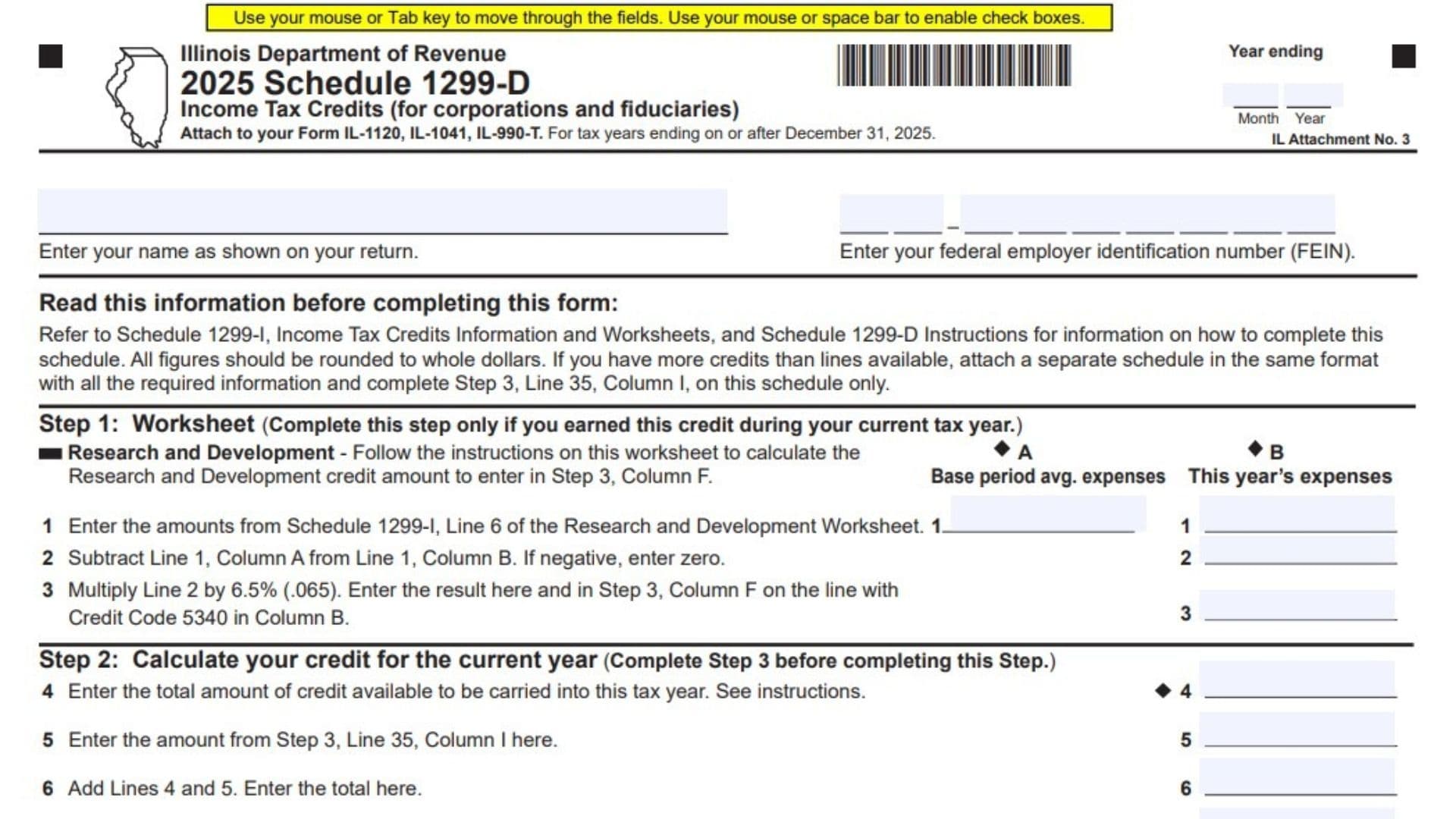
Illinois Schedule 1299-D, Income Tax Credits for Corporations and Fiduciaries, is an Illinois Department of Revenue schedule used with Form IL-1120, Form IL-1041, or Form IL-990-T to report income tax credits and determine the amount that can be claimed for the current tax year. The 2025 version applies to tax years ending on or after December 31, 2025. It brings together available credits carried into the year, credits earned directly during the year, distributive share credits reported through Schedule K-1-P, and transferred credits. It also includes a research and development worksheet for calculating that particular current-year credit. The schedule collects identifying information, credit codes, earning and expiration dates, certificate numbers, and unitary group member information when relevant. Completing it accurately matters because the credit available is not necessarily the same as the credit that can be used: the final calculation limits the current-year claim to the income tax amount available to be offset.
How To File Schedule 1299-D
Where To Submit the Schedule
Submit Schedule 1299-D to the Illinois Department of Revenue as an attachment to the applicable Illinois income tax return:
- Form IL-1120.
- Form IL-1041.
- Form IL-990-T.
The schedule is identified as Illinois Attachment No. 3. Include it with the return to which the credit applies rather than treating it as a separate income tax return.
Follow the submission instructions for your main return. Schedule 1299-D does not provide a separate mailing address or an independent filing deadline.
Information and Documents To Prepare
Before completing the schedule, gather:
- Your business or fiduciary name exactly as it appears on the main return.
- Your federal employer identification number, or FEIN.
- The month and year your tax year ends.
- Records supporting credits available to carry into the current tax year.
- Records of credits earned or received during the current tax year.
- Applicable credit codes and earning and expiration dates.
- Credit certificate numbers, where relevant.
- FEINs for relevant members of a unitary group.
- Schedule K-1-P information supporting distributive share credits.
- Documentation supporting transferred credits.
- The income tax amount from the applicable line of your main return.
- Schedule CR information if you file Form IL-1041 and claim a credit for income tax paid to another state.
- Schedule 1299-I, Income Tax Credits Information and Worksheets.
- The Schedule 1299-D instructions.
If you earned a research and development credit during the current tax year, also complete the relevant worksheet in Schedule 1299-I before calculating that credit on this schedule.
Rounding and Additional Credit Entries
Report all monetary amounts in whole dollars.
If your current-year credits require more rows than the schedule provides, attach an additional schedule using the same column layout and supplying all required information. Report the combined total on Step 3, Line 35, Column I of the main Schedule 1299-D only.
Order of Completion
Although Step 2 appears before Step 3, complete the schedule in this practical order:
- Fill in the identification fields.
- Complete Step 1 if you earned a research and development credit during the current tax year.
- Complete Step 3 to list current-year credits.
- Complete Step 2 to determine the credit you may claim.
- Transfer the allowed credit to your main return.

How To Complete the Identification Fields
Year Ending: Month and Year
Enter the month and year in which the tax year covered by the schedule ends. Make sure this matches the reporting period on your main Illinois return.
Name as Shown on Your Return
Enter the same taxpayer name used on the return receiving the credit. Avoid using a different trade name or abbreviated name that does not match the return.
Federal Employer Identification Number
Enter the taxpayer’s FEIN. Check that it matches the number on the main return and supporting credit records.
Step 1: Research and Development Credit Worksheet
Complete this worksheet only if you earned the research and development credit during the current tax year. A credit carried forward from an earlier year is not a newly earned credit for this worksheet.
Line 1 Inputs: Base Period and Current-Year Expenses
Line 1, Column A: Base Period Average Expenses
Enter the base period average expense amount from Line 6 of the Research and Development Worksheet in Schedule 1299-I. Use the completed worksheet amount rather than substituting an expense total from your accounting records.
Line 1, Column B: This Year’s Expenses
Enter the current-year expense amount from Line 6 of the Research and Development Worksheet in Schedule 1299-I. Keep this amount in Column B so it is compared with the base period figure in Column A.
Lines 2 and 3: Credit Calculation
Line 2: Expenses Above the Base Period Average
Subtract Line 1, Column A from Line 1, Column B.
If current-year expenses do not exceed the base period average, enter zero rather than a negative amount.
Line 3: Research and Development Credit
Multiply Line 2 by 6.5%, or 0.065.
Enter the result on Line 3. Also enter it in Step 3, Column F, on the credit row that shows credit code 5340 in Column B.
Do not treat this worksheet result as the final amount claimable on your return. It must first be included in the current-year credit listing and then pass through the limitation calculation in Step 2.
Step 3: Report Current-Year Credits
Complete Step 3 before Step 2.
Use this section only for credits earned or received during the current tax year, including credits you will not use this year. Do not list prior-year carryforwards as newly earned or received credits here; those amounts enter the calculation through Step 2, Line 4.
Combine credits of the same type on one row unless they belong to different members of a unitary group or relate to different certificate numbers. Those circumstances require separate entries.
Columns A Through E: Identify Each Credit
Column A: Expiration Date
Enter the credit’s expiration year and month in YYYY-MM format. Use the applicable credit records and instructions to establish the date; do not assume every credit has the same expiration period.
Column B: Credit Code
Enter the code identifying the credit being reported. For the research and development credit calculated in Step 1, use code 5340.
For other credits, use the applicable code provided through the credit guidance.
Column C: Credit Earned Date
Enter the year and month the credit was earned in YYYY-MM format. Do not substitute the date you prepare or submit the return.
Column D: Unitary Member FEIN
When the entry relates to a member of a unitary group, enter that member’s FEIN. Keep credits earned by different members on separate rows, even when they have the same credit code.
Column E: Certificate Number
Enter the certificate number associated with the credit, when applicable. Credits associated with different certificate numbers must remain on separate rows.
Columns F Through I: Enter Credit Amounts
Column F: Credit Amount Earned
Enter the credit earned directly during the current tax year.
For the research and development credit, enter the amount calculated on Step 1, Line 3 on the row identified by credit code 5340.
Column G: Distributive Share Credit From Schedule K-1-P
Enter the distributive share credit reported to you through Schedule K-1-P. Use the supporting information to identify the credit and place it on the appropriate row.
Column H: Transferred Credit Amount
Enter the transferred credit amount received during the current tax year. Use the supporting transfer records to complete the associated identifying fields.
Column I: Total Credits
Add Columns F, G, and H for the same row:
Column I = Column F + Column G + Column H.
This column records the total current-year credit represented by that entry. It does not establish how much can be used against the current year’s tax.
Lines 11 Through 34: Individual Credit Entries
Each line uses the same Columns A through I explained above. Use only as many rows as needed, applying the rules for combining credits and separating unitary members or certificate numbers.
Line 11: First Current-Year Credit Entry
Enter the first credit’s identifying information in Columns A through E, its applicable amounts in Columns F through H, and the row total in Column I.
Line 12: Second Current-Year Credit Entry
Enter the next credit requiring a separate row. Add its amounts in Columns F through H and report the result in Column I.
Line 13: Third Current-Year Credit Entry
Complete Columns A through I for the next separate credit entry, using the applicable dates, code, and supporting records.
Line 14: Fourth Current-Year Credit Entry
Report the next credit entry. Keep a different unitary member or certificate number separate even if the credit code matches an earlier row.
Line 15: Fifth Current-Year Credit Entry
Enter the next current-year credit and calculate Column I by adding Columns F, G, and H.
Line 16: Sixth Current-Year Credit Entry
Complete the identifying fields and applicable amount columns for the next separate credit entry.
Line 17: Seventh Current-Year Credit Entry
Report the next credit earned or received during the current tax year, including it even if you will not use it this year.
Line 18: Eighth Current-Year Credit Entry
Enter the next separate credit and total its directly earned, distributive share, and transferred amounts in Column I.
Line 19: Ninth Current-Year Credit Entry
Complete Columns A through I for the next credit entry supported by your records.
Line 20: Tenth Current-Year Credit Entry
Enter the next separate current-year credit, preserving any distinction required by member FEIN or certificate number.
Line 21: Eleventh Current-Year Credit Entry
Report the next credit and add Columns F through H to determine its Column I total.
Line 22: Twelfth Current-Year Credit Entry
Complete the next credit row with the applicable identification details and current-year amounts.
Line 23: Thirteenth Current-Year Credit Entry
Enter the next separate credit. Do not include a prior-year carryforward in its current-year amount columns.
Line 24: Fourteenth Current-Year Credit Entry
Report the next credit earned or received this year and calculate its total in Column I.
Line 25: Fifteenth Current-Year Credit Entry
Complete Columns A through I for the next credit requiring its own row.
Line 26: Sixteenth Current-Year Credit Entry
Enter the next credit’s identifying information and applicable amounts, then total Columns F, G, and H.
Line 27: Seventeenth Current-Year Credit Entry
Report the next separate current-year credit using the same column requirements.
Line 28: Eighteenth Current-Year Credit Entry
Complete the next available row, checking that its code, dates, and any certificate information match your records.
Line 29: Nineteenth Current-Year Credit Entry
Enter the next credit and report the combined amount from Columns F through H in Column I.
Line 30: Twentieth Current-Year Credit Entry
Report the next current-year credit requiring a separate entry.
Line 31: Twenty-First Current-Year Credit Entry
Complete Columns A through I for the next credit, keeping distinct unitary members and certificate numbers separate.
Line 32: Twenty-Second Current-Year Credit Entry
Enter the next separate credit and calculate its Column I total.
Line 33: Twenty-Third Current-Year Credit Entry
Report the next credit earned or received during the year using the applicable column information.
Line 34: Twenty-Fourth Current-Year Credit Entry
Use this final printed credit row for the next separate entry. If additional rows are necessary, continue on an attached schedule in the same format.
Line 35: Total Current-Year Credits
Line 35, Column I: Sum of Current-Year Credits
Add the Column I amounts from Lines 11 through 34. If you attached additional credit rows, include their Column I amounts in the combined total.
Enter the total on Line 35, Column I of the main schedule only. Transfer that same total to Step 2, Line 5.
Step 2: Calculate the Credit You May Claim This Year
Complete this section after finishing Step 3. It combines available carryforwards with current-year credits and compares the result with the income tax available to be offset.
Lines 4 Through 6: Total Available Credits
Line 4: Credit Carried Into the Current Tax Year
Enter the total credit available to carry into the current tax year.
Use your prior-year credit records and the Schedule 1299-D instructions to establish the available amount. Do not include these carryforwards again in Step 3.
Line 5: Current-Year Credits
Enter the amount from Step 3, Line 35, Column I.
This figure represents the total credits earned or received during the current tax year, including amounts listed on any additional credit schedule.
Line 6: Combined Available Credits
Add Lines 4 and 5.
The result is the combined amount of credit available before applying the income tax limitation.
Lines 7 Through 9: Income Tax Limitation
Line 7: Income Tax From Your Main Return
Enter the income tax amount from the line corresponding to your return:
- Form IL-1120: Step 7, Line 47.
- Form IL-1041: Step 6, Line 44.
- Form IL-990-T: Step 5, Line 21.
Use the specified income tax line rather than a balance due or another tax amount.
Line 8: Credit for Income Tax Paid to Another State
If you file Form IL-1041, enter the credit for income tax paid to another state from Schedule CR, Step 5, Line 59.
If you file Form IL-1120 or Form IL-990-T, enter zero.
Line 9: Income Tax Remaining for This Credit Calculation
Subtract Line 8 from Line 7.
If the result is zero or negative, enter zero. This amount limits the Schedule 1299-D credit available for the current year.
Line 10: Allowed Current-Year Credit
Line 10: Credit You May Claim
Compare Line 6 with Line 9 and enter the smaller amount.
Transfer the result to the appropriate line on your main return:
- Form IL-1120: Step 7, Line 48.
- Form IL-1041: Step 6, Line 46.
- Form IL-990-T: Step 5, Line 22.
If Line 9 is zero, Line 10 must also be zero, even if Line 6 shows available credits.
Credit Carryforward and Required Information
Determining a Future-Year Carryforward
The current-year credit listing and allowed-credit calculation do not, by themselves, establish the amount available to carry into a later year.
The Schedule 1299-D instructions include a worksheet that may be used to determine the credit carryforward for the next tax year. Use that worksheet and the applicable credit rules rather than assuming every unused amount remains available indefinitely.
Disclosure Requirements
The schedule states that the requested information is required under the Illinois Income Tax Act and that failure to provide it may result in a penalty. Review all applicable identification and credit fields rather than entering only the final credit amount.
Final Review Before Filing
- Confirm that you are using the schedule for the appropriate tax year.
- Match the taxpayer name, FEIN, and year-ending information to the main return.
- Report all monetary amounts in whole dollars.
- Complete Step 1 only if you earned a research and development credit during the current tax year.
- Check that Step 1, Line 1 amounts come from the correct Schedule 1299-I worksheet.
- Apply the 6.5% rate correctly on Step 1, Line 3.
- Report the research and development credit under code 5340 in Step 3.
- Include only current-year credits in Step 3, even when they will not be used this year.
- Combine credits of the same type unless separate unitary members or certificate numbers require separate rows.
- Check all expiration dates, earning dates, credit codes, member FEINs, and certificate numbers.
- Verify that each Column I amount equals Columns F, G, and H added together.
- Include any additional credit rows in the total on the main schedule’s Line 35.
- Transfer Step 3, Line 35, Column I to Step 2, Line 5.
- Keep prior-year carryforwards on Step 2, Line 4 rather than duplicating them in Step 3.
- Use the correct main-return income tax amount on Line 7.
- Enter zero on Line 8 unless the Form IL-1041 Schedule CR entry applies.
- Enter zero on Lines 2 or 9 when their respective subtraction rules require it.
- Confirm that Line 10 is the smaller of Lines 6 and 9.
- Transfer Line 10 to the correct credit line on the main return.
- Attach Schedule 1299-D and any required continuation schedule to the applicable Illinois return.
- Retain supporting credit records and review the carryforward worksheet for any credit potentially available in a future year.