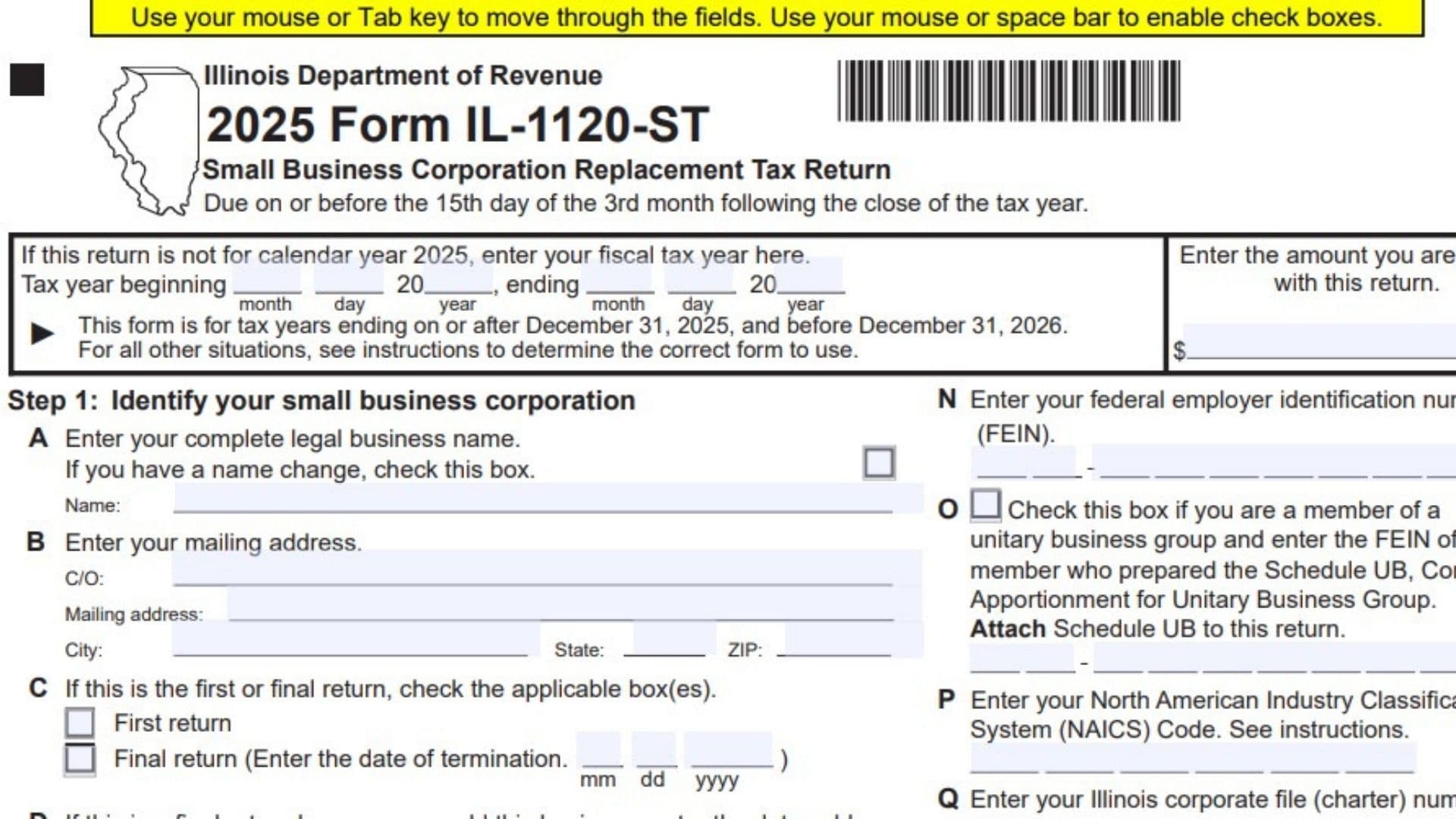
Illinois Form IL-1120-ST, titled Small Business Corporation Replacement Tax Return, is used by eligible small business corporations to report income, calculate Illinois replacement tax, report applicable tax credits and payments, and determine whether they owe additional tax or qualify for a refund. The form collects information about the corporation, its federal income or loss, Illinois additions and subtractions, business income allocation, net income, investment credits, pass-through withholding, pass-through entity tax, and other amounts that affect the corporation’s Illinois tax obligations. It also identifies the corporation’s business activities, accounting records location, filing status, and required supporting schedules. The return includes calculations for ordinary income or loss, unmodified base income, Illinois base income, income allocation, net income, replacement tax, surcharges, payments, and any balance due. The 2025 version applies to tax years ending on or after December 31, 2025, and before December 31, 2026. Corporations with tax periods outside that range should consult the applicable instructions to determine which form to use. The form is generally due by the 15th day of the third month following the close of the tax year. Completing it accurately is important because errors in income reporting, apportionment, tax credits, withholding, or payment calculations can affect the amount owed or refunded. Depending on the corporation’s activities, supporting documents may include federal Form 1120-S, Form IL-4562, Illinois Schedule M, Schedule 80/20, Schedule 1299-A, Schedule NLD, Schedule 4255, Form IL-477, and Schedule B. The corporation must complete the applicable sections, include the required supporting documents, and have an authorized officer sign the return before filing.
How To File Form IL-1120-ST
Form IL-1120-ST is submitted to the Illinois Department of Revenue. The due date is generally the 15th day of the third month following the close of the corporation’s tax year.
For example, a corporation using a calendar tax year that ends December 31, 2025, generally has a filing deadline of March 15, 2026. If the tax year ends on a different date, calculate the deadline using the applicable rule and confirm it in the official instructions.
Documents to Prepare Before Completing the Return
Gather the following records and supporting documents, as applicable:
- Federal Form 1120-S and its Schedule K.
- Records of ordinary income or loss, rental income, portfolio income, capital gains, and other separately reported items.
- Records of charitable contributions, Section 179 expenses, and interest on investment indebtedness.
- Form IL-4562 for Illinois special depreciation adjustments.
- Illinois Schedule M for other business additions and subtractions.
- Schedule 80/20 for related-party expense adjustments.
- Schedule 1299-A for applicable Illinois subtractions.
- Schedule UB and the Subgroup Schedule, if applicable.
- Schedules K-1-P and K-1-T for applicable pass-through income, additions, subtractions, credits, and withholding.
- Schedule B for partners’ or shareholders’ information and applicable pass-through withholding calculations.
- Schedule NB for nonbusiness income or loss.
- Schedule NLD for the Illinois net loss deduction.
- Schedule 4255 for investment credit recapture.
- Form IL-477 for investment credits.
- Form 982 for applicable discharge of indebtedness adjustments.
- Form IL-2220 for the underpayment of estimated tax penalty, if applicable.
- Forms W-2G supporting Illinois income tax withholding, if applicable.
- Records of estimated tax payments, prior overpayments, and other payments or credits.
Not every corporation needs every document. Prepare the schedules that apply to the corporation’s activities and the entries made on the return.
Payment and Mailing Instructions
The form provides a space at the top of page 1 for the amount being paid with the return. It also directs the filer to attach the payment and Form IL-1120-ST-V in the designated area.
If submitting a paper return, the form provides the following mailing addresses.
If payment is enclosed:
Illinois Department of Revenue
P.O. Box 19053
Springfield, IL 62794-9053
If payment is not enclosed:
Illinois Department of Revenue
P.O. Box 19032
Springfield, IL 62794-9032
Use the address that matches your filing situation and follow the applicable instructions for the payment method. If paying with the return, make sure the amount entered at the top of page 1 agrees with the payment submitted.

How To Complete Form IL-1120-ST
The form contains five pages. Pages 1 through 3 contain the main corporation return, while pages 4 and 5 contain Schedule B, Partners’ or Shareholders’ Information.
The return has eleven main steps:
- Step 1 identifies the corporation and its filing circumstances.
- Step 2 calculates ordinary income or loss.
- Step 3 calculates unmodified base income or loss.
- Step 4 calculates income or loss after Illinois additions.
- Step 5 calculates base income or loss after subtractions.
- Step 6 allocates income or loss to Illinois when required.
- Step 7 calculates net income.
- Step 8 calculates net replacement tax.
- Step 9 calculates taxes, surcharges, pass-through withholding, and penalties.
- Step 10 determines the refund or balance due.
- Step 11 contains the signature and paid preparer information.
The form requires whole-dollar amounts for the main income and tax calculations. Use the corporation’s records and the relevant supporting schedules to complete each entry.
Page 1: Step 1 — Identify Your Small Business Corporation
This step collects the corporation’s identifying information, tax year, filing status, business classifications, and supporting schedule details.
Tax Year and Payment Information
Tax Year Beginning and Ending
If the return covers a fiscal year rather than calendar year 2025, enter the beginning and ending dates in the spaces provided. Include the month, day, and year for each date.
The form is intended for tax years ending on or after December 31, 2025, and before December 31, 2026. If the corporation’s tax year falls outside that period, consult the applicable instructions to determine the correct form.
Amount You Are Paying With This Return
Enter the amount of payment being submitted with the return. If no payment is being submitted, do not enter an amount that has not actually been paid.
Make sure the amount agrees with the payment records and the applicable payment voucher.
Corporation Identification
Field A: Complete Legal Business Name
Enter the corporation’s complete legal business name as shown in its official tax records.
Name Change Checkbox
Mark this box if the corporation’s legal business name has changed. Use the correct name in the business name field.
Field B: Mailing Address
Enter the corporation’s mailing address. Complete the applicable fields:
- C/O: Enter the name of the person, department, or organization that should receive correspondence, if applicable.
- Mailing address: Enter the street address or other appropriate mailing address.
- City: Enter the city associated with the mailing address.
- State: Enter the state abbreviation.
- ZIP code: Enter the ZIP code for the mailing address.
Use the address where the corporation should receive tax correspondence.
Field C: First Return
Mark the First Return box if this is the corporation’s first return, as applicable.
Field C: Final Return
Mark the Final Return box if this is the corporation’s final return. Enter the date of termination in month/day/year format.
Field D: Final Return Due to Sale of the Business
If the corporation is filing a final return because the business was sold, enter the date of sale in month/day/year format.
Also enter the new owner’s federal employer identification number (FEIN). Check the number against the information available from the transaction or the new owner.
Apportionment and Supporting Schedule Information
Field E: Apportionment Formulas
Mark the applicable checkbox or boxes for the corporation’s apportionment formula. The form lists the following business categories:
- Financial organizations.
- Federally regulated exchanges.
- Transportation companies.
- Sales companies.
Use the applicable apportionment formula instructions to determine which classification applies. Do not select a category solely because it appears similar to the corporation’s general business description.
Field F: Form IL-4562 Attached
Mark this box if Form IL-4562 is attached to report Illinois special depreciation adjustments.
Field G: Illinois Schedule M Attached
Mark this box if Illinois Schedule M for businesses is attached to report applicable additions or subtractions.
Field H: Schedule 80/20 Attached
Mark this box if Schedule 80/20 is attached for related-party expense adjustments.
Field I: Schedule 1299-A Attached
Mark this box if Schedule 1299-A is attached for applicable Illinois tax subtractions.
Field J: Subgroup Schedule Attached
Mark this box if the Subgroup Schedule is attached.
Field K: 52/53-Week Filer
Mark this box if the corporation uses a 52/53-week tax year.
Field L: Pass-Through Entity Tax Election
Mark this box if the corporation elected to file and pay pass-through entity tax. Review the applicable instructions before making the election or reporting its effects.
Field M: Annualized Income on Form IL-2220
Mark this box if the corporation is paying pass-through entity tax and annualized its income on Form IL-2220.
Attach Form IL-2220 when this field applies.
Additional Corporation Information
Field N: Federal Employer Identification Number
Enter the corporation’s FEIN. Check the number against the corporation’s federal tax records.
Field O: Unitary Business Group
Mark this box if the corporation is a member of a unitary business group. Enter the FEIN of the member that prepared Schedule UB, Combined Apportionment for Unitary Business Group.
Attach Schedule UB to the return.
Field P: NAICS Code
Enter the corporation’s North American Industry Classification System (NAICS) code. Use the code applicable to the corporation’s business activity and consult the instructions if you need help determining the correct code.
Field Q: Illinois Corporate File or Charter Number
Enter the corporation’s file or charter number issued by the Illinois Secretary of State.
Field R: Location of Accounting Records
Enter the city, state, and ZIP code where the corporation’s accounting records are maintained.
Use the two-letter postal abbreviation for the state.
Field S: Business Income Election
Mark this box if the corporation elects to treat all nonbusiness income as business income.
When this election applies, the form directs the corporation to enter zero on lines 36 and 44. Review the applicable instructions before making the election.
Field T: Federal Disclosure Forms
Mark this box if the corporation completed either of the following federal documents:
- Federal Form 8886.
- Federal Schedule M-3, Part II, line 10.
Attach the applicable federal form or schedule to the return.
Field U: Discharge of Indebtedness Adjustment
Mark this box if the corporation is making a discharge of indebtedness adjustment on Schedule NLD or line 48 of Form IL-1120-ST.
Attach federal Form 982.
Field V: Public Law 86-272 Protection
Mark this box if the corporation’s business activity is protected under Public Law 86-272. Review the applicable instructions to determine whether the protection applies to the corporation.
Step 2: Figure Your Ordinary Income or Loss
Step 2 reports ordinary income or loss and other separately stated income items from the corporation’s federal tax information.
Enter whole-dollar amounts in the fields provided.
Line 1: Ordinary Income or Loss From Federal Schedule K
Enter the ordinary income or loss, or its applicable equivalent, reported on federal Schedule K. Use the amount corresponding to the corporation’s tax records.
Line 2: Net Income or Loss From Rental Real Estate Activities
Enter the net income or loss from all rental real estate activities reported for the tax year.
Line 3: Net Income or Loss From Other Rental Activities
Enter the net income or loss from rental activities other than rental real estate activities reported on line 2.
Line 4: Portfolio Income or Loss
Enter the corporation’s portfolio income or loss for the year. Use the amount reported in the relevant federal tax records.
Line 5: Net Internal Revenue Code Section 1231 Gain or Loss
Enter the net gain or loss under Internal Revenue Code Section 1231.
Use the applicable federal reporting information to determine the amount.
Line 6: All Other Items of Income or Loss
Enter other income or loss items that were not included in the calculation of income or loss on page 1 of federal Form 1120-S.
Identify the type of item in the space provided. Use the applicable instructions to determine which items belong on this line.
Line 7: Ordinary Income or Loss Total
Add lines 1 through 6.
Calculation:
Line 7 = Line 1 + Line 2 + Line 3 + Line 4 + Line 5 + Line 6
Enter the result. This is the total used in the next step to calculate unmodified base income or loss.
Step 3: Figure Your Unmodified Base Income or Loss
Step 3 identifies certain expenses that are handled separately when calculating the corporation’s unmodified base income or loss.
Line 8: Charitable Contributions
Enter the corporation’s charitable contributions reported for the tax year. Use the applicable federal and supporting tax records.
Line 9: Expense Deduction Under Internal Revenue Code Section 179
Enter the applicable expense deduction under Internal Revenue Code Section 179.
Line 10: Interest on Investment Indebtedness
Enter the amount of interest on investment indebtedness that belongs in this section.
Line 11: All Other Items of Expense
Enter other expense items that were not deducted when calculating ordinary income or loss on page 1 of federal Form 1120-S.
Identify the type of expense in the space provided. Follow the applicable instructions to determine which items must be reported separately.
Line 12: Total Expenses
Add lines 8 through 11.
Calculation:
Line 12 = Line 8 + Line 9 + Line 10 + Line 11
Enter the total in the designated field.
Line 13: Total Unmodified Base Income or Loss
Subtract line 12 from line 7.
Calculation:
Line 13 = Line 7 − Line 12
Enter the result. This amount carries forward to Step 4.
Step 4: Figure Your Income or Loss
Step 4 calculates income or loss after adding applicable Illinois adjustments and other separately reported items.
Line 14: Amount From Line 13
Enter the amount from line 13.
If the corporation is a unitary filer, enter the amount from Schedule UB, Step 2, Column E, line 30 instead.
Line 15: State, Municipal, and Other Interest Income
Enter the applicable state, municipal, and other interest income excluded from line 14.
Use the supporting tax records to determine the amount.
Line 16: Illinois Taxes and Surcharge Deducted
Enter the Illinois taxes and surcharge deducted when arriving at the amount reported on line 14.
Follow the applicable instructions to determine which amounts belong here.
Line 17: Illinois Special Depreciation Addition
Enter the Illinois special depreciation addition.
Attach Form IL-4562 and mark field F in Step 1.
Line 18: Related-Party Expenses Addition
Enter the applicable related-party expenses addition.
Attach Schedule 80/20 and mark field H in Step 1.
Line 19: Distributive Share of Additions
Enter the corporation’s distributive share of additions reported through partnerships or other applicable pass-through entities.
Attach the relevant Schedules K-1-P or K-1-T.
Line 20: Loss Distributable to a Shareholder Subject to Replacement Tax
Enter the amount of loss distributable to a shareholder that is subject to replacement tax.
Attach Schedule B. Complete the applicable shareholder information and calculations in that schedule.
Line 21: Other Additions
Enter other applicable additions not reported on the preceding lines.
Attach Illinois Schedule M for businesses and mark field G in Step 1.
Line 22: Total Income or Loss
Add lines 14 through 21.
Calculation:
Line 22 = Line 14 + Line 15 + Line 16 + Line 17 + Line 18 + Line 19 + Line 20 + Line 21
Enter the resulting amount. It is used to calculate base income or loss in Step 5.
Step 5: Figure Your Base Income or Loss
Step 5 reports applicable subtractions and calculates the corporation’s base income or loss.
Line 23: Interest Income From U.S. Treasury or Other Exempt Federal Obligations
Enter the applicable interest income from U.S. Treasury obligations or other federally exempt obligations.
Use the supporting tax records and applicable instructions.
Line 24: Share of Income Distributable to a Shareholder Subject to Replacement Tax
Enter the share of income distributable to a shareholder that is subject to replacement tax.
Attach Schedule B.
Line 25: River Edge Redevelopment Zone Dividend Subtraction
Enter the applicable dividend subtraction associated with a River Edge Redevelopment Zone.
Attach Schedule 1299-A.
Line 26: River Edge Redevelopment Zone Interest Subtraction
Enter the applicable interest subtraction associated with a River Edge Redevelopment Zone.
Attach Schedule 1299-A.
Line 27: High Impact Business Dividend Subtraction
Enter the applicable dividend subtraction for a qualifying High Impact Business.
Attach Schedule 1299-A.
Line 28: High Impact Business Interest Subtraction
Enter the applicable interest subtraction for a qualifying High Impact Business.
Attach Schedule 1299-A.
Line 29: Contribution Subtraction
Enter the applicable contribution subtraction.
Attach Schedule 1299-A and follow the instructions for determining the amount that qualifies.
Line 30: Illinois Special Depreciation Subtraction
Enter the applicable Illinois special depreciation subtraction.
Attach Form IL-4562 and mark field F in Step 1.
Line 31: Related-Party Expenses Subtraction
Enter the applicable related-party expenses subtraction.
Attach Schedule 80/20 and mark field H in Step 1.
Line 32: Distributive Share of Subtractions
Enter the corporation’s distributive share of applicable subtractions from partnerships or other pass-through entities.
Attach the relevant Schedules K-1-P or K-1-T.
Line 33: Other Subtractions
Enter other applicable subtractions not reported on the preceding lines.
Attach Illinois Schedule M for businesses and mark field G in Step 1.
Line 34: Total Subtractions
Add lines 23 through 33.
Calculation:
Line 34 = Line 23 + Line 24 + Line 25 + Line 26 + Line 27 + Line 28 + Line 29 + Line 30 + Line 31 + Line 32 + Line 33
Enter the total in the designated field.
Line 35: Base Income or Loss
Subtract line 34 from line 22.
Calculation:
Line 35 = Line 22 − Line 34
Enter the result. Next, determine whether the corporation can transfer this amount directly to Step 7 or must complete Step 6.
Choose the Applicable Income Allocation Option
Box A: Income Derived Entirely Within Illinois
Mark box A if the amount on line 35 is derived entirely within Illinois.
Transfer the amount from line 35 directly to line 47 in Step 7. Leave lines 36 through 46 in Step 6 blank.
A unitary filer must not select box A.
Box B: Income Derived Partly Outside Illinois or Unitary Filer
Mark box B if any portion of the amount on line 35 is derived outside Illinois.
A unitary filer must also select box B.
Complete all applicable lines in Step 6. The form specifically directs filers not to leave lines 40 through 42 blank when Step 6 applies.
Step 6: Figure Your Income Allocable to Illinois
Complete Step 6 only if box B in Step 5 is selected. This step separates nonbusiness income from business income and calculates the amount allocated to Illinois.
Line 36: Nonbusiness Income or Loss
Enter the corporation’s nonbusiness income or loss.
Attach Schedule NB.
Line 37: Business Income or Loss From Pass-Through Entities
Enter the business income or loss included in line 35 from applicable non-unitary partnerships, partnerships included on Schedule UB, S corporations, trusts, or estates.
Follow the applicable instructions and use the relevant supporting tax information.
Line 38: Total Nonbusiness and Pass-Through Income or Loss
Add lines 36 and 37.
Calculation:
Line 38 = Line 36 + Line 37
Enter the total in the designated field.
Line 39: Business Income or Loss
Subtract line 38 from line 35.
Calculation:
Line 39 = Line 35 − Line 38
Enter the resulting business income or loss.
Line 40: Total Sales Everywhere
Enter the corporation’s total sales everywhere.
The form states that this amount cannot be negative. Use the sales records required by the applicable apportionment instructions.
Line 41: Total Sales Inside Illinois
Enter the corporation’s total sales inside Illinois.
This amount also cannot be negative.
Line 42: Apportionment Factor
Divide line 41 by line 40. Round the result to six decimal places.
Calculation:
Line 42 = Line 41 ÷ Line 40
Enter the resulting factor in the designated field.
Line 43: Business Income or Loss Apportionable to Illinois
Multiply line 39 by line 42.
Calculation:
Line 43 = Line 39 × Line 42
Enter the result.
Line 44: Nonbusiness Income or Loss Allocable to Illinois
Enter the corporation’s nonbusiness income or loss allocated to Illinois.
Attach Schedule NB.
If the corporation made the business income election in field S, follow the form’s instruction to enter zero on this line.
Line 45: Business Income or Loss Apportionable to Illinois From Pass-Through Entities
Enter the applicable business income or loss apportioned to Illinois from non-unitary partnerships, partnerships included on Schedule UB, S corporations, trusts, or estates.
Use the relevant supporting tax information and follow the applicable instructions.
Line 46: Base Income or Loss Allocable to Illinois
Add lines 43 through 45.
Calculation:
Line 46 = Line 43 + Line 44 + Line 45
Enter the result. This amount carries forward to line 47 in Step 7.
Step 7: Figure Your Net Income
Step 7 calculates net income after applicable discharge of indebtedness adjustments and the Illinois net loss deduction.
Line 47: Base Income or Net Loss
Enter the amount from line 35 in Step 5 if box A was selected, or the amount from line 46 in Step 6 if box B was selected.
Line 48: Discharge of Indebtedness Adjustment
Enter the applicable discharge of indebtedness adjustment.
Attach federal Form 982 and mark field U in Step 1 when this adjustment applies.
Line 49: Adjusted Base Income or Net Loss
Add lines 47 and 48.
Calculation:
Line 49 = Line 47 + Line 48
Enter the result.
Line 50: Illinois Net Loss Deduction
Enter the applicable Illinois net loss deduction.
If line 49 is zero or negative, enter zero on line 50.
Attach Schedule NLD. If the corporation has merged losses, mark the designated checkbox and attach a detailed statement.
Line 51: Net Income
Subtract line 50 from line 49.
Calculation:
Line 51 = Line 49 − Line 50
Enter the resulting net income. This amount is used to calculate replacement tax in Step 8.
Step 8: Figure Your Net Replacement Tax
Step 8 calculates replacement tax and applies the applicable investment credit recapture and investment credits.
Line 52: Replacement Tax
Multiply line 51 by 1.5%, or 0.015.
Calculation:
Line 52 = Line 51 × 0.015
Enter the calculated replacement tax.
Line 53: Recapture of Investment Credits
Enter the applicable investment credit recapture amount.
Attach Schedule 4255.
Line 54: Replacement Tax Before Investment Credits
Add lines 52 and 53.
Calculation:
Line 54 = Line 52 + Line 53
Enter the total replacement tax before investment credits.
Line 55: Investment Credits
Enter the applicable investment credits.
Attach Form IL-477 and any supporting information required by its instructions.
Line 56: Net Replacement Tax
Subtract line 55 from line 54.
Calculation:
Line 56 = Line 54 − Line 55
If the result is negative, enter zero. The resulting amount carries forward to Step 9.
Step 9: Figure the Taxes, Surcharges, Pass-Through Withholding, and Penalty You Owe
Step 9 combines the net replacement tax with applicable surcharges, pass-through withholding, pass-through entity tax, and estimated tax penalties.
Line 57: Compassionate Use of Medical Cannabis Program Act Surcharge
Enter the applicable surcharge under the Compassionate Use of Medical Cannabis Program Act.
Consult the applicable instructions to determine whether the surcharge applies and how to calculate it.
Line 58: Sale of Assets by Gaming Licensee Surcharge
Enter the applicable surcharge associated with the sale of assets by a gaming licensee, if required.
Line 59: Pass-Through Withholding Owed on Behalf of Members
Enter the amount from Schedule B, Section A, line 5.
This line reports pass-through withholding or investment partnership withholding that the corporation owes on behalf of its members. Attach Schedule B and complete the required member information.
Line 60: Pass-Through Entity Income
Enter the applicable pass-through entity income amount as required by the relevant instructions.
The form identifies this as a separate entry. Follow the applicable instructions for reporting and calculating this amount.
Line 61: Pass-Through Entity Tax
Enter the applicable pass-through entity tax amount as required by the instructions.
Line 62: Total Net Replacement Tax, Surcharges, Pass-Through Withholding, and Pass-Through Entity Tax
Add lines 56, 57, 58, 59, and 61.
Calculation:
Line 62 = Line 56 + Line 57 + Line 58 + Line 59 + Line 61
The printed calculation does not include line 60 in this total. Follow the applicable instructions for the separate reporting treatment of line 60.
Line 63: Underpayment of Estimated Tax Penalty
Enter the applicable penalty for underpayment of estimated tax from Form IL-2220.
Attach Form IL-2220 when required.
Line 64: Total Taxes, Surcharges, and Penalty
Add lines 62 and 63.
Calculation:
Line 64 = Line 62 + Line 63
Enter the total. This amount is used to determine whether the corporation owes additional tax or has an overpayment.
Step 10: Figure Your Refund or Balance Due
Step 10 compares the corporation’s payments and credits with the total taxes, surcharges, and penalties reported on line 64.
Line 65: Payments
Line 65 contains four separate payment and credit entries.
Line 65a: Credit From Previous Overpayments
Enter any applicable credit carried forward from a previous overpayment.
Use the corporation’s Illinois tax account records to verify the amount available.
Line 65b: Total Payments Made Before Filing
Enter the total payments made before the date the return is filed.
Use the actual payment records rather than an estimate.
Line 65c: Pass-Through Withholding Reported to You
Enter the pass-through withholding reported to the corporation on Schedules K-1-P or K-1-T.
Attach the applicable Schedules K-1-P or K-1-T.
Line 65d: Illinois Income Tax Withholding
Enter the applicable Illinois income tax withholding.
Attach Forms W-2G supporting the amount reported on this line.
Line 66: Total Payments
Add lines 65a through 65d.
Calculation:
Line 66 = Line 65a + Line 65b + Line 65c + Line 65d
Enter the total payments in the designated field.
Determine the Overpayment or Refund
Line 67: Overpayment
If line 66 is greater than line 64, subtract line 64 from line 66.
Calculation:
Line 67 = Line 66 − Line 64
Enter the result when payments and credits exceed the total taxes, surcharges, and penalty.
Line 68: Amount to Be Credited Forward
Enter the portion of the overpayment to be credited forward, following the applicable instructions.
If the carryforward is being transferred to a different FEIN, mark the designated checkbox and attach a detailed statement.
Line 69: Refund
Subtract line 68 from line 67.
Calculation:
Line 69 = Line 67 − Line 68
Enter the amount to be refunded after accounting for the credit carried forward.
Line 70: Direct Deposit Information
Complete line 70 if the corporation is requesting its refund by direct deposit.
Routing Number
Enter the bank routing number for the account receiving the refund.
Account Number
Enter the account number for the receiving bank account.
Checking or Savings
Mark the appropriate box to identify whether the account is a checking or savings account.
Check the routing number, account number, and account type carefully before submitting the return.
Line 71: Tax Due
If line 64 is greater than line 66, subtract line 66 from line 64.
Calculation:
Line 71 = Line 64 − Line 66
Enter the remaining amount owed.
If tax is due, enter the payment amount at the top of page 1 and follow the applicable payment instructions.
Step 11: Sign the Return
The corporation must complete the signature section before filing. The declaration states that the signer has examined the return and believes it is true, correct, and complete to the best of their knowledge, under penalties of perjury.
Authorized Officer’s Signature
The authorized officer must sign the return in the designated space.
Date
Enter the date the officer signs the return in month/day/year format.
Title
Enter the officer’s business title or position.
Phone Number
Enter a telephone number where the officer can be contacted.
Permission to Discuss the Return With the Paid Preparer
Mark the checkbox if the Illinois Department of Revenue may discuss the return with the paid preparer identified in the preparer section.
Paid Preparer Information
Complete this section when a paid preparer is involved.
Paid Preparer’s Name
Enter the printed or typed name of the person who prepared the return.
Paid Preparer’s Signature
Enter the paid preparer’s signature in the designated space.
Paid Preparer’s Date
Enter the date the preparer signs the return in month/day/year format.
Self-Employed Preparer Checkbox
Mark this box if the paid preparer is self-employed.
Paid Preparer’s PTIN
Enter the preparer’s Preparer Tax Identification Number (PTIN).
Firm’s Name
Enter the name of the preparer’s firm, if applicable.
Firm’s FEIN
Enter the firm’s federal employer identification number.
Firm’s Address
Enter the preparer’s firm’s business address.
Firm’s Phone Number
Enter the firm’s telephone number.
Review the signature and preparer information before submitting the return.
Schedule B is included on pages 4 and 5 of the form packet. It provides information about the corporation’s partners or shareholders, including their share of income or loss, pass-through withholding, distributable credits, and pass-through entity tax credits.
The schedule is attached to Form IL-1065 or Form IL-1120-ST, as applicable.
Before completing Schedule B:
- Complete the applicable Schedules K-1-P and K-1-P(3) or K-1-P(4).
- Complete Section B of Schedule B, which contains the individual partner or shareholder information.
- Use the totals from Section B when completing Section A.
- If the business is an investment partnership, attach documentation supporting its status as an investment partnership.
The form warns that failure to follow these instructions may delay processing or result in a request for additional information.
Schedule B Identification Information
Year Ending
Enter the applicable year-ending information in the designated field.
Business Name
Enter the business name exactly as shown on Form IL-1065 or Form IL-1120-ST.
Federal Employer Identification Number
Enter the business’s FEIN. Verify that it matches the identification number on the main return.
Schedule B, Section A: Total Members’ Information
Complete Section B before Section A. Section A summarizes the amounts reported on the members’ Schedules K-1-P and the individual member entries in Section B.
Totals From Schedules K-1-P
Line 1: Total Nonbusiness Income or Loss
Add the nonbusiness income or loss reported on all applicable Schedules K-1-P for the corporation’s members.
Enter the combined total in the designated field.
Line 2: Total Income and Replacement Tax Credits
Add the income and replacement tax credits reported on all applicable Schedules K-1-P for the corporation’s members.
Enter the combined total.
Totals From Schedule B, Section B
Line 3: Total Distributable Amounts for Members Subject to Replacement Tax or an ESOP
Add the amounts reported on Section B, line E, for all partners or shareholders across all pages where the box indicating that the entity is subject to Illinois replacement tax or is an employee stock ownership plan (ESOP) has been checked.
Enter the total on line 3.
Line 4a: Withholding for Nonresident Individual Members
Add the pass-through withholding or investment partnership withholding amounts reported on Section B, line J, for nonresident individual members.
Enter the total on line 4a.
Line 4b: Withholding for Nonresident Estate Members
Add the applicable Section B, line J amounts for nonresident estate members.
Enter the total on line 4b.
Line 4c: Withholding for Partnership and S Corporation Members
Add the applicable Section B, line J amounts for partnership and S corporation members.
Enter the total on line 4c.
Line 4d: Withholding for Nonresident Trust Members
Add the applicable Section B, line J amounts for nonresident trust members.
Enter the total on line 4d.
Line 4e: Withholding for C Corporation Members
Add the applicable Section B, line J amounts for C corporation members.
Enter the total on line 4e.
Line 5: Total Pass-Through or Investment Partnership Withholding Owed
Add lines 4a through 4e.
Calculation:
Line 5 = Line 4a + Line 4b + Line 4c + Line 4d + Line 4e
This amount represents the total pass-through withholding or investment partnership withholding owed on behalf of the applicable nonresident partners or shareholders.
Transfer the amount to the applicable return:
- Form IL-1120-ST or Form IL-1120-ST-X, line 59.
- Form IL-1065 or Form IL-1065-X, line 59a, for pass-through withholding.
- Form IL-1065 or Form IL-1065-X, line 59b, for investment partnership withholding.
Use the destination that applies to the corporation’s filing type.
Line 6: Total Pass-Through Entity Tax Credit Paid to Members
Add the pass-through entity tax credit amounts reported on Section B, line K, across all applicable pages.
Enter the total on line 6.
Line 7: Total Pass-Through Entity Tax Credit Received and Distributed to Members
Add the amounts reported on Section B, line L, across all applicable pages.
Enter the total on line 7.
Attach all completed pages of Schedule B, Section B, behind Section A as directed by the form.
Schedule B, Section B: Members’ Information
Section B records information for individual members. The schedule provides space for three members per page. If the corporation has more members than the available space, attach additional copies of the page as needed.
Complete a separate set of entries for each partner or shareholder.
Member Identification Fields
Field A: Member’s Name
Enter the full name of the member.
Field A: C/O
Enter the care-of information if correspondence or identification details need to include another person or organization.
Field A: Address 1
Enter the member’s primary street address.
Field A: Address 2
Enter additional address information, if applicable, such as an apartment, suite, or unit number.
Field A: City
Enter the city associated with the member’s address.
Field A: State and ZIP Code
Enter the state abbreviation and ZIP code for the member’s address.
Field B: Entity Type
Enter the applicable entity type for the member. Use the entity classification and codes required by the Schedule B instructions.
Field C: SSN or FEIN
Enter the member’s applicable Social Security number (SSN) or federal employer identification number (FEIN), depending on the member’s classification.
Verify the identification number against the member’s tax records.
Member Income and Withholding Information
Field D: Subject to Illinois Replacement Tax or an ESOP
Mark the applicable box to identify whether the member is subject to Illinois replacement tax or qualifies as an ESOP for the purpose of this schedule.
Use the applicable instructions and the member’s classification to determine the correct selection.
Field E: Member’s Distributable Amount of Base Income or Loss
Enter the member’s distributable amount of base income or loss.
Use the applicable member-level tax information and the instructions for Schedule B to determine the correct amount.
Field F: Excluded From Pass-Through Withholding
Mark the box if the member is excluded from pass-through withholding under the applicable rules.
Review the relevant instructions before selecting this option.
Field G: Share of Illinois Income Subject to Pass-Through or Investment Partnership Withholding
Enter the member’s share of Illinois income subject to pass-through withholding or investment partnership withholding.
Use the applicable allocation and member records to determine the amount.
Field H: Pass-Through or Investment Partnership Withholding Before Credits
Enter the applicable withholding amount before credits.
Use the member’s withholding calculation and supporting records.
Field I: Distributable Share of Credits
Enter the member’s distributable share of applicable credits.
Use the amounts and credit information required by the Schedule B instructions.
Field J: Pass-Through or Investment Partnership Withholding Amount
Enter the pass-through withholding or investment partnership withholding amount attributable to the member.
These amounts are used to calculate the totals in Section A, including lines 4a through 4e and line 5.
Field K: Pass-Through Entity Tax Credit Paid to Members
Enter the applicable pass-through entity tax credit paid to the member.
Use the corporation’s supporting tax and distribution records.
Field L: Pass-Through Entity Tax Credit Received and Distributed to Members
Enter the applicable pass-through entity tax credit received and distributed to the member.
Use the supporting records and applicable instructions to determine the amount.
Completing Additional Members
Member 1
Complete fields A through L for the first partner or shareholder.
Member 2
Complete fields A through L for the second partner or shareholder, if applicable.
Member 3
Complete fields A through L for the third partner or shareholder, if applicable.
If the corporation has additional members, attach further copies of Section B and complete the same fields for each additional member.
Check that the information in Section B agrees with the supporting Schedules K-1-P, K-1-P(3), or K-1-P(4), as applicable. Then use the completed member entries to calculate the totals in Section A.
Common Mistakes to Avoid When Filing Form IL-1120-ST
- Using the wrong tax-year form: Confirm that the corporation’s tax year falls within the period covered by the 2025 form.
- Entering an incorrect FEIN: Verify the corporation’s identification number and any unitary group member’s FEIN.
- Forgetting the required supporting schedules: Attach each applicable schedule and mark the corresponding checkbox in Step 1.
- Using the wrong amount from federal Schedule K: Make sure each income or loss item is entered on the appropriate line in Step 2.
- Confusing expenses with income adjustments: Report separately stated expenses in Step 3 and applicable additions in Step 4.
- Entering subtractions on the wrong lines: Check the descriptions for lines 23 through 33 and attach the required supporting schedules.
- Selecting the wrong Illinois allocation option: Determine whether income is derived entirely within Illinois or whether Step 6 must be completed.
- Leaving required apportionment fields blank: If Step 6 applies, complete lines 40 through 42 as directed.
- Using the wrong apportionment factor: Divide Illinois sales by total sales everywhere and round to six decimal places.
- Claiming an unsupported net loss deduction: Use the applicable Schedule NLD and provide a detailed statement when the return reports merged losses.
- Calculating replacement tax incorrectly: Apply the 1.5% rate to the amount on line 51 and then account for the applicable credit recapture and investment credits.
- Omitting pass-through withholding: Complete Schedule B and transfer the applicable total from Section A, line 5, to line 59.
- Confusing line 60 with the line 62 total: Follow the printed calculation for line 62 and the applicable instructions for line 60.
- Reporting payments inaccurately: Verify prior overpayment credits, payments made, pass-through withholding, and Illinois withholding before calculating the refund or balance due.
- Leaving Schedule B incomplete: Complete Section B before Section A and attach additional pages when there are more members than the schedule accommodates.
- Forgetting the signature: Ensure that the authorized officer signs and dates the return and that the paid preparer section is completed when applicable.
- Using the wrong mailing address: Select the address based on whether payment is enclosed.
Final Review Before Filing
Before submitting Form IL-1120-ST, use this checklist to review the return and its supporting schedules.
- The correct tax year beginning and ending dates are entered.
- The payment amount at the top of page 1 is accurate, if applicable.
- The corporation’s legal name and mailing address are correct.
- The name-change, first-return, final-return, and business-sale fields have been completed when applicable.
- The apportionment formula and business classification fields have been reviewed.
- The corporation’s FEIN, NAICS code, Illinois charter number, and accounting records location are correct.
- All applicable checkboxes in fields F through V have been reviewed.
- Lines 1 through 7 correctly report ordinary income or loss and other income items.
- Lines 8 through 13 correctly calculate unmodified base income or loss.
- Lines 14 through 22 include the applicable Illinois additions and other income adjustments.
- Lines 23 through 35 correctly calculate base income or loss.
- The correct option has been selected in Step 5 to determine whether Step 6 is required.
- If Step 6 applies, lines 36 through 46 are complete.
- The apportionment factor on line 42 has been rounded to six decimal places.
- Lines 47 through 51 correctly calculate net income after applicable adjustments and deductions.
- Lines 52 through 56 correctly calculate replacement tax after credits.
- Lines 57 through 64 include applicable surcharges, pass-through withholding, pass-through entity tax, and penalties.
- Lines 65a through 65d include the applicable payments and credits.
- Line 66 reflects the correct total payments.
- Lines 67 through 69 correctly determine any overpayment, carryforward, and refund.
- Direct deposit information on line 70 is accurate, if applicable.
- Line 71 correctly reports the balance due, if any.
- Schedule B, Section B, includes the required information for every partner or shareholder.
- Schedule B, Section A, totals agree with the applicable member schedules and entries.
- All required supporting forms and schedules are attached.
- The authorized officer has signed and dated the return.
- The paid preparer information is complete when applicable.
- The correct mailing address and payment method have been selected.
- The filing deadline has been confirmed for the corporation’s tax year.
Form IL-1120-ST helps small business corporations report their Illinois replacement tax obligations, applicable income adjustments, tax credits, payments, and member-related withholding. Completing each step carefully, checking the calculations, and including the required supporting schedules can help ensure that the return is accurate and ready for filing.