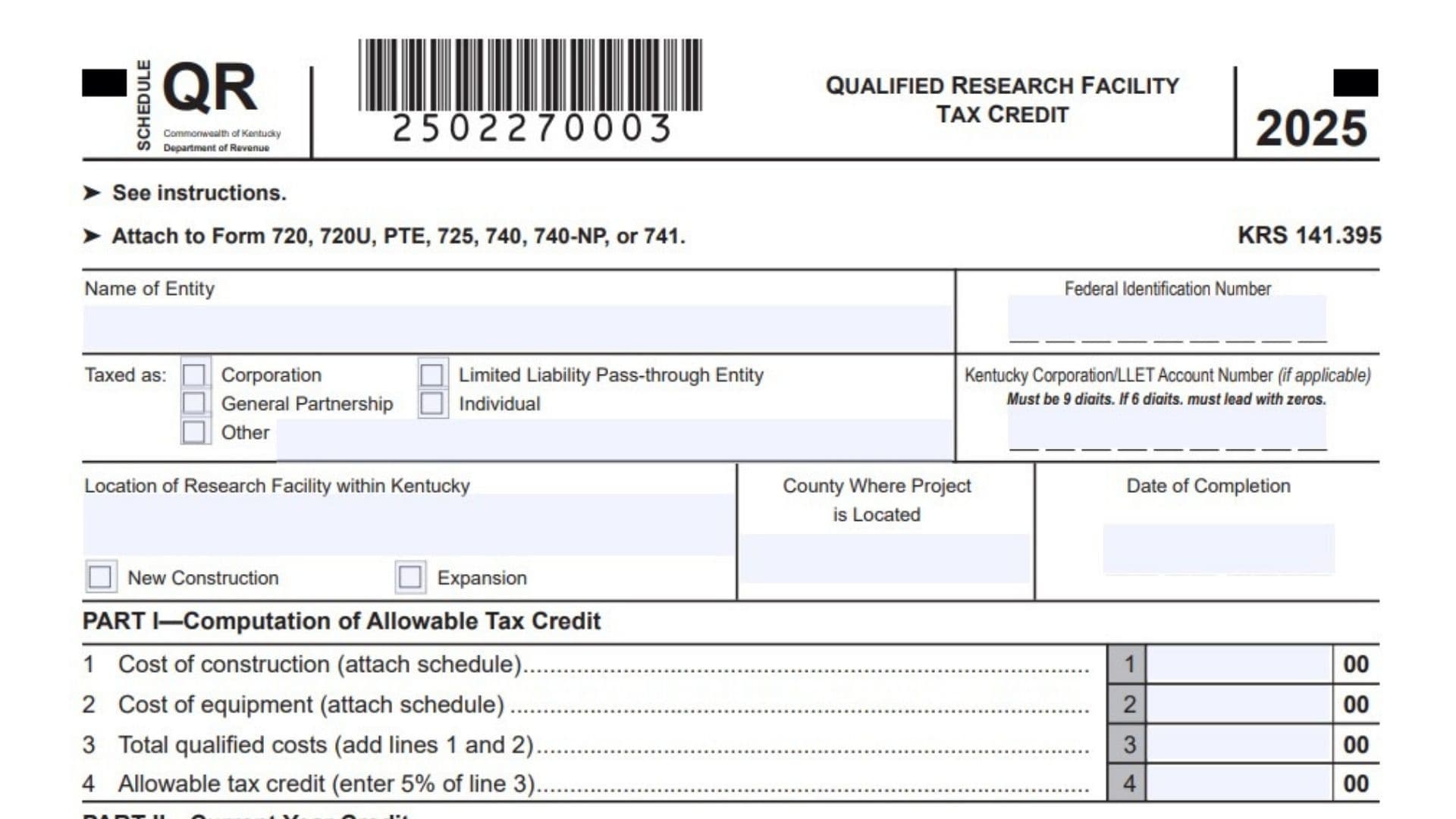
Kentucky Schedule QR is used to calculate and claim the Qualified Research Facility Tax Credit available for eligible research facility projects completed in Kentucky. The credit may be applied against Kentucky corporation income tax, individual income tax, or the Limited Liability Entity Tax, commonly called LLET. A qualifying project may involve constructing a new research facility, remodeling or equipping a facility, or expanding an existing Kentucky facility for qualified research activities. Eligible project costs are limited to tangible, depreciable property used in the research facility, and replacement property does not qualify. The credit becomes available when the qualifying property is placed in service, not simply when it is purchased or when construction begins. The allowable credit equals 5 percent of the qualifying construction and equipment costs. Taxpayers must calculate and track the credit separately for income tax and LLET purposes because an unused income tax balance cannot be shifted to LLET, and an unused LLET balance cannot be shifted to income tax. Schedule QR also records the credit claimed each year and the remaining balance available during the 10-year carryforward period. A separate schedule must be prepared for each newly qualifying project, and a copy must be filed each year until the entire credit is used or the carryforward period expires.
Who May Claim The Kentucky Qualified Research Facility Tax Credit?
The credit may be available to a taxpayer that constructs, remodels, equips, or expands a research facility located in Kentucky for qualified research activities.
A qualifying taxpayer may be taxed as:
- A corporation
- A limited liability pass-through entity
- A general partnership
- An individual
- Another eligible entity type
Qualified research generally means research that meets the definition of qualified research under Internal Revenue Code Section 41.
The qualifying facility project must involve tangible, depreciable property placed in service in Kentucky. Costs for replacement property do not qualify for the credit.
What Costs May Qualify?
Eligible costs may include qualifying construction and equipment expenses for:
- Constructing a new research facility
- Remodeling an existing Kentucky facility for qualified research
- Expanding an existing research facility
- Installing tangible, depreciable research equipment
- Equipping a newly constructed or expanded facility
- Other tangible, depreciable property directly connected with the qualifying research facility
Do not include routine operating expenses, research wages, supplies consumed during research, land, intangible property, general administrative costs, or replacement property unless those amounts independently satisfy the applicable qualified facility rules.
When Does The Credit Become Available?
The credit becomes available when the qualifying tangible, depreciable property is placed in service.
The purchase date alone does not determine when the credit may be claimed. A taxpayer should maintain records showing both the purchase date and the placed-in-service date for every item included in the calculation.
How To File Kentucky Schedule QR
Attach Schedule QR to the applicable Kentucky return. Depending on the taxpayer’s filing classification, it may accompany:
- Form 720
- Form 720U
- Form PTE
- Form 725
- Form 740
- Form 740-NP
- Form 741
Corporations and entities claiming the credit against corporation income tax or LLET must also report the current-year credit on Schedule TCS.
Individuals, estates, trusts, or other eligible taxpayers claiming an individual income tax credit should report it on the applicable Form 740, Form 740-NP, or Form 741.
Prepare a separate Schedule QR for each new project that qualifies. Continue attaching a copy of the schedule each year until one of the following occurs:
- The full credit has been used
- The 10-year carryforward period has expired
- No remaining credit is available for either applicable tax category
Pass-through entities must also report each partner’s, member’s, shareholder’s, or beneficiary’s proportionate share of the approved credit on the applicable Kentucky Schedule K-1.
Records Needed To Complete Kentucky Schedule QR
Gather the following records before completing the schedule:
- Construction contracts
- Contractor invoices
- Equipment invoices
- Purchase records
- Placed-in-service records
- Depreciation schedules
- Project completion records
- Facility location records
- Research activity documentation
- Prior-year Schedule QR copies
- Prior-year credit usage records
- LLET and income tax credit carryforward workpapers
The supporting property schedule should identify the purchase date, placed-in-service date, description, and cost of each asset included on Part I, Lines 1 and 2.
How To Complete The Taxpayer Information Section
Name Of Entity: Enter the complete legal name of the taxpayer claiming the credit. Use the same name reported on the Kentucky return to which the schedule will be attached.
Federal Identification Number: Enter the taxpayer’s federal employer identification number. An individual should use the identifying number required for the related Kentucky income tax return.
Kentucky Corporation/LLET Account Number: Enter the Kentucky Corporation or LLET account number when applicable. The account number must contain nine digits. If the assigned number contains six digits, add three zeros at the beginning. For example, enter 123456 as 000123456.
How To Complete The Taxed As Section
Corporation: Check this box when the taxpayer is taxed as a corporation.
Limited Liability Pass-Through Entity: Check this box when the taxpayer is a limited liability entity treated as a pass-through entity for Kentucky tax purposes.
General Partnership: Check this box when the taxpayer is taxed as a general partnership.
Individual: Check this box when the credit is being claimed by an individual taxpayer.
Other: Check this box when the taxpayer’s classification is not listed. Write the entity type on the line provided.
Select only the classification that matches the taxpayer’s treatment on the related Kentucky return.
How To Complete The Research Facility Information
Location Of Research Facility Within Kentucky: Enter the full physical address or another clear description of the Kentucky location where the qualifying research facility project was completed.
Do not enter only the taxpayer’s mailing address unless it is also the actual location of the qualifying facility.
County Where Project Is Located: Enter the Kentucky county in which the research facility is physically located.
Date Of Completion: Enter the date the qualifying project was completed. Use the month, day, and year format requested on the schedule.
The completion date should be consistent with construction records and placed-in-service documentation.
How To Select The Project Type
New Construction: Check this box when the credit relates to the construction and equipping of a new qualifying research facility in Kentucky.
Expansion: Check this box when the credit relates to expanding, remodeling, or equipping an existing Kentucky facility for qualified research.
Select the category that accurately describes the project. Maintain documentation showing the nature and scope of the construction or expansion.

Kentucky Schedule QR Line By Line Instructions
Part I, Computation Of Allowable Tax Credit
Part I calculates the total credit generated by the qualifying project. Complete this part for the year the project first qualifies.
Part I, Line 1: Enter the total qualifying construction cost for the Kentucky research facility.
Include only construction, remodeling, expansion, or related facility costs attributable to tangible, depreciable property used for qualified research.
Do not include land, intangible property, ordinary repairs, nondepreciable property, replacement property, research wages, or unrelated operating expenses.
Attach a supporting schedule listing every property item included in the Line 1 total. For each item, provide:
- Date purchased
- Date placed in service
- Description of the property
- Cost of the property
The attached schedule’s total construction cost must equal the amount reported on Line 1.
Part I, Line 2: Enter the total qualifying cost of equipment placed in service as part of the Kentucky research facility project.
Include tangible, depreciable equipment used to equip the newly constructed, remodeled, or expanded research facility for qualified research.
Do not include replacement equipment or property that does not satisfy the qualifying research facility requirements.
Attach a detailed equipment schedule showing the purchase date, placed-in-service date, description, and cost of each item. The schedule’s total must equal Line 2.
Part I, Line 3: Add Line 1 and Line 2.
This amount represents the total qualifying construction and equipment costs for the project.
Use the following calculation:
Line 1 qualifying construction cost + Line 2 qualifying equipment cost = Line 3 total qualified costs
Confirm that no asset or expense has been reported on both Lines 1 and 2.
Part I, Line 4: Multiply Line 3 by 5 percent.
Use the following calculation:
Line 3 × 0.05 = Line 4 allowable tax credit
The Line 4 amount is the total credit generated by the qualifying research facility project before considering the taxpayer’s current-year tax liabilities.
For example, if Line 3 is $500,000:
$500,000 × 5% = $25,000
Enter $25,000 on Line 4.
Part II, Current Year Credit
Part II reports the portion of the available project credit claimed during the current tax year.
The taxpayer may claim the credit against the applicable LLET, corporation income tax, or individual income tax liability. The amounts claimed must be supported by Part III.
Separate Credit Tracking Requirement
Maintain separate credit balances for LLET and income tax purposes.
An unused income tax credit balance cannot be applied against LLET. An unused LLET credit balance cannot be applied against corporation or individual income tax.
The taxpayer may claim different amounts against corporation income tax and LLET, depending on the available credit balance and each tax liability.
Part II, Line 1: Enter the amount of the current-year Qualified Research Facility Tax Credit claimed against LLET.
Report this amount on Schedule TCS, Part II, Column E.
The credit cannot reduce LLET below the required $175 minimum. Calculate the taxpayer’s LLET liability before deciding how much credit to enter.
The amount entered cannot exceed:
- The remaining LLET credit balance for the project
- The current-year LLET amount available to be offset
- The amount that would reduce LLET only to the $175 minimum
If no LLET credit is being claimed for the current year, enter zero.
Part II, Line 2: Enter the amount of the current-year credit claimed against Kentucky corporation income tax.
Report this amount on Schedule TCS, Part II, Column F.
The amount cannot exceed the remaining income tax credit balance or the eligible corporation income tax liability available to be offset.
Do not include any amount claimed against LLET on this line.
If no corporation income tax credit is being claimed, enter zero.
Part II, Line 3: Enter the amount of the current-year credit claimed against Kentucky individual income tax.
Report this amount on the applicable Form 740, Form 740-NP, or Form 741.
This line generally applies when the taxpayer claiming the credit is an individual, estate, trust, or another eligible taxpayer reporting the credit through one of those returns.
Do not use Line 3 for a corporation income tax or LLET credit.
If no individual income tax credit is claimed, enter zero.
Pass-Through Entity Reporting
A pass-through entity must report each owner’s proportionate share of the approved credit on the applicable Kentucky Schedule K-1.
The allocation should follow the ownership or distributive share rules applicable to the entity and the approved credit.
The pass-through entity should maintain a supporting schedule showing:
- Each partner, member, shareholder, or beneficiary
- The recipient’s identifying number
- The recipient’s allocation percentage
- The allocated LLET credit, when applicable
- The allocated income tax credit
- The remaining entity-level credit balance
Part III, Amount Of Credit Claimed
Part III tracks the credit over the available carryforward period.
Complete the table separately for the LLET balance and income tax balance. The same project may have different amounts remaining for the two tax categories because the credit claimed against each tax can differ.
How To Complete Column A
Column A, Taxable Year Credit Taken: Enter the month and year for each taxable year in which credit from the project is claimed.
Use the month and year format shown on the schedule.
For example, enter 12/2025 when identifying a taxable year ending in December 2025.
Each row should represent one taxable year.
How To Complete Column B
Column B, LLET Balance: For the first year, enter the allowable credit calculated on Part I, Line 4 as the beginning LLET credit balance.
For each later year, enter the prior year’s LLET balance from Column B minus the prior year’s LLET credit used in Column C.
Use this calculation:
Prior-year LLET balance − Prior-year LLET credit used = Current-year LLET balance
Column B, Income Tax Balance: For the first year, enter the allowable credit from Part I, Line 4 as the beginning income tax credit balance.
For each later year, enter the prior year’s income tax balance from Column B minus the prior year’s income tax credit used in Column C.
Use this calculation:
Prior-year income tax balance − Prior-year income tax credit used = Current-year income tax balance
The LLET balance and income tax balance must be tracked independently.
How To Complete Column C
Column C, LLET Amount Used: Enter the amount of Qualified Research Facility Tax Credit used against LLET for the taxable year shown in Column A.
This amount should agree with Part II, Line 1 for the current year.
If no LLET credit was used for that year, enter zero.
Column C, Income Tax Amount Used: Enter the amount of credit used against corporation or individual income tax for the taxable year shown in Column A.
For a corporation, this amount should agree with Part II, Line 2.
For an individual or another eligible filer, this amount should agree with Part II, Line 3.
If no income tax credit was used, enter zero.
Part III Row-By-Row Instructions
Part III, Row 1: Enter the first taxable year in which the project credit is claimed in Column A. Enter the full allowable credit from Part I, Line 4 in both the LLET and income tax sections of Column B. Enter the actual credit used against each tax in Column C.
Part III, Row 2: Enter the second taxable year in Column A. Enter the remaining LLET and income tax balances after subtracting the amounts used in Row 1. Enter the credit used during the second year in Column C.
Part III, Row 3: Enter the third taxable year. Carry forward each remaining balance from Row 2 after subtracting the Row 2 credit used. Report the third-year credit used separately for LLET and income tax.
Part III, Row 4: Enter the fourth taxable year. Calculate each beginning balance using the previous row and report the credit used during the fourth year.
Part III, Row 5: Enter the fifth taxable year. Continue tracking the LLET balance and income tax balance separately. Enter zero for a tax category when no credit is claimed.
Part III, Row 6: Enter the sixth taxable year. Carry forward only the unused balance remaining for each tax category and report the credit used during that year.
Part III, Row 7: Enter the seventh taxable year. Subtract the prior-year credit used from the prior-year balance separately for LLET and income tax.
Part III, Row 8: Enter the eighth taxable year. Report the remaining balances and the credit used against each applicable tax.
Part III, Row 9: Enter the ninth taxable year. Continue the separate credit tracking and confirm that neither amount used exceeds its available balance.
Part III, Row 10: Enter the tenth taxable year. Report the credit balances available and the amounts used during the final year of the standard 10-year carryforward period.
Part III, Row 11: Use this row when the table requires an additional entry to show the original credit year together with the 10 succeeding carryforward years, or when needed to complete the project’s full annual history. Do not extend the credit beyond the legally permitted carryforward period. Enter the applicable month and year, available balances, and amounts used.
How To Calculate The Remaining Credit
For each tax category, subtract the credit used from the available balance.
LLET Calculation
LLET balance in Column B − LLET credit used in Column C = LLET balance carried to the next row
Income Tax Calculation
Income tax balance in Column B − Income tax credit used in Column C = Income tax balance carried to the next row
Never combine the two balances.
For example, assume the project generated a $25,000 credit. During the first year, the taxpayer used $4,000 against LLET and $7,000 against corporation income tax.
The second-year LLET balance would be:
$25,000 − $4,000 = $21,000
The second-year income tax balance would be:
$25,000 − $7,000 = $18,000
Enter $21,000 in the next row’s LLET balance and $18,000 in the next row’s income tax balance.
What Happens When A Credit Balance Reaches Zero?
When the LLET balance reaches zero, no additional credit from that project may be claimed against LLET.
When the income tax balance reaches zero, no additional credit from that project may be claimed against corporation or individual income tax.
A remaining balance in one category cannot restore or replace a zero balance in the other category.
For example, if the income tax balance is zero but the LLET balance is $5,000, the $5,000 may be considered only for LLET. It cannot be transferred to income tax.
Supporting Schedule For Construction And Equipment
Attach a detailed schedule supporting Part I, Lines 1 and 2.
For every asset, include:
Date Purchased: Enter the date the taxpayer acquired the asset.
Date Placed In Service: Enter the date the asset became ready and available for its intended research facility use.
Description: Clearly describe the construction component, equipment, or other tangible depreciable property.
Cost: Enter the qualifying cost assigned to the asset.
Separate construction assets from equipment so the supporting totals reconcile directly with Lines 1 and 2.
Separate Schedule Requirement For Multiple Projects
Prepare a separate Schedule QR for every project that independently qualifies for the credit.
Do not combine unrelated research facility projects on one schedule, even when the same taxpayer completed them during the same year.
Each project schedule should have its own:
- Facility location
- County
- Completion date
- New construction or expansion designation
- Construction cost
- Equipment cost
- Allowable credit
- Current-year credit claim
- Carryforward history
Common Kentucky Schedule QR Mistakes
Do not claim the credit before the qualifying property is placed in service.
Do not include replacement property in the qualifying cost.
Do not include land, intangible assets, ordinary operating expenses, or nondepreciable property.
Do not combine separate research facility projects on one schedule.
Do not omit the supporting construction and equipment schedule.
Do not report the same asset on both Line 1 and Line 2.
Do not calculate Line 4 using anything other than 5 percent of Line 3.
Do not use the LLET credit to reduce LLET below the $175 minimum.
Do not combine the remaining LLET and income tax credit balances.
Do not transfer unused income tax credit to LLET or unused LLET credit to income tax.
Do not claim more credit than the amount available in the applicable Part III balance.
Do not stop filing Schedule QR while a credit balance remains available within the carryforward period.
Do not forget to report pass-through allocations on Kentucky Schedules K-1.
Kentucky Schedule QR Filing Checklist
Before filing, confirm that:
- The research facility is located in Kentucky
- The activity meets the qualified research requirements
- The project involves new construction, remodeling, equipping, or expansion
- The qualifying property is tangible and depreciable
- Replacement property has been excluded
- The property was placed in service
- The entity information is complete
- The correct taxpayer classification is checked
- The facility location and county are entered
- The project completion date is entered
- The correct project type is checked
- Line 1 includes only qualifying construction costs
- Line 2 includes only qualifying equipment costs
- The supporting property schedule is attached
- Line 3 equals Lines 1 plus 2
- Line 4 equals 5 percent of Line 3
- Part II reports only the current-year credit claimed
- The LLET credit does not reduce LLET below $175
- The corporation income tax credit is reported on Schedule TCS
- The individual income tax credit is reported on the applicable return
- Part III tracks LLET and income tax balances separately
- Zero is entered when no credit was used
- A separate Schedule QR is prepared for each project
- Pass-through entity allocations are reported on Kentucky Schedules K-1
- The schedule is attached each year until the credit is fully used or expires