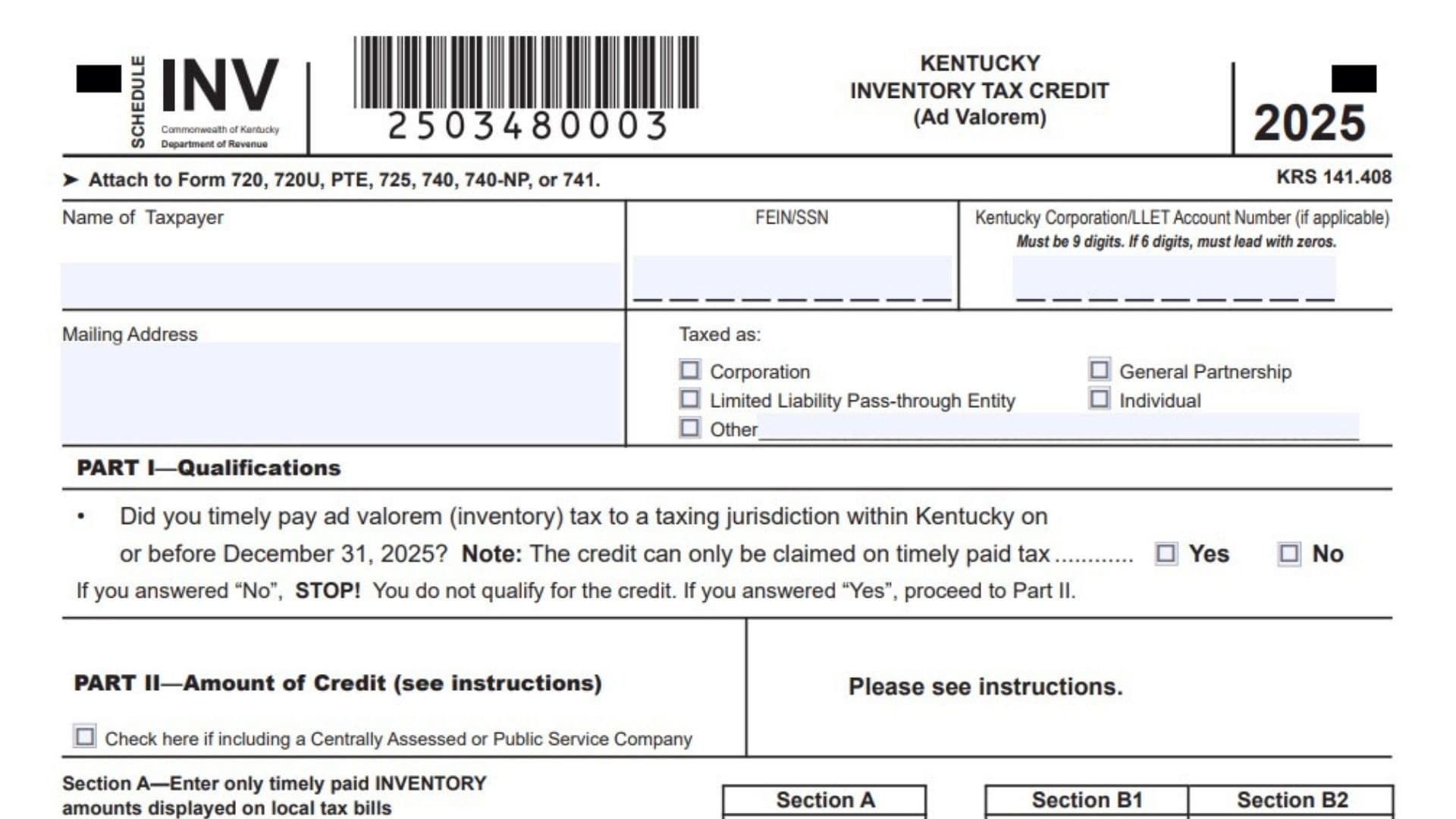
Kentucky Schedule INV is used to calculate and claim the Kentucky inventory tax credit for qualifying ad valorem taxes paid on eligible inventory property. The credit may be available to individuals, corporations, partnerships, limited liability pass-through entities, and certain other taxpayers that timely paid Kentucky inventory tax to the Commonwealth or a political subdivision, such as a city or county. The credit applies only to qualifying inventory taxes paid by the required deadline, and it is both nonrefundable and nontransferable. This means the credit can reduce an eligible Kentucky income tax or Limited Liability Entity Tax liability, but it cannot produce a refund beyond the tax due and cannot be sold or transferred to another taxpayer. Pass-through entities may apply part of the credit against their own LLET liability and distribute the remaining allowable credit to partners, members, shareholders, or beneficiaries according to their distributive shares of income or loss. Schedule INV reports the value of qualifying inventory, the amount of inventory tax timely paid, the allowable credit percentage, and the resulting inventory tax credit. It also provides a section for pass-through entities to allocate the credit among their owners. For the 2025 tax year, the allowable credit percentage is 100 percent, so the entire amount of qualifying, timely paid inventory tax may generally be included in the calculation, subject to the applicable rules and available tax liability.
Who May Qualify For The Kentucky Inventory Tax Credit?
You may qualify when you timely paid Kentucky ad valorem tax on eligible inventory property on or before December 31, 2025.
Qualifying inventory may include amounts reported on applicable Kentucky property tax forms, including:
- Merchants inventory
- Manufacturing finished goods
- Manufacturers raw materials and goods in process
- Certain inventory reported in other qualifying categories
- Goods stored in a warehouse or distribution center
- Inventory in transit
- Inventory held by certain centrally assessed or public service companies
- Distilled spirits inventory held in bonded warehouses
Only taxes that were timely paid may be used to calculate the credit. A tax amount paid after the required deadline does not qualify.
How To File Kentucky Schedule INV
Attach the completed schedule to the Kentucky return that applies to the taxpayer. Schedule INV may be attached to:
- Form 720
- Form 720U
- Form PTE
- Form 725
- Form 740
- Form 740-NP
- Form 741
Schedule INV should be filed with the related Kentucky tax return rather than filed by itself.
You should also attach standard letter-size photocopies of both the front and back of the property tax bills supporting the credit. Keep copies of the property tax returns, payment checks, receipts, and other records showing that the tax was paid on time. The Kentucky Department of Revenue may request these records during its review.
The allowable credit calculated on Part II, Line 11 must also be reported on the applicable credit schedule. Enter it on Schedule TCS, Part II, Line 19, or Schedule ITC, Section A, Line 22, as appropriate.

How to Complete Kentucky Schedule INV
How To Complete The Taxpayer Information Section
Name Of Taxpayer: Enter the taxpayer’s complete legal name. Use the same name shown on the Kentucky tax return to which Schedule INV will be attached.
FEIN/SSN: Enter the Social Security number when the taxpayer is an individual. All other taxpayers should enter their federal employer identification number.
Kentucky Corporation/LLET Account Number: Enter the Kentucky Corporation or LLET account number when applicable. The number must contain nine digits. If the assigned number contains six digits, place three zeros before it. For example, enter 123456 as 000123456.
Mailing Address: Enter the taxpayer’s complete mailing address, including the street address, city, state, and ZIP code.
Taxed As, Corporation: Check this box when the taxpayer is taxed as a corporation.
Taxed As, General Partnership: Check this box when the taxpayer is taxed as a general partnership.
Taxed As, Limited Liability Pass-Through Entity: Check this box when the taxpayer is a limited liability company or another entity treated as a pass-through entity for Kentucky tax purposes.
Taxed As, Individual: Check this box when the credit is being claimed by an individual taxpayer.
Taxed As, Other: Check this box when none of the listed classifications applies. Write the taxpayer’s entity type on the line provided.
Part I, Qualifications
Qualification Question: Indicate whether the taxpayer timely paid Kentucky ad valorem inventory tax to a Kentucky taxing jurisdiction on or before December 31, 2025.
Yes: Check Yes when qualifying inventory tax was paid by the required deadline. Continue to Part II.
No: Check No when the taxpayer did not timely pay qualifying inventory tax. Stop preparing the schedule because the taxpayer does not qualify for the credit.
Do not include inventory taxes that were paid late, even when the underlying inventory would otherwise qualify.
Part II, Amount Of Credit
Part II is divided into Section A, Section B1, and Section B2.
Section A is used for inventory tax amounts that are separately displayed on local tax bills.
Section B1 reports inventory valuations that were not included in Section A.
Section B2 reports the corresponding inventory tax timely paid on the inventory reported in Section B1.
Do not report the same inventory or tax amount in both Section A and Sections B1 or B2.
Centrally Assessed Or Public Service Company Checkbox
Check Here If Including A Centrally Assessed Or Public Service Company: Check this box when claiming a credit for inventory reported on the applicable centrally assessed or public service company property tax forms.
Taxpayers claiming credit for inventory reported on those forms should report the timely paid tax in Section A. Sections B1 and B2 may also be used for other qualifying inventory that was reported on a different acceptable property tax form.
Leave the box blank when the taxpayer is not claiming credit for centrally assessed or public service company inventory.
How To Complete Section A
Section A reports qualifying inventory tax that was timely paid and separately stated on local city or county property tax bills.
A taxpayer may report separately stated local inventory tax in Section A or choose to report the related inventory valuation and tax in Sections B1 and B2. Do not use both methods for the same amount.
Part II, Section A, Line 1: Enter the total Kentucky inventory tax timely paid that is separately identified on local personal property tax bills. Local bills may include city bills, county bills, or separate bills issued by different taxing jurisdictions.
Do not use Section A, Line 1 when the property tax bill does not separately show the inventory tax amount. Instead, report the inventory valuation and related tax in the appropriate category in Sections B1 and B2.
Part II, Section A, Lines 2 Through 7: Do not enter amounts on these shaded lines. Section A uses Line 1 to report the separately stated inventory tax.
Part II, Section A, Line 8: Enter the amount from Section A, Line 1. This carries the total separately stated local inventory tax into the credit calculation.
How To Complete Sections B1 And B2
Use Section B1 to report qualifying inventory valuations not included in Section A.
Use Section B2 to report the corresponding Kentucky inventory tax timely paid on those valuations.
Combine amounts from all qualifying locations within each inventory category. Do not include any valuation or tax already reported in Section A.
Inventory Categories
Part II, Line 1: Do not enter an amount in Sections B1 or B2 on this shaded line. Separately displayed local inventory taxes belong in Section A, Line 1.
Part II, Line 2, Merchants Inventory: In Section B1, enter the total valuation of qualifying merchants inventory not reported in Section A. In Section B2, enter the total Kentucky inventory tax timely paid on that merchants inventory. This category generally corresponds to merchants inventory reported on Line 31 of the applicable Kentucky personal property tax return.
Part II, Line 3, Manufacturing Finished Goods: In Section B1, enter the total valuation of qualifying finished goods held by manufacturers and not reported in Section A. In Section B2, enter the timely paid inventory tax associated with that valuation. This category generally corresponds to Line 32 of the applicable property tax return.
Part II, Line 4, Manufacturers Raw Materials And Goods In Process: In Section B1, enter the total valuation of qualifying raw materials and goods in process that were not included in Section A. In Section B2, enter the corresponding inventory tax paid on time. This category generally corresponds to Line 33 of the applicable property tax return.
Part II, Line 5, Various Reported Items: In Section B1, enter the qualifying inventory valuation reported within the applicable various-items category and not included in Section A. In Section B2, enter the related tax that was timely paid. This line generally corresponds to Line 34 of the applicable property tax return. Review the underlying property tax records to confirm that the amounts reported here qualify as inventory.
Part II, Line 6, Goods Stored In Warehouse Or Distribution Center: In Section B1, enter the total valuation of qualifying goods stored in a warehouse or distribution center and not reported in Section A. In Section B2, enter the inventory tax timely paid on those goods. This category generally corresponds to Line 35 of the applicable property tax return.
Part II, Line 7, Inventory In Transit: In Section B1, enter the total valuation of qualifying inventory in transit that was not included in Section A. In Section B2, enter the tax timely paid on that inventory. This category generally corresponds to Line 36 of the applicable property tax return.
Part II, Section B1, Line 8: This line is not used to calculate the credit directly. The credit is based on the tax paid, not the reported inventory valuation. Review Lines 2 through 7 to ensure every valuation is entered in the correct category.
Part II, Section B2, Line 8: Add the tax amounts entered on Section B2, Lines 2 through 7. Enter the total on Line 8.
Special Reporting Rules
Communications And Multichannel Video Programming Service Providers
Taxpayers filing the applicable tangible personal property tax return should classify inventory according to its proper type. Report merchants inventory, finished goods, raw materials, warehouse goods, inventory in transit, and other qualifying inventory on the corresponding Lines 2 through 7.
Enter each inventory valuation in Section B1 and its related timely paid tax in Section B2.
Centrally Assessed And Public Service Companies
Taxpayers claiming a credit for inventory reported on centrally assessed or public service company property tax forms must check the checkbox in the Part II heading.
Report the timely paid inventory tax for that inventory in Section A. Other qualifying inventory reported on another accepted property tax form may be entered in Sections B1 and B2.
Centrally Assessed Distilled Spirits In Bonded Warehouses
Taxpayers reporting centrally assessed distilled spirits inventory in bonded warehouses should generally complete Part II, Lines 8 through 11 only.
All values reported on the applicable distilled spirits property tax form are treated as inventory. Therefore, qualifying ad valorem tax timely paid on that inventory may be used in the inventory tax credit calculation.
Complete Lines 2 through 7 only when the taxpayer is also claiming credit for inventory reported on another acceptable personal property tax form.
Part II Credit Calculation
Part II, Line 8: Enter the Section A total on Section A, Line 8 and the Section B2 total on Section B2, Line 8. Section A, Line 8 should equal Section A, Line 1. Section B2, Line 8 should equal the sum of Section B2, Lines 2 through 7.
Part II, Line 9: Add Section A, Line 8 and Section B2, Line 8. Enter the combined qualifying inventory tax on Line 9.
Do not include the Section B1 inventory valuations in this calculation. Section B1 supports the claim but does not represent tax paid.
Part II, Line 10: Enter the allowable percentage for the tax year. The allowable percentage for 2025 is 100 percent.
Part II, Line 11: Multiply Line 9 by the percentage on Line 10. Enter the result as the allowable inventory tax credit.
Because the 2025 allowable percentage is 100 percent, Line 11 will generally equal Line 9. Report the Line 11 amount on the appropriate Kentucky tax credit schedule.
Part III, Pass-Through Entities Only
Complete Part III only when the taxpayer is a pass-through entity, such as a partnership, S corporation, or limited liability company treated as a pass-through entity for Kentucky tax purposes.
A pass-through entity may use part of the credit against its own LLET liability and pass the applicable credit through to its partners, members, shareholders, or beneficiaries.
The credit should generally be allocated in the same proportion used to distribute income or loss.
Part III, Line 1: Enter the total allowable inventory tax credit from Part II, Line 11.
Part III, Line 2: Enter the required information for each partner, member, shareholder, or beneficiary receiving a share of the credit.
Part III Allocation Table
Partner, Member, Shareholder, Or Beneficiary Name: Enter the complete legal name of each person or entity receiving a distributive share of the credit.
FEIN/SSN: Enter the recipient’s federal employer identification number or Social Security number, as applicable.
Distributive Share Percentage: Enter the recipient’s percentage share of the pass-through entity’s income or loss.
Distributive Share Of Allowable Inventory Tax Credit: Enter the amount of the inventory tax credit allocated to the recipient.
The amounts allocated in Part III should also be reported on the recipients’ Kentucky Schedules K-1.
When the entity has more than five partners, members, shareholders, or beneficiaries, attach a supporting schedule using the same column order and format as the table in Part III.
How To Calculate Each Owner’s Credit
Multiply the total credit available for distribution by each owner’s distributive share percentage.
For example, assume a pass-through entity has a distributable inventory tax credit of $10,000 and an owner has a 25 percent distributive share:
$10,000 × 25% = $2,500
Enter 25 percent in the distributive share percentage column and $2,500 in the distributive share of allowable inventory tax credit column.
Confirm that the total amount allocated to all recipients agrees with the credit being distributed by the entity.
Supporting Documents To Attach
Attach photocopies of the front and back of each property tax bill used to support the inventory tax credit.
The Department of Revenue may also request:
- Kentucky tangible personal property tax returns
- Property tax bills
- Canceled checks
- Bank records
- Electronic payment confirmations
- Receipts from the taxing jurisdiction
- Inventory valuation records
- Schedules identifying inventory by location and type
- Documents showing the payment date
The Department may deny an inventory tax credit that cannot be verified through supporting records.
Common Kentucky Schedule INV Mistakes
Do not claim taxes that were paid after the required deadline. Do not report the same inventory tax in both Section A and Section B2. Do not enter total property tax when only part of the bill relates to qualifying inventory.
Enter inventory valuations in Section B1 and tax paid in Section B2. Do not reverse the two sections.
Make sure Section B2, Line 8 equals the total of Lines 2 through 7. Confirm that Line 9 equals Section A, Line 8 plus Section B2, Line 8.
Use the correct 100 percent allowable percentage for 2025. Attach copies of both sides of the supporting property tax bills.
Pass-through entities should complete Part III, report each recipient’s distributive share, and include the same amounts on the appropriate Kentucky Schedules K-1.
Kentucky Schedule INV Filing Checklist
Before filing, confirm that:
- The taxpayer paid qualifying inventory tax on time
- The correct taxpayer name and identification number are entered
- The appropriate entity type is checked
- Part I is answered Yes
- Centrally assessed taxpayers checked the required box
- Section A includes only separately stated local inventory tax
- Sections B1 and B2 exclude amounts already reported in Section A
- Inventory valuations are entered in Section B1
- Timely paid tax is entered in Section B2
- Line 9 includes the Section A and Section B2 totals
- Line 10 shows 100 percent for 2025
- Line 11 is reported on the applicable tax credit schedule
- Pass-through entity allocations are completed in Part III
- Supporting property tax bills are attached
- Copies of payment records are retained