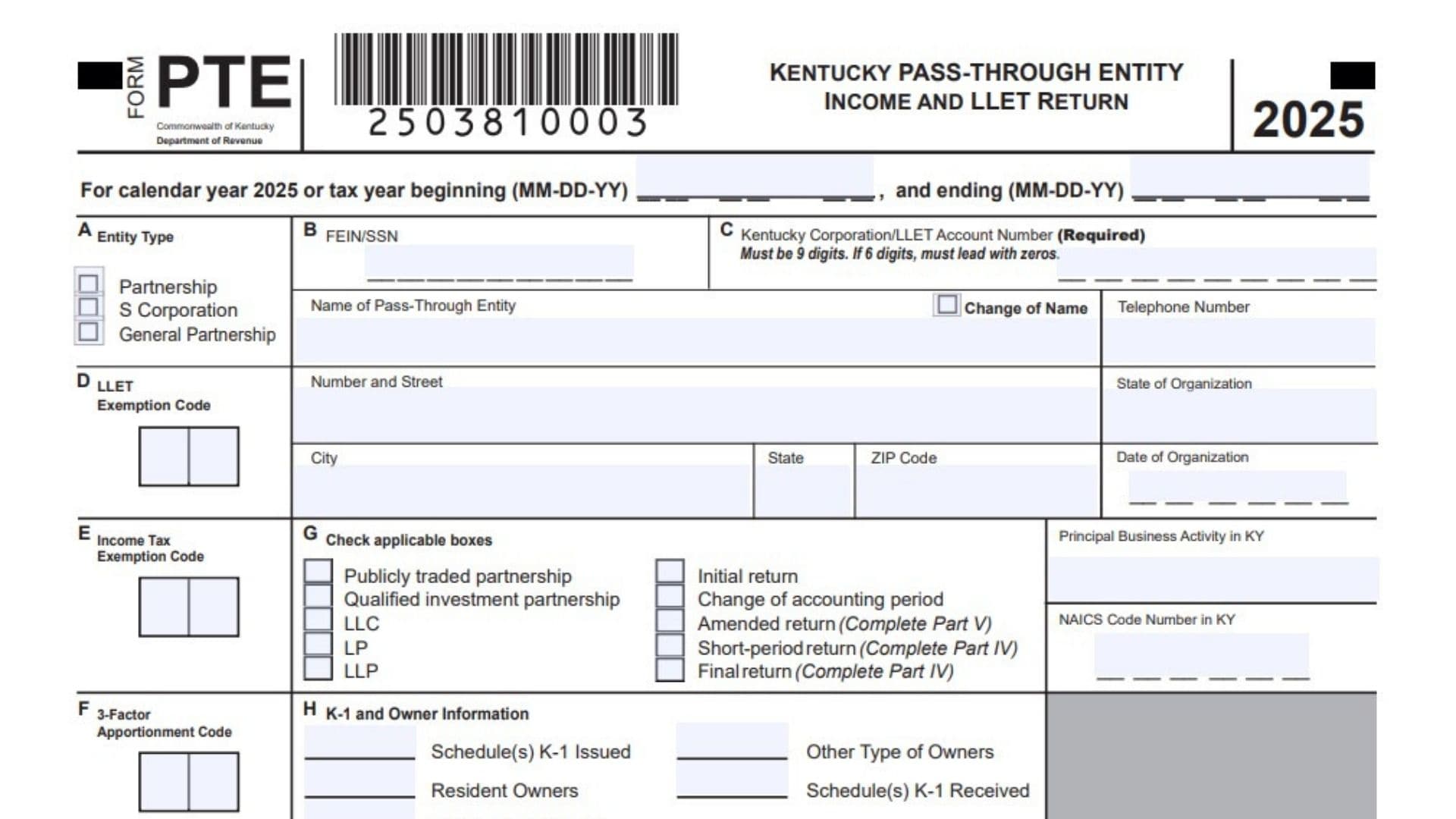
Kentucky Form PTE is the state return used by pass-through entities to report Kentucky ordinary income or loss, Limited Liability Entity Tax, commonly called LLET, and certain income tax items for S corporations, partnerships, general partnerships, and other pass-through businesses connected to Kentucky. The form gathers basic business identification details, entity type, exemption codes, accounting period, Kentucky account number, owner and Schedule K-1 information, income additions and subtractions, LLET calculations, income tax calculations, final or amended return explanations, required questionnaire answers, owners’ share of income and deductions, pass-through LLET items, apportionment data, and the detailed Schedule L computation for gross receipts, gross profits, and LLET. In simple terms, this return tells Kentucky how much income the entity has, what Kentucky adjustments apply, whether the business owes LLET or income tax, whether any overpayment should be credited or refunded, and what information must be passed through to owners. It is especially important because it combines several major filing responsibilities in one place, including entity identification, tax liability, credits, estimated payments, refund handling, final return information, amended return explanations, and supporting schedule reporting.
How To File Kentucky Form PTE
Complete the entity information first, including the tax year, FEIN or SSN, Kentucky Corporation or LLET account number, entity type, business name, address, telephone number, organization state, organization date, Kentucky activity, NAICS code, exemption codes, and all applicable checkboxes.
Use whole-dollar style entries where the form requires money amounts, and make sure every required calculation flows from the correct supporting line or schedule.
Attach any required schedules, statements, federal forms, Kentucky schedules, explanations, credit schedules, depreciation forms, apportionment schedules, Schedule COGS, Schedule DE, Schedule RPC, Schedule TCS, Form 2220-K, or certifications when the related line calls for them.
If the return has no payment or requests a refund, include the supporting federal forms and schedules, including federal Schedules C, E, or F when they apply, and mail the return to the no-payment address shown on the form.
If the return includes a payment, make the check payable to the Kentucky State Treasurer, include the proper return and supporting documents, and use the payment mailing address shown on the form.
Electronic payment options are available through the Kentucky revenue payment system when the filer wants to pay online.
The return must be signed by an authorized member or representative. A paid preparer must also sign and complete the preparer section when someone other than the taxpayer prepares the return.

How To Complete Kentucky Form PTE
Top Section, Entity And Filing Information
Tax Year: Enter the calendar year 2025, or enter the beginning and ending dates if the entity uses a fiscal or short tax year.
Line A, Entity Type: Check the box that matches the entity’s filing status, such as partnership, S corporation, or general partnership.
Line B, FEIN Or SSN: Enter the entity’s federal identification number. Use the FEIN when the entity has one, or the SSN only when that is the correct federal identifier.
Line C, Kentucky Corporation/LLET Account Number: Enter the required Kentucky account number. It must be nine digits, and a six-digit number must be completed with leading zeros.
Name Of Pass-Through Entity: Enter the legal name of the entity exactly as it should appear on the Kentucky return.
Change Of Name: Check this box only if the entity’s legal name changed from the name used on a prior Kentucky filing.
Telephone Number: Enter a current phone number where the entity or its representative can be reached.
Number And Street: Enter the entity’s mailing street address.
City, State, And ZIP Code: Enter the city, state, and ZIP code for the entity’s mailing address.
Line D, LLET Exemption Code: Enter the correct LLET exemption code if the entity qualifies for an exemption.
State Of Organization: Enter the state where the entity was legally formed or organized.
Date Of Organization: Enter the entity’s formation date.
Line E, Income Tax Exemption Code: Enter the correct income tax exemption code if the entity qualifies for one.
Principal Business Activity In Kentucky: Describe the main business activity the entity performs in Kentucky.
NAICS Code Number In Kentucky: Enter the NAICS code that best matches the entity’s Kentucky business activity.
Line F, 3-Factor Apportionment Code: Enter the correct code if the entity uses three-factor apportionment.
Line G, Publicly Traded Partnership: Check this box if the entity is a publicly traded partnership.
Line G, Qualified Investment Partnership: Check this box if the entity is treated as a qualified investment partnership.
Line G, LLC: Check this box if the entity is a limited liability company.
Line G, LP: Check this box if the entity is a limited partnership.
Line G, LLP: Check this box if the entity is a limited liability partnership.
Line G, Initial Return: Check this box if this is the entity’s first Kentucky PTE return.
Line G, Change Of Accounting Period: Check this box if the entity changed its accounting period for the return year.
Line G, Amended Return: Check this box if correcting or changing a return already filed. Complete Part V.
Line G, Short-Period Return: Check this box if the return covers less than a full tax year. Complete Part IV.
Line G, Final Return: Check this box if this is the entity’s last Kentucky PTE return. Complete Part IV.
Line H, Schedule(s) K-1 Issued: Enter information for Kentucky Schedule K-1 forms issued to owners.
Line H, Other Type Of Owners: Enter details for any owners that do not fit the standard owner categories.
Line H, Resident Owners: Enter the number or details of resident owners as required.
Line H, Schedule(s) K-1 Received: Enter information for Kentucky Schedule K-1 forms received from other entities.
Line H, Nonresident Owners: Enter the number or details of nonresident owners as required.
Official Use Only: Leave this area blank because it is reserved for the Department of Revenue.
Part I, Ordinary Income (Loss) Computation
Line 1, Federal Ordinary Income (Loss): Enter the entity’s federal ordinary business income or loss before Kentucky additions and subtractions.
Additions To Federal Ordinary Income
Line 2, State Taxes Based On Net Or Gross Income: Add back state taxes measured by net income or gross income that were deducted federally.
Line 3, Federal Depreciation: Enter federal depreciation, but do not include the IRC Section 179 expense deduction on this line.
Line 4, Related Party Expense: Enter related-party expenses that must be added back, and attach Schedule RPC.
Line 5, Loss From Form 4797: Enter the loss reported from Form 4797 that appears on the applicable federal Form 1120S or Form 1065 line.
Line 6, Gain From Kentucky Form 4797: Enter the gain from Kentucky Form 4797, Part II, line 17.
Line 7, Federal Allowable Depletion: Enter federal depletion allowed on the applicable federal S corporation or partnership return line.
Line 8, Additions From Kentucky Schedule(s) K-1: Enter additions to federal taxable income passed through from Kentucky Schedule K-1 forms received by the entity.
Line 9, Internal Revenue Code Adjustments: Enter required Kentucky additions caused by differences between Kentucky law and federal Internal Revenue Code treatment.
Line 10, Other Additions: Enter any other Kentucky additions not reported on the earlier addition lines, and attach a clear explanation.
Line 11, Total Additions And Income: Add lines 1 through 10 and enter the total.
Subtractions From Federal Ordinary Income
Line 12, Reserved For Future Use: Leave this line blank unless Kentucky later provides specific instructions for it.
Line 13, Kentucky Depreciation: Enter the Kentucky depreciation amount, excluding any IRC Section 179 expense deduction.
Line 14, Gain From Form 4797: Enter the gain from Form 4797 that appears on the applicable federal Form 1120S or Form 1065 line.
Line 15, Loss From Kentucky Form 4797: Enter the loss from Kentucky Form 4797, Part II, line 17.
Line 16, Kentucky Allowable Depletion: Enter the depletion amount allowed for Kentucky purposes.
Line 17, Subtractions From Kentucky Schedule(s) K-1: Enter Kentucky Schedule K-1 subtraction amounts passed through to the entity.
Line 18, Internal Revenue Code Adjustments: Enter Kentucky subtraction adjustments caused by differences between Kentucky and federal tax treatment.
Line 19, Other Subtractions: Enter any other subtraction items not listed above, and attach an explanation.
Line 20, Total Subtractions: Add lines 12 through 19 and enter the total.
Line 21, Kentucky Ordinary Income (Loss): Subtract line 20 from line 11 to calculate Kentucky ordinary income or loss.
Part II, LLET Computation
Line 1, Schedule L Amount: Enter the LLET amount from Schedule L, Section E, line 1.
Line 2, Tax Credit Recapture: Enter any tax credit recapture amount that must be added back to tax.
Line 3, Total LLET Before Credits: Add lines 1 and 2.
Line 4, Nonrefundable LLET Credit From Kentucky Schedule(s) K-1: Enter any nonrefundable LLET credit passed through to the entity.
Line 5, Nonrefundable Tax Credits: Enter nonrefundable tax credits, and attach Schedule TCS.
Line 6, LLET Liability: Subtract lines 4 and 5 from line 3, but enter at least the $175 minimum when required.
Line 7, Estimated Tax Payments: Enter estimated tax payments made toward LLET for the year.
Line 8, Refundable Tax Credits: Enter refundable credits, and attach Schedule TCS.
Line 9, Reserved For Future Use: Leave this line blank unless Kentucky later provides instructions for it.
Line 10, Extension Payment: Enter any payment made with an extension request.
Line 11, Prior Year’s Tax Credit: Enter any prior-year credit carried forward and applied to this year.
Line 12, Income Tax Overpayment From Part III: Enter the amount from Part III, line 13, if income tax overpayment is credited to LLET.
Line 13, LLET Paid On Original Return: For an amended return, enter LLET paid with the original filing.
Line 14, LLET Overpayment On Original Return: For an amended return, enter the LLET overpayment previously reported.
Line 15, Estimated Tax Penalty: Enter any estimated tax penalty, and attach Form 2220-K.
Line 16, LLET And Estimated Tax Penalty Due: Add lines 6, 14, and 15, then subtract lines 7 through 13. Enter the amount due.
Line 17, LLET Overpayment: Add lines 7 through 13, then subtract lines 6, 14, and 15. Enter the overpayment.
Line 18, Credited To 2025 Income Tax: Enter the portion of the LLET overpayment applied to 2025 income tax.
Line 19, Credited To 2025 Interest: Enter the portion of the overpayment applied to 2025 interest.
Line 20, Credited To 2025 Late File Or Pay Penalty: Enter the portion of the overpayment applied to 2025 late filing or late payment penalties.
Line 21, Credited To 2026 LLET: Enter the portion of the overpayment to apply to 2026 LLET.
Line 22, Amount To Be Refunded: Subtract lines 18 through 21 from line 17 and enter the refund amount.
Part III, Income Tax Computation
Part III Eligibility Note: Complete this section for S corporations or partnerships when income tax items apply.
IRS Audit Election Box: A partnership should check this box only if it elects to pay tax on behalf of partners because of an IRS audit under KRS 141.211(4).
Line 1, Excess Net Passive Income Tax: Enter any excess net passive income tax due.
Line 2, Built-In Gains Tax: Enter any built-in gains tax due.
Line 3, Tax Installment On LIFO Recapture: Enter the installment amount due for LIFO recapture.
Line 4, Total Income Tax: Add lines 1 through 3, but do not enter less than zero.
Line 5, Estimated Tax Payments: Enter estimated income tax payments made for the year.
Line 6, Extension Payment: Enter any income tax payment made with an extension.
Line 7, Prior Year’s Tax Credit: Enter any prior-year tax credit applied to this year.
Line 8, LLET Overpayment From Part II: Enter the amount from Part II, line 18, if applied to income tax.
Line 9, Income Tax Paid On Original Return: For an amended return, enter income tax previously paid with the original return.
Line 10, Income Tax Overpayment On Original Return: For an amended return, enter the income tax overpayment previously reported.
Line 11, Income Tax Due: Add lines 4 and 10, then subtract lines 5 through 9. Enter the amount due.
Line 12, Income Tax Overpayment: Add lines 5 through 9, then subtract lines 4 and 10. Enter the overpayment.
Line 13, Credited To 2025 LLET: Enter the portion of income tax overpayment applied to 2025 LLET.
Line 14, Credited To 2025 Interest: Enter the portion of the overpayment applied to 2025 interest.
Line 15, Credited To 2025 Late File Or Pay Penalty: Enter the portion applied to 2025 late filing or late payment penalties.
Line 16, Credited To 2026 Corporation Income Tax: Enter the portion credited to 2026 corporation income tax.
Line 17, Amount To Be Refunded: Subtract lines 13 through 16 from line 12 and enter the refund amount.
Part IV, Explanation Of Final Return And/Or Short-Period Return
Ceased Operations In Kentucky: Check this box if the entity stopped doing business in Kentucky.
Change In Filing Status: Check this box if the entity’s filing status changed.
Change Of Ownership: Check this box if ownership changed during the period.
Merger: Check this box if the entity was involved in a merger.
Successor To Previous Business: Check this box if the entity continued or replaced a previous business.
Other: Check this box for another final-return or short-period reason, and write the explanation in the space provided.
Part V, Explanation Of Amended Return Changes
Amended Return Explanation: If filing an amended return, explain what changed from the original return. Include enough detail to show the reason for the correction and how the corrected amounts were determined.
Signature, Preparer, Enclosures, And Payment
Declaration Statement: By signing, the filer confirms under penalty of perjury that the return and all attached schedules are true, correct, and complete to the best of the signer’s knowledge.
Signature Of Member: An authorized member or representative must sign the return.
Date: Enter the date the authorized signer signs the return.
Name Of Member: Print the name of the person signing for the entity.
Title: Enter the signer’s title or role.
Signature Of Preparer: If a paid preparer completed the return, the preparer must sign here.
Preparer Date: Enter the date the paid preparer signs the return.
Name Of Preparer Or Firm: Print the preparer’s name or the firm’s name.
ID Number: Enter the preparer or firm identification number.
Email And/Or Telephone Number: Enter the preparer’s contact email or phone number.
DOR Discussion Permission: Check Yes if the Department of Revenue may discuss the return with the preparer. Check No if permission is not granted.
Supporting Federal Forms And Schedules: Attach all required federal forms and schedules, including federal Schedules C, E, or F when they apply.
Refund Or No Payment Mailing Address: Use the refund or no-payment mailing address when no payment is enclosed.
With Payment Mailing Address: Use the payment mailing address when a check or payment is enclosed.
Check Payable: Make any check payable to the Kentucky State Treasurer.
E-Pay Options: Use the online payment option if paying electronically.
Schedule Q, Questionnaire
Schedule Q Important Note: Questions 1 and 2 must be answered if this is the entity’s initial return or if the entity did not file under the same name and federal ID number in the prior year.
Question 1(a), New Business: Check this box if the entity is a newly formed or newly operating business.
Question 1(b), Successor To Existing Business: Check this box if the entity continues a business that existed before.
Question 1(b)(1), Corporation: Check this box if the prior business was organized as a corporation.
Question 1(b)(2), Partnership: Check this box if the prior business was organized as a partnership.
Question 1(b)(3), Sole Proprietorship: Check this box if the prior business was organized as a sole proprietorship.
Question 1(b)(4), Other: Check this box if the prior business had another structure, and describe it in the blank space.
Previous Business Name: If the entity is a successor, enter the name of the prior business.
Previous Business FEIN: Enter the federal identification number of the prior business.
Previous Business Address: Enter the prior business address.
Question 2, Foreign Entity Qualification Date: If the entity was formed outside Kentucky, enter the date it qualified to do business in Kentucky.
Questions 3 Through 7 Note: All pass-through entities must complete Questions 3 through 7.
Question 3, Books Are In Care Of Name: Enter the name of the person or business responsible for maintaining the entity’s books and records.
Question 3, Books Are In Care Of Address: Enter the address where the books and records are maintained.
Question 4, Disregarded Entities Included: Check Yes or No to show whether disregarded entities are included in the return.
Question 4, Schedule DE Attachment: If the answer is Yes, attach Schedule DE.
Question 5, Interest In Another Kentucky Pass-Through Entity: Check Yes or No to show whether the entity was a partner or member in another pass-through entity doing business in Kentucky.
Question 5, Entity A Name And FEIN: If Yes, list the first pass-through entity’s name and FEIN.
Question 5, Entity B Name And FEIN: If needed, list the second pass-through entity’s name and FEIN.
Question 5, Entity C Name And FEIN: If needed, list the third pass-through entity’s name and FEIN.
Question 5, Entity D Name And FEIN: If needed, list the fourth pass-through entity’s name and FEIN.
Question 5, Entity E Name And FEIN: If needed, list the fifth pass-through entity’s name and FEIN.
Question 5, Entity F Name And FEIN: If needed, list the sixth pass-through entity’s name and FEIN.
Question 5, Entity G Name And FEIN: If needed, list the seventh pass-through entity’s name and FEIN.
Question 6, Kentucky Business Activity Outside Pass-Through Interest: Check Yes or No to show whether the entity did business in Kentucky other than through its ownership interest in another pass-through entity.
Question 7(a), Cash Basis: Check this box if the return was prepared using the cash method of accounting.
Question 7(b), Accrual Basis: Check this box if the return was prepared using the accrual method of accounting.
Question 7(c), Other Accounting Method: Check this box if another accounting method was used, and describe the method in the space provided.
Schedule K, Section A, Income (Loss) And Deductions
Line 1, Kentucky Ordinary Income (Loss): Enter Kentucky ordinary business income or loss from Part I, line 21.
Line 2, Rental Real Estate Net Income (Loss): Enter net income or loss from rental real estate activities, and attach federal Form 8825.
Line 3(a), Other Rental Gross Income: Enter gross income from rental activities other than rental real estate.
Line 3(b), Other Rental Expenses: Enter expenses from other rental activities, and attach a schedule.
Line 3(c), Other Rental Net Income (Loss): Subtract line 3(b) from line 3(a) and enter the result.
Line 4(a), Interest Income: Enter portfolio interest income.
Line 4(b), Dividend Income: Enter portfolio dividend income.
Line 4(c), Royalty Income: Enter portfolio royalty income.
Line 4(d), Net Short-Term Capital Gain (Loss): Enter net short-term capital gain or loss, and attach federal Schedule D and Kentucky Schedule D when applicable.
Line 4(e), Net Long-Term Capital Gain (Loss): Enter net long-term capital gain or loss, and attach federal Schedule D and Kentucky Schedule D when applicable.
Line 4(f), Other Portfolio Income (Loss): Enter other portfolio income or loss, and attach a schedule.
Line 5, Guaranteed Payments To Partners: Partnerships should enter guaranteed payments made to partners.
Line 6, IRC Section 1231 Net Gain (Loss): Enter IRC Section 1231 net gain or loss, excluding casualty or theft items, and attach federal Form 4797 and Kentucky Form 4797.
Line 7, Other Income (Loss): Enter other income or loss items, and attach a schedule.
Line 8, Charitable Contributions: Enter charitable contributions, and attach a schedule.
Line 9, IRC Section 179 Expense Deduction: Enter the Section 179 deduction, and attach federal Form 4562 and Kentucky Form 4562.
Line 10, Deductions Related To Portfolio Income (Loss): Enter deductions tied to portfolio income or loss, and attach a schedule.
Line 11, Other Deductions: Enter other deductible items, and attach a schedule.
Schedule K, Section A Continued, Investment Interest
Line 12(a), Investment Interest Expense: Enter interest expense on investment debts.
Line 12(b)(1), Investment Income Included On Portfolio Lines: Enter investment income already included on lines 4(a), 4(b), 4(c), and 4(f).
Line 12(b)(2), Investment Expenses Included On Line 10: Enter investment expenses already included in line 10.
Schedule K, Section A Continued, Nonrefundable Tax Credits
Line 13(a), Applicable Tax Credit: Enter the name and amount of the first applicable nonrefundable tax credit.
Line 13(b), Applicable Tax Credit: Enter the name and amount of the second applicable nonrefundable tax credit.
Line 13(c), Applicable Tax Credit: Enter the name and amount of the third applicable nonrefundable tax credit.
Schedule K, Section A Continued, General Partnerships Only, Refundable Tax Credits
Line 14, Certified Rehabilitation Tax Credit: General partnerships should enter the certified rehabilitation tax credit and attach required certifications.
Line 15, Kentucky Entertainment Incentive Tax Credit: General partnerships should enter the Kentucky Entertainment Incentive tax credit and attach required certifications.
Line 16, Decontamination Tax Credit: General partnerships should enter the decontamination tax credit and attach required certifications.
Schedule K, Section A Continued, Other Items
Line 17(a), Type Of IRC Section 59(e)(2) Expenditures: Identify the type of IRC Section 59(e)(2) expenditures.
Line 17(b), Amount Of IRC Section 59(e)(2) Expenditures: Enter the amount of those expenditures.
Line 18, Tax-Exempt Interest Income: Enter tax-exempt interest income.
Line 19, Other Tax-Exempt Income: Enter other tax-exempt income.
Line 20, Nondeductible Expenses: Enter expenses that are not deductible.
Line 21, Property Distributions: Enter property distributions, including cash, other than dividend distributions reported on Form 1099-DIV.
Line 22, Supplemental Owner Information: Enter any required supplemental information that must be reported to each owner, and attach a schedule.
Line 23, S Corporation Dividend Distributions From Accumulated Earnings And Profits: S corporations should enter total dividend distributions paid from accumulated earnings and profits.
Schedule K, Section B, LLET Pass-Through Items
Line 1, Kentucky Gross Receipts: Enter Kentucky gross receipts from Schedule L, Section A, line 2.
Line 2, Total Gross Receipts: Enter total gross receipts from Schedule L, Section B, line 1.
Line 3, Kentucky Gross Profits: Enter Kentucky gross profits from Schedule L, Section A, line 5.
Line 4, Total Gross Profits: Enter total gross profits from Schedule L, Section B, line 3.
Line 5, LLET Nonrefundable Credit: Enter the LLET nonrefundable credit using the total of Part II, lines 4 and 6, reduced by $175.
Schedule K, Section C, Apportionment Pass-Through Items
Line 1, Kentucky Receipts: Enter Kentucky receipts from Schedule A, Part I, line 1.
Line 2, Total Receipts: Enter total receipts from Schedule A, Part I, line 2.
Schedule K, Section D, 3-Factor Apportionment
Line 1, Kentucky Property: Enter Kentucky property from Schedule A, Part I, line 5.
Line 2, Total Property: Enter total property from Schedule A, Part I, line 6.
Line 3, Kentucky Payroll: Enter Kentucky payroll from Schedule A, Part I, line 8.
Line 4, Total Payroll: Enter total payroll from Schedule A, Part I, line 9.
Schedule L, Limited Liability Entity Tax Computation
Schedule L-C Checkbox: Check this box if the filing corporation is a partner or member of a limited liability pass-through entity or general partnership doing business in Kentucky. Complete Schedule L-C and carry the totals into Section A.
Schedule L, Section A, Kentucky Gross Receipts And Gross Profits
Line 1(a), Gross Receipts Less Returns And Allowances: Enter Kentucky gross receipts after reducing for returns and allowances.
Line 1(b), Kentucky Statutory Gross Receipts Reductions: Enter Kentucky statutory reductions allowed against gross receipts.
Line 2, Adjusted Gross Receipts: Subtract line 1(b) from line 1(a).
Line 3(a), Cost Of Goods Sold: Enter Kentucky cost of goods sold, and attach Schedule COGS.
Line 3(b), Kentucky Statutory Cost Of Goods Sold Reductions: Enter Kentucky statutory reductions to cost of goods sold.
Line 4, Adjusted Cost Of Goods Sold: Subtract line 3(b) from line 3(a).
Line 5, Gross Profits: Subtract line 4 from line 2.
Schedule L, Section B, Total Gross Receipts And Gross Profits
Line 1, Adjusted Gross Receipts: Enter total adjusted gross receipts from all sources.
Line 2, Cost Of Goods Sold: Enter total cost of goods sold from all sources, and attach Schedule COGS.
Line 3, Gross Profits: Subtract line 2 from line 1.
Section B Threshold Rule: If Section B, line 1 or line 3 is $3,000,000 or less, skip Sections C and D. Enter $175 on Section E, line 1, and also enter $175 on Part II, line 1.
Schedule L, Section C, Gross Receipts LLET
Line 1, Gross Receipts Between $3,000,000 And $6,000,000: If total gross receipts are more than $3,000,000 but less than $6,000,000, calculate the phase-in gross receipts LLET using Section A, line 2 and the formula shown on the form. Do not enter less than zero.
Line 2, Gross Receipts Of $6,000,000 Or More: If total gross receipts are $6,000,000 or more, multiply Section A, line 2 by 0.00095.
Line 3, Gross Receipts LLET Amount: Enter the amount from line 1 or line 2, whichever applies.
Schedule L, Section D, Gross Profits LLET
Line 1, Gross Profits Between $3,000,000 And $6,000,000: If total gross profits are more than $3,000,000 but less than $6,000,000, calculate the phase-in gross profits LLET using Section A, line 5 and the formula shown on the form. Do not enter less than zero.
Line 2, Gross Profits Of $6,000,000 Or More: If total gross profits are $6,000,000 or more, multiply Section A, line 5 by 0.0075.
Line 3, Gross Profits LLET Amount: Enter the amount from line 1 or line 2, whichever applies.
Schedule L, Section E, Computation Of LLET
Line 1, Final LLET Amount: Enter the smaller of Section C, line 3 or Section D, line 3. If the result is below $175, enter $175 here and on Part II, line 1.