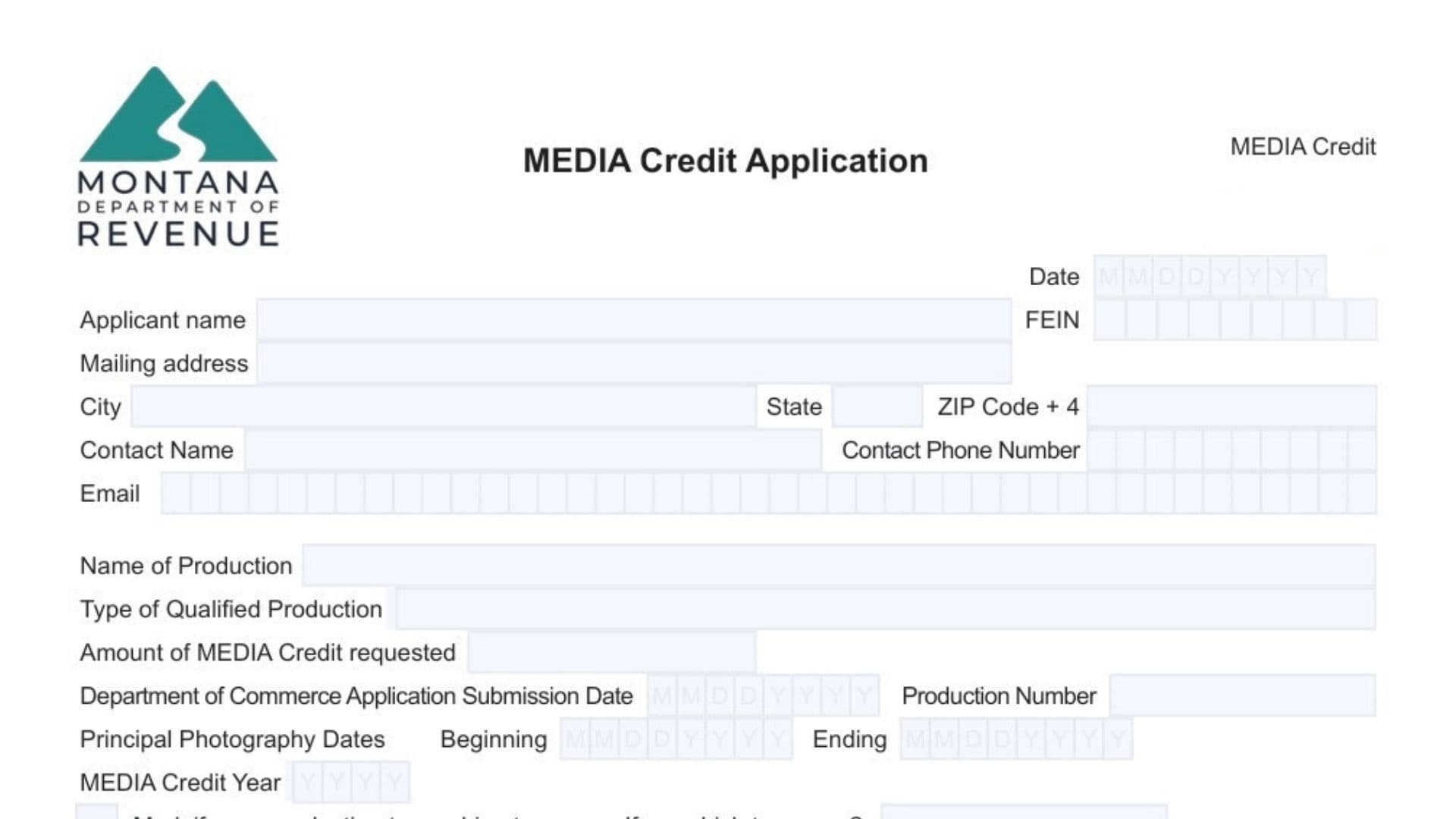
The Montana MEDIA Credit Application is a formal request document that production companies submit to the Montana Department of Revenue to claim tax credits for qualified media production expenses incurred in Montana. This application must be filed by the same entity that originally applied for the media credit with the Department of Commerce, and it serves as the official mechanism for reserving and receiving the tax credit certificate. The form works in conjunction with a CPA Report and a “Submission of Costs” (supporting documentation and fee) to create a complete application package that demonstrates the production company’s eligibility and substantiates the credit amount being requested.
The credit is available for various types of qualified productions, including films, videos, digital projects, theatrical or television series, streaming pilots, movies and scripted shows for television or streaming platforms, televised commercial advertisements, music videos, corporate videos, industrial films, website creation productions, television specials, sports events, video games, interactive entertainment, pre-released interactive games, and sound recording projects tied to feature films, series, pilots, or television movies. However, certain production types do not qualify: news coverage, local interest programming, instructional videos, commercials distributed solely on the internet, infomercials, solicitation-based productions, nonscripted television programs, feature films made primarily of stock footage not originally recorded in Montana, or projects containing obscenity as defined under Montana law (45-8-201(2), MCA).
The MEDIA credit is reserved on a first-in-time basis when a complete application is received, which means the credit amount requested will be reserved once the Department of Revenue confirms that all required components—the Submission of Costs and the CPA Report—have been properly submitted. Understanding this timing is crucial because submitting an incomplete application delays your reservation and may affect the available credit pool for your production year.
When To Submit The Application
File the MEDIA Credit Application after you have finished principal photography and when you have your CPA Report ready, since the application must be submitted together with the CPA Report. Principal photography refers to the time period when the fundamental component of your project is being materialized in Montana—beginning on the starting date of shooting and ending when the production completes wrap.
How To File Montana MEDIA Credit Application Form
Submit your completed application form along with your CPA Report to the Montana Department of Revenue. The application becomes complete only when both the “Submission of Costs” (which includes your application fee and all supporting documentation) and the CPA Report have been received. Use Montana’s File Transfer System to upload your CPA Report and supporting documentation, and use the Media Credit Payment Voucher available at MTRevenue.gov to submit your application fee.

How to Complete Montana MEDIA Credit Application Form
Header And Version Information
- “MEDIA Credit Application” title: Confirms you are completing the correct form for applying for Montana’s media production tax credit.
- “MEDIA Credit” subtitle: Identifies the specific credit program being administered by the Montana Department of Revenue.
- “V3 11/2024” version notation: Shows the form version and date, which helps ensure you are using the most current version of the application.
Contact And Help Information
- “Questions? Call us at (406) 444-6900, or Montana Relay at 711 for hearing impaired.”: Provides phone numbers for assistance if you have questions while completing the form—use 711 if you need hearing-impaired relay services.
Basic Applicant Information
- Date (first field at top): Enter the date you are completing and signing this application form using the MM DD YYYY format shown.
- Applicant name: Write the legal name of the production company or entity that applied for the media credit with the Department of Commerce (this must be the same entity, not a parent company unless the parent applied).
- FEIN (Federal Employer Identification Number): Provide the federal tax identification number assigned to the applicant production company.
- Mailing address: Enter the street address where the applicant company receives mail.
- City: Write the city name for the mailing address.
- State: Provide the two-letter state abbreviation for the mailing address.
- ZIP Code + 4: Enter the full ZIP code including the four-digit extension if available.
Primary Contact Information
- Contact Name: Provide the name of the primary individual who will handle correspondence regarding this application.
- Contact Phone Number: Enter the telephone number where the primary contact can be reached.
- Email: Write the email address for the primary contact person.
Production Details
- Name of Production: Enter the official title or working name of the media production project for which you are requesting the credit.
- Type of Qualified Production: Specify what category your production falls under (such as film, television series, commercial advertisement, video game, etc.) from the qualified production types described in the instructions.
- Amount of MEDIA Credit requested: State the dollar amount of tax credit you are requesting based on your qualified expenses.
Department Of Commerce Information
- Department of Commerce Application Submission Date: Enter the date when both your Department of Commerce application and the application fee were submitted to the Department of Commerce using MM DD YYYY format. If you submitted the application fee after the application itself, use the date when the fee was paid as your submission date.
- Production Number: Provide the alpha-numeric production number that was included in the certification letter you received from the Montana Film Office during the Department of Commerce application process (for example, the format looks like 20-PROD-90-001).
Principal Photography Timing
- Principal Photography Dates – Beginning: Enter the starting date of shooting for your production in MM DD YYYY format.
- Principal Photography Dates – Ending: Enter the date when your production completed wrap in MM DD YYYY format.
Credit Year And Tax Year Elections
- MEDIA Credit Year: Enter the year (YYYY format) that represents the first year the credit can be claimed or transferred. This is generally the year your production company incurred its expenses for the production. If you submitted your Submission of Costs within 60 days after principal photography ended, the Media Credit Year is the year you incurred the expenses; if you did not submit it within 60 days, the Media Credit Year becomes the following year.
- Mark if you are electing to combine tax years. If so, which tax years?: Check this box if your production spans more than one calendar year and you want to combine credit years into the most recent calendar year. If you check this box, specify which tax years you are combining (for example, a production filming from November 2021 through May 2022 could elect to treat all qualified expenses as part of a 2022 Media Credit Year application). Remember that if you elect to combine tax years, you must add-back all expenses from the combined years on your Montana return for the year you are claiming the media credit.
Submission Of Costs Documentation
- Submission Date of Submission of Costs: Enter the date when both your media credit application fee was paid and your supporting documentation was uploaded to Montana’s File Transfer System, using MM DD YYYY format. If the fee and documentation were not provided at the same time, use the later of the two dates (either when documentation was uploaded or the postmark date of the check). The Submission of Costs includes your substantiating documentation such as the media credit spreadsheet provided by the Montana Department of Revenue, general ledgers, invoices and purchase orders, earnings reports and payroll reports, check stubs, Form Media-Comp for each employee and loan-out, loan-out withholding agreements, verification of loan-out withholding payments, and other supporting documentation proving your qualification for the credit.
CPA Information
- CPA: Enter the name of the certified public accountant who prepared the CPA Report that accompanies this application. This individual must be authorized to practice in Montana.
- Montana License Number: Provide the Montana license number for the CPA who prepared your report.
- Submission Date of CPA Report: Enter the date the CPA Report was uploaded to Montana’s File Transfer System in MM DD YYYY format.
Application Fee Selection And Payment
- Fee section with three checkboxes: Mark the checkbox that corresponds to your situation based on your base investment amount or credit type.
- “If base investment is less than $350,000” – $500: Check this box if your base investment is under $350,000, which requires a $500 application fee.
- “If base investment is $350,000 or more” – $1,000: Check this box if your base investment is $350,000 or greater, which requires a $1,000 application fee.
- “If applying for the postproduction credit” – $1,000: Check this box if you are a postproduction company applying for the postproduction tax credit, which requires a $1,000 application fee.
- “(Please mark the applicable fee)” instruction: Reminds you to select one of the three fee options above.
- Submission date of MEDIA Credit Application fee: Enter the date you paid the application fee in MM DD YYYY format. The fee can be submitted at any time, but it is required for your application to be considered complete.
- “Provide Fee with MEDIA Credit payment voucher available at MTRevenue.gov” instruction: Directs you to use the payment voucher form found on the Montana Department of Revenue website to submit your fee payment.
Authorized Contacts Section
- “The below contacts are authorized to discuss matters related to the MEDIA Credit Application” heading: Introduces the section where you list individuals who have permission to discuss any aspects of your media credit application with the Department of Revenue.
- Authorized Contact (first set): Provides fields for Name, Phone, and Email for the first authorized contact. Include all persons with authority to discuss any and all matters related to the application.
- Name (second authorized contact): Enter the name of a second person authorized to discuss the application.
- Phone (second authorized contact): Provide the phone number for the second authorized contact.
- Email (second authorized contact): Write the email address for the second authorized contact.
- Name (third authorized contact): Enter the name of a third person authorized to discuss the application.
- Phone (third authorized contact): Provide the phone number for the third authorized contact.
- Email (third authorized contact): Write the email address for the third authorized contact.
- Instructions note about authorized contacts: If you have more than three authorized contacts and there is insufficient space on the form, attach an additional page with the extra names and contact information. If you need to modify this list later, re-submit the form with the changes, but note that re-submitting solely to add or remove authorized persons does not create a new media credit application.
Signature And Declaration
- Signature: The person signing must be an individual with contractual authority to bind the production company into agreements, such as an officer, manager, or other personnel designated by the company.
- Date (signature line): Enter the date you are signing the application in MM DD YYYY format.
- “Under penalties of false swearing, I declare that the information provided above is accurate and that I am an employee of the production company above, or I have been assigned to perform services for the production company above.” declaration: By signing, you affirm under penalty of false swearing that all information on the form is accurate and that you are either an employee of the production company or have been assigned to perform services for it.
Form Management
- Clear Form button: Use this button only if you need to erase all entries and start over, as it will reset all fields on the form.