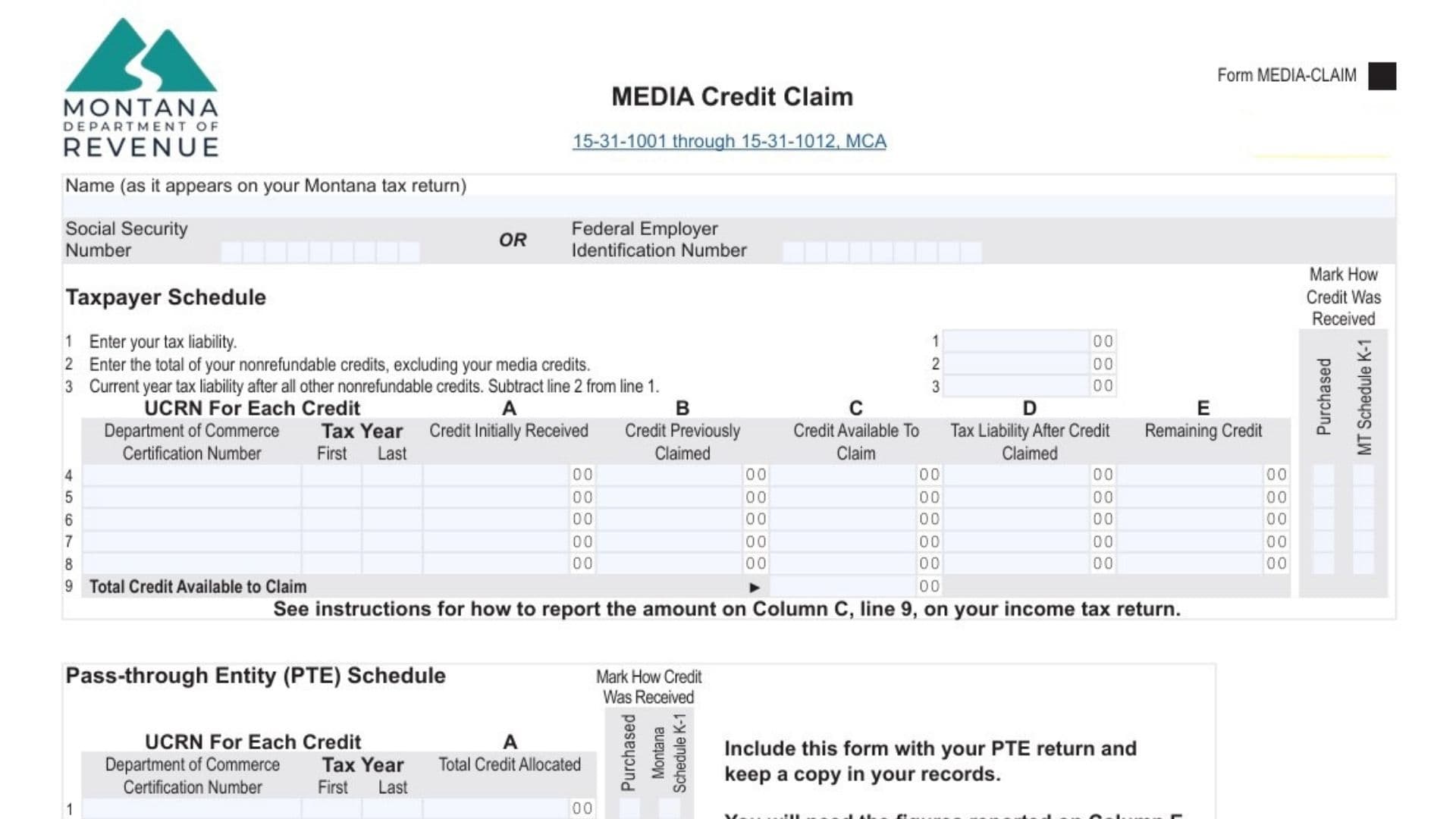
Form MEDIA-CLAIM is the official 2026 MEDIA Credit Claim form issued by the Montana Department of Revenue, designed to allow media production and postproduction companies, as well as individual investors and business entities, to report and claim tax credits earned through qualifying film, television, and media production activities in Montana. This form governs the application of Montana’s media production tax credit program, which is codified under Montana Code Annotated Sections 15-31-1001 through 15-31-1012 and administered by the Department of Revenue. The MEDIA credit is a significant financial incentive for filmmakers, production companies, and postproduction facilities that conduct eligible work in Montana, offering substantial tax liability reductions on a dollar-for-dollar basis. However, claiming these credits requires precise documentation, accurate tracking of unique credit registration numbers (UCRNs), understanding of carryover periods that can extend across multiple tax years, and proper reporting on the corresponding Montana income tax return. The form itself spans two pages and includes multiple schedules to accommodate different taxpayer types—individuals, C corporations, estates, trusts, and pass-through entities such as partnerships, S corporations, and LLCs. Understanding how to complete Form MEDIA-CLAIM correctly ensures you maximize the tax benefit of your media production investment while maintaining full compliance with Montana tax law and avoiding costly errors that could trigger audits or claim denials.
When And Why You Need The Montana MEDIA Credit Claim Form
You must file Form MEDIA-CLAIM if any of the following circumstances apply to your situation:
You Are A Certified Media Production Company – If your business has been certified by the Department of Commerce as a media production or postproduction company and you have received a validation letter from the Department of Revenue specifying the dollar amount of credit you can claim and the associated UCRN, you must file this form annually.
You Purchased A Media Credit – If you have purchased a media credit from another eligible entity and received a transfer validation letter from the department documenting the amount transferred and the UCRN, you are now the owner of that credit and must report it on this form. Upon transfer, the previous owner is no longer the credit owner and cannot claim it.
You Are Allocated Credit As A Pass-Through Entity Owner – If you are a partner in a partnership, shareholder in an S corporation, member of an LLC, or beneficiary of a trust or estate, and the entity has allocated media credits to you, you must report your share on this form or the appropriate Montana Schedule K-1 supplemental information section.
You Have Unused Credit From Prior Years – If you claimed a media credit in a previous tax year but could not use the entire credit amount against your tax liability, you may have a carryover balance that can be claimed in the current year. This form calculates and tracks those carryover amounts.
Critical Rule – You must file Form MEDIA-CLAIM annually if you own a media credit, even if you do not have a current year tax liability. This maintains an active record of your credits and ensures you do not miss the carryover deadline window defined in your UCRN.
How To File The Montana MEDIA Credit Claim Form
Filing the MEDIA Credit Claim Form involves a systematic process tailored to your entity type:
Step 1: Gather Required Documentation – Collect your validation letter or transfer validation letter from the Department of Revenue, which specifies your UCRN, the dollar amount of credit available, and the tax years during which the credit can be claimed. Also gather your Montana income tax return forms (Form 2 for individuals, Form CIT for C corporations, Form FID-3 for estates/trusts, or Form PTE for pass-through entities).
Step 2: Determine Your Entity Type – Identify whether you are filing as an individual, C corporation, estate, trust, or pass-through entity. This determines which schedule you complete on the form.
Step 3: Complete The Appropriate Schedule – If you are an individual, C corporation, estate, or trust claiming the credit directly, complete the “Taxpayer Schedule” on page 1. If you are a pass-through entity allocating credit to owners or beneficiaries, complete the “Pass-through Entity (PTE) Schedule” on page 1.
Step 4: Enter Your Identification Information – Print your legal name exactly as it appears on your Montana tax return, and enter either your Social Security Number (SSN) or Federal Employer Identification Number (FEIN), depending on your entity type.
Step 5: Gather Tax Liability Information – Compile the tax liability figures from your Montana income tax return, including total nonrefundable credits, and calculate your current year tax liability after other credits.
Step 6: Enter UCRN Information – For each media credit you own, enter the unique credit registration number (UCRN) you received from the Department of Revenue. If you own multiple credits, list them with the shortest remaining carryover period first.
Step 7: Calculate Available Credits and Carryover – Using the form columns, calculate the amount of credit you can claim in the current year based on your tax liability and the credit amount available. Determine any carryover balance that rolls to the next tax year.
Step 8: Report On Your Income Tax Return – Depending on your entity type, report the total claimed credit on the appropriate line of your Montana income tax return (Form 2 for individuals, Form CIT for C corporations, Form FID-3 for estates/trusts).
Step 9: File The Form – Include the completed Form MEDIA-CLAIM with your Montana income tax return (or with your Form PTE/FID-3 if you are a pass-through entity). Maintain a copy in your records for at least three years.
Step 10: Keep Carryover Information – Retain the “Remaining Credit” amounts (Column E) from the current year’s form to complete your next tax year’s return.

How to Complete Montana MEDIA Credit Claim Form
This schedule is completed by individuals, C corporations, estates, and trusts that are directly claiming media credits.
Identifying Information Section
Name (As It Appears On Your Montana Tax Return) – Print your full legal name exactly as shown on the Montana income tax return you are filing. For individuals, use your first name, middle initial (if applicable), and last name. For corporations, use the registered corporate name. For estates and trusts, use the legal name of the estate or trust as shown in the will or trust document.
Social Security Number OR Federal Employer Identification Number – Enter either your nine-digit SSN (if you are an individual, estate, or trust) or your nine-digit FEIN (if you are a C corporation). Do not leave this field blank; the department uses this identifier to match your form to your tax return.
Line 1: Enter Your Tax Liability
Instructions by Entity Type:
- Individuals – Report the amount from your Montana Form 2, line 8 (Montana tax after standard deduction).
- Estates and Trusts – Report the amount from your Montana Form FID-3, page 3, line 13. Exception: Electing Small Business Trusts (ESBTs) must enter the amount from Form FID-3, Schedule IV, line 22.
- C Corporations – Report the amount from your Montana Form CIT, line 10 (taxable income times the tax rate).
What This Represents – Line 1 is your total Montana income tax liability before any credits are applied. This is the maximum amount of credits you can use in the current year. If your credit amount exceeds this liability, the excess becomes a carryover balance for future years.
Line 2: Enter Total Nonrefundable Credits (Excluding Media Credits)
Instructions by Entity Type:
- Individuals – Report the amount from your Montana Form 2, Schedule III, line 14, but subtract any media credit reported on line 11 of that schedule. This prevents double-counting the media credit.
- Estates and Trusts – Report the combined amounts from your Montana Form FID-3, page 3, lines 14 and 15, but exclude the media credit.
- Electing Small Business Trusts – Report the amount from Form FID-3, Schedule IV, line 23, excluding the media credit.
- C Corporations – Report the amount from your Montana Form CIT, line 21, but subtract the media credit shown on line 20 of that form.
What This Represents – Line 2 accounts for all other tax credits you are claiming (such as earned income credits, property tax relief, dependent care credits, etc.). These other credits reduce your tax liability before you apply your media credit.
Line 3: Current Year Tax Liability After All Other Nonrefundable Credits
Calculation – Subtract line 2 from line 1. This is your remaining tax liability available to be offset by your media credit.
Example: If your tax liability (line 1) is $10,000 and your other nonrefundable credits (line 2) are $2,000, your line 3 would be $8,000. This $8,000 is the maximum media credit you can claim in the current year.
Lines 4 through 8: Enter Each Media Credit UCRN
You may list up to five different media credits on this form (one per line). If you own more than five credits, file additional Form MEDIA-CLAIM copies.
UCRN (Unique Credit Registration Number) – Enter the complete UCRN you received from the Department of Revenue validation letter or transfer letter. A typical UCRN format is “20-Post-10-002-2023-2027,” where the numbers indicate the credit type, the initial year (2023), and the final carryover year (2027).
Important Rule – Enter credits with the shortest remaining carryover period first. This ensures you use credits that will expire sooner before using those with longer remaining periods.
Mark How Credit Was Received – Check one of two boxes:
- Checkbox: “Purchased” – Check this if you purchased this credit from another eligible entity.
- Checkbox: “MT Schedule K-1” – Check this if you received this credit allocation from a pass-through entity (partnership, S corporation, LLC) on a Montana Schedule K-1.
- Leave Both Unchecked – If you are a certified media production company that earned the credit directly (not purchased or allocated), leave both boxes blank.
Department of Commerce Certification Number (Column A) – Enter the department certification number associated with the media project or credit. This may be the same as or related to your UCRN; refer to your validation letter.
Tax Year (Column B) – Enter the tax year during which you initially received the credit. This helps the department track credit age and carryover periods.
Credit Initially Received (Column C) – Enter the dollar amount of the media credit you originally received. This is taken directly from your validation letter or transfer letter.
Credit Previously Claimed (Column D) – Enter the amount of this credit that you claimed on your Montana income tax return in prior years. If this is the first year you are claiming this credit, enter $0.
Credit Available To Claim (Column E) – Calculate this by subtracting column D from column C. This is the unused portion of your credit that is still available for claiming. Example: If you initially received $50,000 (column C) and previously claimed $20,000 (column D), your available credit is $30,000 (column E).
Tax Liability After Credit Claimed (Column F) – Subtract the credit claimed from line 3. However, do not claim more credit than your line 3 amount. Example: If your line 3 tax liability is $8,000 and your available credit is $30,000, you can only claim $8,000. Your column F would be $0 (line 3 minus $8,000). Do not carry this calculation below $0.
Remaining Credit (Column G) – Calculate this by subtracting the claimed credit from column E. This is your carryover balance for the next tax year. Example: Using the prior example, if your available credit (column E) is $30,000 and you claim $8,000, your remaining credit (column G) is $22,000. You will report this $22,000 on next year’s Form MEDIA-CLAIM.
Carryover Deadline – You cannot carry over any excess credit after the tax year that ends in the final calendar year shown in your UCRN. If your UCRN is “20-Post-10-002-2023-2027,” you must claim or lose any remaining balance by the tax year ending in 2027.
Line 9: Total Credit Available To Claim
Calculation – Add all amounts in column E (Credit Available To Claim) from lines 4 through 8. This is the total credit you could potentially claim if you had unlimited tax liability.
How To Report On Your Income Tax Return – The form instructs you to report the amount from line 9, column C (after applying your tax liability limitation) as follows:
- Individuals – Report on Montana Form 2, Schedule III, line 11.
- Estates and Trusts – Include on Montana Form FID-3, page 3, line 15. Also, if you have remaining credits (column G amounts), deduct the sum of those from your line 9 total and report the net amount on Form FID-3, Schedule C, Column C, line 20.
- C Corporations – Report on Montana Form CIT, Schedule C, Column B, line 20. Deduct any remaining credits (column G amounts) from the line 9 total and report the net on Schedule C, Column C, line 20.
Line-By-Line Instructions For The Pass-Through Entity Schedule
This schedule is completed by partnerships, S corporations, LLCs, and entities taxed as pass-through entities (Form PTE), as well as estates and trusts that allocate media credits to owners or beneficiaries.
Lines 1 through 5: Enter Each Media Credit UCRN
Similar to the Taxpayer Schedule, you enter each UCRN you own or are allocating. However, this schedule has a critical timing requirement:
Tax Year Eligibility – You can only allocate a media credit to owners or beneficiaries if the tax year for which you are filing the form falls within the carryover period covered by the UCRN. Example: If your UCRN is “20-Post-10-002-2023-2027,” you can allocate the credit for tax years 2023 through 2027. You cannot allocate it for tax year 2022 (before the starting year) or 2028 (after the ending year).
Mark How Credit Was Received – Check the appropriate box:
- Checkbox: “Purchased” – You purchased the credit from another entity.
- Checkbox: “MT Schedule K-1” – You received the credit from another pass-through entity (your entity received an allocation from a partnership, S corporation, or LLC that you are now passing through to your owners/beneficiaries).
- Leave Both Unchecked – If your entity earned the credit directly through certified media production work.
Department of Commerce Certification Number (Column A) – Enter the certification number from your validation letter.
Tax Year (Column B) – Enter the tax year associated with the credit.
Total Credit Allocated (Column C) – Enter the total dollar amount of media credit you are allocating to all owners or beneficiaries combined for this UCRN. This must not exceed the total amount of the credit you own.
Instructions Following the Form – The form states: “Include this form with your PTE return and keep a copy in your records. You will need the figures reported on Column E, if any, to complete next tax year’s return.” If you cannot allocate the entire credit in the current year (due to carryover limitations or other factors), column E will show the remaining amount to carry to the next year.
Montana Schedule K-1 Supplemental Information Section (Page 2)
If you are a pass-through entity, estate, or trust allocating media credits to owners or beneficiaries, you must complete this supplemental section for each individual owner or beneficiary that is receiving an allocation.
Entity Information
Tax Year – Enter the tax year you are filing (e.g., 2026).
PTE, Estate, or Trust Name – Enter the legal name of the entity making the allocation (your partnership, S corporation, LLC, estate, or trust).
FEIN – Enter the Federal Employer Identification Number of the entity.
Owner or Beneficiary Information
Name – Enter the legal name of the owner or beneficiary receiving the allocation. If you are allocating to a corporation or other entity, use its legal name.
SSN or FEIN – Enter the owner’s Social Security Number (if an individual) or their Federal Employer Identification Number (if they are another business entity).
Credit Allocation Lines 1 through 5
UCRN – For each media credit being allocated to this specific owner or beneficiary, enter the UCRN.
Department of Commerce Certification Number (Column A) – Enter the certification number from your validation letter.
Tax Year (Column B) – Enter the tax year the credit applies to.
Total Credit Allocated (Column C) – Enter the dollar amount of this specific credit that you are allocating to this owner or beneficiary. The sum of amounts allocated to all owners for a single UCRN cannot exceed the total credit available for that UCRN.
Important Instruction – Include this completed supplemental information with the Montana Schedule K-1 you send to each owner or beneficiary. Do not send just the Form MEDIA-CLAIM to them; the supplemental information on page 2 is what they need to report on their own Form MEDIA-CLAIM.
Allocation Methodology For Pass-Through Entities
If you are a pass-through entity allocating media credits, the form instructs: “Unless a special allocation is required in your partnership agreement or trust instrument, allocate your media credit to your owners or beneficiaries based on their percentage of items of income and loss and credit.”
Standard Allocation Example – If your partnership has three equal partners (each owning 33.33%), and you have a $60,000 media credit to allocate, each partner receives a $20,000 allocation. However, if your partnership agreement allows for special allocations of certain items, you may deviate from this pro-rata method.
Key Timing And Carryover Rules
When Credits Can Be Claimed – You cannot claim a media credit until you file your income tax return for the tax year that marks the starting year of your UCRN. Example: If your UCRN reads “20-Post-10-002-2023-2027,” you must wait to claim the credit until you file your 2023 tax return. You cannot claim it on a 2022 return, even if you completed the media work early.
Carryover Window – The last tax year in which you can claim or carry over any remaining credit is the tax year that ends in the ending year of your UCRN. Any unused balance after that final year is lost.
Example From The Form – “You completed principal photography in the year 2023 and received a validation letter from the Department of Revenue with $1,000 of credit associated with UCRN 20-Post-10-002-2023-2027. The $12 million cap for the year 2023 has not been exceeded. You must wait until you file your tax return for Tax Year 2023 to claim the credit. The last year you can claim the credit is Tax Year 2027.”
Critical Compliance Points
Annual Filing Requirement – You must file Form MEDIA-CLAIM every year you own a media credit, even if you have no tax liability and claim no credit in that year. Missing a year could result in loss of the credit if it falls outside the carryover window.
Coordination With Income Tax Return – Do not rely on Form MEDIA-CLAIM alone. You must also report the claimed credit on your actual Montana income tax return (Form 2, Form CIT, Form FID-3, or Form PTE) on the specific line required for your entity type. The form is a supporting document to calculate and track your credits, not a standalone claim.
Transfer Validation Letters – If you purchase a credit and do not receive your transfer validation letter within 30 days of recording the transfer, contact the Montana Department of Revenue immediately. Without this letter, you cannot file Form MEDIA-CLAIM for the purchased credit.
Amended Returns and Corrected Credits – If you made an error on a prior year’s Form MEDIA-CLAIM, file an amended return (Form 2-X, Form CIT-X, Form FID-3-X, or Form PTE-X, depending on your entity type) along with a corrected Form MEDIA-CLAIM.
Questions And Contact Information
If you have questions about completing Form MEDIA-CLAIM, contact the Montana Department of Revenue:
Phone: (406) 444-6900
Montana Relay Service: 711 (for individuals who are hearing impaired)