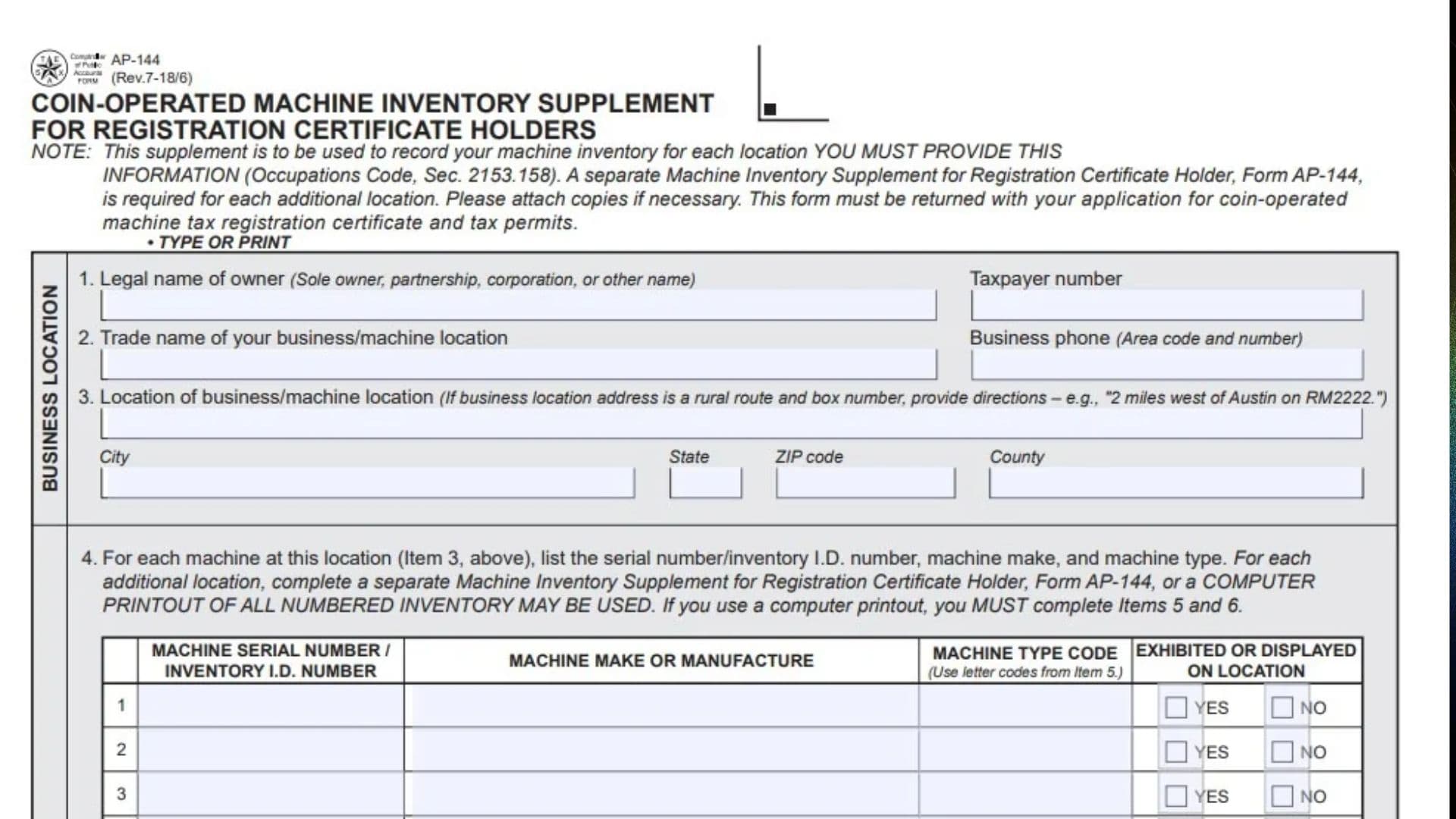
Texas Form AP-144, Coin-Operated Machine Inventory Supplement for Registration Certificate Holders, is a supplemental form used to report the inventory of coin-operated machines at a particular business location. It is associated with the registration requirements administered by the Texas Comptroller of Public Accounts under Section 2153.158 of the Texas Occupations Code.
The form is designed for individuals and businesses applying for or holding a coin-operated machine tax registration certificate and applicable tax permits. It collects information about the machine owner, business location, individual machines, machine identification numbers, manufacturers, machine types, and the number of machines requiring tax permits.
Form AP-144 requires applicants to provide a separate inventory for each business or machine location. If a business operates machines at multiple locations, a separate supplement must be completed for every additional location. This helps identify where the machines are located and ensures that the inventory information is recorded separately for each business location.
The form provides space to list up to 20 individual machines. For every machine, the owner must provide its serial number or inventory identification number, manufacturer or make, machine type code, and whether the machine is exhibited or displayed at that location. It also includes a summary section for reporting the number of music machines, pool tables, video games, and other coin-operated machines.
Completing Form AP-144 accurately is important because the information supports the coin-operated machine registration and tax permit application process. Missing machine identification numbers, incorrect machine classifications, or inaccurate inventory totals may create difficulties when the application is reviewed. The completed supplement must be returned with the application for a coin-operated machine tax registration certificate and tax permits.
How To File Texas Form AP-144
Form AP-144 must be completed and returned with your application for a coin-operated machine tax registration certificate and tax permits.
The supplement is used to document the machine inventory at each individual business location.
If you operate coin-operated machines at more than one location, you must complete a separate Form AP-144 for each additional location. You may attach additional copies of the form when necessary.
The form also permits applicants to provide a computer printout of all numbered machine inventory instead of manually listing every machine. However, if you use a computer printout, you must still complete Items 5 and 6.
Information To Prepare Before Completing the Form
Gather the following information before starting:
- Legal name of the machine owner.
- Taxpayer identification number.
- Trade name of the business or machine location.
- Business telephone number, including area code.
- Complete physical address of the business or machine location.
- City, state, ZIP code, and county.
- Serial number or inventory identification number for each machine.
- Machine manufacturer or make.
- Machine type classification.
- Information about whether each machine is exhibited or displayed at the location.
- Total number of music machines.
- Total number of pool tables.
- Total number of video games.
- Total number of other coin-operated machines.
If you operate multiple locations, organize the inventory information separately for each location before completing the supplements.

How To Complete Texas Form AP-144
Form AP-144 contains six numbered items divided into two main sections:
- Business Location Information.
- Machine Inventory List.
The final section summarizes the machine categories and calculates the total number of machines requiring tax permits.
Business Location Information
This section identifies the legal owner, business name, contact details, and physical location associated with the machine inventory.
Item 1: Legal Name of Owner and Taxpayer Number
Enter the legal name of the individual or business that owns the coin-operated machines.
The form allows the owner to be identified as a sole owner, partnership, corporation, or another applicable business organization.
Enter the corresponding taxpayer number in the designated field.
Make sure the legal name and taxpayer number accurately identify the owner responsible for the registration application.
Item 2: Trade Name of Your Business or Machine Location
Enter the trade name under which the business operates or the name associated with the machine location.
If the business uses a name different from its legal owner’s name, provide the appropriate operating or trade name.
Business Phone
Enter the business telephone number, including the area code.
Provide a current telephone number where the owner or business representative can be contacted if additional information is required.
Item 3: Location of Business or Machine Location
Enter the complete physical address where the coin-operated machines are located.
Provide the street address or other information necessary to identify the actual machine location.
If the business location uses a rural route and box number instead of a conventional street address, provide additional directions to help identify the property.
For example, the form provides this type of location description: “2 miles west of Austin on RM2222.”
City
Enter the name of the city where the business or machine location is situated.
State
Enter the two-letter abbreviation of the state where the location is situated.
ZIP Code
Enter the ZIP code associated with the physical business or machine location.
County
Enter the county in which the business or machine location is located.
Make sure the city, state, ZIP code, and county correspond to the physical location where the machines are maintained.
Machine Inventory List
The machine inventory section records the individual coin-operated machines located at the business address provided in Item 3.
The form provides 20 numbered entries. Each machine must be identified using its serial number or inventory identification number, manufacturer or make, machine type code, and display status.
If you have more than 20 machines or operate additional locations, follow the instructions for using additional supplements or a computer-generated inventory printout.
Item 4: Individual Machine Inventory Information
For every machine at the business location, complete the applicable information in the following columns.
Machine Serial Number / Inventory ID Number
Enter the serial number assigned to the machine by its manufacturer.
If the machine does not have a manufacturer serial number, enter its inventory identification number, as applicable.
Use a separate entry for each machine so that every item can be individually identified.
Machine Make or Manufacture
Enter the manufacturer or make of the machine.
Provide the brand or manufacturer name associated with the individual machine.
If multiple machines have the same manufacturer, enter the appropriate information for each machine separately.
Machine Type Code
Enter the machine type code corresponding to the classification used in Item 5.
Use the appropriate letter code to identify the machine category.
The form refers applicants to Item 5 for the available machine classifications.
Exhibited or Displayed on Location
Indicate whether the machine is exhibited or displayed at the business location identified in Item 3.
For each machine, select one of the following:
- Yes: Select this option if the machine is exhibited or displayed at the location.
- No: Select this option if the machine is not exhibited or displayed at the location.
Select the appropriate response for every machine listed.
Machine Inventory Entries 1 Through 20
Use the numbered rows to report each individual machine.
Enter one machine per row, providing its identification number, manufacturer, type code, and display status.
If the business has fewer than 20 machines, complete only the necessary rows.
If you have additional machines, use another Form AP-144 or provide a computer printout containing all numbered machine inventory.
Computer-Generated Machine Inventory Printout
Instead of manually completing the individual machine inventory table, you may provide a computer printout of all numbered inventory.
The printout must contain the machine inventory identification information required by the form.
If you choose this method, you must still complete Item 5 and Item 6 on Form AP-144.
Item 5: Number of Each Type of Coin-Operated Machine
Item 5 summarizes the number of each type of music, skill, or pleasure coin-operated machine located at the business address.
The form divides the inventory into four categories, identified by letters A through D.
Enter the total number of machines belonging to each category.
Column A: Music
Enter the total number of music coin-operated machines at the location.
Include the machines that fall under the music category.
Column B: Pool Tables
Enter the total number of pool tables at the location.
Count each applicable pool table and report the combined number in this column.
Column C: Video Games
Enter the total number of coin-operated video games at the location.
Include the applicable video game machines in this category.
Column D: Other
Enter the total number of other music, skill, or pleasure coin-operated machines that do not fall into the three preceding categories.
Use this category for the remaining applicable machine types.
Make sure each machine is counted in the appropriate category and is not counted more than once.
Item 6: Total Number of Machines Requiring Tax Permits
Item 6 calculates the total number of machines at the business location that require tax permits.
Add the amounts reported in Item 5, Columns A, B, C, and D.
The calculation is:
Total Machines = Music + Pool Tables + Video Games + Other
Enter the combined number in the designated field.
For example, if a location has:
- 5 music machines.
- 3 pool tables.
- 8 video games.
- 4 other machines.
The total is:
5 + 3 + 8 + 4 = 20 machines.
Enter 20 as the total number of machines requiring tax permits.
Verify that the total agrees with the machine inventory maintained for the location.
Additional Location and Inventory Requirements
Form AP-144 contains important instructions for businesses operating coin-operated machines at multiple locations or maintaining large machine inventories.
Separate Supplement for Each Additional Location
A separate Form AP-144 is required for each additional business or machine location.
Do not combine machines from different locations into one location’s inventory list.
Complete the business location information and machine inventory details separately for each location.
Attaching Additional Copies
If the available inventory rows are insufficient, attach additional copies of Form AP-144 as necessary.
Use the additional forms to provide the required machine identification information.
Using a Computer Printout
A computer printout of all numbered machine inventory may be submitted instead of manually listing the machines in Item 4.
However, Items 5 and 6 must still be completed on the supplement.
Returning the Completed Supplement
The completed Form AP-144 must be returned with the application for the coin-operated machine tax registration certificate and tax permits.
Make sure the inventory information is complete for every applicable business location.
Taxpayer Information and Privacy Rights
The bottom of Form AP-144 includes a notice explaining certain rights available to taxpayers under Chapters 552 and 559 of the Texas Government Code.
These provisions address the taxpayer’s ability to review information maintained about them, request access to that information, and correct information when necessary.
If you need to review or correct information maintained in your records, contact the Texas Comptroller using the address or telephone number provided on your application.
Final Review Before Filing
Before returning Texas Form AP-144 with your registration certificate and tax permit application, review the following checklist.
- The legal name of the machine owner is entered correctly.
- The taxpayer number is accurate.
- The business trade name is provided.
- The business telephone number includes the correct area code.
- The physical business or machine location address is complete.
- Rural route directions are included if necessary.
- The city is entered correctly.
- The state abbreviation is accurate.
- The ZIP code is correct.
- The county is identified correctly.
- Every machine at the location is included in the inventory.
- Each machine’s serial number or inventory identification number is provided.
- The manufacturer or machine make is identified.
- The appropriate machine type code is entered.
- The Yes or No display status is selected for every listed machine.
- Additional inventory sheets are attached if the 20 available rows are insufficient.
- A separate Form AP-144 is completed for every additional location.
- If a computer printout is used, it includes the numbered machine inventory.
- Item 5, Column A, correctly reports the number of music machines.
- Item 5, Column B, correctly reports the number of pool tables.
- Item 5, Column C, correctly reports the number of video games.
- Item 5, Column D, correctly reports the number of other machines.
- Item 6 correctly adds the totals from Item 5, Columns A through D.
- The completed supplement is included with the coin-operated machine tax registration certificate and tax permit application.
- A copy of the completed inventory information is retained for business records.
Texas Form AP-144 is an essential inventory supplement for businesses and individuals registering coin-operated machines. By accurately identifying the owner, business location, individual machines, machine classifications, and total machine counts, applicants can provide the inventory information required for the registration certificate and tax permit application. Businesses operating at multiple locations should prepare a separate supplement for each location and verify all inventory totals before returning the completed forms.