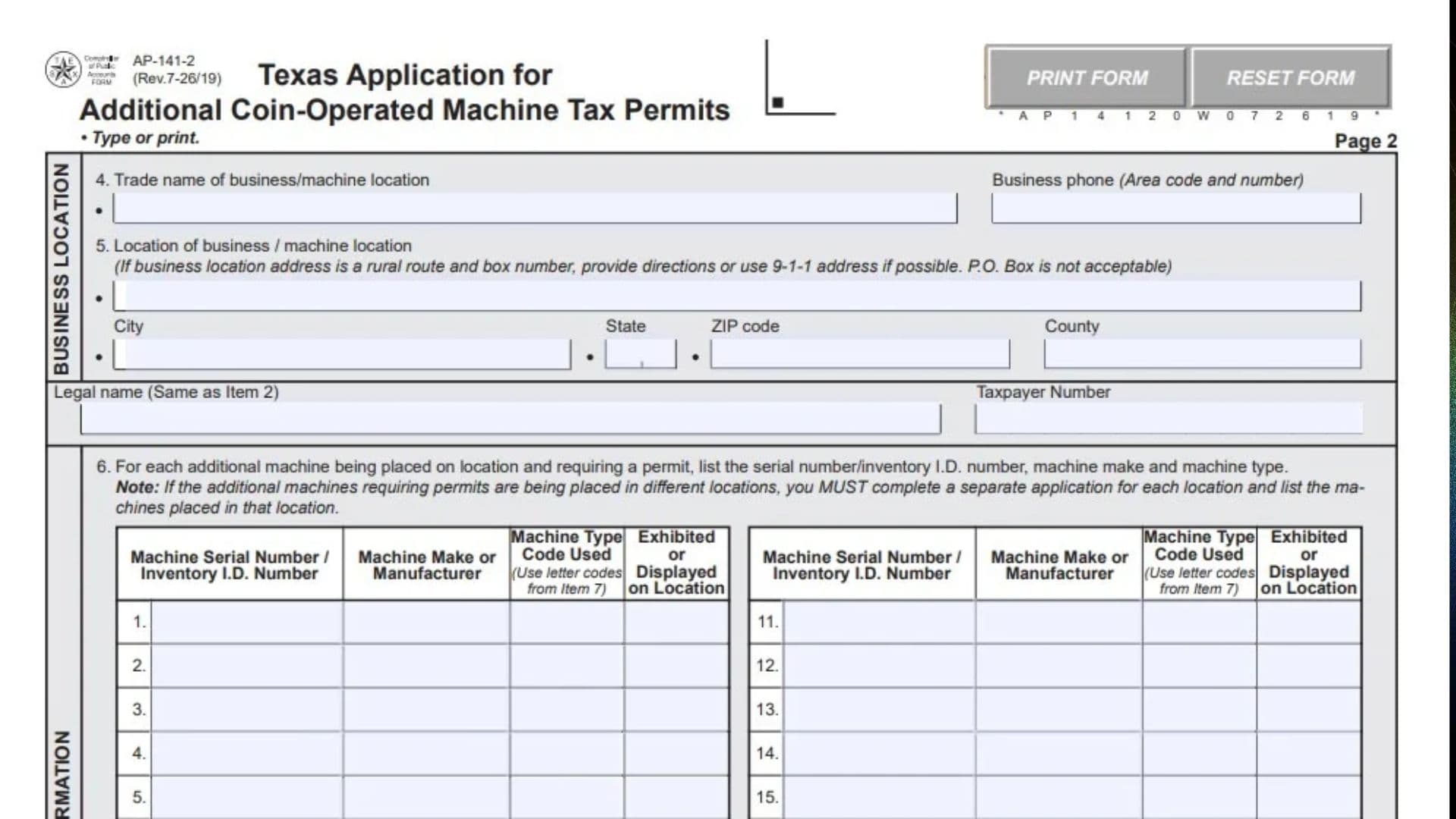
Texas Form AP-141, Application for Additional Coin-Operated Machine Tax Permits, is a document issued by the Texas Comptroller of Public Accounts. It is used by eligible coin-operated machine owners who hold a valid Registration Certificate or General Business License and need to purchase additional occupation tax permits for machines being placed at a business location in Texas. The form helps the state identify the owner of the machines, verify the business and physical location where the machines will operate, record machine identification details, and calculate the occupation tax due for the additional permits. It applies to music, skill, and pleasure coin-operated machines, including machines such as music machines, pool tables, and video games. Owners must register eligible machines using their serial numbers or assigned inventory identification numbers, manufacturer information, and machine type.
The application collects several types of information, including the calendar year for which the permits are requested, the owner’s legal business name, taxpayer identification number, mailing address, business trade name, physical machine location, and contact information. It also requires a detailed inventory of the additional machines, including their identification numbers, manufacturers, machine categories, and location status. Applicants must provide the number of machines in each category and calculate the applicable occupation tax based on the calendar quarter in which the machines are first placed at the location.
Completing Form AP-141 accurately is important because the Texas Comptroller uses the information to process additional occupation tax permits and maintain accurate machine registration records. Each eligible machine must have its own valid tax permit, and the permit must be securely attached to the machine in a location where the public can clearly see it. Incorrect machine information, incomplete business details, or inaccurate tax calculations may delay the application process or result in incorrect permit records.
The form is not intended for coin-operated cigarette, service, or merchandise vending machines or coin-operated amusement machines designed exclusively for children. Machine owners should also understand that occupation tax permits are issued for machines exhibited or displayed at an actual location, rather than for machines kept in storage.
How To File Form AP-141
Form AP-141 must be completed and mailed to the Texas Comptroller of Public Accounts along with the required payment.
Mailing address:
Comptroller of Public Accounts
111 E. 17th St.
Austin, TX 78774-0100
Before completing the application, gather the following information:
- The calendar year for which the additional permits are requested.
- Your valid Registration Certificate or General Business License information.
- The legal name of the machine owner or business.
- The taxpayer identification number.
- The current mailing address and any updated address information.
- The trade name and physical address of the business where the machines will be placed.
- The business telephone number.
- The serial number or inventory identification number of every additional machine.
- The machine manufacturer or make.
- The machine type for each machine.
- The number of additional machines in each machine category.
- The calendar quarter when each machine is first placed at the location.
- The total occupation tax calculated for the additional permits.
- The name, title, driver’s license information, and contact details of the authorized person signing the application.
Applicants should type or print all information clearly. Payment must be made payable to the State Comptroller. Cash should not be mailed with the application.
If the additional machines will be placed at different business locations, a separate application must be completed for each location.

How To Complete Form AP-141
Form AP-141 consists of 11 numbered items divided into taxpayer information, business location, machine information, occupation tax calculation, and certification sections. The following instructions explain how to complete each item.
Taxpayer Information
This section identifies the machine owner and confirms the business license or registration status associated with the application.
Item 1: Calendar Year and License Type
Enter the calendar year for which you are requesting the additional coin-operated machine tax permits.
Select the appropriate checkbox to identify which credential you currently hold:
- Registration Certificate: Select this option if you hold a valid Registration Certificate for the applicable calendar year.
- General Business License: Select this option if you hold a valid General Business License for the applicable calendar year.
Choose the option that correctly represents your current licensing status. Do not select both unless the form’s applicable instructions specifically permit it.
Item 2: Legal Name of Owner and Taxpayer Number
Enter the full legal name of the person or business that owns the coin-operated machines.
The legal owner may be an individual operating as a sole proprietor, a partnership, a corporation, or another legal business entity.
Enter the taxpayer identification number associated with the owner in the designated field.
Make sure the legal name matches the name associated with your existing Registration Certificate or General Business License. The taxpayer number should also be entered accurately to help the Comptroller identify the correct account.
Item 3: Mailing Address
Check the box if your mailing address has changed since your previous registration or licensing information was submitted.
If you select this option, provide your complete and updated mailing address.
Enter the following information:
- Mailing Address: Provide the street number and street name, P.O. Box, or rural route and box number.
- City: Enter the city where your mailing address is located.
- State: Provide the applicable state abbreviation.
- ZIP Code: Enter the correct five-digit ZIP code or applicable extended ZIP code.
- County: Enter the county associated with the mailing address.
If your mailing address has not changed, do not check the change-of-address box. Ensure that any address entered is complete and accurate.
Business Location
This section identifies the business operating under the trade name and the physical location where the additional coin-operated machines will be placed.
Item 4: Trade Name of Business and Business Phone
Enter the trade name used by the business or the name associated with the location where the coin-operated machines will operate.
A trade name is the name under which the business is commonly known to customers. It may differ from the owner’s legal name entered in Item 2.
In the business phone field, provide the telephone number for the business location.
Include the area code and the complete telephone number so the Comptroller can contact the business if additional information is needed.
Item 5: Location of Business or Machine Location
Enter the complete physical address of the business or the specific location where the additional coin-operated machines will be installed or displayed.
This address must identify the actual machine location rather than a mailing address.
Provide the following details:
- Street Address: Enter the complete street number and street name.
- City: Enter the city where the machines will be located.
- State: Enter the applicable state abbreviation.
- ZIP Code: Provide the correct ZIP code.
- County: Enter the county where the business or machine location is situated.
If the business location uses a rural route and box number, provide additional directions to help identify the location. A 9-1-1 street address may be provided when available.
A P.O. Box cannot be used as the physical business or machine location address.
The form also requires the following information beneath the location details:
- Legal Name: Enter the same legal owner name provided in Item 2.
- Taxpayer Number: Enter the same taxpayer identification number provided in Item 2.
Ensure that the owner information matches the taxpayer information section.
Machine Information
This section provides the detailed inventory of the additional coin-operated machines for which you are purchasing occupation tax permits.
Item 6: Additional Machine Identification and Details
List each additional coin-operated machine being placed at the business location and requiring a tax permit.
The form provides space for up to 20 machines. Each machine must be identified separately.
Complete the following columns for every machine:
Machine Serial Number / Inventory I.D. Number
Enter the manufacturer’s serial number assigned to the machine.
If the machine does not have a manufacturer’s serial number, the owner must assign an inventory identification number and permanently stamp or engrave that number on the machine.
Machine Make or Manufacturer
Enter the brand, make, or manufacturer’s name associated with the machine.
Use the information available on the machine’s identification plate or manufacturer documentation.
Machine Type Code Used
Enter the appropriate letter code corresponding to the machine category listed in Item 7.
Use the following categories:
- A: Music machines.
- B: Pool tables.
- C: Video games.
- D: Other eligible coin-operated machines.
Choose the category that correctly describes each machine.
Exhibited or Displayed on Location
Identify the machine’s status in relation to the business location. The machine must be exhibited or displayed at the location to qualify for an occupation tax permit under the application instructions.
List only the additional machines being placed at the location for which you are requesting permits.
The application provides two groups of machine entries, numbered 1 through 10 and 11 through 20. Use these spaces to list all applicable machines.
If you need more room than the form provides, attach a supplemental page or a computer-generated printout containing the same machine information.
If machines requiring additional permits will be placed at different business locations, complete a separate Form AP-141 for each location and list only the machines assigned to that particular location.
Item 7: Number of Machines by Type
Enter the total number of additional machines in each category being placed at this specific business location for which you are purchasing tax permits.
The form provides four categories:
- Item 7A – Music: Enter the total number of music machines.
- Item 7B – Pool Tables: Enter the total number of pool tables.
- Item 7C – Video Games: Enter the total number of video game machines.
- Item 7D – Other: Enter the total number of other eligible music, skill, or pleasure coin-operated machines that do not fall into the first three categories.
Count each machine only once and ensure that the category totals match the machine inventory provided in Item 6.
Item 8: Total Number of Additional Machines
Calculate the total number of additional coin-operated machines requiring occupation tax permits at this business location.
Add the amounts entered in Items 7A, 7B, 7C, and 7D.
Use the following calculation:
Total Machines = Item 7A + Item 7B + Item 7C + Item 7D
Enter the resulting number in the space provided.
Check that the total agrees with the number of individual machines listed in Item 6.
Occupation Tax Calculation
This section determines the total occupation tax payable for the additional machine permits.
The applicable tax rate depends on the calendar quarter in which each machine is first placed at the business location.
The form provides four quarterly tax rates:
- First quarter (January–March): $60 per machine.
- Second quarter (April–June): $45 per machine.
- Third quarter (July–September): $30 per machine.
- Fourth quarter (October–December): $15 per machine.
Calculate the tax separately for each quarter in which additional machines are first placed at the location.
Item 9: Calculate the Total Occupation Tax Due
Complete each quarterly calculation using the number of machines first placed at the location during that quarter.
Item 9a: First Quarter (January–March)
Enter the number of additional machines first placed at the business location between January and March.
Multiply that number by $60 per machine.
Calculation:
Number of Machines × $60 = First-Quarter Tax
Enter the resulting amount in the designated dollar field.
Item 9b: Second Quarter (April–June)
Enter the number of additional machines first placed at the business location between April and June.
Multiply that number by $45 per machine.
Calculation:
Number of Machines × $45 = Second-Quarter Tax
Enter the calculated amount in the space provided.
Item 9c: Third Quarter (July–September)
Enter the number of additional machines first placed at the business location between July and September.
Multiply that number by $30 per machine.
Calculation:
Number of Machines × $30 = Third-Quarter Tax
Enter the resulting tax amount in the appropriate field.
Item 9d: Fourth Quarter (October–December)
Enter the number of additional machines first placed at the business location between October and December.
Multiply that number by $15 per machine.
Calculation:
Number of Machines × $15 = Fourth-Quarter Tax
Enter the calculated amount in the designated field.
Make sure each machine is included in the correct quarter based on when it is first placed at the location. Do not count the same machine in more than one quarterly calculation.
Item 10: Total Amount Due for Tax Permits
Calculate the total occupation tax payable by adding the amounts from all four quarterly calculations in Item 9.
Use the following calculation:
Total Amount Due = Item 9a + Item 9b + Item 9c + Item 9d
Enter the final amount in the dollar field.
This is the total payment required for the additional occupation tax permits requested in the application.
Payment must be made payable to the State Comptroller. Do not send cash with the application.
Statement and Certification
This section confirms that the applicant is authorized to submit the application and that the information provided is accurate.
Item 11: Certification
Read the certification statement carefully before signing the application.
By completing this section, you confirm that you are requesting occupation tax permits for the coin-operated machines listed in the application and that the information provided is true and correct.
Complete the following fields:
Type or Print Name and Title of Sole Owner, Partner, or Officer
Enter the full name of the individual responsible for submitting the application.
Provide the person’s appropriate business title or legal capacity, such as sole owner, partner, or corporate officer.
Driver License Number / State
Enter the driver’s license number of the individual signing the application.
Also provide the state that issued the driver’s license.
Make sure the information is accurate and corresponds to the authorized individual completing the certification.
Sole Owner, Partner, or Officer Signature
The authorized individual must sign the application in the designated signature area.
The signature confirms that the applicant accepts responsibility for the information provided and certifies that the application is accurate.
Do not leave the signature field incomplete.
The form also includes a legal warning explaining that knowingly obtaining or attempting to obtain a license through fraud, false statements, or misrepresentation is a second-degree felony under Texas law. The stated penalties include imprisonment for two to twenty years and a fine of up to $10,000.
Business Phone (Area Code and Number)
Enter the business telephone number of the applicant or business associated with the application.
Include the area code and complete telephone number.
Residence Phone (Area Code and Number)
Enter the applicant’s residential telephone number, including the area code.
Provide a valid contact number where the responsible individual can be reached if clarification is required.
Additional Licensing Warning
The form also advises applicants that operating a business may require additional permits or licenses from the State of Texas or a local government authority.
Applicants should check the relevant state licensing information and contact the municipality and county where the business operates to determine whether additional local requirements apply.
The Texas.gov website is identified as an online resource for information about state licenses, permits, and registrations.
General Instructions and Important Filing Requirements
In addition to completing the numbered items, applicants should understand several important requirements included with Form AP-141.
Machine Registration Requirements
Owners of eligible music, skill, and pleasure coin-operated machines must register each machine with the Texas Comptroller.
The registration information must include:
- The machine’s serial number or inventory identification number.
- The machine’s make or manufacturer.
- The machine type.
- The business name and location where the machine is placed.
The serial number, owner’s name, and owner’s telephone number must be clearly visible on the outside of each machine.
If a machine does not have a manufacturer’s serial number, the owner must assign one and stamp or engrave it onto the machine.
The registration requirement does not cover coin-operated cigarette, service, or merchandise vending machines or coin-operated amusement machines designed exclusively for children.
Occupation Tax Permit Requirements
Eligible machine owners must purchase an annual occupation tax permit for each machine placed at a location in Texas.
The standard annual occupation tax is $60 per machine, with the application providing different rates depending on the quarter in which a machine is first placed at the location.
Each permit must be securely attached to its registered machine when the machine is placed at the location.
The permit must be visible to the public and cannot be attached on top of another permit.
Intentionally removing a current tax permit from a machine may result in criminal penalties.
Tax Permit Expiration and Renewal
Occupation tax permits expire on December 31 of each calendar year.
Machine owners must renew their permits on or before November 30 each year.
If you purchase additional coin-operated machines, you must purchase a valid occupation tax permit for each new machine placed at a business location.
Permits cannot be stockpiled or attached to unregistered machines. The Comptroller issues occupation tax permits only for machines exhibited or displayed at an actual business location.
Purchasing Machines From Out-of-State Vendors
If you purchase a coin-operated machine from an out-of-state vendor without paying Texas tax, you may be required to report and pay Texas use tax.
However, if you already paid Texas use tax directly to the vendor, you do not need to report the same tax again.
In that situation, the vendor must provide a receipt showing the amount of Texas use tax collected. Keep a copy of this receipt with your business tax records as evidence of payment.
Transferring Tax Permits When Selling a Machine
A current calendar-year occupation tax permit may be transferred when a coin-operated machine is sold.
To complete the transfer, the parties must use the Coin-Operated Machine Tax Permit(s) Ownership Transfer Statement, Form AP-212.
Applicable Laws and Regulations
The use of occupation tax permits is governed by Texas Occupations Code Section 2153.406 and Rule 3.602.
The form also identifies Section 2153.357 of the Texas Occupations Code and Section 12.33 of the Texas Penal Code in connection with fraudulent licensing applications.
Applicants should ensure that they comply with the applicable registration, permit, and machine-location requirements.
Assistance and Accessibility Information
For questions about completing Form AP-141, applicants can contact the Texas Comptroller of Public Accounts at:
Telephone: 800-531-5441, Extension 33731
The form may also be requested in alternative formats under the Americans with Disabilities Act by calling:
Accessibility Assistance: 800-252-5555
Texas law also provides individuals with certain rights to review information maintained about them by the Comptroller and request corrections, subject to applicable legal exceptions. These rights are identified under Chapters 559 and 552 of the Texas Government Code.
Final Review Before Filing
Before mailing Form AP-141, review the entire application to ensure that all required information has been provided accurately.
Use the following checklist:
- Enter the correct calendar year in Item 1.
- Select the appropriate Registration Certificate or General Business License checkbox.
- Provide the owner’s complete legal name in Item 2.
- Enter the correct taxpayer identification number.
- Check the mailing address change box if applicable.
- Provide the complete mailing address in Item 3.
- Enter the business trade name and telephone number in Item 4.
- Provide the actual physical business or machine location in Item 5.
- Do not use a P.O. Box as the physical machine location.
- Confirm that the legal name and taxpayer number match Item 2.
- List every additional machine in Item 6.
- Provide each machine’s serial number or assigned inventory identification number.
- Enter the correct machine manufacturer or make.
- Identify the appropriate machine category using the letter codes from Item 7.
- Confirm that the machines are exhibited or displayed at the specified location.
- Enter the correct machine totals in Items 7A through 7D.
- Verify that Item 8 equals the combined total of Items 7A through 7D.
- Calculate the applicable quarterly occupation tax in Item 9.
- Verify the quarterly rates of $60, $45, $30, and $15 per machine.
- Confirm that Item 10 equals the sum of Items 9a through 9d.
- Provide the authorized individual’s printed name and title in Item 11.
- Enter the driver’s license number and issuing state.
- Obtain the authorized sole owner’s, partner’s, or officer’s signature.
- Provide both business and residence telephone numbers.
- Attach a supplemental machine inventory page if additional space is needed.
- Prepare payment payable to the State Comptroller.
- Do not include cash with the application.
- Mail the completed application and payment to the Texas Comptroller of Public Accounts, 111 E. 17th St., Austin, TX 78774-0100.
A complete and accurate Form AP-141 helps the Texas Comptroller process requests for additional coin-operated machine occupation tax permits. Before submitting the application, verify the machine inventory, business location, quarterly tax calculations, and certification details to reduce the possibility of processing delays.