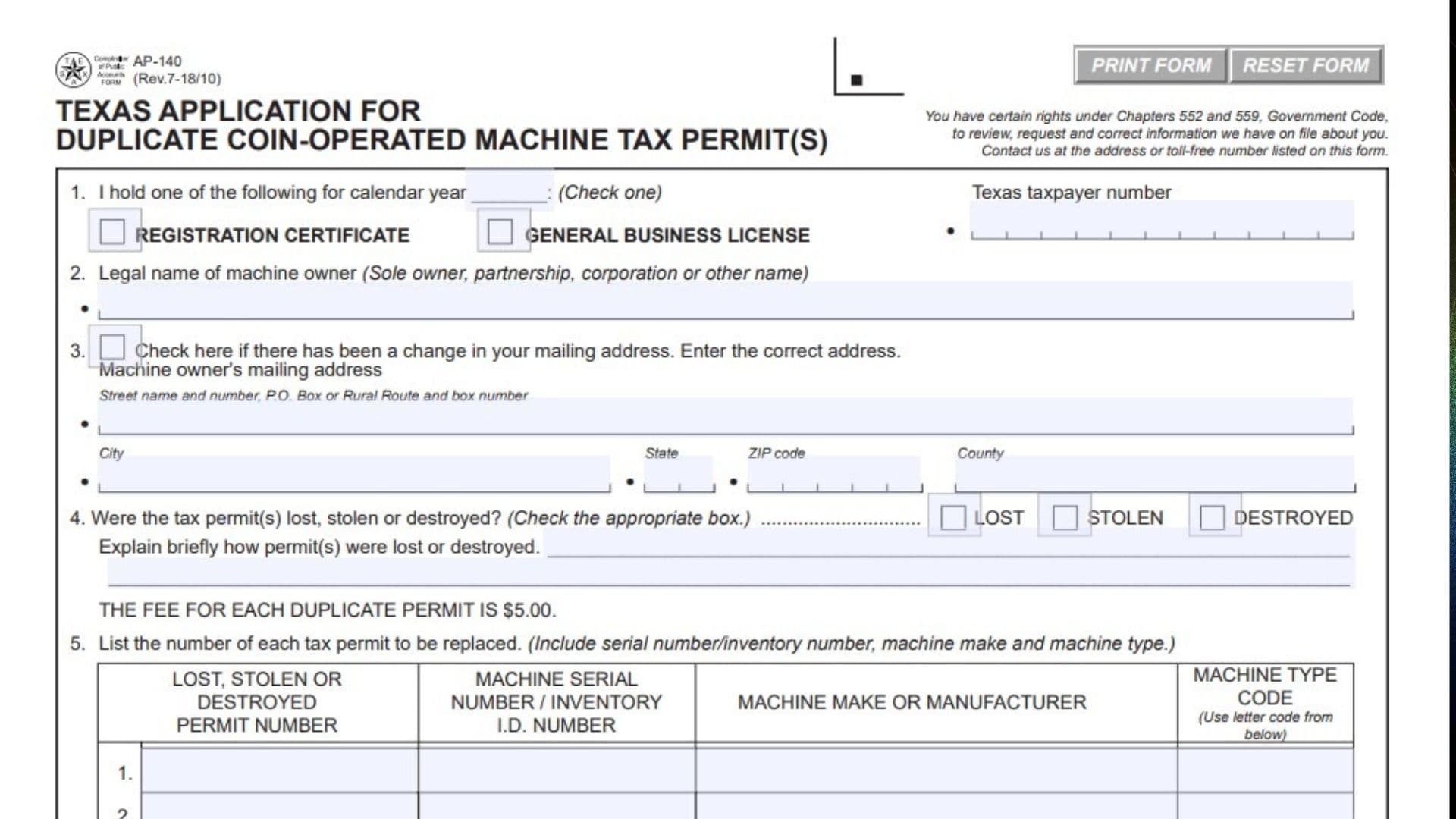
Texas Form AP-140, Application for Duplicate Coin-Operated Machine Tax Permits, is a document issued by the Texas Comptroller of Public Accounts for machine owners who need replacement occupation tax permits because their original permits have been lost, stolen, or destroyed. The form allows eligible owners to request duplicate permits for registered coin-operated machines without submitting a new application for additional machines. It is intended for individuals and businesses that hold a valid Registration Certificate or General Business License for the relevant calendar year. The application collects the owner’s legal name, Texas taxpayer number, mailing address, license information, and details about the missing or damaged permits. It also requires the identification number, manufacturer, and machine category for every machine associated with a replacement permit request. Applicants must indicate whether the original permits were lost, stolen, or destroyed, briefly explain what happened, and calculate the replacement fee. Each duplicate permit costs $5.00, and the total payment depends on the number of permits requested. The form also includes a certification section where an authorized owner, partner, corporate officer, or representative confirms that the information provided is accurate. Completing Form AP-140 correctly helps the Comptroller identify the affected machines, verify the permit replacement request, and process the appropriate number of duplicate occupation tax permits.
How To File Form AP-140
Form AP-140 must be completed and mailed to the Texas Comptroller of Public Accounts with the required payment.
Mailing Address:
Comptroller of Public Accounts
111 E. 17th Street
Austin, TX 78774-0100
Before completing the application, prepare the following information:
- The calendar year for which the permits were issued.
- Your Registration Certificate or General Business License information.
- Your Texas taxpayer identification number.
- The legal name of the coin-operated machine owner.
- The owner’s current mailing address.
- Information about whether the original permits were lost, stolen, or destroyed.
- A brief explanation of what happened to the original permits.
- The permit number of each replacement permit being requested.
- The serial number or inventory identification number of each machine.
- The machine’s make or manufacturer.
- The applicable machine type code.
- The total number of duplicate permits requested.
- The total replacement fee.
- The authorized person’s signature and identification details.
The application provides space for 13 machine entries. If you need additional space, you may attach a supplemental page or a computer-generated printout containing the required machine information.

How To Complete Form AP-140
Form AP-140 contains seven numbered items, followed by a certification statement and contact information. Each section must be completed carefully to help the Comptroller identify the original permits and issue the correct replacements.
Taxpayer And Owner Information
Item 1: Calendar Year and License Type
Enter the calendar year associated with the Registration Certificate or General Business License for which you are requesting duplicate tax permits.
Select only one of the following options:
- Registration Certificate: Check this box if you hold a Registration Certificate for the applicable calendar year.
- General Business License: Check this box if you hold a General Business License for the applicable calendar year.
Enter your Texas taxpayer number in the designated field on the right side of the form.
Make sure the calendar year, license selection, and taxpayer number correspond to the owner’s existing registration or licensing information.
Item 2: Legal Name of Machine Owner
Enter the complete legal name of the individual or business that owns the coin-operated machines.
The owner may be:
- A sole proprietor.
- A partnership.
- A corporation.
- Another legally recognized business entity.
Use the same legal name associated with the machine ownership and taxpayer registration records. Avoid entering only a trade name if it differs from the legal owner’s name.
Item 3: Machine Owner’s Mailing Address
Check the box if the machine owner’s mailing address has changed and provide the updated address.
Enter the following details:
- Street Name and Number: Provide the complete street address, including the building number and street name. A P.O. Box or rural route and box number may also be used for this mailing address.
- City: Enter the city where the owner receives mail.
- State: Provide the applicable state abbreviation.
- ZIP Code: Enter the correct ZIP code.
- County: Identify the county associated with the mailing address.
If the mailing address has not changed, leave the change-of-address checkbox unselected. Ensure that the address information provided is accurate and complete.
Duplicate Permit Information
Item 4: Reason for Requesting Duplicate Permits
Indicate what happened to the original occupation tax permits by selecting the appropriate checkbox.
Choose one of the following:
- Lost: Select this option if the original tax permits have been misplaced or cannot be located.
- Stolen: Select this option if the original permits were taken without authorization.
- Destroyed: Select this option if the original permits were damaged or destroyed and can no longer be used.
After selecting the appropriate option, briefly explain how the permits were lost, stolen, or destroyed.
Provide a clear and straightforward description of the circumstances. For example, explain whether the permits were misplaced during business operations, stolen from the premises, or damaged accidentally.
The application specifies a replacement fee of $5.00 for each duplicate permit.
Item 5: List of Tax Permits to Be Replaced
Provide the details of every occupation tax permit for which you are requesting a duplicate.
The form contains space for 13 entries. Each entry must identify the original permit and the machine associated with it.
Complete the following columns for every replacement request:
Lost, Stolen, or Destroyed Permit Number
Enter the original occupation tax permit number that needs to be replaced.
Use the number associated with the missing, stolen, or destroyed permit so the Comptroller can identify the specific permit record.
Machine Serial Number / Inventory I.D. Number
Enter the serial number assigned to the corresponding coin-operated machine.
If the machine is identified through an inventory identification number, provide that number instead.
Ensure that the identification number matches the machine associated with the original permit.
Machine Make or Manufacturer
Enter the machine’s brand, make, or manufacturer’s name.
Use the information available from the machine’s identification plate or ownership records to identify the correct manufacturer.
Machine Type Code
Enter the letter code representing the category of the coin-operated machine.
Use the following classification provided by the form:
- A: Music: For music coin-operated machines.
- B: Pool Tables: For coin-operated pool tables.
- C: Video Games: For coin-operated video game machines.
- D: Other: For other eligible coin-operated machines that do not fall into the first three categories.
Make sure the machine type code matches the actual machine being identified.
Repeat these details for every permit requiring replacement.
If more than 13 duplicate permits are needed, attach an additional page containing the same information or provide a computer-generated printout with all required machine details.
Duplicate Permit Count And Payment
Item 6: Total Number of Duplicate Occupation Tax Permits Requested
Enter the total number of duplicate occupation tax permits you are requesting.
Count the individual permits listed in Item 5.
For example, if you have listed eight original permits that need replacement, enter 8 in Item 6.
Make sure the number matches the total number of replacement requests included in your application and any supplemental pages.
Item 7: Total Tax Due
Calculate the total replacement fee by multiplying the number entered in Item 6 by $5.00.
Use this calculation:
Total Tax Due = Number of Duplicate Permits × $5.00
For example:
If you are requesting 8 duplicate permits:
8 × $5.00 = $40.00
Enter the calculated amount in the dollar field provided.
Payment must be made payable to the State Comptroller. Do not send cash with the application.
Mail the completed application and payment to:
Comptroller of Public Accounts
111 E. 17th Street
Austin, TX 78774-0100
Certification And Signature
After completing Items 1 through 7, review the certification statement and complete the remaining information.
The certification confirms that you are requesting duplicate tax permits for the coin-operated machines listed in the application and that the information supplied is true and correct to the best of your knowledge and belief.
Type or Print Name and Title of Sole Owner, Partner, Officer, or Authorized Representative
Enter the full name of the individual responsible for submitting the duplicate permit application.
Provide the person’s appropriate title or legal capacity, such as:
- Sole owner.
- Partner.
- Corporate officer.
- Authorized representative.
The person identified here should be authorized to certify the information provided in the application.
Driver’s License Number / State
Enter the driver’s license number of the individual completing the certification.
Also identify the state that issued the driver’s license.
Check the information carefully before submitting the form.
Sole Owner, Partner, Officer, or Authorized Representative Signature
The authorized individual must sign the application in the designated signature area.
The signature confirms that the applicant is requesting duplicate permits for the listed machines and certifies the accuracy of the submitted information.
Do not leave the signature field blank.
Business Phone (Area Code and Number)
Provide the business telephone number associated with the machine owner or business.
Include the area code and complete telephone number so the Comptroller can contact the applicant if additional information is required.
Residence Phone (Area Code and Number)
Enter the applicant’s residential telephone number, including the area code.
Provide a working contact number where the responsible individual can be reached.
Important Legal Information And Applicant Rights
Penalties For Fraudulent Applications
Form AP-140 includes a legal warning concerning fraudulent license applications.
Knowingly obtaining or attempting to obtain a license through fraud, misrepresentation, or deceptive practices is classified as a second-degree felony under the cited Texas laws.
Upon conviction, the stated penalties include imprisonment for two to twenty years and a fine of up to $10,000.
The warning references Texas Occupations Code Section 2153.357 and Texas Penal Code Section 12.33.
Applicants should ensure that all ownership, machine identification, permit, and certification details are accurate.
Rights To Review And Correct Personal Information
The form also explains that individuals have certain rights under Chapters 552 and 559 of the Texas Government Code.
These rights include the ability to review information maintained about them, request access to applicable records, and seek corrections to inaccurate information, subject to legal exceptions.
For assistance with these rights, applicants may contact the Texas Comptroller using the address or telephone number provided on the application.
Contact Information For Assistance
If you have questions about completing Form AP-140 or requesting duplicate coin-operated machine tax permits, contact the Texas Comptroller of Public Accounts.
Telephone: 1-800-531-5441, Extension 33731
Final Review Before Filing
Before mailing Form AP-140, review the entire application to ensure that every required field has been completed correctly.
Use this checklist:
- Enter the correct calendar year in Item 1.
- Select either Registration Certificate or General Business License.
- Provide the correct Texas taxpayer number.
- Enter the machine owner’s complete legal name in Item 2.
- Check the mailing address change box if applicable.
- Provide the complete mailing address in Item 3.
- Select the correct reason for replacement in Item 4.
- Explain briefly how the original permits were lost, stolen, or destroyed.
- List every original permit number requiring replacement in Item 5.
- Provide the corresponding machine serial number or inventory identification number.
- Enter the correct machine make or manufacturer.
- Use the appropriate machine type code: A, B, C, or D.
- Attach a supplemental machine list if more than 13 permits need replacement.
- Enter the correct number of duplicate permits in Item 6.
- Calculate the replacement fee at $5.00 per permit in Item 7.
- Verify that the total payment matches the number of duplicate permits requested.
- Make payment payable to the State Comptroller.
- Do not include cash with the application.
- Print the authorized individual’s name and title.
- Enter the driver’s license number and issuing state.
- Obtain the required authorized signature.
- Provide the business and residence telephone numbers.
- Mail the completed application and payment to the Comptroller of Public Accounts, 111 E. 17th Street, Austin, TX 78774-0100.
Submitting a complete and accurate Form AP-140 helps the Texas Comptroller identify the original occupation tax permits and process the requested replacements. Double-check the permit numbers, machine identification details, replacement fee, and certification before mailing your application.