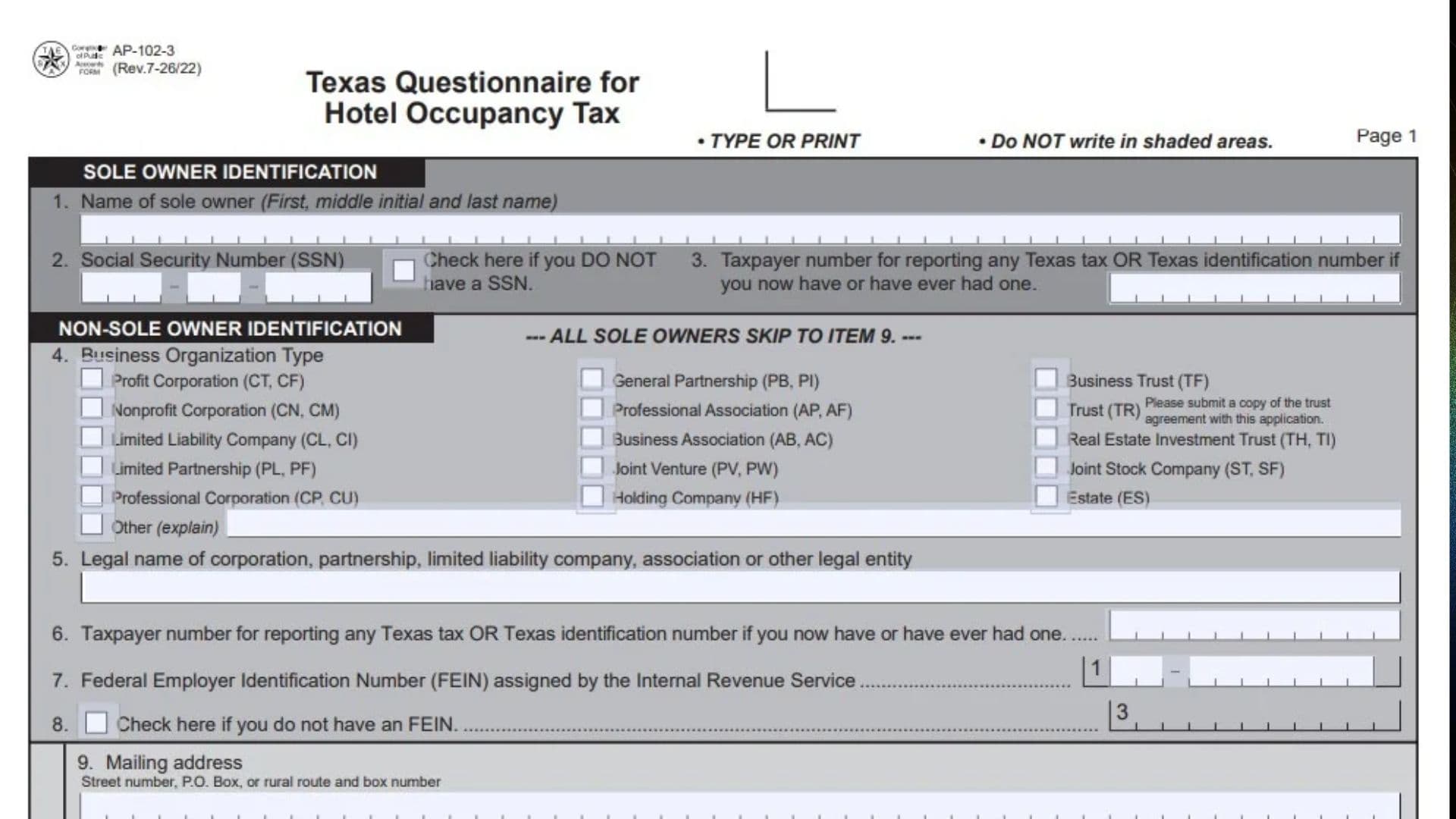
Texas Form AP-102, Hotel Occupancy Tax Questionnaire, is a registration questionnaire issued by the Texas Comptroller of Public Accounts for individuals, partnerships, corporations, and other organizations that operate hotels or provide taxable sleeping accommodations in Texas. Its purpose is to collect business, ownership, and property information so the Comptroller can determine the appropriate Hotel Occupancy Tax registration and establish the business’s tax reporting responsibilities. The questionnaire applies to a broad range of accommodation providers, not just traditional hotels. Its definition of a hotel includes motels, bed and breakfasts, rooming houses, skid-mounted bunkhouses, tourist houses, tourist courts, manufactured homes, residency inns, condominiums, cabins, and cottages where members of the public receive sleeping accommodations in exchange for payment. The form collects information about the sole owner or legal business entity, Social Security number, Texas taxpayer identification number, Federal Employer Identification Number (FEIN), mailing address, business contact person, principal business activities, and business organization type. It also requests information about business registration, partners, principal officers, managers, and ownership percentages. Applicants must identify each business location, provide its physical address, indicate whether it is inside city limits, describe its accommodation services, report the date operations began or are expected to begin, and disclose the number of rentable rooms. Property ownership details are also required, including whether the business owns or leases the premises. Businesses that acquire an existing hotel or its assets must provide information about the previous owner, purchased assets, purchase price, and acquisition date. The questionnaire also requires authorized owners, partners, corporate officers, or representatives to certify the accuracy of the information through their signatures. Submitting the questionnaire is important because hotel operators who are subject to Texas Hotel Occupancy Tax must meet the applicable tax reporting and payment obligations. Businesses that have already been operating without submitting the required questionnaire may need to file outstanding reports and pay unpaid taxes, penalties, and interest for the period they operated.
Who Must Submit Form AP-102?
You must submit Form AP-102 if you are an individual, partnership, corporation, or other organization operating a hotel in Texas.
The term hotel covers any business location where members of the public receive sleeping accommodations in exchange for payment.
Examples include:
- Hotels and motels.
- Bed and breakfast establishments.
- Rooming houses.
- Skid-mounted bunkhouses.
- Tourist houses and tourist courts.
- Manufactured homes.
- Residency inns.
- Condominiums.
- Cabins and cottages.
The questionnaire also identifies sleeping accommodations provided to the public for a charge of $15 or more per day as subject to Hotel Occupancy Tax registration requirements.
If your business has already been operating but you have not submitted the questionnaire, you may need to file the required tax reports and pay outstanding taxes, along with applicable penalties and interest, for the entire period of operation.
How To File Form AP-102
Complete the questionnaire by typing or printing all requested information clearly. Once completed and signed, mail it to the Texas Comptroller of Public Accounts.
Mailing Address:
Comptroller of Public Accounts
111 E. 17th Street
Austin, TX 78774-0100
Before completing the questionnaire, prepare the following information:
- Legal name of the sole owner or business entity.
- Social Security number, if applying as an individual sole owner.
- Texas taxpayer number or Texas identification number, if previously assigned.
- Federal Employer Identification Number (FEIN).
- Complete business mailing address.
- Name and telephone number of the person responsible for daily operations.
- Principal business classification.
- Description of accommodation services and business activities.
- Applicable NAICS code.
- Business formation and registration information.
- Names, addresses, identification numbers, and ownership percentages of partners or principal officers.
- Physical address of each hotel or accommodation location.
- Whether each location is inside city limits.
- Date of first business operation or planned opening date.
- Number of rentable rooms.
- Property ownership or lease information.
- Previous owner and acquisition details, if an existing hotel business or its assets were purchased.
- Required signatures and driver’s license information for authorized signers.
Important Filing Instructions
- Type or print all information clearly.
- Do not write in shaded areas.
- Complete every applicable section.
- Sole owners must skip the non-sole-owner identification and applicable entity information sections as instructed.
- Attach additional sheets when the available spaces are insufficient.
- Complete separate business location information for every additional location.
- Do not use dashes when entering Social Security numbers, FEINs, or Texas identification numbers.
- Keep a copy of the completed questionnaire and supporting information for your records.

How To Complete Form AP-102
The questionnaire contains 29 numbered items divided into sole owner identification, non-sole-owner identification, business information, taxpayer information, business locations, previous owner information, and signatures.
Sole Owner Identification
Item 1: Name of Sole Owner
If you operate the hotel as an individual sole proprietor, enter your complete legal name.
Provide the following:
- First name.
- Middle initial.
- Last name.
Use your personal legal name rather than the hotel’s trade or operating name.
If the applicant is a partnership, corporation, LLC, or another legal entity, follow the non-sole-owner identification instructions instead.
Item 2: Social Security Number (SSN)
Enter your Social Security number if you are applying as an individual sole owner.
The form also provides a checkbox for individuals who do not have a Social Security number.
Select that checkbox if you do not have an SSN.
Do not enter a made-up or unrelated identification number in this field.
Item 3: Texas Taxpayer Number or Texas Identification Number
Enter your Texas taxpayer number or Texas identification number if you currently have, or have previously had, one.
This field applies to individuals who have an existing or former Texas tax registration.
If you have a Texas taxpayer number or Texas identification number, provide the applicable number in the designated space.
Non-Sole Owner Identification
All sole owners must skip this section and proceed directly to Item 9.
Partnerships, corporations, LLCs, and other legal entities must complete the applicable items.
Item 4: Business Organization Type
Select the checkbox that identifies the legal structure of your business.
The questionnaire provides the following classifications:
- Profit Corporation (CT, CF): Select this option if your business operates as a for-profit corporation.
- Nonprofit Corporation (CN, CM): Choose this option if your organization is registered as a nonprofit corporation.
- Limited Liability Company (CL, CI): Select this option if the business operates as an LLC.
- Limited Partnership (PL, PF): Choose this option if your business is legally registered as a limited partnership.
- Professional Corporation (CP, CU): Select this option for a professional corporation.
- General Partnership (PB, PI): Choose this option if the business operates as a general partnership.
- Professional Association (AP, AF): Select this option if the organization is a professional association.
- Business Association (AB, AC): Choose this option if the business operates as a business association.
- Joint Venture (PV, PW): Select this option if the business is organized as a joint venture.
- Holding Company (HF): Choose this option if the organization operates as a holding company.
- Business Trust (TF): Select this option if the business is organized as a business trust.
- Trust (TR): Choose this option if the applicant operates as a trust. A copy of the trust agreement must be attached to the questionnaire.
- Real Estate Investment Trust (TH, TI): Select this option if the organization is a real estate investment trust.
- Joint Stock Company (ST, SF): Choose this option if the business operates as a joint stock company.
- Estate (ES): Select this option if the applicant is an estate.
- Other: Choose this option if the organization does not fit any listed classification. Explain the legal structure in the space provided.
Select the category that accurately represents your business’s legal organization.
Item 5: Legal Name of Business Entity
Enter the complete legal name of the corporation, partnership, limited liability company, association, or other legal organization applying for the questionnaire.
For corporations, use the exact name registered with the appropriate Secretary of State.
For partnerships and other organizations, provide the official legal name associated with their business records.
Do not enter only a trade name if it differs from the legal entity name.
Item 6: Texas Taxpayer Number or Texas Identification Number
Enter the identification number used for reporting Texas taxes if your business currently has, or has previously had, one.
Provide the applicable Texas taxpayer number or Texas identification number.
Use the number associated with the legal entity rather than an owner’s personal identification number.
Item 7: Federal Employer Identification Number (FEIN)
Enter the Federal Employer Identification Number assigned to your business by the Internal Revenue Service.
The FEIN identifies the business for federal tax administration purposes.
If your business does not have an assigned FEIN, follow the instructions in Item 8.
Item 8: No FEIN Declaration
Check this box if your business does not have a Federal Employer Identification Number.
Do not select this option if the IRS has already assigned an FEIN to your organization.
Business Information
Item 9: Mailing Address
Enter the complete mailing address where you want to receive official correspondence from the Texas Comptroller of Public Accounts.
Complete the following fields:
Street Number, P.O. Box, or Rural Route and Box Number
Enter the building number and street name, P.O. Box, or rural route and box number used for receiving mail.
City
Enter the city associated with the mailing address.
State or Province
Provide the applicable state or province.
ZIP Code
Enter the correct ZIP code.
County or Country
Identify the county for a U.S. address. If the address is outside the United States, enter the country.
Make sure the address is complete and accurate so the Comptroller can deliver tax notices and other official correspondence.
Item 10: Contact Person for Day-to-Day Business Operations
Provide the name and daytime telephone number of the individual responsible for the hotel’s daily business operations.
Complete the following fields:
Name of Contact Person
Enter the full name of the person who manages or oversees routine business activities.
Daytime Phone
Provide the contact person’s telephone number, including the area code.
Choose someone who can respond to questions about the hotel’s operations and business information.
Item 11: Principal Type of Business
Select the industry category that best describes the primary activities of your business.
The available categories are:
- Agriculture.
- Finance.
- Manufacturing.
- Transportation.
- Services.
- Wholesale Trade.
- Retail Trade.
- Construction.
- Other.
- Real Estate.
- Utilities.
- Mining.
- Insurance.
- Communications.
- Public Administration.
If you select Other, describe your actual business category in the space provided.
Choose the category that most accurately represents your principal business activities.
Item 12: Primary Business Activities, Products or Services, and NAICS
Describe the main activities performed by your business and the accommodation services you provide to customers.
Explain the type of hotel or lodging establishment you operate and the services offered at the location.
For example, describe whether the business operates a hotel, motel, bed and breakfast, condominium accommodation, cabin rental, or another type of lodging facility.
Enter the applicable North American Industry Classification System (NAICS) code in the designated field.
Use the classification that best corresponds to your primary business activities.
Business Formation And Taxpayer Information
Sole owners must skip Items 13 through 17 and proceed directly to Item 18.
Item 13: Texas Business Formation Information
Complete this item if your business is a Texas profit corporation, nonprofit corporation, professional corporation, or limited liability company.
Provide the following:
Texas Secretary of State File Number
Enter the registration or file number assigned to your business by the Texas Secretary of State.
Registration Date
Enter the date the business was officially registered.
Provide the month, day, and year.
Use the information shown in the organization’s official Texas formation records.
Item 14: Non-Texas Business Formation And Registration Information
Complete this item if your business was originally formed outside Texas as a profit corporation, nonprofit corporation, professional corporation, or limited liability company.
The questionnaire requests the original formation details and, where applicable, Texas registration information.
Complete the following fields:
State or Country of Incorporation
Enter the state or country where the business was originally formed.
Charter Number
Provide the original charter or registration number assigned by the state or country of formation.
Original Registration Date
Enter the date the business was originally incorporated or established.
Provide the month, day, and year.
Texas Certificate of Authority Number
If the corporation has received a Texas Certificate of Authority, enter its associated file number.
Texas Certificate of Authority Date
Provide the date associated with the Texas Certificate of Authority.
Make sure the original formation information is clearly distinguished from the Texas authorization details.
Item 15: Corporate Merger During The Previous Seven Years
Answer whether your corporation has participated in a merger during the last seven years.
Select one option:
- Yes: Choose this option if the corporation has been involved in a merger during the specified period.
- No: Select this option if no such merger has occurred.
If you answer Yes, attach a detailed explanation describing the merger.
The additional explanation should provide enough information for the Comptroller to understand the business’s merger history.
Item 16: Limited Partnership Or Registered Limited Liability Partnership Information
Complete this item if your business operates as a limited partnership or registered limited liability partnership.
Provide the following information:
Home State
Enter the state where the partnership is originally registered or established.
Registration Number
Provide the identification or registration number assigned by the appropriate state authority.
Use the official partnership registration details.
Item 17: General Partners, Principal Members, Officers, Managing Directors, Or Managers
This section identifies the individuals responsible for owning, managing, or directing the business.
Depending on the business structure, provide information about:
- All general partners.
- Principal members.
- Corporate officers.
- Managing directors.
- Managers.
The questionnaire provides space for two individuals. Attach additional sheets if more people need to be reported.
Complete the following information for each individual:
Name
Enter the person’s complete legal name.
Title
Provide the individual’s official business position or title.
Phone (Area Code and Number)
Enter the individual’s telephone number, including the area code.
Home Address
Provide the individual’s complete residential street address.
City
Enter the city where the individual resides.
State
Provide the applicable state abbreviation.
ZIP Code
Enter the residential ZIP code.
SSN or FEIN
Enter the individual’s Social Security number or applicable Federal Employer Identification Number.
For an individual general partner or other individual, provide the SSN. For an entity, provide the applicable FEIN.
County or Country
Identify the county associated with a U.S. address or the country if the individual resides outside the United States.
Percentage of Ownership
Enter the percentage of the business owned by the individual.
Use the actual ownership percentage reflected in the company’s official records.
Position Held
Select every position that applies to the individual.
The available options are:
- Partner: Select this option if the individual is a business partner.
- Officer: Choose this option if the person holds an official corporate or organizational position.
- Director: Select this option if the individual serves as a director.
- Corporate Stockholder: Choose this option if the individual owns corporate shares.
- Record Keeper: Select this option if the person is responsible for maintaining business records.
Repeat these details for all applicable individuals.
If additional people need to be listed, attach separate sheets containing the same information.
Business Location Information
Item 18: Legal Name of Entity
Enter the legal name of the applicant.
The name must match the information provided in Item 1 for a sole owner or Item 5 for a non-sole-owner business.
Use the same legal name throughout the questionnaire to ensure that all business location information is connected to the correct applicant.
Item 19: Business Location Name And Address
Provide the name and complete physical address of the hotel or accommodation facility.
If your business operates multiple locations, attach additional sheets containing the same information for every additional location.
Complete the following fields:
Business Location Name
Enter the name of the hotel, motel, bed and breakfast, or other accommodation establishment.
Use the operating name associated with the specific location.
Street And Number
Provide the actual street address, including the building number and street name.
Do not use a P.O. Box or rural route as the physical street address.
City
Enter the city where the accommodation facility is located.
State
Provide the applicable state abbreviation.
ZIP Code
Enter the physical location’s ZIP code.
County
Identify the county where the hotel or accommodation business operates.
Physical Location
If the business location uses a rural route and box number rather than a conventional street address, provide clear directions that allow the Comptroller to identify the property.
For example, describe the property’s distance and direction from a recognizable road or location.
Business Location Phone
Enter the telephone number associated with the specific hotel or accommodation location, including the area code.
If the business operates more than one hotel or lodging facility, provide separate location information for each property.
Item 20: Business Location Inside City Limits
Indicate whether the hotel or accommodation business is physically located inside the city limits.
Select one option:
- Yes: Choose this option if the business location is within the official municipal boundaries of a city.
- No: Select this option if the location is outside city limits.
Answer based on the physical location of the property rather than its mailing address.
Item 21: Description Of Business Activities At This Location
Provide a brief description of the activities performed at the specific hotel or accommodation location.
Explain the type of lodging services offered and how the property is used.
For example, identify whether the location operates as a hotel, motel, bed and breakfast, tourist accommodation, cabin facility, or another type of establishment.
If the business operates different types of accommodation services at separate properties, describe the activities specific to each location.
Item 22: First Date Of Business Operation Subject To Hotel Occupancy Tax
Enter the date when the business first began operating at the location in a manner subject to Hotel Occupancy Tax.
If the business has not started operating yet, enter the planned commencement date.
Provide the applicable date in the designated field.
The questionnaire specifically states that the planned date cannot be more than 90 days in the future.
Use the actual opening or commencement date whenever operations have already begun.
Item 23: Number Of Rentable Rooms
Enter the total number of rooms available for rent at the business location.
Count the rentable rooms associated with the specific hotel or accommodation property.
If the business operates multiple locations, report the number of rentable rooms separately for each location.
Item 24: Property Ownership Or Rental Status
Indicate whether your business owns or rents/leases the property where the hotel or accommodation facility operates.
Select one option:
- Own: Choose this option if the business owns the real property.
- Rent/Lease: Select this option if the business operates from property rented or leased from another owner.
If you select Rent/Lease, provide the following additional information:
Property Owner’s Name
Enter the full legal name of the individual or organization that owns the property.
Property Owner’s Address
Provide the property owner’s complete mailing or street address.
Include the street number, street name, city, state, and ZIP code where applicable.
These details identify the legal owner of the property used for the accommodation business.
Previous Owner Information
Complete Items 25 through 28 only if you purchased an existing hotel business or acquired business assets.
If you did not purchase an existing business or its assets, skip these items and proceed directly to Item 29.
Item 25: Previous Owner’s Trade Name And Taxpayer Number
Enter the trade or operating name used by the previous owner of the acquired business.
Complete the following fields:
Previous Owner’s Trade Name
Provide the name under which the former hotel or accommodation business operated.
Previous Owner’s Taxpayer Number
Enter the previous owner’s Texas taxpayer identification number, if available.
Use the number associated with the former business or its tax account.
If the number is unknown, do not guess.
Item 26: Previous Owner’s Legal Name, Address, And Phone Number
Provide the former owner’s identifying and contact information, if available.
Complete the following fields:
Legal Name
Enter the previous owner’s complete legal name.
Phone (Area Code and Number)
Provide the former owner’s telephone number, including the area code.
Address
Enter the former owner’s street address.
City
Provide the city associated with the previous owner’s address.
State
Enter the applicable state abbreviation.
ZIP Code
Provide the correct ZIP code.
Use the information available in your business acquisition or ownership transfer records.
Item 27: Assets Purchased
Check every category that represents assets acquired from the previous owner.
The questionnaire provides five options:
- Inventory: Select this option if the transaction included business inventory.
- Corporate Stock: Choose this option if you acquired corporate stock.
- Equipment: Select this option if the purchase included furniture, machinery, appliances, or other business equipment.
- Real Estate: Choose this option if the acquisition included the property or other real estate.
- Other Assets: Select this option if you acquired assets that do not fall into the listed categories.
You may select multiple options if the transaction included several types of assets.
Item 28: Purchase Price And Date Of Purchase
Provide the financial and transaction details of the acquired business or assets.
Purchase Price
Enter the total purchase price paid for the business or acquired assets in the dollar field.
Date of Purchase
Enter the date when the business or assets were purchased.
Provide the month, day, and year.
Make sure the purchase information matches the relevant transaction records.
Signatures And Certification
Item 29: Authorized Signatures And Declaration
The final section requires the appropriate individuals to certify that the information provided in the questionnaire and all attachments is true and correct to the best of their knowledge and belief.
The required signers may include:
- Sole owner.
- All general partners.
- Corporation or organization president.
- Vice-president.
- Secretary.
- Treasurer.
- Managing director.
- Authorized representative.
If an authorized representative signs the questionnaire, a written power of attorney must accompany the submission.
The form provides three signature spaces. Attach additional sheets if more signatures are necessary.
Complete the following fields for each required signer:
Date of Signature
Enter the date on which the authorized individuals sign the questionnaire.
Provide the month, day, and year.
Type Or Print Name And Title
Enter the printed name and official business title of the person signing.
Use the appropriate designation, such as sole owner, partner, president, secretary, or treasurer.
Driver License Number and State
Enter the signer’s driver’s license number and the state that issued it.
Provide the correct information in the designated fields.
Sole Owner, Partner, Or Officer Signature
The applicable individual must sign in the corresponding signature area.
Additional Partner Or Officer Names And Signatures
Provide the printed names, titles, driver’s license information, and signatures of other required partners or officers.
All required individuals must sign based on the business’s legal structure and the questionnaire’s instructions.
Declaration Of Accuracy
By signing, the responsible individuals confirm that the information in the questionnaire and its attachments is accurate and complete to the best of their knowledge and belief.
Review all sections carefully before signing.
Comptroller Use Only
The bottom section of the final page contains administrative fields reserved for the Texas Comptroller of Public Accounts.
These include:
- User ID.
- Date.
Applicants should leave these fields blank unless specifically instructed otherwise by the Comptroller.
Additional Tax And Business Registration Information
The second page of the questionnaire provides information about other taxes and fees administered by the Texas Comptroller of Public Accounts.
This section is informational. It helps businesses identify whether they may need additional tax permits or accounts beyond Hotel Occupancy Tax registration.
If your business is responsible for any listed tax or fee but does not have the required permit or account, contact the Comptroller or visit a local enforcement field office to obtain the appropriate application.
The listed taxes, fees, and related forms include:
9-1-1 Emergency Service Fee/Equalization Surcharge
Telecommunications utilities, mobile service providers, and qualifying business service users responsible for collecting emergency communication charges or surcharges may need Form AP-201.
Automotive Oil Sales Fee
Businesses that manufacture and sell automotive oil in Texas, import automotive oil for sale or use, or meet the specified annual sales and warehouse conditions may need Form AP-161.
Battery Sales Fee
Businesses selling or offering new or used lead-acid batteries may need Form AP-160.
Cement Production Tax
Businesses manufacturing or producing cement in Texas, or importing and distributing or using cement in Texas, may need Form AP-171.
Cigarette, Cigar, And Tobacco Products Tax
Businesses that wholesale, distribute, store, or make retail sales of cigarettes, cigars, or tobacco products may need Form AP-175 or Form AP-193.
Coastal Protection Fee
Businesses transferring crude oil and condensate to or from vessels at a Texas marine terminal may need Form AP-159.
Coin-Operated Machine Tax
Businesses dealing in coin-operated amusement machines or operating such machines exclusively on their business premises may need Form AP-146 or Form AP-147.
Crude Oil And Natural Gas Production Taxes
Businesses producing or purchasing crude oil or natural gas may need Form AP-134.
Direct Payment Permit
Businesses purchasing at least $800,000 annually in taxable items for their own use rather than resale may apply using Form AP-101.
Fireworks Tax
Businesses collecting tax on retail fireworks sales must complete Form AP-201 in addition to obtaining the applicable sales tax permit.
Franchise Tax
General partnerships and non-Texas entities without a certificate of authority or certificate of registration may need Form AP-114.
Fuels Tax
Businesses required to obtain a license under the Texas Fuels Tax Law must complete Form AP-133 for the applicable license category.
Gross Receipts Tax
Businesses providing certain services on oil and gas wells or qualifying utility companies operating in incorporated cities or towns with populations exceeding 1,000 may need Form AP-110.
Off-Road, Heavy-Duty Diesel-Powered Equipment Surcharge
Businesses selling, leasing, or renting qualifying off-road heavy-duty diesel-powered equipment must complete Form AP-201 in addition to obtaining a sales tax permit.
Hotel Occupancy Tax
Businesses providing sleeping accommodations to the public for a charge of $15 or more per day must complete Form AP-102.
International Fuel Tax Agreement (IFTA)
Businesses operating qualifying motor vehicles that require IFTA licensing must complete Form AP-178.
Manufactured Housing Sales Tax
Manufacturers of manufactured homes or industrialized housing conducting business in Texas may need Form AP-118.
Maquiladora Export Permit
Maquiladora enterprises seeking to make tax-free purchases in Texas for export to Mexico may apply using Form AP-153.
Motor Vehicle Seller-Financed Sales Tax
Businesses financing motor vehicle sales and collecting Motor Vehicle Sales Tax through periodic payments may need Form AP-169.
Motor Vehicle Gross Rental Tax
Businesses renting motor vehicles in Texas must complete Form AP-143.
Petroleum Products Delivery Fee
Businesses required to obtain a license under Section 26.3574 of the Texas Water Code must complete Form AP-154.
Sales And Use Tax
Businesses selling or leasing taxable tangible personal property, providing taxable services in Texas, or acquiring taxable items from certain out-of-state suppliers may need Form AP-201.
Sulphur Production Tax
Businesses owning, controlling, managing, leasing, or operating sulphur mines, wells, or shafts, or producing sulphur by any method, may need Form AP-171.
Texas Customs Broker License
Businesses licensed by the United States Customs Service that wish to issue export certifications may need Form AP-168.
Important Filing Requirements And Legal Information
Late Registration And Outstanding Tax Responsibilities
If your hotel or accommodation business has already been operating without submitting the required questionnaire, you may have outstanding tax responsibilities.
You may need to:
- Submit the required questionnaire.
- File outstanding Hotel Occupancy Tax reports.
- Pay unpaid taxes for the applicable operating period.
- Pay any applicable penalties and interest.
Do not assume that registering now automatically eliminates previous tax obligations.
Federal Privacy Act And Social Security Number Disclosure
The questionnaire explains that disclosure of a Social Security number is required and authorized under applicable law for tax administration and identification purposes.
The cited legal provisions include:
- 42 U.S.C. Section 405(c)(2)(C)(i).
- Texas Government Code Sections 403.011 and 403.078.
Information released in response to public information requests is governed by Chapter 552 of the Texas Government Code, the Texas Public Information Act, and applicable federal law.
Rights To Review And Correct Information
Applicants have certain rights under Chapters 552 and 559 of the Texas Government Code.
These rights include reviewing information maintained by the Comptroller, requesting access to applicable records, and seeking corrections to inaccurate information, subject to applicable legal exceptions.
For assistance, contact the Texas Comptroller using the address or telephone number provided with the questionnaire.
Americans With Disabilities Act
The questionnaire may be requested in alternative formats to accommodate individuals with disabilities.
For alternative document formats, call:
800-252-5555
Hearing-impaired taxpayers may use:
800-RELAY-TX
Hiring Employees And Texas Unemployment Taxes
If your hotel or accommodation business hires one or more employees, you may have additional payroll tax responsibilities.
Contact the Texas Workforce Commission (TWC) to determine whether your business must pay unemployment taxes under the Texas Unemployment Compensation Act.
Texas Workforce Commission Telephone: 512-463-2699
You may also contact your local TWC tax office for assistance.
Processing Time
The questionnaire states that the Comptroller’s office normally processes applications within 10 business days after receiving them.
However, incomplete applications may delay processing and the mailing of permits.
Make sure all required information, signatures, and supporting documents are included before submitting the questionnaire.
Contact Information For Assistance
For questions about Form AP-102, Hotel Occupancy Tax registration, or related tax responsibilities, contact your nearest Texas Comptroller field office.
Telephone: 800-252-1385
For questions about other tax permits and applications, the questionnaire also provides the following telephone number:
800-252-5555
For information about payroll taxes and employee-related responsibilities, contact the Texas Workforce Commission at 512-463-2699.
Mailing Address:
Comptroller of Public Accounts
111 E. 17th Street
Austin, TX 78774-0100
Final Review Before Filing
Before submitting Form AP-102, review every section to ensure that the information is complete and accurate.
Use the following checklist:
- Enter the sole owner’s legal name in Item 1, if applicable.
- Provide the Social Security number or select the no-SSN checkbox in Item 2.
- Enter the Texas taxpayer number or Texas identification number in Item 3, if applicable.
- Complete the business organization classification in Item 4 for non-sole-owner applicants.
- Enter the legal business entity name in Item 5.
- Provide the applicable Texas taxpayer number or identification number in Item 6.
- Enter the FEIN in Item 7.
- Check the no-FEIN declaration in Item 8 if applicable.
- Provide the complete mailing address in Item 9.
- Enter the daily operations contact person’s name and daytime telephone number in Item 10.
- Select the correct principal business category in Item 11.
- Describe the primary business activities and provide the applicable NAICS code in Item 12.
- Complete the Texas business registration information in Item 13, if applicable.
- Provide the original formation and Texas authorization information in Item 14, if applicable.
- Answer the corporate merger question in Item 15.
- Complete the partnership registration information in Item 16, if applicable.
- Identify all required partners, principal members, officers, managing directors, or managers in Item 17.
- Provide their addresses, identification numbers, telephone numbers, titles, ownership percentages, and positions.
- Enter the legal entity name in Item 18.
- Provide the business location name and complete physical address in Item 19.
- Answer whether the business is inside city limits in Item 20.
- Describe the business activities at the location in Item 21.
- Enter the first business operation date or planned commencement date in Item 22.
- Verify that the planned date is not more than 90 days in the future.
- Enter the number of rentable rooms in Item 23.
- Indicate whether the property is owned or rented/leased in Item 24.
- Provide the property owner’s name and address if the property is rented or leased.
- Complete Items 25 through 28 if an existing business or its assets were purchased.
- Provide the former owner’s trade name and taxpayer number, if available.
- Enter the previous owner’s legal name, address, and telephone number, if available.
- Select all applicable purchased asset categories in Item 27.
- Enter the purchase price and date of purchase in Item 28.
- Obtain all required signatures in Item 29.
- Provide the required driver’s license number and issuing state for each signer.
- Attach a written power of attorney if an authorized representative signs.
- Attach additional sheets for additional partners, officers, or business locations.
- Attach a copy of the trust agreement if applying as a trust.
- Verify that no information has been entered in shaded areas.
- Make sure all identification numbers are entered without dashes.
- Mail the completed and signed questionnaire to the Comptroller of Public Accounts, 111 E. 17th Street, Austin, TX 78774-0100.
Submitting a complete and accurate Form AP-102 helps the Texas Comptroller establish the appropriate Hotel Occupancy Tax registration for your accommodation business. Before mailing the questionnaire, verify your ownership information, business locations, rentable room count, property details, and required signatures to help prevent processing delays and ensure that your hotel meets its applicable Texas tax reporting responsibilities.