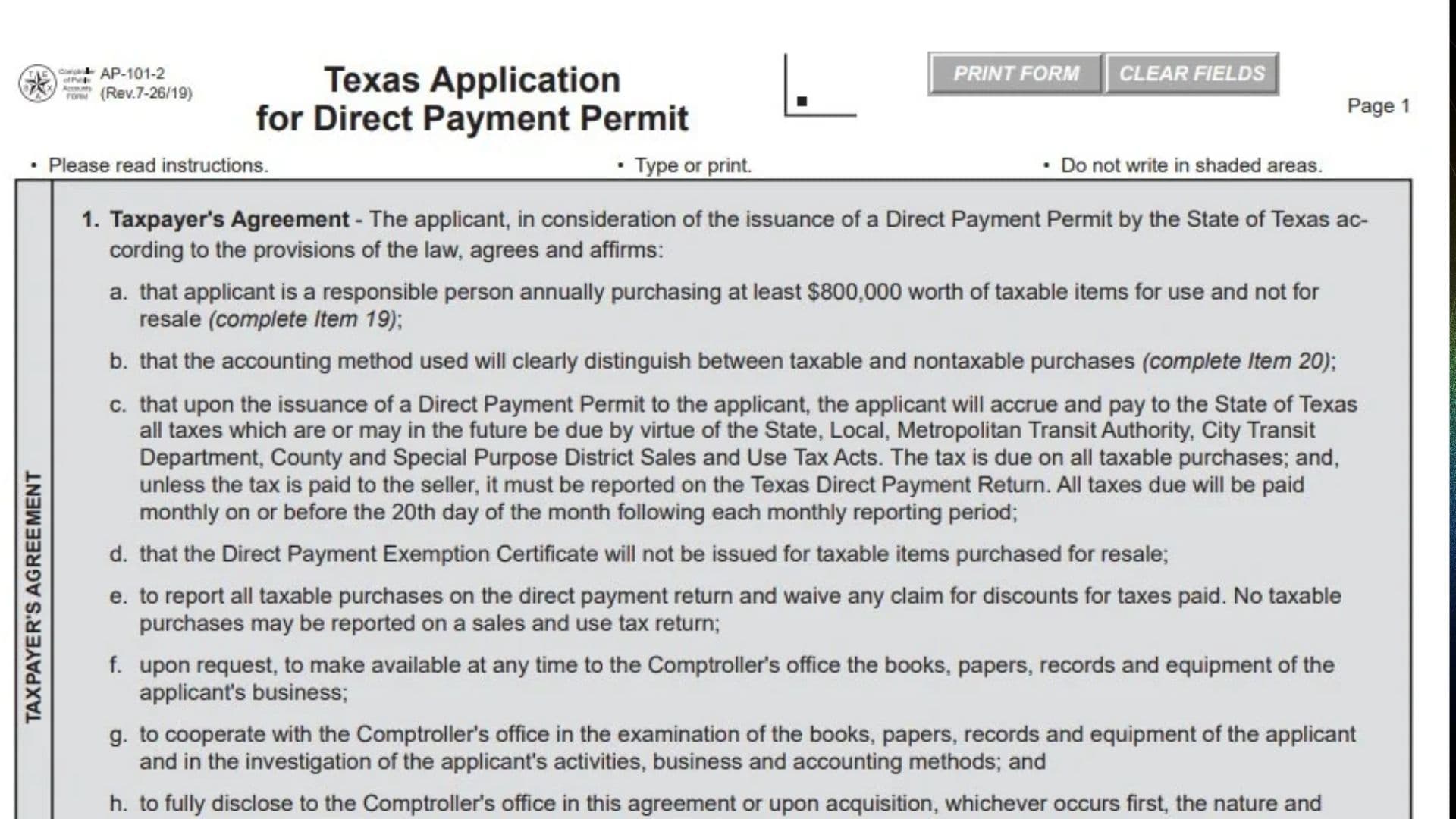
Texas Form AP-101, Application for Direct Payment Permit, is an application issued by the Texas Comptroller of Public Accounts for qualifying businesses that want permission to purchase taxable goods and services without paying Texas sales tax directly to their suppliers. Instead, businesses holding a Direct Payment Permit are responsible for calculating, reporting, and paying the applicable sales and use taxes directly to the state through designated tax returns. This arrangement is intended for businesses that make substantial taxable purchases for their own use rather than for resale. To qualify, an applicant must generally purchase at least $800,000 worth of taxable items annually for its own use. The application collects information about the business owner, legal organization, taxpayer identification numbers, mailing address, business ownership structure, partners, corporate officers, and principal business activities. It also requests details about the company’s accounting procedures, annual taxable purchases, business locations, and major fixed assets located in Texas. Applicants must demonstrate that their accounting system can clearly separate taxable purchases, exempt purchases, purchases on which tax has already been paid, and items acquired tax-free for resale. The form also requires businesses to explain how they will identify and report local sales and use tax obligations, including applicable city, county, Metropolitan Transit Authority, City Transit Department, and Special Purpose District taxes. Authorized owners, partners, corporate officers, or representatives must sign the application and certify that the information is accurate. The Comptroller reviews the application to determine whether the applicant satisfies the requirements established under Section 151.419 of the Texas Tax Code. Approval is essential because businesses cannot use the Direct Payment Permit exemption or make qualifying tax-free purchases until the permit has actually been issued. Once approved, the permit holder assumes responsibility for reporting taxable purchases and paying applicable taxes, generally on a monthly basis by the 20th day of the month following the reporting period.
Who Can Apply For Form AP-101?
A business may apply for a Texas Direct Payment Permit if it annually purchases at least $800,000 worth of taxable items for its own use and not for resale.
Applicants may include:
- Sole proprietors.
- Partnerships.
- Texas corporations.
- Foreign corporations.
- Limited partnerships.
- Other qualifying business organizations.
The Comptroller may issue the permit after reviewing the completed application and determining that the applicant satisfies the requirements outlined in the Taxpayer’s Agreement.
Meeting the annual purchase threshold alone does not automatically guarantee approval. Applicants must also demonstrate that they have appropriate accounting procedures and can meet the tax reporting responsibilities associated with the permit.
How To File Form AP-101
Complete the application, provide the required supporting information, obtain all necessary signatures, and mail it to the Texas Comptroller of Public Accounts.
Mailing Address:
Comptroller of Public Accounts
111 E. 17th St.
Austin, TX 78774-0100
Before completing the application, prepare the following information:
- Legal name of the business owner or organization.
- Complete mailing address.
- Social Security number, if applying as a sole owner.
- Federal Employer Identification Number (FEIN), if applicable.
- Texas taxpayer number or Texas Vendor Identification Number.
- Business ownership classification.
- Texas or foreign corporation registration information, if applicable.
- Names and contact information of partners, officers, or managing members.
- Business name and telephone number.
- Physical address of the principal business location.
- Description of the company’s business activities and products or services.
- Annual taxable purchase amount.
- Written explanation of the accounting method used to distinguish different purchase categories.
- Information about major fixed assets permanently located in Texas.
- Required signatures and supporting power of attorney, if applicable.
Important Filing Instructions
- Do not separate the application pages.
- Type or print all information clearly.
- Complete all applicable fields and answer every required question.
- Write only in designated white areas.
- Do not write in shaded sections.
- Do not use dashes when entering SSNs, FEINs, Texas taxpayer numbers, or Texas Vendor Identification Numbers.
- Attach additional sheets when the available spaces are insufficient.
- Submit the completed application to the Comptroller.
Important: You cannot make purchases tax-free under the Direct Payment Permit until the application has been approved and the permit has been issued.

How To Complete Form AP-101
Form AP-101 contains 22 numbered items divided into the taxpayer’s agreement, taxpayer identification, business ownership, proprietor information, business location, direct payment information, and signatures.
Taxpayer’s Agreement
Item 1: Taxpayer’s Agreement
This section establishes the legal responsibilities you accept when applying for a Direct Payment Permit.
By signing this agreement, you confirm that your business will comply with the applicable Texas sales and use tax requirements.
The agreement contains eight important conditions:
A. Annual Taxable Purchase Requirement
Confirm that you are a responsible person representing a business that purchases at least $800,000 in taxable items annually for its own use rather than resale.
Provide the supporting annual purchase information in Item 19.
B. Accounting Method
Agree to maintain an accounting system that clearly distinguishes taxable purchases from nontaxable purchases.
Your accounting procedures must allow the business to identify and report the correct tax obligations.
Provide a detailed explanation of your accounting method in Item 20.
C. Responsibility For Reporting And Paying Taxes
Agree to calculate, report, and pay all applicable Texas sales and use taxes after receiving the permit.
These obligations include applicable state, local, Metropolitan Transit Authority, City Transit Department, county, and Special Purpose District taxes.
Taxable purchases must be reported on the Texas Direct Payment Return unless the applicable tax has already been paid to the seller.
The agreement requires monthly tax payments on or before the 20th day of the month following each reporting period.
D. No Resale Exemption Through The Direct Payment Permit
Understand that the Direct Payment Exemption Certificate cannot be used for taxable items purchased for resale.
Purchases intended for resale must be handled under the applicable resale procedures rather than treated as direct payment purchases for business use.
E. Reporting All Taxable Purchases
Agree to report all taxable purchases on the Direct Payment Return.
The agreement also requires you to waive claims for discounts relating to taxes paid.
Taxable purchases covered by the direct payment arrangement must not be reported on a regular Texas Sales and Use Tax Return.
F. Availability Of Business Records
Agree to make your company’s books, documents, accounting records, and business equipment available to the Comptroller whenever requested.
Maintain records that support the business’s tax reporting activities.
G. Cooperation With Comptroller Examinations
Agree to cooperate with the Comptroller during examinations of your business records, accounting systems, and commercial activities.
This includes providing information necessary to review your accounting procedures and tax compliance.
H. Disclosure Of Business Ownership Or Control
Agree to disclose the nature and extent of any ownership or control you have in businesses from which you make purchases using the Direct Payment Permit.
This information must be provided when completing the agreement or when acquiring the relevant ownership or control, whichever happens first.
Taxpayer Agreement Signature
Enter the printed name of the sole owner, partner, or corporate officer responsible for signing the agreement.
The same individual must sign the designated signature area.
The agreement is made under Section 151.419 of the Texas Tax Code.
Taxpayer Identification
Item 2: Legal Name of Owner
Enter the complete legal name of the individual or business entity applying for the Direct Payment Permit.
The required information depends on the business structure:
- Sole Owner: Enter the individual’s first name, middle initial, and last name.
- Partnership: Enter the partnership’s complete legal name.
- Corporation: Use the exact legal name registered with the Secretary of State.
- Other Organization: Enter the official name or title of the organization.
Make sure the name matches the applicable business and tax registration records.
Item 3: Mailing Address
Provide the complete mailing address where you want to receive correspondence from the Texas Comptroller of Public Accounts.
Complete the following fields:
Street Number, P.O. Box, Or Rural Route
Enter the street address, P.O. Box, or rural route and box number used for receiving mail.
City
Enter the city associated with the mailing address.
State
Provide the applicable state abbreviation.
ZIP Code
Enter the correct ZIP code.
County
Identify the county associated with the mailing address.
If you want to receive correspondence for other Texas taxes at a different address, attach a separate letter identifying the additional mailing address or addresses.
Item 4: Home Address Of Sole Owner
Complete this item only if you are applying as a sole owner and your residential address differs from the mailing address provided in Item 3.
Enter the following information:
- Street address.
- City.
- State.
- ZIP code.
If your home address is the same as the mailing address in Item 3, a separate address is not necessary.
Item 4a: Telephone Number Of Person Responsible For Tax Returns
Enter the telephone number of the individual primarily responsible for preparing and filing the business’s tax returns.
Include the area code and complete telephone number.
Use an active number where the Comptroller can reach the responsible person if questions arise about the application or tax reporting.
Item 5: Social Security Number (SSN)
Enter your Social Security number if you are applying as an individual sole owner.
This field applies to sole proprietors rather than corporations or other business entities.
Enter the number without dashes.
Item 6: Federal Employer Identification Number (FEIN)
Provide the Federal Employer Identification Number assigned to your business by the Internal Revenue Service, if one has been issued.
The FEIN identifies the business for federal tax administration.
If your business does not have an FEIN, leave this field blank and follow the instructions in Item 8.
Item 7: Texas Taxpayer Number Or Vendor Identification Number
Enter your Texas taxpayer number used for reporting Texas taxes or your Texas Vendor Identification Number, if you currently have or previously had one.
If your business has both a Texas taxpayer number and a Texas Vendor Identification Number, enter only the first 11 digits of the Vendor Identification Number.
Make sure the identification number belongs to the applicant.
Business Ownership
Item 8: Business Ownership Classification
Select the option that accurately describes how your business is legally owned.
The available classifications are:
- 1, Sole Owner: Select this option if one individual owns the business.
- 2, Partnership: Choose this option if the business operates as a partnership.
- 3, Texas Corporation: Select this option if the business is incorporated in Texas.
- 6, Foreign Corporation: Choose this option if the corporation was formed outside Texas.
- 7, Limited Partnership: Select this option if the business is legally registered as a limited partnership.
- Other: Choose this option if the business does not match any listed category. Explain the organization’s structure in the space provided.
Select only the classification that accurately represents your business’s legal ownership.
Item 9: Texas Corporation Registration Information
Complete this item if your business is incorporated in Texas.
Provide the following:
File Number
Enter the corporation’s registration or file number assigned by the Texas Secretary of State.
Registration Date
Enter the date the corporation was officially registered.
Provide the month, day, and year.
Use the information shown in the corporation’s official registration documents.
Item 10: Foreign Corporation Registration Information
Complete this item if your corporation was established outside Texas.
The application requires the corporation’s original home-state registration details and its Texas registration information.
Complete the following fields:
Home State
Enter the state where the corporation was originally incorporated.
Home State Registration Number
Provide the corporation’s original registration or identification number assigned by its home state.
Texas File Number
Enter the file number assigned to the corporation by the Texas Secretary of State.
Texas Registration Date
Enter the applicable date associated with the corporation’s Texas registration.
Provide the month, day, and year.
Make sure the information matches the corporation’s official registration records.
Item 11: Limited Partnership Registration Information
Complete this item if your business operates as a limited partnership.
Provide the following:
Home State
Enter the state where the limited partnership was originally established or registered.
Identification Number
Enter the official registration or identification number assigned to the partnership.
Use the number recorded in the relevant state registration documents.
Proprietors And Business Management
Item 12: Legal Name Of Owner
Enter the legal name of the owner or business entity.
The name must match the information already provided in Item 2.
Use the same legal name to maintain consistency throughout the application.
Item 13: General Partners, Officers, Or Managing Members
List all individuals who serve as general partners, corporate officers, or managing members of the business.
If you are a sole owner, skip this item.
The form provides space for two individuals. If additional people must be reported, attach separate sheets containing the same information.
For each individual, complete the following fields:
Name
Enter the person’s complete legal name.
Phone (Area Code And Number)
Provide the individual’s telephone number, including the area code.
Home Address
Enter the person’s complete residential address.
City
Provide the city where the individual resides.
State
Enter the applicable state abbreviation.
ZIP Code
Provide the residential ZIP code.
SSN
Enter the individual’s Social Security number when applicable.
FEIN
If a partner is a corporation or another business entity, provide its Federal Employer Identification Number.
The application specifically instructs partnerships to report information for all partners. If a partner is a corporation, enter that corporation’s FEIN.
County Or Country
Enter the county associated with a U.S. residential address or the country if the individual resides outside the United States.
Percentage Of Ownership
Enter the percentage of the business owned by the individual.
Use the ownership percentage reflected in the company’s records.
Position Held
Select the appropriate position or positions:
- General Partner: Select this option if the individual is a general partner.
- Officer/Director: Choose this option if the person serves as a corporate officer or director.
- Managing Member: Select this option if the individual manages an LLC or another applicable organization.
- Other: Choose this option if the individual’s position does not match the listed categories. Explain the role in the space provided.
For corporations and other organizations, provide information about the principal officers, including the president, secretary, and treasurer.
Make sure all required individuals are included. Attach additional sheets if the available spaces are insufficient.
Business Location And Type
Item 14: Business Name And Telephone Number
Enter the operating name of your business.
This may be the name customers recognize when dealing with your company, provided it accurately identifies the business applying for the permit.
Also enter the business telephone number, including the area code.
Item 15: Principal Place Of Business
Provide the complete physical address of your principal business location.
The application specifically requires a street address or directions rather than a P.O. Box or rural route number.
Complete the following:
Street Address Or Physical Directions
Enter the street number and name where the business operates.
If the location cannot be identified through a standard street address, provide clear directions.
City
Enter the city where the principal business is located.
State
Provide the applicable state abbreviation.
ZIP Code
Enter the correct ZIP code.
County
Identify the county where the principal business operates.
Use the physical business location rather than the mailing address provided in Item 3.
Item 16: Business Location Inside City Limits
Indicate whether your principal business location is inside the official city limits of the city identified in Item 15.
Select one option:
- Yes: Choose this option if the business is located within the city’s municipal boundaries.
- No: Select this option if the business is outside the city limits.
Answer based on the actual physical location of your business.
Item 17: Principal Type Of Business
Select the category that best describes your company’s main business activities.
The available options are:
- Exploration/Production: Select this option if your business primarily explores for or produces natural resources.
- Construction: Choose this option if your business performs construction activities.
- Manufacturer/Processor: Select this option if your business manufactures or processes products or materials.
- Service: Choose this option if your primary operations involve providing services.
- Other: Select this option if your business does not fit the listed categories. Describe the business type in the space provided.
Choose the category that most accurately reflects your principal business operations.
Item 18: Description Of Texas Business And Goods Or Services Sold
Provide a specific description of your Texas business activities and the goods or services your company sells.
Explain the primary nature of the business and the products or services involved.
The application gives examples such as:
- Highway construction.
- Crude petroleum.
- Natural gas transmission.
- Industrial chemicals.
Avoid vague descriptions. Clearly explain the type of business you conduct and the goods or services associated with your operations.
Direct Payment Information
Item 19: Annual Taxable Purchases Subject To Texas Use Tax
Enter the total annual amount of taxable items your business purchased during the previous year or expects to purchase.
The amount should include taxable purchases intended for your own use.
Do not include purchases for which a resale certificate can or could have been issued.
The application uses this information to evaluate the annual $800,000 purchase requirement for Direct Payment Permit eligibility.
Enter the total amount in dollars in the designated field.
Make sure your figure is supported by actual purchase records or a reasonable estimate of expected annual taxable purchases.
Item 20: Accounting Method For Distinguishing Purchase Categories
Prepare and attach a separate written explanation describing the accounting system your business will use to identify and report different types of purchases.
This is an important eligibility requirement. Your accounting method must clearly distinguish taxable purchases, exempt purchases, tax-paid purchases, and items purchased tax-free for resale.
The explanation must describe your internal controls, accounting procedures, and the flow of information used to prepare your Direct Payment Return.
Address the following questions in your written statement:
Distinguishing Different Purchase Categories
Explain how your accounting system will separate:
- Purchases made using a Direct Payment Exemption Certificate.
- Purchases intended for resale.
- Nontaxable purchases.
- Purchases made within Texas and outside Texas.
- Other tax-free purchases.
- Purchases on which sales tax has already been paid.
Describe how these categories will be identified in your purchasing and accounting records.
Separate Purchase Orders
Explain whether your business will issue separate purchase orders when buying items for resale and items for its own use from the same supplier.
If separate purchase orders will not be used, describe how your accounting system will distinguish the two purchase types.
Supplier Tax Collection
Explain how you will identify which items should be subject to tax collection by suppliers if you do not issue blanket exemption certificates.
Describe the procedures used to communicate the applicable tax treatment to suppliers.
Monthly Use Tax Reporting
Explain the accounting procedure your business will follow to report use tax during the same month in which vendor bills are received.
Describe how purchase invoices and accounting records will be reviewed to identify taxable transactions.
Local Tax Allocation
Explain how your accounting system will determine and report the correct use tax amounts for the applicable:
- City.
- Metropolitan Transit Authority (MTA).
- City Transit Department (CTD).
- County.
- Special Purpose District (SPD).
Describe how the business will identify the correct taxing jurisdiction for each purchase.
Information Sources For Direct Payment Returns
Explain where the information needed to prepare your Direct Payment Return will come from.
Describe how purchase records, vendor invoices, accounting reports, and other relevant information will be collected and transferred to the person responsible for preparing the return.
Review And Internal Controls
Explain whether more than one person will review purchase records and compare them with the purchases reported on tax returns.
Describe the review process and the procedures used to identify errors or missing transactions.
Preventing Incorrect Sales Tax Reporting
Explain how your accounting procedures will ensure that tax-free purchases are not incorrectly reported on a regular Texas Sales and Use Tax Return.
Your written explanation should be detailed enough for the Comptroller to understand how the business controls, tracks, reviews, and reports its taxable purchases.
Attach the completed explanation to the application.
Item 21: Major Fixed Assets Permanently Located In Texas
List and describe all major fixed assets that are permanently located within Texas.
Identify the assets and provide enough information for the Comptroller to understand their nature and location.
Examples may include major machinery, production equipment, buildings, or other significant business assets permanently maintained in Texas.
If the business has several major fixed assets or locations, attach additional sheets containing the requested details.
Signatures And Certification
Item 22: Declaration And Authorized Signatures
The final section requires the applicant to certify that the information provided in the application and its attachments is true and correct to the best of their knowledge and belief.
The application must be signed by the appropriate individuals, including:
- Sole owner.
- All general partners.
- Members.
- Corporate officers.
- Authorized representative.
If an authorized representative signs, a written power of attorney must accompany the application.
The form provides three signature spaces. Attach additional sheets if more signatures are required.
Complete the following fields:
Date Of Signature
Enter the date the application is signed.
Provide the month, day, and year.
Type Or Print Name Of Sole Owner, Partner, Or Officer
Enter the printed legal name of the individual signing the application.
Sole Owner, Partner, Or Officer Signature
The applicable owner, partner, or officer must sign the designated area.
Additional Partner Or Officer Names
Enter the printed names of other required partners or officers.
Additional Partner Or Officer Signatures
Obtain the signatures of the remaining required individuals.
Make sure every person required to sign has completed the appropriate signature section.
Legal Declaration
By signing, the responsible individuals certify that all information in the application and its attachments is accurate and complete.
The declaration is made under the penalties established by Texas Penal Code Section 37.10.
Comptroller Use Only
The bottom section of the application contains administrative fields reserved for the Texas Comptroller of Public Accounts.
These include:
- Field Office Or Section Number.
- Employee Name.
- User ID.
- Date.
Applicants should leave these fields blank unless specifically instructed otherwise by the Comptroller.
Important Direct Payment Permit Requirements
Annual Purchase Threshold
The application establishes an annual purchase threshold of at least $800,000 in taxable items purchased for the applicant’s own use and not for resale.
The amount entered in Item 19 should reflect taxable purchases made during the previous year or expected purchases.
Purchases eligible for a resale certificate should not be included in this calculation.
Accounting System And Recordkeeping
Maintaining a reliable accounting system is essential for Direct Payment Permit eligibility.
Your business must be able to identify taxable, exempt, tax-paid, and resale purchases separately.
The system must also support accurate reporting of state and local use tax obligations.
The Comptroller may request access to business books, invoices, records, equipment, and other relevant information to examine the applicant’s accounting practices and business activities.
Direct Payment Exemption Certificate
The permit allows qualifying businesses to purchase applicable taxable items for their own use without paying sales tax directly to the seller under the direct payment arrangement.
However, the certificate cannot be used for purchases intended for resale.
You must also ensure that the permit has been officially issued before making qualifying tax-free purchases.
Monthly Tax Reporting And Payment
Once the permit is issued, the applicant becomes responsible for reporting and paying applicable taxes on taxable purchases.
The agreement requires monthly reporting and payment by the 20th day of the month following each monthly reporting period.
Taxable purchases covered by the permit must be reported through the Texas Direct Payment Return rather than a regular Sales and Use Tax Return.
The applicant also agrees to waive claims for discounts relating to taxes paid.
Additional State And Local Business Permits
Obtaining a Direct Payment Permit does not automatically satisfy every licensing requirement for operating a business in Texas.
Depending on your activities, you may need additional permits, licenses, or registrations from:
- The State of Texas.
- The municipality where the business operates.
- The county where the business is located.
- Other applicable local governmental authorities.
Review the relevant state and local licensing requirements before conducting business.
Privacy Rights And Legal Information
Federal Privacy Act And Social Security Number Disclosure
The application explains that disclosure of a Social Security number is required and authorized under applicable law for tax administration and identification purposes.
The cited legal provisions include:
- 42 U.S.C. Section 405(c)(2)(C)(i).
- Texas Government Code Sections 403.011 and 403.078.
Information released in response to public information requests is governed by Chapter 552 of the Texas Government Code, the Texas Public Information Act, and applicable federal law.
Rights To Review And Correct Information
Applicants have certain rights under Chapter 559 of the Texas Government Code.
These rights include reviewing information maintained by the Comptroller, requesting access to applicable records, and seeking corrections to inaccurate information, subject to applicable legal exceptions.
For assistance, contact the Texas Comptroller using the address or telephone numbers provided with the application.
Contact Information For Assistance
For questions about Form AP-101, Direct Payment Permit eligibility, tax returns, or other Texas tax matters, contact the nearest Texas Comptroller of Public Accounts local office.
Telephone Numbers:
- 800-252-5555
- 512-463-4600
Mailing Address:
Comptroller of Public Accounts
111 E. 17th St.
Austin, TX 78774-0100
Final Review Before Filing
Before submitting Form AP-101, carefully review every section to ensure that the application is complete and accurate.
Use the following checklist:
- Review and understand the Taxpayer’s Agreement in Item 1.
- Enter the printed name and signature of the responsible owner, partner, or officer in the agreement section.
- Provide the correct legal business name in Item 2.
- Enter the complete mailing address in Item 3.
- Provide the sole owner’s home address in Item 4 if it differs from the mailing address.
- Enter the telephone number of the person responsible for tax returns in Item 4a.
- Provide the sole owner’s SSN in Item 5, if applicable.
- Enter the business FEIN in Item 6, if applicable.
- Provide the Texas taxpayer number or Vendor Identification Number in Item 7.
- Enter only the first 11 digits of the Vendor Identification Number if both Texas identification numbers exist.
- Select the correct ownership classification in Item 8.
- Complete Texas corporation registration information in Item 9, if applicable.
- Provide foreign corporation registration information in Item 10, if applicable.
- Enter limited partnership registration details in Item 11, if applicable.
- Repeat the legal owner name in Item 12.
- List all required partners, officers, or managing members in Item 13.
- Provide their contact details, identification numbers, ownership percentages, and positions.
- Enter the business name and telephone number in Item 14.
- Provide the physical principal business address in Item 15.
- Answer the city-limits question in Item 16.
- Select the correct principal business category in Item 17.
- Describe the Texas business activities and goods or services in Item 18.
- Enter the annual taxable purchase amount in Item 19.
- Verify that the annual purchase amount meets the $800,000 eligibility threshold.
- Exclude purchases intended for resale from the Item 19 calculation.
- Prepare the detailed accounting method explanation for Item 20.
- Explain how taxable, exempt, tax-paid, and resale purchases will be distinguished.
- Describe the accounting controls and monthly use tax reporting procedures.
- Explain how applicable local taxes will be identified and reported.
- Attach the written accounting explanation to the application.
- List all major fixed assets permanently located in Texas in Item 21.
- Attach additional sheets if necessary.
- Obtain all required signatures in Item 22.
- Attach a written power of attorney if an authorized representative signs.
- Enter the correct signature date.
- Verify that all supporting documents are included.
- Keep all application pages together.
- Make sure no information has been entered in shaded areas.
- Check that identification numbers are entered without dashes.
- Leave the Comptroller’s administrative fields blank.
- Mail the completed application to the Comptroller of Public Accounts, 111 E. 17th St., Austin, TX 78774-0100.
A complete and accurate Form AP-101 helps the Texas Comptroller evaluate your eligibility for a Direct Payment Permit. Before submitting the application, pay particular attention to the annual taxable purchase requirement, accounting procedures, ownership information, and supporting documentation. Remember that you cannot make qualifying tax-free purchases under the direct payment arrangement until the Comptroller approves your application and officially issues the permit.