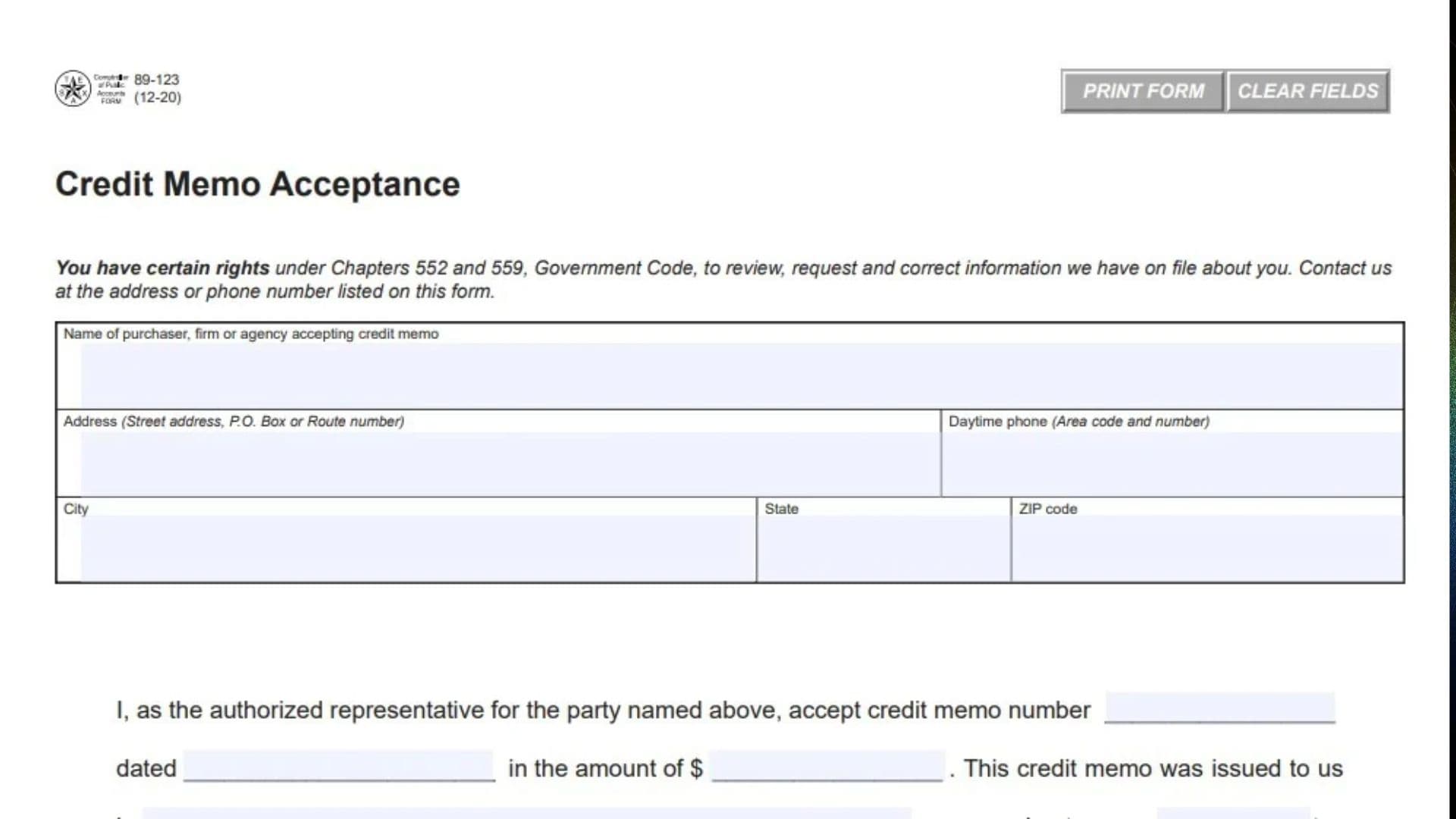
Texas Form 89-123, Credit Memo Acceptance, is a document used by the Texas Comptroller of Public Accounts to record a taxpayer’s or business’s acceptance of a credit memo issued in place of a cash refund. It applies when a purchaser, company, or agency has paid a tax or fee in error and is receiving a credit memo from a vendor instead of receiving money directly from the vendor or the State of Texas. By signing this form, the authorized representative confirms that the credit memo has been received and agrees that its value will be applied to the purchaser’s account with the vendor. The form identifies the purchaser or organization accepting the credit, provides contact information, and records important details about the credit memo, including its reference number, issue date, amount, issuing vendor, related invoice numbers, and the date of the vendor’s invoice. It also requires the applicant to identify the type of tax or fee for which the credit is being provided. This information helps establish which transaction and tax payment the credit memo relates to and documents the purchaser’s agreement to accept the credit as full and final settlement of the refund due for the specified tax. Form 89-123 may be used for certain taxes and fees paid incorrectly, including limited sales, excise, and use tax, oil well service tax, and miscellaneous gross receipts tax. However, it cannot be used for motor vehicle tax. The purchaser must provide the name and position of the authorized representative, along with a signature and date, to confirm acceptance on behalf of the business or organization. Once signed, the credit memo is treated as an alternative to a cash refund, and the amount is credited against the purchaser’s account with the vendor. Importantly, the acceptance applies regardless of any subsequent actions taken by the vendor. Completing the form accurately ensures that the credit memo, the original tax-related transaction, and the purchaser’s acceptance are properly documented.
Who Should Complete Form 89-123?
Form 89-123 should be completed by an individual authorized to represent the purchaser, firm, or agency receiving the credit memo.
It may apply to:
- Businesses receiving a vendor-issued credit memo.
- Firms that paid an applicable tax or fee in error.
- Agencies accepting a credit memo on behalf of an organization.
- Authorized representatives responsible for accepting tax-related credits.
The person signing the form must have the authority to accept the credit memo for the organization.
Important: This form cannot be used for motor vehicle tax refunds.
How To File Form 89-123
Complete the form with the purchaser’s information and the details of the credit memo being accepted.
Before completing it, prepare the following information:
- Legal name of the purchaser, firm, or agency.
- Complete mailing address.
- Daytime telephone number.
- Credit memo number.
- Credit memo issue date.
- Credit memo amount.
- Name of the vendor issuing the credit.
- Applicable tax type.
- Original invoice number or numbers.
- Date of the vendor’s invoice.
- Authorized representative’s printed name.
- Representative’s position or relationship to the organization.
- Signature and date.
Submission Instructions
The form does not specify a mailing address, submission method, or separate attachment requirement. Follow the instructions provided by the vendor or the Texas Comptroller for returning the completed acceptance document.
Keep a copy of the signed form and the related credit memo and invoices for your business records.

How To Complete Form 89-123
Form 89-123 is a one-page document containing purchaser identification fields, credit memo details, an acceptance declaration, and an authorized signature section.
Purchaser And Business Information
Name of Purchaser, Firm, or Agency Accepting Credit Memo
Enter the complete legal name of the individual, business, or agency accepting the credit memo.
If the credit is being accepted by a company, use the organization’s legal business name.
If an individual is accepting the credit, provide that person’s full name.
Make sure the name identifies the same party that received the credit memo.
Address
Provide the complete mailing address of the purchaser, firm, or agency.
Include the following information:
- Street address, P.O. Box, or route number.
- Any applicable additional address details.
Use an address where official correspondence concerning the credit memo can be received.
Daytime Phone
Enter the telephone number where the purchaser or organization can be contacted during normal business hours.
Include the area code and complete telephone number.
Use an active contact number in case clarification is needed about the credit memo.
City
Enter the city associated with the purchaser’s mailing address.
State
Provide the applicable state abbreviation.
ZIP Code
Enter the correct ZIP code for the mailing address.
Check the complete address before proceeding to the credit memo information.
Credit Memo Details And Acceptance
Credit Memo Number
Enter the identification number assigned to the credit memo being accepted.
Use the exact number shown on the vendor-issued credit memo.
This number helps identify the specific credit transaction being documented.
Credit Memo Date
Enter the date the credit memo was issued.
Use the date shown on the original credit memo.
Credit Memo Amount
Enter the total dollar amount of the credit memo.
Make sure the amount matches the value issued by the vendor.
Do not enter the original invoice amount unless it is the same as the actual credit memo amount.
Vendor Name
Enter the complete name of the vendor that issued the credit memo.
This should be the business or supplier responsible for providing the credit.
Use the vendor’s name as it appears on the credit memo or related transaction records.
Tax Type
Identify the specific type of tax or fee associated with the credit memo.
The form requires the tax type to be entered in the designated space.
Examples of eligible tax categories include:
- Limited sales tax.
- Excise tax.
- Use tax.
- Oil well service tax.
- Miscellaneous gross receipts tax.
Enter the tax or fee category that was originally collected from your organization.
The form cannot be used for motor vehicle tax.
Invoice Number(s)
Enter the invoice number or numbers associated with the tax or fee collected by the vendor.
If the credit memo covers multiple invoices, list all applicable invoice numbers in the available space.
Make sure the invoice references correspond to the transactions for which the credit is being issued.
Vendor Invoice Date
Enter the date shown on the original invoice or invoices issued by the vendor.
Use the applicable invoice date associated with the tax collection covered by the credit memo.
Check that the date matches the supporting transaction records.
Credit Memo Acceptance Declaration
This section confirms that the authorized representative understands the conditions associated with accepting the credit memo instead of receiving a cash refund.
By completing this declaration, the representative acknowledges that:
- The credit memo is being provided instead of a cash refund from the vendor or the State of Texas.
- The credit amount will be applied against the purchaser’s account with the vendor.
- Acceptance of the credit memo represents full and final settlement of the refund due for the specified tax.
- The acceptance remains valid regardless of any subsequent actions taken by the vendor.
Tax Type
Enter the type of tax for which the credit memo is accepted.
This should match the tax category identified earlier in the declaration.
For example, if the credit relates to use tax, enter Use Tax in this field.
Make sure the tax type is consistent throughout the form.
Authorized Representative Information
The final section identifies the person accepting the credit memo on behalf of the purchaser, firm, or agency.
Complete all four fields.
Print or Type Name
Enter the complete printed name of the authorized representative.
The name should identify the individual signing the acceptance document.
Relationship to Entity
Enter the representative’s official position or relationship with the purchaser, firm, or agency.
Examples include:
- President.
- Treasurer.
- Business owner.
- Authorized representative.
Use the person’s actual organizational position.
Signature
The authorized representative must sign the form to confirm acceptance of the credit memo.
The signature indicates agreement with the declaration and the conditions associated with the credit.
Make sure the individual signing has the authority to accept the credit on behalf of the named organization.
Date
Enter the date the authorized representative signs the form.
Use the actual signing date.
Review the information above before completing this final field.
Important Information About Credit Memo Acceptance
Credit Memo Instead Of Cash Refund
Form 89-123 documents acceptance of a credit memo as an alternative to receiving a cash refund.
The credit is applied to the purchaser’s account with the vendor rather than being paid directly as cash.
By signing the form, the authorized representative accepts this arrangement as full and final settlement of the refund due for the specified tax.
Eligible Tax Types
The form may be used for taxes or fees paid in error for which a refund may be approved.
Examples include:
- Limited sales tax.
- Excise tax.
- Use tax.
- Oil well service tax.
- Miscellaneous gross receipts tax.
Tax Type Not Covered
Form 89-123 cannot be used for motor vehicle tax.
If the refund concerns motor vehicle tax, this credit memo acceptance form is not the appropriate document.
Privacy And Information Rights
The form explains that individuals have certain rights under Chapters 552 and 559 of the Texas Government Code.
These rights include reviewing information maintained by the Comptroller, requesting access to applicable records, and seeking corrections to inaccurate information, subject to applicable legal exceptions.
For assistance, contact the Texas Comptroller using the appropriate contact information provided for the relevant tax or refund matter.
Additional Refund Information
For further information about Texas tax refunds, the Comptroller directs taxpayers to its official refund information service.
You should review the applicable refund guidance if you have questions about credit memo acceptance or the refund process.
Final Review Before Filing
Before returning Form 89-123, review the completed document to ensure that every required field is accurate.
Use the following checklist:
- Enter the correct name of the purchaser, firm, or agency.
- Provide the complete mailing address.
- Enter the daytime telephone number, including the area code.
- Provide the correct city.
- Enter the state abbreviation.
- Verify the ZIP code.
- Enter the correct credit memo number.
- Provide the credit memo issue date.
- Enter the exact credit memo amount.
- Identify the vendor that issued the credit memo.
- Specify the correct tax or fee type.
- List all applicable original invoice numbers.
- Enter the vendor’s invoice date.
- Confirm that the credit memo is being accepted instead of a cash refund.
- Verify that the credit amount will be applied to the purchaser’s vendor account.
- Confirm that the tax type in the final declaration matches the earlier entry.
- Enter the authorized representative’s printed name.
- Provide the representative’s position or relationship to the organization.
- Obtain the authorized representative’s signature.
- Enter the actual signing date.
- Make sure the form does not concern motor vehicle tax.
- Keep a copy of the completed acceptance form and supporting transaction records.
- Follow the applicable instructions for returning the signed document.
Completing Form 89-123 correctly documents your organization’s acceptance of a vendor-issued credit memo instead of a cash refund. Before signing, carefully verify the credit amount, vendor details, invoice references, and tax type. The authorized representative should understand that signing the form accepts the credit as full and final settlement of the refund due for the specified tax.