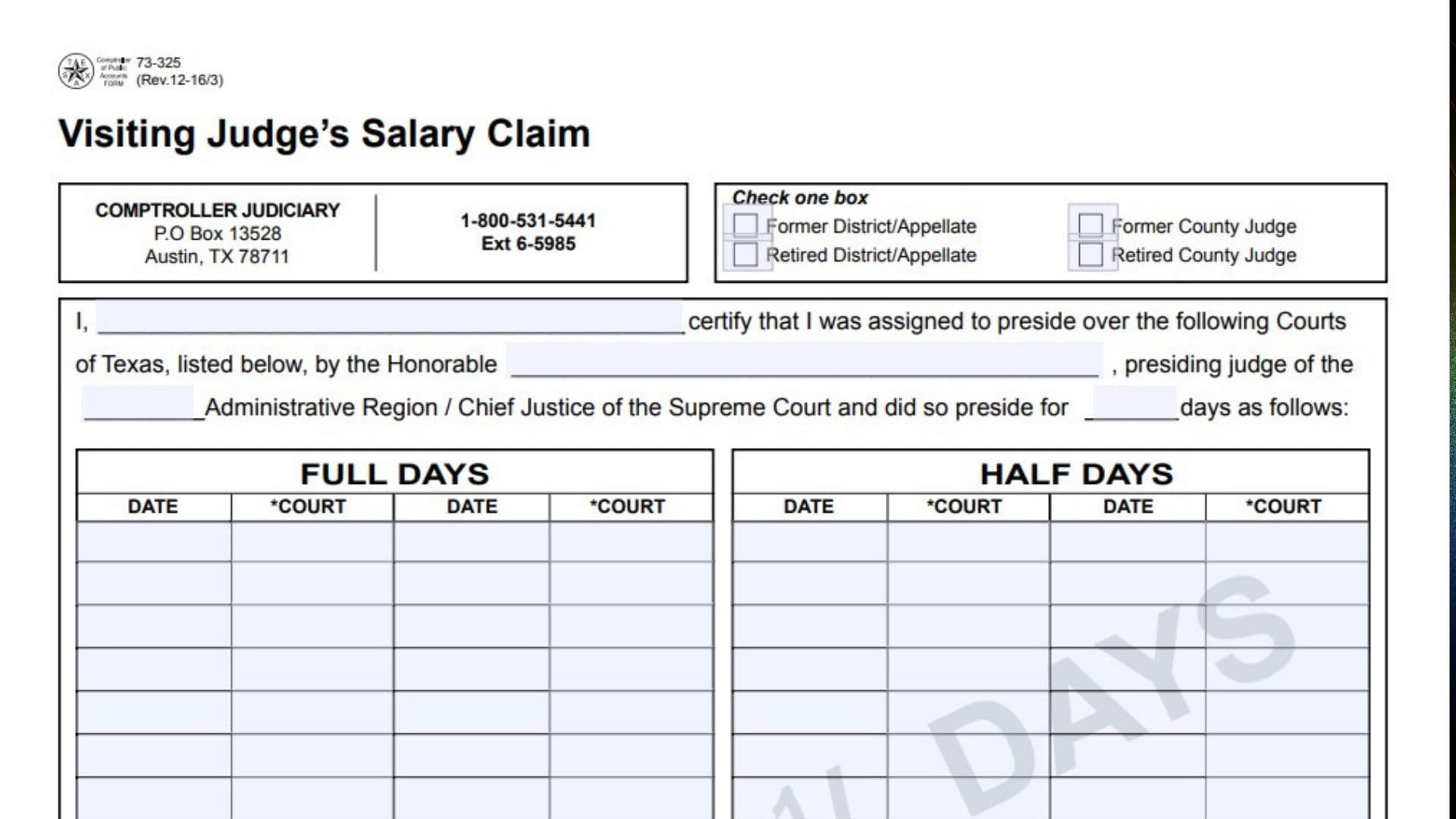
Texas Form 73-325, known as the Visiting Judge’s Salary Claim, is a form used by eligible former or retired judges to report their service as assigned judges presiding over Texas courts and claim the salary associated with that service. It is designed to document the dates on which a judge performed judicial duties, identify the courts where those duties were carried out, and confirm that the service was authorized by the appropriate presiding judge or the Chief Justice of the Supreme Court of Texas. The form is intended for four categories of judges: former district or appellate judges, retired district or appellate judges, former county judges, and retired county judges. It collects the claimant’s name, judicial classification, assignment authority, administrative region, service dates, court identification details, and the number of full and half days served. It also requires the assigned judge to certify that the claim is accurate and unpaid. A separate certification from the presiding judge or Chief Justice confirms that the claimant performed the reported service. The form additionally collects contact information and a Texas identification number so the claim can be properly associated with the claimant. The final section is reserved for the Texas Comptroller’s office to record salary calculations, court details, service months, daily rates, approvals, and accounting information. Completing the form accurately is important because the reported dates, court information, and certifications provide the basis for reviewing and processing the salary claim.
How To File Form 73-325
Form 73-325 is submitted to the Comptroller Judiciary at the mailing address printed on the form. The document does not identify another tax return or application that must accompany the claim. It also does not specify a filing deadline, mandatory supporting documents, or an alternative electronic submission method.
Before completing the form, gather the following information:
- Your full name and applicable judicial classification.
- The name of the presiding judge or Chief Justice who authorized your assignment.
- The relevant administrative region, where applicable.
- The dates on which you presided over Texas courts.
- The names and identification numbers of the courts where you served.
- The number of full and half days worked.
- Your Texas identification number.
- Your current mailing address and daytime telephone number.
- The required signatures and dates from both the assigned judge and the presiding judge or Chief Justice.
Review your assignment records carefully so that the dates and court information match the service you actually performed.
Where To Submit Form 73-325
Mail the completed claim to the following address:
Comptroller Judiciary
P.O. Box 13528
Austin, TX 78711
For questions about the form or submission process, contact the Comptroller Judiciary using the telephone number provided on the form:
Telephone: 1-800-531-5441
Extension: 65985
The contact extension appears as 6-5985 in the form’s contact box.
Supporting Documents And Attachments
The form does not list any mandatory supporting documents or attachments. Therefore, do not assume that a particular additional document is required. Keep your assignment and service records available in case further information is requested during the review process.

How To Complete Form 73-325
The form contains several sections covering judicial classification, assignment information, service dates, certifications, contact details, and administrative processing. Follow the instructions below to complete each field.
Judge Classification
Check One Box: Former District/Appellate
Select this option if you are claiming compensation under the former district or appellate judge classification. Choose only one category that accurately reflects your status.
Check One Box: Retired District/Appellate
Select this option if you are a retired district or appellate judge submitting a salary claim for assigned judicial service.
Check One Box: Former County Judge
Select this option if your applicable judicial classification is former county judge.
Check One Box: Retired County Judge
Select this option if you are a retired county judge claiming compensation for your assigned service.
Only one of the four available classifications should be selected. The form does not provide further definitions of former and retired status, so contact the Comptroller Judiciary if you are uncertain which classification applies.
Claimant And Judicial Assignment Information
Claimant’s Full Name
Enter your complete legal name in the first blank in the certification statement. This identifies the judge submitting the salary claim. Make sure the name is accurate and consistent with your official records.
Name Of The Assigning Presiding Judge
Enter the full name of the Honorable judge who assigned you to preside over the listed Texas courts. This identifies the judicial authority responsible for your assignment.
Administrative Region / Chief Justice Of The Supreme Court
Enter the applicable administrative region associated with your assignment. The form also provides for assignments made by the Chief Justice of the Supreme Court of Texas. Identify the appropriate authority according to how your assignment was authorized.
Total Number Of Days Served
Enter the total number of days you served in the assigned courts. This figure should correspond to the service dates recorded in the full-day and half-day sections below.
The form separates full-day and half-day service but does not provide a specific conversion formula for calculating the combined total. If you are unsure how half-day service should be reflected in the total, confirm the correct counting method with the Comptroller Judiciary.
Full Days And Half Days
This is one of the most important sections of Form 73-325. It provides separate tables for recording full-day and half-day judicial service.
Each table contains repeated Date and Court columns, allowing you to record multiple service dates and court assignments.
Full Days Section
Date – Full Days
Enter the date on which you performed a full day of assigned judicial service. Record each service date in the appropriate row. Use a clear and consistent date format.
Court – Full Days
Enter the identification of the Texas court where you presided on the corresponding date. Follow the court abbreviation and identification instructions printed beneath the tables.
If you served in different courts on different dates, make sure each court entry is matched with the correct service date.
The full-day table contains two sets of Date and Court columns so that multiple entries can be recorded in the available space.
Half Days Section
Date – Half Days
Enter the date on which you performed a half day of assigned judicial service. Only record half-day service in this section, not in the full-day table.
Court – Half Days
Enter the identification of the court where you performed the corresponding half-day service. Make sure the court information matches the date entered in the same row.
The half-day table also contains two sets of Date and Court columns for recording multiple entries.
Important: Do not mix full-day and half-day service records. Keeping them separate helps the reviewing office distinguish between the two types of service.
Court Identification Instructions
The form provides specific abbreviations for identifying different types of Texas courts. Use the correct abbreviation and court number when completing the Court columns.
District Court (DC)
For service performed in a District Court, enter the abbreviation DC followed by the applicable court number.
Court Of Appeals (COA)
For service performed in a Court of Appeals, use COA followed by the applicable court number.
Criminal District Court (CDC)
For service performed in a Criminal District Court, use CDC followed by the applicable court number. An additional county identifier is required for certain counties:
- T: Use this identifier for Tarrant County.
- D: Use this identifier for Dallas County.
- J: Use this identifier for Jefferson County.
Make sure the court abbreviation, court number, and applicable county identifier are entered correctly. Incorrect court identification may make it difficult to verify the reported service.
Assigned Judge’s Certification And Contact Information
After completing the service information, review the certification statement and provide the required personal information.
Assigned Judge’s Certification
The assigned judge must confirm that the claim has been reviewed and that, to the best of their knowledge and belief, the information is correct and the amount claimed remains unpaid.
Read this certification carefully before signing. By signing, you confirm the accuracy of the information submitted.
Signature Of Assigned Judge
Sign in the designated signature field. The signature must belong to the judge submitting the salary claim.
Date – Assigned Judge
Enter the date on which you sign the claim. Make sure the date is accurate and clearly written.
Address
Enter your current mailing address. Provide the complete address so that correspondence relating to the claim can reach you.
Texas Identification Number
Enter your Texas identification number in the designated field. Check the number carefully before submitting the form to avoid identification errors.
City, State, ZIP Code
Provide the city, state, and ZIP code associated with your mailing address. Ensure that these details are consistent with the address entered above.
Daytime Phone (Area Code And Number)
Enter a telephone number where you can be reached during regular daytime hours. Include the area code and the complete phone number.
Rights Under Chapter 559, Government Code
The form includes a notice explaining that you have certain rights under Chapter 559 of the Texas Government Code. These rights relate to reviewing, requesting, and correcting information maintained about you by the Comptroller.
If you need assistance with information held on file, contact:
Telephone: 1-800-531-5441
Extension: 65985
This notice is provided for your information and does not require a separate signature or additional entry.
Presiding Judge / Chief Justice Certification
The next section must be completed by the presiding judge or the Chief Justice of the Supreme Court, as applicable. This certification confirms that the assigned judge actually performed the judicial service reported in the claim.
Assigned Judge’s Name
Enter the full name of the judge who performed the service. This name should match the claimant’s name entered in the first section of the form.
Number Of Days Served
Enter the number of days the assigned judge served, as recorded in the service tables above. This figure should agree with the service being certified.
Signature Of Presiding Judge / Chief Justice
The presiding judge or Chief Justice must sign in the designated space to confirm that the assigned judge performed the reported service.
Date – Presiding Judge / Chief Justice
Enter the date on which the presiding judge or Chief Justice signs the certification.
Make sure this section is completed before submitting the claim. The assigned judge’s signature alone does not replace the separate certification required from the presiding judge or Chief Justice.
For Comptroller Use Only
The bottom section of Form 73-325 is specifically reserved for the Comptroller’s office. Claimants should leave this entire section blank.
It contains administrative fields used during the review, salary calculation, and processing of the claim.
Total Salary
This field is used by the Comptroller’s office to record the total salary associated with the claim.
Court
The reviewing office records the applicable court information for administrative and payment processing purposes.
Month
This field identifies the month associated with the reported judicial service.
Number Of Days
The Comptroller’s office records the number of service days used in the salary calculation.
Daily Rate
This field is used to record the applicable daily salary rate.
Approvals
The approvals area is reserved for the relevant internal authorization and review process.
Total
The Comptroller’s office records the calculated total amount after reviewing the applicable service information and salary details.
Coding
This field is reserved for internal accounting or processing codes used by the Comptroller’s office.
Do not enter your own salary calculations, approval information, or administrative codes in this section. These fields are intended for official processing.
Final Review Before Filing
Before mailing Form 73-325, review the entire document to ensure that all required information is complete and accurate.
Use the following checklist:
- Selected the correct judicial classification from the four available options.
- Entered your complete name correctly.
- Provided the name of the presiding judge or Chief Justice responsible for the assignment.
- Identified the applicable administrative region or assignment authority.
- Entered the total number of days served.
- Recorded every full-day service date in the Full Days section.
- Recorded every half-day service date in the Half Days section.
- Entered the correct court abbreviations and court numbers.
- Included the required county identifiers for applicable Criminal District Courts.
- Reviewed the service dates and court details for accuracy.
- Read and signed the assigned judge’s certification.
- Entered the assigned judge’s signature date.
- Provided your complete mailing address.
- Entered your Texas identification number.
- Provided your city, state, and ZIP code.
- Included a daytime telephone number with the area code.
- Obtained the presiding judge’s or Chief Justice’s certification.
- Checked that the certified number of days matches the reported service.
- Confirmed that both required signatures and dates are present.
- Left the entire For Comptroller Use Only section blank.
- Confirmed the mailing address before sending the completed claim.
Where To Mail The Completed Form
Comptroller Judiciary
P.O. Box 13528
Austin, TX 78711
For Assistance: 1-800-531-5441, Extension 65985.
A carefully completed Visiting Judge’s Salary Claim helps ensure that the reported judicial service can be reviewed and processed using accurate assignment details, service records, and the required certifications.