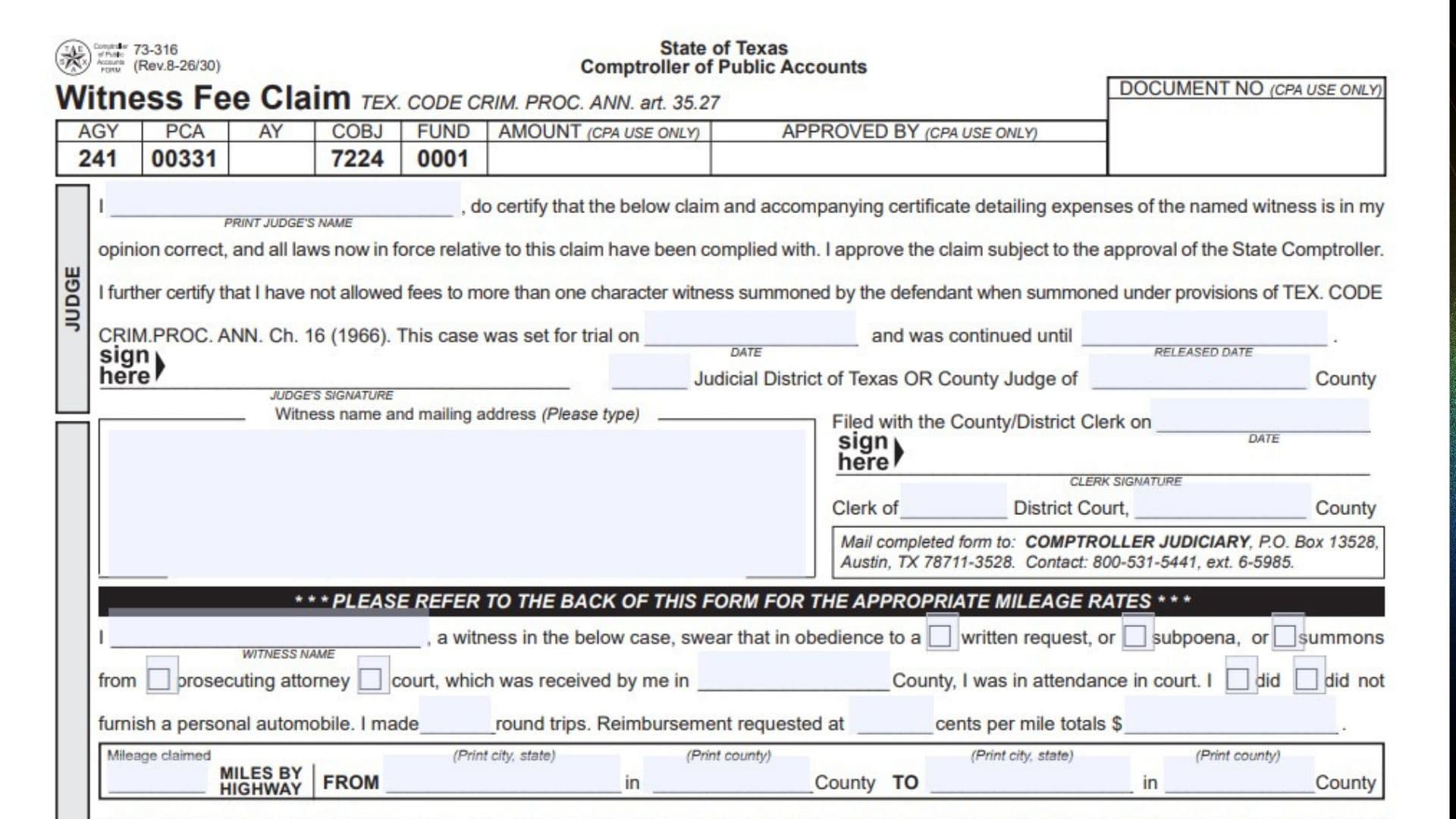
Texas Form 73-316, known as the Witness Fee Claim, is a document issued by the Texas Comptroller of Public Accounts for reporting and claiming fees and expenses associated with attending court as a witness. The form is used when a witness attends court in response to a written request, subpoena, or summons issued by a prosecuting attorney or the court. It provides a formal record of the witness’s attendance, travel, mileage, meals, lodging, and other eligible expenses connected with the court appearance. The form is governed by Article 35.27 of the Texas Code of Criminal Procedure and requires information and certifications from several parties involved in the claim. The witness provides personal details, confirms the reason for attending court, reports the miles traveled, identifies the court case, and itemizes the expenses being claimed. The judge reviews and certifies the claim, while the County or District Clerk completes the relevant filing information. The witness must also provide a sworn statement confirming that the information is accurate, the mileage was actually traveled, and the reported services were performed as stated. A notary public must witness the required sworn signature. The form includes separate sections for calculating the total expenses, identifying amounts payable to the witness or county, and recording additional meal and lodging expenses on the reverse side. Completing Form 73-316 accurately is important because the information is used to verify court attendance, confirm travel and expense claims, and determine the amounts payable. The form also contains mileage reimbursement rates for different periods in 2026 and explains that a Form 1099-NEC will be provided when a witness’s reimbursements reach or exceed $600.
How To File Form 73-316
Form 73-316 is submitted to the Comptroller Judiciary after the required information, certifications, and signatures have been completed. The form includes separate sections for the judge, witness, notary public, and County or District Clerk. Each party must complete the relevant portion before the claim is submitted for processing.
Where To Submit Form 73-316
Mail the completed form to the following address:
Comptroller Judiciary
P.O. Box 13528
Austin, TX 78711-3528
For questions about the form or the claim process, contact the Comptroller Judiciary:
Telephone: 800-531-5441
Extension: 6-5985
Information And Documents To Prepare
Before completing the form, gather the information needed to report the court appearance and calculate the expenses.
Prepare the following:
- Witness’s full legal name and mailing address.
- Name of the judge reviewing the claim.
- Judicial district or county information.
- Date the case was scheduled for trial and the date it was continued.
- Date and details of the court appearance.
- Written request, subpoena, or summons information.
- Name of the prosecuting attorney or court that requested the appearance.
- County where the request or summons was received.
- Travel details, including departure and destination locations.
- Total highway miles and number of round trips.
- Applicable mileage reimbursement rate.
- Case information, including defendant’s name and case number.
- Daily meal and lodging expenses.
- Receipts for parking, taxi or rental car, and bus, train, or air travel expenses.
- Witness’s Social Security number.
- County payment information, if any amount is payable to the county.
The form specifically requires receipts for parking, taxi or rental car, and bus, train, or air expenses. Keep these receipts available when preparing the claim.
The form does not specify a general filing deadline or provide an electronic submission procedure.
How To Complete Form 73-316
Form 73-316 contains two pages. The first page includes the judge’s certification, witness affidavit, case details, and expense calculations. The second page provides additional space for mileage information, daily meals and lodging expenses, and optional explanations.
Follow the instructions below to complete each section.
Top Administrative Information
Document Number (CPA Use Only)
This field is reserved for the Texas Comptroller of Public Accounts. It is used for administrative identification and processing of the claim. The claimant should leave this field blank.
AGY
This field identifies the agency associated with the claim. The form displays a preprinted agency code of 241. Do not change the preprinted information.
PCA
This field contains the preprinted program or accounting classification code 00331. It is an administrative field and should not be altered by the claimant.
AY
This field represents the accounting year. The form does not provide a preprinted value in this space. Do not guess an accounting code; follow any instructions provided by the Comptroller’s office.
COBJ
This field identifies the Comptroller’s object classification. The form displays the preprinted code 7224.
FUND
This field identifies the fund classification. The preprinted value is 0001.
Amount (CPA Use Only)
This space is reserved for the Comptroller’s office to record the amount associated with the claim. Leave it blank.
Approved By (CPA Use Only)
This field is used by the Comptroller’s office to record the official approval information. The claimant should not complete it.
Judge’s Certification
The upper section of the form must be completed by the judge responsible for reviewing and approving the witness fee claim.
Judge’s Printed Name
Enter the full name of the judge in the designated blank. The judge must identify themselves before certifying the accuracy of the witness’s claim.
Judge’s Certification Statement
The judge must review the claim and the accompanying certificate detailing the witness’s expenses. By completing this certification, the judge confirms that, to the best of their knowledge, the claim is correct and that the applicable laws have been followed.
The judge also approves the claim subject to the final approval of the State Comptroller.
Character Witness Certification
The judge must also confirm that fees have not been allowed to more than one character witness summoned by the defendant under the provisions referenced in Chapter 16 of the Texas Code of Criminal Procedure.
This certification is part of the judge’s required declaration. It should be reviewed carefully before signing.
Date – Case Set For Trial
Enter the original date on which the case was scheduled for trial. This date documents when the case was initially expected to proceed.
Released Date – Case Continued Until
Enter the date indicated as the date the case was continued or released. Make sure the information corresponds to the relevant court records.
Judge’s Signature
The judge must sign in the designated space to certify the information and approve the claim subject to the Comptroller’s approval.
Judicial District Of Texas
Enter the applicable judicial district when the judge is signing in that capacity. This identifies the district associated with the judge’s authority.
County Judge Of County
If the claim is being certified by a county judge, enter the name of the county in the designated space. Use the applicable identification rather than completing both alternatives.
Witness Name And Mailing Address
Witness Name And Mailing Address
Enter the witness’s complete name and mailing address in the large designated area. The form specifically requests that this information be typed.
Include the information clearly so the witness can be identified and contacted regarding the claim.
County Or District Clerk Information
This section records when the claim was filed with the appropriate County or District Clerk and identifies the clerk responsible for the filing information.
Filed With The County/District Clerk On
Enter the date on which the claim was filed with the County or District Clerk. This date documents the filing of the claim with the relevant court office.
Clerk Signature
The responsible clerk must sign in the designated space to acknowledge the filing information.
Clerk Of District Court
Enter the name or identification of the applicable District Court associated with the clerk’s office.
County
Enter the name of the county where the relevant court is located.
The completed form must then be mailed to the Comptroller Judiciary at the address printed on the form.
Witness Mileage And Attendance Affidavit
The witness must complete this section to explain why they attended court and provide the details needed to calculate mileage reimbursement.
Witness Name
Enter your full name in the blank provided. This should match the name entered in the witness information section above.
Written Request, Subpoena, Or Summons
Select the appropriate checkbox to identify the document or instruction under which you attended court.
The available options are:
- Written request.
- Subpoena.
- Summons.
Select the option that accurately describes how you were instructed to appear.
Prosecuting Attorney Or Court
Identify the authority that issued the request for your attendance.
Select either:
- Prosecuting attorney.
- Court.
Choose the option that applies to your situation.
County Where The Request Was Received
Enter the name of the county where you received the written request, subpoena, or summons. This information identifies the location associated with the official request.
Court Attendance Confirmation
The affidavit confirms that you attended court in response to the applicable request or summons. Review this statement carefully before signing the form.
Did Furnish A Personal Automobile
Select the appropriate option to indicate whether you provided a personal automobile for the travel associated with your court appearance.
- Select Did if you furnished a personal automobile.
- Select Did Not if you did not furnish a personal automobile.
Choose only the applicable option.
Number Of Round Trips
Enter the total number of round trips you made for the court appearance. A round trip represents travel from your starting location to the destination and back.
Make sure this number agrees with the mileage information reported below.
Reimbursement Requested At Cents Per Mile
Enter the applicable mileage reimbursement rate in cents per mile. Use the rate corresponding to the travel period shown in the mileage rate table on the reverse side of the form.
Total Mileage Reimbursement
Enter the total dollar amount requested for mileage reimbursement. Calculate this amount using the total eligible highway miles and the applicable rate.
For example, if you traveled 100 miles at a rate of 72.5 cents per mile, the calculation would be:
100 × $0.725 = $72.50.
Mileage Claimed – Miles By Highway
Enter the total number of highway miles traveled for which reimbursement is requested. Report the actual miles traveled rather than an estimated distance.
From – Starting City And State
Enter the city and state where your journey began. Print the location clearly.
Starting County
Enter the county associated with your starting location.
To – Destination City And State
Enter the city and state where you traveled for the court appearance.
Destination County
Enter the county associated with the destination court location.
Ensure that the starting location, destination, mileage, and number of round trips are consistent.
Witness Sworn Statement And Residency Information
The next part of the affidavit requires the witness to confirm the accuracy of the reported information.
Accuracy Of The Claim
The witness must confirm that the information provided in the affidavit is correct, the services were performed as stated, and the mileage charged represents miles actually traveled.
The statement also requires the witness to disclose whether any portion of the claim has already been paid, except as shown in the claim.
Confirmation Of Summons
The witness must confirm that they were summoned in the manner identified in the earlier section.
County Of Bona Fide Residence
Enter the name of the county where you are a bona fide resident. This identifies your permanent county of residence.
State Of Residence
Enter the state associated with your permanent residence.
Permanent Residence Certification
The witness must confirm that their residence in the identified county is permanent and that they have not established a temporary residence for the purpose of obtaining mileage and per diem as a witness.
Read this statement carefully before signing because it forms part of the sworn declaration.
Witness Social Security Number
Enter your complete Social Security number in the designated spaces. Check the number carefully to avoid identification errors.
Form 1099-NEC Notice
The form includes a notice explaining that a Form 1099-NEC will be provided to the witness if reimbursements reach or exceed $600.
This is an informational notice and does not require a separate entry.
Witness Signature
Sign your name in the designated signature field to confirm the accuracy of the sworn statement and the information provided in the claim.
Notary Certification
The witness affidavit includes a notary section that must be completed as part of the sworn certification.
Subscribed And Sworn Before Me On
The notary must enter the date on which the witness appeared and made the sworn statement.
Notary Signature
The notary public must sign in the designated space to certify the notarization.
Notary Seal
The notary must apply the appropriate official seal in the space provided.
Make sure the witness signature, notarization date, notary signature, and seal are completed as required before submitting the form.
Case Information
This section identifies the court case connected with the witness’s attendance and expense claim.
Defendant
Enter the name of the defendant associated with the case. This helps identify the legal proceeding for which the witness was summoned.
Case Number
Enter the official case number assigned by the court. Check the number against the court records to ensure accuracy.
Type Of Case – Misdemeanor
Select this checkbox if the case is classified as a misdemeanor.
Type Of Case – Felony
Select this checkbox if the case is classified as a felony.
Choose the classification that matches the case.
Was This A Change Of Venue? – Yes
Select Yes if the case involved a change of venue.
Was This A Change Of Venue? – No
Select No if the case did not involve a change of venue.
Only one answer should be selected.
Witness Expenses – Page 1
This section records the witness’s daily meal and lodging expenses and calculates the total amount claimed.
The form instructs witnesses to enter meal and lodging expenses for each date. Additional dates can be recorded on the reverse side.
Daily Expenses For Meals And Lodging
Date
Enter the date on which the meal or lodging expense was incurred. Record each applicable date separately.
Meals
Enter the amount spent on meals for the corresponding date. Keep the amount associated with the correct date.
Lodging
Enter the lodging expense for the corresponding date. Record the amount in the appropriate column.
If you have more expense dates than the first page provides space for, use the continuation table on the reverse side.
Expense Totals And Calculations
Total Miles At Cents Per Mile
Enter the total mileage being claimed and the applicable reimbursement rate per mile. Calculate the mileage reimbursement by multiplying the eligible miles by the applicable rate.
Parking Total – Receipts Required
Enter the total amount spent on parking during the court-related travel. Receipts are required for these expenses.
Taxi And/Or Rental Car Total – Receipts Required
Enter the total expenses for taxi services or rental cars used in connection with the court appearance. The form specifically requires receipts for these expenses.
Bus, Train, Or Air Total – Receipts Required
Enter the total amount spent on bus, train, or air transportation associated with the court appearance. Attach the required receipts.
Meals Total
Add the meal expenses recorded in the daily expense tables and enter the combined amount in this field.
Lodging Total
Add the lodging expenses recorded in the daily expense tables and enter the combined amount.
Grand Total Of Expenses Claimed
Add the applicable mileage, parking, taxi or rental car, bus, train or air transportation, meals, and lodging expenses.
Enter the combined amount in the Grand Total Of Expenses Claimed field.
Total Amount Due Witness
Enter the total amount payable directly to the witness based on the completed claim.
Total Amount Due County
Enter the amount payable to the county, if applicable. If the county is entitled to receive money toward the witness’s expenses, this amount must be reported here.
The form does not provide a separate allocation formula for dividing the total between the witness and the county. Use the applicable court or Comptroller instructions when determining the amounts.
Meals And Lodging Totals
The left side of the expense section contains separate spaces for combining daily expenses recorded on both pages.
Totals From Above
Enter the combined meal and lodging amounts recorded in the daily expense table on the first page.
Totals From Back
Enter the combined meal and lodging amounts recorded in the continuation table on the reverse side.
Grand Totals For Meals And Lodging
Combine the totals from the first page and the reverse side. Enter the final meal and lodging totals in the appropriate spaces.
These amounts should agree with the Meals Total and Lodging Total reported in the expense calculation section.
County Payment Information
The final section on the first page must be completed only when the county is due money toward the witness’s expenses.
If no amount is due to the county, this section does not need to be completed.
Witness Signature
The witness must sign the certification in this section to confirm the county’s entitlement to the specified amount.
County Name
Enter the full name of the county that is due reimbursement.
Amount Due To County
Enter the dollar amount payable to the county toward the witness’s expenses. This amount should correspond to the Total Amount Due County reported in the expense summary.
County Address
Provide the complete mailing address of the county receiving the payment.
County Vendor Identification Number
Enter the county’s vendor identification number in the designated field. This identifies the county for payment processing.
County Contact And Email Address
Provide the name or contact information of the appropriate county representative along with the relevant email address.
Phone – Area Code And Number
Enter the county contact’s telephone number, including the area code. This allows the Comptroller’s office to contact the county if additional payment information is required.
How To Complete The Reverse Side Of Form 73-316
The second page is titled Witness Fee Claim Continuation. It provides additional space for witness identification, mileage rate information, daily meal and lodging expenses, page totals, and optional comments.
Witness Fee Claim Continuation
Document Number
This field is reserved for identifying the claim during administrative processing. Leave it blank unless the Comptroller’s office instructs you to enter a number already assigned to the claim.
Witness Name
Enter the witness’s full name. Make sure it matches the name provided on the first page so the additional expense information can be associated with the correct claim.
Mileage Rates
The reverse side provides the mileage reimbursement rates applicable to two periods in 2026.
January 1, 2026, Through June 30, 2026 – 72.5 Cents Per Mile
The form lists a reimbursement rate of 72.5 cents per mile for travel during this period.
Use this rate when calculating mileage for the applicable dates.
July 1, 2026, Through December 31, 2026 – .76 Cents Per Mile
The form prints the rate for this period as .76 cents per mile. Check this printed rate with the Comptroller Judiciary before calculating or submitting a claim for travel during this period if the notation is unclear.
Always use the applicable rate for the actual travel dates rather than automatically applying one rate to every trip.
Additional Witness Expenses
Date – Additional Expenses
Enter the date associated with each additional meal or lodging expense that could not be recorded in the first-page table.
Meals – Additional Expenses
Enter the meal expenses incurred on each additional date. Keep each amount aligned with the correct date.
Lodging – Additional Expenses
Enter the lodging expenses incurred on each additional date. Record each amount in the corresponding row.
The continuation table provides additional rows for witnesses who have more daily expenses than can fit on the first page.
Totals – For This Page Only
Add together all meal expenses entered on the continuation page and calculate the total. Do the same for lodging expenses.
Enter the respective totals in the designated columns.
These figures represent only the expenses recorded on the reverse side. They should then be included in the Totals From Back section on the first page when calculating the overall meal and lodging expenses.
Comments And Explanation
Comments / Explanation (Optional)
Use this space to provide additional information or explanations relevant to the witness’s expense claim.
For example, you may clarify an expense entry or provide an explanation that helps the reviewing office understand the information reported.
This section is optional. If no additional explanation is necessary, it may be left blank.
Final Review Before Filing
Before mailing Form 73-316, review both pages carefully. Make sure the witness information, court details, mileage calculations, expenses, and required certifications are complete.
Use the following checklist:
- Confirmed that the correct witness information is entered.
- Checked that the judge’s name is correctly printed.
- Obtained the judge’s required certification and signature.
- Entered the original trial date and continued or released date.
- Completed the judicial district or county judge information.
- Entered the witness’s full name and mailing address.
- Completed the County or District Clerk filing information.
- Selected the correct written request, subpoena, or summons option.
- Identified whether the request came from the prosecuting attorney or court.
- Entered the county where the request was received.
- Selected the correct personal automobile option.
- Reported the number of round trips and actual highway miles.
- Entered the correct starting and destination locations.
- Applied the mileage rate corresponding to the travel period.
- Completed the witness’s residency and sworn statement information.
- Entered the witness’s Social Security number.
- Obtained the witness’s signature.
- Completed the notary date, signature, and seal.
- Entered the defendant’s name and case number.
- Selected the correct misdemeanor or felony classification.
- Answered the change-of-venue question.
- Recorded all daily meal and lodging expenses.
- Entered additional expense dates on the reverse side when necessary.
- Calculated the totals from both pages correctly.
- Entered mileage, parking, taxi, rental car, public transportation, meals, and lodging expenses where applicable.
- Attached receipts for parking, taxi or rental car, and bus, train, or air expenses.
- Verified the Grand Total Of Expenses Claimed.
- Checked the Total Amount Due Witness and Total Amount Due County.
- Completed the county payment section if the county is due money.
- Entered the county’s address, vendor identification number, contact information, email, and telephone number when applicable.
- Entered the witness’s name on the continuation page.
- Completed the optional comments section if an explanation is necessary.
- Confirmed that all required signatures and certifications are present.
- Reviewed both pages for missing information and calculation errors.
Where To Mail The Completed Form
Comptroller Judiciary
P.O. Box 13528
Austin, TX 78711-3528
For Assistance: 800-531-5441, Extension 6-5985.
Carefully completing both pages of Form 73-316 helps ensure that the witness’s court attendance, mileage, and other reported expenses can be properly reviewed and processed by the Texas Comptroller of Public Accounts.