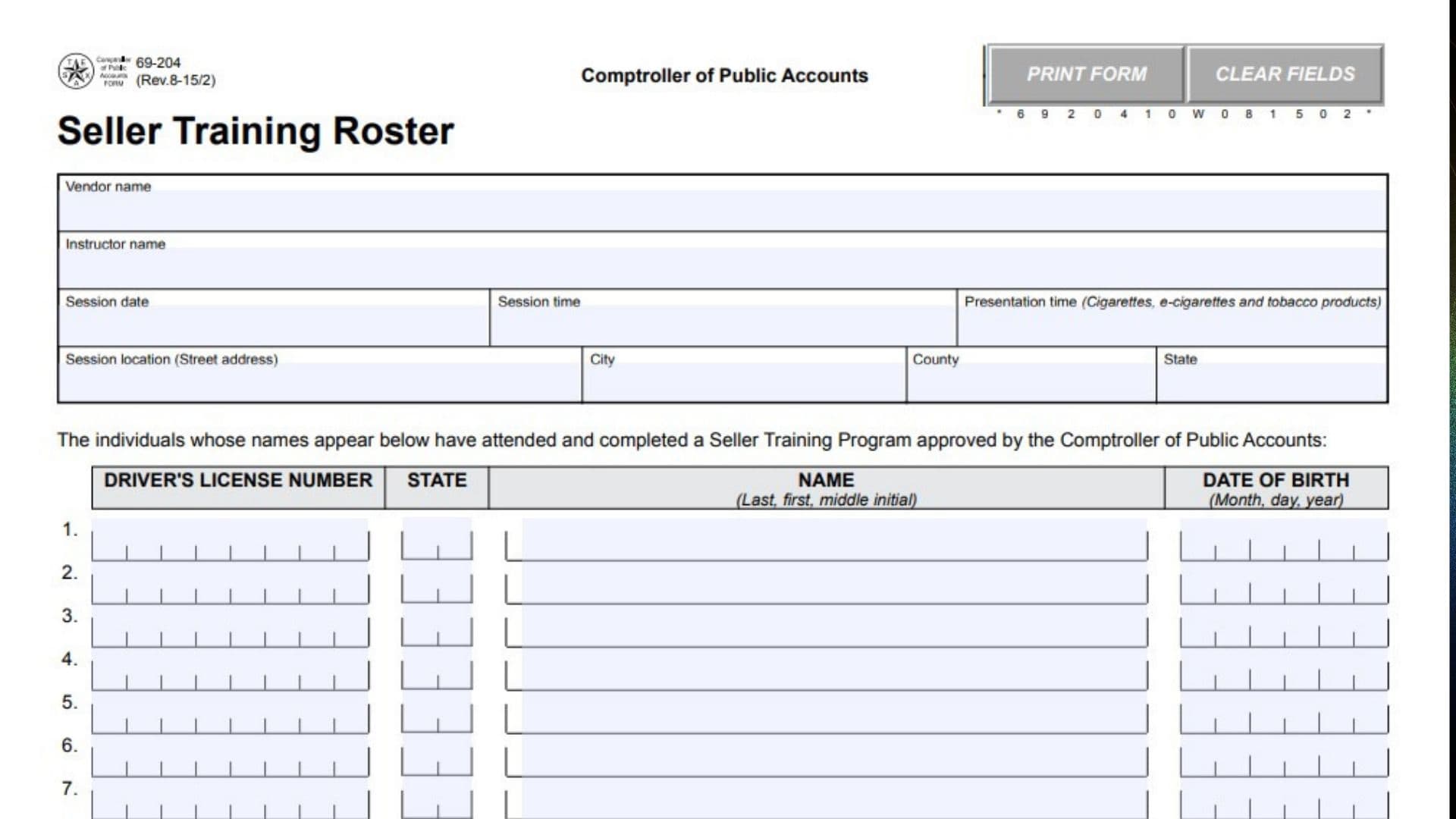
Form 69-204, known as the Seller Training Roster, is a document issued by the Texas Comptroller of Public Accounts to record the individuals who attend and successfully complete an approved Seller Training Program. The form provides an official record of each training session conducted by a vendor certified by the Comptroller to provide seller training. Its primary purpose is to document the training session details and identify everyone who completed the approved curriculum. The form collects information about the certified vendor, the instructor responsible for conducting the session, the date and starting time of the training, the duration of the approved presentation, and the location where the session took place. It also records personal identification details for each participant, including their driver’s license number, the state that issued the license, their full name, and their date of birth. The roster accommodates up to 50 participants across its two pages. An instructor must sign and date the completed roster to confirm the training record. The information collected is important because it allows the Texas Comptroller of Public Accounts to maintain records of seller training activities and verify the individuals reported as having completed an approved program. Vendors must also include the information from each training session in their monthly Seller Training Report, Form 69-205. Completing Form 69-204 accurately helps ensure that participant details, training records, and monthly reporting information are properly documented.
How To File Form 69-204
Form 69-204 is completed by a vendor certified by the Texas Comptroller of Public Accounts to conduct seller training. The vendor or the responsible instructor should prepare a separate roster containing the information for each training session conducted.
The completed form is not submitted as a standalone monthly report. Instead, the roster must accompany the monthly Seller Training Report, Form 69-205, for the applicable reporting period.
Before completing the roster, prepare the following information:
- The vendor’s certified business name.
- The name of the instructor who conducted the training.
- The date and starting time of the training session.
- The duration of the approved training presentation.
- The complete training location address.
- Each participant’s driver’s license number and issuing state.
- Each participant’s full name and date of birth.
- The instructor’s signature and the date of signing.
Where To Submit Form 69-204
After completing and signing the roster, include it with the corresponding monthly Seller Training Report (Form 69-205).
Mail the completed documents to the following address:
Comptroller of Public Accounts
P.O. Box 12010
Austin, TX 78711-2010
Make sure the roster contains the information for the training session being reported and is included with the appropriate monthly report.

How To Complete Form 69-204
Form 69-204 consists of two pages. The first page contains the session identification section and participant entries numbered 1 through 30. The second page continues the participant list with entries numbered 31 through 50 and provides the instructor’s signature and date fields, followed by the official instructions.
Follow the explanations below to complete every section.
Session Identification Information
The first section appears at the top of page 1. It identifies the vendor, instructor, date, time, presentation duration, and location of the training session.
Vendor Name
Enter the name of the vendor that is certified by the Texas Comptroller of Public Accounts to conduct seller training. Use the vendor’s name as it appears in the Comptroller’s certification records. Make sure the name correctly identifies the certified training provider.
Instructor Name
Enter the name of the person who actually conducted the seller training session. This should be the instructor responsible for delivering the approved training curriculum, not simply the name of the vendor or business.
Session Date
Enter the date on which the seller training session took place. Use the actual date the training was conducted rather than the date the roster was prepared or submitted.
Session Time
Enter the starting time of the training session. This field records when the session began. It is different from the presentation time, which records the duration of the approved curriculum.
Presentation Time (Cigarettes, E-Cigarettes and Tobacco Products)
Enter the length of time spent delivering the approved training curriculum during the session. This field relates specifically to the presentation covering cigarettes, e-cigarettes, and tobacco products.
Record the actual duration of the approved presentation rather than the session’s starting time.
Session Location (Street Address)
Enter the street address where the seller training session was conducted. Provide the physical location at which participants attended the training.
City
Enter the name of the city where the training session took place. This should correspond to the street address provided in the previous field.
County
Enter the county in which the training location is situated. Make sure the county information matches the actual training venue.
State
Enter the state where the training session was conducted. This field identifies the state associated with the training location.
Participant Information – Page 1
The first page contains 30 numbered participant entries, beginning with number 1 and ending with number 30.
The roster is intended for individuals who attended and completed the Seller Training Program approved by the Comptroller of Public Accounts. Complete a separate entry for every qualifying participant.
Each numbered entry contains four information fields.
Participant Entries 1–30
Use the numbered spaces from 1 through 30 to record the information for each individual who successfully completes the training session identified at the top of the roster.
Enter the information in the corresponding columns:
Driver’s License Number
Enter the participant’s driver’s license number in the designated space. Use the license number belonging to the individual who completed the training. Make sure the number is accurate and corresponds to the correct participant.
State
Enter the abbreviation of the state that issued the participant’s driver’s license. For example, if the driver’s license was issued by Texas, enter TX.
Do not enter the state where the training session took place unless it is also the state that issued the participant’s license.
Name (Last, First, Middle Initial)
Enter the participant’s name in the order requested:
- Last name (surname).
- First name.
- Middle initial.
For example, if a participant’s name is John Michael Smith, enter Smith, John, M.
Follow this order for every participant to maintain consistent identification records.
Date of Birth (Month, Day, Year)
Enter the participant’s complete date of birth using the month, day, and year format.
For example, a participant born on March 15, 1995, should have the date entered as 03/15/1995.
Make sure the date belongs to the individual listed in the corresponding name field.
Repeat these four entries for every participant listed in rows 1 through 30. If fewer than 30 individuals complete the training, use only the necessary spaces. Do not enter information for individuals who did not complete the training session.
Participant Information – Page 2
The second page continues the participant roster from the first page. It provides additional spaces for participants numbered 31 through 50.
This page follows the same identification requirements as page 1. The four columns remain unchanged, so use the same entry format for every additional participant.
Participant Entries 31–50
Use the numbered spaces from 31 through 50 when more than 30 individuals complete the same training session.
For each participant, complete the following fields:
Driver’s License Number
Enter the individual’s correct driver’s license number in the corresponding row.
State
Provide the abbreviation of the state that issued the individual’s driver’s license.
Name (Last, First, Middle Initial)
Enter the participant’s last name, first name, and middle initial in the specified order.
Date of Birth (Month, Day, Year)
Record the participant’s date of birth using the required month/day/year format.
Continue the numbering from page 1 without restarting the participant list. For example, the first entry on page 2 must be numbered 31, not 1.
The second page allows the vendor to record up to 20 additional participants, bringing the total capacity of the two-page roster to 50 individuals.
If the training session has more than 50 participants, the form does not provide additional numbered spaces. A separate continuation arrangement should not be assumed without confirming the Comptroller’s requirements.
Instructor’s Signature and Date
The signature section appears below the participant list on page 2. It confirms that the instructor has completed the training roster.
Instructor’s Signature
The instructor who conducted the seller training session must sign the designated signature area. The signature provides confirmation of the completed training record.
Make sure the signature is placed in the appropriate space and is clearly identifiable.
Date
Enter the date on which the instructor signs the roster. This should be the actual signing date, not automatically the training date if the two dates are different.
The instructor should review the session information and participant entries before signing to help ensure that the submitted roster is accurate and complete.
Additional Reporting Requirements
Completing Form 69-204 is only one part of the seller training reporting process. The form’s instructions require vendors to include the information from each training session in their monthly Seller Training Report, Form 69-205.
Monthly Seller Training Report (Form 69-205)
Include the data from the completed training session in the applicable monthly Seller Training Report. The roster provides the session and participant details that must be reflected in the monthly reporting process.
Submission of Completed Rosters
Submit the completed Form 69-204 roster or rosters together with the Seller Training Report for the relevant reporting period.
Submission Address
Mail the completed reporting documents to:
Comptroller of Public Accounts
P.O. Box 12010
Austin, TX 78711-2010
Make sure all required session and participant information is recorded before submitting the documents.
Final Review Before Filing
Before mailing Form 69-204 with the monthly Seller Training Report, review the following checklist to make sure the roster is properly completed.
- The vendor name matches the name under which the vendor is certified to conduct seller training.
- The instructor’s name identifies the person who conducted the training session.
- The actual training session date has been entered.
- The starting time of the session has been recorded.
- The presentation duration has been entered correctly.
- The complete street address of the training location has been provided.
- The city, county, and state information has been completed.
- Every listed participant attended and completed the approved training program.
- Each participant’s driver’s license number has been entered correctly.
- The correct issuing-state abbreviation has been provided for each driver’s license.
- Every participant’s name follows the last name, first name, and middle initial format.
- Each participant’s date of birth is entered in month/day/year format.
- Participant numbering continues correctly from 1 through 50 across both pages.
- The instructor has signed the roster.
- The date of the instructor’s signature has been entered.
- The session information has been included in the monthly Seller Training Report (Form 69-205).
- The completed roster is included with the corresponding monthly report.
- The documents are addressed to the Comptroller of Public Accounts, P.O. Box 12010, Austin, TX 78711-2010.
A carefully completed Form 69-204 helps maintain accurate records of approved seller training sessions and their participants. Review both pages before submission and ensure that the completed roster accompanies the appropriate monthly Seller Training Report (Form 69-205).