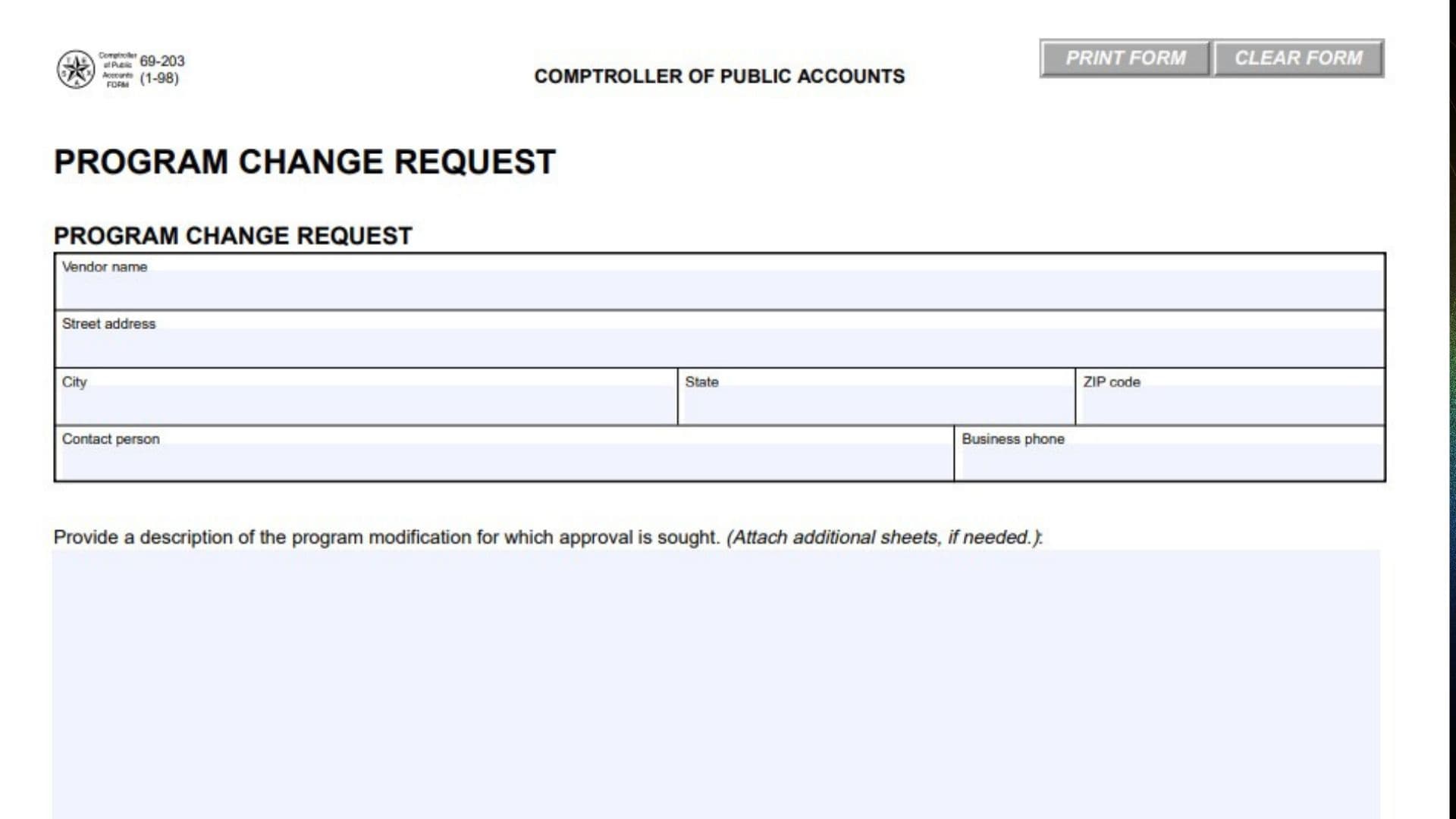
Form 69-203, issued by the Texas Comptroller of Public Accounts, is a document used by seller training vendors to request modifications to an approved training program and provide information about scheduled training sessions or class cancellations. The form serves several administrative purposes related to the management and reporting of seller training activities. Its first page contains a Program Change Request section, which allows a vendor to identify its business, provide contact information, describe a proposed modification to its existing training program, and explain why the change is being requested. The second page contains two types of notices: Notice of Scheduled Training Session and Notice of Class Cancellation. The scheduled training section provides space for three separate training session notices, allowing vendors to report details such as the vendor’s name, session date, starting time, training location, language, and date of notification. The cancellation section records information about a training session that will no longer take place, including the original session date, location, cancellation date and time, and the name of the person cancelling the class. The form also includes signature and date fields for authorization. Vendors use this document to communicate program modification requests and relevant training schedule changes to the Comptroller of Public Accounts. Providing complete and accurate information helps the Comptroller identify the vendor, understand the requested program changes, and maintain appropriate records of scheduled and cancelled training activities.
How To File Form 69-203
Form 69-203 is intended for vendors involved in the seller training program administered by the Texas Comptroller of Public Accounts. It combines a program modification request with notices for scheduled training sessions and class cancellations.
Before completing the form, gather the information relevant to the section you intend to submit.
For a program change request, prepare:
- The vendor’s registered or certified business name.
- The complete business street address.
- The city, state, and ZIP code.
- The contact person’s name.
- The business telephone number.
- A detailed description of the proposed program modification.
- The reason for requesting the modification.
- The authorized person’s signature and signing date.
For a scheduled training session notice, prepare:
- The vendor’s name.
- The scheduled training date and starting time.
- The complete training location.
- The city and county.
- The language in which the training will be conducted.
- The date of the notice.
For a class cancellation notice, prepare:
- The vendor’s name.
- The original scheduled session date.
- The training location, city, and county.
- The date and time the class was cancelled.
- The name of the person cancelling the class.
Where To Submit Form 69-203
The form provides the following mailing address for completed documents:
Comptroller of Public Accounts
P.O. Box 12010
Austin, TX 78711-2010
Complete the applicable section, provide the required information, and ensure the relevant signature and date fields are filled in before mailing the form.
If additional information is needed to explain a proposed program modification, additional sheets may be attached to the Program Change Request section.

How To Complete Form 69-203
Form 69-203 consists of two pages and contains three main reporting sections:
- Program Change Request on page 1.
- Notice of Scheduled Training Session on page 2.
- Notice of Class Cancellation on page 2.
Each section serves a different purpose. Complete the section that corresponds to the information or request being reported.
Part 1: Program Change Request
The first page contains the Program Change Request section. Vendors use this section to identify themselves and explain the changes they are requesting to make to their existing training program.
Vendor Information
Vendor Name
Enter the name of the vendor requesting approval for a program modification. Use the business name associated with the vendor’s seller training activities so the Comptroller can identify the correct training provider.
Street Address
Provide the complete street address of the vendor’s business. Include the building number and street name to identify the vendor’s business location.
City
Enter the city where the vendor’s business is located. Make sure the city corresponds to the street address provided above.
State
Enter the state in which the vendor’s business is located. Use the appropriate state abbreviation or full state name.
ZIP Code
Provide the ZIP code associated with the vendor’s business address. Check that it matches the street address, city, and state.
Contact Person
Enter the name of the individual who can be contacted regarding the program change request. This person should be familiar with the proposed modification and able to respond to questions about the request.
Business Phone
Provide the business telephone number through which the contact person or vendor can be reached. Enter a working number and check that it is accurate.
Program Modification Details
Description of the Program Modification
Explain the specific changes the vendor wants to make to the existing seller training program. Describe the proposed modification clearly so the Comptroller can understand what is being changed.
Include the relevant details of the proposed change rather than providing only a general statement. If the available space is insufficient, attach additional sheets containing the remaining explanation.
Any additional sheets should clearly identify the vendor and relate directly to the program modification being requested.
Reason for Modification
Explain why the vendor is requesting the proposed program change. Describe the circumstances or reasons that make the modification necessary.
The explanation should correspond to the change described in the previous section. Make sure the reason is clear enough for the Comptroller to understand the purpose of the request.
Authorization
Authorized Signature
The authorized individual must sign in the designated signature area to authenticate the program change request. Make sure the signature is provided in the correct space.
Date
Enter the date on which the authorized individual signs the request. Use the actual signing date rather than automatically entering the date on which the form was prepared.
Part 2: Notice of Scheduled Training Session
The second page contains a Notice of Scheduled Training Session section. This section provides three separate blocks for reporting scheduled seller training sessions.
Each block collects the same information. Vendors can use the available spaces to report up to three scheduled sessions on the page.
Complete a separate block for each training session being reported.
Scheduled Training Session – First Notice
Vendor Name
Enter the name of the vendor responsible for conducting the scheduled seller training session. Use the vendor’s business name so the Comptroller can identify the training provider.
Session Date
Enter the date on which the training session is scheduled to take place. Provide the planned date rather than the date on which the notice is being completed.
Session Time
Enter the scheduled starting time of the training session. Make sure the time reflects when participants are expected to begin the training.
Session Location: Street and Number
Provide the street address and building number of the location where the training session will be conducted. Enter enough information to identify the training venue.
City
Enter the city where the scheduled training session will take place. This should correspond to the street address provided in the location field.
County
Enter the county in which the training location is situated. Make sure the county information matches the physical training venue.
Language
Specify the language in which the training session will be conducted. Enter the language that participants can expect to use during the training.
Date of Notice
Enter the date on which the scheduled training session notice is prepared or issued. This identifies when the vendor provided the notification.
Scheduled Training Session – Second Notice
The second notice block contains the same fields as the first. Use this section to provide information about another scheduled training session.
Vendor Name
Enter the name of the vendor conducting the second scheduled training session.
Session Date
Provide the planned date of the second training session.
Session Time
Enter the scheduled starting time for this session.
Session Location: Street and Number
Enter the street address and building number of the second training location.
City
Provide the city where the second session will take place.
County
Enter the county associated with the second training location.
Language
Specify the language in which the second training session will be conducted.
Date of Notice
Enter the date on which the second training session notice is issued.
Scheduled Training Session – Third Notice
The third notice block allows the vendor to report another scheduled training session using the same information requirements.
Vendor Name
Enter the name of the vendor responsible for the third training session.
Session Date
Provide the date on which the third training session is scheduled.
Session Time
Enter the planned starting time of the session.
Session Location: Street and Number
Provide the street address and building number of the training venue.
City
Enter the city where the third session will be conducted.
County
Provide the county in which the training location is situated.
Language
Specify the language that will be used during the training session.
Date of Notice
Enter the date on which the third training session notice is prepared or issued.
Make sure the information in each notice block relates to the correct scheduled session. Do not mix the dates, locations, or times of different training sessions.
Part 3: Notice of Class Cancellation
The lower portion of page 2 contains the Notice of Class Cancellation section. Vendors use this section to provide information about a seller training class that has been cancelled.
Complete each field with information relating to the session that will no longer take place.
Vendor Name
Enter the name of the vendor responsible for the training session being cancelled. Use the vendor’s business name to identify the training provider.
Session Date
Enter the original date on which the training session was scheduled to take place. This identifies the class affected by the cancellation.
Session Location: Street and Number
Provide the street address and building number of the original training location. Enter the location where the cancelled session was supposed to be conducted.
City
Enter the city where the cancelled training session was scheduled to take place.
County
Provide the county associated with the original training location. Ensure that the county corresponds to the street address and city.
Date Cancelled
Enter the date on which the training session was cancelled. This is different from the original session date because it identifies when the cancellation occurred.
Time Cancelled
Enter the time at which the class was cancelled. Record the cancellation time accurately so the notification contains the relevant timing information.
Name of Person Cancelling Class
Enter the name of the individual who cancelled the training session. This identifies the person responsible for making the cancellation.
Signature and Date
Signature
Sign in the designated signature area at the bottom of page 2. The signature field appears below the Notice of Class Cancellation section. Ensure that the appropriate person signs the form.
Date
Enter the date associated with the signature. Use the actual date on which the form is signed.
Additional Information About the Form
Using the Three Scheduled Training Notice Blocks
Page 2 provides three separate notice blocks under the scheduled training section. Each block collects the same vendor, session, location, language, and notice-date information.
This arrangement allows vendors to record details for multiple scheduled training sessions on the same form page. When completing multiple notices, make sure each block contains the correct information for its respective session.
Using the Class Cancellation Section
The cancellation section is separate from the scheduled training notices. It records information about a class that has been cancelled rather than a session that is scheduled to take place.
Pay particular attention to the difference between the original session date and the cancellation date. The original session date identifies when the class was planned, while the cancellation date and time identify when the cancellation occurred.
Additional Sheets for Program Change Requests
The Program Change Request section on page 1 expressly allows additional sheets when more space is needed to describe a proposed modification.
If the explanation cannot fit in the available area, attach additional pages containing the necessary details. Make sure the additional information clearly relates to the vendor and the modification being requested.
Final Review Before Filing
Before submitting Form 69-203, review the applicable sections using the following checklist.
Program Change Request
- The vendor’s name has been entered correctly.
- The complete business street address has been provided.
- The city, state, and ZIP code are accurate.
- The contact person’s name has been entered.
- The business telephone number is correct.
- The proposed program modification has been clearly explained.
- Additional sheets have been attached if the description requires more space.
- The reason for requesting the modification has been explained.
- The authorized signature has been provided.
- The signature date has been entered.
Notice of Scheduled Training Session
- The vendor’s name is correct in each completed notice.
- The scheduled session date has been provided.
- The starting time has been entered correctly.
- The complete street address and building number have been provided.
- The city and county information is accurate.
- The training language has been specified.
- The date of each notice has been entered.
- Information for different training sessions has not been mixed up.
Notice of Class Cancellation
- The vendor’s name has been provided.
- The original scheduled session date is correct.
- The original training location has been identified.
- The city and county have been entered.
- The actual cancellation date has been provided.
- The cancellation time has been entered.
- The name of the person cancelling the class has been recorded.
- The signature field has been completed.
- The signature date has been entered.
Final Submission
- All applicable sections have been completed.
- All information is legible and accurate.
- Any necessary additional sheets are attached.
- The appropriate signature and date fields have been completed.
- The completed form is addressed to the Comptroller of Public Accounts.
Mail the completed form to:
Comptroller of Public Accounts
P.O. Box 12010
Austin, TX 78711-2010
Carefully reviewing the applicable sections before submission helps ensure that program modification requests, scheduled training notifications, and class cancellation information are properly documented and communicated to the Texas Comptroller of Public Accounts.