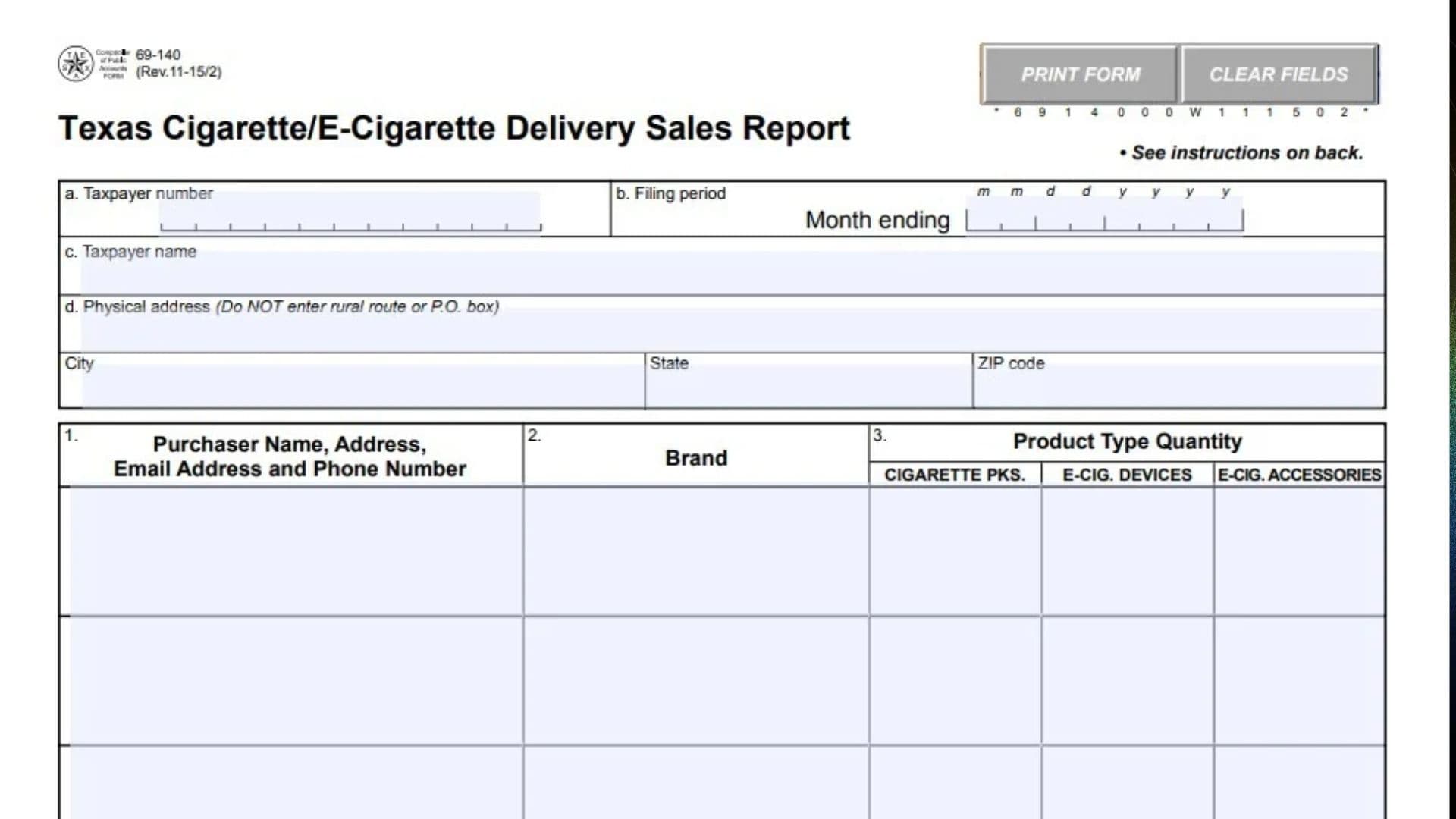
Texas Form 69-140, titled Texas Cigarette / E-Cigarette Delivery Sales Report, is a monthly compliance report issued by the Texas Comptroller of Public Accounts for businesses that ship cigarettes or e-cigarette products directly to consumers in Texas. It exists to track remote delivery sales—orders placed by telephone, mail, delivery service, the Internet, or any other online platform—so the state can monitor product shipments and enforce Texas tobacco and e-cigarette tax laws. Sellers use this form to report their Texas taxpayer identification details alongside an itemized log of every Texas buyer, including each purchaser’s contact information, the product brand sold, and the exact quantity of cigarette packs, e-cigarette devices, or e-cigarette accessories shipped. Filing Form 69-140 accurately and on time each month keeps remote sellers in good standing with the Texas Comptroller and avoids compliance issues tied to unreported delivery shipments.
How To File Texas Form 69-140
Any seller of cigarette or e-cigarette products that makes a delivery sale or ships products to a Texas consumer from an order placed by phone, mail, delivery service, the Internet, or another online service must file this report.
Filing Deadline And Mailing Address
All delivery sales must be reported by the 10th day of the month following the month in which the sale occurred. Mail your completed Form 69-140 to:
Comptroller of Public Accounts
P.O. Box 149361
Austin, TX 78714-9361
What To Prepare Before Starting
Gather the following records before completing the monthly report:
- Your Texas sales and use tax permit showing your 11-digit Texas taxpayer number and registered entity name.
- Your business’s physical street address.
- A complete monthly log of all Texas delivery sales, including each customer’s name, address, email address, and phone number.
- Product brand names and exact unit counts separated by cigarette packs, e-cigarette devices, and e-cigarette accessories (such as chargers, batteries, or liquids).

How To Complete Texas Form 69-140
Fill out the seller identification block (Items a through d) at the top of the form, then list each delivery sale in the reporting table (Items 1 through 3).
Seller Identification (Items a Through d)
Item a: Taxpayer Number
Enter your 11-digit Texas taxpayer number exactly as it appears on your Texas sales and use tax permit.
Item b: Filing Period (Month Ending)
Enter the last working day of the month covered by the report using the MM DD YYYY format.
Item c: Taxpayer Name
Enter your legal entity or taxpayer name exactly as shown on your Texas sales and use tax permit.
Item d: Physical Address
Enter the physical street address, city, state, and ZIP code of your business entity. Do not enter a rural route or P.O. Box.
Delivery Sales Details (Items 1 Through 3)
For each delivery sale shipped to a Texas consumer during the reporting month, complete Items 1, 2, and 3 across the row.
Item 1: Purchaser Name, Address, Email Address, And Phone Number
Enter the buyer’s full name, street address, email address, and telephone number.
Item 2: Brand
Enter the brand name of the cigarette or e-cigarette product shipped to that purchaser.
Item 3: Product Type And Quantity
Record the exact quantity purchased under the matching product column:
- Cigarette Pks.: Enter the total number of cigarette packs purchased.
- E-Cig. Devices: Enter the total number of e-cigarette devices purchased.
- E-Cig. Accessories: Enter the total number of e-cigarette accessories purchased, including chargers, batteries, or liquids.
Final Review Before Filing
Before mailing Form 69-140 to the Texas Comptroller, verify these items:
- Confirm your 11-digit Texas taxpayer number (Item a) and taxpayer name (Item c) match your Texas sales and use tax permit.
- Verify that Item b shows the last working day of the reporting month in
MM DD YYYYformat. - Check that Item d lists a physical street address rather than a P.O. Box or rural route.
- Confirm every Texas delivery sale for the month is listed with complete purchaser contact information (Item 1), brand name (Item 2), and accurate unit quantities under the correct product type column (Item 3).
- Mail the completed report to the Austin P.O. Box on or before the 10th day of the following month.