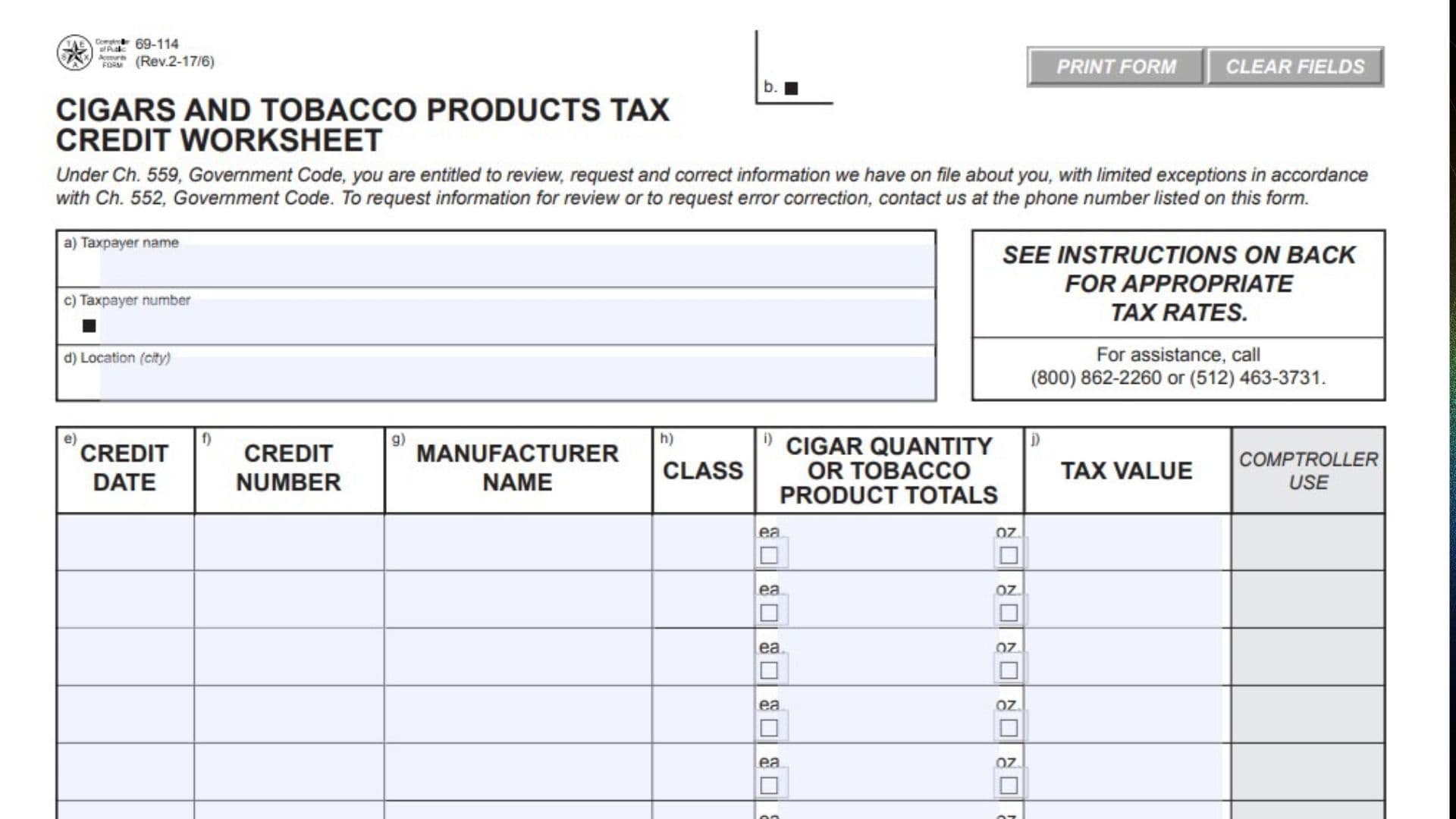
Texas Form 69-114, known as the Cigars and Tobacco Products Tax Credit Worksheet, is a tax document used by tobacco products distributors to request credit for taxes previously paid on tobacco products that have become stale, unusable, or unfit for sale and have been returned to the manufacturer. The form is administered by the Texas Comptroller of Public Accounts and provides a way for eligible distributors to document returned products and calculate the tax credit associated with those returns. It collects information about the taxpayer, the permitted business location, manufacturer credit records, product classifications, returned product quantities, and the corresponding tax values. Distributors must provide the manufacturer’s credit memo and supporting affidavit to verify the type and quantity of products returned. The worksheet also requires a sworn statement confirming that the tobacco products listed were personally returned to the manufacturers identified in the document. Because the credit request must be supported by manufacturer-issued records, distributors should make sure that the credit dates, credit numbers, manufacturer names, product classes, and quantities match the supporting documents. The form must be signed and notarized before submission. It is important to complete the calculations accurately because the total credit depends on the product classification, applicable tax rate, and quantity or value of the returned products. Form 69-114 must be submitted separately and should not be included with the Texas Distributor Monthly Report of Cigar and Tobacco Products, Form 69-101 or Form 69-133.
Who Must File Form 69-114?
A tobacco products distributor must complete Form 69-114 when requesting a credit for taxes previously paid on tobacco products that have become stale or unfit for sale and have been returned to the manufacturer.
The form applies to distributors seeking a tax credit for qualifying returned products.
To qualify for the credit request, the distributor must have supporting documentation from the manufacturer confirming the products returned and their quantities.
The required supporting documents include:
- A credit memo issued by the manufacturer.
- A supporting affidavit issued by the manufacturer.
- Information verifying the type of tobacco products returned.
- Information verifying the quantity or amount of the returned products.
The worksheet must also be signed and notarized before submission.
How To File Form 69-114
Form 69-114 must be submitted to the Texas Comptroller of Public Accounts with the required supporting documents.
Supporting Documents Required
Before submitting the worksheet, prepare the following documents:
Manufacturer Credit Memo
Obtain a credit memo from the manufacturer for each credit number entered on the worksheet. The credit memo must support the returned products and the corresponding credit information.
Manufacturer Supporting Affidavit
Obtain an affidavit issued by the manufacturer verifying the type and amount of tobacco products returned.
Completed And Notarized Form 69-114
Complete the worksheet, sign the required sworn statement, and have the document notarized.
Each credit number listed on the worksheet must have its corresponding manufacturer credit memo and affidavit attached.
Important Filing Instructions
- Submit the signed and notarized Form 69-114.
- Attach the manufacturer credit memo for each credit number listed.
- Attach the supporting manufacturer affidavit for each credit number.
- Do not submit Form 69-114 with the Texas Distributor Monthly Report of Cigar and Tobacco Products, Form 69-101 or Form 69-133.
The form’s instructions do not specify a mailing address for submitting the worksheet. Contact the Texas Comptroller for submission guidance if you need to confirm the appropriate delivery method.

How To Complete Form 69-114
Form 69-114 contains taxpayer identification fields, a product return and tax credit calculation table, a total credit section, and a notarized affidavit.
Complete the following sections using the information provided by the manufacturer and the taxpayer’s permit records.
Taxpayer Information
This section identifies the tobacco products distributor requesting the tax credit.
Field a: Taxpayer Name
Enter the legal name of the business or taxpayer requesting the credit.
Use the same entity or taxpayer name shown on the Texas Cigarette and/or Tobacco Products Permit, Form 69-300.
Field b: Checkbox
The form displays a small checkbox marked with the letter b near the upper-right corner. The printed instructions do not explain the purpose of this checkbox. Do not select it based on an assumption; confirm its purpose with the Texas Comptroller if applicable.
Field c: Taxpayer Number
Enter the taxpayer number assigned to the business.
Use the taxpayer number shown on the Texas Cigarette and/or Tobacco Products Permit, Form 69-300.
Check the number against the permit to avoid identification errors.
Field d: Location (City)
Enter the city name of the permitted location where tobacco products are sold.
Use the city listed on the Texas Cigarette and/or Tobacco Products Permit, Form 69-300.
Do not substitute a different business location or mailing address.
Tobacco Product Credit Details
The main table records information about the returned products and calculates the tax credit associated with each manufacturer’s credit record.
Each row should contain the relevant information for a returned product credit.
Column e: Credit Date
Enter the credit or invoice date provided by the manufacturer.
Use the date shown on the manufacturer’s documentation supporting the returned tobacco products.
Column f: Credit Number
Enter the credit number assigned by the manufacturer.
This number identifies the manufacturer’s credit record for the returned products.
Make sure the number matches the attached credit memo and supporting affidavit.
Column g: Manufacturer Name
Enter the name of the manufacturer that accepted the returned tobacco products and issued the supporting documentation.
The manufacturer must be permitted or registered in Texas.
Use the manufacturer’s name as shown on the credit memo and supporting affidavit.
Column h: Class
Enter the appropriate tobacco product class for the returned products.
The form identifies six product classifications: Class A, Class W, Class B, Class C, Class D, and Class F.
Select the classification that applies to the returned products.
The classifications are explained below.
Class A: Tobacco Products Purchased Or Received Before September 1, 2009
Class A covers tobacco products purchased or received before September 1, 2009.
These products include:
- Snuff.
- Smoking tobacco.
- Chewing tobacco.
Class W: Tobacco Products Purchased On Or After September 1, 2009
Class W covers tobacco products purchased on or after September 1, 2009.
These products include:
- Chewing tobacco.
- Snuff.
- Pipe tobacco.
- Roll-your-own tobacco.
- Other products made of tobacco or a tobacco substitute that are not cigarettes.
Class B: Little Cigars
Class B applies to little cigars weighing not more than 3 pounds per 1,000 cigars.
Use this classification when the returned products meet the stated weight requirement.
Class C: Lower-Priced Cigars
Class C applies to cigars weighing 3 pounds per 1,000 cigars and selling for 3.3 cents or less per cigar.
Class D: Natural Leaf Cigars
Class D applies to natural leaf cigars weighing 3 pounds per 1,000 cigars and selling for more than 3.3 cents each.
Class F: Cigars With Substantial Non-Tobacco Filler
Class F applies to cigars weighing 3 pounds per 1,000 cigars that contain substantial non-tobacco filler and sell for more than 3.3 cents each.
Column i: Cigar Quantity Or Other Tobacco Product Totals
Enter the quantity or weight of the returned tobacco products according to their classification.
The form provides separate spaces for individual quantities (ea.) and weights in ounces (oz.).
The reporting method depends on the product class.
For Class A Products
For Class A tobacco products purchased or received before September 1, 2009, report the returned products using the manufacturer’s list prices.
The tax credit is based on the sum of the manufacturer’s list prices for the qualifying returned products.
For Class W Products
For Class W products purchased on or after September 1, 2009, use the following quantity rules:
- Products weighing 1.2 ounces or less per can or package: Enter the total number of individual cans or packages in the quantity field marked ea.
- Products weighing more than 1.2 ounces per can or package: Enter the combined weight of all individual cans or packages in the field marked oz.
Use the correct reporting method based on the weight of each individual package.
For Class B, C, D, And F Products
Enter the total number of returned cigars as a whole number.
Do not report these quantities as decimal amounts or ounces.
Column j: Tax Value
Calculate and enter the tax value associated with the returned product quantity or list price.
The applicable tax rate depends on the product class and, for certain tobacco products, the purchase or receipt date.
Use the following rates provided in the form instructions.
Class A Tax Rate
For Class A tobacco products, the tax rate is:
- January 1, 2007, through August 31, 2009: 0.40000.
Use the manufacturer’s list price information for the qualifying returned products when calculating the tax value.
Class W Tax Rates
Class W products have different tax rates depending on the weight of each package and the applicable purchase period.
Class W Products Weighing 1.2 Ounces Or Less
Apply the following per-item rates:
| Purchase Period | Tax Rate Per Item |
|---|---|
| September 1, 2009 – August 31, 2010 | $1.32000 |
| September 1, 2010 – August 31, 2011 | $1.36000 |
| September 1, 2011 – August 31, 2012 | $1.39000 |
| September 1, 2012 – August 31, 2013 | $1.43000 |
| September 1, 2013, and after | $1.46000 |
Multiply the number of qualifying individual cans or packages by the applicable per-item tax rate.
Class W Products Weighing More Than 1.2 Ounces
Apply the following per-ounce rates:
| Purchase Period | Tax Rate Per Ounce |
|---|---|
| September 1, 2009 – August 31, 2010 | $1.10000 |
| September 1, 2010 – August 31, 2011 | $1.13000 |
| September 1, 2011 – August 31, 2012 | $1.16000 |
| September 1, 2012 – August 31, 2013 | $1.19000 |
| September 1, 2013, and after | $1.22000 |
Multiply the total reported weight in ounces by the applicable per-ounce tax rate.
Class B, C, D, And F Tax Rates
For cigar products, use the following tax rates:
| Product Class | Tax Rate |
|---|---|
| Class B | 0.00100 |
| Class C | 0.00750 |
| Class D | 0.01100 |
| Class F | 0.01500 |
Multiply the reported whole-number quantity by the applicable class tax rate to determine the tax value.
Column j: Comptroller Use
The final column is reserved for the Texas Comptroller of Public Accounts.
Leave this column blank. It is intended for official processing and should not be completed by the taxpayer.
Total Credits
Column k: Total Credits
Add the tax values calculated for all returned product classes and enter the combined amount in the Total Credits field.
Use the tax values recorded in Column j.
Formula:
Total Credits = Sum of All Applicable Tax Values
Include the credit amounts associated with all qualifying returned products listed in the worksheet.
Check the calculation against the attached manufacturer credit memos and affidavits before completing the notarized section.
Notarized Affidavit
The lower portion of Form 69-114 contains a sworn statement confirming that the tobacco products listed in the worksheet were personally returned to the manufacturers identified in the document.
The distributor or authorized individual must complete the required information and sign the affidavit before a notary public.
State Of
Enter the name of the state where the affidavit is being executed.
County Of
Enter the county where the notarization takes place.
Personally Appeared Before Me
Enter the full name of the individual appearing before the notary public.
This is the person making the sworn statement about the returned tobacco products.
Of
Enter the business or entity name associated with the individual making the statement.
Use the appropriate taxpayer or business name.
Returned Tobacco Products Confirmation
The individual must confirm under oath that the tobacco products listed in the worksheet were personally returned to the manufacturers identified in the document.
The statement also confirms that the required affidavit and credit memos are attached.
Review the supporting documents before signing this declaration.
Sworn And Subscribed To Before Me
Enter the day, month, and year when the individual makes the sworn statement before the notary public.
Use the actual notarization date.
Notary Public
The notary public must complete the designated signature field after administering the required oath and notarization.
Notary Seal
The notary public must place the official notary seal in the designated area.
County
Enter the county associated with the notary public’s commission as requested in the form.
The notarization must be completed before submitting the worksheet.
How To Calculate The Total Cigars And Tobacco Products Tax Credit
The tax credit calculation depends on the returned product class, quantity or weight, and applicable tax rate.
The general calculation process is:
- Identify the correct product class in Column h.
- Enter the quantity, weight, or manufacturer’s list price information in Column i.
- Identify the applicable tax rate based on the product class and purchase period.
- Calculate the tax value and enter it in Column j.
- Add the tax values for all returned products.
- Enter the combined amount in Column k.
Example: Class W Products Weighing 1.2 Ounces Or Less
Assume a distributor returns 100 qualifying Class W packages purchased during the period beginning September 1, 2013.
The applicable tax rate is $1.46 per item.
Calculation:
- Returned packages: 100
- Tax rate: $1.46 per item
- Tax value: 100 × $1.46
- Total tax credit: $146
The calculated amount is entered in Column j for the applicable product entry.
This is an illustrative calculation. The actual credit request must be supported by the manufacturer’s documentation.
Important Filing Requirements
Before submitting Form 69-114, distributors should understand the following requirements.
Manufacturer Documentation Is Required
A manufacturer-issued credit memo and supporting affidavit must be attached for every credit number listed in the worksheet.
These documents must verify the type and amount of returned tobacco products.
The Form Must Be Notarized
The worksheet must be signed and notarized. An unsigned or incomplete affidavit does not meet the form’s stated submission requirements.
Do Not Attach It To The Monthly Distributor Report
Do not submit Form 69-114 with:
- Form 69-101: Texas Distributor Monthly Report of Cigar and Tobacco Products.
- Form 69-133: Texas Distributor Monthly Report of Cigar and Tobacco Products.
Submit the tax credit worksheet separately with its supporting documentation.
How To Get Help With Form 69-114
If you have questions about the Cigars and Tobacco Products Tax Credit Worksheet, the applicable tax rates, or the supporting documentation requirements, contact the Texas Comptroller of Public Accounts.
Texas Comptroller Assistance
Telephone: (800) 862-2260
Alternative telephone number: (512) 463-3731
Website: www.comptroller.texas.gov
Final Review Before Filing
Before submitting Form 69-114, review the taxpayer information, returned product details, tax calculations, supporting documents, and notarized affidavit.
Taxpayer Information
- Enter the correct taxpayer name.
- Verify the taxpayer number against Form 69-300.
- Confirm the permitted location’s city.
- Check the applicable information in the upper-right section.
Product Return Information
- Enter the correct credit date for each manufacturer credit.
- Verify every credit number against its supporting credit memo.
- Enter the correct manufacturer name.
- Confirm that the manufacturer is permitted or registered in Texas.
- Select the appropriate product class.
- Check that Class A and Class W products are classified according to the applicable purchase or receipt dates.
- Verify cigar quantities or tobacco product weights.
- Use individual package quantities for applicable Class W products weighing 1.2 ounces or less.
- Use total ounces for applicable Class W products weighing more than 1.2 ounces.
- Report Class B, C, D, and F cigar quantities as whole numbers.
Tax Credit Calculations
- Apply the correct tax rate for each product class.
- Check the applicable purchase period for Class A and Class W products.
- Calculate the tax value for each returned product entry.
- Verify the amounts entered in Column j.
- Add all applicable tax values.
- Enter the correct total in Column k.
- Leave the Comptroller Use column blank.
Supporting Documentation
- Attach a manufacturer-issued credit memo for every credit number.
- Attach the corresponding manufacturer affidavit for every credit number.
- Make sure the documents identify the type and quantity of returned products.
- Confirm that the supporting records match the information entered in the worksheet.
Notarization And Submission
- Complete the state and county information.
- Enter the name of the individual making the sworn statement.
- Verify the business or entity name.
- Confirm the statement about returning the tobacco products.
- Sign the affidavit as required.
- Have the form properly notarized.
- Make sure the notary signature and seal are included.
- Submit the completed worksheet separately from Form 69-101 and Form 69-133.
A properly completed Form 69-114, supported by manufacturer credit memos and affidavits, helps tobacco distributors document eligible returned products and request the corresponding tax credits from the Texas Comptroller of Public Accounts.