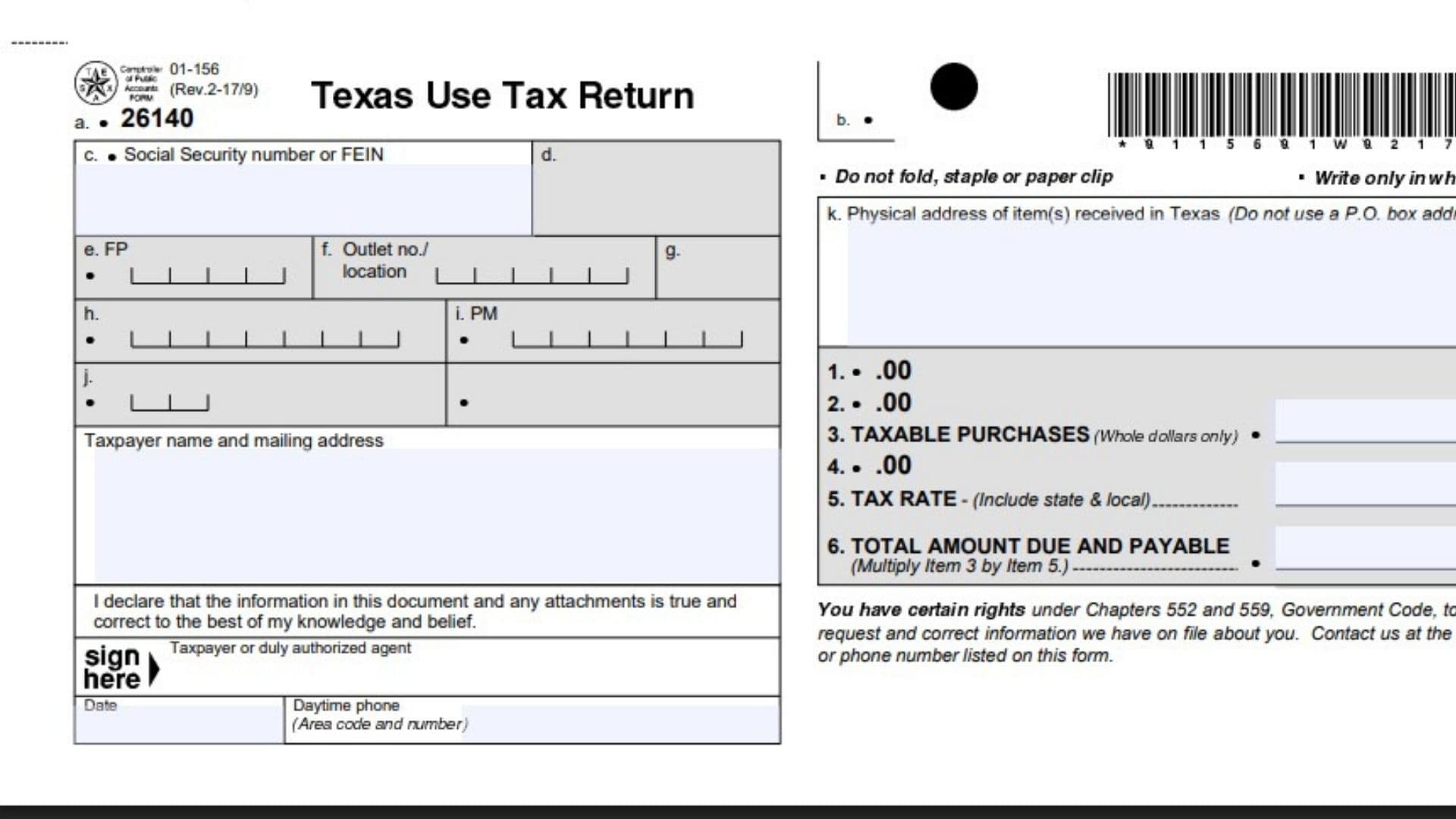
Texas Form 01-156, Texas Use Tax Return, allows individuals and businesses without a Texas sales and use tax permit to report taxable purchases on which Texas sales or use tax has not been paid. Use tax complements sales tax by covering taxable goods and services purchased, leased, or rented for use, storage, or consumption in Texas. Examples include purchases from out-of-state internet or telephone sellers that do not collect Texas tax and taxable items acquired while traveling outside Texas. The return identifies the taxpayer, records the Texas location where the items were received, and calculates the amount payable using the taxable purchase total and applicable state and local rate. Completing it correctly matters because permitted taxpayers must report taxable purchases on their regular sales and use tax returns instead, and this form specifically requires entries in Items 3, 5, and 6. These instructions explain the February 2017 revision.
Who Should File Form 01-156?
Use this return if you are an individual or business that:
- Does not hold a Texas sales and use tax permit.
- Purchased, leased, or rented taxable goods or services.
- Brought or received those purchases in Texas for use, storage, or consumption.
- Has not paid Texas sales or use tax on those purchases.
If you hold a Texas sales and use tax permit, do not use Form 01-156. Report taxable purchases on your regular sales and use tax return.
The form states that paying another state’s sales or use tax does not, by itself, eliminate the Texas use tax obligation. It does not provide a separate calculation for an out-of-state tax credit. Obtain guidance from the Comptroller if you need to determine how an out-of-state payment affects your particular purchase.
How To File Form 01-156
When To File
Submit the return and payment by the 20th day after the applicable reporting period ends. The instructions describe the reporting period as a month or year during which the taxable items were brought into Texas.
If the 20th falls on a Saturday, Sunday, or legal holiday, the deadline moves to the next business day.
The form does not explain how to determine whether a particular taxpayer should report monthly or annually. Contact the Comptroller if your reporting period is unclear.
Where To Send the Return
The mailing address printed on this revision is:
Comptroller of Public Accounts
111 E. 17th Street
Austin, TX 78774-0100
Make the payment payable to STATE COMPTROLLER for the amount calculated in Item 6.
The form does not instruct you to attach it to another tax return or require a separate supporting schedule. Keep purchase records available to substantiate the amount reported.
Because these instructions concern the February 2017 revision, confirm the appropriate form and submission details before using it for a current filing.
Information To Prepare
Gather the following before completing the return:
- Your Social Security number or the organization’s Federal Employer Identification Number.
- The taxpayer’s name and mailing address.
- The physical Texas address where the items were received.
- Invoices, receipts, rental agreements, or lease records supporting taxable purchases.
- Records showing whether Texas sales or use tax was collected.
- The applicable reporting period.
- The state and local tax rate for the relevant Texas location.
- A daytime contact number.
For help, contact a local Texas Comptroller field office or call 1-800-252-5555.

General Instructions for Completing Form 01-156
Write only in the white entry areas. Leave shaded areas and administrative processing spaces untouched.
Do not fold, staple, or attach a paper clip to the return.
Do not leave Items 3, 5, or 6 blank. These entries establish the taxable purchase amount, applicable rate, and resulting payment.
Report Item 3 in whole dollars. The instructions do not specify a rounding method, so obtain clarification if you are uncertain how to convert your purchase total to whole dollars.
How To Complete the Identification Fields
Taxpayer Identification
Item a: Preprinted Code
The form displays code 26140 in this area. It is a processing identifier, not an amount you must calculate. Leave the printed code unchanged.
Item b: Unlabeled Processing Area
No taxpayer-entry instruction is provided for this area. Leave it untouched rather than entering additional information.
Item c: Social Security Number or FEIN
If filing as an individual, enter your Social Security number.
For an organization, enter its Federal Employer Identification Number. Use the identification number belonging to the taxpayer reporting the purchases.
Administrative Fields
Item d: Administrative Area
The form does not assign a taxpayer entry to this field. Leave it blank.
Item e: FP
This is a processing field without a taxpayer-completion instruction. Do not assume it is a space for writing a reporting period.
Item f: Outlet Number or Location
The form labels this space for an outlet number or location but does not explain how an unpermitted taxpayer should complete it. Do not invent an outlet number or substitute a different identification number. Ask the Comptroller if you are instructed to supply an entry.
Item g: Administrative Area
No taxpayer instruction is provided. Leave the field untouched.
Item h: Administrative Area
No taxpayer instruction is provided. Do not add information to this space.
Item i: PM
Leave this processing field for the Comptroller. The form does not request a taxpayer-entered date here.
Item j: Administrative Area
The form provides no completion instruction for this field. Leave it blank.
Name and Address Information
Taxpayer Name and Mailing Address
Enter the name of the individual or organization reporting the taxable purchases and the complete mailing address.
Keep this separate from the physical location requested in Item k. A mailing address does not necessarily identify where the items were received.
Item k: Physical Address of Items Received in Texas
Enter the actual Texas street address where the items were received. Do not use a post office box.
This location information is relevant to identifying the applicable local tax rate. If the purchases involve several Texas locations, ask the Comptroller how to report them because this form does not provide a multiple-location worksheet.
How To Complete the Tax Calculation
Unlabeled Amount Fields
Item 1: Unlabeled Amount Field
The form contains an amount space numbered 1 but does not provide a description or instructions for a taxpayer entry. Do not assume it requests total purchases, deductions, or another amount.
Item 2: Unlabeled Amount Field
No calculation or taxpayer-entry requirement is supplied for this amount space. Do not create a deduction or adjustment here.
Taxable Purchases
Item 3: Taxable Purchases
Enter the total amount of purchases subject to Texas use tax, in whole dollars.
Include taxable items purchased, leased, or rented for personal or business purposes when Texas sales or use tax was not paid and the items were brought or shipped into Texas for use, storage, or consumption.
Use your purchase records to establish this total. Enter the taxable purchase amount—not the tax itself.
Do not leave Item 3 blank.
Item 4: Unlabeled Amount Field
The form provides no taxpayer instruction for this space. Do not use it for an assumed exemption, credit, penalty, or interest calculation.
State and Local Tax Rate
Item 5: Tax Rate
Enter the combined state and applicable local use tax rate.
The February 2017 revision specifies:
- A Texas state rate of 6.25%.
- Applicable local tax based on where the merchandise is delivered or used in Texas.
- A maximum combined state and local rate of 8.25%.
Use the actual applicable rate rather than automatically selecting the maximum. The instructions direct taxpayers to the Comptroller’s address-based tax-rate lookup to identify the local rate.
Do not leave Item 5 blank.
Total Amount Due
Item 6: Total Amount Due and Payable
Multiply Item 3 by the rate entered in Item 5.
\text{Item 6}=\text{Item 3}\times\text{Item 5 expressed as a decimal}For example, if taxable purchases are $1,000 and the applicable combined rate is 8.25%:
1{,}000\times0.0825=82.50The amount due would be $82.50. This example illustrates the calculation; it does not establish the rate for your location.
Enter the calculated payment amount in Item 6 and make the payment payable to STATE COMPTROLLER.
Do not leave Item 6 blank.
Declaration, Signature, and Contact Information
Accuracy Declaration
Review the return and any attachments before signing. The declaration confirms that the information is accurate to the signer’s knowledge and belief.
Taxpayer or Duly Authorized Agent
The taxpayer or an appropriately authorized representative must sign the return.
Date
Enter the date the return is signed.
Daytime Phone
Provide a daytime telephone number, including the area code, where questions about the return can be addressed.
Privacy and Information Rights
Social Security Number Disclosure
The privacy notice explains that disclosure of an individual filer’s Social Security number is required for tax administration and identification under the cited federal and Texas provisions.
It also explains that disclosure of information in response to a public-information request is governed by the applicable Texas public-information law and federal law. Do not interpret the notice as a promise that every entry is automatically public or automatically confidential.
Reviewing or Correcting Information
The form identifies rights under Texas Government Code Chapters 552 and 559 to request, review, and correct information maintained about you.
Use the Comptroller’s listed address or telephone number to ask about reviewing or correcting that information.
Form Controls
Print Form
Use this control to produce a paper copy after reviewing your entries. Printing does not submit the return or make the payment.
Clear Form
Use this control only when you intend to erase entered information. Retain a completed copy before clearing the form if you need a record of your work.
Final Review Before Filing
- Confirm that you do not hold a Texas sales and use tax permit.
- Verify that the purchases are taxable and that Texas sales or use tax has not already been paid.
- Confirm the appropriate reporting period and filing deadline.
- Check your Social Security number or organization’s FEIN.
- Enter the taxpayer’s name and complete mailing address.
- Provide the physical Texas address where the items were received; do not use a post office box.
- Report taxable purchases in whole dollars in Item 3.
- Verify the combined state and local rate in Item 5.
- Recalculate Item 6 using the rate as a decimal.
- Make sure Items 3, 5, and 6 are completed.
- Leave unlabeled, shaded, and administrative areas untouched unless the Comptroller directs otherwise.
- Sign and date the return and include a daytime telephone number.
- Make the payment payable to STATE COMPTROLLER.
- Confirm the appropriate submission address before mailing.
- Do not fold, staple, or paper clip the return.
- Keep a copy of the completed return, payment record, and supporting purchase documents.
- Check any unresolved questions with the Comptroller before filing.