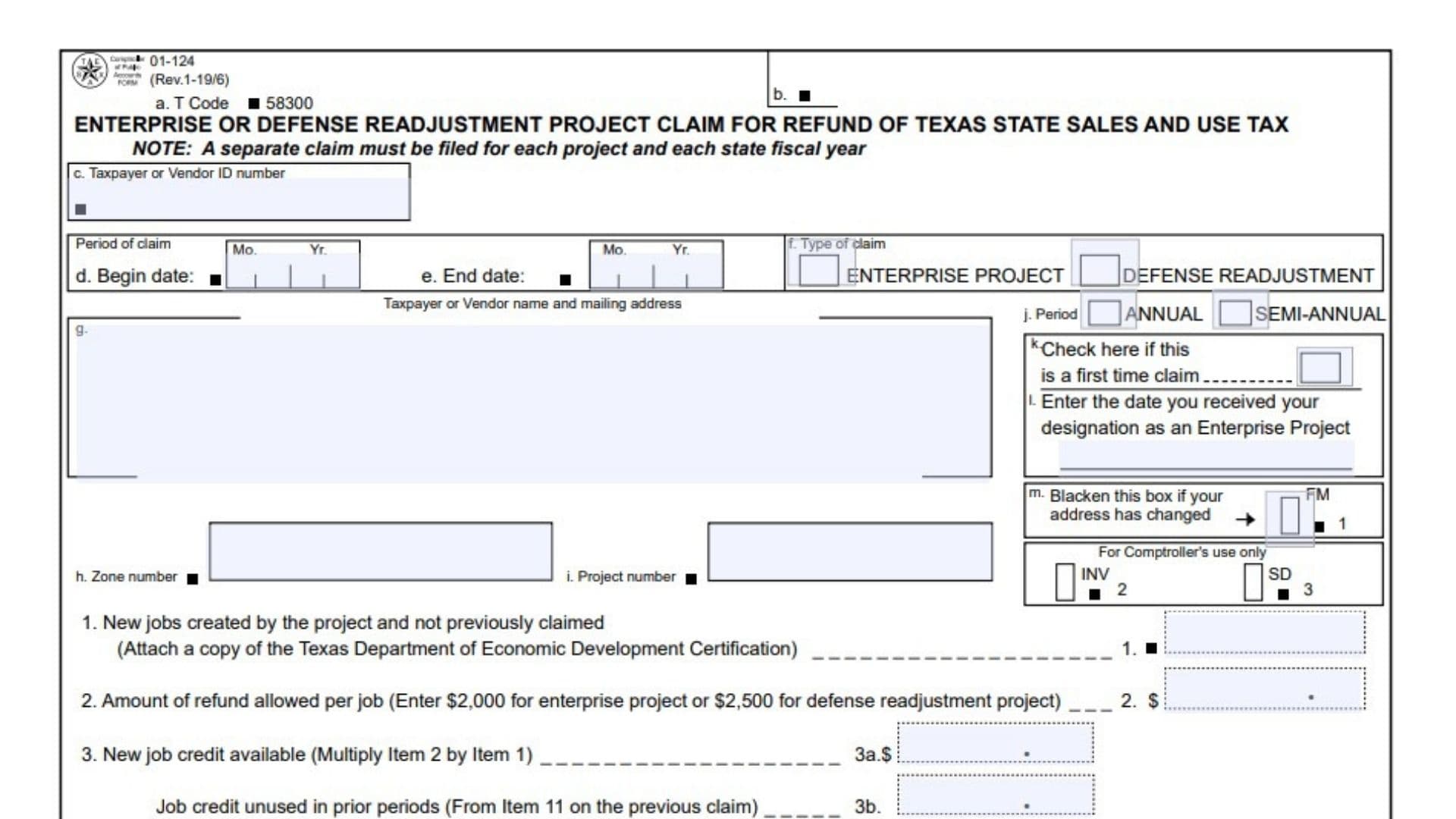
Form 01-124 is the Enterprise or Defense Readjustment Project Claim for Refund of Texas State Sales and Use Tax. It is used by qualifying Enterprise Projects and Defense Readjustment Projects to claim a refund of eligible Texas state sales and use tax paid in connection with the project. A separate claim is required for each project and each Texas state fiscal year. The claim tracks the project’s qualifying new jobs, the maximum job-related credit available, amounts claimed in previous periods, taxes actually paid on eligible purchases, and any refund that must be carried forward to a future period. The form distinguishes between Enterprise Projects and Defense Readjustment Projects because the refund amount permitted for each qualifying new job is different: $2,000 for an Enterprise Project and $2,500 for a Defense Readjustment Project. The form also limits the total refund available for a Texas state fiscal year to $250,000. Only the state portion of sales tax is refundable through this claim. Local sales taxes may have separate refund rules administered by the applicable local taxing authority. Completing Form 01-124 accurately is important because the refund is limited by both the project’s available job credit and the amount of eligible Texas state sales or use tax actually paid. The claim also requires supporting information, including the applicable certification for newly created jobs and, generally, Form 01-125 listing the invoices or contracts on which the claimed Texas tax was paid.
How To File Form 01-124
A separate Form 01-124 claim must be prepared for each project and each state fiscal year. The Texas state fiscal year runs from September 1 through August 31.
A project may file its claim annually or semi-annually. Select the filing period that applies to the project.
The completed claim is mailed to:
COMPTROLLER OF PUBLIC ACCOUNTS
111 E. 17th Street
Austin, Texas 78774-0100
Before preparing the claim, gather the project’s taxpayer or vendor identification number, designation information, project and zone numbers, qualifying new-job information, eligible invoices or contracts, and information from previous claims when credits or refunds are being carried forward.
Supporting Forms And Documentation
Texas Department of Economic Development Certification
A copy of the applicable certification showing the number of new jobs created by the project must be attached when required for Item 1.
Form 01-125: Enterprise or Defense Readjustment Project — Invoices or Contracts
Form 01-125 is generally required with Item 6. It identifies the invoices or contracts on which Texas sales or use tax was paid and for which a refund is being claimed.
The instructions provide an exception when the entire claim is based on a carryover amount from Item 10 of a previous claim.
Eligible Taxes And Purchases
The claim may include actual Texas state sales or use taxes paid on qualifying items such as:
- Machinery or equipment used in the project.
- Building materials used for renovation, rehabilitation, or construction of the project.
- Labor associated with remodeling, rehabilitating, or constructing a structure by the project.
- Electricity and natural gas purchased and consumed in the normal course of business at the project.
Only the Texas state portion of the tax is refundable through this claim. Tax paid to another state must not be included as a refundable amount. When an invoice includes both Texas tax and tax paid to another state, include the invoice but exclude the amount paid to the other state when calculating the claim.
Calculations should be based on tax actually paid. Amounts that were previously refunded or exempted under another Texas sales tax provision should not be included again.

How To Complete Form 01-124
Return Identification And Project Information
Item a: T Code
The form identifies the claim with the preprinted T Code 58300. Use the preprinted code shown on the form.
Item b: Comptroller Processing Field
This area is reserved for the Comptroller’s processing information. Do not enter taxpayer calculations or other information unless specifically instructed by the Comptroller.
Item c: Taxpayer Or Vendor ID Number
Enter the taxpayer or vendor identification number associated with the claim.
The instructions specify that an individual filing the claim may use a Federal Employer Identification Number or Social Security Number, as applicable.
Period of Claim
The claim period identifies the time covered by the refund request. Make sure the period corresponds to the correct Texas state fiscal year and filing frequency.
Item d: Begin Date
Enter the beginning month and year of the claim period.
The selected period should correspond to the project’s applicable annual or semi-annual reporting period.
Item e: End Date
Enter the ending month and year of the claim period.
For an annual claim, the period relates to the Texas state fiscal year, which runs from September 1 through August 31.
Item f: Type Of Claim
Select the type of project for which the refund is being claimed.
Choose Enterprise Project if the claim relates to an Enterprise Project.
Choose Defense Readjustment if the claim relates to a Defense Readjustment Project.
This selection is important because the amount of refund credit permitted per qualifying new job differs between the two project types.
Item g: Taxpayer Or Vendor Name And Mailing Address
Enter or verify the taxpayer or vendor’s name and mailing address.
Use the current mailing information associated with the project and claim.
Item h: Zone Number
Enter the project’s zone number.
This identifies the applicable zone associated with the project.
Item i: Project Number
Enter the project number assigned to the project.
This number should correspond to the project for which the refund is being claimed.
Item j: Filing Period
Select whether the claim is being filed annually or semi-annually.
An annual claim covers the applicable Texas state fiscal year. A semi-annual claim divides the fiscal year into applicable reporting periods.
Item k: First Time Claim
Check this box if the project is filing a refund claim for the first time.
For a first-time claim, the project must also provide the date it received its designation as an Enterprise Project where applicable.
Item l: Enterprise Project Designation Date
Enter the date the project received its designation as an Enterprise Project.
This information is particularly relevant when the project is submitting its first refund claim.
First-time claims may include qualifying taxes paid as much as 90 days before the designation date through the end of the designation period.
Item m: Address Change
Blacken this box if the project’s mailing address has changed.
Make sure the appropriate current address information is provided with the claim.
For Comptroller’s Use Only
The form contains fields identified for Comptroller processing, including the areas marked FM, INV, and SD. These areas are not for the taxpayer’s ordinary entries and should be left for agency use.
Item n: PM Date
This is a processing field shown on the form. It is associated with the Comptroller’s processing of the claim rather than the taxpayer’s refund calculation.
Job Credit Calculation
Item 1: New Jobs Created By The Project And Not Previously Claimed
Enter the number of new jobs created by the project that have not previously been claimed for this refund calculation.
The number should come from the applicable certification issued by the Texas Department of Economic Development. Attach a copy of the certification as required.
Only jobs that qualify for the credit and have not already been claimed should be included in this item.
Item 2: Amount Of Refund Allowed Per Job
Enter the applicable refund amount for each qualifying new job.
For an Enterprise Project, enter $2,000 per job.
For a Defense Readjustment Project, enter $2,500 per job.
The project type selected in Item f determines which amount applies.
Item 3a: New Job Credit Available
Calculate the new job credit by multiplying Item 2 by Item 1.
Item 3a = Item 2 × Item 1
This produces the amount of job-related refund credit generated by the qualifying new jobs reported in the current claim.
Item 3b: Job Credit Unused In Prior Periods
Enter the unused job credit carried forward from the previous claim.
This amount comes from Item 11 of the previous claim.
If the job credit generated in an earlier period was greater than the refund claimed during that period, the unused portion may be carried forward and entered here.
Item 3: Total Job Credit Available
Add Item 3a and Item 3b.
Item 3 = Item 3a + Item 3b
This represents the total job credit available for determining the maximum refund that can be claimed during the current period.
Annual Refund Limitation
Item 4a: Maximum Claim Allowed For One Year
The form establishes a maximum annual refund amount of $250,000.
This limit applies to each Texas state fiscal year.
The state fiscal year runs from September 1 through August 31.
Item 4b: Refunds Previously Claimed For This Fiscal Year
If the project files semi-annually and has already submitted another claim during the same Texas state fiscal year, enter the amount previously claimed for that fiscal year.
The annual $250,000 limit must be reduced by amounts already claimed during the same fiscal year.
Item 4: Maximum Allowed On This Claim
Subtract Item 4b from Item 4a.
Item 4 = Item 4a − Item 4b
This calculation determines how much of the annual refund ceiling remains available for the current claim.
Item 5: Maximum Refund Allowed
Enter the smaller of Item 3 or Item 4.
This is the maximum refund that can be allowed based on the project’s available job credit and the remaining annual refund limitation.
The maximum refund is therefore limited by both the job-based credit and the applicable $250,000 annual ceiling.
Eligible Texas Tax And Carryovers
Item 6: Total Texas State Sales Or Use Tax Paid On Eligible Invoices Or Contracts
Enter the total Texas state sales or use tax actually paid on the invoices or contracts listed on Form 01-125.
Form 01-125 should identify the invoices or contracts on which tax was paid and for which the refund is being requested.
Do not include tax paid to another state. If an invoice contains both Texas tax and tax paid to another state, include only the Texas portion in the refund calculation.
Item 6 should represent actual tax paid and should not include amounts that were already refunded or exempted under another Texas sales tax provision.
Item 7: Carryover Claim From Prior Periods
Enter the refund claim carried over from a previous period.
This amount comes from Item 10 of the previous claim.
A carryover generally represents eligible tax that could not be refunded during the earlier period because the applicable refund ceiling had already been reached.
Item 8: Total Refund Claim For This Period
Add Item 6 and Item 7.
Item 8 = Item 6 + Item 7
This represents the total refund being requested for the current period before applying the maximum refund limitation in Item 5.
Item 9: Total Refund Allowed For This Period
Enter the smaller of Item 5 or Item 8.
Item 9 = Smaller of Item 5 and Item 8
This calculation ensures that the refund approved for the current period does not exceed the maximum amount permitted by the project’s available credit and the applicable annual limitation.
Carryover Calculations
Item 10: Carryover Of Refund Claim For Future Period
If Item 8 is greater than Item 5, subtract Item 5 from Item 8 and enter the difference.
Item 10 = Item 8 − Item 5, when Item 8 exceeds Item 5.
This represents eligible tax for which a refund is due but which cannot be claimed during the current period because the applicable refund ceiling has been reached. The amount may be carried forward for a future claim.
Item 11: Job Credit Unused In This Period
Calculate the unused job credit by subtracting Item 9 from Item 3.
Item 11 = Item 3 − Item 9
This amount represents the remaining job-based tax credit available for a future claim.
The unused amount may be used on the next claim even if no additional new jobs are created. It may also be combined with credit generated from new jobs in a later period by entering the carryforward amount in Item 3b of the next claim.
Understanding The Refund Limits
The refund calculation involves two different limitations that should not be confused.
First, the project has a job-based credit determined by the number of qualifying new jobs:
Enterprise Project:
Number of qualifying jobs × $2,000
Defense Readjustment Project:
Number of qualifying jobs × $2,500
Second, the refund available for a Texas state fiscal year cannot exceed $250,000.
The amount that can ultimately be allowed is therefore restricted by the applicable job credit and the annual limitation.
When eligible tax exceeds the amount that can be refunded during the current period, the excess may be carried forward as provided by Items 10 and 11.
Annual And Semi-Annual Claims
Annual Claims
An annual claim covers the applicable Texas state fiscal year, which runs from September 1 through August 31.
The annual refund limitation is $250,000 for the fiscal year, subject to the project’s available job-based credit.
Semi-Annual Claims
A project may instead file semi-annually.
When more than one claim is submitted during the same fiscal year, Item 4b accounts for refunds previously claimed during that fiscal year. This prevents the project from exceeding the $250,000 annual refund limitation.
First-Time Claims
If the project has never previously filed a refund claim, mark the first-time claim box and provide the applicable project designation date.
The form permits qualifying taxes paid as much as 90 days before the designation date to be included, continuing through the end of the designation period.
The applicable project designation information should therefore be available before preparing a first-time claim.
Local Sales Tax
Form 01-124 refunds only the state portion of eligible sales and use tax.
Local taxes may or may not be refundable by the applicable local taxing authority. Questions about potential local tax refunds should be directed to the appropriate local taxing authorities or the Texas Department of Economic Development.
Do not treat the local portion as part of the state refund calculated on Form 01-124.
Signature And Declaration
Claimant Or Authorized Agent
The claimant or an authorized agent must sign the claim.
The signature certifies that the information provided on the claim and its attachments is true and correct to the best of the claimant’s knowledge and belief.
Phone
Enter a telephone number, including the area code, where the claimant or authorized representative can be contacted.
Date
Enter the date the claim is signed.
The completed claim should be reviewed before it is signed and mailed.
Assistance With Form 01-124
Questions about the claim can be directed to the assistance contacts provided on the form.
The form provides a toll-free telephone number with an extension for assistance, as well as additional telephone access for callers using a telecommunications device for the deaf.
Final Review Before Filing
Before submitting Form 01-124, verify the following:
- The claim is being filed for the correct project.
- A separate claim is prepared for the applicable project and Texas state fiscal year.
- The taxpayer or vendor identification number is correct.
- The claim beginning and ending periods are correct.
- The correct claim type is selected: Enterprise Project or Defense Readjustment.
- The project is correctly identified by its zone number and project number.
- Annual or semi-annual filing status is correctly selected.
- The first-time claim box is marked when applicable.
- The Enterprise Project designation date is entered when required.
- Any mailing-address change is properly indicated.
- Item 1 includes only qualifying new jobs that have not previously been claimed.
- The applicable Texas Department of Economic Development certification is attached when required.
- Item 2 uses the correct amount: $2,000 for an Enterprise Project or $2,500 for a Defense Readjustment Project.
- Item 3a is correctly calculated from Items 1 and 2.
- Item 3b includes any unused job credit from Item 11 of the previous claim.
- Item 3 correctly adds Items 3a and 3b.
- Item 4a reflects the $250,000 annual limitation.
- Item 4b accounts for refunds previously claimed during the same fiscal year when applicable.
- Item 4 correctly subtracts Item 4b from Item 4a.
- Item 5 contains the smaller of Item 3 and Item 4.
- Item 6 includes only eligible Texas state sales or use tax actually paid.
- Form 01-125 is attached when required.
- Tax paid to another state has been excluded from the refund calculation.
- Previously refunded or exempted tax has not been included again.
- Item 7 correctly carries forward any amount from Item 10 of the previous claim.
- Item 8 correctly adds Items 6 and 7.
- Item 9 contains the smaller of Items 5 and 8.
- Item 10 correctly identifies any refund claim that must be carried forward because Item 8 exceeds Item 5.
- Item 11 correctly calculates unused job credit by subtracting Item 9 from Item 3.
- The claimant or authorized agent has signed the claim.
- The telephone number and signature date are provided.
- The completed claim and required attachments are addressed to the Comptroller of Public Accounts.
- A copy of the completed claim and supporting documentation is retained for the project’s records. 01-124