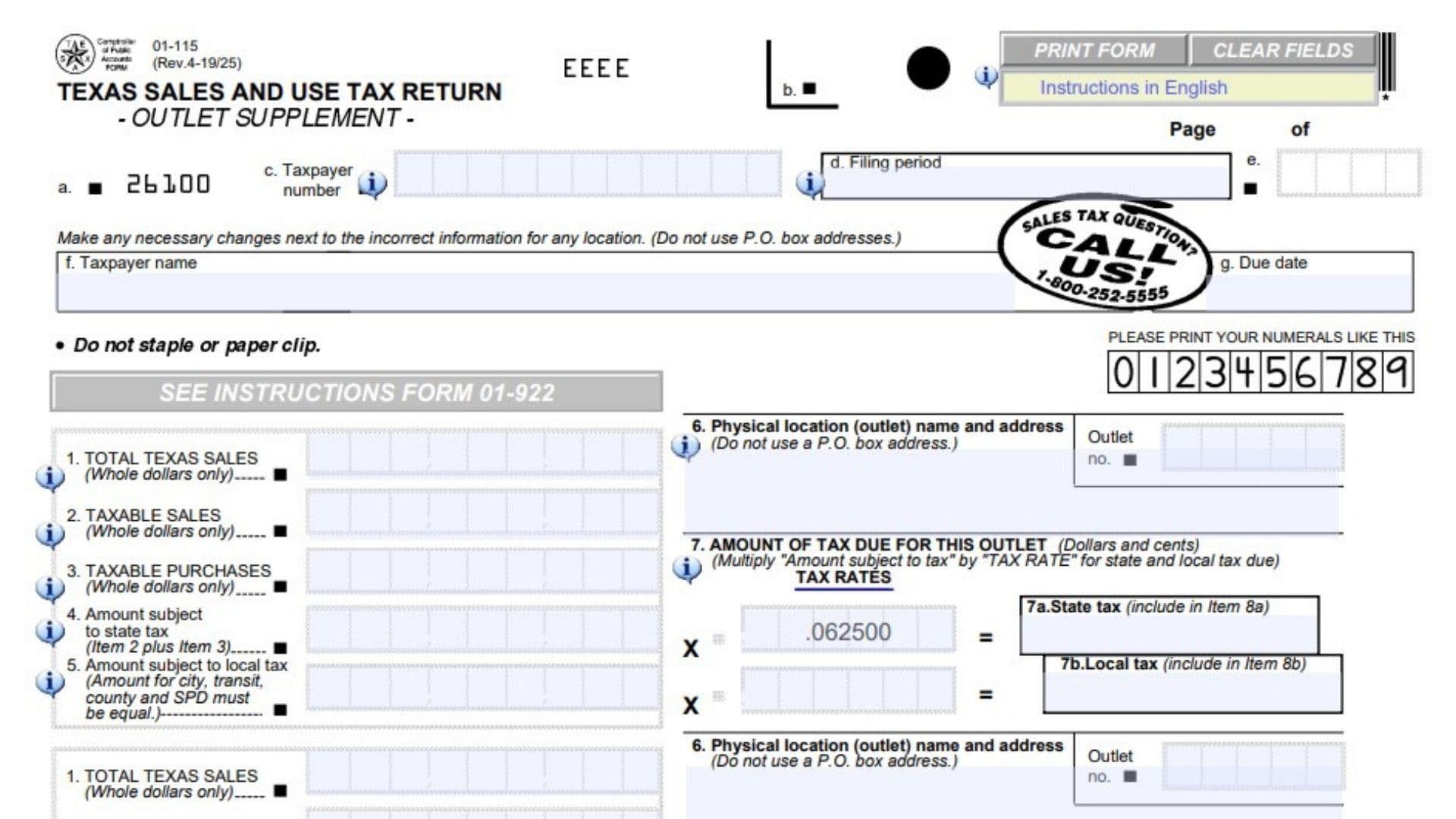
Form 01-115, formally known as the Texas Sales and Use Tax Return Outlet Supplement, is an official tax document created by the Texas Comptroller of Public Accounts. This form exists specifically for businesses that operate multiple physical locations, branches, or storefronts within the state of Texas. Instead of lumping all business revenue together, this supplement allows business owners to break down their sales volume, taxable purchases, and tax liabilities on a strict per-location basis. It collects detailed financial data for each specific outlet, which is vital because different locations often fall under different local tax jurisdictions. Completing this form correctly matters immensely, as it ensures that local entities like cities, counties, and special purpose districts receive their accurate portion of the tax revenues generated in their specific areas.
How To File Form 01-115
This form is not filed on its own; it serves as a mandatory attachment to your primary Texas Sales and Use Tax Return (usually Form 01-114). It must be submitted alongside your main return to the Comptroller of Public Accounts for the matching filing period.
Before sitting down to complete this document, you should gather detailed financial records separated by physical location. You will need the gross receipts, taxable sales, and untaxed business purchase receipts for every individual outlet you operate. You will also need to know the specific local tax rate for each location’s address. If any preprinted location information on the form is incorrect or outdated, you must cross it out and write the necessary updates directly next to the incorrect text.

How to Complete Texas Form 01-115
General Header Information
Before entering financial data for your locations, you must ensure the general business and filing period information at the top of the page is accurate.
Taxpayer Number Enter your unique state-issued taxpayer identification number. This ensures your supplemental data is correctly linked to your main business account.
Filing Period Indicate the specific tax reporting period that this supplement covers. This must match the timeframe on your primary tax return perfectly.
Taxpayer Name Write the legal name of your business or your personal name if operating as a sole proprietor.
Due Date Provide the official deadline date for when this tax return is legally required to be submitted to the Comptroller.
Page Numbering Fill in the current page number and the total number of supplement pages you are attaching (for example, Page 1 of 3). This helps the tax office track multiple pages if you operate many locations.
Outlet Information and Tax Calculations
The main body of the form contains identical blocks used to report data for each individual business location. You must complete a separate block for every active outlet.
Item 1: Total Texas Sales Report the absolute total of all gross receipts generated by this specific location. This figure must include everything you sold at this branch, including both taxable and tax-exempt items. You must round this figure to whole dollars.
Item 2: Taxable Sales Enter the exact portion of your total sales from this location that is legally subject to state sales tax. Do not include tax-exempt transactions here. You must round this amount to whole dollars.
Item 3: Taxable Purchases Record the total value of any items or business equipment purchased for this specific location without paying sales tax upfront, which are now subject to Texas use tax. You must round this amount to whole dollars.
Item 4: Amount Subject to State Tax Add the whole dollar amounts from Item 2 and Item 3 together. This creates the baseline figure that will be used to calculate the state tax liability for this individual outlet.
Item 5: Amount Subject to Local Tax Enter the total volume of sales and purchases subject to local taxes at this location. Because this location sits in a specific jurisdiction, the taxable amounts applied toward city, transit, county, and special purpose district (SPD) taxes must be identical.
Item 6: Physical Location (Outlet) Name and Address Provide the exact physical street address and the specific operating name for this branch. You are strictly prohibited from using a P.O. Box address in this space; it must be a physical geographical location.
Outlet Number Enter the designated outlet identifier number assigned to this specific location by the state.
Item 7a: State Tax Calculate the state tax liability for this location by multiplying your total from Item 4 by the standard Texas state tax rate (0.0625). Record this exact number in dollars and cents. You will later include this amount in the total state tax line (Item 8a) on your primary return.
Item 7b: Local Tax Calculate the local tax liability for this branch by multiplying your total from Item 5 by the specific local tax rate applicable to this exact physical address. Record this exact number in dollars and cents. You will later include this amount in the total local tax line (Item 8b) on your primary return.
Total Tax Due on This Page
At the very bottom of the document, there is a section designated strictly for the taxpayer’s own record-keeping and mathematical organization.
Total Tax Due on This Page (State Tax) Add together all the figures calculated in Item 7a for every location listed on this specific page. This gives you a running total of the state tax liability for this sheet.
Total Tax Due on This Page (Local Tax) Add together all the figures calculated in Item 7b for every location listed on this specific page. This gives you a running total of the local tax liability for this sheet.
Final Review Before Filing
Before attaching this supplement to your main return and submitting it, go through this final checklist to ensure everything is perfect:
- Verify that you have used a separate reporting block for every single physical location your business operates.
- Confirm that no P.O. Boxes have been used in the physical location address fields.
- Double-check that Items 1, 2, and 3 are rounded to whole dollars only.
- Ensure that your final tax calculations in Items 7a and 7b are written out precisely in dollars and cents.
- Check your math to ensure the local taxable amount (Item 5) is consistent for city, transit, county, and SPD reporting.
- Confirm that any changes to preprinted address information have been clearly marked and updated next to the old text.
- Ensure all supplement pages are properly numbered and securely attached to your primary Texas Sales and Use Tax Return.