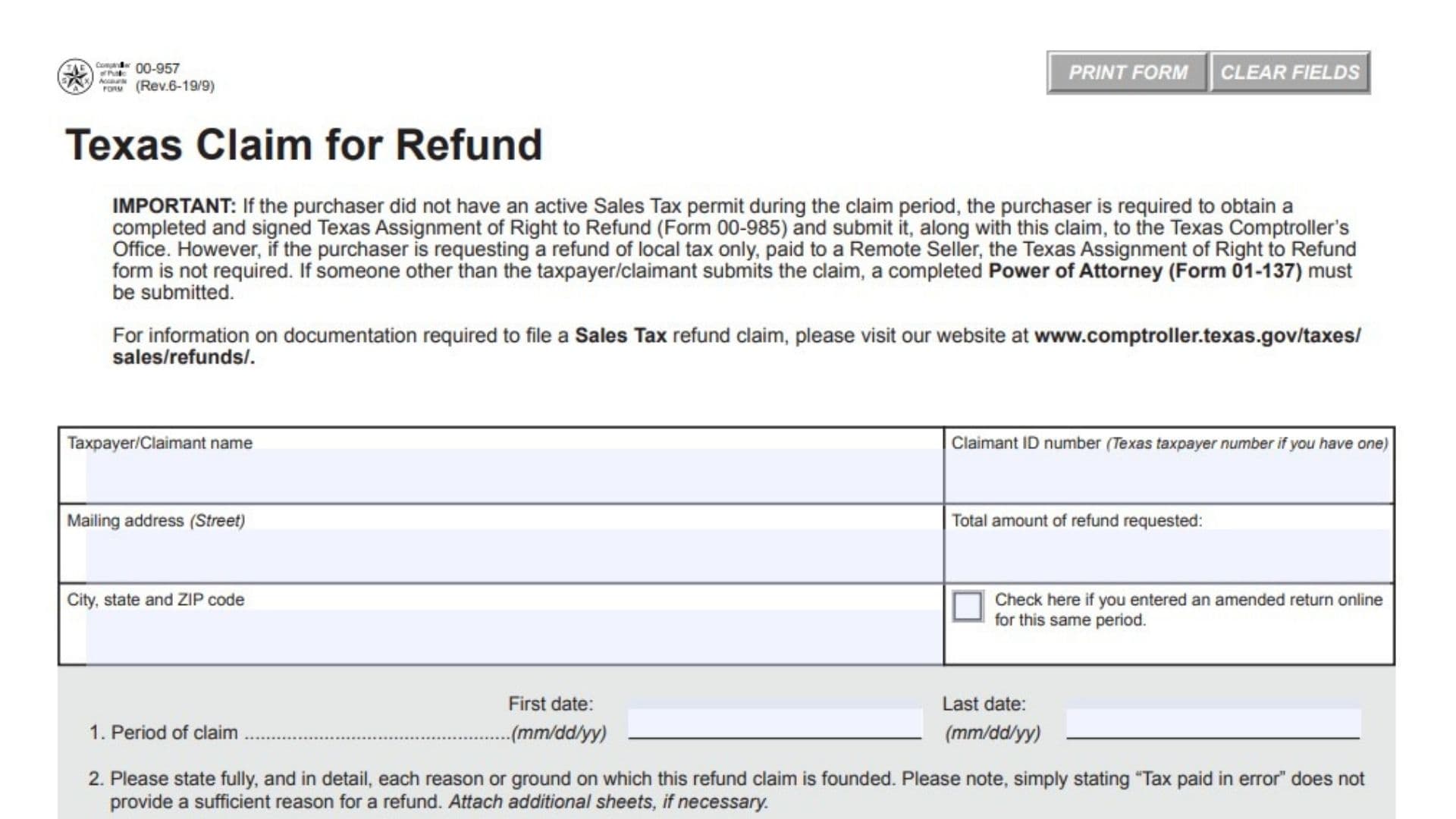
Texas Form 00-957 is the official administrative petition used by businesses and consumers to recover overpaid state and local taxes from the Texas Comptroller of Public Accounts. Tax overpayments frequently happen due to bookkeeping miscalculations, unapplied statutory exemptions, improper sales tax billed by vendors, or subsequent contract cancellations. Form 00-957 creates a formal audit record establishing why money is legally owed back to the claimant and sets the official postmark date to stop the four-year statute of limitations from running. Because the state requires strict evidentiary proof before releasing public treasury funds, completing this form with specific legal grounds and organized transaction schedules ensures auditors can verify your eligibility without rejecting or returning your claim.
How To File Form 00-957
Taxpayers and purchasers submit this refund claim either electronically via email or by mailing physical copies directly to the Comptroller’s audit division. Before preparing the claim, confirm whether specialized ancillary forms are required based on your purchasing status:
- If you are a buyer who did not hold an active Texas Sales Tax permit during the transaction period and you paid tax to a permitted vendor, you must secure a signed assignment of right to refund from that seller before the state can pay you directly.
- An assignment form is not required if your request is solely for local tax paid to an out-of-state remote seller.
- If a third-party accountant, tax attorney, or representative prepares or files the claim on your behalf, an executed power of attorney form must accompany the package.
Assemble the following materials before completing the request:
- Itemized sales receipts or purchase invoices showing the tax paid.
- Proof of payment, such as cleared bank checks, merchant card receipts, or electronic statements.
- Direct accounting ledgers, journal entries, and credit memos if claiming an internal bookkeeping error.
- An itemized transaction schedule listing all transactions if your submission exceeds ten individual sales invoices.
- Specific local taxing jurisdiction codes, authority identification numbers, and allocated local amounts for every sales tax transaction.
Choose only one delivery method to avoid duplicate processing:
Email your completed form and digital PDF documentation to:
refund.request@cpa.texas.gov
Or mail the physical packet to:
Comptroller of Public Accounts
Revenue Accounting Division
Sales & Motor Vehicle Tax Refunds
111 E. 17th Street
Austin, TX 78774-0100

How To Complete Form 00-957
Form 00-957 contains claimant identity blocks, filing date ranges, legal grounds explanations, tax type classification codes, and authorized verification signatures. Provide complete answers across all lines to avoid administrative processing delays.
Claimant Identification and Summary Figures
Field: Taxpayer/Claimant Name
Enter the complete legal name of the entity, business partnership, corporation, or individual requesting the refund. Ensure this name matches the legal title registered on state records or your official identification documents.
Field: Claimant ID Number
Record your eleven-digit Texas Taxpayer Number if your business is registered with the Comptroller. If you are an unregistered individual consumer, provide your Social Security number or Federal Employer Identification number.
Field: Mailing Address (Street)
Write the primary street address, suite number, or post office box where the Comptroller should mail formal audit determinations and state warrant checks.
Field: City, State, and ZIP Code
Provide the city, two-letter state abbreviation, and complete five-digit or nine-digit postal ZIP code for your mailing destination.
Field: Total Amount of Refund Requested
State the total dollar balance you are claiming across all transactions included in this request. This number must equal the mathematical sum of all state and local taxes itemized in your attached schedules.
Field: Online Amended Return Checkbox
Check this box if you previously submitted an amended tax return through the Comptroller’s web portal covering the identical tax period and liabilities included in this claim. Leave this checkbox blank if you did not submit an online adjustment.
Claim Period and Justification
Line 1: Period of Claim
Enter the starting date in the first date field and the concluding date in the last date field using standard two-digit month, day, and year formatting. These dates must define the specific filing periods or transaction dates during which the tax overpayment occurred.
Line 2: Grounds for Refund Claim
Explain in clear factual and statutory detail why you are legally entitled to receive a refund. General phrases such as tax paid in error are legally insufficient and will cause the Comptroller to reject your filing. State precisely why the transaction was exempt, cite relevant Texas Tax Code provisions or administrative rules, and describe the nature of the accounting error or commercial transaction. If the provided lines do not offer enough space, type your complete narrative on a separate attachment and reference it here.
Tax Category Selection
Line 3: Type of Tax or Fee Upon Which This Refund Claim Is Based
Review the provided numeric tax code menu and write the appropriate two-digit classification code corresponding to your claim:
- Enter code 26 for standard Sales Tax.
- Enter code 27 for Direct Pay permit holders.
- Enter code 50 for the Texas Emissions Reduction Surcharge.
- Enter code 63 for Mixed Beverage Sales Tax.
- Enter code 64 for the Petroleum Product Delivery Fee.
- Enter code 70 for Motor Vehicle Seller-Financed Sales Tax.
- Enter code 73 for Mixed Beverage Gross Receipts Tax.
- Enter code 75 for State-Only Hotel Occupancy Tax.
- If your refund involves a state levy not listed above, check the other tax box and write the specific statutory tax name on the adjacent line.
Supporting Documentation Requirements
Item 4: Document Submission Instructions
If your claim involves internal bookkeeping errors, provide complete general ledger pages, chart of accounts reconciliations, and journal entries. For transaction-based claims, provide full copies of purchase invoices and proof of payment; when presenting more than ten individual sales invoices, you must compile and attach an itemized summary schedule.
Item 5: Local Sales Tax Breakdown
When claiming sales tax, your attached schedule must break down the specific local authority names, individual local jurisdiction identification numbers, and exact tax amounts allocated to each city, county, transit authority, or special purpose district. You can verify local jurisdiction codes through the Comptroller’s online sales tax rate locator or obtain them directly from the original seller.
Contact Information and Execution
Field: Signature of Taxpayer/Claimant/Contact
The claimant, corporate officer, or authorized legal representative must sign by hand or via a validated digital signature to certify the truth and accuracy of the refund petition.
Field: Date
Enter the calendar date on which the authorized signer executes the document.
Field: Name of Contact
Type or print the full legal name of the designated person who can answer technical audit inquiries regarding the underlying records.
Field: Daytime Phone
Provide an active daytime telephone number, including area code, where state auditors can reach your contact person directly during business hours.
Field: Email Address of Contact
Write the direct email address used to receive official correspondence, audit notifications, and refund determinations from the state revenue department.
Final Review Before Filing
- Confirm that your legal reasoning explains the statutory basis for exemption rather than using generic error descriptions.
- Ensure the requested refund amount reconciles with all underlying invoices and itemized transaction spreadsheets.
- Verify that claims containing more than ten invoices include an itemized schedule.
- Check that local sales tax amounts are itemized by jurisdiction name and authority identification code.
- Ensure non-permitted purchasers have attached an assignment of rights form signed by the vendor, unless requesting remote seller local taxes.
- Include an executed power of attorney form if a third party submits the request on your behalf.
- Verify that your contact email and telephone numbers are active and checked regularly.
- Confirm your submission is postmarked or transmitted before the expiration of the four-year statute of limitations.