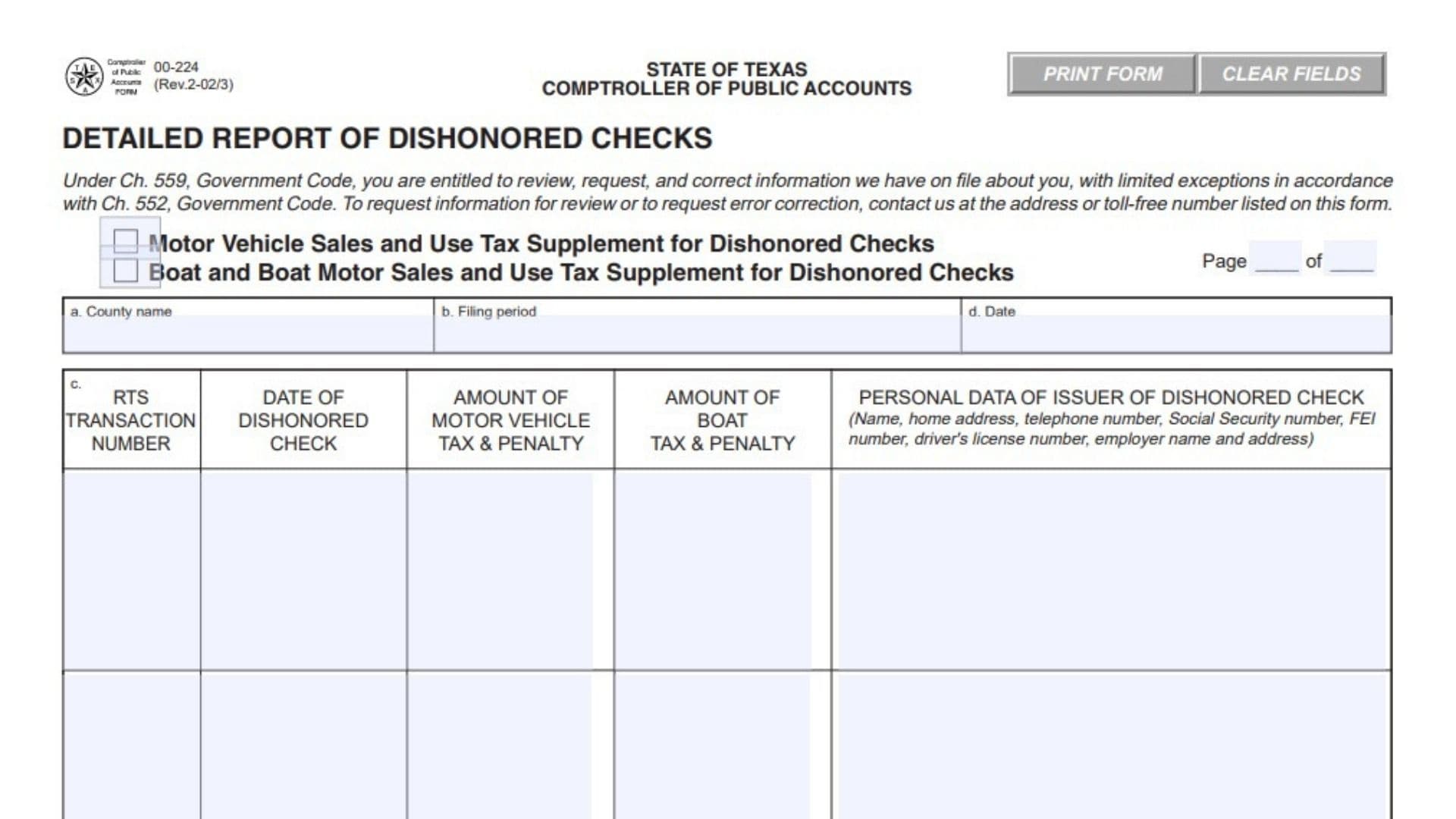
Texas Form 00-224 is an official accounting schedule used by county tax assessor-collectors and designated local collection offices to report uncollectible payments for state-administered taxes. When customers pay motor vehicle or boat sales taxes using checks that subsequently bounce due to insufficient funds, stopped payments, or closed accounts, the local collection agency faces an immediate accounting discrepancy. The local office initially remits or reports those funds to the state, expecting the bank draft to clear. Form 00-224 exists to officially log each returned check so the county can claim a credit against state tax liabilities, adjust commission calculations, and transfer the uncollected liability to the Texas Comptroller of Public Accounts. Submitting this schedule ensures local county ledgers balance with state treasury records while equipping state revenue enforcement officers with the identity information necessary to recover outstanding taxes directly from the check issuer.
How To File Form 00-224
County tax offices submit this schedule in conjunction with their statutory monthly tax reports, followed by dedicated supporting documentation mailed to the Comptroller’s accounting division. Filing rules differ depending on whether the dishonored payment applies to motor vehicle transactions or marine equipment sales, but both claims are subject to a strict four-year statute of limitations from the date the tax was originally remitted.
For Motor Vehicle Sales and Use Tax claims, file your regular Motor Vehicle Sales and Use Tax Report along with the Detailed Report of Collections, and include this form to claim your credit on that monthly filing. Under separate cover, submit a secondary packet containing:
- A copy of this completed form.
- Photocopies showing both the front and back of every dishonored check.
- A photocopy of the corresponding Registration and Title System transaction receipt.
For Boat and Boat Motor Sales and Use Tax claims, prepare an amended Boat and Boat Motor Sales and Use Tax Report for the specific historical reporting period when the original payment was accepted. Mail the amended filing along with:
- The completed original schedule.
- Photocopies of the front and back of each bounced check.
- A copy of the relevant state marine validation document, either receipt form PWD-143-A1100 or PWD-144-A1100.
Mail these documentation packets to:
Comptroller of Public Accounts
Revenue Accounting Division
Miscellaneous Taxes Section
P.O. Box 13528
Austin, TX 78711-3528

How To Complete Form 00-224
Form 00-224 contains a header identifying the filing jurisdiction, an itemized ledger detailing each returned check, and a summary calculation area at the base of the page. Prepare a separate sheet if your office processed more returned checks than the grid accommodates, numbering each sheet in sequential order.
Header Information
Field: Page Number
Enter the current sheet number followed by the total count of sheets prepared for this submission. For example, enter page 1 of 1 if all dishonored transactions fit on a single document.
Field: Tax Category Selection Checkbox
Check the appropriate box at the top of the schedule to identify the tax type being adjusted. Select either the Motor Vehicle Sales and Use Tax Supplement checkbox or the Boat and Boat Motor Sales and Use Tax Supplement checkbox. Do not combine both tax categories on a single sheet.
Field a: County Name
Enter the legal name of the Texas county where your tax office operates.
Field b: Filing Period
Write the calendar month and calendar year for which you are submitting this schedule or to which the amended adjustment applies.
Field c: Unlabeled Identifier Box
Record any internal county reference, station identifier, or county office tracking code if utilized by your local accounting procedures. Leave this space blank if your department uses no supplementary tracking designation.
Field d: Date
Enter the date on which this report is prepared and certified by your county office staff.
Itemized Dishonored Checks Ledger
Column: RTS Transaction Number
Enter the specific audit transaction code generated by the Texas Department of Motor Vehicles Registration and Title System for the affected motor vehicle transaction. For boat tax entries where an RTS number does not exist, leave this blank or input the relevant marine document reference number.
Column: Date of Dishonored Check
Write the calendar date written on the face of the returned check by the payor.
Column: Amount of Motor Vehicle Tax & Penalty
Record the combined dollar total of motor vehicle sales tax, use tax, and any associated statutory penalties covered by the bounced check. Leave this column blank when preparing a boat tax report.
Column: Amount of Boat Tax & Penalty
Enter the total dollar sum of boat or boat motor sales tax and applicable late fees represented by the unpaid draft. Leave this column blank when reporting motor vehicle items.
Column: Personal Data of Issuer of Dishonored Check
Provide full identifying background details for the check writer, including individual full name, residential street address, active telephone number, Social Security number, Federal Employer Identification number, state driver’s license number, and employer business name and workplace address. Obtaining the issuer’s Social Security number or federal tax ID is critical, as state revenue collections agents require these identifiers to initiate formal administrative enforcement.
Calculations and Totals
Line: Total Credit This Page
Add the figures listed down the relevant tax amount column on this page and enter the cumulative sum. If you are reporting motor vehicle payments, sum the motor vehicle column; if reporting marine transactions, sum the boat column.
Line: Minus Boat Commission
Calculate and enter the statutory county collection commission associated with the boat tax total reported above, or enter zero if reporting motor vehicle items. Subtract this retained commission amount from the line above to establish the actual net credit due from state revenue accounts.
Line: Total Amount
Subtract the boat commission figure from the total credit amount on this sheet, and enter the net refundable balance. Carry this final dollar total forward to the credit line of your accompanying monthly or amended tax return.
Line: Authorization Signature Marker (X)
Sign your name on the designated signature line to certify that the listed returned checks represent valid, uncollectible state tax payments accepted in good faith by your county office.
Final Review Before Filing
- Confirm that every transaction occurred within the four-year statutory limitations window.
- Verify that motor vehicle claims and boat tax claims are separated onto distinct reports.
- Ensure that complete personal data, particularly Social Security numbers or federal employer identification numbers, is recorded for every check writer.
- Check that photocopies of both the front and back of each dishonored check are legible and included in your mailing packet.
- Confirm that matching RTS transaction receipts or Parks and Wildlife validation receipts accompany each listed item.
- Double-check your column additions, commission deductions, and net credit calculations before posting figures to your primary tax report.
- Verify that your document packet is signed, numbered correctly across all sheets, and addressed to the Miscellaneous Taxes Section in Austin.