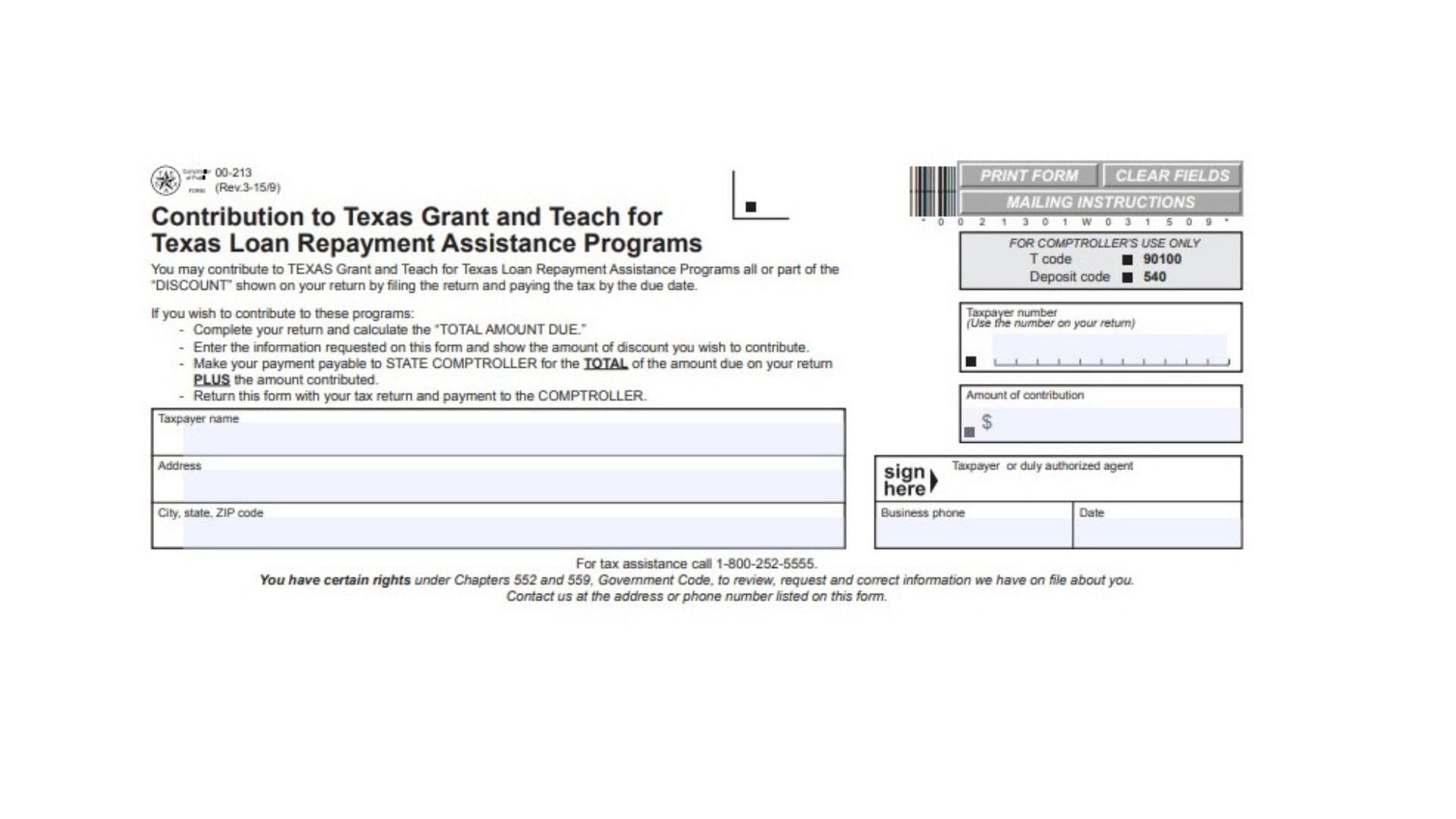
Texas Form 00-213 allows businesses and taxpayers reporting state taxes to redirect their timely filing discount toward public higher education assistance. Under Texas tax statutes, taxpayers who file and pay their returns on or before the legal deadline frequently qualify for a collection allowance or timely filing discount. Rather than keeping that credit as a deduction against total tax liabilities, business owners can choose to donate some or all of that discount to support the Toward EXCELLENCE, Access, & Success (TEXAS) Grant program and the Teach for Texas Loan Repayment Assistance Program. These state-administered initiatives expand college access for undergraduate students with financial need and provide student debt relief to certified classroom educators serving in shortage teaching fields or critical communities. Filing this form provides the Texas Comptroller of Public Accounts with the explicit accounting authorization required to transfer your discount allowance into these state educational funds while crediting your primary tax return in full.
How To File Form 00-213
Taxpayers submit this schedule directly with their underlying Texas state tax return when remitting payment by mail. Because this donation originates from the timely filing discount earned on your return, you must complete your base tax report first to establish eligibility. If your primary tax return is submitted past the statutory deadline, the discount is forfeited under state law, making the contribution void.
Gather the following items before filling out the form:
- Your completed primary Texas tax return showing timely figures.
- The precise timely filing discount amount calculated on your primary tax report.
- Your official eleven-digit Texas Taxpayer Number assigned by the Comptroller.
- Current business registration details, including legal name and mailing address.
- A single check or money order covering the full combined remittance.
Prepare a single payment made out to the State Comptroller. The total remittance must equal the overall tax liability reported on your tax return plus the specific contribution amount designated on Form 00-213. Place the completed contribution form on top of or directly behind your tax return, attach the combined payment instrument, and mail the entire package to the Texas Comptroller of Public Accounts according to your tax type’s standard filing instructions.

How To Complete Form 00-213
Completing this document requires transcribing key identifying data from your tax return, specifying your chosen donation, and providing an authorized signature. Ensure every field matches your tax report to prevent processing delays or misallocated payments.
Taxpayer Identification
Field: Taxpayer Name
Enter the complete legal name of the individual proprietor, partnership, corporation, or entity as registered with the state. This entry must correspond with the name shown on your accompanying tax return.
Field: Address
Provide the primary street address, suite number, or post office box where your business receives official state tax correspondence.
Field: City, State, ZIP Code
Write the city, two-letter state abbreviation, and five-digit or nine-digit postal ZIP code associated with your mailing address.
Field: Taxpayer Number
Input the official eleven-digit state identification number assigned to your account by the Texas Comptroller. Copy this sequence directly from your primary tax return to ensure the contribution links to your specific filing record.
Contribution Details
Field: Amount of Contribution
Specify the dollar value of the timely filing discount you wish to allocate to the educational programs. You may donate the entire discount or any partial share of that discount earned on your return. The entered amount cannot exceed the total collection discount calculated on your accompanying tax filing.
Verification and Signature
Field: Taxpayer or Duly Authorized Agent
Provide the handwritten or digital signature of the individual taxpayer, corporate officer, partner, or formally appointed tax representative authorized to allocate business funds.
Field: Business Phone
List the daytime telephone number, including area code, where state tax examiners can contact the authorized signer if questions arise regarding the return.
Field: Date
Enter the calendar date on which the authorized signer signs and approves the document. This date must precede or match the statutory filing deadline of your tax return.
Agency Processing Reference
Field: For Comptroller’s Use Only
Leave this administrative block entirely blank. State revenue personnel utilize this area to process transaction code 90100 and deposit code 540 when routing your funds into the dedicated educational program accounts.
Final Review Before Filing
- Verify that your underlying tax return is completely filled out and that the timely filing discount has been computed accurately.
- Ensure the contribution amount does not exceed the allowed discount shown on your tax return.
- Confirm your eleven-digit taxpayer number and business name match your tax filing records.
- Check that your payment instrument is made payable to the State Comptroller.
- Confirm your check or money order amount equals the tax due on the return plus the contribution amount.
- Ensure the document is signed and dated by an authorized representative before mailing.
- Postmark the entire packet on or before the official statutory due date to protect your timely filing discount.