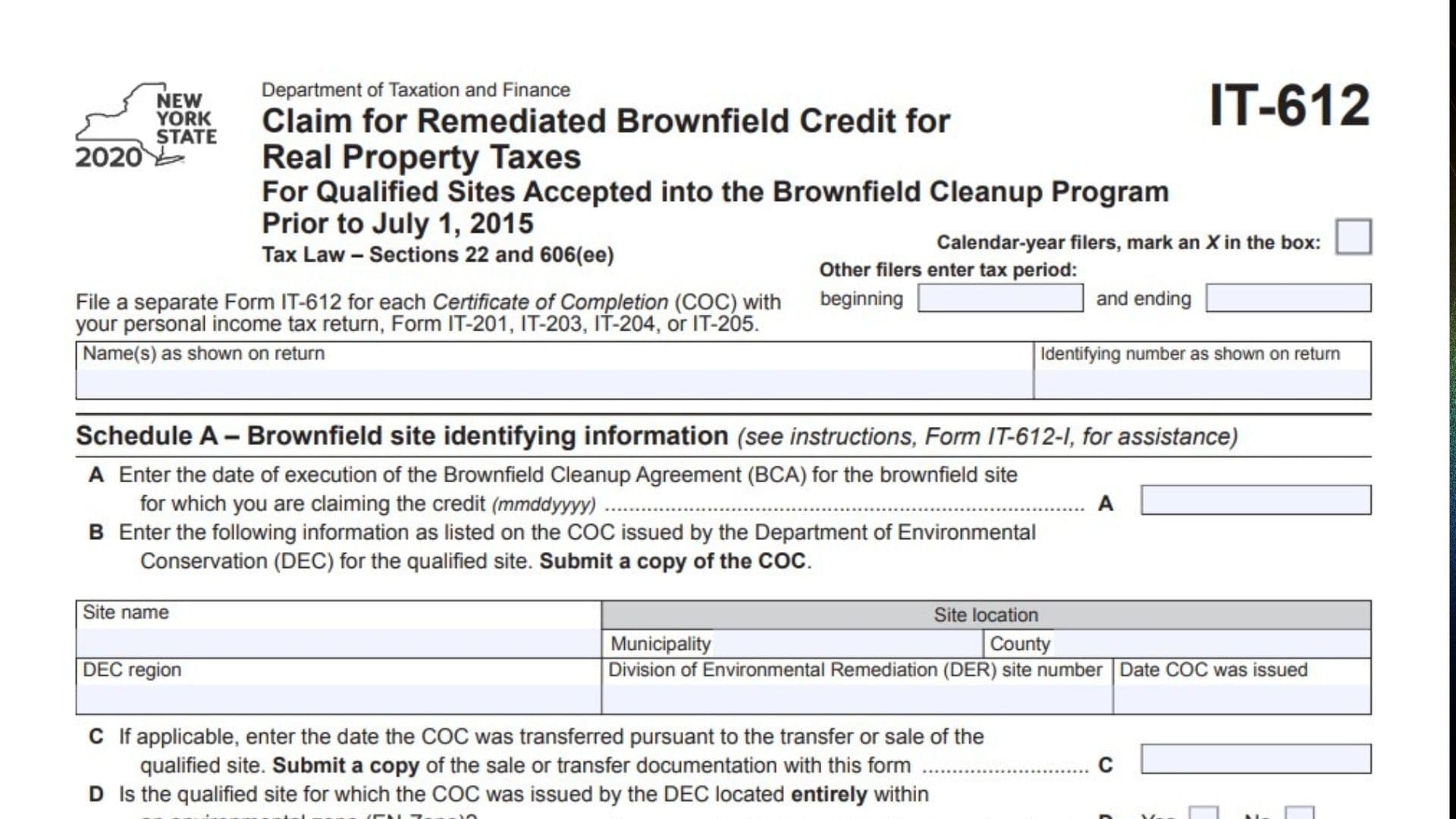
New York Form IT-612, Claim for Remediated Brownfield Credit for Real Property Taxes, is a tax form used by eligible individuals, sole proprietors, partnerships, fiduciaries, and other qualifying taxpayers to claim a credit for real property taxes associated with qualified brownfield sites. The form applies to qualified sites accepted into the Brownfield Cleanup Program before July 1, 2015, under New York Tax Law Sections 22 and 606(ee). The credit is intended to provide tax relief for qualifying brownfield redevelopment projects by allowing eligible taxpayers to claim a portion of the real property taxes associated with the qualified site. The form collects information about the Brownfield Cleanup Agreement (BCA), the Certificate of Completion (COC), the site’s location and environmental classification, the number of full-time employees working at the site, eligible real property taxes, and applicable credit calculations. It also addresses credit amounts received through partnerships, New York S corporations, estates, and trusts. Depending on the taxpayer’s entity type, the credit may need to be allocated among beneficiaries, partners, shareholders, or other eligible recipients. The form includes separate schedules for identifying the qualified brownfield site, calculating the employment number factor, determining the credit, reporting entity-level allocations, and calculating any credit recapture. Completing Form IT-612 accurately is important because the allowable credit depends on several conditions, including the site’s qualification, employee numbers, eligible property taxes, environmental zone status, and applicable credit limitations. Taxpayers must also consider whether any previously claimed credit is subject to recapture. A separate Form IT-612 must be completed for each Certificate of Completion (COC) associated with a qualified site. The completed form is attached to the applicable New York personal income tax or fiduciary return, or reported through the appropriate partnership filing process.
How To File Form IT-612
Form IT-612 must be filed with the appropriate New York State tax return. The form specifically requires a separate credit claim for each Certificate of Completion (COC).
Depending on the taxpayer’s filing situation, attach Form IT-612 to one of the following returns:
- Form IT-201 – Resident Income Tax Return.
- Form IT-203 – Nonresident and Part-Year Resident Income Tax Return.
- Form IT-204 – Partnership Return.
- Form IT-205 – Fiduciary Income Tax Return.
Calendar-year taxpayers should mark the calendar-year checkbox at the top of the form. Taxpayers using another reporting period must enter the beginning and ending dates of their tax period.
Before completing Form IT-612, prepare the following information:
- Your name and identifying number as shown on the applicable tax return.
- The tax period covered by the credit claim.
- The date the Brownfield Cleanup Agreement (BCA) was executed.
- A copy of the Certificate of Completion issued by the New York State Department of Environmental Conservation (DEC).
- The brownfield site’s name and location.
- The municipality, county, DEC region, and DER site number.
- The date the Certificate of Completion was issued.
- Transfer or sale documentation if the Certificate of Completion was transferred.
- Information confirming whether the qualified site is entirely within an Environmental Zone (EN-Zone).
- Notification information concerning Brownfield Opportunity Area designation, if applicable.
- Quarterly full-time employee information for the developer and lessees.
- Eligible real property tax information.
- Credit recapture information, if applicable.
- Partnership, S corporation, estate, or trust information when the credit is received through another entity.
- Beneficiary information when the credit is allocated through a fiduciary.
Important: A copy of the Certificate of Completion must be submitted with the form. If the Certificate of Completion was transferred because of a sale or transfer of the qualified site, include a copy of the relevant sale or transfer documentation.

How To Complete Form IT-612
Form IT-612 contains eight schedules, labeled Schedule A through Schedule H. These schedules identify the qualified brownfield site, calculate the employment factor, determine the available credit, report credit allocations, and summarize any credit recapture.
Follow the instructions below in the same order as the form.
Taxpayer and Tax Period Information
The top section identifies the taxpayer and the tax period for which the remediated brownfield credit is being claimed.
Calendar-Year Filer Checkbox
Mark an X in this box if you file your tax return on a calendar-year basis.
Calendar-year filers use the standard calendar tax year.
Tax Period Beginning
If you are not a calendar-year filer, enter the beginning date of your tax period.
Provide the month, day, and year in the spaces provided.
Tax Period Ending
If you are not a calendar-year filer, enter the ending date of your tax period.
Make sure the beginning and ending dates accurately reflect the reporting period used on your tax return.
Name(s) as Shown on Return
Enter the name or names exactly as they appear on the New York State tax return to which Form IT-612 will be attached.
For an individual return, use the taxpayer’s name as reported on the return. For other eligible entities, use the appropriate entity name.
Identifying Number as Shown on Return
Enter the identifying number associated with the tax return.
Use the applicable taxpayer identification number shown on the return, such as a Social Security number or Federal Employer Identification Number, as appropriate.
Schedule A: Brownfield Site Identifying Information
Schedule A collects information about the qualified brownfield site and its participation in the Brownfield Cleanup Program.
You must provide the information associated with the Certificate of Completion issued by the New York State Department of Environmental Conservation.
Schedule A, Line A: Date of Execution of the Brownfield Cleanup Agreement
Enter the date the Brownfield Cleanup Agreement (BCA) was executed for the qualified brownfield site.
Use the MMDDYYYY format.
For example, if the agreement was executed on March 15, 2014, enter 03152014.
Make sure the date relates to the specific brownfield site for which you are claiming the credit.
Schedule A, Line B: Qualified Site Information
Use the information shown on the Certificate of Completion issued by the Department of Environmental Conservation (DEC).
The form requires the following site details:
Site Name
Enter the official name of the qualified brownfield site as shown on the Certificate of Completion.
Site Location: Municipality
Enter the municipality where the qualified brownfield site is located.
Site Location: County
Enter the county in which the qualified site is situated.
DEC Region
Enter the DEC region associated with the qualified brownfield site.
Use the information provided in the site’s environmental records or Certificate of Completion.
Division of Environmental Remediation (DER) Site Number
Enter the site’s identification number assigned by the Division of Environmental Remediation.
Verify the number against the Certificate of Completion.
Date COC Was Issued
Enter the date the Department of Environmental Conservation issued the Certificate of Completion.
Submit a copy of the COC with Form IT-612 as required.
Schedule A, Line C: Date the Certificate of Completion Was Transferred
Complete this line if the Certificate of Completion was transferred as a result of the sale or transfer of the qualified site.
Enter the date the transfer occurred.
You must also submit a copy of the sale or transfer documentation with the form.
If the Certificate of Completion was not transferred, follow the applicable instructions for this line.
Schedule A, Line D: Environmental Zone (EN-Zone) Status
Indicate whether the qualified site for which the DEC issued the Certificate of Completion is located entirely within an Environmental Zone (EN-Zone).
- Select Yes if the entire qualified site is within an EN-Zone.
- Select No if the entire site is not within an EN-Zone.
This information affects the credit calculation in Schedule C, particularly the percentage entered on Line 4.
Schedule A, Line E: Brownfield Opportunity Area Notification
Mark an X in this box if you received notification from the New York State Department of State confirming that the qualified site is located in a Brownfield Opportunity Area.
Only mark this box if you received the specified notification.
Schedule B: Computation of Average Number of Full-Time Employees
Schedule B calculates the average number of full-time employees employed by the developer and any lessees at the qualified brownfield site during the current tax year.
The employee information is used to determine the employment number factor applied in Schedule C.
Current Tax Year: March 31
Enter the number of full-time employees employed at the qualified site as of March 31.
Include the applicable employees of the developer and any lessees at the site.
Current Tax Year: June 30
Enter the number of full-time employees employed at the qualified site as of June 30.
Use the employment information for the specified date.
Current Tax Year: September 30
Enter the number of full-time employees employed at the qualified site as of September 30.
Make sure the figure reflects the applicable employee count for that date.
Current Tax Year: December 31
Enter the number of full-time employees employed at the qualified site as of December 31.
Use the employment records for the specified date.
Total: Number of Full-Time Employees
Enter the total of the full-time employee counts reported for the four measurement dates.
Add the figures for March 31, June 30, September 30, and December 31.
Line 1: Average Number of Full-Time Employees
Enter the average number of full-time employees employed by the developer and any lessees at the qualified site.
Use the applicable calculation method provided in the Form IT-612 instructions.
The form states that no credit is allowed if the average number of full-time employees is less than 25.
The average employee count determines the employment number factor shown in the following table.
Employment Number Factor Table
Use the average number of full-time employees reported on Line 1 to identify the applicable factor.
- At least 25 but fewer than 50 employees: Enter 0.25.
- At least 50 but fewer than 75 employees: Enter 0.50.
- At least 75 but fewer than 100 employees: Enter 0.75.
- At least 100 employees: Enter 1.00.
For example, if the average number of full-time employees is 60, the applicable employment number factor is 0.50.
If the average is below 25, the form states that no credit is allowed.
Schedule C: Individuals, Partnerships, and Fiduciaries
Schedule C calculates the remediated brownfield credit for real property taxes. It applies to individuals, including sole proprietors, partnerships, and fiduciaries.
The calculation uses the employment number factor, eligible real property taxes, the applicable percentage, and any required credit recapture.
Line 2: Employment Number Factor
Enter the employment number factor determined from the table in Schedule B.
Use the factor corresponding to the average number of full-time employees reported on Schedule B, Line 1.
The available factors are 0.25, 0.50, 0.75, and 1.00.
Line 3: Eligible Real Property Taxes
Enter the amount of eligible real property taxes associated with the qualified brownfield site.
Use the amount determined under the applicable Form IT-612 instructions.
Do not include taxes that do not qualify for the remediated brownfield credit.
Line 4: Applicable Percentage
Enter 0.25 as the standard percentage.
However, if the qualified site is located entirely within an Environmental Zone (EN-Zone), enter 1.00 instead.
The appropriate amount depends on the EN-Zone status reported in Schedule A, Line D.
Line 5: Remediated Brownfield Credit for Real Property Taxes
Multiply the employment number factor on Line 2 by eligible real property taxes on Line 3 and the percentage on Line 4.
The calculation is:
Line 2 × Line 3 × Line 4 = Line 5
Enter the resulting credit amount on Line 5.
Line 6: Recapture of Remediated Brownfield Credit for Real Property Taxes
Enter the applicable amount of credit recapture associated with the remediated brownfield credit.
Use the Form IT-612 instructions to determine whether a recapture applies and how to calculate the amount.
Line 7: Net Recapture of Remediated Brownfield Credit for Real Property Taxes
Enter the net recapture amount determined under the applicable instructions.
Use the required recapture calculation to determine the amount reported on this line.
Line 8: Remediated Brownfield Credit for Real Property Taxes After Recapture
Subtract Line 6 from Line 5.
The calculation is:
Line 5 − Line 6 = Line 8
Enter the resulting amount on Line 8.
Continue to Line 9 to determine the applicable credit limitation.
Line 9: Credit Limitation
Multiply the average number of full-time employees reported on Schedule B, Line 1, by $10,000.
The calculation is:
Line 1 × $10,000 = Line 9
Enter the result on Line 9.
This amount establishes the credit limitation based on the average number of full-time employees at the qualified site.
Line 10: Remediated Brownfield Credit for Real Property Taxes Claimed
Compare the amounts on Lines 8 and 9.
Enter the smaller of the two amounts.
The calculation is:
Smaller of Line 8 or Line 9 = Line 10
The amount reported on Line 10 is the allowable remediated brownfield credit for real property taxes after applying the credit limitation.
Transfer the amount as follows:
- Individuals and partnerships: Enter the Line 10 amount on Line 15.
- Fiduciaries: Include the Line 10 amount on the Total line of Schedule F, Column C.
Schedule D: Partnership, S Corporation, Estate, and Trust Information
Schedule D identifies partnerships, New York S corporations, estates, and trusts from which the taxpayer received a share of the remediated brownfield credit.
Complete this schedule if you were a partner in a partnership, a shareholder of a New York S corporation, or a beneficiary of an estate or trust and received a share of the credit from that entity.
Provide the requested information for each applicable entity.
Name
Enter the complete name of the partnership, New York S corporation, estate, or trust from which you received the credit.
Use the entity’s official name.
Type
Enter the appropriate entity classification code:
- P for Partnership.
- S for S Corporation.
- ET for Estate or Trust.
Select the code that corresponds to the entity distributing the credit.
Employer ID Number
Enter the Federal Employer Identification Number (EIN) of the partnership, S corporation, estate, or trust.
Verify the number against the entity’s tax information.
If you received credit from multiple entities, provide the requested information for each one in the available spaces.
Schedule E calculates the total remediated brownfield credit received through partnerships, S corporations, and estates or trusts.
Complete the lines that apply to your relationship with the entity distributing the credit.
Line 11: Partner’s Share of Credit
Enter your share of the remediated brownfield credit received from a partnership.
Use the amount allocated to you by the partnership.
Line 12: S Corporation Shareholder’s Share of Credit
Enter your share of the remediated brownfield credit received from a New York S corporation.
Use the credit amount allocated to you as a shareholder.
Line 13: Beneficiary’s Share of Credit
Enter your share of the remediated brownfield credit received from an estate or trust.
Use the amount allocated to you as a beneficiary.
Line 14: Total Share of Credit
Add the amounts reported on Lines 11, 12, and 13.
The calculation is:
Line 11 + Line 12 + Line 13 = Line 14
Enter the total on Line 14.
Transfer the amount according to your entity classification:
- Fiduciaries: Include the Line 14 amount in the Total line of Schedule F, Column C.
- All others: Enter the Line 14 amount on Line 16.
Schedule F is used to report the allocation of the remediated brownfield credit and credit recapture between beneficiaries and the fiduciary.
This schedule is particularly relevant to estates and trusts that distribute or allocate the credit to beneficiaries.
The schedule contains four columns.
Column A: Beneficiary’s Name
Enter the name of each beneficiary receiving a share of the remediated brownfield credit.
The beneficiary’s name must match the name reported on Form IT-205, Schedule C.
Column B: Identifying Number
Enter the identifying number associated with each beneficiary.
Use the appropriate identifying information for the beneficiary.
Column C: Share of Remediated Brownfield Credit for Real Property Taxes
Enter the amount of the remediated brownfield credit allocated to each beneficiary.
The Total line in Column C must include the amount from Schedule C, Line 10, plus the amount from Schedule E, Line 14.
The fiduciary should allocate and report the applicable credit amounts in the appropriate beneficiary and fiduciary rows.
Column D: Share of Recapture of Credit
Enter the applicable share of the credit recapture allocated to each beneficiary.
Use the required recapture information and applicable instructions to determine each beneficiary’s amount.
Schedule F: Total Line
Complete the Total line to report the overall credit and recapture amounts.
For Column C, enter the amount from Schedule C, Line 10, plus the amount from Schedule E, Line 14.
For Column D, enter the applicable total share of recapture.
Fiduciary Line
Enter the fiduciary’s own share of the remediated brownfield credit in Column C and the fiduciary’s applicable share of credit recapture in Column D.
Make sure the beneficiary allocations and fiduciary amounts are consistent with the total amounts reported in the schedule.
Schedule G: Computation of Credit
Schedule G calculates the total remediated brownfield credit based on the taxpayer’s category.
The applicable line depends on whether the credit comes directly from the qualified site, through another entity, or through a fiduciary allocation.
Line 15: Credit for Individuals and Partnerships
Individuals and partnerships must enter the amount from Schedule C, Line 10.
Transfer the amount without changing the calculation.
Line 16: Credit for Partners, S Corporation Shareholders, and Beneficiaries
Partners, S corporation shareholders, and beneficiaries must enter the amount from Schedule E, Line 14.
Use the total credit allocated to you through the applicable entity or entities.
Line 17: Credit for Fiduciaries
Fiduciaries must enter the amount from Schedule F, Column C, Fiduciary line.
Use the amount representing the fiduciary’s share of the remediated brownfield credit.
Line 18: Total Credit
Enter the total credit determined under the applicable instructions.
This line summarizes the credit amounts reported through Schedule G.
Use the applicable calculation method for your taxpayer classification and avoid including amounts that do not apply to your situation.
Schedule H: Summary of Recapture Credit
Schedule H summarizes the recapture amounts associated with the remediated brownfield credit.
Complete the applicable lines based on your role as an individual, partnership, partner, S corporation shareholder, beneficiary, or fiduciary.
Line 19: Individual’s and Partnership’s Recapture of Credit
Enter the applicable recapture amount for an individual or partnership.
Use the recapture calculation determined under the Form IT-612 instructions.
Line 20: Beneficiary’s Share of Recapture of Credit
Enter the amount of credit recapture allocated to the beneficiary.
Use the beneficiary’s share of the recapture reported through the applicable fiduciary allocation.
Line 21: Partner’s Share of Recapture of Credit
Enter the partner’s share of the recaptured credit received through a partnership.
Use the amount allocated to the partner.
Line 22: S Corporation Shareholder’s Share of Recapture of Credit
Enter the amount of credit recapture allocated to an S corporation shareholder.
Use the shareholder’s applicable share of the recaptured credit.
Line 23: Fiduciary’s Share of Recapture of Credit
This line applies to fiduciaries.
Enter the fiduciary’s share of the amount reported in Schedule F, Column D, Fiduciary line.
Transfer the applicable amount from the fiduciary section of Schedule F.
Line 24: Total Recapture of Credit
Enter the total recapture amount calculated under the applicable instructions.
This line summarizes the recapture amounts reported in Schedule H.
The amount must be transferred to the appropriate tax return based on the taxpayer’s classification:
- Individuals: Enter the Line 24 amount and code 172 on Form IT-201-ATT, Line 20, or Form IT-203-ATT, Line 19.
- Fiduciaries: Include the Line 24 amount on Form IT-205, Line 12.
- Partnerships: Enter the Line 24 amount and code 172 on Form IT-204, Line 148.
Make sure the correct tax return and reporting line are used.
Final Review Before Filing
Before submitting Form IT-612, review the following checklist to confirm that all site information, employee calculations, credit amounts, allocations, and recapture details are accurate.
Taxpayer and Qualified Site Information
- Confirm the correct tax year or reporting period.
- Verify the taxpayer’s name as shown on the tax return.
- Check the identifying number.
- Complete Schedule A, Line A, with the correct BCA execution date.
- Enter the qualified site’s official name.
- Verify the municipality and county.
- Confirm the DEC region and DER site number.
- Enter the date the Certificate of Completion was issued.
- Attach a copy of the Certificate of Completion.
- Complete Line C if the Certificate of Completion was transferred.
- Attach sale or transfer documentation when required.
- Answer the Environmental Zone question correctly.
- Mark the Brownfield Opportunity Area box only if the required notification was received.
Employment and Credit Calculation
- Complete all four quarterly employee-count fields in Schedule B.
- Verify the total employee count.
- Calculate the average number of full-time employees using the applicable instructions.
- Confirm that the average is at least 25 to qualify for the credit.
- Select the correct employment number factor.
- Enter eligible real property taxes on Schedule C, Line 3.
- Use the correct percentage on Line 4 based on EN-Zone status.
- Calculate the preliminary credit on Line 5.
- Report applicable recapture on Lines 6 and 7.
- Calculate the credit after recapture on Line 8.
- Calculate the credit limitation on Line 9.
- Enter the smaller amount on Line 10.
Entity and Beneficiary Information
- Complete Schedule D if credit was received through a partnership, S corporation, estate, or trust.
- Use the correct entity type code: P, S, or ET.
- Verify each entity’s EIN.
- Complete the applicable lines in Schedule E.
- Add Lines 11, 12, and 13 correctly on Line 14.
- Complete Schedule F if applicable.
- Verify beneficiary names against Form IT-205, Schedule C.
- Check beneficiary identifying numbers.
- Confirm credit allocations in Column C.
- Verify recapture allocations in Column D.
- Confirm the fiduciary’s share of credit and recapture.
Credit and Recapture Reporting
- Complete the applicable lines in Schedule G.
- Verify the total credit reported on Line 18.
- Complete applicable recapture calculations in Schedule H.
- Verify Lines 19 through 23.
- Calculate the total recapture amount on Line 24.
- Transfer the recapture amount to the correct tax return and line.
- Use code 172 where required for individual and partnership reporting.
- Make sure all calculations agree with the applicable supporting schedules.
Supporting Documents and Filing
- Attach the required Certificate of Completion.
- Include transfer or sale documentation if applicable.
- Confirm that a separate Form IT-612 is completed for each Certificate of Completion.
- Attach Form IT-612 to the appropriate tax return.
- Review all identifying information and financial amounts before submission.
Final Filing Reminder: New York Form IT-612 is specifically designed for claiming the Remediated Brownfield Credit for Real Property Taxes for qualified sites accepted into the Brownfield Cleanup Program before July 1, 2015. Complete the applicable schedules based on your taxpayer classification, report all required credit allocations and recapture amounts, and attach the form to the appropriate New York State tax return. Always consult the applicable Form IT-612 instructions for detailed eligibility requirements and calculations that depend on your particular brownfield site and tax situation.