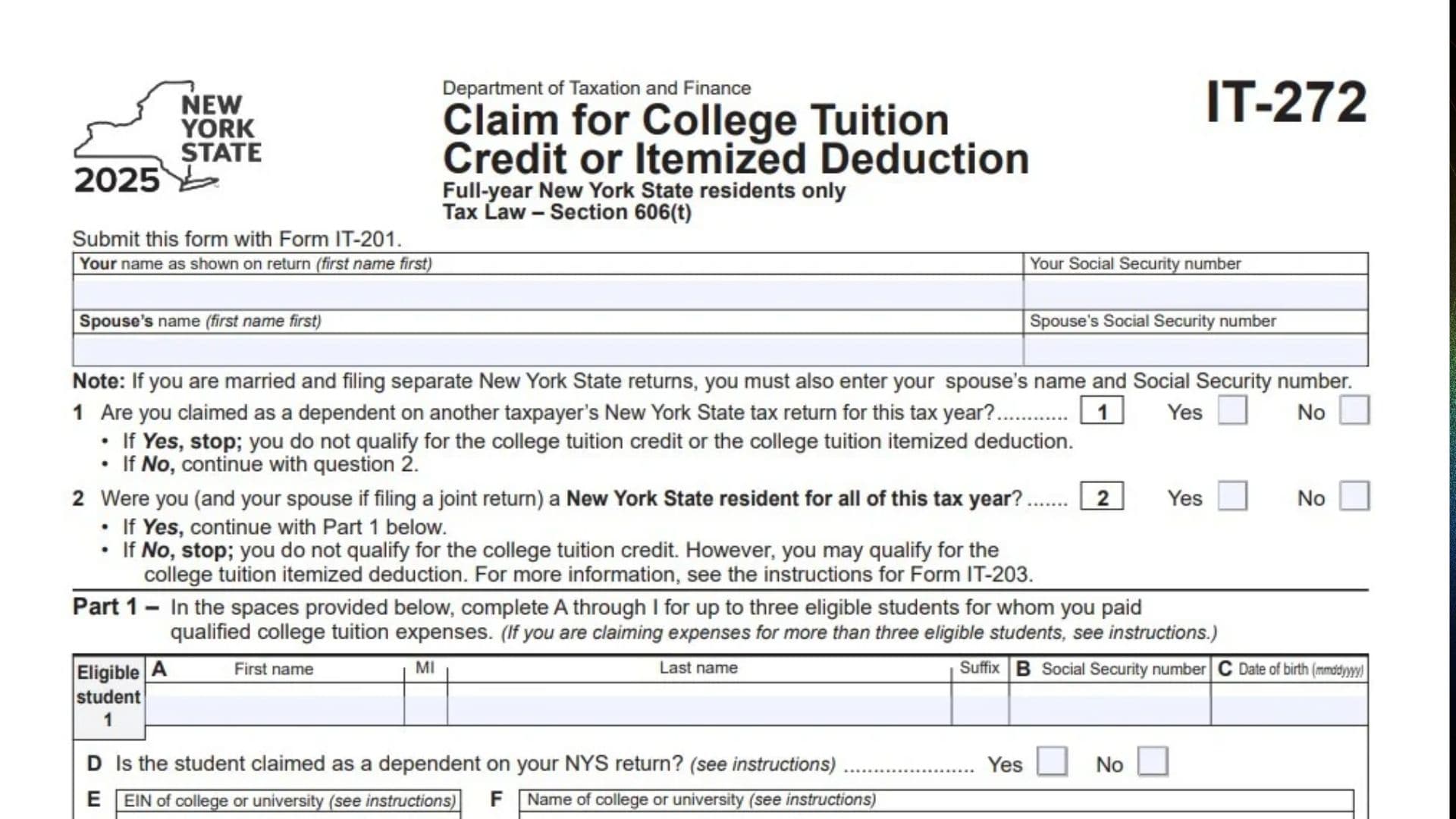
New York Form IT-272, titled Claim for College Tuition Credit or Itemized Deduction, is a tax form used by eligible New York taxpayers to claim a state tax benefit for qualified college tuition expenses paid for eligible students during the tax year. The form is governed by New York Tax Law Section 606(t) and is designed for full-year New York State residents claiming either the college tuition credit or the college tuition itemized deduction. It collects information about the taxpayer, spouse, eligible students, educational institutions, and qualifying tuition expenses. Taxpayers can report information for up to three eligible students directly on the form, with additional forms required when claiming expenses for more students. The form calculates the available college tuition credit based on the total qualified tuition expenses reported. Taxpayers with expenses below $5,000 generally calculate their credit using a fixed $200 limitation, while those with expenses of $5,000 or more calculate the credit using a 4% rate. Taxpayers who itemized deductions on their New York return may also have the option to claim a college tuition itemized deduction instead of the credit. However, both benefits cannot be claimed for the same expenses. Completing Form IT-272 correctly is important because eligibility, student dependency, residency status, qualified tuition amounts, and the selected tax benefit all affect the final amount reported on the New York income tax return.
Who Needs To File Form IT-272?
Form IT-272 is intended for eligible taxpayers who paid qualified college tuition expenses for themselves or eligible students during the tax year.
Generally, you may need this form if:
- You were a full-year New York State resident during the tax year.
- You paid qualified college tuition expenses for one or more eligible students.
- You are not claimed as a dependent on another taxpayer’s New York State tax return for the same tax year.
- You want to claim the New York college tuition credit.
- You itemized deductions on your New York return and want to consider the college tuition itemized deduction.
The form also accommodates taxpayers reporting tuition expenses for students claimed as dependents on their New York State tax returns.
How To File Form IT-272
Form IT-272 must be submitted with New York Form IT-201, Resident Income Tax Return.
Before completing the form, gather the following information:
- Your full name and Social Security number.
- Your spouse’s name and Social Security number, if applicable.
- Information about each eligible student.
- Each student’s Social Security number and date of birth.
- The EIN of each college or university.
- The name of each educational institution.
- Records showing qualified college tuition expenses.
- Your New York State residency information.
- Your New York itemized deduction information, if applicable.
If you are claiming tuition expenses for more than three eligible students, follow the additional form instructions.

How To Complete Form IT-272
Taxpayer And Spouse Information
Your Name As Shown On Return
Enter your first and last name exactly as they appear on your New York State income tax return. Enter your first name before your last name.
Your Social Security Number
Enter your Social Security number in the designated field. Use the same number reported on your Form IT-201.
Spouse’s Name
If you are married and filing a separate New York State income tax return, enter your spouse’s name, beginning with the first name.
Spouse’s Social Security Number
Enter your spouse’s Social Security number when required. Taxpayers filing separate New York State returns must provide both the spouse’s name and Social Security number.
Eligibility Questions
Question 1: Are You Claimed As A Dependent On Another Taxpayer’s New York State Tax Return?
Answer whether another taxpayer claims you as a dependent on their New York State income tax return for the same tax year.
- Select Yes if another taxpayer claims you as a dependent on their New York return. Stop completing the form because you do not qualify for the college tuition credit or college tuition itemized deduction.
- Select No if nobody claims you as a dependent on another taxpayer’s New York State return. Continue to Question 2.
Question 2: Were You And Your Spouse, If Filing Jointly, New York State Residents For The Entire Tax Year?
Indicate whether you were a New York State resident for the entire tax year. If you file jointly, your spouse must also have been a New York State resident throughout the year.
- Select Yes if the applicable residency requirement is met. Continue to Part 1.
- Select No if the residency requirement is not met. You cannot claim the college tuition credit using this form. However, you may qualify for the college tuition itemized deduction. Review the instructions for Form IT-203 for additional information.
Part 1: Eligible Student And Qualified Tuition Information
Part 1 collects information about the students for whom you paid qualified college tuition expenses.
The form provides space for three eligible students. Complete sections A through I separately for each student.
If you paid qualifying expenses for more than three students, follow the additional form instructions.
Eligible Student 1
A: First Name, Middle Initial, Last Name, And Suffix
Enter the student’s full legal name.
Provide the first name, middle initial, last name, and applicable suffix, such as Jr. or III.
B: Social Security Number
Enter the student’s Social Security number.
Verify that the number matches the student’s official identification records.
C: Date Of Birth
Enter the student’s date of birth using the MMDDYYYY format.
For example, a student born on March 15, 2005, would have the date entered as 03152005.
D: Is The Student Claimed As A Dependent On Your New York State Return?
Select Yes if the student is claimed as your dependent on your New York State income tax return.
Select No if the student is not claimed as your dependent on that return.
E: EIN Of College Or University
Enter the Employer Identification Number (EIN) of the college or university attended by the student.
Use the institution’s correct EIN when completing this field.
F: Name Of College Or University
Enter the full name of the college or university where the student attended classes and incurred the qualified tuition expenses.
G: Were Expenses For Undergraduate Tuition?
Indicate whether the reported tuition expenses were for undergraduate education.
Select Yes if the expenses relate to undergraduate tuition.
Select No if they do not relate to undergraduate tuition.
H: Amount Of Qualified College Tuition Expenses
Enter the amount of qualified college tuition expenses paid for the student during the tax year.
Use the applicable tuition payment records to determine the amount.
I: Enter The Lesser Of Line H Or $10,000
Compare the amount entered on line H with $10,000.
Enter whichever amount is smaller.
For example, if line H is $7,500, enter $7,500 on line I. If line H is $12,000, enter $10,000.
Eligible Student 2
Complete the same information for the second student.
A: First Name, Middle Initial, Last Name, And Suffix
Enter the second student’s complete legal name.
B: Social Security Number
Enter the second student’s Social Security number.
C: Date Of Birth
Enter the second student’s birth date using the MMDDYYYY format.
D: Student’s Dependent Status
Indicate whether the student is claimed as a dependent on your New York State income tax return.
E: EIN Of College Or University
Enter the educational institution’s Employer Identification Number.
F: Name Of College Or University
Provide the full name of the college or university attended by the second student.
G: Undergraduate Tuition
Select Yes or No to indicate whether the reported expenses were for undergraduate tuition.
H: Qualified College Tuition Expenses
Enter the qualified tuition expenses paid for the second student during the tax year.
I: Lesser Of Line H Or $10,000
Enter the smaller of the amount on line H or $10,000.
Eligible Student 3
If you paid qualified tuition expenses for a third eligible student, complete the remaining student information section.
A: First Name, Middle Initial, Last Name, And Suffix
Enter the third student’s full legal name.
B: Social Security Number
Provide the third student’s Social Security number.
C: Date Of Birth
Enter the student’s date of birth using the MMDDYYYY format.
D: Student’s Dependent Status
Indicate whether the third student is claimed as a dependent on your New York State tax return.
E: EIN Of College Or University
Enter the EIN of the educational institution attended by the third student.
F: Name Of College Or University
Enter the full name of the college or university.
G: Undergraduate Tuition
Indicate whether the tuition expenses were for undergraduate education.
H: Qualified College Tuition Expenses
Enter the amount of qualified college tuition expenses paid for the third student.
I: Lesser Of Line H Or $10,000
Compare line H with $10,000 and enter the smaller amount.
Line 3: Total Qualified College Tuition Expenses
Add the amounts reported on line I for all eligible students.
Include amounts from additional forms, if applicable.
Enter the combined total on line 3.
You will use this amount to complete either Part 2 or Part 3, depending on whether your total qualified tuition expenses are below $5,000 or at least $5,000.
Part 2: College Tuition Credit For Expenses Below $5,000
Complete Part 2 if the total qualified college tuition expenses reported on line 3 are less than $5,000.
Line 4: Credit Limitation
Enter $200.
This is the fixed credit limitation provided on the form for taxpayers whose total qualified college tuition expenses are below $5,000.
Line 5: College Tuition Credit
Enter the smaller of line 3 or line 4.
For example, if your total qualified tuition expenses are $3,500, compare that amount with the $200 limitation. Your college tuition credit is $200.
If you did not itemize deductions on your New York return, transfer the amount from line 5 to Form IT-201, line 68.
If you itemized deductions on your New York return, continue to Part 4 to consider the college tuition itemized deduction election.
Part 3: College Tuition Credit For Expenses Of $5,000 Or More
Complete Part 3 if your total qualified college tuition expenses on line 3 are $5,000 or more.
Line 6: Total Qualified College Tuition Expenses
Enter the amount from line 3.
This is the combined qualified tuition expense amount for all eligible students, including amounts reported on additional forms.
Line 7: College Tuition Credit
Multiply the amount on line 6 by 4%, or 0.04.
Enter the result on line 7.
For example, if your qualified college tuition expenses total $8,000, multiply $8,000 by 0.04 to calculate a credit of $320.
If you did not itemize deductions on your New York return, transfer the amount from line 7 to Form IT-201, line 68.
If you itemized deductions on your New York return, continue to Part 4.
Part 4: College Tuition Itemized Deduction Election
Part 4 allows eligible taxpayers who itemized deductions on their New York return to choose the college tuition itemized deduction instead of the college tuition credit.
The form provides two worksheets in its accompanying instructions to help taxpayers compare these options.
Worksheet 1: College Tuition Itemized Deduction Calculation
Complete Worksheet 1 using the applicable instructions to calculate your college tuition itemized deduction.
Enter the amount from Worksheet 1, line 5, on Form IT-196, New York Resident, Nonresident, and Part-Year Resident Itemized Deductions, if you choose the deduction.
Worksheet 2: Comparison Of Tax Benefits
Complete Worksheet 2 to determine whether claiming the college tuition itemized deduction or the college tuition credit provides a greater tax benefit.
Use the worksheet results to make your election.
Line 8: College Tuition Itemized Deduction Election
Mark an X in the box on line 8 only if you elect to claim the college tuition itemized deduction instead of the college tuition credit.
If you select this option:
- Enter the amount from Worksheet 1, line 5, on Form IT-196.
- Do not enter the college tuition credit from line 5 or line 7 on Form IT-201.
- Do not claim both the college tuition credit and the itemized deduction.
If you do not mark the box on line 8 and choose the college tuition credit instead, transfer the applicable amount from line 5 or line 7 to Form IT-201, line 68.
Important: You may claim either the college tuition credit or the college tuition itemized deduction, but not both.
Final Review Before Filing
Before submitting Form IT-272 with your New York State income tax return, review the following checklist:
- Confirm that your name and Social Security number match Form IT-201.
- Enter your spouse’s information if required.
- Answer Question 1 about dependent status correctly.
- Verify your New York State residency status in Question 2.
- Complete the information for every eligible student.
- Check each student’s name and Social Security number.
- Verify each student’s date of birth.
- Confirm the dependent status of every student.
- Enter the correct college or university EIN.
- Provide the institution’s full name.
- Answer the undergraduate tuition question for each student.
- Enter the qualified college tuition expenses for each student.
- Limit each student’s line I amount to the lesser of line H or $10,000.
- Include additional student forms when necessary.
- Verify the total on line 3.
- Complete Part 2 if total expenses are below $5,000.
- Complete Part 3 if total expenses are $5,000 or more.
- Complete Part 4 if considering the college tuition itemized deduction.
- Compare the available benefits using Worksheets 1 and 2 when applicable.
- Make sure you claim either the credit or the deduction, not both.
- Transfer the applicable credit or deduction amount to the correct New York tax form.
- Attach Form IT-272 to your Form IT-201 return.
Remember that Form IT-272 must be submitted with your New York State income tax return when claiming the college tuition credit or college tuition itemized deduction. Review all student information and tuition calculations carefully before filing to help ensure that your claimed tax benefit is accurate.