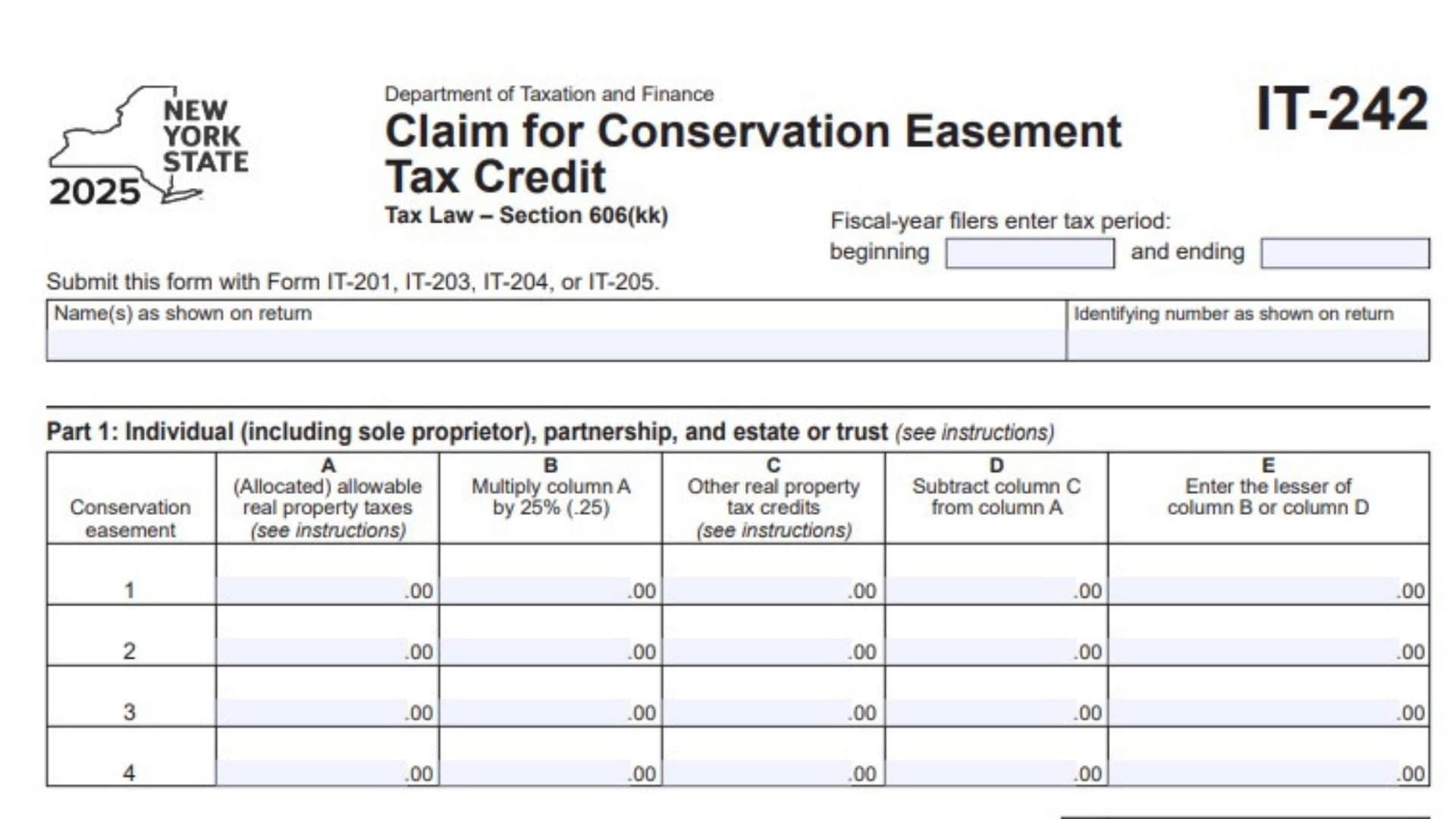
New York Form IT-242, officially titled Claim for Conservation Easement Tax Credit, is a tax form issued by the New York State Department of Taxation and Finance. It is used to calculate and claim the conservation easement tax credit under New York Tax Law Section 606(kk). The form is designed for individuals, including sole proprietors, partnerships, estates, and trusts that qualify to claim the credit or receive an allocated share of it. It collects information about conservation easements, allowable real property taxes, other real property tax credits, and the amount of credit available to the taxpayer. It also provides sections for reporting credits received through partnerships, estates, or trusts, as well as information about beneficiaries and fiduciaries. The form calculates the credit before applying the applicable limitation and identifies the conservation properties through their addresses, conservation agency names, recording information, conveyance dates, and Department of Environmental Conservation identification numbers. Completing Form IT-242 accurately is important because the allowable credit depends on the applicable real property tax amounts, other credits, and the taxpayer’s relationship to the conservation easement. The completed form must accompany the applicable New York income tax return, which may be Form IT-201, IT-203, IT-204, or IT-205, depending on the taxpayer’s filing circumstances.
Who Needs To File Form IT-242?
Form IT-242 is intended for taxpayers claiming a New York conservation easement tax credit or reporting their allocated share of the credit through another entity.
The form identifies the following taxpayer categories:
- Individuals.
- Sole proprietors.
- Partnerships.
- Estates.
- Trusts.
- Partners receiving a share of the credit from partnerships.
- Beneficiaries receiving a share of the credit from estates or trusts.
- Fiduciaries reporting and allocating conservation easement tax credits.
The applicable sections depend on how the taxpayer receives or claims the credit.
For example, an individual claiming a credit directly may complete Part 1 and Part 5, while a partner receiving an allocated credit may also need Parts 2 and 3. Fiduciaries have additional reporting responsibilities in Part 4.
How To File Form IT-242
Form IT-242 is submitted with the applicable New York income tax return. It is not intended to be filed as a standalone tax return.
Where To Submit Form IT-242
Attach the completed Form IT-242 to the applicable tax return:
- Form IT-201: New York State Resident Income Tax Return.
- Form IT-203: New York State Nonresident and Part-Year Resident Income Tax Return.
- Form IT-204: New York Partnership Return.
- Form IT-205: New York Fiduciary Income Tax Return.
Select the applicable return based on your taxpayer classification and filing circumstances.
Information To Prepare Before Completing The Form
Gather the following information before starting:
- Your name exactly as it appears on your tax return.
- Your identifying number, as reported on the return.
- The beginning and ending dates of your tax year if you are a fiscal-year filer.
- Information about each conservation easement.
- Allocated allowable real property tax amounts.
- Information about other real property tax credits.
- Details of any conservation easement credit received through a partnership, estate, or trust.
- Partnership, estate, or trust names and employer identification numbers.
- Beneficiary identification information, if completing the fiduciary section.
- The applicable Mississippi? No — New York conservation easement credit information, including relevant DEC identification numbers.
- Any applicable tax credit amounts and allocation records.
Keep the relevant property, tax, and entity records available to verify the amounts entered.

How To Complete Form IT-242
The 2025 New York Form IT-242 contains six parts:
- Part 1: Individual, Partnership, Estate, Or Trust.
- Part 2: Partnership, Estate, And Trust Information.
- Part 3: Partner’s Or Beneficiary’s Share Of Credit.
- Part 4: Beneficiary’s And Fiduciary’s Share Of Credit.
- Part 5: Calculation Of Credit.
- Part 6: Conservation Easement Identifying Information.
Each section serves a different purpose in determining and reporting the conservation easement tax credit.
Taxpayer Information And Tax Period
Before completing Part 1, enter the identifying information at the top of the form.
Name(s) As Shown On Return
Enter the taxpayer’s name exactly as it appears on the applicable New York income tax return.
For a joint return or an entity filing, use the name or names shown on the corresponding return.
Identifying Number As Shown On Return
Enter the identifying number associated with the taxpayer or entity.
Use the same identification number reported on the applicable income tax return.
Check the number carefully to ensure that the credit is associated with the correct taxpayer.
Tax Year
The form is designated for the 2025 tax year.
Fiscal-Year Tax Period Beginning
If you file using a fiscal year rather than a calendar year, enter the beginning date of your fiscal tax period.
Fiscal-Year Tax Period Ending
Enter the ending date of the same fiscal tax period.
Make sure both dates accurately reflect the reporting period covered by the return.
Part 1: Individual, Partnership, And Estate Or Trust
Part 1 calculates the allowable conservation easement tax credit based on allocated allowable real property taxes and other real property tax credits.
This section contains a table with four conservation easement entries and five calculation columns, identified as Columns A through E.
Each row represents a separate conservation easement calculation.
Conservation Easement Calculation
Conservation Easement Entries 1 Through 4
The form provides four numbered rows for reporting conservation easement calculations.
Use a separate row for each applicable conservation easement.
For each row, complete Columns A through E using the corresponding property tax and credit information.
Column A: Allocated Allowable Real Property Taxes
Enter the allocated allowable real property taxes associated with the conservation easement.
Use the amount determined under the applicable Form IT-242 instructions.
The form specifically refers taxpayers to the instructions for determining the allowable amount.
Keep the amount for each conservation easement separate when completing the individual rows.
Column B: 25% Of Allowable Real Property Taxes
Multiply the amount entered in Column A by 25%, or 0.25.
Use the following calculation:
Column B = Column A × 0.25.
Enter the resulting amount in Column B.
Repeat the calculation for each conservation easement reported.
Column C: Other Real Property Tax Credits
Enter the amount of other real property tax credits applicable to the corresponding conservation easement.
The form directs taxpayers to consult the instructions for this category.
Use the applicable credit information when determining the amount to enter.
Column D: Remaining Amount After Other Credits
Subtract the amount in Column C from the amount in Column A.
The calculation is:
Column D = Column A − Column C.
Enter the resulting amount in Column D.
This calculation determines the amount remaining after accounting for other real property tax credits.
Column E: Allowable Credit Amount
Compare the amounts entered in Column B and Column D.
Enter the smaller of the two amounts.
The calculation is:
Column E = Lesser of Column B or Column D.
This amount represents the allowable credit calculation for the corresponding conservation easement.
Repeat the same process for each applicable row.
Part 1: Total Credit Calculations
After completing the four conservation easement rows, calculate the totals using the following lines.
Line 1: Total Column E Amounts From Additional Forms IT-242
If you used additional Forms IT-242, enter the combined Column E amounts from those additional forms.
This line is used to bring the applicable amounts from additional schedules into the current form.
If no additional forms were used, there are no additional-form amounts to transfer.
Line 2: Total Of All Column E Amounts
Add all the amounts reported in Column E for the current form and include the amount entered on Line 1.
The calculation is:
Line 2 = Current Form Column E Total + Line 1.
Enter the resulting total on Line 2.
This amount is used in the subsequent credit calculation.
Important transfer instruction:
The form provides different instructions depending on the taxpayer’s classification:
- Fiduciaries: Include the Line 2 amount on the Total line of Part 4, Column C.
- All others: Enter the Line 2 amount on Line 6 in Part 5.
Make sure you follow the correct transfer instruction for your filing situation.
Part 2: Partnership, Estate, And Trust Information
Part 2 is used when you received a share of the conservation easement tax credit from a partnership, estate, or trust.
If you received the credit through one or more of these entities, provide the requested information for each applicable entity.
The section contains three columns.
Name Of Entity
Enter the legal name of the partnership, estate, or trust from which you received your share of the conservation easement tax credit.
Use the entity’s correct name as shown in its tax records.
If you received credits from multiple entities, enter each entity separately.
Type
Identify the classification of the entity using the codes specified on the form.
Enter:
- P: For a partnership.
- ET: For an estate or trust.
Use the appropriate code for each entity.
Employer Identification Number
Enter the Employer Identification Number (EIN) associated with the partnership, estate, or trust.
Verify that the EIN matches the entity identified in the corresponding row.
Additional Entity Entries
If you received conservation easement tax credits from more than one partnership, estate, or trust, use a separate row for each entity.
Make sure the name, entity type, and EIN are correctly matched.
Part 3 reports the conservation easement tax credit received through partnerships, estates, or trusts.
The section distinguishes between partners and beneficiaries because the source of the allocated credit determines which line should be completed.
Line 3: Partner’s Share Of Credit From Partnerships
If you are a partner who received a share of the conservation easement tax credit from one or more partnerships, enter your allocated share on Line 3.
Use the credit amount assigned to you by the partnership or partnerships.
Do not enter the entire credit claimed by the partnership if only a portion has been allocated to you.
Line 4: Beneficiary’s Share Of Credit From An Estate Or Trust
If you are a beneficiary who received a share of the conservation easement tax credit from an estate or trust, enter the allocated amount on Line 4.
Use the amount reported as your share of the credit by the estate or trust.
Keep this amount separate from any partnership credit reported on Line 3.
Line 5: Total Partner’s And Beneficiary’s Credit
Add the amounts entered on Lines 3 and 4.
The calculation is:
Line 5 = Line 3 + Line 4.
Enter the total on Line 5.
This amount represents the combined conservation easement tax credit received through partnerships, estates, and trusts.
Important transfer instruction:
The form provides different instructions depending on your filing capacity:
- Fiduciaries who are also partners or beneficiaries of another entity: Include the Line 5 amount on the Total line of Part 4, Column C.
- All others: Enter the Line 5 amount on Line 7 in Part 5.
Follow the applicable instruction when transferring the amount.
Part 4 is used to report the allocation of conservation easement tax credits between beneficiaries and fiduciaries.
This section is particularly relevant to fiduciaries completing Form IT-205.
The table contains three columns:
- Column A: Beneficiary’s name.
- Column B: Identifying number.
- Column C: Share of credit.
Beneficiary And Fiduciary Information
Column A: Beneficiary’s Name
Enter the name of each beneficiary receiving a share of the conservation easement tax credit.
The name must match the beneficiary’s name as reported on Form IT-205, Schedule C.
Use the same name shown on the corresponding fiduciary tax return schedule.
Column B: Identifying Number
Enter the identifying number associated with the beneficiary listed in Column A.
Make sure the identifying number corresponds to the correct beneficiary.
Column C: Share Of Credit
Enter the amount of conservation easement tax credit allocated to each beneficiary.
Use the actual amount assigned to that beneficiary.
Report each beneficiary’s share separately.
Total: Fiduciary’s Total Credit Available
The Total row is used to report the combined amount available for the fiduciary’s allocation.
The form instructs fiduciaries to enter the amount from Line 2 plus the amount from Line 5.
The calculation is:
Total Credit Available = Part 1, Line 2 + Part 3, Line 5.
Enter the resulting amount in Column C of the Total row.
This combines the directly calculated credit with any applicable credit received through a partnership, estate, or trust.
Fiduciary: Fiduciary’s Share Of Credit
The form provides a separate row labeled Fiduciary.
Enter the fiduciary’s own share of the conservation easement tax credit in Column C, where applicable.
This amount is used in Part 5, Line 8.
Ensure that the beneficiary and fiduciary allocations are consistent with the credit information being reported.
Part 5: Calculation Of Credit
Part 5 calculates the final conservation easement tax credit after combining the applicable amounts from the previous sections and applying the limitation shown on the form.
The applicable line depends on whether the taxpayer is an individual, partnership, partner, beneficiary, or fiduciary.
Line 6: Individual, Sole Proprietor, And Partnership Credit
Individuals, including sole proprietors, and partnerships must enter the amount from Part 1, Line 2.
Transfer the amount directly from Line 2 without recalculating it.
Line 7: Partner And Beneficiary Credit
Partners and beneficiaries must enter the amount reported on Part 3, Line 5.
This represents their total allocated credit received from partnerships, estates, or trusts.
Line 8: Fiduciary Credit
Fiduciaries must enter the amount reported on Part 4, Fiduciary row, Column C.
Use the amount allocated to the fiduciary in that section.
Line 9: Credit Before Limitation
Calculate the credit before applying the limitation.
The form provides separate instructions for fiduciaries and other taxpayers.
- Fiduciaries: Enter the amount from Line 8.
- All others: Add Lines 6, 7, and 8.
For taxpayers other than fiduciaries, the calculation is:
Line 9 = Line 6 + Line 7 + Line 8.
For fiduciaries, Line 9 equals Line 8.
Enter the resulting amount on Line 9.
Line 10: Conservation Easement Tax Credit
Calculate the allowable conservation easement tax credit using the limitation specified on the form.
For taxpayers other than partnerships, enter the lesser of:
- The amount on Line 9.
- $5,000.
The calculation is:
Line 10 = Lesser of Line 9 or $5,000.
Special instruction for partnerships: Partnerships must enter the amount from Line 9 rather than applying the $5,000 comparison shown for other taxpayers.
The amount entered on Line 10 represents the conservation easement tax credit.
Part 6: Conservation Easement Identifying Information
Part 6 collects identifying details about the conservation easements associated with the credit claim.
The form provides four numbered sections, allowing information to be entered for up to four conservation easements on the form.
Complete the applicable information for each conservation easement.
Each numbered section contains five identifying fields.
Conservation Easement Number
The form provides numbered entries from 1 through 4.
Use the corresponding numbered section to identify each conservation easement being reported.
Make sure the information in each section relates to the correct conservation easement.
Address
Enter the address of the property associated with the conservation easement.
Provide the applicable property address so that the easement can be identified.
Name Of Conservation Agency
Enter the name of the conservation agency associated with the conservation easement.
Use the agency’s correct name as reflected in the applicable conservation easement records.
Recording Information
Enter the recording information associated with the conservation easement.
Use the relevant information from the recorded conservation easement documents to identify the recorded property agreement.
Make sure the information corresponds to the property and easement being reported.
Date Of Conveyance
Enter the date the conservation easement was conveyed.
The form specifically requires the date in month-day-year format:
MMDDYYYY
For example, if the conveyance occurred on April 15, 2025, enter:
04152025
Use the actual conveyance date reflected in the relevant records.
DEC Identification Number
Enter the Department of Environmental Conservation identification number associated with the conservation easement.
The form displays the prefix CE next to this field.
Use the applicable assigned identification number and ensure that it matches the conservation easement records.
Additional Conservation Easements
Repeat the same process for each additional conservation easement.
The form provides four numbered entries. If additional forms are needed, review the applicable instructions for completing additional Form IT-242 schedules.
Important Notes About Form IT-242
Understand The Difference Between Direct And Allocated Credits
Form IT-242 accommodates both taxpayers calculating a credit directly and taxpayers receiving an allocated share from another entity.
Part 1 calculates the credit using allowable real property taxes and other real property tax credits.
Parts 2 and 3 identify and report credits received through partnerships, estates, or trusts.
Use the applicable sections based on how the credit is received.
Follow The Correct Transfer Instructions
Several sections require amounts to be transferred to another part of the form.
Pay particular attention to:
- Part 1, Line 2, which transfers to Part 5, Line 6 for nonfiduciaries or Part 4, Column C for fiduciaries.
- Part 3, Line 5, which transfers to Part 5, Line 7 for nonfiduciaries or Part 4, Column C for fiduciaries.
- Part 4, Fiduciary row, Column C, which transfers to Part 5, Line 8.
Entering an amount in the wrong destination can affect the final credit calculation.
Understand The $5,000 Credit Limitation
Line 10 requires most taxpayers to enter the lesser of the credit before limitation or $5,000.
However, the form provides a specific exception for partnerships, which must enter the full Line 9 amount.
Make sure you follow the correct calculation for your taxpayer classification.
Keep Conservation Easement Records
Part 6 requires identifying information for each conservation easement.
Keep the relevant property address, conservation agency details, recording information, conveyance date, and DEC identification number available when preparing the form.
The information should match the applicable conservation easement records.
Final Review Before Filing
Before submitting Form IT-242 with your New York income tax return, review the following checklist.
Taxpayer Information
- Name matches the applicable income tax return.
- Identifying number is correct.
- Fiscal-year beginning date is entered, if applicable.
- Fiscal-year ending date is entered, if applicable.
- The applicable tax year is correctly identified.
Part 1: Conservation Easement Credit Calculation
- Each applicable conservation easement is reported separately.
- Column A contains the correct allocated allowable real property taxes.
- Column B correctly multiplies Column A by 25%.
- Column C includes applicable other real property tax credits.
- Column D correctly subtracts Column C from Column A.
- Column E contains the lesser of Column B or Column D.
- Line 1 includes Column E amounts from additional Forms IT-242, if applicable.
- Line 2 correctly totals all Column E amounts, including Line 1.
- The Line 2 amount has been transferred to the correct section.
Part 2: Partnership, Estate, And Trust Information
- Each applicable partnership is identified.
- Each applicable estate or trust is identified.
- Entity names are correct.
- The correct P or ET classification is entered.
- Employer identification numbers are accurate.
- Line 3 contains the partner’s share of partnership credits.
- Line 4 contains the beneficiary’s share of estate or trust credits.
- Line 5 correctly adds Lines 3 and 4.
- The Line 5 amount has been transferred according to the fiduciary or nonfiduciary instructions.
Part 4: Beneficiary And Fiduciary Allocation
- Beneficiary names match Form IT-205, Schedule C.
- Beneficiary identifying numbers are correct.
- Column C contains the correct beneficiary credit amounts.
- The Total row includes the amount from Part 1, Line 2, plus Part 3, Line 5.
- The fiduciary’s share is entered on the Fiduciary row, Column C, where applicable.
Part 5: Final Credit Calculation
- Line 6 matches Part 1, Line 2.
- Line 7 matches Part 3, Line 5.
- Line 8 matches Part 4, Fiduciary row, Column C.
- Line 9 follows the correct calculation for the taxpayer classification.
- Line 10 applies the $5,000 limitation where applicable.
- Partnerships have entered the Line 9 amount as specifically instructed.
Part 6: Conservation Easement Identification
- Each applicable conservation easement is identified.
- Property addresses are accurate.
- Conservation agency names are correct.
- Recording information is complete.
- Conveyance dates use the MMDDYYYY format.
- DEC identification numbers are entered correctly.
- The information corresponds to the correct conservation easement.
Final Filing Checks
- All applicable sections have been completed.
- All calculations have been reviewed.
- Credit amounts transferred between sections are consistent.
- The correct taxpayer return has been identified.
- Form IT-242 is attached to Form IT-201, IT-203, IT-204, or IT-205, as applicable.
- A copy of the completed form and supporting records is retained.
Final Reminder: New York Form IT-242 is used to calculate and claim the conservation easement tax credit under Tax Law Section 606(kk). Complete the applicable sections according to your taxpayer classification, verify the real property tax and credit calculations, and ensure that all conservation easement identification details are accurate before submitting the form with your applicable New York income tax return.
Note: The form refers to separate instructions for determining allocated allowable real property taxes, other real property tax credits, and certain credit calculations. Those detailed eligibility and allocation rules are not reproduced on the two-page form itself and should be checked in the applicable official IT-242 instructions before filing.