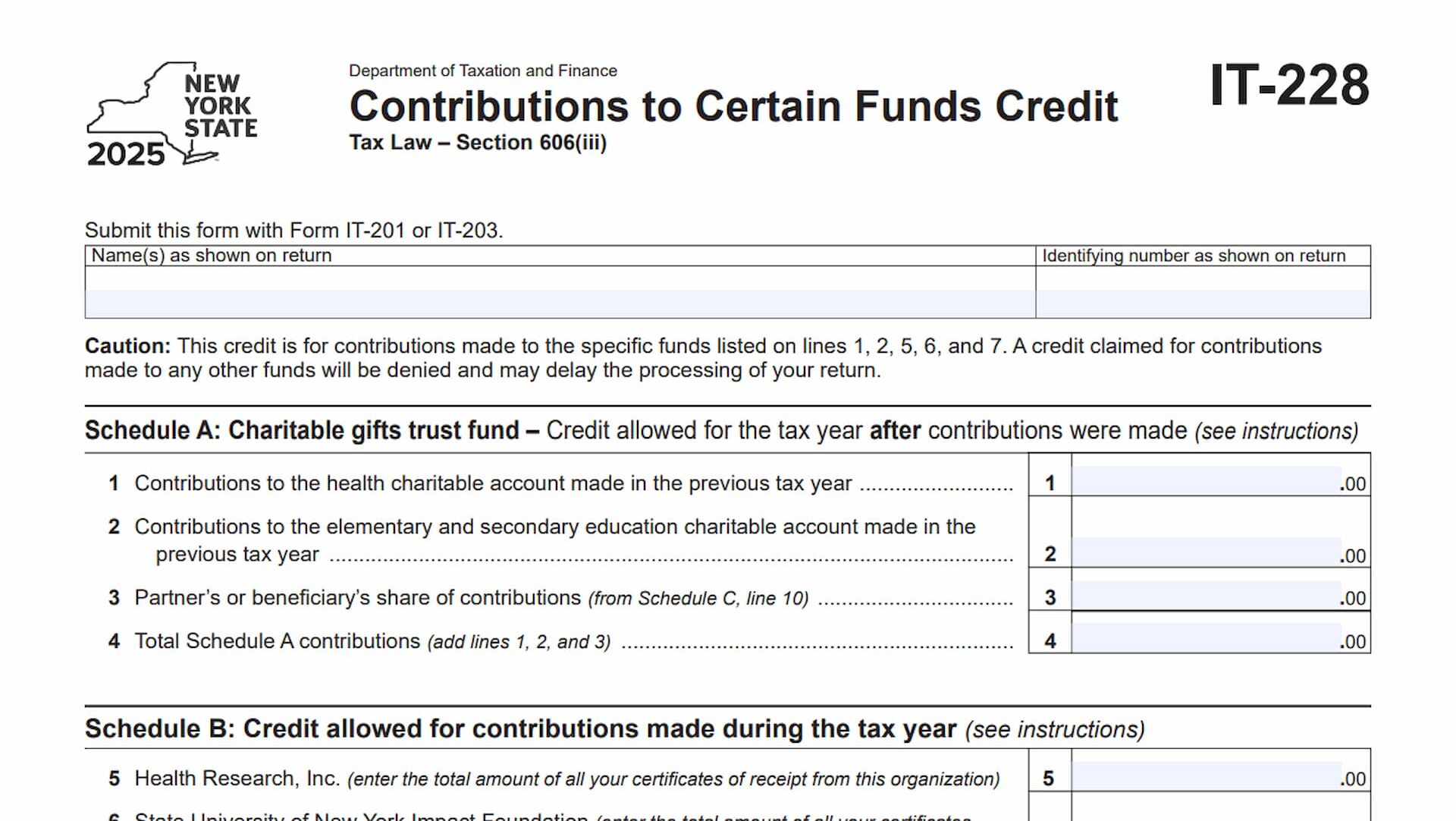
Form IT-228, Contributions to Certain Funds Credit, is a New York State tax form used to calculate and claim a tax credit for eligible contributions made to specific charitable and research funds. The credit is authorized under Section 606(iii) of the New York State Tax Law and allows qualifying taxpayers to receive a credit equal to 85% of their eligible contributions, subject to the applicable tax limitations.
The form is designed for individuals who made qualifying contributions to designated funds during the previous or current tax year. It also accommodates taxpayers who received a share of eligible contributions through a partnership, estate, or trust. The contributions covered by this credit must be made to the organizations and accounts specifically identified on the form. These include the health charitable account, the elementary and secondary education charitable account, Health Research, Inc., the State University of New York Impact Foundation, and the Research Foundation of the City University of New York.
Form IT-228 collects information about the taxpayer, the amounts contributed to eligible funds, any qualifying contributions passed through from partnerships or fiduciary entities, and the tax receipt numbers associated with contributions made during the current tax year. It also calculates the total eligible contributions, applies the 85% credit rate, and determines how much of the resulting credit can be used against the taxpayer’s current-year tax liability.
Completing the form accurately is important because contributions to organizations that are not specifically listed do not qualify for this credit. The form also requires supporting tax receipt numbers for contributions reported in Schedule B. Missing or incorrect information may result in the credit being denied or delayed processing of the tax return.
How To File Form IT-228
Form IT-228 must be submitted with the taxpayer’s New York State income tax return. Individuals filing Form IT-201 should attach Form IT-228 to their resident income tax return. Nonresidents and part-year residents filing Form IT-203 should attach it to their corresponding New York State income tax return.
The credit calculated on Form IT-228 must also be transferred to the appropriate attachment for the main tax return. Taxpayers filing Form IT-201 must report the credit on Form IT-201-ATT, line 2, using code 228. Those filing Form IT-203 must report it on Form IT-203-ATT, line 3, using the same code.
Before completing the form, gather the following information:
- Your New York State income tax return and identifying information.
- Records of contributions made to the eligible charitable accounts during the previous tax year.
- Certificates of receipt for qualifying contributions made during the current tax year.
- Tax receipt numbers issued by the eligible organizations.
- Schedule K-1 or other relevant information showing your share of contributions from a partnership, estate, or trust, if applicable.
- Your tax liability before credits and the amounts of other credits applied against that liability.
Only contributions made to the specific funds listed on Form IT-228 qualify. Contributions to other organizations or funds should not be included when calculating this credit.

How To Complete Form IT-228
Form IT-228 contains five schedules. Schedule A reports qualifying contributions made during the previous tax year, while Schedule B covers eligible contributions made during the current tax year. Schedule C accounts for contributions received through partnerships, estates, and trusts. Schedule D calculates the allowable credit, and Schedule E records the tax receipt numbers supporting current-year contributions.
Taxpayer Information
At the top of the form, enter the taxpayer information exactly as it appears on the New York State income tax return.
Name(s) as Shown on Return
Enter the taxpayer’s name or names exactly as they appear on Form IT-201 or Form IT-203. If the return includes more than one taxpayer, use the names shown on that return.
Identifying Number as Shown on Return
Enter the identifying number associated with the tax return. Use the same number shown on Form IT-201 or Form IT-203.
Schedule A: Charitable Gifts Trust Fund
Schedule A reports eligible contributions made to the designated charitable accounts during the previous tax year. The credit associated with these contributions is allowed for the tax year after the contributions were made.
Complete this schedule using the amounts contributed to the qualifying accounts during the preceding tax year. If you received a qualifying share of contributions from a partnership, estate, or trust, include the applicable amount from Schedule C.
Line 1: Contributions to the Health Charitable Account
Enter the total amount contributed to the health charitable account during the previous tax year. Only contributions made to this specifically designated account should be included.
Line 2: Contributions to the Elementary and Secondary Education Charitable Account
Enter the total contributions made to the elementary and secondary education charitable account during the previous tax year. Do not include contributions made to other education-related organizations or accounts.
Line 3: Partner’s or Beneficiary’s Share of Contributions
Enter the amount from Schedule C, line 10. This represents your share of qualifying charitable gifts trust fund contributions made during the previous tax year through a partnership, estate, or trust.
If you did not receive any qualifying contributions through one of these entities, this amount will generally be zero.
Line 4: Total Schedule A Contributions
Add the amounts reported on lines 1, 2, and 3. Enter the combined total on line 4.
The amount on this line represents your total eligible contributions for Schedule A and will be used in the overall credit calculation on Schedule D.
Schedule B: Credit Allowed for Contributions Made During the Tax Year
Schedule B covers eligible contributions made during the current tax year. Unlike Schedule A, which reports contributions from the previous year, this schedule focuses on contributions made to three specifically named research organizations during the tax year covered by the return.
Use your certificates of receipt to determine the amounts reported on lines 5, 6, and 7. If you received a qualifying share of contributions through a partnership, estate, or trust, report that amount on line 8.
Line 5: Health Research, Inc.
Enter the total amount of your eligible contributions to Health Research, Inc. during the current tax year.
Add together the amounts shown on all certificates of receipt issued by this organization and report the combined total on this line.
Line 6: State University of New York Impact Foundation
Enter the total amount contributed to the State University of New York Impact Foundation during the current tax year.
Combine the amounts shown on all certificates of receipt issued by the foundation. Report the total rather than entering each individual contribution separately.
Line 7: Research Foundation of the City University of New York
Enter the total amount of eligible contributions made to the Research Foundation of the City University of New York during the current tax year.
Add the amounts from all certificates of receipt issued by this organization and enter the combined figure.
Line 8: Partner’s or Beneficiary’s Share of Contributions
Enter the amount from Schedule C, line 11. This represents your share of qualifying current-year contributions received through a partnership, estate, or trust.
Use the amount calculated in Schedule C rather than independently estimating your share.
Line 9: Total Schedule B Contributions
Add the amounts reported on lines 5, 6, 7, and 8. Enter the combined amount on line 9.
This figure represents your total eligible current-year contributions and will be combined with the Schedule A amount when calculating the credit in Schedule D.
Schedule C is for taxpayers who received a share of qualifying contributions through a partnership, estate, or trust. If you were a partner in a partnership or a beneficiary of an estate or trust that received eligible contributions, use this schedule to report your share.
Complete a separate entry for each partnership, estate, or trust from which you received a share of the credit. If you have more entities to report than the available rows allow, use additional forms as necessary.
The schedule contains five columns.
Column A: Name of Entity
Enter the full name of the partnership, estate, or trust through which you received your share of eligible contributions.
Provide a separate entry for each entity.
Column B: Type
Identify the type of entity using the appropriate abbreviation:
- Enter P for a partnership.
- Enter ET for an estate or trust.
Use the applicable designation for each entity listed in Column A.
Column C: EIN
Enter the Employer Identification Number (EIN) of the partnership, estate, or trust.
Use the EIN associated with the entity rather than your personal identifying number.
Column D: Share of Charitable Gifts Trust Fund Contributions Made in the Previous Tax Year
Enter your share of qualifying charitable gifts trust fund contributions made by the entity during the previous tax year.
This column relates to the contributions reported in Schedule A. The total of all amounts in Column D must be transferred to line 10.
Column E: Share of Qualified Current-Year Contributions
Enter your share of eligible contributions made by the entity during the current tax year.
This column relates to the contributions reported in Schedule B. The total of all amounts in Column E must be transferred to line 11.
Additional Forms: Totals of Columns D and E
If you use additional Schedule C forms because you have more entities to report, combine the amounts from Column D and Column E of those additional forms.
Enter the corresponding totals in the designated additional-forms row. This ensures that contributions reported on supplementary schedules are included in the final calculations.
Line 10: Total Column D Amounts
Add all amounts reported in Column D, including applicable amounts from additional forms.
Enter the combined total on line 10. Transfer this amount to Schedule A, line 3.
Line 11: Total Column E Amounts
Add all amounts reported in Column E, including applicable amounts from additional forms.
Enter the combined total on line 11. Transfer this amount to Schedule B, line 8.
Schedule D: Calculation of Credit
Schedule D determines the total credit generated by eligible contributions and calculates how much of that credit can be used against the taxpayer’s current-year tax liability.
The calculation begins by combining the contributions reported in Schedules A and B. The form then applies an 85% credit rate and accounts for the taxpayer’s tax liability and other credits already claimed.
Line 12: Total Contributions
Add the amounts reported on line 4 of Schedule A and line 9 of Schedule B.
Enter the combined amount on line 12. This represents the total eligible contributions included in the credit calculation.
Line 13: Credit Rate
The credit rate is fixed at 85%, or 0.85.
Enter 0.85 on line 13. This percentage is used to calculate the total credit available from the eligible contributions.
Line 14: Total Credit
Multiply the amount on line 12 by the credit rate on line 13.
Enter the result on line 14. This figure represents the total credit generated by your qualifying contributions before applying the current-year tax limitation.
Line 15: Tax Due Before Credits
Enter the amount of New York State tax due before applying credits.
Use the applicable tax calculation from your Form IT-201 or Form IT-203 and follow the instructions for determining this amount.
Line 16: Credits Applied Against the Tax Before This Credit
Enter the total amount of other credits already applied against your tax liability before the Contributions to Certain Funds Credit.
Use the relevant credit information from your income tax return and follow the applicable form instructions.
Line 17: Net Tax
Subtract the amount on line 16 from the amount on line 15.
If line 16 is greater than line 15, enter zero rather than a negative amount.
The result represents the remaining tax liability available against which this credit can be applied.
Line 18: Credit Used for the Current Tax Year
Compare the amounts on lines 14 and 17. Enter whichever amount is smaller.
This is the portion of the Contributions to Certain Funds Credit that can be used for the current tax year. The allowable amount cannot exceed either the total credit calculated on line 14 or the remaining tax liability shown on line 17.
After completing line 18, transfer the amount to the appropriate attachment for your New York State income tax return:
- Form IT-201 filers: Enter the amount on Form IT-201-ATT, line 2, using credit code 228.
- Form IT-203 filers: Enter the amount on Form IT-203-ATT, line 3, using credit code 228.
Schedule E: Tax Receipt Number for Schedule B Contributions
Schedule E records the tax receipt numbers associated with contributions reported in Schedule B.
Taxpayers must provide the applicable receipt numbers issued by the three eligible organizations. These numbers help identify and support the contributions used to claim the credit.
The schedule provides three receipt entries for each organization. Use a separate entry for each applicable certificate of receipt.
Health Research, Inc.
Line 19a: Tax Receipt Number
Enter the tax receipt number shown on the first applicable certificate of receipt issued by Health Research, Inc.
Line 19b: Tax Receipt Number
Enter the tax receipt number from the second certificate of receipt issued by Health Research, Inc., if applicable.
Line 19c: Tax Receipt Number
Enter the tax receipt number from the third certificate of receipt issued by Health Research, Inc., if applicable.
State University of New York Impact Foundation
Line 20a: Tax Receipt Number
Enter the tax receipt number from the first applicable certificate of receipt issued by the State University of New York Impact Foundation.
Line 20b: Tax Receipt Number
Enter the tax receipt number from the second certificate of receipt issued by the foundation, if applicable.
Line 20c: Tax Receipt Number
Enter the tax receipt number from the third certificate of receipt issued by the foundation, if applicable.
Research Foundation of the City University of New York
Line 21a: Tax Receipt Number
Enter the tax receipt number from the first applicable certificate of receipt issued by the Research Foundation of the City University of New York.
Line 21b: Tax Receipt Number
Enter the tax receipt number from the second certificate of receipt issued by this organization, if applicable.
Line 21c: Tax Receipt Number
Enter the tax receipt number from the third certificate of receipt issued by this organization, if applicable.
Additional Certificates of Receipt
If you have more than three certificates of receipt from any of the three organizations, attach additional forms containing the extra receipt information.
Mark an X in the designated checkbox at the bottom of Schedule E to indicate that additional forms have been attached.
Make sure all additional receipt information corresponds to the contribution amounts reported in Schedule B. Missing tax receipt numbers may delay processing or result in the credit being disallowed.
Final Review Before Filing
Before submitting Form IT-228 with your New York State income tax return, review the following items to ensure that all required information and calculations are complete.
- Taxpayer information: Confirm that your name and identifying number match the information on Form IT-201 or Form IT-203.
- Eligible contributions: Verify that all reported contributions were made to the specific funds and organizations identified on the form.
- Schedule A: Confirm that lines 1 and 2 include qualifying contributions made during the previous tax year.
- Schedule A total: Check that line 4 correctly adds lines 1, 2, and 3.
- Schedule B: Verify that contributions to Health Research, Inc., the State University of New York Impact Foundation, and the Research Foundation of the City University of New York are reported accurately.
- Contribution certificates: Make sure the amounts on lines 5, 6, and 7 agree with the applicable certificates of receipt.
- Schedule B total: Confirm that line 9 correctly adds lines 5 through 8.
- Schedule C: If applicable, verify the name, entity type, and EIN for each partnership, estate, or trust.
- Schedule C calculations: Check that Column D and Column E totals are correctly transferred to lines 10 and 11.
- Schedule D: Confirm that line 12 combines lines 4 and 9 and that the 85% rate is entered correctly on line 13.
- Credit calculation: Verify that line 14 equals line 12 multiplied by 0.85.
- Tax limitation: Check that lines 15 and 16 reflect the applicable tax amounts and that line 17 correctly calculates the remaining tax liability.
- Current-year credit: Make sure line 18 contains the smaller amount from lines 14 and 17.
- Schedule E: Enter the applicable tax receipt numbers for contributions reported in Schedule B.
- Additional certificates: If you have more than three certificates from any eligible organization, attach the additional forms and mark the checkbox in Schedule E.
- Credit transfer: Transfer the line 18 amount using code 228 to Form IT-201-ATT, line 2, or Form IT-203-ATT, line 3, as applicable.
- Return attachment: Submit Form IT-228 together with your completed Form IT-201 or Form IT-203.
Review all contribution amounts, receipt numbers, and calculations before filing. Accurate reporting helps ensure that your eligible contributions are properly considered when determining your New York State tax credit.