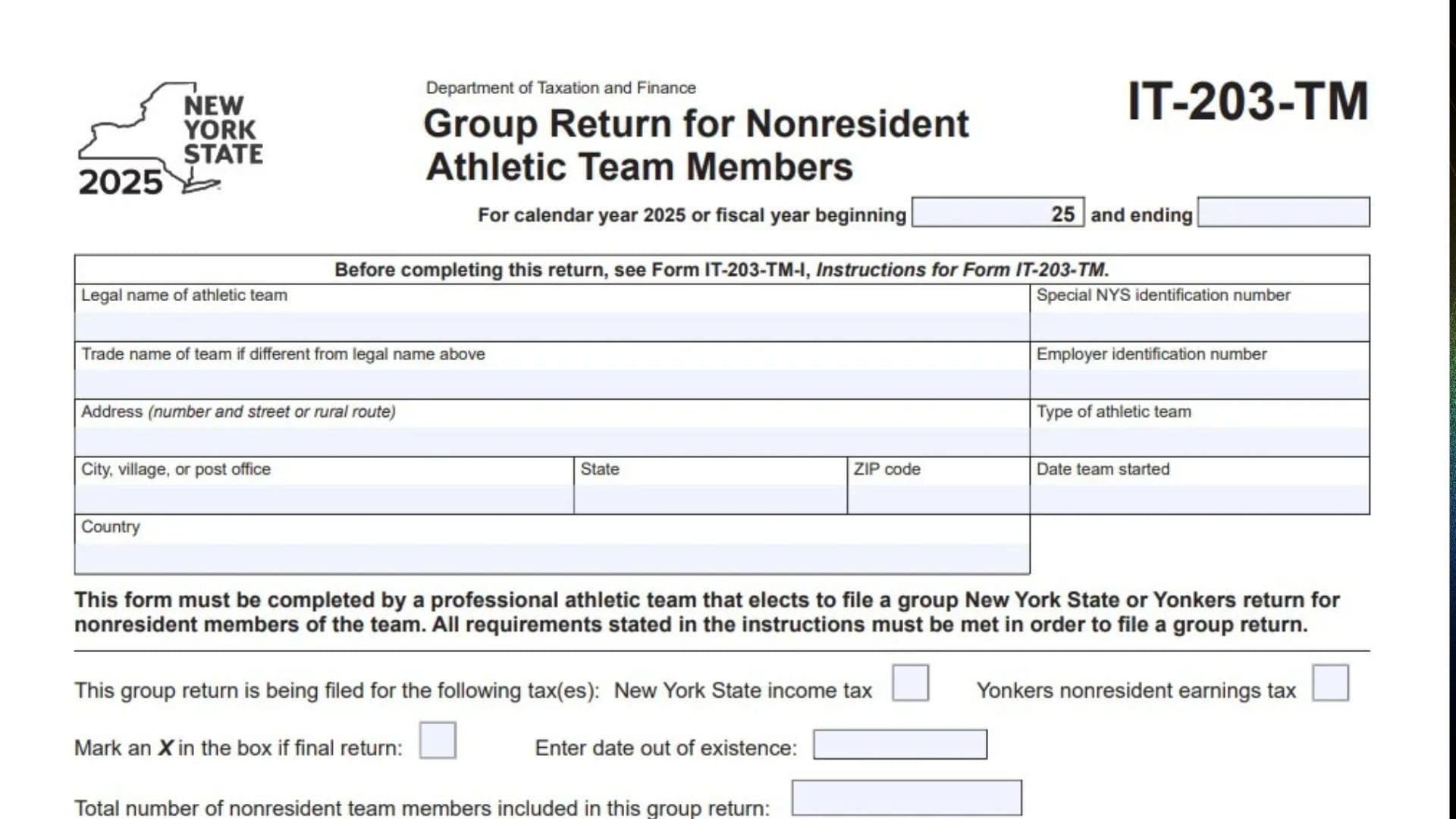
New York Form IT-203-TM, officially known as the Group Return for Nonresident Athletic Team Members, is a tax return issued by the New York State Department of Taxation and Finance. It is designed for professional athletic teams that elect to file a group New York State income tax return, a Yonkers nonresident earnings tax return, or both on behalf of their nonresident team members. Instead of requiring each eligible nonresident team member to file an individual return for the applicable income covered by the group filing, the professional athletic team can report the relevant income, calculate the taxes, and account for payments through one group return. The form collects the athletic team’s legal name, trade name, employer identification number, special New York State identification number, business address, type of athletic team, date the team started, tax year information, and the number of nonresident team members included in the filing. It also calculates New York State taxable income, Yonkers taxable wages, New York State income tax, Yonkers nonresident earnings tax, total tax liability, withholding amounts, estimated tax payments, and any remaining balance due or overpayment. The return requires additional supporting information through Forms IT-203-TM-ATT-A and IT-203-TM-ATT-B, which contain Schedules A and B, respectively. These schedules provide the detailed member-level information needed to calculate the amounts transferred to the main return. Schedule A supports the New York State income tax calculation, while Schedule B supports the Yonkers nonresident earnings tax calculation, when applicable. The athletic team must complete the applicable schedules before entering information on Lines 1 through 12 of Form IT-203-TM. The group return may cover the calendar year 2025 or an applicable fiscal year beginning in 2025 and ending in the designated period. The form also includes separate sections for the paid preparer and group agent. The paid preparer provides professional identification and contact information, while the group agent identifies themselves, provides their title and contact information, and signs the return. Completing the form correctly is important because errors in team identification, member counts, taxable income, withholding, estimated payments, or tax calculations can result in incorrect tax reporting or payment discrepancies. The professional athletic team must meet all applicable group filing requirements explained in the official instructions before using this return.
Who Must File Form IT-203-TM?
Form IT-203-TM must be completed by a professional athletic team that elects to file a group New York State or Yonkers return for its nonresident team members.
The team must satisfy all applicable group filing requirements described in the official instructions.
The return can cover one or both of the following taxes:
- New York State income tax: Used to report the applicable New York State taxable income and tax for nonresident team members.
- Yonkers nonresident earnings tax: Used to report applicable Yonkers taxable wages and nonresident earnings tax.
The athletic team should select the tax or taxes applicable to its group filing.
How To File Form IT-203-TM
Form IT-203-TM is the main group return for reporting applicable New York State and Yonkers tax liabilities for nonresident athletic team members.
The supporting schedules must be completed before entering amounts on the main return.
Supporting Forms Required
The form identifies two supporting attachments:
- Form IT-203-TM-ATT-A, Schedule A: Used to calculate and report the New York State income tax information for participating nonresident team members.
- Form IT-203-TM-ATT-B, Schedule B: Used to calculate and report the Yonkers nonresident earnings tax information for participating nonresident team members.
Complete the schedules that apply to the taxes being reported.
Submit the applicable schedules with Form IT-203-TM.
Tax Year Information
The form accommodates:
- Calendar year 2025.
- A fiscal year beginning in 2025 and ending on the applicable date.
Enter the correct tax period in the designated fields at the top of the return.
Information To Prepare Before Completing Form IT-203-TM
Gather the following information before starting:
- Legal name of the professional athletic team.
- Trade name, if different from the legal name.
- Special New York State identification number.
- Federal employer identification number (EIN).
- Complete business address.
- Type of athletic team.
- Date the team started.
- Applicable tax year or fiscal year.
- Total number of nonresident team members included in the group return.
- New York State taxable income information from Schedule A.
- Yonkers taxable wages information from Schedule B, when applicable.
- New York State tax calculations.
- Yonkers nonresident earnings tax calculations.
- New York State income tax withheld.
- New York State estimated tax payments.
- Payments made with Form IT-370.
- Yonkers tax withheld.
- Yonkers estimated tax payments.
- Paid preparer information, if applicable.
- Group agent’s name, title, signature, and contact information.
Make sure the supporting schedules are completed and reviewed before transferring their totals to the main return.

How To Complete Form IT-203-TM
Form IT-203-TM contains the athletic team’s identification section, group filing information, Lines 1 through 12, and separate signature and identification sections for the paid preparer and group agent.
Complete the sections in the order presented on the form.
Athletic Team Identification Information
The top portion of the form collects identifying information about the professional athletic team filing the group return.
Tax Year Or Fiscal Year Beginning
For a calendar-year return, use the applicable calendar-year reporting period.
For a fiscal-year return, enter the beginning date of the fiscal year in the designated field.
The form identifies 2025 as the applicable beginning year for the reporting period.
Tax Year Or Fiscal Year Ending
Enter the ending date of the applicable tax period.
For fiscal-year filers, make sure the ending date corresponds to the team’s actual fiscal year.
Legal Name Of Athletic Team
Enter the complete legal name of the professional athletic team filing the group return.
Use the official legal name associated with the team’s tax and business records.
Special NYS Identification Number
Enter the special New York State identification number assigned to the athletic team for group return filing.
This number identifies the team in its group filing relationship with the New York State Department of Taxation and Finance.
Verify the number before completing the remaining sections.
Trade Name Of Team If Different From Legal Name Above
Enter the team’s trade name if it operates under a name different from its legal name.
If the trade name and legal name are identical, follow the applicable form instructions for this field.
Employer Identification Number (EIN)
Enter the federal employer identification number assigned to the athletic team.
Use the EIN associated with the legal entity filing the group return.
Do not substitute an individual team member’s Social Security number.
Address (Number And Street Or Rural Route)
Enter the complete street address or rural route address of the athletic team.
Use the team’s applicable business mailing address.
Type Of Athletic Team
Identify the type or category of professional athletic team filing the return.
Enter the applicable team classification in the designated field.
City, Village, Or Post Office
Enter the city, village, or post office associated with the team’s address.
State
Enter the state associated with the team’s business address.
Use the appropriate two-letter state abbreviation when applicable.
ZIP Code
Enter the ZIP code associated with the team’s mailing address.
Verify that the ZIP code corresponds to the address provided.
Date Team Started
Enter the date the athletic team began operating.
Use the applicable starting date from the team’s official business records.
Country
Enter the country associated with the team’s business address.
Group Return Information
This section establishes which taxes the group return covers and identifies the number of nonresident team members included.
New York State Income Tax Checkbox
Mark an X in this box if the group return includes New York State income tax reporting.
Select this option when the athletic team is filing the group return for the applicable New York State income tax obligations of its nonresident team members.
Yonkers Nonresident Earnings Tax Checkbox
Mark an X in this box if the group return includes the Yonkers nonresident earnings tax.
Select this option when the applicable Yonkers nonresident earnings tax is being reported through the group return.
Both tax boxes may be selected when the group return covers both tax obligations.
Final Return Checkbox
Mark an X in this box if the group return is the team’s final return.
This indicates that the athletic team is filing its final group return for the applicable reporting situation.
Do not select this box for an ordinary continuing group return.
Date Out Of Existence
Enter the date the athletic team ceased to exist when filing a final return.
Use the applicable date from the team’s official records.
This field is associated with the final return designation.
Total Number Of Nonresident Team Members Included In This Group Return
Enter the total number of nonresident team members included in the group return.
Count all eligible nonresident team members covered by the filing.
Make sure the number agrees with the team-member information reported on the applicable supporting schedules.
Important Instructions Before Completing Lines 1 Through 12
Before entering any amounts on Lines 1 through 12, complete the applicable supporting forms:
- Form IT-203-TM-ATT-A, Schedule A.
- Form IT-203-TM-ATT-B, Schedule B.
The main return specifically requires these schedules to be completed before the line entries are made.
Use the applicable column totals from the supporting schedules when transferring amounts to the corresponding lines.
Submit the applicable supporting schedules with Form IT-203-TM.
Main Return: Lines 1 Through 12
The following lines calculate the group’s taxable income, tax liability, payments, balance due, and overpayment.
Income And Tax Calculations
Line 1: New York State Taxable Income
Enter the total New York State taxable income from Schedule A, Column G.
Use the amount calculated for all participating nonresident team members included in the applicable New York State group return.
Do not independently recalculate the amount on this line if the supporting schedule already provides the required total.
Transfer the total from Schedule A, Column G.
Line 2: Yonkers Taxable Wages
Enter the total Yonkers taxable wages from Schedule B, Column G.
Use the applicable total for participating nonresident team members subject to the Yonkers nonresident earnings tax.
If the group return does not include Yonkers nonresident earnings tax, follow the applicable instructions for this line.
Transfer the amount from Schedule B, Column G.
Line 3: New York State Tax
Enter the total New York State tax calculated on Schedule A, Column H.
Use the combined tax amount for the participating nonresident team members included in the group return.
Transfer the amount directly from Schedule A, Column H.
Line 4: Yonkers Nonresident Earnings Tax
Enter the total Yonkers nonresident earnings tax calculated on Schedule B, Column H.
Use the applicable amount for the team members included in the Yonkers tax filing.
Transfer the amount from Schedule B, Column H.
Line 5: Total Tax
Add the amounts reported on Lines 3 and 4.
The calculation is:
Line 3 + Line 4 = Line 5.
Enter the combined tax amount.
This represents the total New York State and Yonkers tax liability reported through the group return.
Tax Payments And Withholding
Line 6: New York State Tax Withheld
Enter the total New York State income tax withheld for the participating nonresident team members.
Use the total from Schedule A, Column I.
This amount represents the New York State tax withholding credited toward the group’s tax liability.
Line 7: New York State Estimated Income Tax Paid / Amount Paid With Form IT-370
Enter the total New York State estimated income tax payments and applicable amounts paid with Form IT-370.
Use the total from Schedule A, Column J.
Include the applicable payments made for the participating nonresident team members.
Transfer the amount from Schedule A, Column J.
Line 8: Yonkers Tax Withheld
Enter the total Yonkers tax withheld for the participating nonresident team members.
Use the amount from Schedule B, Column I.
This amount represents the Yonkers tax withholding available to reduce the group’s Yonkers tax liability.
Line 9: Yonkers Estimated Income Tax Paid / Amount Paid With Form IT-370
Enter the total Yonkers estimated income tax payments and applicable payments made with Form IT-370.
Use the amount from Schedule B, Column J.
Transfer the total from Schedule B, Column J.
Total Payments And Final Tax Position
Line 10: Total Payments
Add the amounts reported on Lines 6, 7, 8, and 9.
The calculation is:
Line 6 + Line 7 + Line 8 + Line 9 = Line 10.
Enter the combined total.
This represents all New York State and Yonkers withholding and estimated payments reported on the group return.
Line 11: Balance Due
Compare Line 5 with Line 10.
If Line 5 is greater than Line 10, subtract Line 10 from Line 5.
The calculation is:
Line 5 − Line 10 = Line 11.
Enter the resulting balance due.
If Line 10 is equal to or greater than Line 5, there is no balance due under this calculation.
If a payment is required, make the check or money order payable in U.S. funds to:
NY State Income Tax
Do not send cash.
Write the athletic team’s special New York State identification number and the applicable tax year reference, 2025 IT-203-TM, on the payment.
Line 12: Amount Overpaid Applied To 2026 Estimated Tax
Determine whether the total payments on Line 10 exceed the total tax on Line 5.
If Line 10 is greater than Line 5, subtract Line 5 from Line 10.
The calculation is:
Line 10 − Line 5 = Line 12.
Enter the resulting overpayment amount.
The amount reported on this line is applied to the team’s 2026 estimated tax.
If Line 5 is equal to or greater than Line 10, there is no overpayment under this calculation.
Paid Preparer Information
The paid preparer section must be completed by the tax professional who prepared the group return, when applicable.
It collects the preparer’s signature, identification numbers, business information, and contact details.
Preparer’s Signature
The paid preparer must sign the return in the designated field.
The signature confirms the preparer’s involvement in preparing the group return.
Date
Enter the date the paid preparer signed the return.
Firm’s Name (Or Yours, If Self-Employed)
Enter the complete legal name of the tax preparation firm.
If the preparer is self-employed and does not work through a separate firm, enter the preparer’s applicable business name or name as directed by the instructions.
Preparer’s NYTPRIN
Enter the preparer’s New York Tax Preparer Registration Identification Number (NYTPRIN), when required.
Use the identification number assigned by the New York State Department of Taxation and Finance.
Preparer’s PTIN Or SSN
Enter the preparer’s Preparer Tax Identification Number (PTIN) or Social Security number, as applicable under the form instructions.
Use the correct identification number for the preparer.
Employer Identification Number
Enter the employer identification number associated with the tax preparation firm, when applicable.
If the preparer is self-employed, follow the applicable instructions for this field.
NYTPRIN Exclusion Code
Enter the applicable NYTPRIN exclusion code if the preparer is exempt from the New York tax preparer registration requirement.
Use the appropriate code based on the preparer’s circumstances.
Address
Enter the complete mailing address of the paid preparer or tax preparation firm.
Include the street address, city, state, and ZIP code as applicable.
Enter the paid preparer’s email address.
Provide an email address that can be used for relevant communications.
Group Agent Information
The group agent section must be completed and signed by the person designated to act as the group’s agent.
The group agent provides identifying information and confirms the return by signing it.
Print Name Of Group Agent
Enter the full name of the individual designated as the group agent.
Print the name clearly.
Title Of Group Agent
Enter the group agent’s official title or position within the athletic team or organization.
Signature Of Group Agent
The group agent must sign the return in the designated signature field.
The signature confirms the group agent’s responsibility for the group filing.
Date
Enter the date the group agent signs the return.
Daytime Phone Number
Enter the group agent’s daytime telephone number.
Include the applicable area code.
This number allows the Tax Department to contact the group agent when necessary.
NYTPRIN
Enter the applicable New York Tax Preparer Registration Identification Number in the designated field if required.
Follow the applicable group agent identification instructions.
Enter the group agent’s email address.
Use an active email address for relevant communications concerning the group return.
Understanding The Supporting Schedules
Form IT-203-TM depends on the supporting schedules to calculate the taxable income, tax, withholding, and estimated payments reported on the main return.
The main form identifies the following transfer points:
| Main Return Line | Supporting Schedule | Column |
|---|---|---|
| Line 1 – New York State taxable income | Schedule A | Column G |
| Line 2 – Yonkers taxable wages | Schedule B | Column G |
| Line 3 – New York State tax | Schedule A | Column H |
| Line 4 – Yonkers nonresident earnings tax | Schedule B | Column H |
| Line 6 – New York State tax withheld | Schedule A | Column I |
| Line 7 – New York State estimated payments | Schedule A | Column J |
| Line 8 – Yonkers tax withheld | Schedule B | Column I |
| Line 9 – Yonkers estimated payments | Schedule B | Column J |
The supporting schedules must be completed before transferring these amounts to the main return.
The detailed member-level fields and calculations in Schedules A and B are not reproduced on Form IT-203-TM itself. Use the corresponding attachment forms and their official instructions to complete those calculations.
Common Mistakes To Avoid When Completing Form IT-203-TM
Review these common errors before submitting the group return:
- Using an incorrect team name: Enter the athletic team’s complete legal name.
- Entering the wrong special NYS identification number: Verify the identification number assigned to the group.
- Using an incorrect EIN: Check the team’s federal employer identification number.
- Leaving the trade name field incomplete when applicable: Provide the trade name if it differs from the legal name.
- Entering an incorrect team address: Verify the street address, city, state, ZIP code, and country.
- Failing to identify the type of athletic team: Complete the applicable classification field.
- Entering the wrong tax period: Make sure the beginning and ending dates match the reporting period.
- Selecting the wrong tax checkbox: Identify whether the group return covers New York State income tax, Yonkers nonresident earnings tax, or both.
- Incorrectly marking the final return checkbox: Select it only when the return is final.
- Forgetting the date out of existence: Complete this field when filing a final return, as applicable.
- Reporting an incorrect team member count: Include the total number of nonresident team members covered by the group return.
- Completing the main return before the schedules: Complete the applicable Forms IT-203-TM-ATT-A and IT-203-TM-ATT-B first.
- Transferring amounts from the wrong columns: Verify each amount against the specified supporting schedule column.
- Incorrectly calculating total tax: Add Lines 3 and 4 on Line 5.
- Forgetting withholding amounts: Include New York State and Yonkers withholding where applicable.
- Omitting estimated tax payments: Include the applicable estimated payments and Form IT-370 payments.
- Incorrectly calculating total payments: Add Lines 6 through 9 on Line 10.
- Confusing the balance due with the overpayment: Use Line 11 when tax exceeds payments and Line 12 when payments exceed tax.
- Sending cash with the return: Use an appropriate check or money order when payment is required.
- Using the wrong payment instructions: Make the payment payable to NY State Income Tax in U.S. funds and include the special NYS identification number and 2025 IT-203-TM reference.
- Forgetting preparer information: Complete the paid preparer section when applicable.
- Failing to obtain the group agent’s signature: The group agent must complete and sign the designated section.
- Leaving contact information incomplete: Provide the required daytime telephone number and email addresses.
Final Review Before Filing
Before submitting Form IT-203-TM, use the following checklist to verify the team’s identification information, supporting schedules, calculations, payments, and signatures.
Athletic Team Identification
- The legal name of the athletic team is correct.
- The special New York State identification number is correct.
- The trade name is entered when different from the legal name.
- The employer identification number is correct.
- The complete team address is provided.
- The type of athletic team is identified.
- The date the team started is entered.
- The country is provided.
- The calendar-year or fiscal-year reporting period is correct.
Group Return Information
- The applicable New York State income tax checkbox is selected.
- The Yonkers nonresident earnings tax checkbox is selected when applicable.
- The final return checkbox is marked when applicable.
- The date out of existence is entered when required.
- The total number of nonresident team members is correct.
- The team meets the applicable group return requirements.
Supporting Schedules
- Form IT-203-TM-ATT-A, Schedule A, is completed when applicable.
- Form IT-203-TM-ATT-B, Schedule B, is completed when applicable.
- All required member-level information has been reviewed.
- Supporting schedule calculations are accurate.
- The applicable schedules are included with the group return.
Main Return: Lines 1 Through 12
- Line 1 contains the correct New York State taxable income from Schedule A, Column G.
- Line 2 contains the correct Yonkers taxable wages from Schedule B, Column G.
- Line 3 contains the correct New York State tax from Schedule A, Column H.
- Line 4 contains the correct Yonkers nonresident earnings tax from Schedule B, Column H.
- Line 5 correctly adds Lines 3 and 4.
- Line 6 contains the correct New York State tax withheld from Schedule A, Column I.
- Line 7 contains the correct New York State estimated tax payments from Schedule A, Column J.
- Line 8 contains the correct Yonkers tax withheld from Schedule B, Column I.
- Line 9 contains the correct Yonkers estimated tax payments from Schedule B, Column J.
- Line 10 correctly adds Lines 6 through 9.
- Line 11 correctly calculates the balance due when applicable.
- Line 12 correctly calculates the overpayment applied to 2026 estimated tax when applicable.
Paid Preparer And Group Agent
- The paid preparer’s signature is provided when applicable.
- The preparer’s date is entered.
- The firm’s name is provided.
- The preparer’s NYTPRIN is entered when required.
- The preparer’s PTIN or SSN is provided as applicable.
- The employer identification number is entered when applicable.
- The NYTPRIN exclusion code is provided when applicable.
- The preparer’s complete address and email are entered.
- The group agent’s printed name is provided.
- The group agent’s title is entered.
- The group agent has signed the return.
- The group agent’s signature date is entered.
- The daytime telephone number is provided.
- The applicable NYTPRIN information is completed.
- The group agent’s email address is provided.
Final Submission And Payment
- All applicable supporting schedules are attached.
- All tax calculations have been reviewed.
- The payment amount agrees with Line 11 when a balance is due.
- Any required check or money order is payable to NY State Income Tax.
- Payment is made in U.S. funds.
- The special New York State identification number and 2025 IT-203-TM reference are written on the payment.
- The official filing and mailing instructions have been reviewed.
- A complete copy of the group return and supporting schedules is retained for the team’s records.
Final Reminder: New York Form IT-203-TM is used by professional athletic teams that elect to file a group New York State or Yonkers return for their nonresident team members. Complete the applicable supporting schedules before entering amounts on Lines 1 through 12. Verify the income, tax, withholding, and estimated payment totals, calculate any balance due or overpayment correctly, and ensure the paid preparer and group agent sections are completed as required.