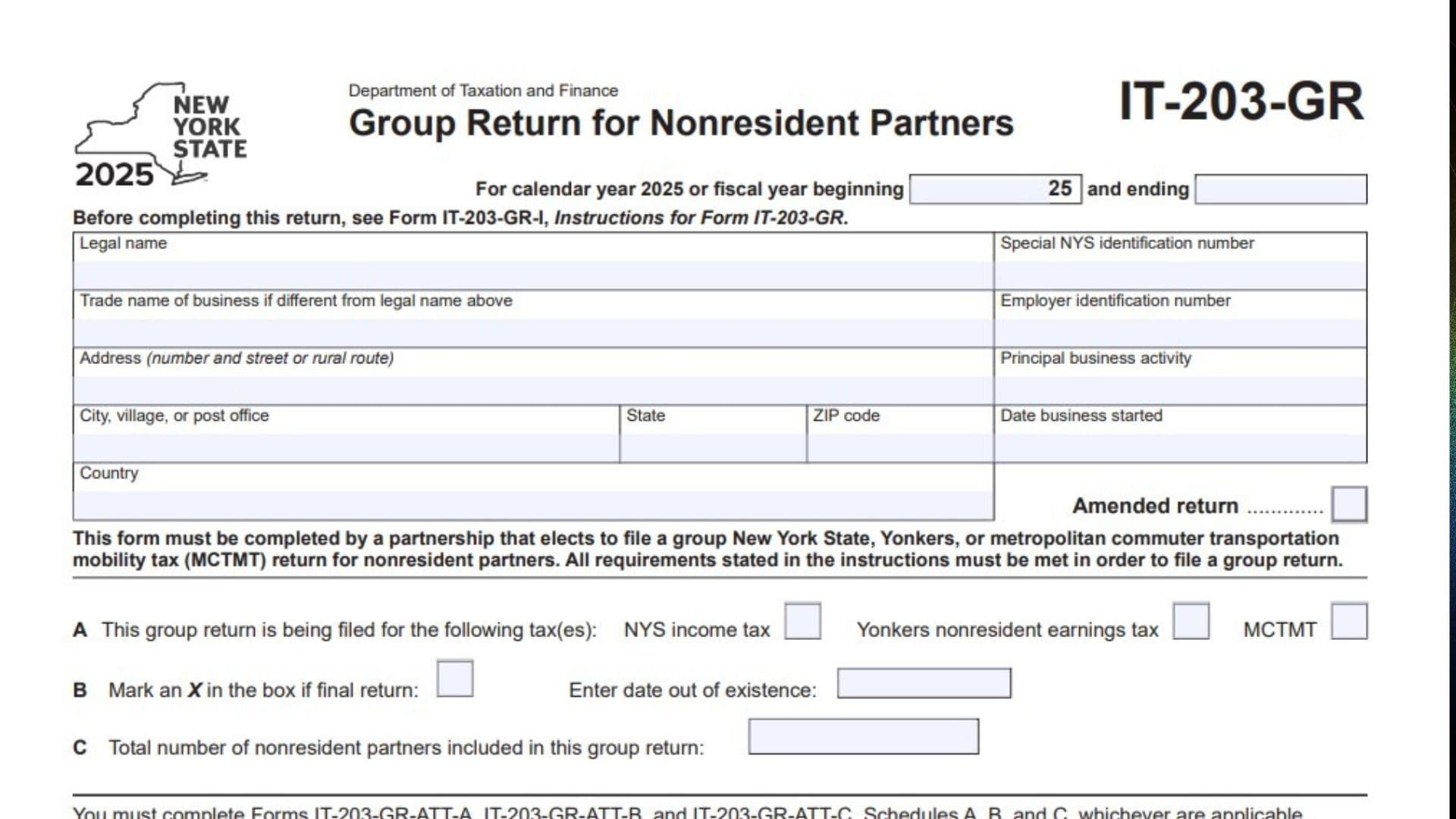
Form IT-203-GR, officially titled Group Return for Nonresident Partners, is a New York State Department of Taxation and Finance tax return designed for partnerships that elect to file a single combined return on behalf of their qualifying nonresident partners. Rather than requiring each individual nonresident partner to file a separate New York State personal income tax return, an eligible partnership can report and pay New York State income tax, Yonkers nonresident earnings tax, and Metropolitan Commuter Transportation Mobility Tax (MCTMT) together on one group filing. To use this return, the partnership must satisfy all eligibility requirements set out in Form IT-203-GR-I, the official instructions for Form IT-203-GR. The form collects the partnership’s identifying details, the specific taxes covered by the group filing, total taxable income and earnings carried over from supporting partner schedules, total tax due, estimated or extension payments, and signatures from both the group agent and any paid preparer. Completing Form IT-203-GR accurately ensures that every participating nonresident partner’s New York tax obligations are properly credited and prevents processing delays, misapplied payments, or underpayment notices.
How To File Form IT-203-GR
Before filling in the lines on Form IT-203-GR, you must complete the applicable supporting schedules and gather the partnership’s tax and payment records.
Required Schedules And Attachments
You cannot complete Lines 1 through 13 on Form IT-203-GR until you finish the supporting schedules that apply to your group return:
- Form IT-203-GR-ATT-A (Schedule A): Required when reporting New York State income tax for nonresident partners.
- Form IT-203-GR-ATT-B (Schedule B): Required when reporting Yonkers nonresident earnings tax.
- Form IT-203-GR-ATT-C (Schedule C): Required when reporting Metropolitan Commuter Transportation Mobility Tax (MCTMT).
Attach all applicable completed schedules to Form IT-203-GR when you submit the return to the New York State Department of Taxation and Finance, following the mailing and submission directions in Form IT-203-GR-I.
Payment Rules
If the return shows a balance due on Line 12, do not send cash. Pay by check or money order in U.S. funds made payable to NY State Income Tax. Write the partnership’s special NYS identification number and 2025 IT-203-GR clearly on the payment so it is credited to the right account and tax year.
What To Prepare Before Starting
Have the following information ready before you begin:
- The partnership’s legal name, trade name (if different), federal Employer Identification Number (EIN), and special NYS identification number.
- Completed copies of Schedules A, B, and C (Forms IT-203-GR-ATT-A, IT-203-GR-ATT-B, and IT-203-GR-ATT-C) as applicable.
- Records of all estimated tax payments and any amounts paid with extension Form IT-370 for New York State, Yonkers, and MCTMT.
- The total count of nonresident partners included in the group return.
- Contact details for the designated group agent and, if applicable, the paid preparer’s credentials.
How To Complete Form IT-203-GR
All dollar figures on Lines 1 through 13 are reported in whole dollars, as the form preprints .00 at the end of each monetary line.
Tax Period And Partnership Identification
Tax Year (Calendar Year Or Fiscal Year)
The form covers calendar year 2025 by default. If the partnership operates on a fiscal year instead, enter the beginning date in 2025 and the ending date in the spaces provided at the top of the return.
Amended Return
Mark an X in the Amended return box if you are filing this form to correct a previously submitted 2025 Form IT-203-GR. Leave it blank if this is an original return.
Legal Name
Enter the partnership’s full legal name.
Special NYS Identification Number
Enter the special New York State identification number assigned to the partnership for group return filings.
Trade Name Of Business
If the partnership operates under a trade name or “doing business as” (DBA) name that differs from its legal name, enter it here. Otherwise, leave this field blank.
Employer Identification Number
Enter the partnership’s federal Employer Identification Number (EIN).
Address (Number And Street Or Rural Route)
Provide the street number and name, or rural route address, for the partnership.
Principal Business Activity
State the main business activity that generates the partnership’s income.
City, Village, Or Post Office
Enter the city, village, or post office for the partnership’s mailing address.
State
Enter the standard two-letter state abbreviation.
ZIP Code
Provide the postal ZIP code for the partnership’s address.
Date Business Started
Enter the date the partnership began operating.
Country
Enter the country if the partnership’s address is outside the United States, or complete it as required for your mailing address.
Filing Indicators (Items A, B, And C)
Item A: Tax(es) Covered By This Group Return
Mark an X in each box that applies to the taxes being reported on this group return:
- NYS Income Tax: Select this box if the return reports New York State personal income tax for nonresident partners.
- Yonkers Nonresident Earnings Tax: Select this box if the return includes Yonkers nonresident earnings tax.
- MCTMT: Select this box if the return includes Metropolitan Commuter Transportation Mobility Tax.
Item B: Final Return And Date Out Of Existence
Mark an X in the box if this is the partnership’s final group return. If you mark this box, enter the exact date the partnership went out of existence on the line provided.
Item C: Total Number Of Nonresident Partners
Enter the total count of qualifying nonresident partners included in this group return.
Income, Tax, And Payment Lines
Complete the applicable Schedules A, B, and C first, then transfer the totals to Lines 1 through 13.
Line 1: New York State Taxable Income
Enter the total New York State taxable income from Schedule A (Form IT-203-GR-ATT-A), column H.
Line 2: Yonkers Taxable Earnings
Enter the total Yonkers taxable earnings from Schedule B (Form IT-203-GR-ATT-B), column F.
Line 3: MCTMT Net Earnings From Self-Employment Allocated To MCTD
Enter the total MCTMT net earnings from self-employment allocated to the Metropolitan Commuter Transportation District (MCTD) from Schedule C (Form IT-203-GR-ATT-C), column C and column D.
Line 4: New York State Tax
Enter the total New York State tax from Schedule A, column I.
Line 5: Yonkers Nonresident Earnings Tax
Enter the total Yonkers nonresident earnings tax from Schedule B, column G.
Line 6: MCTMT
Enter the total Metropolitan Commuter Transportation Mobility Tax from Schedule C, column E.
Line 7: Total Tax
Add the amounts on Lines 4, 5, and 6, and enter the combined total tax here.
Line 8: New York State Estimated Income Tax Paid / Amount Paid With Extension Form IT-370
Enter the total New York State estimated income tax payments and any payment submitted with extension Form IT-370 from Schedule A, column J.
Line 9: Yonkers Estimated Income Tax Paid / Amount Paid With Form IT-370
Enter the total Yonkers estimated income tax payments and any amount paid with Form IT-370 from Schedule B, column H.
Line 10: MCTMT Estimated Tax Paid / Amount Paid With Form IT-370
Enter the total MCTMT estimated tax payments and any amount paid with Form IT-370 from Schedule C, column F.
Line 11: Total Payments
Add the amounts on Lines 8, 9, and 10, and enter the total payments here.
Line 12: Balance Due
If Line 7 is greater than Line 11, subtract Line 11 from Line 7 and enter the balance due. Remit this amount by check or money order payable in U.S. funds to NY State Income Tax, and write your special NYS identification number and 2025 IT-203-GR on the payment.
Line 13: Amount Overpaid Applied To 2026 Estimated Tax
If Line 11 is greater than Line 7, subtract Line 7 from Line 11 and enter the overpayment here. This overpaid amount is applied toward the group’s 2026 estimated tax.
Group Agent Signature
The designated group agent must complete and sign this section for the return to be valid.
Print Name Of Group Agent
Print the full name of the authorized group agent.
Title Of Group Agent
Enter the group agent’s official title.
Signature Of Group Agent
The group agent must sign their name here.
Date
Enter the date the group agent signs the return.
Daytime Phone Number
Provide a daytime telephone number, including the area code, where the group agent can be reached.
Email
Enter the group agent’s email address.
Paid Preparer Section
Leave this section blank if no one was paid to prepare the return. If a paid preparer completed Form IT-203-GR, they must fill out every applicable box below.
Preparer’s Signature
The individual who prepared the return for compensation must sign here.
Preparer’s NYTPRIN
Enter the preparer’s New York Tax Preparer Registration Identification Number (NYTPRIN), if required to register with New York State.
NYTPRIN Excl. Code
If the paid preparer is exempt from New York’s registration requirement, enter the applicable NYTPRIN exclusion code here instead of a NYTPRIN.
Firm’s Name (Or Yours, If Self-Employed)
Enter the name of the tax preparation firm, or the preparer’s own name if self-employed.
Preparer’s PTIN Or SSN
Enter the preparer’s federal Preparer Tax Identification Number (PTIN). If the preparer does not have a PTIN, enter their Social Security number.
Address
Enter the paid preparer’s business mailing address.
Employer Identification Number
Enter the preparation firm’s federal Employer Identification Number (EIN).
Date
Enter the date the paid preparer signs the return.
Email
Provide the paid preparer’s email address.
Final Review Before Filing
Before submitting Form IT-203-GR, verify the following details:
- Confirm the partnership’s legal name, special NYS identification number, EIN, and fiscal year dates (if applicable) are entered accurately.
- Check that Item A reflects every tax being reported on the return, and that Item C matches the exact number of nonresident partners listed on your supporting schedules.
- Double-check that every figure on Lines 1 through 10 matches the exact column totals from Schedules A, B, and C, and re-verify the math on Lines 7, 11, 12, and 13.
- Attach all required supporting schedules (Forms IT-203-GR-ATT-A, IT-203-GR-ATT-B, and IT-203-GR-ATT-C).
- Ensure the group agent has signed, dated, and provided their title, phone number, and email address.
- Confirm the paid preparer section is fully completed and signed if you hired a paid preparer.
- If you owe a balance on Line 12, include a check or money order payable to NY State Income Tax labeled with your special NYS identification number and 2025 IT-203-GR.