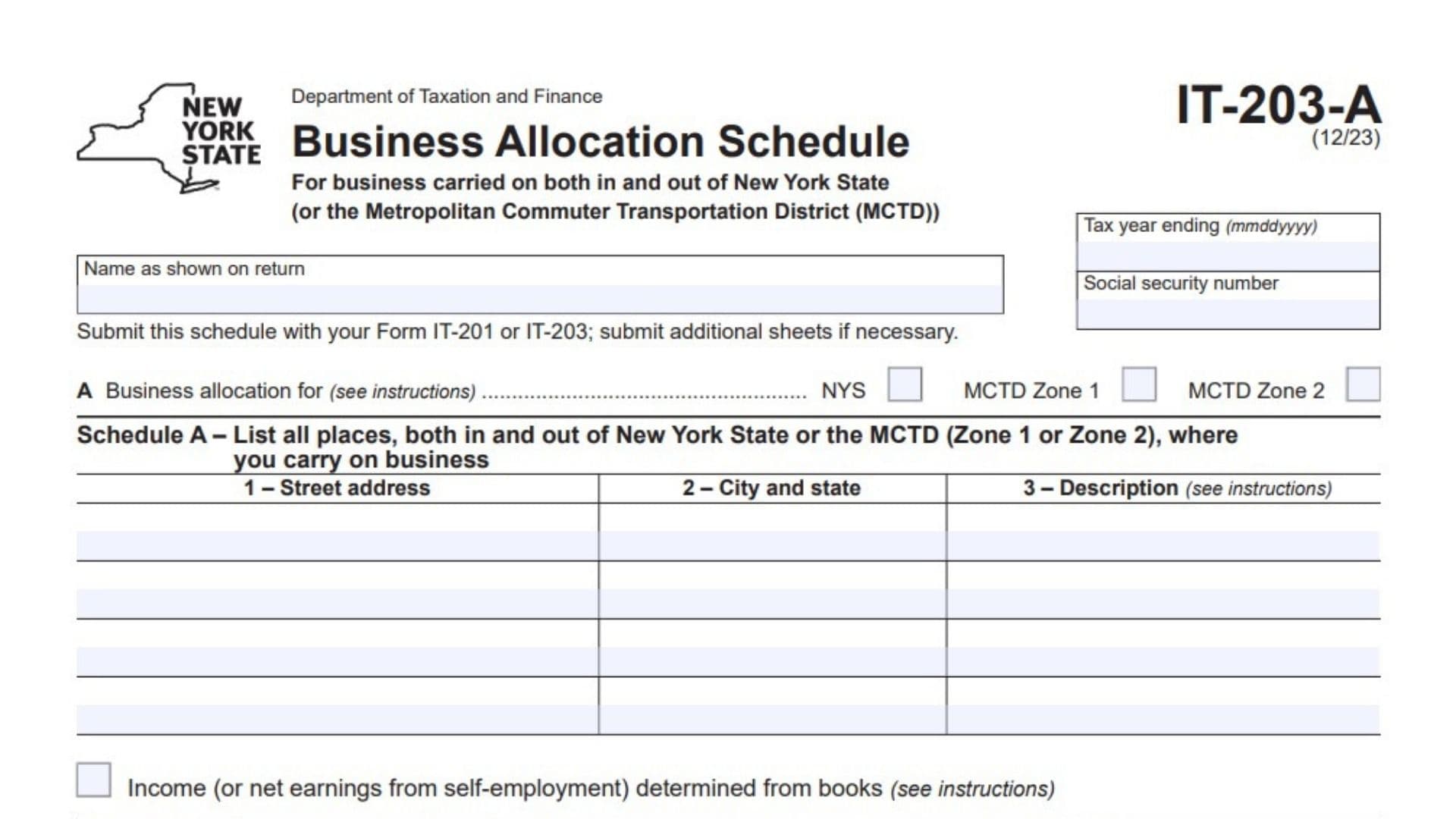
New York Form IT-203-A, officially titled Business Allocation Schedule, is a tax schedule used by individuals who conduct business both inside and outside New York State or the Metropolitan Commuter Transportation District (MCTD). Its purpose is to determine the portion of business income, business losses, or net earnings from self-employment that must be allocated to New York State or the applicable MCTD zone.
When a taxpayer operates a business in multiple locations, not all business income is necessarily attributable to New York. Form IT-203-A provides a method for identifying business locations and calculating the appropriate allocation percentage. This percentage is then applied to the relevant business income or loss reported on the taxpayer’s income tax return.
The schedule offers two methods for determining the allocation. The first method uses business records or accounting books when they clearly identify the income or net earnings attributable to New York State or the applicable MCTD zone. The second method uses a formula-based allocation when the books do not separately establish the New York or MCTD portion. The formula considers property, payroll, and gross income as allocation factors.
Form IT-203-A also distinguishes between New York State and two MCTD zones. Taxpayers must identify whether their business allocation relates to New York State, MCTD Zone 1, or MCTD Zone 2. The selected allocation area determines how the applicable amounts are reported and transferred to the main income tax return.
The form collects the taxpayer’s name, Social Security Number, tax year, business locations, property information, payroll figures, gross income, and business income or loss amounts. It also provides calculations for determining the allocation percentage and applying that percentage to individual income items and net earnings from self-employment.
Form IT-203-A is a supporting schedule rather than a standalone income tax return. It must be submitted with Form IT-201 or Form IT-203, as applicable. Taxpayers who need additional space to report business locations or allocation calculations must submit additional sheets.
Completing this schedule accurately is important because the resulting allocation percentage determines how much business income or loss is attributed to New York State or the applicable MCTD zone. Incorrect property, payroll, gross income, or business location information can affect the allocation calculation and the amounts transferred to the taxpayer’s main return.
How To File Form IT-203-A
New York Form IT-203-A must be submitted with the taxpayer’s applicable New York income tax return.
The form specifically identifies two filing destinations:
- Form IT-201: For taxpayers filing the applicable New York resident income tax return.
- Form IT-203: For taxpayers filing the applicable New York nonresident and part-year resident income tax return.
Form IT-203-A should not be submitted as an independent income tax return.
Information To Prepare Before Completing Form IT-203-A
Gather the following information before starting:
- Taxpayer’s full name as shown on the income tax return.
- Social Security Number.
- Applicable tax year ending date.
- Complete addresses of all business locations.
- City and state for each business location.
- Description of business activities at each location.
- Identification of the applicable allocation area.
- Business accounting records showing income or net earnings attributable to New York, if available.
- Real property owned by the business.
- Real property rented from others.
- Tangible personal property owned.
- Tangible personal property rented from others.
- Total property amounts inside and outside the applicable allocation area.
- Payroll information.
- Gross income information.
- Business income or loss amounts reported on Form IT-203.
- Net earnings from self-employment, where applicable.
Important Filing Considerations
Determine Whether Business Records Support Direct Allocation
The form provides an option to report income or net earnings from self-employment determined directly from business books.
If the accounting records clearly establish the portion attributable to New York State or the applicable MCTD zone, use the book-based method as instructed.
Use Formula-Based Allocation When Necessary
If business records do not show the portion attributable to New York or the applicable MCTD zone, complete Schedule B.
Schedule B uses property, payroll, and gross income percentages to calculate the business allocation percentage.
Select The Correct Allocation Area
The form provides three allocation choices:
- NYS.
- MCTD Zone 1.
- MCTD Zone 2.
Select the applicable allocation area based on the business activity being reported.
Additional Sheets
If the available spaces are insufficient to list all business locations or calculate all income allocations, submit additional sheets as instructed.
Transfer The Calculated Amounts
Amounts calculated on Form IT-203-A must be transferred to the appropriate lines of Form IT-201 or Form IT-203, depending on the taxpayer’s filing circumstances.

How To Complete New York Form IT-203-A
Form IT-203-A contains taxpayer identification fields, an allocation selection, Schedule A for business locations, and Schedule B for formula-based allocation.
It also includes separate calculations for allocating business income and net earnings from self-employment.
Complete the identification section first, followed by the applicable business allocation method.
Taxpayer Identification Information
Tax Year Ending (MMDDYYYY)
Enter the ending date of the tax year covered by the schedule.
The form requires the date in MMDDYYYY format.
For example, if the tax year ends on December 31, 2025, enter 12312025.
Name As Shown On Return
Enter the taxpayer’s full name exactly as it appears on the associated Form IT-201 or Form IT-203.
Use the same taxpayer identification information as the main income tax return.
Social Security Number
Enter the taxpayer’s Social Security Number.
Verify that the number matches the identification information reported on the associated income tax return.
Section A: Business Allocation
Section A identifies the geographic area for which the business allocation is being calculated.
The form provides three checkboxes.
NYS: New York State
Select this checkbox when calculating the business allocation attributable to New York State.
This selection identifies the New York State allocation being reported.
MCTD Zone 1
Select this checkbox when the allocation relates to MCTD Zone 1.
Use this option when reporting business activity attributable to the applicable Metropolitan Commuter Transportation District zone.
MCTD Zone 2
Select this checkbox when the allocation relates to MCTD Zone 2.
This identifies the allocation calculation associated with the second MCTD zone.
Select the applicable allocation category for the calculation being completed. The form does not provide a detailed geographic listing of the zones, so taxpayers should consult the applicable instructions when determining the correct zone.
Schedule A: Business Locations
Schedule A requires taxpayers to list all locations, both inside and outside New York State or the applicable MCTD zone, where they carry on business.
The purpose of this schedule is to identify the locations associated with the taxpayer’s business activities.
The table contains three columns.
Understanding The Columns In Schedule A
Column 1: Street Address
Enter the complete street address of each location where the taxpayer carries on business.
Include the street number and street name.
If the taxpayer operates from multiple locations, list each location separately.
Column 2: City And State
Enter the city and state associated with the business location reported in column 1.
Ensure that the location corresponds to the street address provided.
Include locations both inside and outside the applicable New York State or MCTD allocation area.
Column 3: Description
Provide a description of the business activity carried on at the corresponding location.
The description should identify the nature of the business activity associated with that address.
Follow the applicable form instructions when determining the appropriate level of detail.
Reporting Multiple Business Locations
Business Location 1
Enter the first business address, its city and state, and a description of the business activity conducted there.
Business Location 2
Enter the second business location if the taxpayer conducts business at another address.
Provide the corresponding city, state, and business activity description.
Additional Business Locations
Repeat the process for every additional location where the taxpayer carries on business.
The form provides several rows for reporting locations. If more space is required, submit additional sheets.
Income Determined From Business Books
Income Or Net Earnings From Self-Employment Determined From Books
This checkbox identifies the use of business accounting records to determine the income or net earnings attributable to the applicable New York State or MCTD allocation area.
Select this checkbox when the taxpayer uses business books to establish the relevant income or self-employment earnings, following the applicable instructions.
This option is important because Schedule B is specifically intended for situations where the books do not show the portion attributable to New York State or the applicable MCTD zone.
Schedule B: Formula-Based Business Allocation
Schedule B is used when the taxpayer’s business books do not establish the portion of business income attributable to New York State or MCTD Zone 1 or Zone 2.
It calculates an allocation percentage using three business factors:
- Property percentage.
- Payroll percentage.
- Gross income percentage.
The schedule contains three calculation columns:
- Column A: Totals inside and outside New York State or the applicable MCTD zone.
- Column B: Amounts attributable to New York State or the applicable MCTD zone.
- Column C: Percentage represented by column B compared with column A.
For each applicable factor, the taxpayer reports the total amount in column A and the corresponding New York State or MCTD amount in column B.
Column C is then used to calculate the allocation percentage.
Property Percentage
The property section considers real property and tangible personal property owned or rented by the business.
It contains four lines covering the different property categories.
Line 1: Real Property Owned
Enter the total value of real property owned by the taxpayer’s business in column A.
In column B, enter the portion attributable to New York State or the applicable MCTD zone.
The reported figures should reflect the property information required under the applicable allocation instructions.
Line 2: Real Property Rented From Others
Enter the total amount associated with real property rented from others in column A.
In column B, enter the corresponding amount attributable to New York State or the applicable MCTD zone.
Use the relevant rental and property records to determine the amounts.
Line 3: Tangible Personal Property Owned
Enter the total amount of tangible personal property owned by the business in column A.
Enter the portion attributable to New York State or the applicable MCTD zone in column B.
Use the applicable property records when determining the figures.
Line 3a: Tangible Personal Property Rented From Others
Enter the total amount of tangible personal property rented from others in column A.
In column B, enter the portion attributable to New York State or the applicable MCTD zone.
Keep the rental and property information consistent with the applicable allocation requirements.
Line 4: Property Percentage
Add the amounts reported on lines 1, 2, 3, and 3a.
Calculate the property totals for columns A and B separately.
The calculation for each column is:
\[ \text{Line 4}=\text{Line 1}+\text{Line 2}+\text{Line 3}+\text{Line 3a} \]
Use the resulting totals to calculate the property percentage in column C.
The percentage is calculated as:
\[ \text{Property Percentage}= \frac{\text{Column B}}{\text{Column A}}\times100 \]
Enter the resulting percentage in column C.
Payroll Percentage
Line 5: Payroll Percentage
Enter the total payroll amount in column A.
In column B, enter the payroll amount attributable to New York State or the applicable MCTD zone.
Calculate the percentage represented by column B compared with column A.
The general calculation is:
\[ \text{Payroll Percentage}= \frac{\text{Column B}}{\text{Column A}}\times100 \]
Enter the resulting payroll percentage in column C.
The form refers taxpayers to its instructions for determining the applicable payroll amounts and calculation requirements.
Gross Income Percentage
Line 6: Gross Income Percentage
Enter the total gross income amount in column A.
In column B, enter the portion of gross income attributable to New York State or the applicable MCTD zone.
Calculate the percentage represented by column B compared with column A.
The general calculation is:
\[ \text{Gross Income Percentage}= \frac{\text{Column B}}{\text{Column A}}\times100 \]
Enter the resulting gross income percentage in column C.
Follow the applicable instructions when determining which income amounts should be included in this calculation.
Total Allocation Percentages
Line 7: Total Of Percentages
Add the percentages reported in column C on lines 4, 5, and 6.
The calculation is:
\[ \text{Line 7}=\text{Line 4}+\text{Line 5}+\text{Line 6} \]
Enter the total percentage.
This figure represents the combined property, payroll, and gross income percentages used to determine the final business allocation percentage.
Final Business Allocation Percentage
Line 8: Business Allocation Percentage
Divide the total on line 7 by three.
If fewer than three percentages are used, divide by the actual number of percentages included, as instructed by the form.
The general calculation is:
\[ \text{Line 8}= \frac{\text{Line 7}}{\text{Number of percentages used}} \]
For example, if all three factors are used, divide the total percentage on line 7 by three.
Enter the resulting percentage on line 8.
This is the final business allocation percentage used for the subsequent income and self-employment calculations.
Allocation Of Business Income To New York State
Line 9: Allocation Of Business Income To New York State
Line 9 calculates the New York State portion of individual business income or loss amounts reported on Form IT-203.
The form instructs taxpayers to multiply each business income or loss amount in the Federal amount column of Form IT-203 by the allocation percentage calculated on line 8.
The calculation is:
\[ \text{New York Amount}= \text{Federal Amount}\times\text{Line 8 Percentage} \]
The line 9 section provides four separate calculation entries.
Each entry contains three fields:
- Form IT-203 line number.
- Business income or loss amount.
- Allocation percentage and resulting New York State amount.
Individual Business Income Allocations
Line 9, Entry 1: First Business Income Or Loss Item
Enter the applicable Form IT-203 line number.
Enter the corresponding federal business income or loss amount.
Multiply that amount by the percentage from line 8.
Enter the resulting New York State amount.
Line 9, Entry 2: Second Business Income Or Loss Item
Enter the second applicable Form IT-203 line number and its corresponding federal amount.
Multiply the amount by the line 8 allocation percentage.
Enter the calculated New York State amount.
Line 9, Entry 3: Third Business Income Or Loss Item
Identify the third applicable Form IT-203 line number.
Enter the corresponding federal income or loss amount and multiply it by the allocation percentage on line 8.
Report the resulting New York State amount.
Line 9, Entry 4: Fourth Business Income Or Loss Item
Enter the fourth applicable Form IT-203 line number and the corresponding federal amount.
Apply the allocation percentage from line 8 and enter the resulting New York State amount.
Additional Business Income Entries
The form provides four calculation spaces.
If more business income or loss items require allocation, prepare an additional schedule containing the same calculation information.
After calculating each New York State amount, transfer the resulting figures to the appropriate lines in the New York State amount column of Form IT-203.
Ensure that each amount is transferred to the correct income category.
Allocation Of Net Earnings From Self-Employment To MCTD Zone 1 Or Zone 2
Line 10: Allocation Of Net Earnings From Self-Employment To Zone 1 Or Zone 2 Of The MCTD
Line 10 calculates the portion of net earnings from self-employment attributable to MCTD Zone 1 or Zone 2.
The calculation requires the taxpayer to multiply net earnings from self-employment by the business allocation percentage reported on line 8.
The formula is:
\[ \text{Allocated Net Earnings}= \text{Net Earnings}\times\text{Line 8 Percentage} \]
Net Earnings
Enter the applicable net earnings from self-employment.
Use the relevant self-employment income information to determine the amount.
Allocation Percentage
Enter the business allocation percentage calculated on line 8.
Use the same percentage established through the applicable allocation calculation.
Allocated Net Earnings
Multiply the net earnings amount by the allocation percentage.
Enter the resulting amount in the final calculation field.
Where To Report The Amount From Line 10
The form specifies different transfer destinations depending on the taxpayer’s income tax return:
- Form IT-201: Transfer the amount to line 54a or line 54b, as applicable.
- Form IT-203: Transfer the amount to line 52b or line 52c, as applicable.
Use the applicable MCTD zone and the corresponding reporting instructions when selecting the destination line.
Final Review Before Filing
Before submitting New York Form IT-203-A, review the taxpayer identification information, business locations, allocation method, property figures, payroll amounts, gross income, and final allocation calculations.
Use the following checklist to verify that the schedule is complete.
Taxpayer Information
- Enter the correct tax year ending date.
- Verify the taxpayer’s name as shown on the income tax return.
- Confirm the Social Security Number.
- Select the correct allocation category: NYS, MCTD Zone 1, or MCTD Zone 2.
Schedule A: Business Locations
- List all business locations inside New York State.
- List all business locations outside New York State.
- Include applicable MCTD Zone 1 or Zone 2 locations.
- Verify each street address.
- Confirm the city and state for every location.
- Provide a description of the business activity at each location.
- Determine whether business books support direct income allocation.
- Select the income determined from books checkbox when applicable.
- Attach additional location schedules if required.
Schedule B: Formula-Based Allocation
- Confirm whether formula-based allocation is required.
- Verify real property owned on line 1.
- Check real property rented from others on line 2.
- Verify tangible personal property owned on line 3.
- Check tangible personal property rented from others on line 3a.
- Recalculate the property percentage on line 4.
- Verify the payroll percentage on line 5.
- Confirm the gross income percentage on line 6.
- Add the percentages correctly on line 7.
- Calculate the final business allocation percentage on line 8.
- Confirm the correct number of allocation factors used in the calculation.
Business Income Allocation
- Identify the applicable Form IT-203 line numbers.
- Verify each federal business income or loss amount.
- Apply the allocation percentage from line 8.
- Check the calculated New York State amounts.
- Complete all applicable line 9 entries.
- Attach additional calculation sheets if necessary.
- Transfer the allocated amounts to the appropriate Form IT-203 lines.
Self-Employment Earnings Allocation
- Verify the net earnings from self-employment.
- Confirm the allocation percentage from line 8.
- Recalculate the allocated net earnings on line 10.
- Confirm the correct MCTD zone.
- Transfer the amount to Form IT-201, line 54a or 54b, or Form IT-203, line 52b or 52c, as applicable.
Final Filing Checks
- Ensure all applicable sections are completed.
- Reconcile allocation amounts with the taxpayer’s business records.
- Verify that all property, payroll, and gross income figures are supported.
- Confirm that the allocation percentage has been calculated correctly.
- Attach additional schedules where required.
- Submit Form IT-203-A with Form IT-201 or Form IT-203, as applicable.
- Retain copies of the completed schedule and supporting business records.
Important Filing Reminder
New York Form IT-203-A is a supporting business allocation schedule used when a taxpayer conducts business both inside and outside New York State or the Metropolitan Commuter Transportation District.
The schedule provides two approaches to determining the applicable allocation: using business books when they establish the relevant income directly, or using the formula-based method in Schedule B when the books do not identify the New York or MCTD portion.
The final allocation percentage calculated on line 8 is particularly important because it is applied to business income or losses on line 9 and net earnings from self-employment on line 10.
Accurate reporting of business locations, property, payroll, gross income, and allocation calculations is essential for correctly determining the New York State or MCTD portion of business income and completing the associated Form IT-201 or Form IT-203.