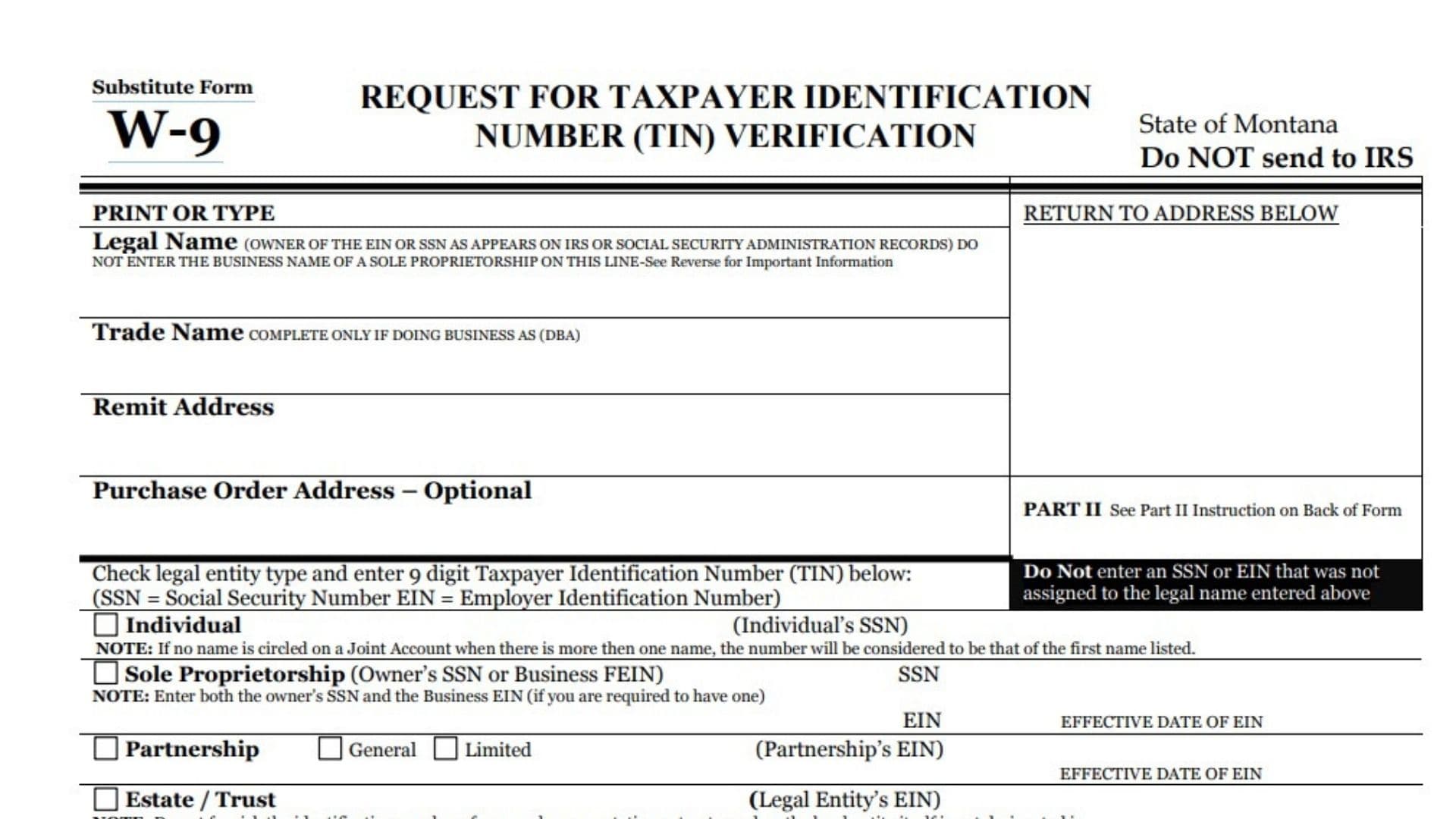
The Montana Substitute Form W-9 is a specific tax document used by the State of Montana to request and verify a taxpayer’s identification number. It is similar to the federal W-9 form but is tailored for state purposes to ensure accurate reporting of payments. This form is used by the state to collect the correct name, address, and Taxpayer Identification Number (TIN)—either a Social Security Number (SSN) or Employer Identification Number (EIN)—from individuals or entities receiving payments. The information provided on this form allows the state to prepare information returns (like Form 1099) and determine if backup withholding applies. Completing this form certifies under penalty of perjury that the TIN provided is correct and clarifies the taxpayer’s exemption status regarding backup withholding. It is a critical step for vendors, contractors, and individuals doing business with the State of Montana to ensure they receive full payment without unnecessary tax deductions.
How to File Montana Substitute Form W-9
The form explicitly states: Do NOT send to IRS.
Instead, you must return the completed form to the address specified in the “RETURN TO ADDRESS BELOW” box, which is typically provided by the state agency requesting the form.

How to Complete Montana Substitute Form W-9
Part I: Taxpayer Information
- Legal Name: Enter the name exactly as it appears on your Social Security card or IRS records. This is the owner of the TIN.
- Note for Sole Proprietorships: Do not enter just your business name here. You must enter your individual name first.
- Trade Name: Complete this line only if you operate under a “Doing Business As” (DBA) name that is different from your legal name.
- Remit Address: Enter the address where payments should be mailed.
- Purchase Order Address – Optional: You may enter a separate address for purchase orders if it differs from your payment address.
Entity Type and TIN
Check the box that corresponds to your legal entity type and enter the 9-digit Taxpayer Identification Number (TIN) associated with that specific legal name. Do not enter a number that was not assigned to the name listed above.
- Individual: Check this box if you are a single person. Enter your Social Security Number (SSN).
- Note: For joint accounts, use the number of the person whose name is listed first.
- Sole Proprietorship: Check this box if you are a sole proprietor. Enter your SSN or Business FEIN.
- Requirement: You should enter both the owner’s SSN and the Business EIN if you have one.
- Partnership: Check this box and specify if it is General or Limited. Enter the Partnership’s EIN.
- Estate / Trust: Check this box. Enter the Legal Entity’s EIN.
- Note: Do not use the personal ID of a trustee or representative unless the entity itself is not designated in the account title.
- Other: Check this box and specify the type (e.g., Limited Liability Company, Joint Venture, Club). Enter the Entity’s EIN.
- Corporation: Check this box. Answer Yes or No to whether you provide legal or medical services. Enter the Corp’s EIN.
- Government Entity: Check this box for government-operated entities. Enter the Entity’s EIN.
- Organization Exempt from Tax: Check this box for 501(a) organizations. Enter the Org’s EIN.
- Additional Questions: Answer if you provide medical services, if you are a licensed real estate broker, or if you are exempt from backup withholding.
Part II: Certification
Under penalties of perjury, you must certify that:
- The number shown is your correct Taxpayer Identification Number.
- You are not subject to backup withholding.
- Note: You must cross out item (2) if the IRS has notified you that you are currently subject to backup withholding due to under-reporting interest or dividends.
Signatures
- Name (Print or Type): Print the name of the person signing.
- Title (Print or Type): Print the title of the person signing.
- Signature of U.S. Person: Sign the form here. This generally must be the person listed on the top line, a partner, or an officer.
- Date: Enter the date of signing.
- Phone: Provide a contact phone number.
- E-Mail Address: Print your email address.
Agency Use Only
Do not write below the line marked “DO NOT WRITE BELOW THIS LINE.” This section is for state agency approval and processing.