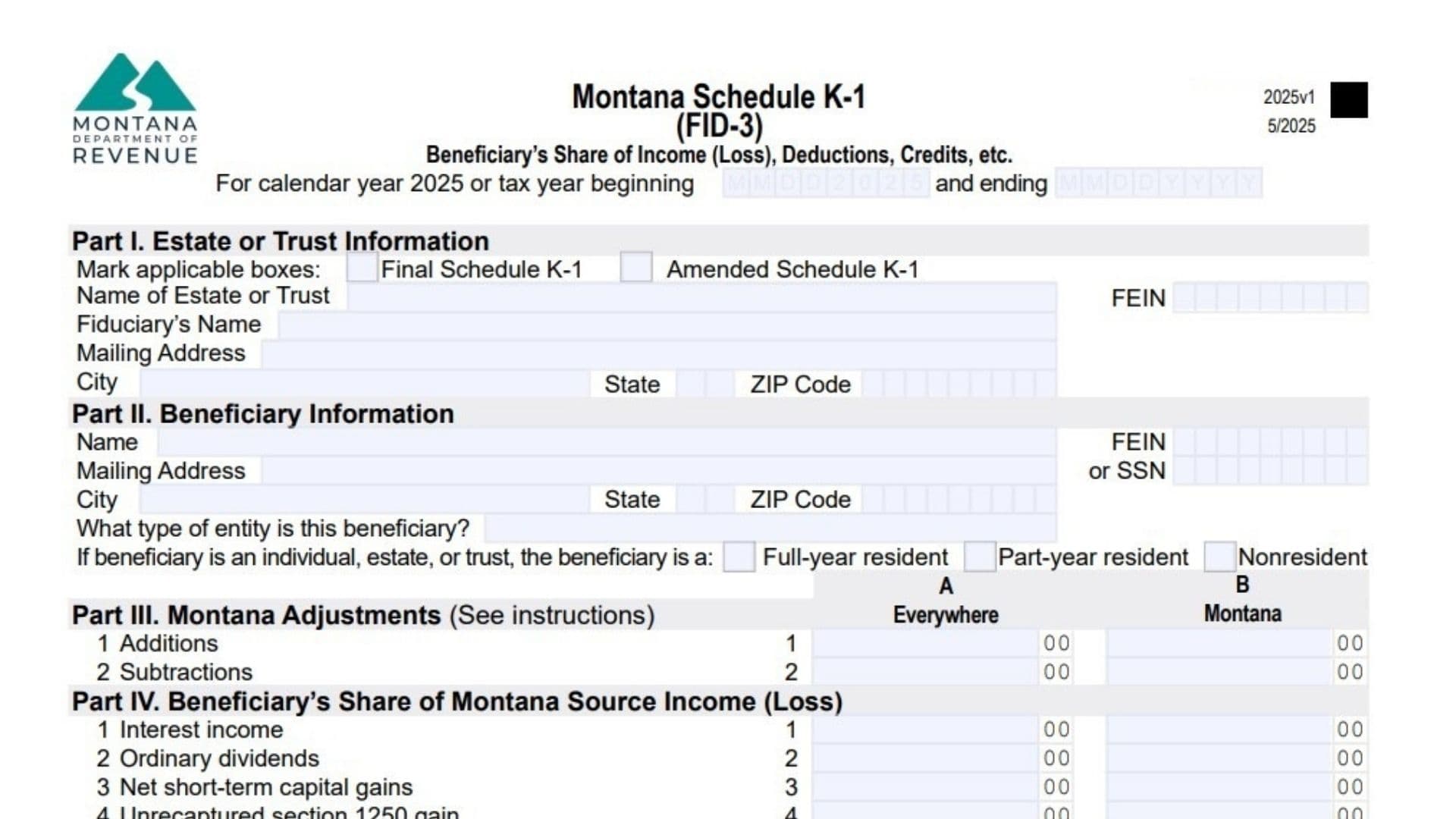
Montana Schedule K-1 (FID-3) reports the portion of income, deductions, credits, and tax adjustments that each beneficiary receives from an estate or trust. When a fiduciary files the Montana estate or trust income tax return, they must also issue a Schedule K-1 to every beneficiary. The schedule breaks down the beneficiary’s share of financial activity such as interest, dividends, capital gains, business income, rental income, and other taxable or deductible items.
The information on this schedule helps beneficiaries correctly prepare their own Montana tax returns because it identifies how much of the estate or trust income is taxable in Montana and what credits or withholding can be claimed. Resident beneficiaries generally report all their income from the estate or trust as Montana income, while nonresident or part-year resident beneficiaries only report the portion sourced to Montana. Corporations, partnerships, or other entities that are beneficiaries also rely on this schedule to determine how trust income affects their Montana tax obligations.

How to Complete Montana Schedule K-1 (FID-3)
Tax Year: Enter the calendar year or fiscal tax year beginning and ending dates for the estate or trust reporting period.
Part I – Estate Or Trust Information
Final Schedule K-1: Mark this box if the estate or trust has terminated and this is the last Schedule K-1 issued to the beneficiary.
Amended Schedule K-1: Mark this box if the fiduciary has updated previously reported information and issued a corrected schedule.
Name Of Estate Or Trust: Enter the legal name of the estate or trust distributing the income.
FEIN: Enter the federal employer identification number of the estate or trust.
Fiduciary’s Name: Enter the name of the executor, trustee, or fiduciary responsible for filing the return.
Mailing Address: Provide the fiduciary’s mailing address.
City: Enter the city of the mailing address.
State: Enter the state of the mailing address.
ZIP Code: Enter the ZIP code for the fiduciary address.
Part II – Beneficiary Information
Beneficiary Name: Enter the full name of the beneficiary receiving income or deductions from the estate or trust.
FEIN Or SSN: Enter the beneficiary’s federal identification number. Individuals usually enter a Social Security Number, while entities use a FEIN.
Mailing Address: Provide the beneficiary’s mailing address.
City: Enter the city of the beneficiary’s address.
State: Enter the state of the beneficiary’s address.
ZIP Code: Enter the ZIP code for the beneficiary’s address.
Beneficiary Entity Type: Identify whether the beneficiary is an individual, estate, trust, corporation, nonprofit organization, or other entity.
Residency Status: If the beneficiary is an individual, estate, or trust, mark whether they are a full-year resident, part-year resident, or nonresident.
Part III – Montana Adjustments
This section reports the beneficiary’s share of adjustments that must be added to or subtracted from federal income when calculating Montana taxable income.
Line 1 – Additions: Enter the beneficiary’s share of income items that must be added back when calculating Montana taxable income.
Line 2 – Subtractions: Enter the beneficiary’s share of income that can be subtracted from federal income when determining Montana taxable income.
Column A reports total income amounts from federal reporting.
Column B shows the portion of that income that is sourced to Montana.
Line 1 – Interest Income: Enter the beneficiary’s share of interest income.
Line 2 – Ordinary Dividends: Enter the share of dividend income received.
Line 3 – Net Short-Term Capital Gains: Report gains from short-term capital asset sales.
Line 4 – Unrecaptured Section 1250 Gain: Enter gains from depreciation recapture related to real estate.
Line 5 – Other Portfolio And Nonbusiness Income: Report additional portfolio-type income.
Line 6 – Ordinary Business Income: Enter income from business activities conducted through the estate or trust.
Line 7 – Net Rental Real Estate Income: Report rental income generated from real property.
Line 8 – Other Rental Income: Enter income from other rental activities.
Line 9 – Directly Apportionable Deductions: Enter deductions that directly reduce income reported above.
Line 10 – Net Long-Term Capital Gains: Enter gains from long-term capital asset sales.
Part V – Supplemental Information
This section reports withholding amounts and other information beneficiaries may use when filing their Montana return.
Line 1 – Montana Income Tax Withheld: Enter the amount of Montana tax withheld on Forms W-2 or 1099 that relates to income distributed to the beneficiary.
Line 2 – Pass-Through Entity Withholding: Report Montana withholding paid by a pass-through entity that was allocated to the beneficiary.
Line 3 – Mineral Royalty Tax Withheld: Enter mineral royalty withholding distributed from the estate or trust to the beneficiary.
Line 4 – Pass-Through Entity Tax Credit: Enter the beneficiary’s share of tax credits generated when a pass-through entity pays tax on behalf of its owners.
Line 5 – Other Information: List additional tax-related information that may affect the beneficiary’s Montana return.
Part VI – Tax Credits
Credit Code: Enter the code that identifies the type of tax credit.
Credit Authorization Number: Enter the authorization number if the credit requires approval from the Montana Department of Revenue.
Amount Of Credit: Enter the credit amount allocated to the beneficiary.
If more than two credits apply, attach an additional statement listing the extra credits.
Part VII – Montana Adjustment Detail
This section provides detailed explanations for the adjustments reported in Part III.
Adjustment Code 1: Enter the adjustment code and amount.
Adjustment Code 2: Enter the adjustment code and amount.
Adjustment Code 3: Enter the adjustment code and amount.
Adjustment Code 4: Enter the adjustment code and amount.
Adjustment Code 5: Enter the adjustment code and amount.
Adjustment Code 6: Enter the adjustment code and amount.
If more adjustments exist, attach a separate statement listing the additional codes and amounts.
Examples Of Common Montana Adjustment Codes
Some common additions and subtractions may appear in Part VII:
AA: Interest or dividends from bonds issued by other states.
AB: State, local, or foreign income taxes deducted on the federal return.
AC: Federal income taxes paid by an S corporation that reduce shareholder income.
AD: Reimbursements of deductions claimed in earlier years.
Common subtraction codes include:
SA: Interest income from federal obligations that is exempt from Montana tax.
SB: Recovery of previously deducted expenses that did not reduce Montana tax.
SM: Subtraction for certain military retirement or survivor benefits.
SR: Federal taxable Railroad Retirement Board benefits.