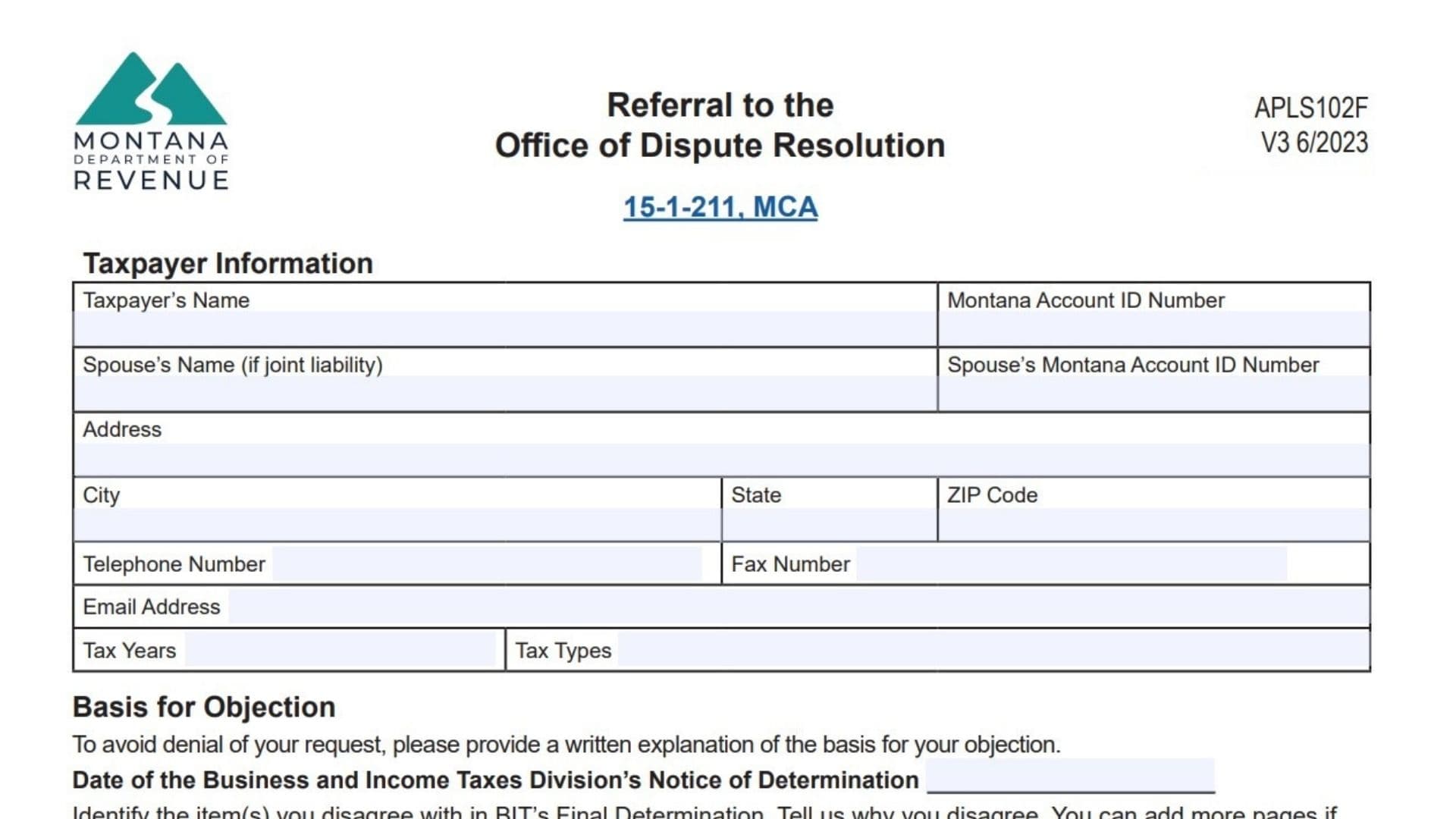
The Montana Referral to the Office of Dispute Resolution Form (APLS102F) is used by taxpayers to appeal a final tax determination issued by the Montana Department of Revenue. Filing this form allows the Office of Dispute Resolution (ODR) to review the dispute impartially, evaluate evidence, and issue a decision. Completing each line accurately ensures your appeal is considered, avoids delays, and keeps the process smooth for both individual taxpayers and businesses.

How To Complete Montana Referral To The Office Of Dispute Resolution Form (APLS102F)
Taxpayer’s Name: Enter the full legal name of the taxpayer who is filing the appeal.
Montana Account ID Number: Provide the Montana tax account identification number associated with the taxpayer.
Spouse’s Name (If Joint Liability): Enter the spouse’s name if the tax liability involves a joint filing.
Spouse’s Montana Account ID Number: Enter the spouse’s Montana account ID number if applicable.
Address: Provide the full mailing address of the taxpayer.
City: Enter the city associated with the mailing address.
State: Enter the state where the taxpayer resides.
ZIP Code: Provide the ZIP code for the mailing address.
Telephone Number: Enter a contact phone number for the taxpayer.
Fax Number: If available, include a fax number.
Email Address: Provide a valid email address for communication regarding the appeal.
Tax Years: Enter the tax year or years related to the dispute.
Tax Types: Specify the type of tax involved in the dispute (e.g., income tax, sales tax).
Basis For Objection Section
Date Of The Business And Income Taxes Division’s Notice Of Determination: Enter the date printed on the official notice you received.
Items You Disagree With: List each adjustment or issue from the final determination that you are disputing.
Reasons You Disagree With The Adjustment: Provide a clear explanation for each disputed item, referencing any supporting evidence. Attach additional pages if necessary.
Declaration Section
Signature Of Taxpayer Or Authorized Representative: Sign to certify that all information is accurate and truthful.
Title: Enter your position if signing on behalf of a business or organization.
Date: Enter the date the form is signed.
Spouse’s Signature (If Joint Liability): If applicable, the spouse signs to confirm joint filing disputes.
Authorized Representative Section
Name Of Representative: Enter the full name of the person representing you.
Telephone Number: Provide the representative’s phone number.
Email Address: Enter the representative’s email.
Note: If a representative is appointed, a Power of Attorney form must also be submitted unless already on file.
Optional: Bypass Office Of Dispute Resolution Review
ODR Review Bypass Option: Check this box if you choose not to proceed with an ODR hearing and instead pursue another appeal option.
Tips For Accurate Submission
File on Time: Submit the appeal within 45 days of the notice date.
Complete All Lines: Make sure each required line is filled accurately.
Attach Documentation: Include supporting records, financial statements, or prior correspondence.
Double-Check Signatures: Ensure all signatures are present and dated.
Keep Copies: Retain a copy for your personal records.