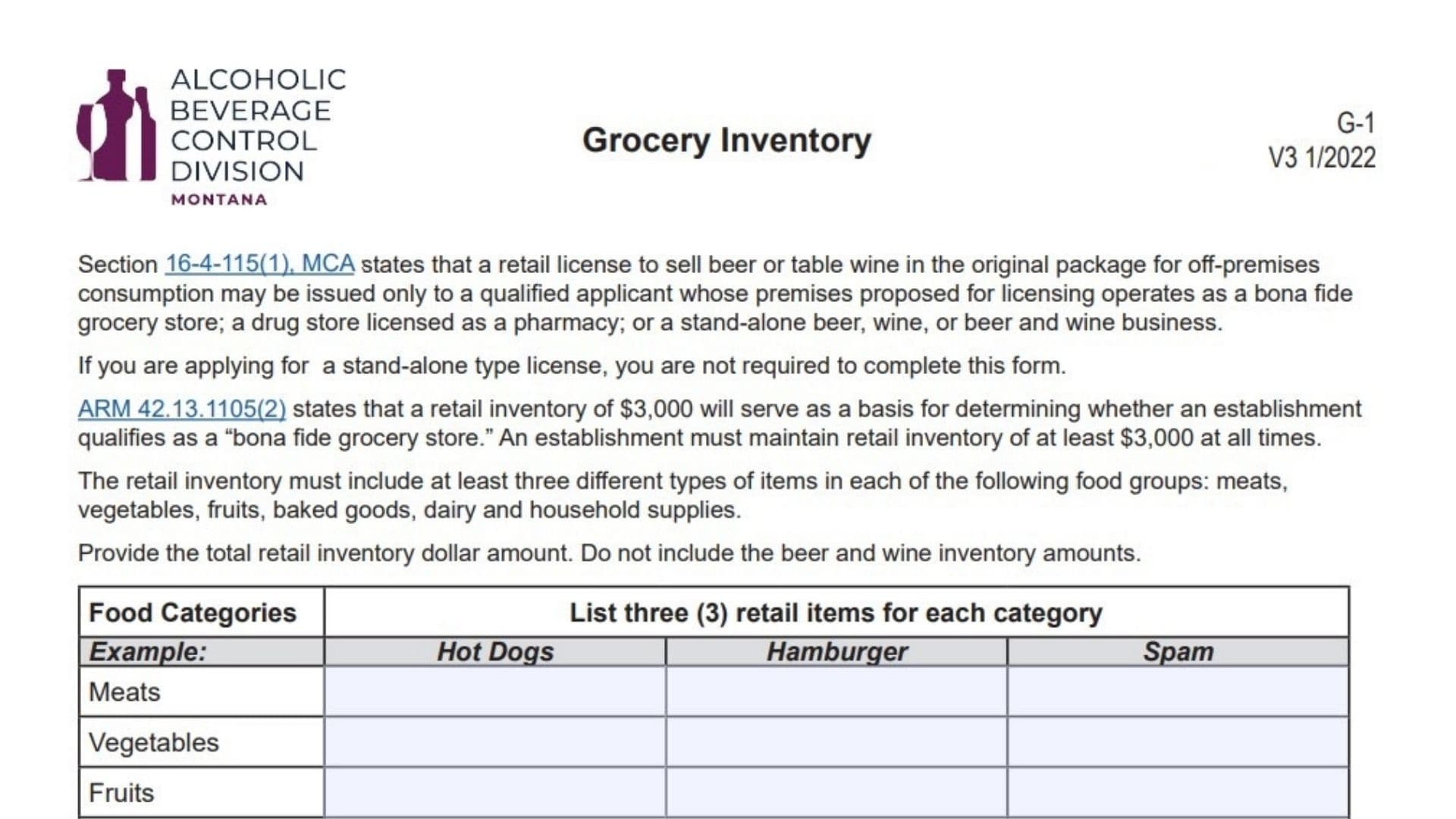
In Montana, selling beer or table wine for off-premises consumption (to-go) is a privilege reserved for specific types of businesses, primarily bona fide grocery stores and pharmacies. The Montana Form G-1, known as the Grocery Inventory form, is the tool the state uses to verify that your business meets the legal definition of a “grocery store.” According to state law (ARM 42.13.1105(2)), a bona fide grocery store must maintain a retail inventory worth at least $3,000 at all times. This inventory cannot just be anything; it must include a diverse selection of food and household staples. Specifically, you must stock at least three different types of items across six mandatory categories: meats, vegetables, fruits, baked goods, dairy, and household supplies. This form requires you to list these specific items and declare the total value of your qualifying inventory (excluding alcohol). If you are applying for a “stand-alone” beer and wine license (like a bottle shop), you are exempt from this form. However, for convenience stores and supermarkets, accurately completing this document is a mandatory step to securing your liquor license.
What Is Montana Form G-1
The Montana Form G-1 is a one-page compliance document issued by the Montana Department of Revenue. Its purpose is to demonstrate that your business is a legitimate grocery operation rather than just a front for selling alcohol. The form asks you to provide concrete examples of the products you sell to prove you meet the “variety” requirement of the law. You must list three distinct items for each of the six required food groups (Meats, Vegetables, Fruits, Baked Goods, Dairy, and Household Supplies). Additionally, you must certify the total dollar value of your non-alcohol retail inventory. This snapshot helps state regulators confirm that your primary business is providing groceries to the community, which qualifies you for the specific license type you are seeking.
How To File Montana Form G-1
This form is typically submitted as part of your initial application for a new retail beer/wine license or during a renewal/audit if requested. You should include it with your broader application packet sent to the Montana Department of Revenue. Ensure the form is fully completed, signed, and dated. There is no specific fee attached to this individual form, but it supports your main license application which does have fees. You can mail the completed form to the Montana Department of Revenue, or if you are working with a licensing specialist, submit it directly to them. Always keep a copy of your completed inventory list for your records in case of a site inspection.

How To Complete Montana Form G-1
Food Categories Inventory
The main section of the form is a table where you must list three (3) specific retail items you carry for each of the following categories. Do not list general terms like “meat”; be specific (e.g., “Hot Dogs,” “Hamburger,” “Spam”).
- Meats: List three types of meat products you stock (e.g., Chicken breast, Ground beef, Bacon).
- Vegetables: List three types of vegetables (e.g., Canned corn, Fresh carrots, Frozen peas).
- Fruits: List three types of fruit (e.g., Apples, Bananas, Canned peaches).
- Baked Goods: List three bakery items (e.g., Bread, Bagels, Muffins).
- Dairy: List three dairy products (e.g., Milk, Cheese, Yogurt).
- Household Supplies: List three non-food essentials (e.g., Toilet paper, Dish soap, Laundry detergent).
Total Retail Inventory Value
- Dollar Amount: In the designated space, enter the total dollar amount of your retail inventory.
- For New Businesses: Enter the proposed value of the inventory you will have upon opening.
- For Established Businesses: Enter the actual total dollar value of the retail inventory you had last month.
- Crucial Note: Do not include the value of beer and wine in this total. The remaining inventory must meet the $3,000 minimum threshold.
Certification
- Signature: Sign the form to certify that the inventory information is correct.
- Business Name/County: Print the legal name of your business and the county where it is located.
- Date: Enter the date you completed the form.