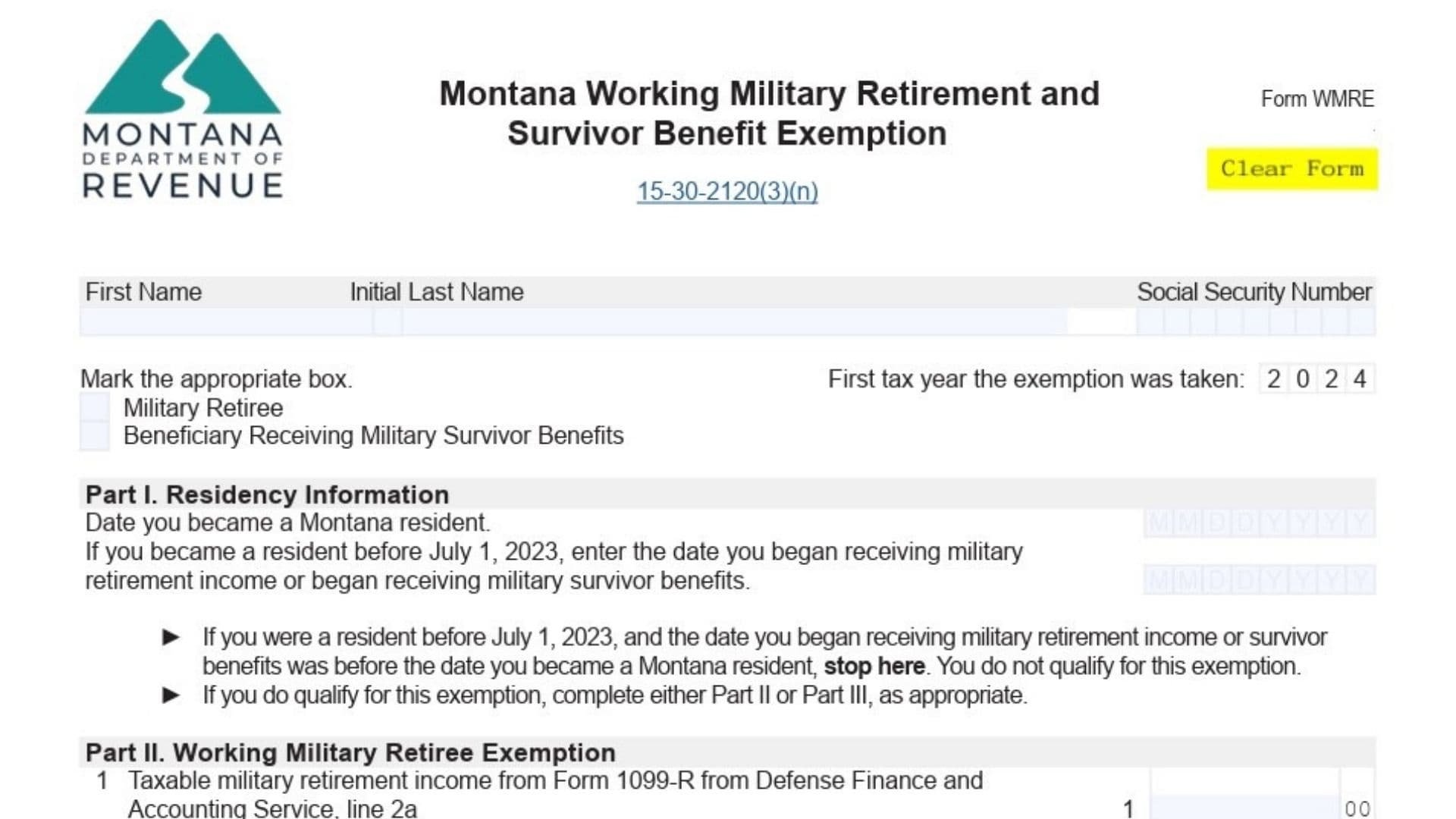
The Montana Form WMRE is designed to help military retirees and survivors of military service members claim a tax exemption on their military retirement or survivor benefits. This exemption can help reduce the amount of taxable income in Montana. The form is part of the state’s tax system and is attached to your Montana Individual Income Tax Form (Form 2) to claim the exemption. In this detailed guide, we’ll cover exactly how to complete the Montana Form WMRE, step by step, so that you can successfully file for the exemption. Whether you are a military retiree or a beneficiary receiving military survivor benefits, this guide will walk you through each part of the form to ensure accuracy and proper submission.
What Is the Montana Form WMRE?
Montana Form WMRE is a tax exemption form for military retirees and survivors of military service members that allows them to exempt a portion of their military retirement income or survivor benefits from Montana state income tax. The exemption applies to those who became residents of Montana after June 30, 2023, or who were residents of Montana before July 1, 2023, and began receiving military retirement income or survivor benefits while a Montana resident. This exemption can only be claimed for five consecutive years, beginning with the 2024 tax year, and is available until 2033.
The exemption amount is determined by calculating the lesser of 50% of military retirement income or survivor benefits, or the total income from various Montana sources such as wages, business income, farming income, etc. The amount can be deducted from your taxable income, reducing your overall tax burden in Montana.

How to File the Montana Form WMRE
To file the Montana Form WMRE, follow these general steps:
- Complete Montana Form WMRE: Ensure you fill out the necessary sections on the form.
- Attach the Form to Your Montana Income Tax Form (Form 2): This form must be submitted along with your standard Montana state income tax return.
- Submit Your Tax Return: Once everything is completed and attached, submit the form to the Montana Department of Revenue by the due date.
How to Complete Montana Form WMRE
Here’s how you complete each section of the Montana Form WMRE:
Taxpayer Information
- Type of Exemption: At the beginning of the form, check the appropriate box to indicate whether you are a Military Retiree or a Beneficiary Receiving Military Survivor Benefits. This will determine which sections you need to complete.
Part I. Residency Information
- Date You Became a Montana Resident:
- Enter the date you became a Montana resident. If you’ve been a resident for your entire life, enter your birthdate.
- If you became a Montana resident after June 30, 2023, and started receiving military benefits after moving to Montana, enter that date.
- Date You Began Receiving Military Retirement Income or Survivor Benefits:
- If you became a resident before July 1, 2023, and started receiving benefits before that, you do not qualify for this exemption. Otherwise, report the date you began receiving military retirement income or survivor benefits.
Part II. Military Retiree Exemption
If you’re claiming the exemption as a Military Retiree, complete this section.
- Line 1 – Taxable Military Retirement Income:
- Enter the taxable amount of military retirement income received from the Defense Finance and Accounting Service (DFAS), as reported on your Form 1099-R (Box 2a). Only report income received while a Montana resident.
- Line 2 – Montana Source Wages:
- Report any Montana source wages earned and reported on your Form 1040 (line 1z). If you’re a part-year resident, only include the wages earned during your time in Montana.
- Line 3 – Montana Source Business Income:
- Report business income from any Montana-based business. If you didn’t earn any business income, enter 0.
- Line 4 – Montana Source Partnership and S Corporation Income:
- Report any income from partnerships or S corporations located in Montana. As with Line 3, if you didn’t earn this income, enter 0.
- Line 5 – Montana Source Farming Income:
- If you earned income from farming activities in Montana, report it here. If you had no farming income, enter 0.
- Line 6 – Total Montana Source Income:
- Add up the amounts from lines 2 through 5 to calculate your total Montana source income.
- Line 7 – Multiply Line 1 by 50% (0.50):
- Multiply your taxable military retirement income by 50% to determine the exemption amount.
- Line 8 – Enter the Lesser of Line 6 or Line 7:
- Enter the smaller amount of your total Montana source income (line 6) or 50% of your retirement income (line 7). This is your Working Military Retirement Exemption.
Part III. Survivor Benefit Exemption
If you’re claiming the exemption as a Military Survivor Benefit recipient, complete this section.
- Line 1 – Taxable Military Survivor Benefits:
- Report the taxable military survivor benefits received from the U.S. Department of Defense’s Survivor Benefit Plan, as reported on your Form 1099-R (Box 2a). Ensure that you do not include death benefits (Box 7, Code 4) in this section.
- Line 2 – Multiply Line 1 by 50% (0.50):
- Multiply the survivor benefits amount by 50%. This is your Military Survivor Benefit Exemption.