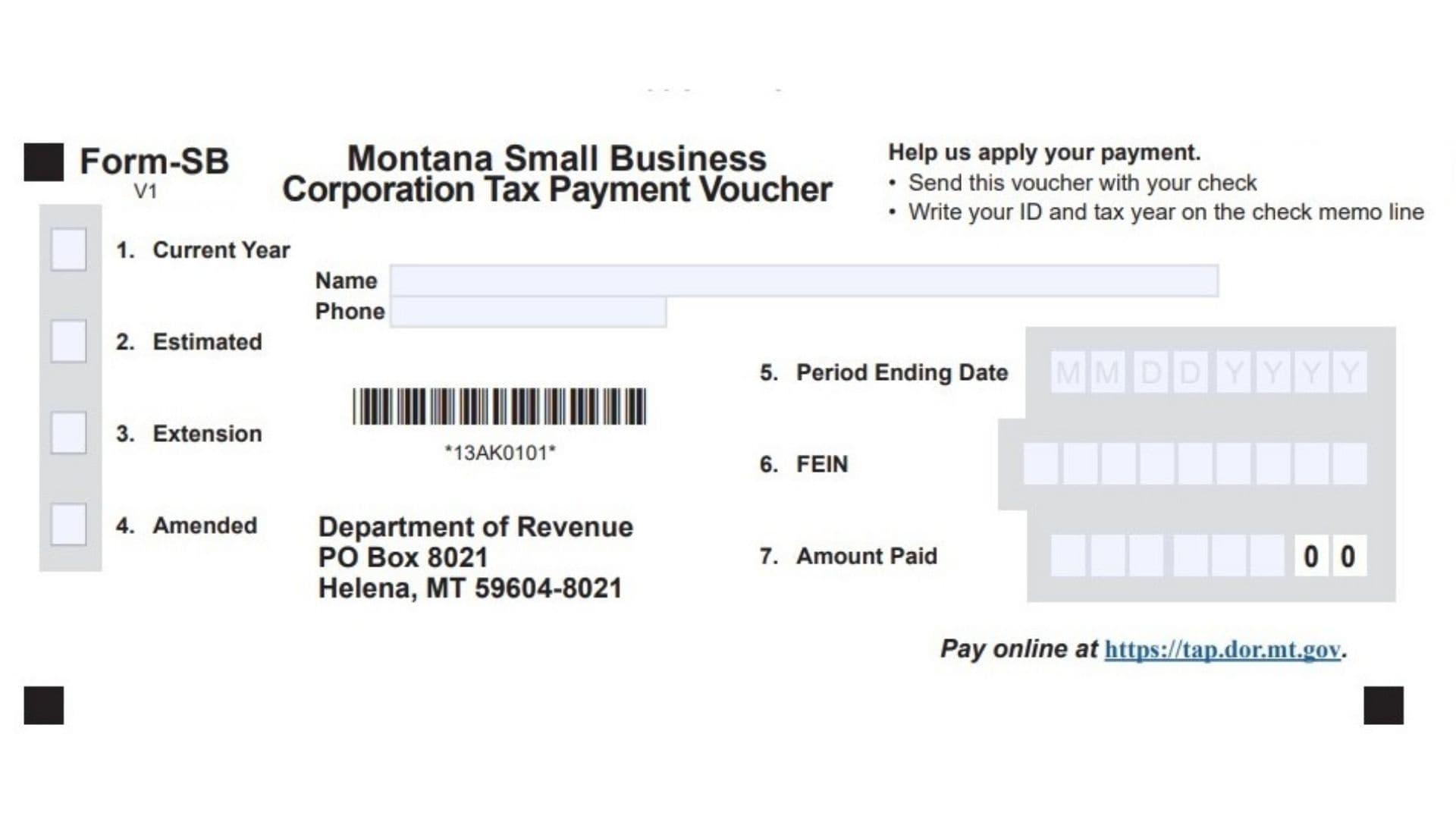
Montana Form SB, formally called the Montana Small Business Corporation Tax Payment Voucher, serves as the required document that S corporations (often referred to as small business corporations under Montana tax rules) must include whenever mailing a paper check for amounts owed on their state-level corporation license tax, composite returns, or related obligations. This straightforward one-page voucher ensures the Montana Department of Revenue can quickly identify the taxpayer, tax period, and payment purpose, correctly crediting funds to the proper account and preventing misallocation that could lead to unnecessary interest or penalties. Designed specifically for S corporations filing forms like the former CLT-4S (now integrated into broader pass-through entity reporting), Form SB applies to balance-due payments on annual returns, quarterly estimated payments, extension payments, or amounts owed on amended filings. While electronic payments through the TransAction Portal (TAP) or approved tax software eliminate the need for this voucher, paper check submissions require it—especially since payments of $500,000 or more mandate electronic methods entirely. By providing clear fields for identification and payment classification, Form SB streamlines processing for the Department while helping S corporations maintain compliance with Montana’s corporation license tax requirements, which differ from federal S corp treatment where income typically passes through without entity-level tax except in specific state scenarios.
What Is Montana Form SB?
Form SB acts as a detachable payment coupon that accompanies any check sent to cover Montana S corporation license tax liabilities. It specifies the corporation’s details, the nature of the payment, and the exact amount, allowing accurate application without relying solely on check memo lines.
When Do You Need To Use Form SB?
Submit Form SB with a check for:
- Balance due on the annual S corporation or pass-through entity return
- Estimated tax installments
- Payments submitted with an extension
- Additional tax from an amended return
Electronic payments or zero-balance filings do not require this voucher.
Payment Options For Montana S Corporation Taxes
Montana provides flexible payment methods:
Electronic Payment (Preferred And Required For Large Amounts)
- Access the TransAction Portal (TAP) at https://tap.dor.mt.gov for free e-checks or credit/debit card payments (with a minor fee).
- Many tax programs enable direct payment during filing or scheduled future remittances.
- Mandatory for any single payment of $500,000 or greater.
Payment By Check
- Fill out Form SB in full.
- Cut along the designated line to separate the voucher.
- Mail the voucher and loose check (never stapled or taped) to:
Montana Department of Revenue
PO Box 8021
Helena, MT 59604-8021 - Prepare separate vouchers and checks for different tax periods.

How to Complete Form SB
Accuracy in every section prevents processing delays—complete all applicable fields.
1. Current Year
Mark this box if the enclosed payment covers the balance due for the regular tax year return.
2. Estimated
Select this option when submitting a quarterly or precautionary estimated tax installment.
3. Extension
Check here if the payment accompanies or follows an approved filing extension.
4. Amended
Indicate this choice for payments related to corrected or amended return filings.
Name
Enter the full legal name of the S corporation as it appears on state and federal tax records.
Phone
Provide a reachable contact number (with area code) for any clarification needed by the Department.
5. Period Ending Date
Input the end date of the tax period in MMDDYYYY format (commonly 1231YYYY for calendar-year entities).
6. FEIN
Write the nine-digit Federal Employer Identification Number assigned to the corporation.
7. Amount Paid
Record the precise payment amount in dollars and cents using numeric format (e.g., 2500.00)—this must match the check exactly.
Additional Steps For All Submissions
- Note the FEIN and tax year in the memo section of your check as a safeguard.
- Verify that the name and FEIN on the voucher align perfectly with the check.
- Retain copies of the completed voucher and check for your records.
Common Errors To Avoid
- Attaching the voucher to the check with staples or tape (delays automated processing).
- Omitting a check signature.
- Combining multiple periods on one voucher.
- Submitting the voucher without payment or vice versa.
- Mismatched name, FEIN, or tax year details.